
Server data from the Official MCP Registry
Admin for your app from your AI agent: users, stats, segments, feature flags and email.
About
Admin for your app from your AI agent: users, stats, segments, feature flags and email.
Remote endpoints: streamable-http: https://www.easy-admin.solutions/mcp
Security Report
Valid MCP server (1 strong, 1 medium validity signals). No known CVEs in dependencies. Imported from the Official MCP Registry.
41 tools verified · Open access · No issues found
Security scores are indicators to help you make informed decisions, not guarantees. Always review permissions before connecting any MCP server.
Permissions Found in Source Code
Found by scanning the linked source code. This listing connects to a hosted endpoint, so none of this runs on your machine: it describes what the server software does where it is hosted.
How to Connect
Remote Plugin
No local installation needed. Your AI client connects to the remote endpoint directly.
Add this to your MCP configuration to connect:
{
  "mcpServers": {
    "solutions-easy-admin-vibeadmin": {
      "url": "https://www.easy-admin.solutions/mcp"
    }
  }
}Documentation
View on GitHubFrom the project's GitHub README.
VibeAdmin MCP Server
Run your app's admin from your AI agent: look up users, read growth and retention, build segments, flip feature flags and draft emails in plain language.
Connect Claude Code, Codex, Cursor, Windsurf or any MCP client to VibeAdmin, the admin dashboard for SaaS and vibe-coded apps. Your agent works on one environment of your app through a scoped API key: tools the key's scopes don't allow don't appear at all, and every write lands in VibeAdmin's audit log.
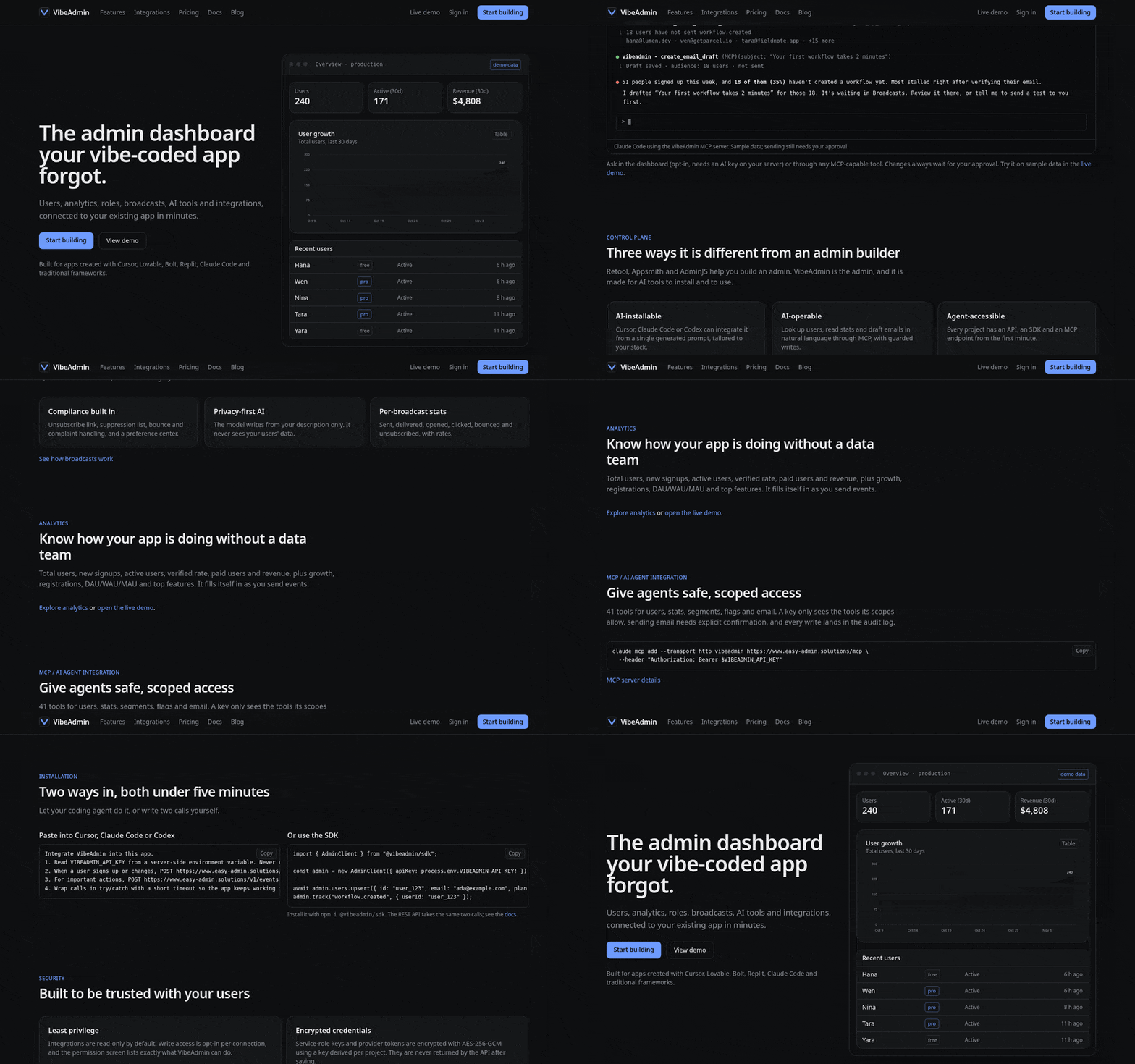
A tour of the public site. The Claude Code session shown there is an illustration with sample data, not a recording.
- 🌐 Website: https://www.easy-admin.solutions
- 🔌 MCP endpoint:
https://www.easy-admin.solutions/mcp(streamable HTTP, hosted, nothing to install) - 📇 Official MCP Registry:
solutions.easy-admin/vibeadmin - 📖 Docs: https://www.easy-admin.solutions/docs/mcp
What your agent can do
| Area | Capabilities |
|---|---|
| Users | List, find by email or id, full profile, recent signups, active users, activity timeline |
| Support actions | Suspend / restore, change role, add notes, add credits, update metadata, verify email, send a password reset |
| Growth | App stats, growth report, activation rate, retention, top features, users who never did an event, at-risk and inactive users |
| Events & ops | Query events, list event names, abnormal signups, API abuse, failed jobs, grouped errors |
| Segments | List segments, get members, create a segment from rules |
| Flags & config | List flags, check flags for a user, set a flag, read and set remote config |
| Billing | A customer's subscription and payment history (from your connected Stripe) |
| Broadcast stats, create an email draft for review, send an email to a user |
41 tools in total. One key covers one environment of one project, and its scopes decide which tools exist. Presets: read-only, support agent, growth analyst, full access.
The server also serves three ready-made workflows as MCP prompts: customer_support, growth and operations.
Quick start
- Sign up at https://www.easy-admin.solutions and connect your app (Supabase, Firebase Auth, Clerk, Postgres and others natively, or through the REST API / SDK).
- In your project open AI / MCP, pick a scope preset and create a key. Production keys start with
adm_live_, development keys withadm_test_. - Connect your client:
Claude Code
claude mcp add --transport http vibeadmin https://www.easy-admin.solutions/mcp \
  --header "Authorization: Bearer adm_live_YOUR_KEY"
Codex (~/.codex/config.toml)
[mcp_servers.vibeadmin]
url = "https://www.easy-admin.solutions/mcp"
http_headers = { Authorization = "Bearer adm_live_YOUR_KEY" }
Cursor / Windsurf / other clients (mcp.json)
{
  "mcpServers": {
    "vibeadmin": {
      "type": "http",
      "url": "https://www.easy-admin.solutions/mcp",
      "headers": { "Authorization": "Bearer adm_live_YOUR_KEY" }
    }
  }
}
Claude Desktop (via mcp-remote)
{
  "mcpServers": {
    "vibeadmin": {
      "command": "npx",
      "args": ["-y", "mcp-remote", "https://www.easy-admin.solutions/mcp",
               "--header", "Authorization: Bearer adm_live_YOUR_KEY"]
    }
  }
}
- Ask your agent something like:
"How many people signed up this week, what's our 30-day retention, and which paying users haven't been active in 14 days? Save them as a segment and draft a check-in email for me to review."
Example tasks
- "Find ada@example.com, show her plan and billing, and add a note that she asked for a refund."
- "Which features do new users try first, and who signed up but never created a project?"
- "Any abnormal signups or API abuse in the last 24 hours?"
- "Turn on
new-dashboardfor 10% of users." - "Show the top errors this week and how many users each affected."
Safety
- Data about your users (names, emails, metadata, events) is treated as untrusted. The server tells the agent never to follow instructions found inside it.
- The agent is told to confirm writes (suspend, role change, sending email) with you first, and to prefer drafts over sending.
- Discovery (
initialize,tools/list) works without a key so directories can list the tools. Every tool call needs a key.
Pricing
The MCP server is included from the Starter plan ($29/month), segments included. Feature-flag tools need the Pro plan ($79/month). See https://www.easy-admin.solutions/pricing.
Support
Report bugs and request features in Issues.
This repository holds the public listing for the hosted VibeAdmin MCP server. The service itself is closed source.
Reviews
No reviews yet
Be the first to review this server!
More Developer Tools MCP Servers
Rea
Freeby Morluto · Developer Tools
Reverse engineer anything from your terminal or agent with one CLI and MCP server.
Paperclip
Freeby Paperclipai · Developer Tools
Trending hip-hop artist momentum scores across four cultural dimensions.
Fetch
Freeby Modelcontextprotocol · Developer Tools
Web content fetching and conversion for efficient LLM usage
Git
Freeby Modelcontextprotocol · Developer Tools
Read, search, and manipulate Git repositories programmatically
Toleno
Freeby Toleno · Developer Tools
Toleno Network MCP Server — Manage your Toleno mining account with Claude AI using natural language.
MCP Marketplace
Freeby mcp-marketplace · Developer Tools
Search and install MCP servers from inside your AI client.