
Server data from the Official MCP Registry
Stealth web browser for agents: search, fetch, click, download and type in persistent MCP sessions.
About
Stealth web browser for agents: search, fetch, click, download and type in persistent MCP sessions.
Remote endpoints: streamable-http: https://browser.aginx.net/mcp
Security Report
Valid MCP server (1 strong, 1 medium validity signals). 1 code issue detected. No known CVEs in dependencies. Imported from the Official MCP Registry. 1 finding(s) downgraded by scanner intelligence.
Endpoint verified · Open access · 1 issue found
Security scores are indicators to help you make informed decisions, not guarantees. Always review permissions before connecting any MCP server.
Permissions Required
This plugin requests these system permissions. Most are normal for its category.
How to Connect
Remote Plugin
No local installation needed. Your AI client connects to the remote endpoint directly.
Add this to your MCP configuration to connect:
{
  "mcpServers": {
    "net-aginx-aginxbrowser": {
      "url": "https://browser.aginx.net/mcp"
    }
  }
}Documentation
View on GitHubFrom the project's GitHub README.
AginxBrowser
The Browser for AI Agents. See the live web. Read it. Act on it. Remember it.



A browser built for agents from the first line of code — not a human browser bolted onto automation. See the world, read it, search it, act on it, and keep what you read: one Rust binary with built-in V8, no Chromium required.
Humans have Chrome. Agents have AginxBrowser.
One binary, zero dependencies, instant service. HTTP API + native MCP + CDP — agents plug in and go, and existing Playwright / Puppeteer / browser-use code attaches directly.
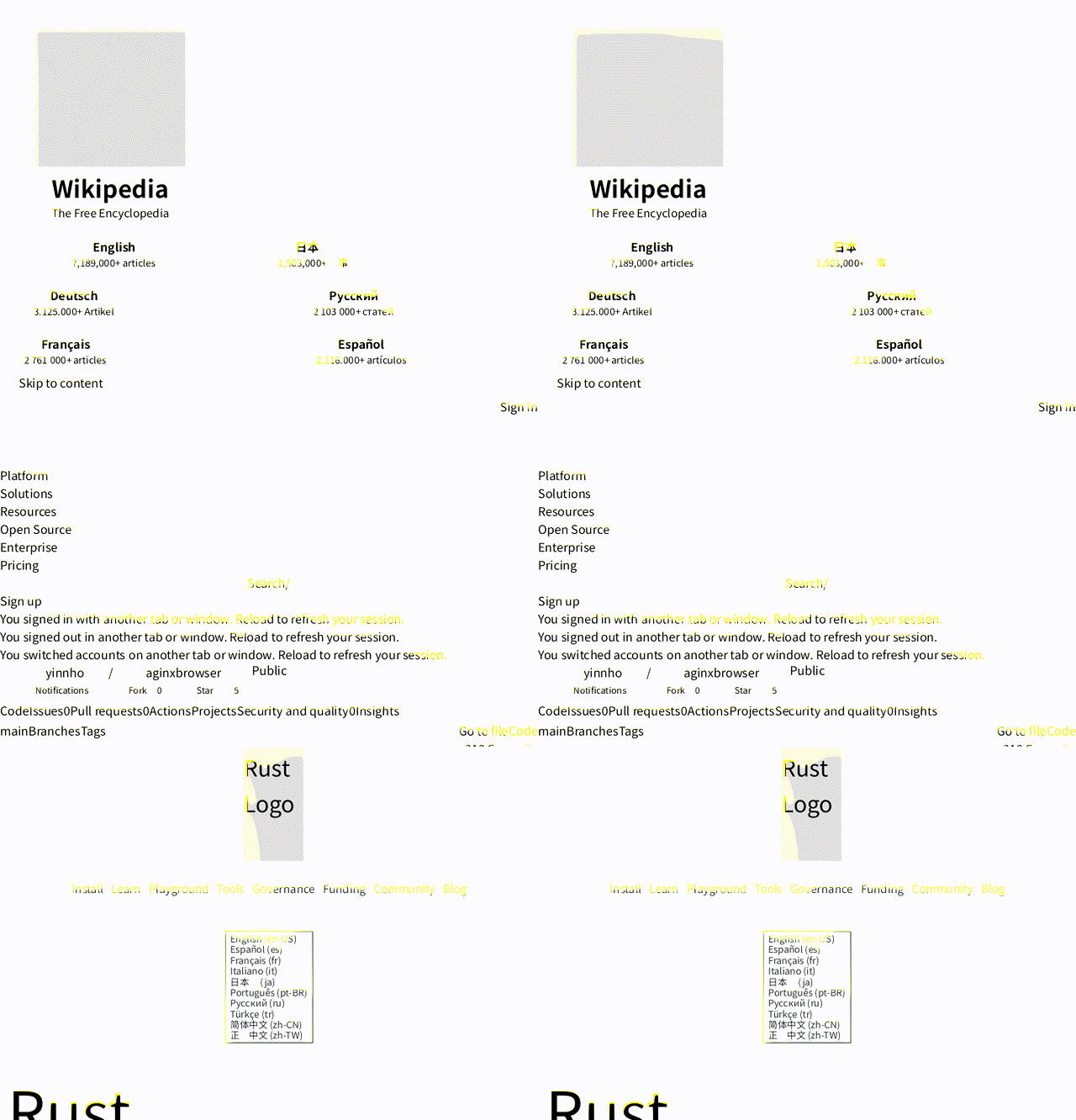
Real pages rendered by AginxBrowser's diting engine (no Chromium) — Wikipedia, this repo, Rust. Screenshot it yourself →
Why Agents Need Their Own Browser
Measured against headless Chrome on the same 20 pages, same network (bench, 2026-08-28): 7.6× faster to agent-usable text (p50 532 ms vs 4 053 ms), ~10× less memory (227 MB for the whole process vs ~2.1 GB per Chrome page), and 0 hard failures where Chrome's --dump-dom produced no DOM on 5 of 40 loads. An agent's total cost is browser efficiency × model efficiency — this is the browser half.
Existing "browser automation" was built for humans or for one-shot scraping — not for agents:
| AginxBrowser | Puppeteer/Playwright | Firecrawl | Browser-use | |
|---|---|---|---|---|
| Designed for | Agents first | Human debugging | Scraping service | LLM wrapper |
| Dependencies | Single binary, no Chromium | Chromium ~500MB | Docker ~1GB | Chromium |
| Sees (screenshots) | ✅ built-in diting rendering engine | Needs Chromium | ❌ | Needs Chromium |
| Reads | markdown + js_extract + fetch receipts | DIY | markdown | DIY |
| Finds (search) | ✅ 15 engines, 7 categories, merged | ❌ | ❌ | ❌ |
| Acts | indexed session interaction | DevTools API | ❌ | LLM-driven |
| Remembers | ✅ local fetch/search cache (SQLite FTS5) | ❌ | crawl cache | ❌ |
| Protocol | HTTP + native MCP + CDP | Node API | HTTP | Python |
| TLS fingerprints | ✅ Chrome/Firefox/Safari/Edge | Plugin required | ❌ | ❌ |
| CAPTCHA | ✅ detect + auto-wait + optional 2captcha | DIY | ❌ | ❌ |
| Interactive sessions | ✅ persistent | ✅ | ❌ | ✅ |
An agent needs five things from a browser: see, read, find, act, remember. One binary covers them all — systemd-friendly, MCP-native for Claude/Cursor, zero dependencies.
Core advantage: no Chromium. AginxBrowser inlines a full browser engine (V8 + Rust HTTP stack + the diting CSS/layout/paint rendering engine, with the Blitz/Stylo/Taffy lineage as its reference implementation). No Puppeteer, no Chrome, no Docker. One Rust binary under systemd is your agent browsing infrastructure.
Three Things Stateless Renderers Can't Do
Most new "agent browsers" are stateless, fingerprint-less one-shot renderers — fine for public pages, dead on arrival against Cloudflare or login flows. AginxBrowser goes the opposite way:
- 🔐 Real TLS fingerprints — stealth mode replicates the complete Chrome145 / Firefox133 / Safari / Edge TLS handshakes via BoringSSL (not just a UA string), switchable per request; Cloudflare Turnstile challenges wait automatically for
cf_clearance. Fingerprint-less engines eat 403s — we get through. - 🤝 Stateful interactive sessions — persistent sessions (8-minute idle keep-alive), login state injectable and exportable (
session_create(cookies=...)↔session_cookies), surviving pagination and multi-step flows. One-shot engines throw state away. - 🔌 MCP native — 18 tools as first-class citizens (not a CDP shim). Claude Code / Cursor / Claude Desktop connect in one line. HTTP + MCP dual protocol — plus a CDP bridge, so the DevTools ecosystem works too.
Reference point: Cloudflare's Kitesurf explicitly ships neither real TLS-fingerprint negotiation nor persistent auth sessions — anti-bot and login territory is exactly where AginxBrowser plays.
Apache-2.0 open source, single binary — self-host today, no cloud lock-in.
Every Fetch Is a Receipt
Agents act on what a browser tells them, so the response reports what actually happened — not just "got a 200":
tier— which path served the page: plain HTTP (~100 ms) or the V8-rendered browser tier. An agent can see why a fetch was fast or slow.redirected_from— the full redirect trail.redirected_from[0]is the URL you asked for,urlis where the content actually came from — requested paired with effective, every hop visible.content_hash+changed_since_prev— every fetch is hashed; consecutive samples of the same URL can be diffed. A rate-limited origin serving the same frozen 200 body for days reads aschanged_since_prev: false— the cheapest drift detector there is.captcha_event— when a challenge page was detected (and solved, if a solver is configured), the response says so instead of handing over a challenge page as if it were content.
The local cache builds on the same idea: search hits come back with [§ heading] section prefixes so an agent knows where on the page a hit landed, and ranking fuses keyword relevance with freshness.
Capabilities
- Tiered rendering: static pages over plain HTTP (~100ms); V8 spins up only when JS rendering is needed (~1-2s) — 90% of the bench page set served without spinning up V8 at all; every response reports which tier served it (
tierfield) - Multi-engine meta-search: general web (Baidu / Bing / Sogou / WeChat / Google / DuckDuckGo), news (Bing News), code (Stack Overflow, GitHub), packages (npm, PyPI), academic (arXiv), AI models (Hugging Face) — 15 engines across 7 categories, queried concurrently, merged and deduplicated. Operators can plug a private Meilisearch index into the same
/search. Search → read in one step - Image search:
categories=imageshits Baidu/Bing image indexes and returns direct binaryimage_urllinks (downloadable straight to jpg/png) plussource_urlprovenance - Interactive sessions: persistent browser sessions with indexed interaction (
state/click/input/scroll/eval) — agents browse like humans do, andsession_exportturns what an agent figured out into a runnable curl replay script (zero model tokens on re-run) - Playback-link sniffer:
session_network(filter=media)extracts the m3u8/mp4/dash URLs a page's player actually requested at runtime — links found only in page HTML are often decoys, so the request log is the source of truth.GET /session/{id}/harexports the same traffic as HAR 1.2 (retained bodies included) - CDP bridge:
/json/version+/devtools/{kind}/{id}WebSocket —chromium.connectOverCDP()from Playwright, Puppeteer, or browser-use attaches with one line (integration guide). DevTools ecosystem compatibility without becoming a CDP shim - File download: streaming to disk (no memory buffering), SHA-256 integrity, resume of interrupted transfers — for binaries, archives, datasets
- Local cache that remembers: every fetch/search lands in SQLite (FTS5) at
~/.aginxbrowser/cache.db. Thecachetool re-answers from what the agent already read instead of re-paying network time: full-text search with CJK substring matching, keyword × freshness fusion ranking,[§ heading]section-aware snippets, per-URL content hashes for drift detection, TTL-bounded, per-session scoping for shared deployments - CAPTCHA handling: type detection with automatic Cloudflare challenge wait and optional 2captcha integration — search never stalls on verification pages
- JS data extraction:
js_extractpullswindow.__INITIAL_STATE__and other structured data out of SPAs - Screenshot rendering:
/screenshotendpoint (opt-in--features screenshot) paints the JS-rendered DOM with the diting rendering engine — pure CPU, no Chromium — to PNG. Vision input for agents - TLS fingerprint spoofing: stealth mode impersonates Chrome145/Firefox133/Safari/Edge, switchable per request
- MCP server:
--mcpmode exposes 18 tools (fetch/eval/search/download/cache + session + screenshot tools) — Claude Code / Claude Desktop / Cursor call them directly - Firecrawl compatible:
/v1/scrapeendpoint — existing Firecrawl clients migrate by changing the base URL - DNS rebinding protection: built-in SSRF guard + post-resolution IP validation
A Browser, Not a Crawler
AginxBrowser exists for real-time retrieval: an agent arrives with a question, reads a handful of pages, leaves with the answer. It is not a crawling tool — and the product is shaped so it can't quietly become one:
- robots.txt is not our gate. The RFC 9309 checker ships built in, but a real-time lookup layer isn't a crawler and doesn't do crawler etiquette by default; operators who want it set
AGINXBROWSER_HONOR_ROBOTS=1. - No site-walking API. There is no crawl endpoint and no link-following recursion — every page load happens because an agent asked for that page.
- Built-in budgets. Per-domain: 20 pages/minute. Per interactive session: 200 pages. Toggled via
AGINXBROWSER_DOMAIN_RATE_PER_MIN/AGINXBROWSER_SESSION_PAGE_LIMIT(0disables on your own instance). Generous for an agent grinding through docs or a console; fatal to the page-after-page crawl pattern, including subdomain rotation (one registrable domain, one budget). - The hosted instance (browser.aginx.net) runs tighter budgets. Every user shares one egress IP, and keeping sites comfortable with that IP is part of the service. Self-host if you want different numbers.
- Need to bulk-crawl a site? Use a crawler. This isn't one, and it won't become one.
What It's For
Not demos — real jobs agent browsers are doing today:
- Grind through admin consoles — AWS / App Store Connect / Google Play, dozens of menu layers per task. Let the agent click; it comes back only when authorization is needed.
- Batch actions behind login — fill carts, dig through order history, check pages that only render while logged in. Inject cookies, operate, export for reuse.
- Past anti-bot walls — Cloudflare protection, Turnstile challenges, TLS fingerprint checks. Stealth mode pushes through instead of retreating at 403.
- The Chinese internet — Baidu / Sogou / WeChat meta-search across 5 engines, correct Chinese page rendering. Not English-web-only.
- On-the-spot scripting — agent reads the page, writes JS, evals it: highlighted comparison tables, reflowed content, product filters on hidden parameters. GreaseMonkey-on-steroids.
- Multimodal vision — screenshots as visual input for look-and-judge flows: picking seats, recognizing layouts, verifying rendering.
Quick Start
Try the hosted instance first: https://browser.aginx.net/
One-command full install (SKILL.md trigger surface + MCP tools + verification):
# Download -> inspect the contents -> run only after review (never blind-run network scripts)
curl -fsSL https://raw.githubusercontent.com/yinnho/aginxbrowser/main/skill.sh -o skill.sh
less skill.sh
bash skill.sh
Register MCP only:
claude mcp add aginxbrowser --transport http https://browser.aginx.net/mcp
Install the skill trigger surface via skills.sh:
npx skills add yinnho/aginxbrowser
Self-hosting:
# macOS / Linux via Homebrew
brew install yinnho/aginxbrowser/aginxbrowser
aginxbrowser doctor   # features + fonts + egress self-check

# Docker (Docker Hub, mirrored on GHCR)
docker run -p 8089:8089 yinnho/aginxbrowser:latest
# (or ghcr.io/yinnho/aginxbrowser:latest)

# Or the prebuilt binary (platform detect + sha256 + mirror fallback + doctor self-check)
# Cautious: download -> inspect -> run (never blind-run network scripts)
curl -fsSL https://browser.aginx.net/install.sh -o install.sh
less install.sh && bash install.sh
# Or straight in, if you trust the repo:
#   curl -fsSL https://browser.aginx.net/install.sh | sh
# GitHub slow/blocked? AGINXBROWSER_GH_PROXY=https://ghfast.top/ bash install.sh
aginxbrowser doctor   # features + fonts + egress self-check

# Or build from source (--features stealth,screenshot or you lose both)
cargo build --release --features stealth,screenshot

# Start the service
./target/release/aginxbrowser
# → Listening on 0.0.0.0:8089

# Verify
curl http://127.0.0.1:8089/health
# → {"status":"ok","engine":"diting"}

# Fetch a page
curl -sS -X POST http://127.0.0.1:8089/fetch \
  -H "Content-Type: application/json" \
  -d '{"url":"https://example.com"}'

# Search
curl -sS -X POST http://127.0.0.1:8089/search \
  -H "Content-Type: application/json" \
  -d '{"q":"macbook price","max_results":5}'

# Create an interactive session
curl -sS -X POST http://127.0.0.1:8089/session/create \
  -H "Content-Type: application/json" \
  -d '{"url":"https://example.com"}'
# → {"session_id":"s_1","url":"https://example.com/"}

# MCP mode (for AI agents)
./target/release/aginxbrowser --mcp
Project Layout
aginxbrowser/
├── Cargo.toml
├── build.rs              # V8 snapshot generation
├── js/
│   └── bootstrap.js      # V8 bootstrap script
├── README.md
├── docs/
│   ├── API.md            # Full API reference (HTTP + MCP)
│   └── integrations.md   # CDP bridge: Playwright / Puppeteer / browser-use
├── bench/                # Benchmark harness + results (vs headless Chrome)
│   ├── README.md         #   methodology + numbers
│   ├── pages.txt         #   fixed 20-page set
│   ├── run.py            #   harness
│   ├── summarize.py      #   TSV → results table
│   └── results/          #   raw run data
└── src/
    ├── main.rs              # HTTP service entry & routing
    ├── server.rs            # Business layer (fetch/click/eval/search)
    ├── session.rs           # Interactive browser sessions
    ├── mcp.rs               # MCP server (18 tools)
    ├── render.rs            # Tiered rendering (HTTP direct → diting browser engine)
    ├── store.rs             # Local fetch/search cache (SQLite FTS5, drift hashes)
    ├── download.rs          # Streaming file download (sha256, resume)
    ├── robots.rs            # RFC 9309 robots.txt checker (opt-in gate)
    ├── rate.rs              # Per-domain + per-session budgets
    ├── captcha.rs           # CAPTCHA detection & auto-solve
    ├── firecrawl_compat.rs  # Firecrawl-compatible /v1/scrape endpoint
    ├── diting_cdp/          # CDP bridge (DevTools HTTP + WebSocket)
    ├── doctor_cli.rs        # `aginxbrowser doctor` self-check
    ├── browser.rs           # Top-level API: Browser, BrowserBuilder
    ├── page.rs              # Top-level API: Page, Element
    ├── config.rs            # BrowserConfig
    ├── cookie.rs            # CookieStore
    ├── error.rs             # Error types
    ├── search/              # 15 native search engines, 7 categories
    │   ├── mod.rs           #   SearchEngine trait, Registry, merge/dedupe, progressive backoff
    │   ├── baidu.rs         #   Baidu (JSON API, wreq stealth)
    │   ├── baidu_images.rs  #   Baidu Images (acjson API, images category)
    │   ├── bing.rs          #   Bing (HTML parsing, plain reqwest)
    │   ├── bing_images.rs   #   Bing Images (images/async endpoint, images category)
    │   ├── bing_news.rs     #   Bing News RSS (news category; proxy-first)
    │   ├── sogou.rs         #   Sogou web (HTML parsing, plain reqwest)
    │   ├── sogou_wechat.rs  #   Sogou WeChat (HTML parsing + /link resolution)
    │   ├── duckduckgo.rs    #   DuckDuckGo (html.duckduckgo.com, general; direct-first)
    │   ├── google.rs        #   Google (HTML parsing, wreq stealth + proxy)
    │   ├── stackexchange.rs #   Stack Overflow (SE API v2.3, code category)
    │   ├── github_repos.rs  #   GitHub repos (api.github.com, code category)
    │   ├── arxiv.rs         #   arXiv (Atom API, academic category)
    │   ├── huggingface.rs   #   HF Hub models/datasets/spaces (ai category)
    │   ├── npm.rs           #   npm packages (npms.io API, packages category)
    │   ├── pypi.rs          #   PyPI name resolution (JSON API, packages)
    │   └── meilisearch.rs   #   Private-index adapter (env-configured)
    │
    ├── diting_dom/          # HTML parsing, DOM tree, CSS selectors
    ├── diting_css/          # CSS parsing + cascade
    ├── diting_net/          # HTTP client, cookies, encoding, proxies
    ├── diting_js/           # V8 runtime, JS ops, module loading
    ├── diting_layout/       # Taffy-based layout, floats, hit-testing
    ├── diting_fonts/        # Bundled CJK font subset, fallback
    └── diting_browser/      # Page navigation, lifecycle, browser context
Build
# Standard build (no stealth; TLS fingerprint features inactive)
cargo build --release

# With stealth (requires go + cmake + C++ toolchain; enables TLS fingerprint spoofing)
cargo build --release --features stealth

# With screenshot rendering (enables /screenshot; adds the rendering stack, +30-40MB)
cargo build --release --features screenshot

# Full featured (recommended for production)
cargo build --release --features stealth,screenshot
Requirements: Rust 1.78+; the V8 static library downloads automatically on first build. The stealth feature additionally needs go, cmake, and a C++ compiler. The screenshot feature ships with a bundled CJK font subset (GB2312 + common symbols) — no system fonts required for correct Chinese rendering.
Runtime Environment Variables
| Variable | Default | Description |
|---|---|---|
AGINXBROWSER_BIND | 0.0.0.0:8089 | Listen address |
AGINXBROWSER_STEALTH | enabled | 0 disables stealth (for diagnostics) |
AGINXBROWSER_UA | Linux Chrome145 | Spoofed User-Agent |
AGINXBROWSER_ACCEPT_LANGUAGE | zh-CN,zh;q=0.9,en;q=0.8 | Accept-Language header |
AGINXBROWSER_PROXY | none | Optional fallback proxy. Blocked-source engines (Google, Bing News, Hugging Face) connect directly first and fall through to this proxy only when the direct attempt fails — overseas deployments need no proxy at all; per-request use_proxy:true also routes fetch/search through it. Browser/session/CDP navigations to known-blocked domains (wikipedia.org, github.com, …) route through it automatically. Standard HTTP_PROXY/HTTPS_PROXY/ALL_PROXY are deliberately ignored by the engine (set them for other tools freely); startup logs a warning when it sees one |
AGINXBROWSER_NAV_CHAIN_LIMIT | 10 | JS navigation-chain cap: documents a page may chain via location/form hops before navigation aborts. The count includes the requested document (10 = initial doc + 9 hops). Raise for legit long chains (SSO handover across providers); HTTP 3xx redirects are budgeted separately (20, per Fetch spec / browser parity) |
AGINXBROWSER_CACHE_TTL_SECS | 600 | /fetch cache TTL, 0 disables |
AGINXBROWSER_HONOR_ROBOTS | unset | robots.txt is not consulted by default on /fetch, /screenshot, /download and MCP tools; set 1 to opt in (operator choice) |
AGINXBROWSER_ROBOTS_TTL_SECS | 3600 | Per-host robots.txt policy cache TTL |
AGINXBROWSER_DOMAIN_RATE_PER_MIN | 20 | Per-registrable-domain page budget per minute (subdomains share one budget); over-budget requests get 429 with the stance message. 0 disables. See "A Browser, Not a Crawler" |
AGINXBROWSER_SESSION_PAGE_LIMIT | 200 | Total pages one interactive session may walk (navigation-causing clicks count); over-budget navigations are refused, the current page stays interactive. 0 disables |
AGINXBROWSER_MCP_ALLOWED_HOSTS | unset | Extra Host values accepted by /mcp (comma-separated) — the transport's DNS-rebinding guard defaults to loopback, so add your LAN IP or Docker hostname when other machines call the instance |
AGINXBROWSER_STORE | on | Local fetch/search cache; 0/false/off disables |
AGINXBROWSER_STORE_PATH | ~/.aginxbrowser/cache.db | SQLite database location (created 0600) |
AGINXBROWSER_STORE_TTL_HOURS | 720 | Cached page TTL |
AGINXBROWSER_STORE_SEARCH_TTL_HOURS | 168 | Cached search-result-set TTL |
AGINXBROWSER_STORE_SCOPE | global | session gives each MCP client session its own cache scope — set this on public multi-client deployments |
CAPTCHA_SOLVER_API_KEY | none | 2captcha API key; enables CAPTCHA auto-solving |
CAPTCHA_SOLVER_SERVICE | 2captcha | CAPTCHA solving provider |
AGINXBROWSER_MEILI_URL | none | Meilisearch base URL; set to enable the private-index engine |
AGINXBROWSER_MEILI_INDEX | none | Meilisearch index uid to query |
AGINXBROWSER_MEILI_KEY | none | Optional Bearer key for the Meilisearch instance |
API Documentation
Full API reference → docs/API.md
CDP integration guide → docs/integrations.md — Playwright / Puppeteer / browser-use one-liners
Security audit notes → docs/skills-sh-audit.md — why skills.sh shows "Critical Risk", and which real product feature each warning corresponds to
Covers:
- All 25 HTTP endpoints (
/fetch,/search,/screenshot,/download,/v1/scrape,/doctor, 11 session endpoints, CDP discovery, MCP transport) - All 17 MCP server tools and their parameters
- Claude Code / Claude Desktop / Cursor client configuration
- Environment variables, error codes, per-site scraping examples
Plugging Into Other Systems
AginxBrowser is pure attach-alongside infrastructure — like a real browser, it runs as an independent service that anything can call, without embedding host code or polluting host config. Deploy one instance per machine (under systemd) and every app needing "render + scrape" capability shares it.
Three attach points:
- HTTP —
/fetch,/search,/screenshot,/downloadfor any language with an HTTP client - MCP — one line into Claude Code / Cursor / Claude Desktop (above)
- CDP — point Playwright / Puppeteer / browser-use at
ws://your-host:8089/devtools/browser/<id>; seedocs/integrations.md
Integration: read the environment variable AGINXBROWSER_URL=http://127.0.0.1:8089. Unset → behavior unchanged; set → risk-controlled sites automatically route through AginxBrowser for rendering, falling back gracefully on failure.
Known Limitations
- Screenshots are opt-in:
/screenshotrequirescargo build --release --features screenshot(adds the rendering stack, +30-40MB). Default render engine is diting (our own CSS+layout+paint stack); passengine: "blitz"to opt back into the Blitz reference pipeline. Complex-site CSS is approximate on both (not pixel-perfect like Chromium) - Element coordinates supported:
/screenshotwithselectorreturns element page coordinates (selector_rects, CSS px);selectoralone crops directly to that element. Inline elements (<a>text</a>) get a rect too on the default diting engine — a union of their flattened inline content, strut-expanded to the element's ownline-heightlike Chrome reports for replaced-only inlines (<a><img></a>→ line-box height, not the image height). Empty inlines still have no rect — pick a block ancestor there - JS interaction broadly works; heavy-fingerprint pages may still fail: React/Vue event delegation works normally (URL-reflection attributes like
src/hrefresolve to absolute URLs so Next.js/webpack hydrate and clicks trigger handlers). Heavy-fingerprint auth pages (WorkOS/Cloudflare) probingnavigator.plugins, WebGL canvas etc. may still break until stealth fingerprint coverage completes - Proxy support: HTTP/HTTPS/SOCKS5 via
AGINXBROWSER_PROXY - Hard risk-controlled sites: Baidu Wenku unsupported; Zhihu articles need a valid
__zse_ck
License
Apache-2.0.
Reviews
No reviews yet
Be the first to review this server!
More Developer Tools MCP Servers
Fetch
Freeby Modelcontextprotocol · Developer Tools
Web content fetching and conversion for efficient LLM usage
Git
Freeby Modelcontextprotocol · Developer Tools
Read, search, and manipulate Git repositories programmatically
Toleno
Freeby Toleno · Developer Tools
Toleno Network MCP Server — Manage your Toleno mining account with Claude AI using natural language.
mcp-creator-python
Freeby mcp-marketplace · Developer Tools
Create, build, and publish Python MCP servers to PyPI — conversationally.
MCP Marketplace
Freeby mcp-marketplace · Developer Tools
Search and install MCP servers from inside your AI client.
MarkItDown
Freeby Microsoft · Content & Media
Convert files (PDF, Word, Excel, images, audio) to Markdown for LLM consumption