
Server data from the Official MCP Registry
Generate answers & visualizations from your engineering data to track software development health.
About
Generate answers & visualizations from your engineering data to track software development health.
Remote endpoints: streamable-http: https://hq.keypup.io/mcp
Security Report
Valid MCP server (1 strong, 1 medium validity signals). No known CVEs in dependencies. Imported from the Official MCP Registry.
Endpoint verified · Requires authentication · 1 issue found
Security scores are indicators to help you make informed decisions, not guarantees. Always review permissions before connecting any MCP server.
Permissions Required
This plugin requests these system permissions. Most are normal for its category.
How to Connect
Remote Plugin
No local installation needed. Your AI client connects to the remote endpoint directly.
Add this to your MCP configuration to connect:
{
  "mcpServers": {
    "io-keypup-engineering-analytics": {
      "url": "https://hq.keypup.io/mcp"
    }
  }
}Documentation
View on GitHubFrom the project's GitHub README.
Keypup MCP Server



Ask your Keypup engineering data in plain language to track delivery, quality and team workload.
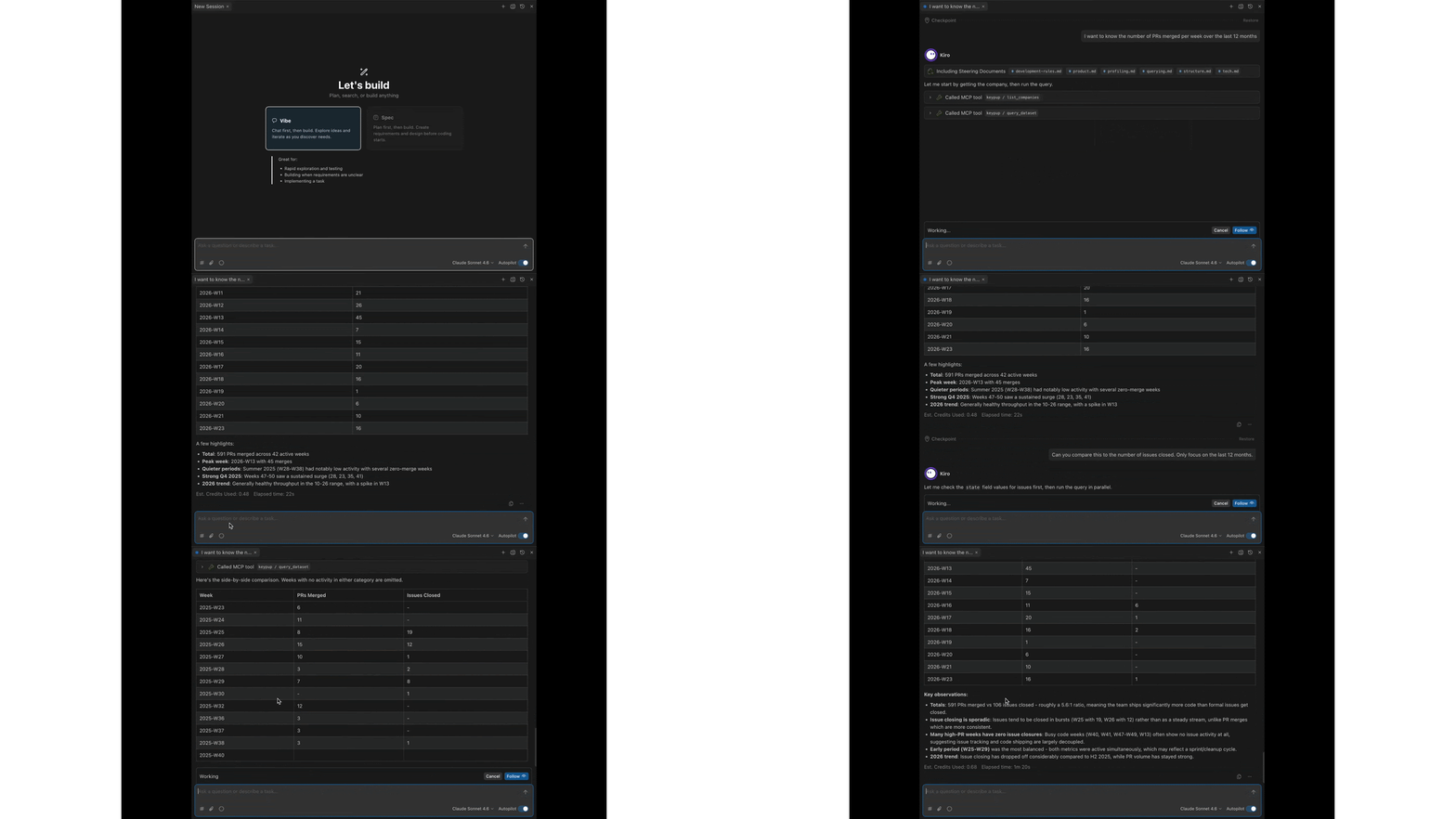
The Keypup MCP (Model Context Protocol) server plugs your Keypup engineering analytics directly into any MCP-compatible AI assistant — Claude, Cursor, Kiro, ChatGPT Desktop, Gemini CLI, VS Code, and others.
Once connected, you ask questions about your engineering activity in plain language and the AI builds and runs the underlying reporting queries for you. No query language to learn, no code to write.
Unlike the GraphQL API, which is designed for developers writing application code, the MCP server is designed to be driven conversationally by an AI on your behalf.
Beta: The Keypup MCP server is currently in beta. The exposed capabilities are continuously expanded during this phase. Feedback and use cases are welcome via the in-app chat.
What it can do
The server exposes a focused set of read-only tools that let an AI explore and query your Keypup data:
- Discover your companies — list the companies (teams) you belong to.
- Explore datasets — browse the available datasets and the fields each one exposes.
- Discover formula operators — list the functions and operators available when building metrics, dimensions, and filters.
- Run reporting queries — execute aggregated queries against any dataset, with metrics, dimensions (group-by), filters, sorting, and pagination.
- Generate a query from natural language — turn a plain-language request into a ready-to-run structured query that the AI can then execute.
The AI orchestrates these tools automatically. A typical flow:
- List your companies
- Pick the relevant dataset
- Look up the fields it needs
- Build the query
- Run it
- Summarize the results
You only ask the question.
Tools
| Tool | Description |
|---|---|
list_companies | List the companies (teams) the authenticated user belongs to. Returns each company's id, name, created_at and updated_at. The id is required by most other tools. |
list_datasets | List the datasets (facts) available for querying, each with its id, label and description. |
list_dataset_fields | List the fields available on a given dataset for a company. Supports filtering by source (NATIVE/CUSTOM) and a regex pattern matched against the field id, plus pagination. |
list_formula_operators | List the operators and functions usable in custom formulas. Supports filtering by scope (DIMENSION/METRIC) and a regex pattern, plus pagination. Set verbose: true for full per-operator documentation. |
query_dataset | Run an aggregated report against a dataset. Metrics, dimensions and filters are expressed as text-based formulas, with optional sorting, limit and offset. |
generate_dataset_query | Turn a natural-language prompt into a structured query compatible with query_dataset. |
Datasets
The reporting engine runs over the following datasets (facts):
ISSUES_PULL_REQUESTS— issues and pull requests.ACTIVITY_EVENTS— transitions on issues/PRs (status changes, assignments, work logged, open/close/reopen).COMMENTS— comments on issues, PRs and reviews.COMMITS— commits attached to pull requests.REVIEWS— pull request reviews.
Example questions
Delivery & throughput
- "How many pull requests did we merge each month over the last 6 months?"
- "What's our weekly issue closing rate this quarter?"
- "How many commits were made per author last month?"
Cycle time & performance
- "What's the average time between PR creation and merge over the last 12 weeks?"
- "Show me the review turnaround time trend for the last 3 months."
- "Which repositories have the slowest cycle time?"
Quality & process
- "How many bugs were raised vs. closed each week this quarter?"
- "What proportion of our pull requests resolve at least one issue?"
- "How many PRs were merged without a review?"
Workload & collaboration
- "Who are our most active reviewers this month?"
- "How is work distributed across the team right now?"
- "How many comments do our pull requests receive on average?"
Open-ended exploration
- "Summarize our engineering activity over the last month."
- "Compare open vs. closed issues over time."
- "What labels are most common on our issues?"
You can refine iteratively: "now break that down by repository", "restrict it to the backend team", and so on.
Setup
Endpoint
https://hq.keypup.io/mcp
The server uses the streamable HTTP transport and supports two authentication methods:
- OAuth 2.1 (recommended) — the client registers itself dynamically and you authorize access through your browser. No token to copy or store.
- API token — a Keypup API token passed in the
Authorizationheader. Use this when your client does not support OAuth dynamic client registration.
Option 1 — OAuth (recommended)
If your client supports OAuth 2.1 with dynamic client registration (e.g. via a Client ID Metadata Document), point it at the endpoint with no credentials:
{
  "mcpServers": {
    "keypup": {
      "type": "http",
      "url": "https://hq.keypup.io/mcp"
    }
  }
}
On first connection the client opens a browser window to sign in to Keypup and
authorize access. There is no token to generate, copy, or rotate — this is the
configuration shipped in this repo's .mcp.json.
If your client does not open an authorization prompt (or fails to register), it likely does not support dynamic client registration yet. Use the API token method below instead.
Option 2 — API token
For clients without OAuth dynamic client registration support, add a keypup
server entry pointing at the endpoint, with your API token in the Authorization
header:
{
  "mcpServers": {
    "keypup": {
      "url": "https://hq.keypup.io/mcp",
      "headers": {
        "Authorization": "Bearer my_keypup_api_token"
      }
    }
  }
}
Notes:
- Replace
my_keypup_api_tokenwith the token you generate (see below). Keep theBearerprefix. - The server name (
keypup) is arbitrary — name it however you like.
Once saved, restart or reconnect the MCP server in your client. The Keypup tools should appear in the client's tool list, and you can start asking questions.
Generating an API token
Only needed for Option 2 (API token). If you authenticate via OAuth, skip this section.
The MCP server authenticates with the same API tokens used by the GraphQL API.
- Go to Settings → Account and open the API Token tab.
- Click Create token.
- Set a descriptive name (e.g., "MCP - Claude Desktop") and an expiration. Setting an expiration is strongly recommended.
- Select the token scopes. The minimal recommended scopes for the MCP server are:
- Reports read (
viz:reports:read) — required to explore datasets/fields and run reporting queries. - Companies read (
hq:companies:read) — required to list the companies you belong to and resolve the company ID used in queries.
- Reports read (
- Click Create. The token is shown only once and can be copied for one minute — copy it into your MCP client configuration right away.
Following the principle of least privilege, grant only the scopes you need. The two scopes above are enough to use the full analytics capabilities of the MCP server.
The token grants the same level of data access you already have in the Keypup user interface — queries are automatically scoped to the companies you are a member of.
Security
- All Keypup MCP tools are read-only — they never modify your data.
- Queries are automatically scoped to the companies you belong to (data isolation).
- Treat your API token like a password. Anyone holding it can query your Keypup data within the granted scopes.
- Prefer short-lived tokens with an expiration, and rotate them periodically.
- Keep tokens out of shared or version-controlled files. Store them in your MCP client's local configuration only.
Resources
Reviews
No reviews yet
Be the first to review this server!
More Data & Analytics MCP Servers
Toleno
Freeby Toleno · Developer Tools
Toleno Network MCP Server — Manage your Toleno mining account with Claude AI using natural language.
mcp-creator-python
Freeby mcp-marketplace · Developer Tools
Create, build, and publish Python MCP servers to PyPI — conversationally.
MCP Marketplace
Freeby mcp-marketplace · Developer Tools
Search and install MCP servers from inside your AI client.
MarkItDown
Freeby Microsoft · Content & Media
Convert files (PDF, Word, Excel, images, audio) to Markdown for LLM consumption
FinAgent
Freeby mcp-marketplace · Finance
Free stock data and market news for any MCP-compatible AI assistant.
Google Workspace MCP
Freeby Taylorwilsdon · Productivity
Control Gmail, Calendar, Docs, Sheets, Drive, and more from your AI