
Server data from the Official MCP Registry
Your AI sees the screen but can't measure it — measured web UI findings, shared live sessions
About
Your AI sees the screen but can't measure it — measured web UI findings, shared live sessions
Security Report
Valid MCP server (2 strong, 2 medium validity signals). No known CVEs in dependencies. Package registry verified. Imported from the Official MCP Registry.
4 files analyzed · 1 issue found
Security scores are indicators to help you make informed decisions, not guarantees. Always review permissions before connecting any MCP server.
Permissions Required
This plugin requests these system permissions. Most are normal for its category.
What You'll Need
Set these up before or after installing:
Environment variable: UISIGHT_URL
Environment variable: UISIGHT_PORT
Environment variable: UISIGHT_LANG
How to Install
Add this to your MCP configuration file:
{
  "mcpServers": {
    "io-github-yusufcemres-uisight": {
      "env": {
        "UISIGHT_URL": "your-uisight-url-here",
        "UISIGHT_LANG": "your-uisight-lang-here",
        "UISIGHT_PORT": "your-uisight-port-here"
      },
      "args": [
        "-y",
        "uisight"
      ],
      "command": "npx"
    }
  }
}Documentation
View on GitHubFrom the project's GitHub README.
uisight


Your AI can already see the screen. It just can't measure it.
Screenshots make an agent guess: "that heading looks a bit faint." uisight makes it know:
- from a screenshot:  "the heading looks a little washed out, maybe adjust the color?"
+ from uisight:       INVISIBLE TEXT 1.04:1 — span.bg-gradient-to-r "your headline"
+                     (text rgba(255,255,255,.5) / bg rgb(247,247,248))
One is an impression. The other is a measurement with a selector attached — the agent fixes that element instead of hunting for it.
uisight is an MCP server for web and responsive UIs (Claude Code, Cursor, Antigravity, anything that speaks MCP). It runs live mobile + desktop sessions side by side, measures what it finds, and puts you and the agent in front of the exact same screen.
Built by a solo founder who got tired of taking phone screenshots, pasting them into chat, and typing "the button looks broken, can you see it?"
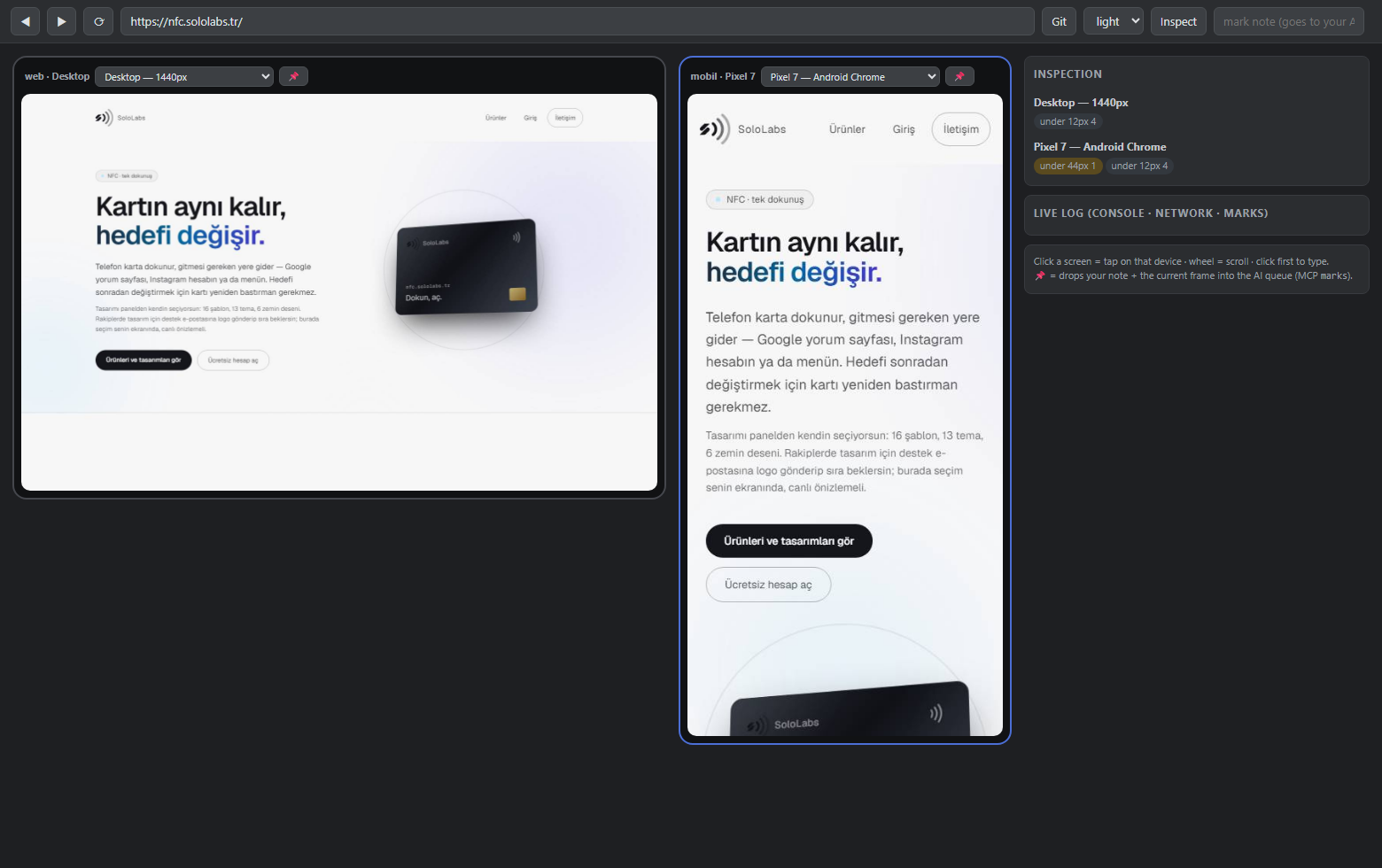 The live panel: desktop + mobile sessions of the same site, URL-synced. Inspect runs on every screen; findings come back per device. Your AI sees this exact view through MCP.
What makes it different
| Multi-viewport browsers(Polypane etc.) | Browser tools / computer use(Playwright MCP, agent harnesses) | Native app toolkits(Argent etc.) | uisight | |
|---|---|---|---|---|
Measures the UI (1.14:1, not "looks low") | ✅ for humans | — | — | ✅ as text, for the agent |
| Human + agent share one live session | — | — | — | ✅ |
| Device × theme matrix in one run | ✅ | — | — | ✅ |
| Human pins a bug → agent reads note + frame | — | — | — | ✅ |
| Native iOS/Android apps | — | — | ✅ | — (web only) |
The measurement engine is the heart: instead of your AI burning tokens squinting at screenshots, inspect returns findings like
[mobile · Pixel 7 · light] https://yourapp.com/
  INVISIBLE TEXT 1.04:1 — span.bg-gradient-to-r "your headline" (text rgba(255,255,255,.5) / bg rgb(247,247,248))
  BUTTON a.text-white "Get Started" → text/background contrast 3.35:1
  touch target below 44px 180x23 — "read the guide"
Text findings are cheap, precise, and directly actionable — your AI fixes the exact selector instead of guessing.
"My agent already does this"
Fair — and partly true. Computer use, browser tools and most agent harnesses can already open a page and take a screenshot. That's the part uisight doesn't try to replace. Three things are still missing:
1. Looking isn't measuring. A vision model reading a screenshot cannot tell you a contrast ratio. It can't tell 4.6:1 (fine) from 4.3:1 (fails WCAG AA) — they look identical. It won't notice that a tap target is 41px instead of 44px, or that an element renders identically in light and dark mode because its color is hard-coded. uisight computes these from the live DOM: alpha-composited backgrounds, gradient text, oklch() colors and all.
2. Screenshots cost more and say less. A mobile screenshot is roughly 1,500 tokens of pixels the model has to interpret. The equivalent inspect result is a few hundred tokens of facts it can act on directly. Someone put it perfectly under the launch thread: "it burns some tokens but it manages." This is the version that doesn't burn them.
3. Nobody's watching with you. In the usual setup the agent looks at the page alone and reports back. Here you both watch the same live session — you see what it does as it does it, and when you spot something, you pin it (📌) with a note and the agent reads your note plus that exact frame. No more describing a bug in words.
Scope note: uisight is for web and responsive UIs. For native iOS/Android app control, Argent is excellent and does far more than we do there.
Quickstart
# once per machine: Playwright ships over npm but downloads browsers separately
npx playwright install chromium webkit   # ~300 MB; chromium alone is enough to start

# one-shot audit: PNGs + gallery + report for iPhone/Pixel/desktop, light+dark
npx uisight https://yourapp.com --theme both

# live panel: mobile + desktop side by side, you browse, AI watches (and vice versa)
npx uisight-panel http://localhost:3000
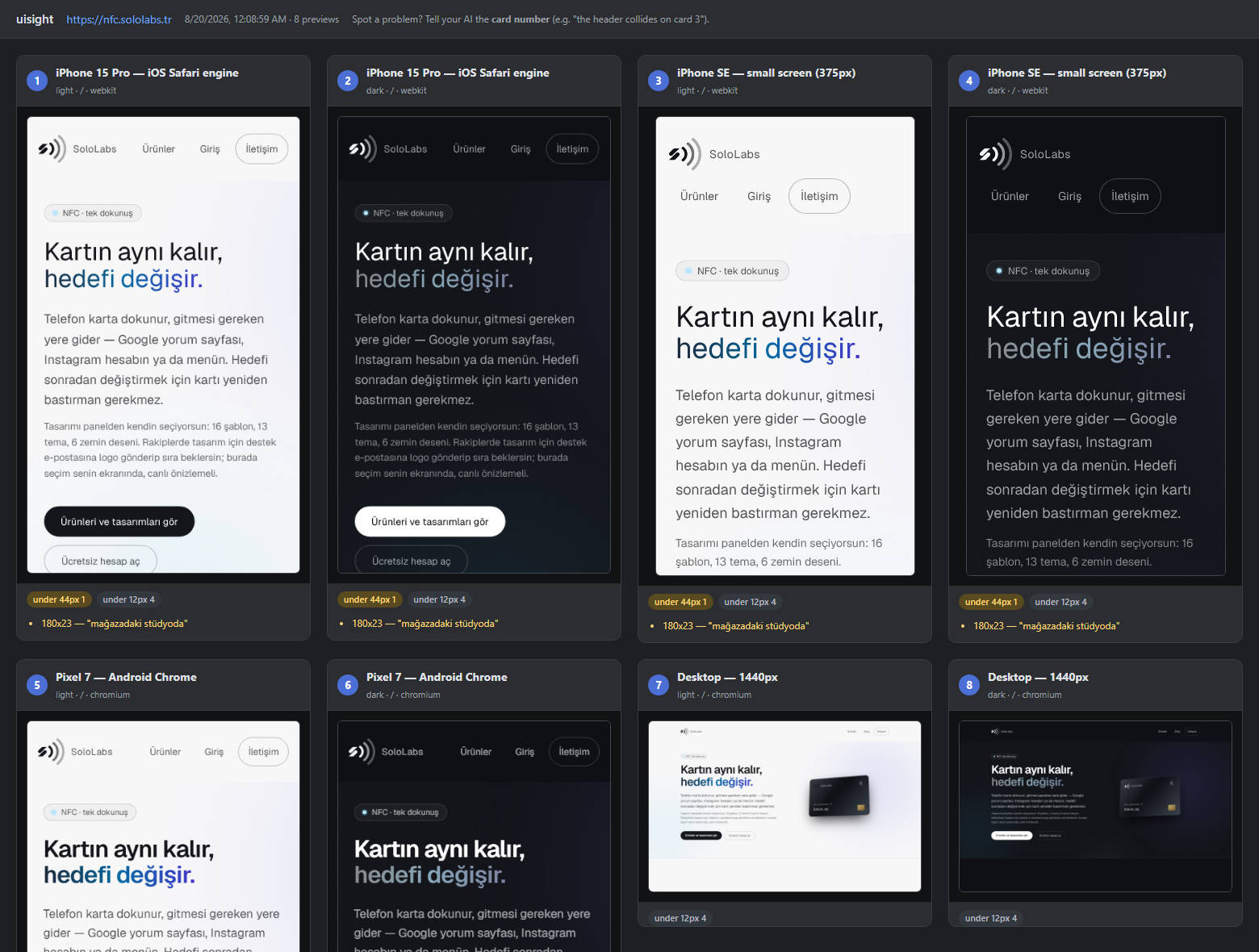
The one-shot audit produces a device × theme gallery with findings per card:
Hook it into your AI (MCP)
# Claude Code
claude mcp add --scope user uisight -- npx -y uisight-mcp
For Cursor / Antigravity / other MCP hosts, add to your MCP config:
{ "mcpServers": { "uisight": { "command": "npx", "args": ["-y", "uisight-mcp"] } } }
Then just tell your agent: "look at my app with uisight". The panel server starts automatically when needed.
MCP tools
| Tool | What it does |
|---|---|
see_screen | Returns the current screen as an image — the exact frame the human sees in the panel |
inspect | Runs contrast / touch-target / overflow / theme checks; returns measured findings as text |
goto | Navigates all sessions to a URL (localhost included) |
tap / type_text / scroll | Drives the page — the human watches it happen live |
set_device | Switches device profile (iphone-15, iphone-se, pixel, galaxy, ipad, desktop, laptop) or light/dark theme |
status | Open URL, sessions, recent console/network errors — first stop when hunting a bug |
marks | Reads the notes the human pinned in the panel (📌 note + screenshot at that moment) |
Turkish tool names available with UISIGHT_LANG=tr (ekrani_gor, denetle, ...).
The panel (human side)
npx uisight-panel <url> opens a browser page at localhost:5055:
- Mobile + desktop side by side, both live, URL-synced
- Click = tap on that device · wheel = scroll · type after clicking
- Per-pane device switcher, shared light/dark toggle
- Inspect button runs the measurement engine on every screen
- 📌 Pin: type a note, pin it — your AI reads note + screenshot via
marks. No more "let me describe what I'm seeing."
Works inside VS Code / Antigravity via Simple Browser: Show → http://localhost:5055.
What it checks
- Invisible text (contrast < 1.6:1) and WCAG AA contrast failures — alpha-composited backgrounds, gradient text,
oklab()/oklch()colors all handled - Touch targets below 44px (mobile profiles only; inline text links exempt by width, per WCAG)
- Horizontal overflow with the offending elements
- Text below 12px, images without alt
- Theme drift: elements identical in light and dark = likely hard-coded colors
- Console/JS errors and failed network requests per device
And the honest limit: automated checks cannot see design mistakes — a collided header measures fine. That's why see_screen exists and why the report says "eyeball the PNGs."
Something didn't work?
Please open an issue — even a one-liner. This is a young project and the fastest way it improves is someone saying "I ran it on X and got Y". Screenshots of the panel or the contents of REPORT.md help a lot.
Known rough edges, so you can tell a bug from a limitation:
- Design mistakes are invisible to the engine. A header that collides with the logo measures perfectly fine. Use
see_screenand look. - Photo backgrounds are skipped. Contrast over a background image can't be computed from CSS, so those elements are left alone rather than guessed at.
- Theme drift samples structural elements (body, header, nav, main, footer, button, a, input, cards/panels/modals/menus) — drift that lives only in body copy won't show up in the light↔dark comparison.
- iPhone profiles are WebKit, not an iOS Simulator — very close to Safari, not identical to a device.
- Internals are still Turkish. Public surfaces (tools, CLI flags, reports) are English; variable names inside
src/aren't yet. PRs welcome either way.
Development
npm install
npx playwright install chromium
npm test          # runs the inspection engine against fixture pages in a real browser
The tests are regression locks: every case in test/inspect.test.mjs is something the engine got wrong at least once — a false "clean" verdict, a false alarm, or a measurement that silently skipped a color format.
See CONTRIBUTING.md before touching the measurement engine — it explains why the color math cannot be extracted into a module, and what a good bug report looks like.
Notes & limitations
- iPhone profiles run on real WebKit (Safari's engine) — close to iOS, but not an iOS Simulator.
- Browsers are downloaded once by Playwright on first run (
npx playwright install chromium webkitif you want to pre-warm). - Everything runs locally — no cloud, no account, your screens never leave your machine.
- As of v0.2 the codebase is English throughout — identifiers, comments, and the panel's HTTP field names. If you were calling the panel API directly, CHANGELOG.md has the rename table.
License
MIT © SoloLabs
Reviews
No reviews yet
Be the first to review this server!
More Developer Tools MCP Servers
Fetch
Freeby Modelcontextprotocol · Developer Tools
Web content fetching and conversion for efficient LLM usage
Git
Freeby Modelcontextprotocol · Developer Tools
Read, search, and manipulate Git repositories programmatically
Toleno
Freeby Toleno · Developer Tools
Toleno Network MCP Server — Manage your Toleno mining account with Claude AI using natural language.
mcp-creator-python
Freeby mcp-marketplace · Developer Tools
Create, build, and publish Python MCP servers to PyPI — conversationally.
MCP Marketplace
Freeby mcp-marketplace · Developer Tools
Search and install MCP servers from inside your AI client.
MarkItDown
Freeby Microsoft · Content & Media
Convert files (PDF, Word, Excel, images, audio) to Markdown for LLM consumption