
Server data from the Official MCP Registry
Queue parallel-agent worktree branches, test together, serialize and recover Git pushes.
About
Queue parallel-agent worktree branches, test together, serialize and recover Git pushes.
Security Report
Valid MCP server (1 strong, 1 medium validity signals). No known CVEs in dependencies. Package registry verified. Imported from the Official MCP Registry.
5 files analyzed · 1 issue found
Security scores are indicators to help you make informed decisions, not guarantees. Always review permissions before connecting any MCP server.
Permissions Required
This plugin requests these system permissions. Most are normal for its category.
How to Install
Add this to your MCP configuration file:
{
  "mcpServers": {
    "io-github-yongjip-mergetrain": {
      "args": [
        "mergetrain"
      ],
      "command": "uvx"
    }
  }
}Documentation
View on GitHubFrom the project's GitHub README.
mergetrain




Safely integrate committed branches from parallel coding agents.
mergetrain is a local merge queue for parallel LLM agents. These coding agents use large language models and work in Git worktrees. mergetrain runs on your machine. A train is a group of queued task branches. A gate is a configured test or check. Each agent commits and enqueues its branch. One runner merges branches in enqueue order and runs gates on the combined result. It updates your Git refs atomically only after explicit approval.
mergetrain is designed for one operator managing local repositories.
There is no mergetrain account, hosted control plane, OAuth app, or product telemetry. Queue and runner state stay on your machine. Only your configured Git remote and trusted gate or verification commands may contact external services.
Keep building through the fix
Default batch mode: passing work lands first. Work that needs a fix returns to its agent. Passing work can land while the repair continues.
Keep building during checks. Agents start their next task while mergetrain checks earlier work. This 14-second loop keeps the same four agents in view.
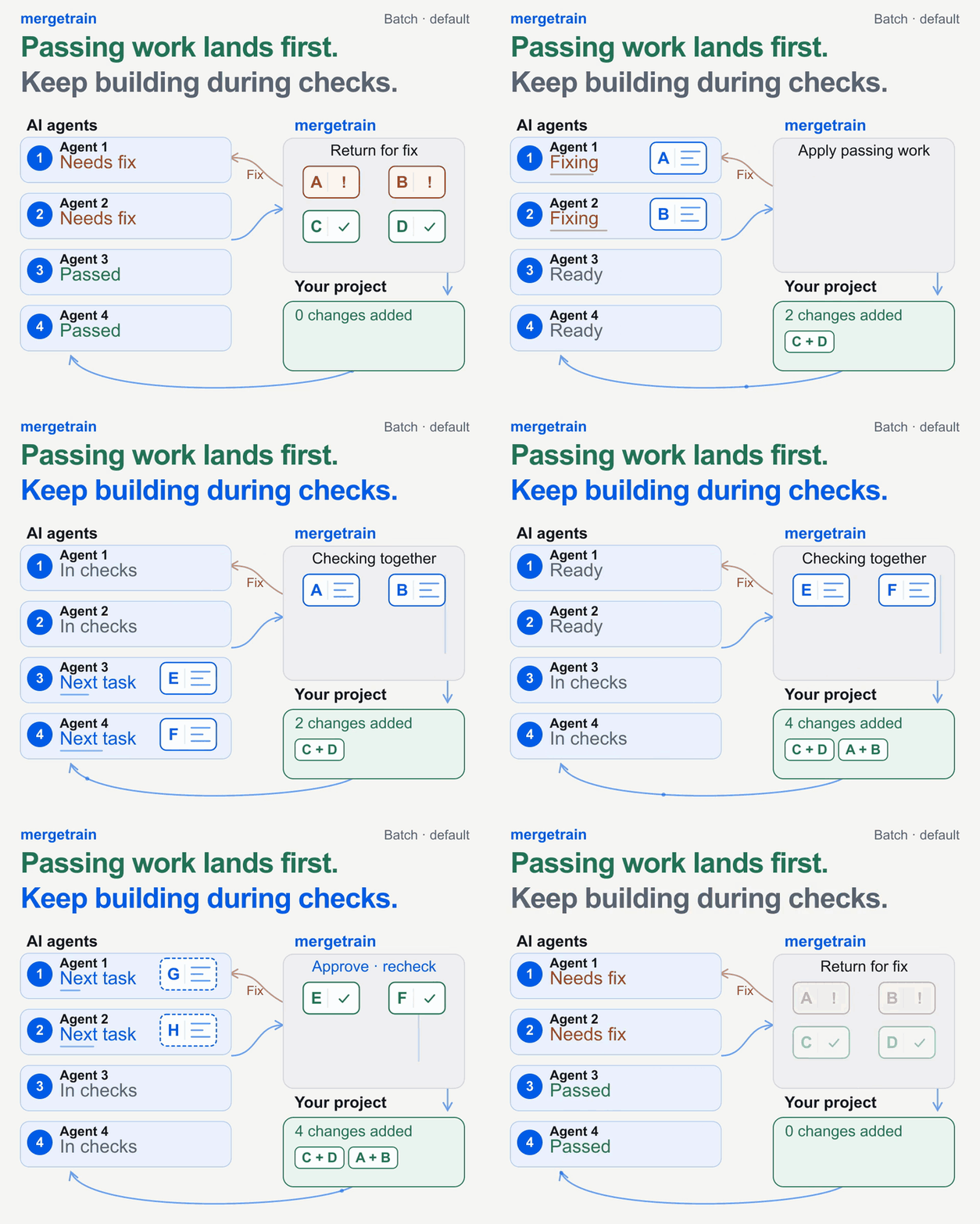
Agents can keep building in both modes. In ordered mode, an unresolved earlier submission holds later landings. Compare the two modes.
Pause or replay the demo · View the still image · Reproduce the continuous workflow
This illustration follows recorded CLI results. The four lanes represent agent roles; letters identify work, not queue job IDs. The capture scripts agent-authored changes and operator approvals in a disposable local repository and bare remote. It does not launch an AI service.
Two fixture gate waits make the overlaps reproducible: E and F are committed during A and B validation, then G and H drafts start during E and F validation. All three deployments retain approval and the default recheck. A fresh clone of the final remote passes six tests.
G and H then refresh onto that result without losing their edits. I and J start there too. These four drafts remain unsubmitted. Your agents or operator create, fix, refresh and resubmit work; mergetrain checks and integrates it. The 14-second animation repeats this recorded window with condensed timing.
The problem
Worktrees let several agents edit one repository without sharing a checkout. They do not decide landing order, test the combined result, prevent push races, or tell you what happened if a laptop dies mid-push.
Without a shared integration workflow, the operator chooses branch order and resolves cross-branch failures. The operator also reruns tests and controls pushes. Repeating these actions can slow parallel work.
mergetrain records this workflow in a durable local queue:
agent branches → local queue → isolated integration worktree → combined gates
               → explicit approval → one atomic push → post-push verification
Who should use it?
Use mergetrain when:
- multiple coding agents finish branches in the same repository throughout the day;
- agents work in Git worktrees and should enqueue rather than push deploy refs;
- the combined result must pass local tests before it lands;
- you want unattended processing only for explicitly pre-approved jobs; or
- one local hub should show queues and runners across several repositories.
It is harness-agnostic: Codex, Claude Code, agy, scripts, and humans all use the same CLI and JSON contract.
Running several Claude Code or Codex sessions on one laptop? The one-laptop guide covers worktrees, unattended landing, heavy gates, sleep and quiet periods, a push guard, and outcome reports, each tested in disposable repositories.
Who should not use it?
You probably do not need mergetrain when:
- one person or agent lands one branch at a time;
- every change already goes through a PR and your forge-native merge queue;
- you need a hosted review UI, organization-wide permission system, or remote runner service; or
- you are looking for a general job queue, CI provider, or deployment platform.
For PR-first teams, use GitHub Merge Queue or GitLab Merge Trains. mergetrain is for local-agent, worktree-first integration, with or before a PR.
Batch by default; ordered when needed
Start with batch, the default. It suits independent work from parallel
agents. The runner combines the queued work available when it starts; it does
not wait for every agent to finish. Compatible work can land while an agent
repairs a failed submission.
Use ordered when each change needs its own landing and the original
submission order must survive a failure and retry.
| Comparison | batch (default) | ordered (optional) |
|---|---|---|
| Agent work example | A fixes login, B adds search filters, C updates the admin screen | A, B, and C make compiler optimizations; measure each change against the previous landed result |
| Landing unit | Available submissions together | One submission at a time |
| If B fails | After isolating B and passing checks on A+C, A+C can land | A can land; C waits until B is repaired and lands, or is explicitly canceled |
B after retry | Joins the back of the queue | Keeps B's original position, before C |
Both modes let agents start their next task after handoff. Both keep deploy approval and the default pre-push recheck. Ordered processing can run checks more often because each submission lands separately. Queue order starts at submission, not when an agent starts work, and does not express code dependencies. Order ends at a successful Git landing. Post-push verification warnings remain visible while later work proceeds; an uncertain push still requires reconciliation.
Availability: ordered is available in 3.6.0 and newer.
Keep the default batch for ordinary parallel agent work.
See the agent work examples,
configuration, and upgrade procedure.
Enforcement boundary
Lease tokens fence concurrent and stale mergetrain runners. They do not
intercept an arbitrary git push from a task agent that has shell access and an
integration-branch credential. To make “one runner owns the push” an enforced
property rather than a protocol assumption, use this topology:
task agents: commit + exact-SHA enqueue; no integration push credential
runner:      separate deploy identity
remote:      protected integration branch; runner or reviewed PR path only
Without credential separation and remote protection, mergetrain still provides safe train assembly and recovery semantics, but it cannot prevent a participant from bypassing the queue. See the security boundary.
Run the real demo
uvx mergetrain demo
The demo creates a disposable repository and local bare remote, then runs four
real branches through merges in enqueue order, a combined-only gate failure,
conflict attribution, and deployment of the compatible train. Use --keep to
inspect the result afterward. Add --brief --pause to read each step before
continuing. The extended workflow recording
adds repair, work committed during validation, the next batch, and three verified
local deployments.
Install and first run
# Install the machine-level CLI
uv tool install mergetrain          # or: pipx install mergetrain
# macOS: brew install yongjip/tap/mergetrain

# Codex: add the Git marketplace, then install the native skill + pinned MCP server
codex plugin marketplace add yongjip/mergetrain --ref main
codex plugin add mergetrain@mergetrain

# agy: install the native skill + pinned MCP server
agy plugin install https://github.com/yongjip/mergetrain
For VS Code / GitHub Copilot or direct MCP setup, see the MCP installation and deployment-confirmation guide.
Initialize the repository:
cd /path/to/your/repo
mergetrain init --project my-app --write
Add at least one project gate to .mergetrain.yaml. A new configuration has
gates: [], so it runs no project tests. For a Python project that uses pytest:
gates:
  - name: tests
    run: python -B -m pytest -q -p no:cacheprovider
Use test commands for your project. Gates must leave the assembled checkout
unchanged. init also creates AGENTS.mergetrain.md and
CLAUDE.mergetrain.md. Link them from your existing AGENTS.md or CLAUDE.md.
Commit and land the configuration and instructions through your normal
integration path before creating task worktrees.
After the task agent commits a clean branch in its own worktree:
mergetrain status --json
mergetrain enqueue \
  --task "add health check" \
  --branch agent/health
The task agent stops after enqueueing. From the operator checkout, run these commands when validation and deployment are authorized:
mergetrain status
mergetrain deploy
For long-running gates, run mergetrain validate earlier; it never pushes and
leaves one exact train Ready for the later deploy confirmation.
deploy names the configured atomic Git ref update; it does not imply an App
Store, Kubernetes, or other provider release.
Agents commit and enqueue. One runner owns merge → test → push → verify.
Unattended daemons process only jobs that a human explicitly enqueued with
--auto. For manual jobs, daemon --validate-only can run merge and gates in
the background, but it pauses at the validated-train approval boundary and
never pushes.
See the quickstart for configuration, daemon, and multi-repository Hub setup.
Integrating parallel Claude Code sessions and Codex worktrees
Use a Git worktree merge queue when parallel Claude Code sessions or parallel Codex worktrees produce committed branches in the same repository. The plugin install guide connects either client to the queue. Task agents commit, enqueue, and stop. A separately authorized runner tests the combined branches and handles the push.
For Orca-managed worktrees, see the Orca setup and queue guide for tested terminal commands, shared queue behavior, validation, and repair. The Orca agent guide adds native Codex, Claude Code, and agy plugin setup and bounded task/validation prompts.
Why not just worktrees and git merge?
Worktrees solve parallel editing. mergetrain solves serialized integration.
| Integration concern | Worktrees + manual merge | mergetrain |
|---|---|---|
| Landing order | A person or agent decides repeatedly | Durable queue in enqueue order |
| Combined validation | Rerun manually after each merge | Gates run over the exact assembled train |
| Cross-branch failure | Diagnose by hand | Isolation runs identify the conflicting pair |
| Push ownership | Every session can race the ref | One lease-fenced runner owns the push |
| Approval | Shell convention | Explicit validate/deploy intent; --auto is opt-in |
| Crash recovery | Infer from local logs | Reconcile SQLite evidence against remote refs |
Agents keep their separate worktrees. One mergetrain runner integrates their committed results.
Why not GitHub or GitLab merge queues?
They solve a related problem for a different operating model.
| Forge-native queue | mergetrain | |
|---|---|---|
| Primary unit | Pull/merge request | Committed local task branch |
| Validation | Forge merge group + remote CI | Local assembled train + shell gates |
| Review | Built-in conversation and approvals | No code-review UI |
| Infrastructure | Forge integration and hosted services | Local SQLite, Git worktrees, any Git remote |
| Best fit | PR-first teams and distributed review | High-throughput local agent integration |
The models can coexist: push a validated train to a review branch and open one PR, or reserve individual PRs for changes that need discussion. The PR workflow guide covers direct, one-PR, split-PR, and validation-only patterns.
Recovering an interrupted Git push
A stopped or timed-out Git push does not prove whether the remote accepted the
update. mergetrain records deployment evidence. Its recovery procedure checks
remote refs before another attempt. Start with mergetrain status --json and
follow the reported recovery action and its approval requirement. See the
recovery guide.
Core safety guarantees
- Exact train identity. Approval names the task HEADs and integration base; changed branches or a moved base cannot silently reuse that approval.
- Combined gates before push. A green branch is not enough. The assembled train passes the configured gates, or nothing lands.
- One fenced mergetrain owner. SQLite claims and lease tokens prevent concurrent or stale mergetrain runners from mutating the same train; remote enforcement additionally requires the credential topology above.
- Atomic remote update. Payload refs and a permanent
refs/mergetrain/deploys/<sha>recovery ref update together. - Remote-truth recovery. Write-ahead markers and pinned commits let
reconciledetermine whether a killed push landed, without replaying a successful deploy or calling a missing one shipped. - Explicit automation. A bare run never deploys. Daemons touch only
pre-approved
--autojobs whose destination and gate/reuse/verify policy still match, and MCP deploy still requires attributable human confirmation. - One state entry point.
statusprojects internal detail into Waiting, Running, Ready, Attention, and Done, and returns the next safe command.inspectsupplies job-level evidence only when it is needed.
Queue state, locking, train assembly, and gates stay local. Your configured Git remote and post-push verification may still use external services. Gate and verify commands are trusted code; review the security boundary before enabling unattended jobs.
These guarantees are exercised on macOS and Linux across Python 3.10–3.14 and
on Windows, including real-Git fault injection around git push --atomic. A
dedicated soak repository completed 20 landed trains at a 100% land rate,
including planned conflict recovery and a real killed-push reconciliation whose
verdict matched the remote. See the
soak evidence,
then use mergetrain stats --json to inspect evidence from your own queue.
Go deeper
- Start: Quickstart · Install · CLI · Config
- Understand: Design and architecture · Machine contract · PR workflow comparison
- Operate: Efficient operation · Failure modes and recovery · Upgrades · Daemon · Multi-repo Hub
- Trust and extend: Security · Agent contract · Agent adoption benchmark · Product-name-free discovery benchmark · Local multi-agent benchmark · MCP server · Adapter pattern · Product scope
Stable interface
The normal CLI is deliberately limited to six verbs:
init status enqueue validate deploy inspect
Version 3 is the long-lived product grammar. There is no planned v4: new capabilities must fit these verbs or stay in advanced operator surfaces, and the v3 JSON and MCP contracts evolve additively apart from the contract bumps recorded in the compatibility policy.
The latest published release is shown by the PyPI badge above. Issues and operating reports are welcome on GitHub.
License
Released under the MIT License.
Reviews
No reviews yet
Be the first to review this server!
More Developer Tools MCP Servers
Rea
Freeby Morluto · Developer Tools
Reverse engineer anything from your terminal or agent with one CLI and MCP server.
Paperclip
Freeby Paperclipai · Developer Tools
Trending hip-hop artist momentum scores across four cultural dimensions.
Toleno
Freeby Toleno · Developer Tools
Toleno Network MCP Server — Manage your Toleno mining account with Claude AI using natural language.
MCP Marketplace
Freeby mcp-marketplace · Developer Tools
Search and install MCP servers from inside your AI client.
mcp-creator-python
Freeby mcp-marketplace · Developer Tools
Create, build, and publish Python MCP servers to PyPI — conversationally.
by Lharries · Communication
Read, search, and send WhatsApp messages through your AI assistant