
Server data from the Official MCP Registry
MCP server for Scrivener: read, write, analyze, and search your manuscripts with AI assistants.
About
MCP server for Scrivener: read, write, analyze, and search your manuscripts with AI assistants.
Security Report
Valid MCP server (1 strong, 1 medium validity signals). No known CVEs in dependencies. Package registry verified. Imported from the Official MCP Registry.
3 files analyzed · 1 issue found
Security scores are indicators to help you make informed decisions, not guarantees. Always review permissions before connecting any MCP server.
Permissions Required
This plugin requests these system permissions. Most are normal for its category.
How to Install
Add this to your MCP configuration file:
{
  "mcpServers": {
    "io-github-writerslogic-scrivener-mcp": {
      "args": [
        "-y",
        "scrivener-mcp"
      ],
      "command": "npx"
    }
  }
}Documentation
View on GitHubFrom the project's GitHub README.
Scrivener MCP
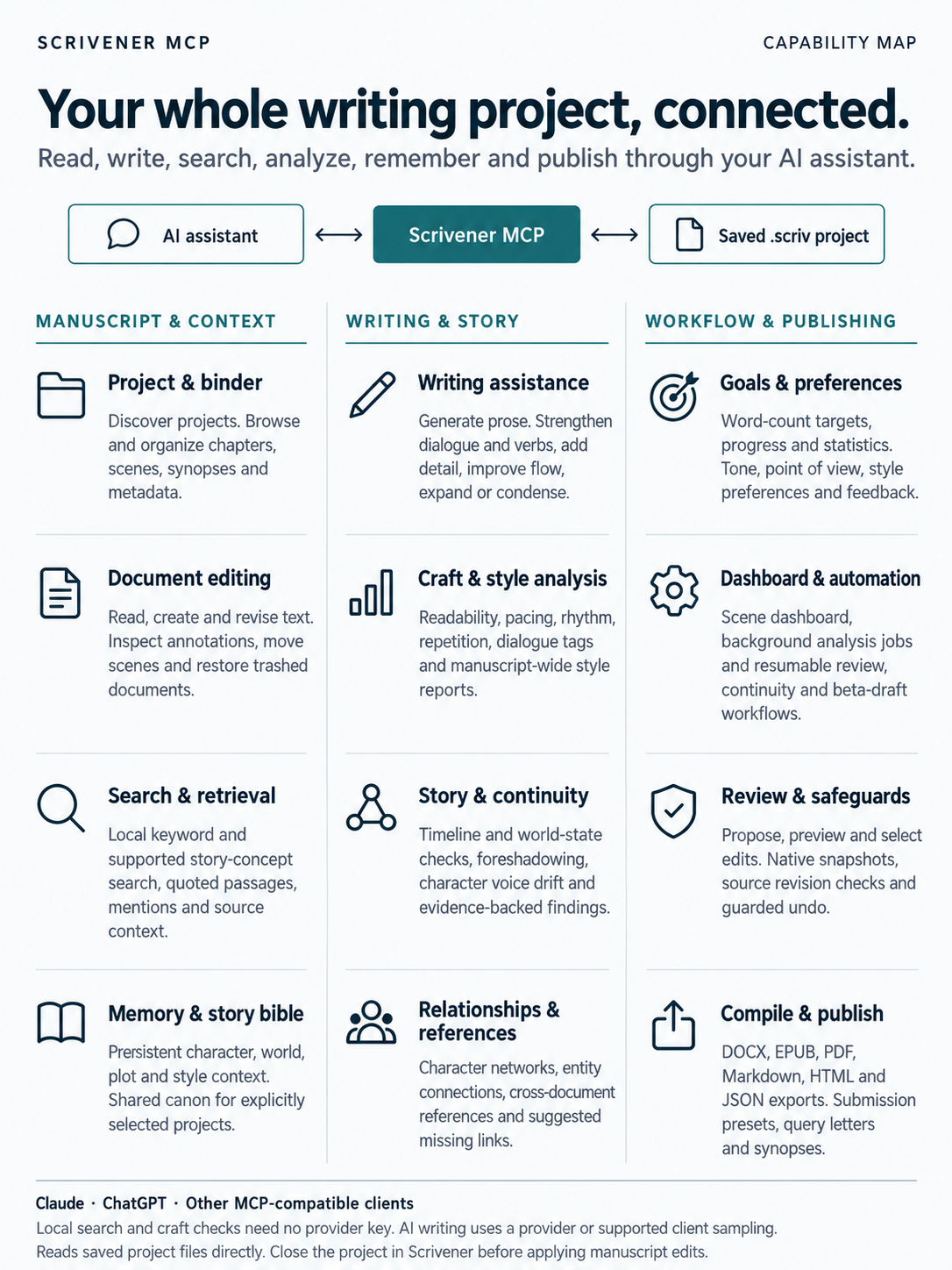
MCP server for Scrivener: connect your novels, screenplays, and manuscripts to Claude, ChatGPT, and any AI assistant, with document management, writing analysis, content enhancement, offline semantic search, and character/plot tracking.
Start with the safe first session, then use editorial review and workflows, export presets, Content Credentials, or the Windows guide. Compatibility evidence records actual coverage and limits.



Scrivener MCP lets your AI assistant open, read, edit, analyze, and search your Scrivener projects directly. No exporting, no copy-pasting text back and forth. Tell it which project to open and start working.
You: Open my novel and analyze the pacing in Chapter 12.
Claude: Opens the .scriv project, reads Chapter 12, runs pacing analysis. The first half moves well, but the middle stalls — a three-page internal monologue starting at paragraph 14 kills the momentum you built in the confrontation scene. Consider cutting it to a paragraph and moving the backstory to Chapter 8.
Works with Claude Desktop,
Claude Code, VS Code (Copilot/Continue), Cursor,
and any MCP-compatible client. Reads Scrivener 3 projects on the
supported platforms. Listed on the
official MCP Registry as
io.github.writerslogic/scrivener-mcp.
Install
Mac app: Draftbridge for Scrivener, $4.99
Not a terminal person? Draftbridge for Scrivener is the ready-made Mac app. It finds your AI apps — Claude Desktop, BoltAI, Cursor, VS Code, LM Studio, Raycast, Claude Code — connects Scrivener MCP to each with one click, shows your projects, and repairs the connection after an app update. No Terminal, no Node.js, no settings files. One-time $4.99, up to 3 Macs, signed and notarized by Apple.
The server, setup tool, and Claude Desktop extension here stay free and open source. The app is
closed source; the fee buys the notarized build and supports development. See the
Mac install guide and FAQ. Report app problems with the
mac-app label.
Free: Claude Desktop extension or command line
Prefer to do it yourself? The .mcpb extension (Claude Desktop only) and the terminal setup below
do the same job for free.
From a terminal:
npm install -g scrivener-mcp
Restart Claude Desktop and it's ready. Other clients need one more step:
npx scrivener-setup
This finds Claude Desktop, Claude Code, Cursor, VS Code, LM Studio, BoltAI, and Raycast and
configures them for you, then confirms the server starts. No Node.js on your Mac? See the
Mac install guide. To set up Claude Code by hand instead:
claude mcp add -s user scrivener -- npx scrivener-mcp, then restart it (or run /mcp).
Smithery
npx -y @smithery/cli install scrivener-mcp --client claude
npx, no install
npx scrivener-mcp
or add it to Claude Desktop's config directly:
{
	"mcpServers": {
		"scrivener": { "command": "npx", "args": ["scrivener-mcp"] }
	}
}
From GitHub
npm install -g writerslogic/scrivener-mcp              # latest main; requires pinned Rust/wasm-pack
npm install -g writerslogic/scrivener-mcp#v0.12.0       # a specific release
Homebrew (macOS)
brew install writerslogic/tap/scrivener-mcp
Docker
docker build --platform linux/amd64 -t scrivener-mcp https://github.com/writerslogic/scrivener-mcp.git
docker run --platform linux/amd64 -i --rm -v /path/to/your/projects:/projects scrivener-mcp
The container uses Linux x64 with glibc because the pinned Narrative Lens 0.2.0 package has no Linux
ARM64 or musl binary. Linux ARM64 and musl hosts can use this Docker configuration; ARM hosts need
Docker's amd64 emulation. The image runs as the non-root node user;
mounted project directories must permit that user to read and write.
Any other MCP client: point it at npx scrivener-mcp as a stdio server.
Document management, deterministic analysis, local passage search, and project memory work with no
API key. Provider-assisted interpretation, generation and enhancement use Anthropic, OpenAI or
OpenRouter. Set more than one and Claude handles chat by default; override with AI_PROVIDER=openai
or AI_PROVIDER=openrouter (OpenRouter defaults to anthropic/claude-sonnet-4.6, change it with
OPENROUTER_MODEL). If the active provider fails on an account-level error — bad key, no credit, an
outage — the server retries on the next one you've configured. If your MCP client supports
sampling, chat-based features can run
through the client's own model on legacy MCP connections, no separate key needed. MCP 2026-07-28 connections currently use configured providers for AI features; modern multi-round sampling is not implemented. Passage retrieval runs locally
through Holographic Memory 0.6.4; interpretation and explanations are optional provider features.
Keys are picked up automatically from:
ANTHROPIC_API_KEY/OPENAI_API_KEY/OPENROUTER_API_KEY~/.envor~/.scrivener-mcp/.env~/.anthropic/key,~/.openai/key,~/.openrouter/key- macOS Keychain (
anthropic-api-key/openai-api-key/openrouter-api-key)
security add-generic-password -s anthropic-api-key -a anthropic -w sk-ant-your-key-here   # Keychain
export ANTHROPIC_API_KEY="sk-ant-..."                                                      # or export it directly
What You Can Do
For manuscript operations, open a project first. The server has no link to the Scrivener app itself and can't see what's open there. Say "Open my Scrivener project at
~/Documents/My Novel.scriv", or "Discover my Scrivener projects" if you don't know the path. On macOS, "Use the project I have open in Scrivener" works too (the first time, macOS will ask permission to control Scrivener). Do this once per conversation. If the project is also open and unsaved in Scrivener itself, save or close it there first, or the two can write over each other.
Manage your manuscript. Read chapters, create scenes, reorganize the binder, update synopses — all through conversation. "Create a new scene called 'The Reveal' after Chapter 5, and move the old epilogue to the trash."
Analyze your writing. Readability, pacing, style, dialogue quality, emotional arc — grounded in your actual prose, not generic advice. Ask whether a chapter's pacing is off and get specifics: which paragraphs stall, how the scene compares to your other chapters, filter-word density against your own average.
Enhance your prose. Targeted edits: cut filter words, strengthen verbs, vary sentence structure, add sensory detail, turn telling into showing, tighten dialogue, fix pacing.
Track characters and plot. Character profiles, plot threads, and style guides persist with the project across sessions. Save a profile for a character once; a consistency check months later catches contradictions — dialogue that doesn't sound like them, a limp that disappears for a chapter.
Search by meaning. Warm 0.6.4 combines native BM25 with local embeddings and optional cross-encoder reranking. Configure local ONNX models for general semantic search; the default encoder covers a disclosed English story-concept vocabulary. Results include exact passages, locations and saved revisions; changed passages update incrementally. No embedding provider is required. See local search configuration.
Track relationships. Record and query how characters, locations, themes, and plot threads connect. Relationships persist in the project's local SQLite state. Discovery proposes unrecorded character/location pairs using saved-text co-occurrence with source revisions.
Compile and export. Assemble chapters into one manuscript with your own formatting and structure preserved. Export inline as Markdown, HTML, or JSON, or write a DOCX, EPUB, or PDF to disk.
Sign and validate exports. Activate credentials with use_skill({"name":"credentials"}), then
call c2pa_capabilities to inspect the installed SDK. Export a PDF with export_project, sign it
to a new embedded output with sign_content_credentials, and check that output with
validate_content_credentials. Credential operations run locally without an open project and use
administrator-configured signing material. They do not establish human authorship or formal C2PA
conformance. See Content Credentials for setup, mode coverage and
limits.
All Tools
82 tools organized by workflow. To keep token usage low, tools load progressively — project tools at
startup, document and search tools once a project is open, the rest on demand. Set
SCRIVENER_MCP_EAGER_TOOLS=1 to load everything up front.
| Tool | What it does |
|---|---|
open_project | Open a .scriv project (accepts .scriv folders or .scrivx files) and make it active |
discover_projects | Scan common locations for Scrivener projects when you don't know the path |
detect_open_project | Detect the project currently open in the Scrivener app (macOS) so you don't need a path |
get_structure | Browse the binder hierarchy (folders, documents, word counts) |
refresh_project | Reload from disk after external edits |
close_project | Close the active project and flush pending changes |
verify_project_integrity | Read-only scan for structural problems (missing/duplicate UUIDs, unreadable content) |
get_compile_settings | Read the project's compile formats and taxonomy -- labels/statuses (with colors), collections, section types |
get_manuscript_briefing | One "where am I?" snapshot: words vs. target (% to goal), document/status/label counts, longest/shortest documents |
list_snapshots | List Scrivener snapshots (title, date) for one document or the whole project |
read_snapshot | Read a snapshot's text as plain text, with word count |
compare_snapshot | Diff a snapshot against the current document (or another snapshot): paragraphs added/removed and net word change |
create_snapshot | Take a Scrivener-native snapshot of a document (restorable from Scrivener's own Snapshots browser) before editing |
| Tool | What it does |
|---|---|
get_document_info | Metadata for one document (title, type, word count, synopsis, label, status) |
read_document | Read content; format: "formatted" for rich text, offset/limit to page long docs |
write_document | Replace saved content with revision checks, native snapshots and disclosed formatting risks |
review_changes | Propose, preview, selectively approve or reject, apply batches, recover and undo saved edits |
manuscript_dashboard | Interactive binder, scene context, pacing, findings and review; text fallback for other clients |
create_document | Create a new text document or folder |
update_document | Change title and/or metadata (synopsis, notes, label, status, custom fields) |
move_document | Reorganize within the binder |
delete_document | Move to trash (reversible) |
| Tool | What it does |
|---|---|
search | Literal full-text search across the active binder; field: "title" for titles, scope: "trash" for trash |
semantic_search | Local concept-vector passage retrieval, with scores, context and source revisions; no API key |
search_passages | Local keyword, bounded English concept, or hybrid retrieval with exact quoted evidence |
find_mentions | Locate every occurrence of a specific name or term, with context |
list_trash | List trashed documents |
restore_document | Restore a document from trash |
read_annotations | Read a document's comments and footnotes |
| Tool | What it does |
|---|---|
analyze_document | Analyze complete saved text; analysisTypes steers provider issues, with explicit broad local fallback and revision checks |
check_consistency | Evidence-backed continuity report with source revisions, canon and inferred candidates |
continuity_findings | Confirm, dismiss, resolve and recheck evidence-bound continuity findings |
analyze_writing_style | Style-focused analysis |
check_plot_consistency | Plot-thread consistency check |
suggest_improvements | AI-generated improvement suggestions |
enhance_content | Propose a complete saved-document rewrite with source revisions; maximum 12000 UTF-16 characters |
generate_content | Generate prose from a prompt, saved-text excerpts and character profiles with revision-checked context |
set_writing_goal | Set a word-count goal (daily, weekly, or whole project) with an optional target date |
get_writing_goals | List goals with progress -- percent complete, words remaining, on-pace status |
set_writing_preferences | Set author preferences (tone, complexity, length, POV, style guide) that steer AI output |
get_writing_preferences | Show current preferences plus feedback insights and suggestions |
collect_feedback | Record a rating/comment on an AI operation to inform those insights |
analyze_manuscript_local | Local manuscript findings with exact evidence, author controls, coverage, persistent baselines and revision comparisons |
analyze_narrative_annotations | Check author-supplied causality, knowledge, promises, subtext and other annotations against saved quotations |
analyze_craft_local | Offline readability, grammar, syntax-tension, dialogue, and word-frequency report for one document (narrative-lens, no AI call) |
check_continuity_local | Offline timeline and world-state continuity pass across the manuscript |
analyze_foreshadowing_local | Offline setup/payoff tracking across scenes |
measure_voice_drift_local | Compare a character's earlier vs later dialogue for voice drift |
analyze_opening_local | Offline opening cues, source ranges and coverage; editorial quality remains unassessed |
check_style_local | Line-edit one document for adverbs, filter words, hedges, clichés, passive voice, nominalizations, and personal tics, each with line and column (bluepencil, no AI call) |
find_repetition_local | Echoes (a word reappearing within a window) and repeated phrases, with both locations |
analyze_rhythm_local | Sentence-length distribution, monotonous runs, overlong sentences, and repeated openers |
analyze_dialogue_tags_local | Dialogue ratio and every quoted line's tag classified as plain, showy, adverb-modified, or untagged |
manuscript_style_report_local | Per-document style density across the manuscript with word-weighted means and outliers |
Manuscript comparisons include comparisonBaseline.name and its original envelope, alongside the
current result's envelope, so both saved source revisions remain identifiable after a baseline name
is reused.
Enhancement types: eliminate-filter-words, strengthen-verbs, vary-sentences,
add-sensory-details, show-dont-tell, improve-flow, enhance-descriptions,
strengthen-dialogue, fix-pacing, expand, condense, rewrite
| Tool | What it does |
|---|---|
compile_documents | Combine documents; mode: "structured" compiles the Draft folder with the binder hierarchy as headings and honors "Include in Compile" (no AI), mode: "intelligent" for AI-optimized output |
export_project | Write the manuscript to disk -- Markdown, HTML, JSON inline, or DOCX, EPUB, PDF as a file |
read_result | Retrieve large compiled/analysis results in bounded UTF-8 chunks without filesystem tools |
export_manuscript | Preflight and export submission DOCX, beta-reader DOCX and validated EPUB presets |
get_statistics | Project-level word/document/character counts |
generate_marketing_materials | Draft synopsis, query letter, pitch, and related materials |
Intelligent compilation returns provider warnings, explicit quality availability, and saved-source
revisions. Rewrites require the complete source to fit 12000 UTF-16 characters; otherwise the
complete original is preserved. Quality opinions cover at most 4000 characters and identify that
coverage. Marketing generation reads the saved Draft by default; use documentIds to select a
smaller scope within the same 12000-character limit. Both reject source changes during generation
and provide read_result references for large output.
Activate the credentials skill on demand; these tools do not require an open project.
| Tool | What it does |
|---|---|
c2pa_capabilities | Inspect actual SDK availability, declared format/mode coverage, limits and unassessed conformance status |
sign_content_credentials | Sign a local asset to a distinct new embedded or supported .c2pa sidecar output using administrator-configured credentials |
validate_content_credentials | Validate a local asset and optional sidecar; report integrity separately from signer trust, with raw reports opt-in |
Format declarations are not proof of native compatibility. Use the Content Credentials guide and per-format native evidence before making coverage claims.
| Tool | What it does |
|---|---|
remember | Store information that persists across sessions with the project |
manage_series | Create, join or leave an explicitly scoped series of selected projects |
story_bible | Curate shared characters, aliases, locations, world rules and chronology with provenance |
recall | Retrieve previously stored memory |
Project memory travels within each .scriv project. Explicit series memberships and shared facts use the server's persistent registry; see editorial workflows.
remember validates nested records and acknowledges the saved snapshot with its revision and record
ID. Use that ID for updates; identical creations reuse their ID, and unknown update IDs fail.
Unrecorded profile fields, style preferences and writing statistics stay absent. worldBuilding
stores named records, for example { name: "Moon Harbor", type: "location" }; all merges custom
JSON by key. Requests are capped at 64 KiB and complete project memory at 16 MiB. Large recall
results use read_result. Earlier custom world data remains available under recall with all.
| Tool | What it does |
|---|---|
add_relationship | Store a relationship between characters, locations, themes, or plot threads |
find_relationships | Query entities related to a given character/theme/location |
discover_connections | Find unrecorded pairs of known characters/locations that co-occur in saved Draft documents, with source revisions |
character_network | The character relationship network |
get_entity_references | Trace the reference graph in either direction: entities a document mentions (by documentId), or documents mentioning an entity (by entity) |
find_orphaned_entities | List registered characters/locations that no document actually mentions |
suggest_connections | Suggest entities a document may be missing, inferred from cross-document co-occurrence |
Relationship tools use project-owned SQLite without an external service. Storage admits up to
10000 relationships; names contain at most 128 UTF-16 characters and labels 64. Discovery covers
the characters and locations already recorded in that graph, up to 256 entities, 1000 Draft
documents, 2 Mi UTF-16 source characters and a source-character count multiplied by entity count
of at most 134217728. Its score is the
fraction of documents mentioning both entities among those mentioning either; it is a candidate
association, not a confirmed story fact. Result limits disclose omitted candidates, and large
responses use read_result. Relationship queries page in stable identity order using nextOffset
and graphRevision; edits require restarting the query. Document cross-reference tools use the
character/location registries and saved text, including Research and Draft items excluded from
Compile. Document queries read only the requested document; entity-wide queries and suggestions
inspect all active text within the same source limits. They disclose missing registries, reject
source/registry changes, and preserve every admitted match offset (up to 1000000 positions and
16 MiB of serialized mention records).
| Tool | What it does |
|---|---|
queue_document_analysis | Analyze supplied document text asynchronously; returns a job id |
queue_project_analysis | Analyze an ordered batch of supplied document texts |
get_job_status | Poll progress/results for a queued job |
get_queue_stats | Inspect project-scoped queue counts, connectivity and legacy migration guidance |
editorial_workflow | Run chapter review, continuity audit or beta-reader preparation with durable progress and resuming |
cancel_job | Request cancellation; running embedded work finishes internally and its result is discarded |
Queued analysis always runs local prose analysis and includes readability by default. Optional
named entities require a native build with ONNX support and a loaded NER model; unavailable results
are explicit. Optional sentiment uses a local lexicon heuristic. Source revisions hash the supplied
UTF-8 text, and the envelope identifies this raw policy separately from saved RTF analysis and saved
project controls. Project batches preserve input order and run sequentially unless parallel is
selected, with at most five documents in flight. Large completed results return a _ref retrieved
through read_result. Redis/KeyDB cannot remove an active job; embedded cancellation prevents work
that has not started and discards the result of work already running.
suggest_improvements accepts async: true for the same suggestion result through get_job_status.
With useContext: true, documentId is required: generation uses up to the first 16000 UTF-16
characters of that saved document and rejects a changed revision. Its result reports the exact
excerpt range, truncation and source revision. The default useContext: false sends only the prompt.
Suggestions use the configured provider or client sampling, and queued generation is not automatically
retried. Large synchronous and queued results use read_result references.
analyze_writing_style accepts 1–64 nonempty text samples, each up to 64000 UTF-16 characters.
Its provider prompt includes at most 8000 characters including separators; coverage reports the
range used from every sample, including any omitted samples. Missing or malformed profile fields
are explicitly unavailable, partial finding lists preserve valid entries, and sample revisions
hash the original supplied UTF-8 text. Large profiles also use read_result references.
| Tool | What it does |
|---|---|
list_skills | List the available tool groups and their tools |
use_skill | Activate another tool group on demand |
Guides
- Getting Started -- Installation, configuration, your first session
- MCP Client Setup -- Copy-paste config for Claude Desktop, Claude Code, Cursor, and VS Code
- Writing with AI -- Analysis workflows, enhancement strategies, memory management
- Troubleshooting -- Common issues and fixes
- Token Optimization -- How the server minimizes context window usage
- Architecture -- How the server works, module structure, data flow
- Scrivener Compatibility -- Supported Scrivener versions, platforms, and format coverage
- Content Credentials -- Local C2PA signing and validation, administrator setup, tested modes and conformance limits
- Scrivener File Format -- The reverse-engineered
.scrivformat, what we read vs. infer, and safe-modification guidance - Fuzzing -- Jazzer.js target and OSS-Fuzz integration details
- Contributing -- Development setup, code conventions, adding new tools
Requirements
- Stable Node.js
^22.23.4 || ^24.22.1 || >=26.12.1(24.22.1 or newer on Node 24 recommended) - Scrivener 3 project files (.scriv)
- Native npm/npx installs: macOS x64/ARM64, Windows x64, or Linux x64 with glibc. Architecture refers to the Node.js runtime.
- Optional: Anthropic, OpenAI, or OpenRouter API key for provider-backed AI features
- Optional: Neo4j for persistence and advanced graph queries; core relationship tools work without it
The patched floors protect Node TLS paths used by the pinned CAI native SDK; SQLite 13 also requires Node-API 10. Node 23 and 25 are excluded. See the runtime compatibility policy.
Development
See the compatibility and upgrade policy for runtime checks, protocol contracts, dependency upgrades and the stable release gate.
git clone https://github.com/writerslogic/scrivener-mcp.git
cd scrivener-mcp
npm install --ignore-scripts
# Install the pinned Rust/wasm-pack tools listed in native/c2pa-binding/README.md
npm run build:c2pa   # Generate the engine from source
npm run dev          # Development mode with hot reload
npm run build        # Compile TypeScript
npm test             # Run tests
npm run typecheck    # Type checking only
Why This One?
A few Scrivener MCP servers exist. Our column describes the current server; other feature claims come from each project's own docs, published package, and advertised tools, last re-read on 2026-10-22; stars, forks, activity, and published version were refreshed 2026-11-02. "No" means undocumented — not
necessarily impossible through the connected AI client.
Documentation truncated — see the full README on GitHub.
Reviews
No reviews yet
Be the first to review this server!
More Developer Tools MCP Servers
Rea
Freeby Morluto · Developer Tools
Reverse engineer anything from your terminal or agent with one CLI and MCP server.
Paperclip
Freeby Paperclipai · Developer Tools
Trending hip-hop artist momentum scores across four cultural dimensions.
Toleno
Freeby Toleno · Developer Tools
Toleno Network MCP Server — Manage your Toleno mining account with Claude AI using natural language.
MCP Marketplace
Freeby mcp-marketplace · Developer Tools
Search and install MCP servers from inside your AI client.
mcp-creator-python
Freeby mcp-marketplace · Developer Tools
Create, build, and publish Python MCP servers to PyPI — conversationally.
by Lharries · Communication
Read, search, and send WhatsApp messages through your AI assistant