
Server data from the Official MCP Registry
Graph-vector memory for AI assistants using FalkorDB and Qdrant
About
Graph-vector memory for AI assistants using FalkorDB and Qdrant
Remote endpoints: streamable-http: https://{endpoint}/mcp sse: https://{endpoint}/mcp/sse
Security Report
Valid MCP server (2 strong, 3 medium validity signals). 2 known CVEs in dependencies (0 critical, 1 high severity) Package registry verified. Imported from the Official MCP Registry. Trust signals: trusted author (11/11 approved).
5 files analyzed · 3 issues found
Security scores are indicators to help you make informed decisions, not guarantees. Always review permissions before connecting any MCP server.
Permissions Required
This plugin requests these system permissions. Most are normal for its category.
How to Install & Connect
Available as Local & Remote
This plugin can run on your machine or connect to a hosted endpoint. during install.
Documentation
View on GitHubFrom the project's GitHub README.
AutoMem MCP: Give Your AI Perfect Memory
One command. Infinite memory. Perfect recall across all your AI tools.
npx @verygoodplugins/mcp-automem setup
Your AI assistant now remembers everything. Forever. Across every conversation.
https://github.com/user-attachments/assets/fd79112b-5158-4320-a054-8c18ab1ea314
Works with Claude Desktop, Cursor IDE, Claude Code, GitHub Copilot (coding agent), ChatGPT, ElevenLabs, OpenAI Codex, OpenClaw, Hermes, Grok Build, Google Antigravity - any MCP-compatible AI platform.
The Problem We Solve
Every AI conversation starts from zero. Claude forgets your coding style. Cursor can't learn your patterns. Your assistant doesn't remember yesterday's decisions.
Until now.
AutoMem MCP connects your AI to persistent memory powered by AutoMem - a graph-vector memory service.
What You Get
🧠 Persistent Memory Across Sessions
- AI remembers decisions, patterns, and context forever
- Works across all MCP platforms - Claude Desktop, Cursor, Claude Code, OpenAI Codex, OpenClaw, Hermes, Grok Build, Google Antigravity
- Cross-device sync - same memory on Mac, Windows, Linux
🏆 Graph-Vector Architecture
- 11 public authorable relationship types between memories (recall results may also include read-only system/internal relations that are not valid
associate_memoriesinputs) - Research-validated approach (HippoRAG 2: 7% better associative memory)
- Sub-second retrieval even with millions of memories
🚀 Works Everywhere You Code
| Platform | Support | Setup Time |
|---|---|---|
| Claude Desktop | ✅ Full | 30 seconds |
| Cursor IDE | ✅ Full | 30 seconds |
| Claude Code | ✅ Full | 30 seconds |
| GitHub Copilot | ✅ Full | 2 minutes |
| OpenAI Codex | ✅ Full | 30 seconds |
| OpenClaw | ✅ Full | 30 seconds |
| Hermes Agent | ✅ Full | 30 seconds |
| Grok Build | ✅ Full | 30 seconds |
| Google Antigravity | ✅ Full | 30 seconds |
| Any MCP client | ✅ Full | 30 seconds |
See It In Action
Claude Desktop with Personal Preferences
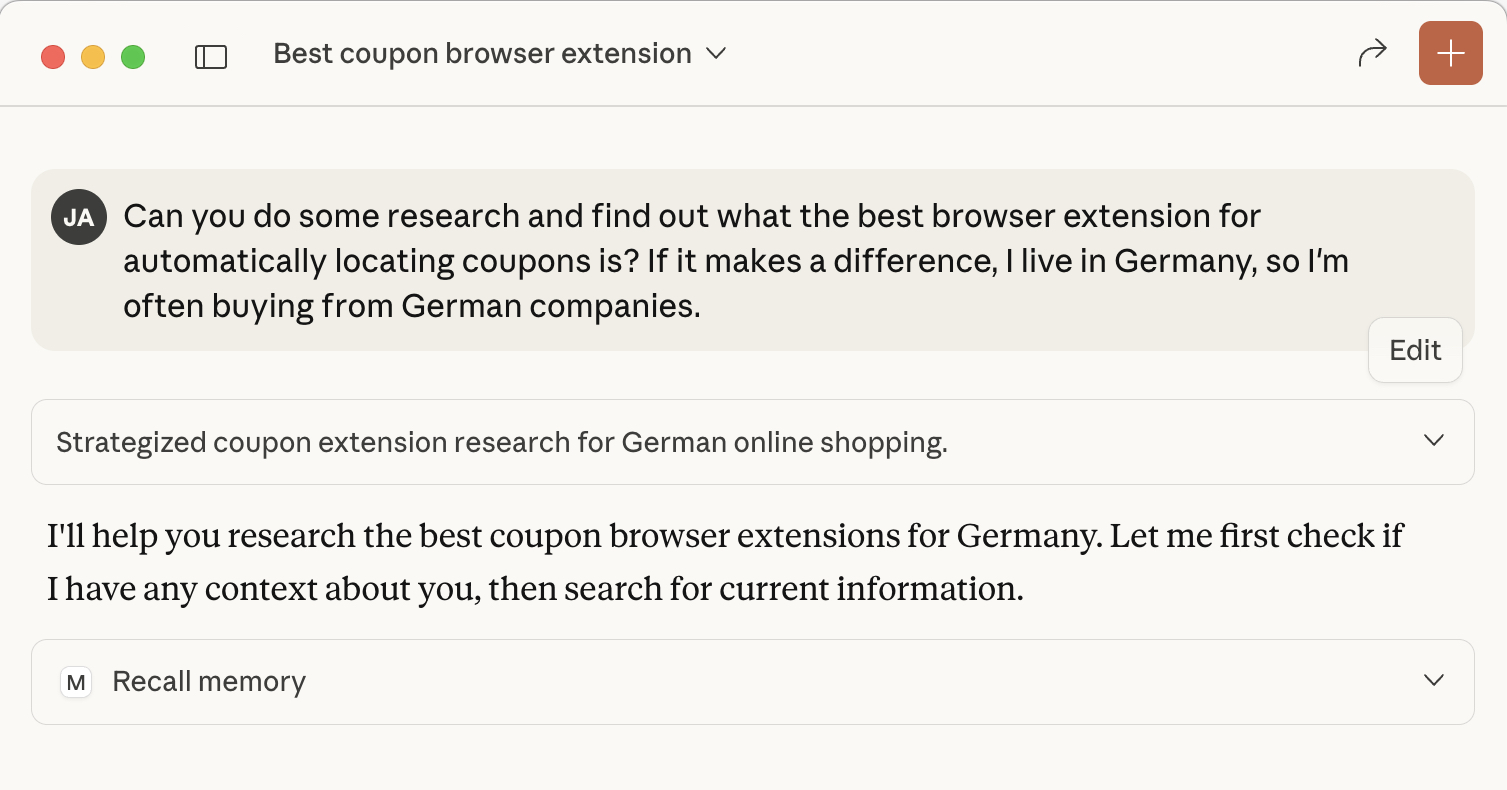 Claude automatically recalls memories using the Personal Preferences template
Cursor IDE with Memory Rules
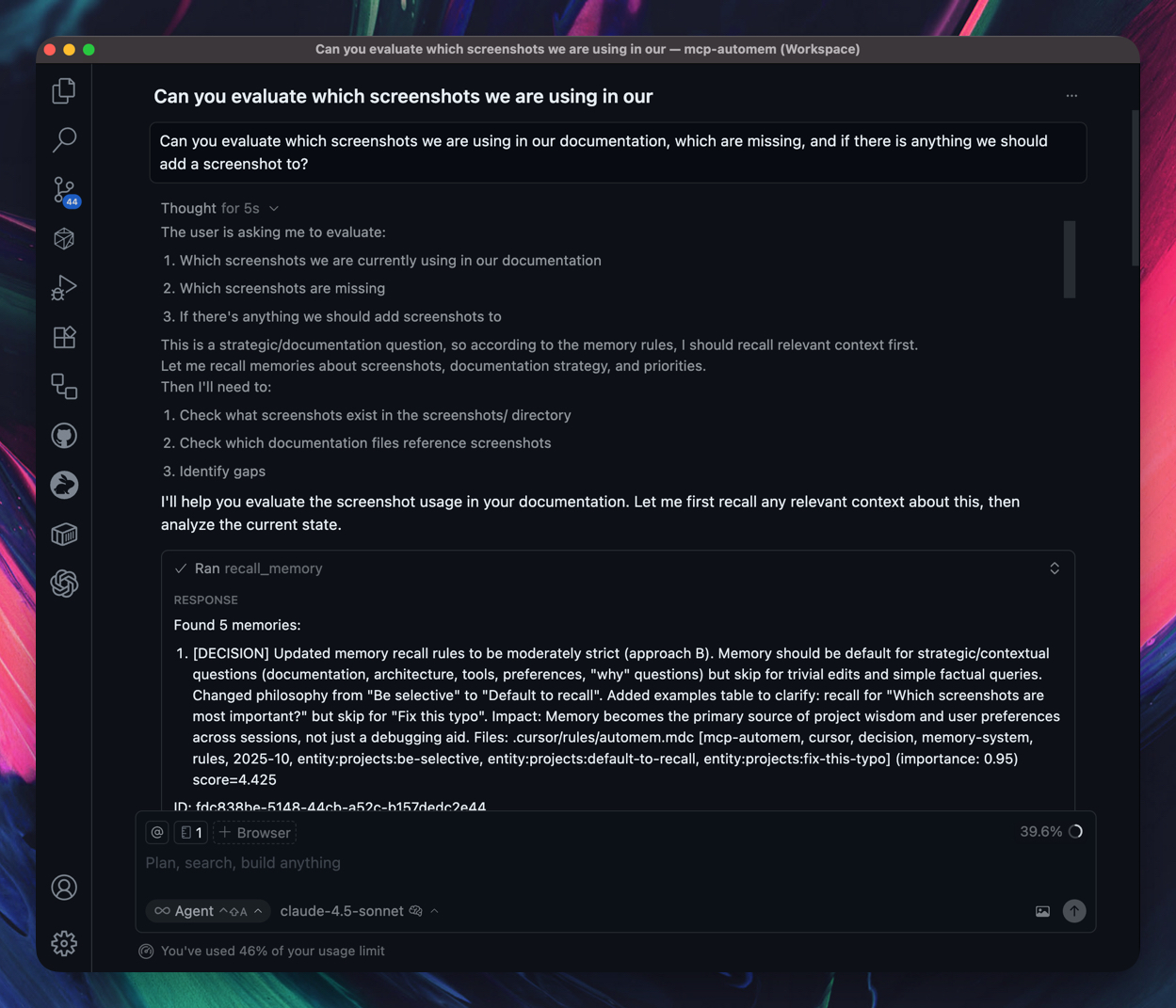 Cursor uses automem.mdc rule to automatically recall and store memories
Claude Code with Session Memory
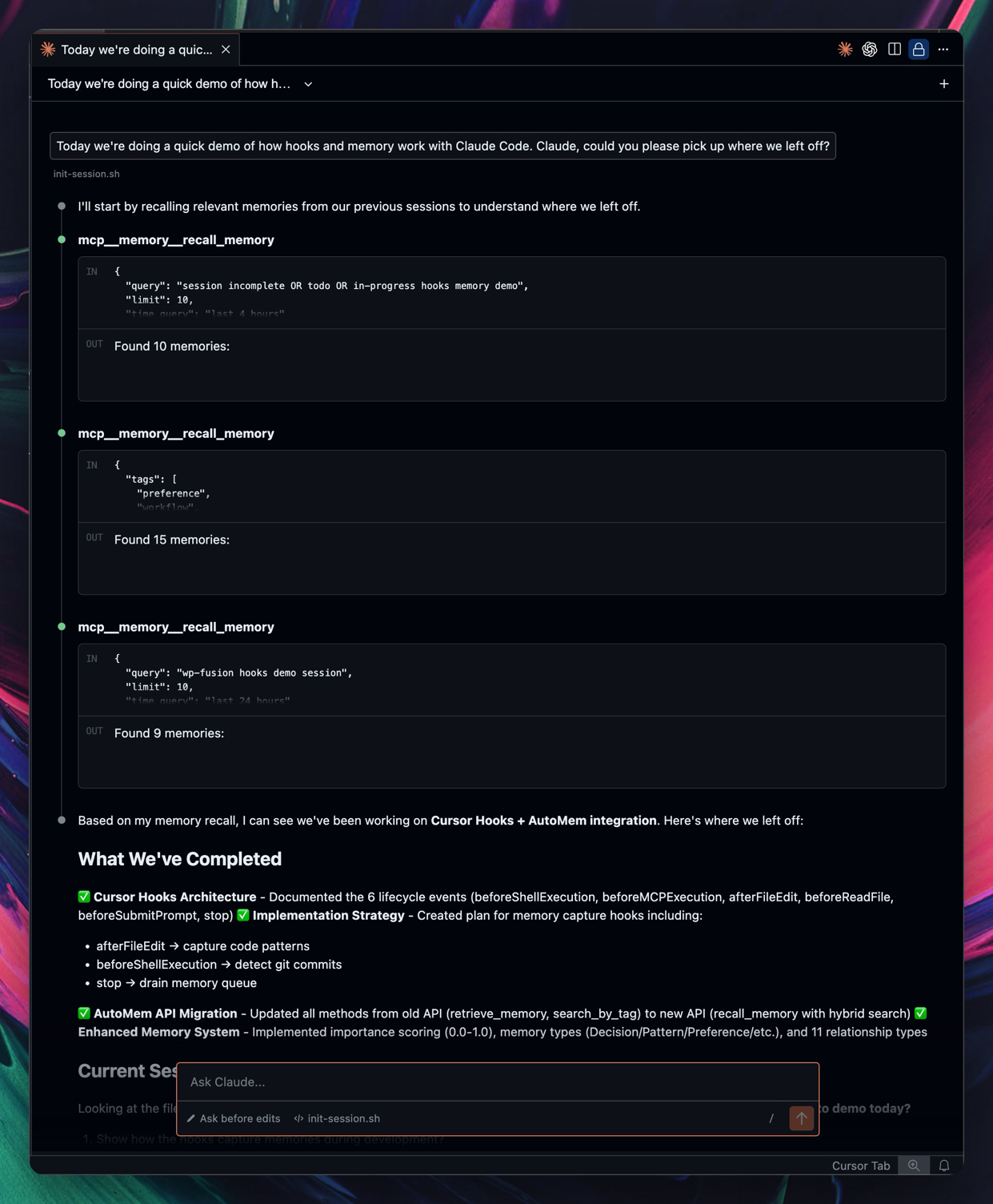 Session-start recall plus LLM-judged storage: Claude decides what's durable and stores it via the memory tools
More platform walkthroughs (Codex, Hermes, Antigravity, remote MCP) live in the Installation Guide.
Quick Start
1. Set Up AutoMem Service
You need a running AutoMem service (the memory backend). Choose one:
Option A: Local Development (fastest, free)
git clone https://github.com/verygoodplugins/automem.git
cd automem
make dev
Service runs at http://localhost:8001 - perfect for single-machine use.
Option B: Railway Cloud (recommended for production)

One-click deploy with $5 free credits. Typical cost: ~$0.50-1/month after trial.
👉 AutoMem Service Installation Guide - Complete setup instructions for local, Railway, Docker, and production deployments.
2. Install MCP Client
Claude Desktop - One-Click Install
Download and double-click to install AutoMem in Claude Desktop:
⬇️ Download AutoMem for Claude Desktop (.mcpb)
After installing:
- Claude Desktop will prompt you for your AutoMem Endpoint (
http://127.0.0.1:8001for local) - Optionally enter your API Key (required for Railway, skip for local)
- Click Enable
Then add the paste-ready Personal Preferences starter from templates/CLAUDE_DESKTOP_INSTRUCTIONS.md. That's it: Claude now has persistent memory and knows when to use it.
Other Platforms
Connect your AI tools to the AutoMem service you just started.
# Guided install - pick where AutoMem runs, verify it, write .env, and
# configure your agents (Codex, Claude Code, Cursor, OpenClaw, Hermes)
npx @verygoodplugins/mcp-automem install
Every change is shown in a review plan before anything is written, and each
modified file keeps a .bak backup. Add --dry-run to preview, --yes to
apply non-interactively. See the Installation Guide
for all flags.
Just need the .env + config snippets without the agent setup? Use the lighter wizard:
# Creates .env and prints config for your AI platform
npx @verygoodplugins/mcp-automem setup
When prompted:
- AutoMem Endpoint:
http://localhost:8001(or your Railway URL if deployed) - API Key: Leave blank for local development (or paste your token for Railway)
The wizard will:
- ✅ Save your endpoint and API key to
.env - ✅ Generate config snippets for Claude Desktop/Cursor/Code
- ✅ Validate connection to your AutoMem service
3. Platform-Specific Setup
For Claude Code (plugin — recommended):
# In Claude Code:
/plugin marketplace add verygoodplugins/mcp-automem
/plugin install automem@verygoodplugins-mcp-automem
Claude Code prompts for your AutoMem URL and API key at enable time, bundles the MCP server and silent recall/store-tracking hooks, and auto-updates. Prefer hooks and permissions written directly into ~/.claude/ instead? Run npx @verygoodplugins/mcp-automem claude-code.
On Windows, the hook payload assumes a POSIX shell environment such as Git Bash, MSYS2, or WSL — only bash is required (the hooks are pure bash+sed).
For Cursor IDE:

# Or use CLI to install automem.mdc rule file
npx @verygoodplugins/mcp-automem cursor
Other platforms — Claude Desktop (one-click .mcpb above, plus the Personal Preferences template), OpenAI Codex, Hermes Agent, Grok Build, OpenClaw, Google Antigravity, and GitHub Copilot:
👉 Full Installation Guide for every platform's setup and verification steps
Remote MCP via HTTP
An optional sidecar service (deployable to Railway or any Docker host) connects AutoMem to platforms that support remote MCP over Streamable HTTP or SSE — ChatGPT (Developer Mode connectors), Claude.ai web and Claude Mobile, and ElevenLabs Agents.
👉 Remote MCP setup for deployment, connect URLs, and per-platform screenshots.
Architecture
┌─────────────────────────────────────────────┐
│         Your AI Platforms                   │
│  Claude Desktop │ Cursor │ Claude Code      │
└──────────────┬──────────────────────────────┘
               │ MCP Protocol
               ▼
┌──────────────────────────────────────────────┐
│   @verygoodplugins/mcp-automem (this repo)  │
│   • Translates MCP calls → AutoMem API      │
│   • Platform integrations & rules           │
│   • Handles authentication                   │
└──────────────┬───────────────────────────────┘
               │ HTTP API
               ▼
┌──────────────────────────────────────────────┐
│        AutoMem Service (separate repo)       │
│        github.com/verygoodplugins/automem    │
│   ┌────────────┐      ┌────────────┐        │
│   │  FalkorDB  │      │   Qdrant   │        │
│   │  (Graph)   │      │ (Vectors)  │        │
│   └────────────┘      └────────────┘        │
└──────────────────────────────────────────────┘
This repo (mcp-automem):
- MCP client that connects AI platforms to AutoMem
- Platform-specific integrations (Cursor rules, Claude Code hooks, etc.)
- Setup wizards and configuration tools
- Backend memory service with graph + vector storage
- Deployment guides (local, Railway, Docker, production)
- API server with FalkorDB + Qdrant
Features
Core Memory Operations
store_memory— Save memories with content, tags, importance, metadata. Two modes:- Single (default): top-level
contentplus optional fields, includingembedding,t_valid,t_invalid, customid. - Batch:
memories: [...](≤500 items) for bulk ingestion. Per-itemid/embedding/t_valid/t_invalidare not supported in batch mode.
- Single (default): top-level
recall_memory— Three modes selected by which params you pass:- ID fetch:
memory_id→ fetches one memory by ID; updateslast_accessed. - Tag enumeration:
tags+exhaustive: true→ paginated exact-match listing for cleanup/audit workflows where ranked recall undercounts. Pair withlimit(≤200) andoffset; returnshas_more. - Ranked retrieval (default): hybrid search across vector, keyword, tags, recency/state controls, score filters, and graph expansion. Supports
state_mode,recency_bias,scope_fallback,expand_respect_tags,min_score,adaptive_floor, and diagnostics such astag_scope,score_filter,query_time_ms,vector_search, and per-resultoutside_tag_scope/state_replaces.
- ID fetch:
associate_memories— Create relationships (11 public authorable types; recall results may also include read-only system relations). Supports single-pair mode and batch mode viaassociations: [...](≤500) with relation-specific props likereason,context,resolution,observations,transformation, androle.update_memory— Modify existing memoriesdelete_memory— Two modes:- Single (default):
memory_id→ removes one memory and its embedding. - Bulk-by-tag:
tags: [...]→ bulk-delete all memories matching ANY tag (exact, case-insensitive). No dry-run; verify withrecall_memory({ tags, exhaustive: true })first.
- Single (default):
check_database_health— Monitor service health, degraded state, sync counts, vector dimensions, and enrichment diagnostics when the service provides them
Advanced Recall (v0.8.0+)
Multi-hop Reasoning - Answer complex questions like "What is Amanda's sister's career?"
mcp__memory__recall_memory({
  query: "What is Amanda's sister's career?",
  expand_entities: true, // Finds "Amanda's sister is Rachel" → memories about Rachel
});
Context-Aware Coding - Recall prioritizes language and style preferences
mcp__memory__recall_memory({
  query: "error handling patterns",
  language: "typescript",
  context_types: ["Style", "Pattern"],
});
Platform Integrations
Cursor IDE
- ✅ Memory-first rule file (
automem.mdcin.cursor/rules/) - ✅ Automatic memory recall at conversation start
- ✅ Auto-detects project context (package.json, git remote)
- ✅ Global user rules option for all projects
- ✅ Simple setup via CLI or one-click install
Claude Code
- ✅ Native plugin - MCP server, silent hooks, and skill in one
/plugin install, with enable-time config prompts and auto-updates - ✅ LLM-judged storage - session-start guidance nudges Claude to store, verify, and associate durable memories during normal work
- ✅ Memory rules in CLAUDE.md guide Claude's memory usage
GitHub Copilot
- ✅ Standalone hook JSON files installed into
$COPILOT_HOME/hooks/or~/.copilot/hooks/ - ✅ Memory rules template for
copilot-instructions.md - ✅ Format flag -
--format cli(camelCase) or--format vscode(PascalCase) - ✅ Setup:
npx @verygoodplugins/mcp-automem copilot --yes
Claude Desktop
- ✅ Direct MCP integration
- ✅ Paste-ready Personal Preferences starter template
- ✅ Full memory API access
Why AutoMem MCP?
vs. Building Your Own
- ✅ 2 years of R&D already done
- ✅ Research-validated architecture (HippoRAG 2, MELODI, A-MEM)
- ✅ Working integrations across all MCP platforms
- ✅ Active development and community
vs. Other Memory Solutions
- ✅ True graph relationships (not just vector similarity)
- ✅ Universal MCP compatibility (works with any MCP client)
- ✅ 7 memory types (Decision/Pattern/Preference/Style/Habit/Insight/Context)
- ✅ Self-hostable ($5/month vs $150+ for alternatives)
vs. Native AI Memory
- ✅ Persistent across sessions (not just context window)
- ✅ Cross-platform (same memory in Claude, Cursor, Code)
- ✅ Structured relationships (not just RAG)
- ✅ Infinite scale (no context window limits)
Documentation
MCP Client & Integrations (this repo)
- 📦 Installation Guide - MCP client setup for all platforms
- 🌐 Remote MCP via HTTP - Connect ChatGPT, Claude Web/Mobile, ElevenLabs
- 🎯 Cursor Setup - IDE integration with rules
- 🤖 Claude Code Setup - Plugin install, hooks, and memory rules
- ⚠️ Deprecations - History of the plugin deprecation and its reversal
- 🚀 OpenAI Codex Setup - Codex CLI/IDE/Cloud integration
- 🪐 Google Antigravity Setup - Raw MCP config via Antigravity's MCP Store
- 📖 MCP Tools Reference - All memory operations
- 📝 Changelog - Release history
AutoMem Service (separate repo)
- 🏗️ AutoMem Service - Backend repository
- 🚀 Service Installation - Local, Railway, Docker deployment
- ⚙️ API Documentation - REST API reference
- 🧪 Evaluation Lab - Exploratory recall-quality benchmarks and ruleset A/B testing
The Science Behind AutoMem
The AutoMem service implements cutting-edge 2025 research:
- HippoRAG 2 (OSU, June 2025): Graph-vector approach achieves 7% better associative memory
- A-MEM (July 2025): Dynamic memory organization with Zettelkasten principles
- MELODI (DeepMind, 2025): 8x memory compression without quality loss
- ReadAgent (DeepMind, 2024): 20x context extension through gist memories
This MCP package provides the bridge between your AI and that research-validated memory system. The backend has also been benchmarked on the neutral Agent Memory Benchmark, including BEAM large-context scaling tiers — reproducible end to end, so you can run it yourself.
Community & Support
- 💬 Discord - Join the community, get help, share feedback
- 🐦 X Community - Discussion and updates
- 📣 @automem_ai - Official announcements
- 📦 NPM Package - This MCP client
- 🔬 AutoMem Service - Backend repo with deployment guides
- 🐛 GitHub Issues - Bug reports and feature requests
Contributing
We welcome contributions! Please:
- Fork the repository
- Create a feature branch
- Make your changes with tests
- Submit a pull request with a Conventional Commit title such as
fix:,feat:,docs:, orchore: - Do not prefix the PR title with labels like
[codex]or[wip]because the squash-merge commit is taken from the PR title
License
MIT - Because great memory should be free.
Ready to give your AI perfect memory?
npx @verygoodplugins/mcp-automem setup
Built with obsession. Validated by neuroscience. Powered by graph theory. Works with every MCP-enabled AI.
Designed by Jack Arturo at Very Good Plugins 🧡
Transform your AI from a tool into a teammate. Start now.
Reviews
No reviews yet
Be the first to review this server!
More Developer Tools MCP Servers
Git
Freeby Modelcontextprotocol · Developer Tools
Read, search, and manipulate Git repositories programmatically
Fetch
Freeby Modelcontextprotocol · Developer Tools
Web content fetching and conversion for efficient LLM usage
Toleno
Freeby Toleno · Developer Tools
Toleno Network MCP Server — Manage your Toleno mining account with Claude AI using natural language.
mcp-creator-python
Freeby mcp-marketplace · Developer Tools
Create, build, and publish Python MCP servers to PyPI — conversationally.
MCP Marketplace
Freeby mcp-marketplace · Developer Tools
Search and install MCP servers from inside your AI client.
MarkItDown
Freeby Microsoft · Content & Media
Convert files (PDF, Word, Excel, images, audio) to Markdown for LLM consumption