
Server data from the Official MCP Registry
Upload, publish and embed 3D models on any website from your agent.
About
Upload, publish and embed 3D models on any website from your agent.
Security Report
Valid MCP server (2 strong, 3 medium validity signals). No known CVEs in dependencies. ⚠️ Package registry links to a different repository than scanned source. Imported from the Official MCP Registry. 1 finding(s) downgraded by scanner intelligence.
10 files analyzed · 1 issue found
Security scores are indicators to help you make informed decisions, not guarantees. Always review permissions before connecting any MCP server.
Permissions Required
This plugin requests these system permissions. Most are normal for its category.
How to Install
Add this to your MCP configuration file:
{
  "mcpServers": {
    "io-github-vectreal-vectreal": {
      "args": [
        "-y",
        "@vctrl/cli"
      ],
      "command": "npx"
    }
  }
}Documentation
View on GitHubFrom the project's GitHub README.
Vectreal Platform
Deployment Actions


See the viewer

NPM packages



Vectreal is an open platform for preparing, managing, and publishing 3D content for the web.
This monorepo contains the full platform app, reusable React packages, shared libraries, and infrastructure code used to run Vectreal in production.
Built on Three.js, React Three Fiber, glTF-Transform, Supabase, and Nx.
Quick Links (External)
What Is In This Repo
| Area | Path | Purpose |
|---|---|---|
| Platform app | apps/vectreal-platform/ | Full-stack React Router v7 app with SSR, auth, dashboard, publisher, and preview routes |
| Viewer package | packages/viewer/ | @vctrl/viewer React 3D viewer component |
| Hooks package | packages/hooks/ | @vctrl/hooks browser-side loading, optimization, and export hooks |
| Core package | packages/core/ | @vctrl/core isomorphic model processing pipeline (Node.js, browser, Web Worker) |
| Embed package | packages/embed/ | @vctrl/embed framework-agnostic SDK for controlling embedded 3D scenes |
| SDK package | packages/sdk/ | @vctrl/sdk typed client and zod schemas for the /api/v1 agent API |
| CLI package | packages/cli/ | @vctrl/cli the vectreal command and its MCP server for agents |
| Shared libraries | shared/ | Shared UI components and utilities |
| Infrastructure | terraform/ | Cloudflare DNS, Turnstile widgets, and Fly.io secret sync scripts |
Documentation Map
| Section | What you will find |
|---|---|
| Getting Started | Your first model in the publisher, with no install or account |
| Guides | Upload, optimize, publish, and embed workflows |
| Package Reference | API docs for @vctrl/viewer, @vctrl/hooks, @vctrl/core, and @vctrl/embed |
| Run It Yourself | Local setup, Fly.io deployment, Terraform, and CI/CD |
| Contributing | Branching, commits, testing, and PR process |
Workflows And Package Reference
Use these links to move between product workflows and the package APIs behind them.
Local Development
The local setup below matches the platform documentation in Installation.
1. Clone the repository
git clone https://github.com/Vectreal/vectreal-platform.git
cd vectreal-platform
2. Install dependencies
pnpm install
3. Configure environment variables
cp .env.development.example .env.development
The main variables required for local development are:
| Variable | Description |
|---|---|
SUPABASE_URL | Local Supabase API URL, usually http://localhost:54321 |
SUPABASE_KEY | Supabase anon key from supabase status |
SUPABASE_SECRET_KEY | Supabase service-role key, used server-side for asset storage |
DATABASE_URL | PostgreSQL connection string for the local Supabase database |
SEND_EMAIL_HOOK_SECRET | Auth email hook secret. Ships blank in the example file and Supabase will not start without it |
CSRF_SECRET is not in the example file and is optional locally: outside production the app falls back to a development value. Set it in production.
Model assets are stored in Supabase Storage (the assets bucket), which is created automatically on first upload. SUPABASE_URL, SUPABASE_KEY and SUPABASE_SECRET_KEY are printed by the supabase-start target in the next step.
4. Start the local Supabase stack
pnpm nx run vectreal-platform:supabase-start
pnpm nx run vectreal-platform:supabase-db-reset
This starts local Postgres, Auth, Storage, and Studio, then applies the baseline schema.
The Supabase project lives at apps/vectreal-platform/supabase/, so go through the Nx target rather than calling the CLI from the repo root, where it would not find config.toml.
5. Start the platform app
pnpm nx dev vectreal-platform
Open http://localhost:4200.
6. Verify the setup
- Open the home page.
- Create an account at
/sign-up. - Complete onboarding and confirm you land in the dashboard.
- Upload a model in the Publisher to verify the full asset pipeline.
Your First Model
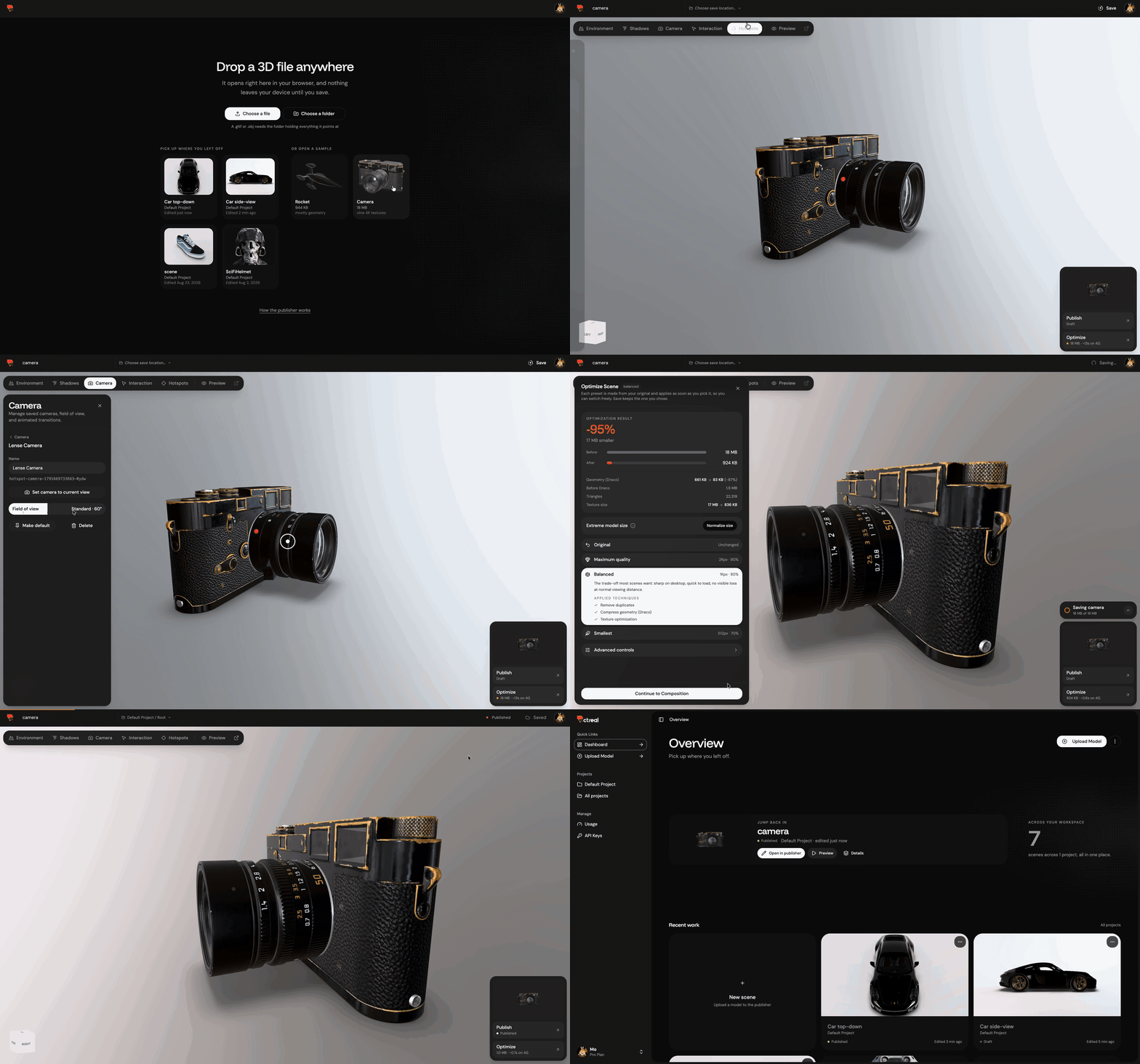
The documented end-to-end workflow is:
- Open the Publisher at https://vectreal.com/publisher.
- Upload a model: GLB, a glTF bundle, STL, FBX, or an OBJ with its
.mtland textures. - Adjust quality, lighting, and camera settings.
- Save the scene to your account.
- Publish it to generate a stable embed URL.
- Copy the iframe snippet into your application.
Full walkthrough: Your First Model.
Architecture Overview
The monorepo is organized into three layers:
vectreal-platform/
├── apps/vectreal-platform/   # Full-stack React Router v7 app (this site)
├── packages/
│   ├── viewer/               # @vctrl/viewer: React 3D viewer component
│   ├── hooks/                # @vctrl/hooks: browser-side loading and optimization hooks
│   ├── core/                 # @vctrl/core: isomorphic model processing
│   └── embed/                # @vctrl/embed: SDK for controlling embedded scenes
├── shared/
│   ├── components/           # Shared Radix UI component library
│   └── utils/                # Shared utility functions
└── terraform/                # Cloudflare DNS + Turnstile, Fly.io secret sync
The platform app uses:
- React Router v7 in framework mode with SSR
- Supabase for authentication, database, and asset storage
- Drizzle ORM for type-safe SQL access
@vctrl/viewerand@vctrl/hooksfor the in-browser 3D pipeline
Package Overview
| Package | Description | Docs |
|---|---|---|
@vctrl/viewer | Ready-to-use React 3D viewer component | Viewer docs |
@vctrl/hooks | Browser-side hooks for loading, optimizing, and exporting models | Hooks docs |
@vctrl/core | Isomorphic (Node.js + browser) loading, optimization, and export utilities | Core docs |
@vctrl/embed | Framework-agnostic SDK for controlling embedded 3D scenes | Embed docs |
@vctrl/sdk | Typed client and zod schemas for the /api/v1 agent API | SDK docs |
@vctrl/cli | The vectreal command and its MCP server for Claude Code, Cursor and VS Code | CLI docs |
Deployment
Vectreal is deployed on Fly.io (region fra) via GitHub Actions, which builds a Docker image and deploys it with flyctl. Cloudflare fronts DNS, caching, and Turnstile bot protection; Terraform manages the Cloudflare configuration. Application secrets are synced to Fly.io from your local .env.development.
Cloudflare infrastructure and Fly.io secret setup:
cd terraform
./scripts/apply-infrastructure.sh          # apply Cloudflare DNS + Turnstile config
./scripts/setup-fly-secrets.sh --env prod  # sync Fly.io app secrets
Database migration flow:
pnpm nx run vectreal-platform:drizzle-generate
pnpm nx run vectreal-platform:supabase-db-push-staging
pnpm nx run vectreal-platform:supabase-db-push-prod
High-level deployment docs: https://vectreal.com/docs/self-hosting/deployment
Canonical infrastructure details: terraform/README.md
Contributing
We welcome contributions across code, docs, fixes, and performance improvements.
- Start with Contributing
- Read CONTRIBUTING.md
- Follow Conventional Commits
- Update docs whenever you change a public API, route, or environment variable
Useful development commands:
pnpm nx affected --target=lint
pnpm nx affected --target=test
pnpm nx test vectreal-platform
Community
- Website: https://vectreal.com
- Discord: https://discord.gg/A9a3nPkZw7
- GitHub Discussions: https://github.com/Vectreal/vectreal-platform/discussions
- GitHub Issues: https://github.com/Vectreal/vectreal-platform/issues
- X: https://x.com/vectreal
- Email: info@vectreal.com
License
GNU Affero General Public License v3.0.
See LICENSE.md.
Reviews
No reviews yet
Be the first to review this server!
More Developer Tools MCP Servers
Rea
Freeby Morluto · Developer Tools
Reverse engineer anything from your terminal or agent with one CLI and MCP server.
Paperclip
Freeby Paperclipai · Developer Tools
Trending hip-hop artist momentum scores across four cultural dimensions.
Fetch
Freeby Modelcontextprotocol · Developer Tools
Web content fetching and conversion for efficient LLM usage
Git
Freeby Modelcontextprotocol · Developer Tools
Read, search, and manipulate Git repositories programmatically
Toleno
Freeby Toleno · Developer Tools
Toleno Network MCP Server — Manage your Toleno mining account with Claude AI using natural language.
MCP Marketplace
Freeby mcp-marketplace · Developer Tools
Search and install MCP servers from inside your AI client.