
Server data from the Official MCP Registry
Unofficial Partner Center REST API knowledge & codegen assistant (scenarios, auth, errors).
About
Unofficial Partner Center REST API knowledge & codegen assistant (scenarios, auth, errors).
Security Report
This is a well-designed MCP server for Partner Center REST API documentation and code generation. It has no authentication requirements (by design), appropriately scoped permissions limited to reading bundled knowledge and cached documentation, and clean code architecture. Minor code quality observations exist but do not pose security risks. Supply chain analysis found 1 known vulnerability in dependencies (0 critical, 1 high severity). Package verification found 1 issue.
4 files analyzed · 5 issues found
Security scores are indicators to help you make informed decisions, not guarantees. Always review permissions before connecting any MCP server.
Permissions Required
This plugin requests these system permissions. Most are normal for its category.
How to Install
Add this to your MCP configuration file:
{
  "mcpServers": {
    "io-github-tunahanaliozturk-partner-center-mcp": {
      "args": [
        "-y",
        "partner-center-mcp"
      ],
      "command": "npx"
    }
  }
}Documentation
View on GitHubFrom the project's GitHub README.
partner-center-mcp

Building against the Partner Center REST API means living in Microsoft Learn. Two hundred odd endpoint pages, an archived .NET SDK that still turns up in search results, and error codes that tell you almost nothing on their own.
This MCP server puts that knowledge next to your agent. Ask how to cancel a subscription and you get the verified method, path, headers, a working code sample, and the constraints the page actually warns about. It holds no credentials and never calls Partner Center. Every answer comes from a bundled knowledge pack, with a cached Microsoft Learn search as the fallback.
Unofficial, community project. Not affiliated with, sponsored, or endorsed by Microsoft. "Partner Center" and "Microsoft" are trademarks of Microsoft, used here only descriptively.
Why
Microsoft archived the Partner Center .NET SDK (3.4.0) in June 2023 and points partners at the
REST APIs instead. Plenty of code still hasn't moved. The retired graph.windows.net audience
keeps producing 401 / 900420, and from 2026-04-01 App+User API calls enforce MFA.
So the server does two things. It shows you the current REST and auth patterns, and it explains the errors you hit on the way there.
How it works
Your MCP host (Claude Code, Cursor, Copilot, VS Code) talks to the server over MCP, on stdio by default or HTTP if you'd rather. The server reads from a knowledge pack that is zod-validated at load and anchored to official Learn pages. When the pack has no answer it falls back to a cached doc search.
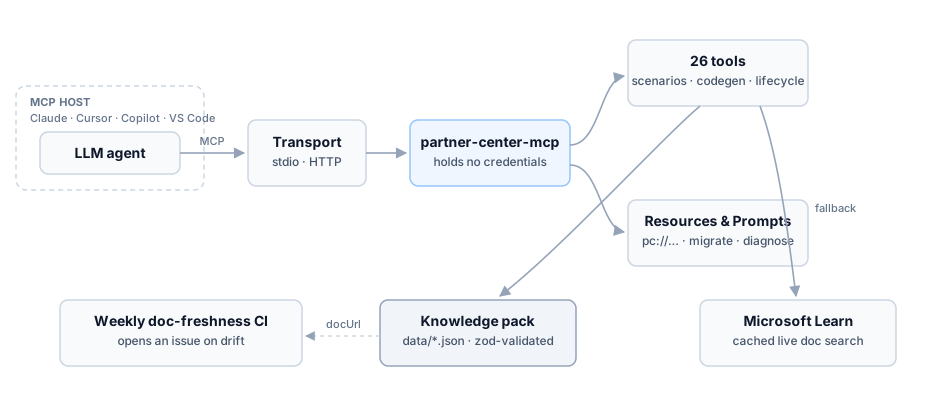
A typical call: the agent picks a tool such as pc_generate_call, the server looks the scenario up
in the pack, and back comes the method, path, headers, a ready code sample, and the gotchas, each
carrying the docUrl it was verified against.
Run
npx partner-center-mcp
No configuration, API keys, or network access to Partner Center required.
Requires Node.js 20 or newer. (0.9.0 dropped Node 18, which reached end of life in April 2025.)
Add to your MCP host
The server speaks MCP over stdio, so any MCP-capable host works. There's nothing host-specific to install. Use whichever config your host expects:
VS Code (.vscode/mcp.json) and Visual Studio (.mcp.json):
{ "servers": { "partner-center": { "command": "npx", "args": ["-y", "partner-center-mcp"] } } }
GitHub Copilot. Copilot reads the same .vscode/mcp.json (VS Code) / .mcp.json (Visual
Studio) shown above; no extra config needed.
Cursor (.cursor/mcp.json) and Windsurf (~/.codeium/windsurf/mcp_config.json):
{ "mcpServers": { "partner-center": { "command": "npx", "args": ["-y", "partner-center-mcp"] } } }
Claude Code:
claude mcp add partner-center -- npx -y partner-center-mcp
Claude Desktop (claude_desktop_config.json), Cline, and Zed use the same
mcpServers shape as Cursor above.
Tip: also add the Microsoft Learn MCP server (
https://learn.microsoft.com/api/mcp) alongside this one for broad documentation search.
Remote / HTTP (optional)
Prefer a hosted endpoint over stdio? Run the Streamable HTTP variant:
PORT=3000 npx -p partner-center-mcp partner-center-mcp-http
# MCP endpoint: POST http://localhost:3000/mcp   •   health: GET /healthz
The endpoint has no authentication of its own, so it binds 127.0.0.1 by
default. Request bodies are capped at 1 MiB, and a browser Origin has to be
loopback or explicitly allowed, which is what keeps a random web page from
driving your local server.
| Variable | Default | What it does |
|---|---|---|
PORT | 3000 | Port to listen on. |
HOST | 127.0.0.1 | Interface to bind. Set 0.0.0.0 only behind a proxy that authenticates. |
ALLOWED_ORIGINS | none | Comma-separated browser origins allowed in addition to loopback. |
MAX_BODY_BYTES | 1048576 | Largest accepted request body. |
Tools
| Tool | Purpose |
|---|---|
pc_list_scenarios | List supported REST scenarios, optionally filtered by area. |
pc_get_scenario | Full detail for one scenario: method, path, headers, examples, gotchas. |
pc_generate_call | Emit a current REST call (curl/csharp/typescript/powershell) with auth/retry/pagination helpers. Never the archived SDK. |
pc_validate_request | Lint a REST call (method, URL, headers, auth) against the known scenarios. |
pc_plan_purchase | The ordered New Commerce purchase workflow: product → SKU availability → cart → checkout → subscriptions. |
pc_migrate_from_sdk | Translate archived .NET SDK code into the equivalent REST scenario(s). |
pc_auth_guidance | Current auth guidance for app-only / app+user, per national cloud, with GDAP + MFA notes. |
pc_check_auth | Lint an auth/client snippet for retired patterns (graph.windows.net, ADAL, archived SDK, AzureAD PS). |
pc_build_request | Build a ready-to-send request: fills path placeholders, generates MS-RequestId/MS-CorrelationId, and a body skeleton from the scenario's fields. |
pc_explain_lifecycle | What you can do to a subscription in its current state: legal operations, the field each precondition reads, and the errors a failed precondition returns. |
pc_plan_subscription_change | Ordered call sequence for one lifecycle change: seats up/down, upgrade, cancel, renewal changes, suspend, reactivate, migrate, transfer. |
pc_plan_order_lifecycle | Ordered call sequence from cart to provisioned subscriptions, with the cancellation and add-on branches. |
pc_plan_transfer | Ordered billing-ownership transfer workflow (create → poll → verify). |
pc_plan_gdap_onboarding | Ordered GDAP onboarding workflow (create → approve → verify) over Microsoft Graph. |
pc_plan_csp_onboarding | Ordered CSP customer onboarding (account linking): invite → verify relationship → confirm agreement → transact. |
pc_plan_user_onboarding | Ordered user onboarding: create user → assign licenses → grant roles → verify. |
pc_plan_user_offboarding | Ordered user offboarding: remove licenses → strip roles → delete user (30-day restore window). |
pc_plan_reconciliation | Ordered reconciliation workflow (invoice → billed/unbilled line items → statement). |
pc_lookup_error | Decode an error code: causes, remediation, and the scenarios it commonly hits. |
pc_decode_error | Paste a raw error response → decoded code, likely scenarios, and the correlation id for support. |
pc_diagnose | Map a symptom to likely causes, fixes, and relevant scenarios. |
pc_get_enums | Look up enum values (billingCycle, termDuration, targetView, transitionType, status, …). |
pc_get_resource | Field dictionary for resources (Customer, Subscription, Order, Invoice, migration schedules, …). |
pc_whats_new | Deprecations & deadlines (MFA enforcement, graph.windows.net, v1→v2 reconciliation, …). |
pc_plan_prerequisites | For any scenario, the ordered calls that produce the ids its path needs, and the parameters you supply yourself. |
pc_diff_pack | What changed between pack releases: scenarios added, removed, or whose route, auth, fields or constraints moved. |
pc_search_docs | Fetch live Microsoft Learn excerpts. The fallback when the curated pack has no answer. |
pc_get_reference | Base URLs, headers, versioning, sandbox, rate limits, national-cloud differences. |
Every tool carries the metadata a calling agent needs: a title, a description that says when to
use it and which sibling to prefer instead, a description on every input parameter, a declared
outputSchema, and MCP behaviour annotations. All 28 are readOnlyHint: true and
destructiveHint: false, because the server holds no credentials and calls no Partner Center
endpoint. It only reads the bundled pack. Three tools break idempotentHint or openWorldHint:
pc_search_docs and pc_get_scenario with enrich: true both reach Microsoft Learn, and
pc_build_request mints a fresh MS-RequestId on every call.
Responses share one envelope. { ok, data } on success, { ok: false, error, suggestions? } on
failure, returned as structuredContent and validated against each tool's outputSchema by the
MCP SDK.
Coverage
Scenarios cover:
- Customers. Identity and profiles, search, users and directory roles, relationship removal, agreements and consent, self-serve policies.
- Subscriptions. The whole lifecycle: seats up and down, upgrade, cancel, renewal changes, suspend and reactivate, add-ons, New Commerce migration, transfer.
- Orders and carts. Through to provisioning status, not just checkout.
- Devices. Autopilot batches and configuration policies, end to end.
- Billing and pricing. Azure consumption usage at every level, spending budgets and overage, invoices and reconciliation line items, service costs, margins and growth margins, price sheets, the offer matrix, FX rates, and promotion eligibility.
- Analytics. Subscription, indirect reseller, referral and search analytics, plus the three separate licence usage and deployment families.
- Plus catalog and products, licenses, address and domain validation, audit, support, security and MFA, and partner profiles.
Every scenario carries the docUrl it was verified against and the date it was last checked, and
185 of them ship the response example their page publishes, so field names and nesting can be read
off rather than guessed at.
National clouds covered: commercial, 21Vianet (China), and US Gov.
Lifecycle changes come with their preconditions, not just their endpoints. pc_explain_lifecycle
returns the state machine: which operation is legal from which state, the field to read off the
live subscription first (cancellationAllowedUntilDate, autoRenewEnabled, suspensionReasons),
and the error you get when the precondition fails.
The pack is also browsable as MCP resources (pc://scenarios, pc://errors, pc://auth,
pc://reference, pc://sdk-map, pc://enums, pc://deprecations, pc://resources,
pc://lifecycle, pc://examples, pc://history, pc://scenario/{id}) and three prompts (migrate-sdk, diagnose-issue,
plan-purchase) for hosts that surface them.
Alongside the scenarios it ships enum values, a resource field dictionary, and a deprecations and
deadlines timeline. npm run export turns the whole pack into an OpenAPI 3.0 spec and a Postman
collection.
Examples
Decode an error you hit in production:
// pc_lookup_error { "code": "900420" }
{
  "httpStatus": 401,
  "errorCode": "900420",
  "description": "The audience in the token is invalid and is no longer supported in Partner Center API.",
  "causes": ["Token requested with the retired graph.windows.net audience"],
  "remediation": "Request the token with resource https://api.partnercenter.microsoft.com ...",
  "docUrl": "https://learn.microsoft.com/partner-center/developer/deprecate-azure-active-directory-graph-token"
}
Lint old auth/client code before you ship it:
// pc_check_auth { "code": "new AuthenticationContext(); get(\"https://graph.windows.net\"); partner.Customers..." }
{
  "findings": [
    { "severity": "error",   "message": "Uses the retired graph.windows.net audience; Partner Center returns 401 / 900420.", "fix": "Request the token with resource https://api.partnercenter.microsoft.com." },
    { "severity": "warning", "message": "Appears to use ADAL, which is deprecated.", "fix": "Use MSAL with the secure application model." }
  ],
  "clean": false
}
Catch a wrong call before you make it:
// pc_validate_request { "method": "POST", "url": "/v1/customers/abc/subscriptions", "headers": { "Authorization": "Bearer x" } }
{
  "ok": false,
  "findings": [
    { "severity": "error", "message": "Path matches a known scenario but the method POST is wrong; expected GET.",
      "fix": "Use GET for /v1/customers/{customer-id}/subscriptions." }
  ]
}
Develop
npm install
npm test
npm run build
The knowledge pack lives in data/ (date-versioned; each record carries a docUrl and
lastVerified). Schemas in src/knowledge/schema.ts validate every
file at load time, so malformed or drifted data fails fast.
Verification runs in two halves, one offline and one networked.
npm run check-pack is the offline half and runs on every PR. It compares each scenario's
method, path, and headers against verification/doc-facts.json, a committed snapshot of what
the Learn pages actually say, and lists documented endpoints that still have no scenario.
npm run check-docs is the weekly networked half. It re-fetches every referenced page and diffs it
against the snapshot, keying drift off the source commit each Learn page embeds. It fails on a
dead, moved, or replaced page, on a page that became unreadable, and when a field the pack depends
on changed. The weekly GitHub Action opens an issue when that happens. An upstream edit that
touched only prose is reported without failing the run. npm run check-docs:update does the same
fetch and rewrites the snapshot; npm run docfacts:refresh rebuilds it from scratch across the
whole developer/ section of the Learn table of contents.
For the rest: npm run eval runs a deterministic golden-case suite, npm run eval:llm (needs
ANTHROPIC_API_KEY) checks that a real model picks the right tool for a question, and
npm run export emits the OpenAPI spec and Postman collection.
npm run read-doc -- <slug> prints one Learn page as plain text, which is how new scenarios get
authored. npm run examples:refresh re-collects the response examples; it merges rather than
overwrites, so a run that Learn rate-limits cannot lose the previous one's work.
The .NET server in dotnet/ exposes the same 28 tools from the same data/ pack and
ships to NuGet as tunahanaliozturk.PartnerCenterMcp. dotnet test PartnerCenterMcp.Tests runs its
suite, one test of which asserts the two servers expose the same tool names.
npm run pack-diff reports what changed since the last recorded release, comparing a fingerprint
of every scenario's route, auth, headers, fields, response shape and gotchas. Re-verifying a
scenario is deliberately not a change. npm run pack-diff -- --record X.Y.Z writes the result into
data/history.json, which is what the pc_diff_pack tool serves.
Contributing
New scenarios and doc-accuracy fixes are very welcome. See CONTRIBUTING.md. This is an unofficial, community project and is not affiliated with Microsoft.
Reviews
No reviews yet
Be the first to review this server!
More Developer Tools MCP Servers
Fetch
Freeby Modelcontextprotocol · Developer Tools
Web content fetching and conversion for efficient LLM usage
Git
Freeby Modelcontextprotocol · Developer Tools
Read, search, and manipulate Git repositories programmatically
Toleno
Freeby Toleno · Developer Tools
Toleno Network MCP Server — Manage your Toleno mining account with Claude AI using natural language.
mcp-creator-python
Freeby mcp-marketplace · Developer Tools
Create, build, and publish Python MCP servers to PyPI — conversationally.
MCP Marketplace
Freeby mcp-marketplace · Developer Tools
Search and install MCP servers from inside your AI client.
MarkItDown
Freeby Microsoft · Content & Media
Convert files (PDF, Word, Excel, images, audio) to Markdown for LLM consumption