
Server data from the Official MCP Registry
Your AI agents' home directory — privacy-first MCP server for portable AI identity.
About
Your AI agents' home directory — privacy-first MCP server for portable AI identity.
Security Report
Valid MCP server (1 strong, 1 medium validity signals). 4 known CVEs in dependencies (0 critical, 3 high severity) Package registry verified. Imported from the Official MCP Registry.
4 files analyzed · 5 issues found
Security scores are indicators to help you make informed decisions, not guarantees. Always review permissions before connecting any MCP server.
Permissions Required
This plugin requests these system permissions. Most are normal for its category.
How to Install
Add this to your MCP configuration file:
{
  "mcpServers": {
    "mcp-server": {
      "args": [
        "-y",
        "tilde-ai"
      ],
      "command": "npx"
    }
  }
}Documentation
View on GitHubFrom the project's GitHub README.
🏠 tilde
Your AI agents' home directory
tilde is a privacy-first Model Context Protocol (MCP) server that acts as the universal memory and profile layer for AI Agents.
Configure once. Use everywhere. Your data, your control.
Supports profile management, skills, resume import, and team sync.
The Problem
Every time you switch AI tools, you face the same issues:
- 🔄 Repetition: "I'm a Senior SWE", "I prefer Python", "Don't use ORMs"
- 🧩 Fragmentation: Preferences learned in Cursor aren't available in Claude
- 🔒 Privacy Concerns: Unsure who has access to your personal context
The Solution
tilde acts as a "digital passport" that your AI agents can read:
┌────────────────────────────────────────────────────────────┐
│  Claude Desktop  │   Cursor   │  Windsurf  │  Your Agent   │
└────────┬─────────┴─────┬──────┴─────┬──────┴───────┬───────┘
         │               │            │              │
         └───────────────┴─────┬──────┴──────────────┘
                               │
                    ┌──────────▼──────────┐
                    │   tilde MCP Server  │
                    │   (runs locally)    │
                    └──────────┬──────────┘
                               │
                    ┌──────────▼──────────┐
                    │   ~/.tilde/profile  │
                    │   (your data)       │
                    └─────────────────────┘
Features
- 🏠 Local-First: Your data stays on your machine by default
- 📋 Structured Profiles: Identity, tech stack, knowledge, skills
- 🔌 MCP Standard: Works with any MCP-compliant agent
- ✏️ Human-in-the-Loop: Agents can propose updates, you approve them
- 🔧 Extensible Schema: Add custom fields without modifying code
- 🔒 Skills Privacy: Control which skills are visible to agents (public/private/team)
- 🤖 Agent-Callable Skills: Define skills that AI agents can invoke on your behalf
- 📄 Resume Import: Bootstrap your profile from existing resume/CV
- 📚 Knowledge Sources: Books, docs, courses, articles - unified learning model
- 👥 Team Sync: Share coding standards across your team
Quick Start
Installation
# Install from PyPI
pip install tilde-ai

# Initialize your profile
tilde init
# Clone the repository
git clone https://github.com/topskychen/tilde.git
cd tilde

# Install with uv
uv sync

# Run locally
uv run tilde init
Configure Cursor
Add to .cursor/mcp.json in your project (or ~/.cursor/mcp.json for global access):
{
  "mcpServers": {
    "tilde": {
      "command": "npx",
      "args": ["-y", "tilde-ai"]
    }
  }
}
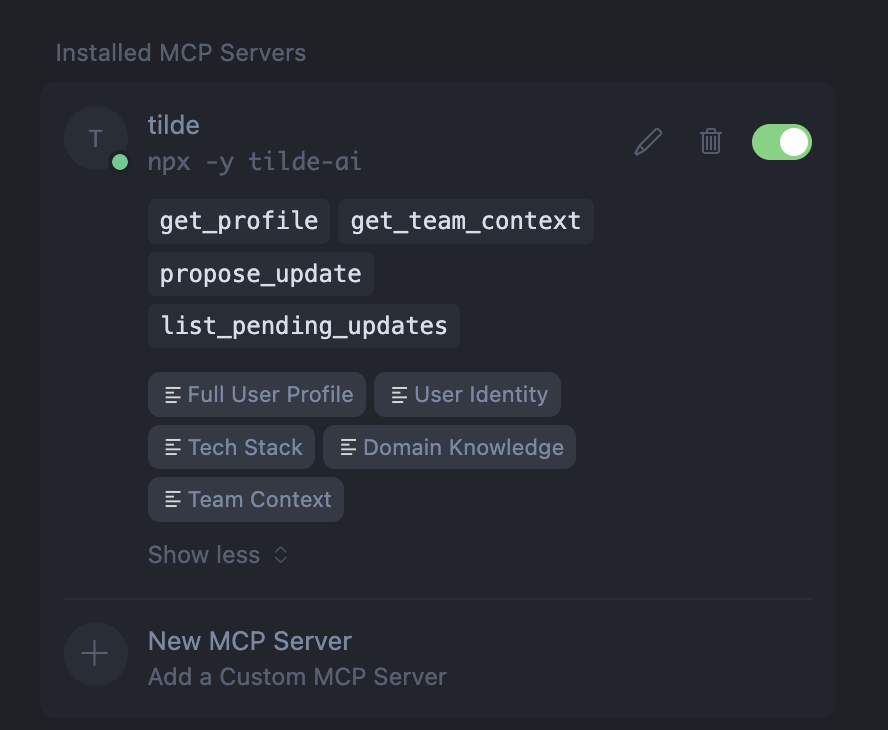
Once configured, you'll see tilde in your MCP servers with all available tools and resources:
Configure Antigravity
Add to .gemini/antigravity/settings.json in your project:
{
  "mcpServers": {
    "tilde": {
      "command": "npx",
      "args": ["-y", "tilde-ai"]
    }
  }
}
Configure Claude Desktop
Add to ~/Library/Application Support/Claude/claude_desktop_config.json:
{
  "mcpServers": {
    "tilde": {
      "command": "npx",
      "args": ["-y", "tilde-ai"]
    }
  }
}
Example Usage
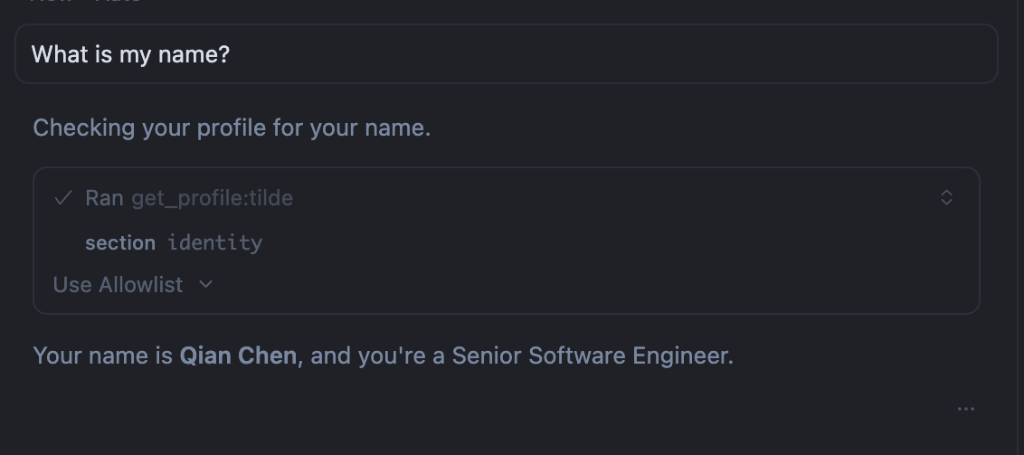
Once configured, your AI agent can access your profile. Try asking:
"What is my name?"
The agent will use the get_profile tool to fetch your identity and respond with your name and role:
Create Your Profile
Edit ~/.tilde/profile.yaml:
schema_version: "1.0.0"

user_profile:
  identity:
    name: "John Doe"
    role: "Full Stack Developer"
    years_experience: 10
    # Add any custom fields you need:
    timezone: "America/Los_Angeles"
    pronouns: "they/them"

  tech_stack:
    languages:
      - TypeScript
      - Python
      - Go
    frameworks:
      - React
      - FastAPI
      - Next.js
    preferences:
      - "Prefer composition over inheritance"
      - "Write tests before implementation (TDD)"
      - "Use descriptive variable names over comments"
    environment: "VS Code, Docker, Linux/MacOS"

  # Knowledge sources: books, docs, courses, articles, etc.
  knowledge:
    domains:
      web_development: "Focus on performance and accessibility"
      ml_ops: "Experience deploying ML models to production"

    sources:
      - title: "Clean Code"
        source_type: "book"
        insights:
          - "Functions should do one thing"
          - "Prefer meaningful names over documentation"
      - title: "React Documentation"
        source_type: "document"
        url: "https://react.dev"
        insights:
          - "Prefer Server Components for data fetching"

  # Agent-callable skills (Anthropic SKILL.md format)
  skills:
    - name: "code-formatter"
      description: "Format code using project conventions"
      visibility: "public"
      tags: ["automation", "code-quality"]
    - name: "deploy-staging"
      description: "Deploy current branch to staging environment"
      visibility: "team"
    - name: "expense-reporter"
      description: "Generate expense reports from receipts"
      visibility: "private"

team_context:
  organization: "Acme Corp"
  coding_standards: "ESLint + Prettier, PR reviews required"
  architecture_patterns: "Monorepo with shared packages"
  do_not_use:
    - "jQuery"
    - "Class components in React"
MCP Resources
tilde exposes these resources to agents:
| Resource URI | Description |
|---|---|
tilde://user/profile | Full user profile |
tilde://user/identity | Name, role, experience, custom fields |
tilde://user/tech_stack | Languages, preferences, environment |
tilde://user/knowledge | Knowledge sources, domains, projects |
tilde://user/skills | Skills (filtered by visibility) |
tilde://user/experience | Work history |
tilde://user/education | Education background |
tilde://user/projects | Personal/open-source projects |
tilde://user/publications | Papers and publications |
tilde://team/context | Team coding standards and patterns |
MCP Tools
| Tool | Description |
|---|---|
get_profile | Retrieve full or partial profile |
get_team_context | Get team-specific context |
propose_update | Agent proposes a profile update (queued for approval) |
list_pending_updates | List updates awaiting user approval |
CLI Commands
tilde init                    # Create default profile
tilde show                    # Display current profile
tilde show skills             # Show skills section only
tilde show --full             # Show full content without truncation
tilde edit                    # Open profile in $EDITOR
tilde config                  # Show current configuration
tilde pending                 # List pending agent updates
tilde approve <id> [id2...]   # Approve one or more updates
tilde reject <id> [id2...]    # Reject one or more updates
tilde approve --all           # Approve all pending updates
tilde reject --all            # Reject all pending updates
tilde approve --all -e <id>   # Approve all except one
tilde log                     # View update history
tilde ingest <file>           # Extract insights from a document
tilde export --format json    # Export profile
Document Ingestion
# Ingest a book and extract insights
tilde ingest "~/Books/DDIA.pdf" --topic data_systems

# Dry run to preview what would be extracted
tilde ingest notes.md --dry-run

# Auto-approve high-confidence updates
tilde ingest paper.pdf --auto-approve 0.8
Resume Import
Bootstrap your profile from an existing resume:
# Import resume (PDF, DOCX, or text)
tilde ingest ~/Documents/resume.pdf --type resume

# Preview what would be extracted
tilde ingest resume.pdf --type resume --dry-run

# Auto-approve high-confidence items
tilde ingest resume.pdf --type resume --auto-approve 0.8
The resume importer extracts:
- Identity: Name, role, years of experience
- Experience: Work history with companies, roles, dates
- Education: Degrees, institutions, graduation years
- Tech Stack: Programming languages, frameworks, tools
- Projects: Personal and open-source projects
- Publications: Papers, patents, articles
Skills Management
Manage Anthropic-format skills with full bundling support:
# Import skills from Anthropic skills directory
tilde skills import /path/to/skills

# Import specific skills by name
tilde skills import /path/to/skills -n mcp-builder -n pdf

# Dry run to preview import
tilde skills import ./skills --dry-run

# Import as private skills
tilde skills import ./skills --visibility private

# List all imported skills
tilde skills list

# Export skills to Anthropic format
tilde skills export ./my-skills

# Export specific skill
tilde skills export ./output -n mcp-builder

# Delete skills
tilde skills delete skill-name
tilde skills delete --all --force
The skill importer bundles:
- SKILL.md: Skill content with YAML frontmatter
- scripts/: Python scripts and utilities
- references/: Documentation files
- templates/: Template files
- assets/: Static assets
- Root files: LICENSE.txt, etc.
All bundled resources are preserved through import → persist → export.
Team Management
# Create a team
tilde team create myteam --name "My Startup" --org "ACME Corp"

# Activate team context (applies to all profile queries)
tilde team activate myteam

# Sync team config from URL or git repo
tilde team sync https://example.com/team.json --activate
tilde team sync git@github.com:myorg/team-config.git --activate

# List and manage teams
tilde team list
tilde team show
tilde team edit
tilde team deactivate
Storage Backends
tilde supports multiple storage backends:
| Backend | Use Case | Command |
|---|---|---|
| YAML (default) | Human-readable, git-friendly | TILDE_STORAGE=yaml |
| SQLite | Queryable, memories, faster at scale | TILDE_STORAGE=sqlite |
| Mem0 | Semantic search via embeddings | TILDE_STORAGE=mem0 |
# Use SQLite backend
export TILDE_STORAGE=sqlite
tilde init

# Query profile fields (SQLite only)
uv run python -c "
from tilde.storage import get_storage
storage = get_storage(backend='sqlite')
print(storage.query('%languages%'))
"
Configuration
tilde uses a centralized configuration for LLM and embedding settings. Configuration is stored in ~/.tilde/config.yaml and can be synced across devices.
Configuration Priority
- Environment variables (highest priority)
- Config file (
~/.tilde/config.yaml) - Built-in defaults (lowest priority)
Environment Variables
| Variable | Description | Default |
|---|---|---|
GOOGLE_API_KEY | Google/Gemini API key (primary) | Required |
OPENAI_API_KEY | OpenAI API key (fallback) | Optional |
TILDE_LLM_MODEL | LLM model for document ingestion | gemini-3-flash-preview |
TILDE_EMBEDDING_MODEL | Embedding model for semantic search | gemini-embedding-001 |
TILDE_STORAGE | Storage backend (yaml, sqlite, mem0) | yaml |
TILDE_PROFILE | Custom profile path | ~/.tilde/profile.yaml |
Managing Configuration
# View current configuration
tilde config

# Save settings to config file (for syncing across devices)
tilde config --save

# Modify a setting and save
tilde config --set llm_model=gemini-1.5-pro

# Show config file path
tilde config --path
Note: API keys are NEVER saved to the config file for security. Always set them via environment variables.
Quick Setup
# Minimal setup (just one API key!)
export GOOGLE_API_KEY="your-google-api-key"

# Save your settings for this device
tilde config --save

# Now you can use all features
tilde ingest paper.pdf
Syncing Across Devices
The config file at ~/.tilde/config.yaml is designed to be synced:
- Via dotfiles repo: Add
~/.tilde/to your dotfiles - Via cloud sync: Dropbox, iCloud, or similar
- Manually: Copy the file to new devices
Example config file:
llm_model: gemini-3-flash-preview
llm_temperature: 0.7
embedding_model: gemini-embedding-001
embedding_dimensions: 768
storage_backend: yaml
Programmatic Configuration
from tilde.config import get_config, call_llm, get_embedding, save_config

# Check current config
config = get_config()
print(f"Provider: {config.provider}")
print(f"LLM Model: {config.llm_model}")

# Use directly
response = call_llm("Summarize this document...")
embedding = get_embedding("Some text to embed")
Roadmap
- Phase 1: MVP with profile reading
- Phase 2: Agent-proposed updates with approval flow
- Phase 3: Document ingestion (books, PDFs)
- Phase 4: Team sync for B2B use cases
- Phase 5: SQLite and Mem0 storage backends
- Phase 6: Skill Management (Anthropic SKILL.md format)
- Batch import from directory with
tilde skills import - Export to directory with
tilde skills export - Full bundling of scripts, references, templates, assets
- Deduplication by skill name
- Batch import from directory with
Why "tilde"?
In Unix, ~ (tilde) represents your home directory — the place where your personal configuration lives. tilde is the home for your AI identity.
Philosophy
- Your Data, Your Control: Local by default, sync only if you choose
- Human-in-the-Loop: Agents propose, humans decide
- Portable & Open: Export anytime, no lock-in, works with any MCP tool
- Progressive Disclosure: Start simple, add complexity as needed
License
MIT
Reviews
No reviews yet
Be the first to review this server!
More Developer Tools MCP Servers
Git
Freeby Modelcontextprotocol · Developer Tools
Read, search, and manipulate Git repositories programmatically
Fetch
Freeby Modelcontextprotocol · Developer Tools
Web content fetching and conversion for efficient LLM usage
Toleno
Freeby Toleno · Developer Tools
Toleno Network MCP Server — Manage your Toleno mining account with Claude AI using natural language.
mcp-creator-python
Freeby mcp-marketplace · Developer Tools
Create, build, and publish Python MCP servers to PyPI — conversationally.
MCP Marketplace
Freeby mcp-marketplace · Developer Tools
Search and install MCP servers from inside your AI client.
MarkItDown
Freeby Microsoft · Content & Media
Convert files (PDF, Word, Excel, images, audio) to Markdown for LLM consumption