
Server data from the Official MCP Registry
Android MCP server for AI-assisted development. Build, test, emulate, and automate.
About
Android MCP server for AI-assisted development. Build, test, emulate, and automate.
Security Report
This is an Android development MCP server with well-structured code and appropriate security practices. The server requires ADB connectivity (no embedded credentials) and uses standard Node.js dependencies. Permissions align well with its stated purpose of Android UI automation and testing. Minor code quality findings (broad error handling, some input validation suggestions) do not significantly impact security. Supply chain analysis found 2 known vulnerabilities in dependencies (0 critical, 1 high severity). Package verification found 1 issue.
3 files analyzed · 6 issues found
Security scores are indicators to help you make informed decisions, not guarantees. Always review permissions before connecting any MCP server.
Permissions Required
This plugin requests these system permissions. Most are normal for its category.
How to Install
Add this to your MCP configuration file:
{
  "mcpServers": {
    "io-github-thecombatwombat-replicant-mcp": {
      "args": [
        "-y",
        "replicant-mcp"
      ],
      "command": "npx"
    }
  }
}Documentation
View on GitHubFrom the project's GitHub README.
replicant-mcp
Let AI build, test, and debug your Android apps.




replicant-mcp is a Model Context Protocol server that gives AI assistants like Claude the ability to interact with your Android development environment. Build APKs, launch emulators, install apps, navigate UIs, and debug crashes—all through natural conversation.
Demo
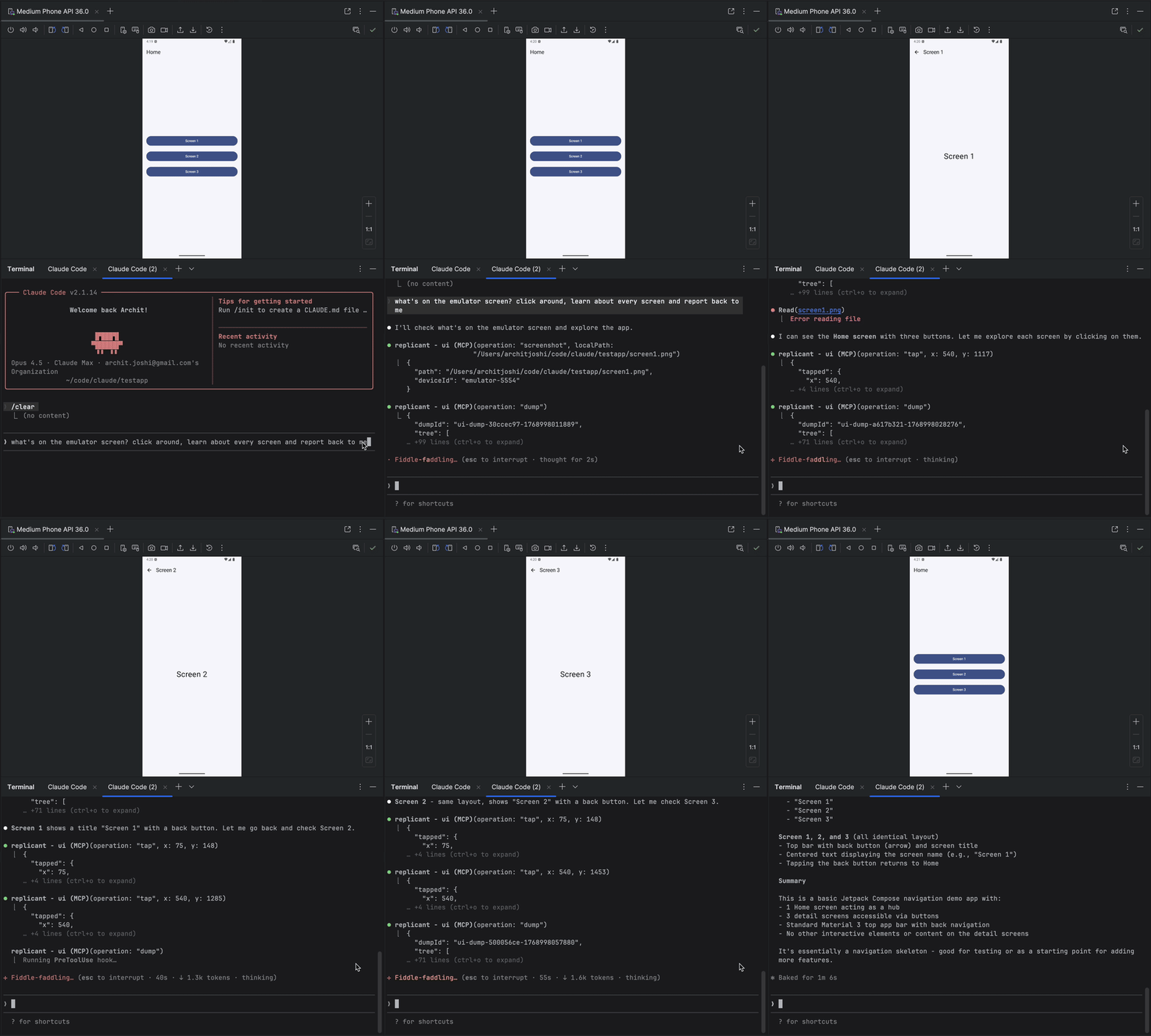
Why replicant-mcp?
| Without replicant-mcp | With replicant-mcp |
|---|---|
"Run ./gradlew assembleDebug, then adb install, then adb shell am start..." | "Build and run the app" |
| Copy-paste logcat output, lose context | AI reads filtered logs directly |
| Screenshot → describe UI → guess coordinates | AI sees accessibility tree, taps elements by text |
| 5,000 tokens of raw Gradle output | 50-token summary + details on demand |
Features
| Category | Capabilities |
|---|---|
| Build & Test | Build APKs/bundles, run unit and instrumented tests, list modules/variants/tasks, test regression detection with baseline comparison |
| Emulator | Create, start, stop, wipe emulators; save/load/delete snapshots |
| Device Control | List connected devices, select active device, query device properties |
| App Management | Install, uninstall, launch, stop apps; clear app data |
| Log Analysis | Filter logcat by package, tag, level, time |
| UI Automation | Accessibility-first element finding, spatial proximity search, tap, text input, screenshots |
| Diagnostics | Environment health checks via replicant doctor; structured logging with configurable level and format |
Coming Soon
- Custom build commands (project-specific overrides, auto-detect gradlew)
- Video capture (start/stop recording, duration-based capture)
Quick Start
Prerequisites
- Node.js 18+
- Android SDK with
adbandemulatorin your PATH - An Android project with
gradlew(for build tools)
node --version      # Should be 18+
adb --version       # Should show Android Debug Bridge version
emulator -version   # Should show Android emulator version
If you don't already have these tools, install them with Homebrew:
Node.js 18+
brew install node
Physical-device only — just adb, sufficient if you never run an emulator:
brew install --cask android-platform-tools
adb lands directly on your PATH; no further config needed.
Full Android SDK — needed for emulator workflows or building APKs via the gradle-* tools. Run the steps in order:
# 1. JDK — required by sdkmanager itself, and by the gradle-* tools
brew install --cask temurin@17

# 2. cmdline-tools (provides sdkmanager)
brew install --cask android-commandlinetools

# 3. Set ANDROID_HOME and create the directory BEFORE running sdkmanager,
#    otherwise sdkmanager has no install target.
export ANDROID_HOME="$HOME/Library/Android/sdk"
mkdir -p "$ANDROID_HOME"

# 4. Accept all SDK licenses first, then install packages.
#    `sdkmanager --install` aborts on unaccepted per-package licenses
#    (e.g. the Google APIs system image) if licenses aren't accepted first.
#    The system-image arch must match your host: `arm64-v8a` for Apple
#    Silicon (M1/M2/M3), `x86_64` for Intel Macs. Check with `uname -m`.
yes | sdkmanager --licenses
sdkmanager --install "platform-tools" "emulator" "system-images;android-34;google_apis;arm64-v8a"
Persist ANDROID_HOME and put the SDK binaries on your PATH by appending to ~/.zshrc (or ~/.bashrc):
export ANDROID_HOME="$HOME/Library/Android/sdk"
export PATH="$ANDROID_HOME/platform-tools:$ANDROID_HOME/emulator:$PATH"
Installation
npm install -g replicant-mcp
After installation, run the built-in diagnostics to verify your environment:
replicant doctor
Updating
npm update -g replicant-mcp
Setup
Claude Desktop
Add to ~/Library/Application Support/Claude/claude_desktop_config.json (macOS) or %APPDATA%\Claude\claude_desktop_config.json (Windows):
{
  "mcpServers": {
    "replicant": {
      "command": "npx",
      "args": ["-y", "replicant-mcp"]
    }
  }
}
Claude Code
claude mcp add replicant -- npx -y replicant-mcp
Cursor
Add to ~/.cursor/mcp.json (global) or .cursor/mcp.json (project):
{
  "mcpServers": {
    "replicant": {
      "command": "npx",
      "args": ["-y", "replicant-mcp"]
    }
  }
}
Windsurf
Add to ~/.codeium/windsurf/mcp_config.json:
{
  "mcpServers": {
    "replicant": {
      "command": "npx",
      "args": ["-y", "replicant-mcp"]
    }
  }
}
OpenAI Codex CLI
Add to ~/.codex/config.toml:
[mcp_servers.replicant]
command = "npx"
args = ["-y", "replicant-mcp"]
Or via CLI:
codex mcp add replicant -- npx -y replicant-mcp
Note: Ensure
adbandemulatorare in your PATH, or setANDROID_HOMEenvironment variable. On macOS:~/Library/Android/sdk, on Linux:~/Android/Sdk.
Example
You: "I just changed the checkout flow. Build the app, go through checkout
      with a test product, and make sure the confirmation screen shows up."

Claude: [Builds debug APK, installs on emulator, launches app]
        [Taps "Electronics" category → "Wireless Headphones" → "Add to Cart"]
        [Navigates to cart, taps "Checkout"]
        [Fills shipping form, taps "Place Order"]

        Confirmation screen is showing:
        - Order #38291
        - "Wireless Headphones" × 1
        - Total: $79.99
        - Estimated delivery: Jan 30

        The flow works. Want me to test the edge cases—empty cart,
        invalid address, payment failure?
Design
replicant-mcp uses progressive disclosure (summaries first, details on demand) to minimize token usage, and accessibility-first UI automation for faster, cheaper, more reliable interactions than screenshot-based approaches. See docs/architecture.md for details.
More Info
- Configuration: Set
REPLICANT_CONFIGfor advanced options. See docs/configuration.md. - Logging: Set
REPLICANT_LOG_LEVEL(error,warn,info,debug) andREPLICANT_LOG_FORMAT(jsonfor structured output) to control server logging. Logs are written to stderr. - Troubleshooting: Common issues and solutions in docs/troubleshooting.md.
- Tool documentation: Ask Claude to call
rtfmwith a category like "build", "adb", "emulator", or "ui".
Documentation
| Document | Description |
|---|---|
| Architecture | Design overview and progressive disclosure pattern |
| Configuration | Config file reference, environment variables, Gradle setup |
| API Stability | Tool API versioning policy and deprecation process |
| Security Model | adb-shell safety model, command denylist, threat boundaries |
| Support Matrix | Tested OS, Node.js, Android SDK, and emulator versions |
| Known Limitations | Accessibility gaps, timeouts, single-device focus, and more |
| Artifacts | .replicant/ directory contents and privacy considerations |
| Troubleshooting | Common issues and solutions |
| Changelog | Version history |
| Security Policy | Vulnerability reporting process |
| Support / Getting Help | How to report bugs and ask questions |
| Contributing | Development setup and guidelines |
Contributing
See CONTRIBUTING.md for development setup and guidelines.
Acknowledgments
- Inspired by xc-mcp for iOS
- Built on the Model Context Protocol
License
Questions? Open an issue
Reviews
No reviews yet
Be the first to review this server!
More Developer Tools MCP Servers
Git
Freeby Modelcontextprotocol · Developer Tools
Read, search, and manipulate Git repositories programmatically
Fetch
Freeby Modelcontextprotocol · Developer Tools
Web content fetching and conversion for efficient LLM usage
Toleno
Freeby Toleno · Developer Tools
Toleno Network MCP Server — Manage your Toleno mining account with Claude AI using natural language.
mcp-creator-python
Freeby mcp-marketplace · Developer Tools
Create, build, and publish Python MCP servers to PyPI — conversationally.
MCP Marketplace
Freeby mcp-marketplace · Developer Tools
Search and install MCP servers from inside your AI client.
MarkItDown
Freeby Microsoft · Content & Media
Convert files (PDF, Word, Excel, images, audio) to Markdown for LLM consumption