
Server data from the Official MCP Registry
Trade Robinhood through natural language in Claude Code.
About
Trade Robinhood through natural language in Claude Code.
Remote endpoints: streamable-http: https://mcp.trayd.ai/mcp
Security Report
Valid MCP server (1 strong, 0 medium validity signals). No known CVEs in dependencies. Imported from the Official MCP Registry.
Endpoint verified · Requires authentication · 1 issue found
Security scores are indicators to help you make informed decisions, not guarantees. Always review permissions before connecting any MCP server.
Permissions Found in Source Code
Found by scanning the linked source code. This listing connects to a hosted endpoint, so none of this runs on your machine: it describes what the server software does where it is hosted.
How to Connect
Remote Plugin
No local installation needed. Your AI client connects to the remote endpoint directly.
Add this to your MCP configuration to connect:
{
  "mcpServers": {
    "io-github-teamtrayd-trayd-mcp": {
      "url": "https://mcp.trayd.ai/mcp"
    }
  }
}Documentation
View on GitHubFrom the project's GitHub README.
Trayd
Trade Robinhood from Claude. Portfolio analysis, real-time quotes, and order execution through natural language.





Setup
Claude.ai (Web App) — No Install Required
- Go to claude.ai > Settings > Connectors
- Click Add custom connector
- Name:
trayd| URL:https://mcp.trayd.ai/mcp - Click Add > Connect > sign in with Google
- Say: "Link my Robinhood account"
- Approve the notification on your phone
- Start trading!
Claude Code (Terminal)
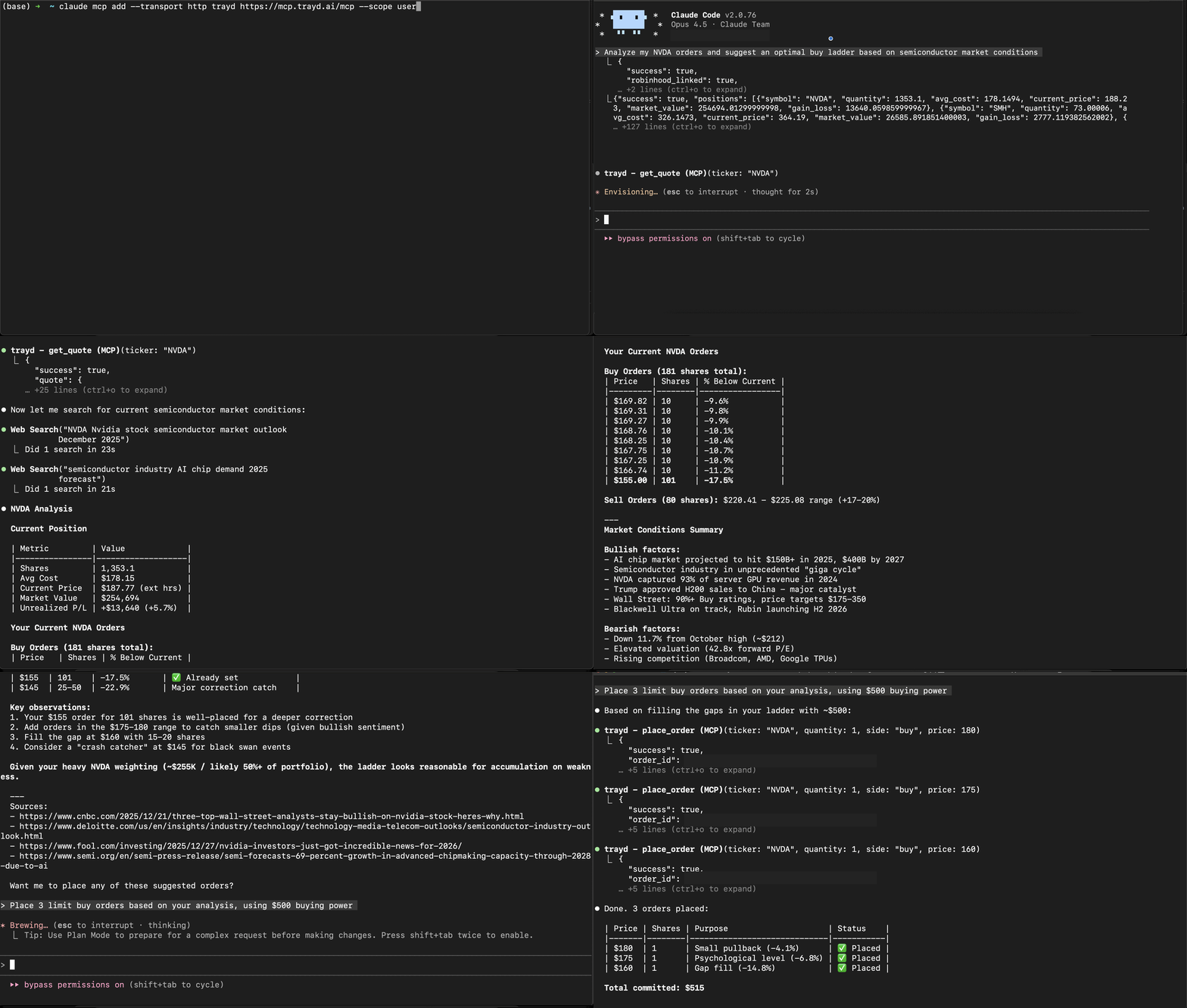
claude mcp add --transport http trayd https://mcp.trayd.ai/mcp --scope user
Type /mcp > select trayd > Authorize > sign in > "Link my Robinhood account"
Both connect to the same account. Use whichever you prefer.
What You Can Do
| Capability | Example |
|---|---|
| Portfolio analysis | "What's my portfolio worth?" / "Which positions are up today?" |
| Real-time quotes | "What's NVDA trading at?" — works 24/7 |
| Buy and sell | "Buy 10 shares of AAPL" / "Sell my TSLA position" |
| Limit orders | "Place a limit order for TSLA at $400" |
| Ladder orders | "Set 5 ladder buys for NVDA from $180 to $175" |
| Short selling | "Short 10 shares of GME" / "Check short availability for AMC" |
| Multi-account | "List my accounts" / "Show portfolio for account 2" |
| Batch orders | "Buy $500 worth of each: AAPL, GOOGL, MSFT" |
| Cancel orders | "Cancel all my open orders" |
| Persistent memory | "Remember my NVDA thesis" — saved to your private wiki, recalled every session |
All limit orders default to 24-hour extended trading. Quotes are served 24/7 — live Robinhood data during market hours, with automatic fallback to a partnered market data provider overnight.
Why Trayd?
Setting 5 ladder limit orders on Robinhood takes 50+ clicks and 5 minutes.
With Trayd: "Set 5 ladder buys for NVDA from $180 to $175" — one sentence, 10 seconds.
What makes Trayd different from other trading MCPs:
- Works in your browser — the only trading MCP that works on claude.ai (no CLI needed)
- Remote server — nothing to install, no Python, no Docker, no API keys
- Full trading — not read-only. Buy, sell, short, batch, ladder
- Multi-account — manage multiple Robinhood accounts from one connection
- 24/7 quotes — dual-source pricing even when markets are closed
- Persistent memory — a private wiki Claude reads and writes, so it remembers your portfolio and strategy across every session
Persistent Memory
Trayd gives Claude a private, persistent knowledge base — your LLM wiki. Tell it something durable ("my cost basis on NVDA is $140", "I only sell covered calls on Fridays", "my thesis on uranium") and Claude saves a markdown note that survives across every future session and conversation — on both claude.ai and Claude Code.
- It compounds — each conversation starts from everything Claude already knows about your portfolio, strategy, and preferences, instead of from scratch.
- You own it — notes are private to your account. Claude and you edit the same files, so you stay in control of what it remembers.
- Examples: "Save my rebalancing rules." / "What's my thesis on SMH?" / "Update my watchlist."
Trading Bot
Claude Code's /loop command turns Trayd into an always-on trading agent:
"Check my positions every 5 minutes. If anything drops 3%, sell it."
"Monitor NVDA. If it hits $130, buy 20 shares."
"Rebalance my portfolio to equal weight every morning at 9:35 AM."
No code. No scripts. Just natural language rules that Claude executes on a schedule.
Security
You → Claude → Trayd Server → Robinhood API
- Robinhood credentials pass directly to Robinhood's API — never stored
- Access tokens held in memory only — wiped on logout, restart, or redeployment
- OAuth 2.1 with PKCE for MCP authentication
- Robinhood phone 2FA on every login — you approve each session on your device
- Infrastructure: AWS ECS Fargate + Cloudflare Tunnel + HTTPS everywhere
Verify it yourself: Place a test order that won't fill — "Limit buy 1 NVDA at $50" — check your Robinhood app, you'll see it. Cancel from either side. Zero risk.
Traction
- 368 traders signed up, 160+ active every month
- 2.4M+ MCP calls served — 2.1M+ live quotes and 87K+ orders executed
- Power users running fully automated strategies via
/loop - Used on both claude.ai and Claude Code
Troubleshooting
| Issue | Fix |
|---|---|
| Auth not working | Type /mcp > select trayd > click Authorize |
| Phone notification missing | Make sure Robinhood app is installed and you're logged in |
| "Authentication required" | Re-run /mcp to refresh your token |
| Order rejected | Make sure to include a price for limit orders |
Disclaimer
This software is provided as-is. You are solely responsible for all trades placed through your account. Not financial advice. Not affiliated with Robinhood Markets, Inc.
Email: team@trayd.ai | Issues: trayders/trayd-mcp
Reviews
No reviews yet
Be the first to review this server!
More Developer Tools MCP Servers
Rea
Freeby Morluto · Developer Tools
Reverse engineer anything from your terminal or agent with one CLI and MCP server.
Paperclip
Freeby Paperclipai · Developer Tools
Trending hip-hop artist momentum scores across four cultural dimensions.
Git
Freeby Modelcontextprotocol · Developer Tools
Read, search, and manipulate Git repositories programmatically
Toleno
Freeby Toleno · Developer Tools
Toleno Network MCP Server — Manage your Toleno mining account with Claude AI using natural language.
MCP Marketplace
Freeby mcp-marketplace · Developer Tools
Search and install MCP servers from inside your AI client.
mcp-creator-python
Freeby mcp-marketplace · Developer Tools
Create, build, and publish Python MCP servers to PyPI — conversationally.