
Server data from the Official MCP Registry
Connector between LLM agents and world data. 643 endpoints, 75+ primary sources.
About
Connector between LLM agents and world data. 643 endpoints, 75+ primary sources.
Remote endpoints: streamable-http: https://app.sugra.ai/mcp
Security Report
Valid MCP server (1 strong, 2 medium validity signals). No known CVEs in dependencies. Package registry verified. Imported from the Official MCP Registry.
Endpoint verified · Open access · 1 issue found
Security scores are indicators to help you make informed decisions, not guarantees. Always review permissions before connecting any MCP server.
Permissions Required
This plugin requests these system permissions. Most are normal for its category.
What You'll Need
Set these up before or after installing:
Environment variable: SUGRA_API_KEY
How to Install & Connect
Available as Local & Remote
This plugin can run on your machine or connect to a hosted endpoint. during install.
Documentation
View on GitHubFrom the project's GitHub README.
sugra-api-mcp
Give any AI agent access to 1,500+ data endpoints across markets, economics, companies, government, news, climate, maritime and entity screening - through one MCP server.
Works with ChatGPT, Claude, Gemini, xAI, Cursor, VS Code and any MCP client.
Official Model Context Protocol server for the Sugra API: one connector, a bundled endpoint catalog, and structured tool results with source attribution on every answer.
See it in action
An agent answering a real question end to end - resolving entities, pulling live snapshots and history, and citing the source and freshness on every number:
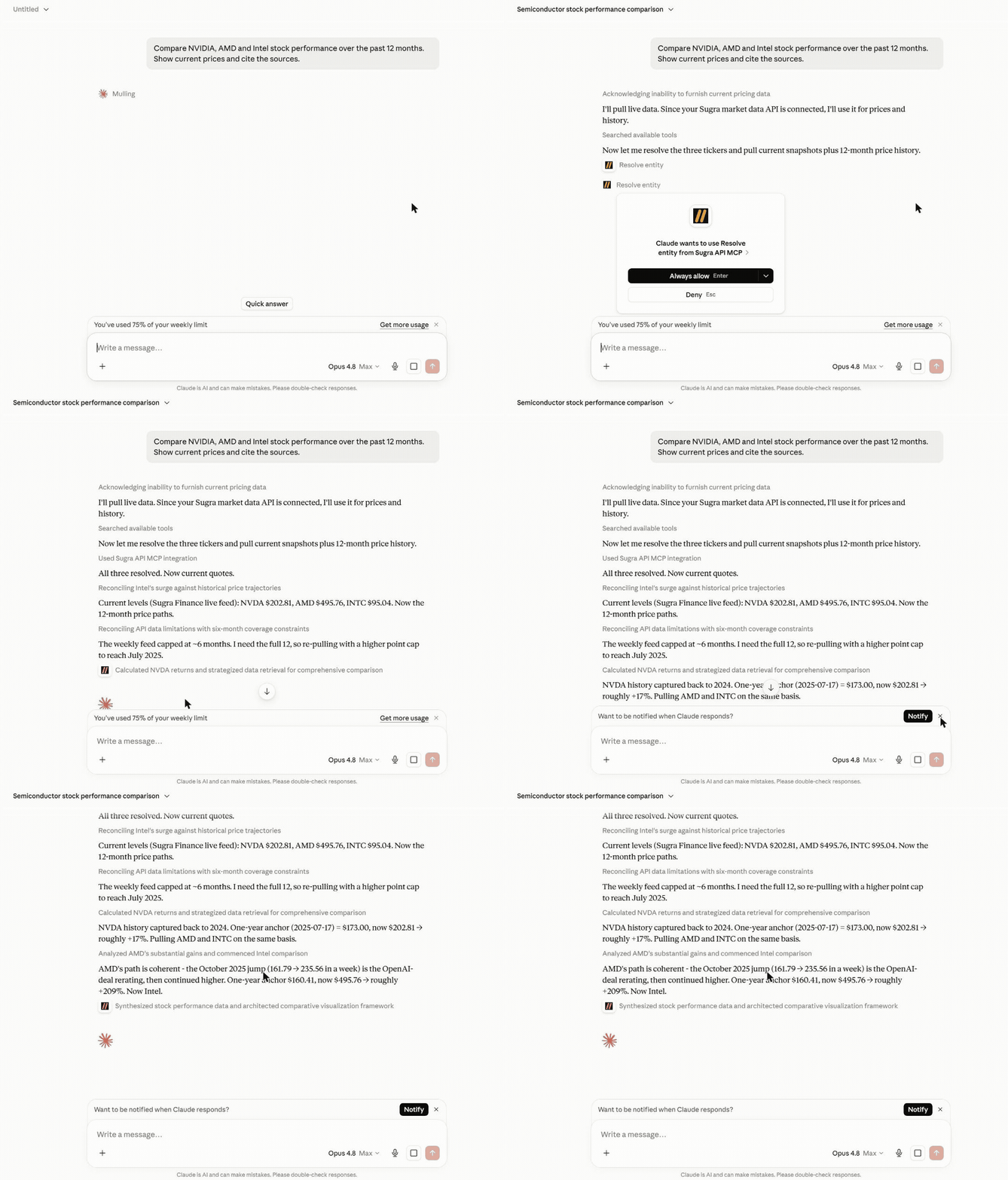
More examples:
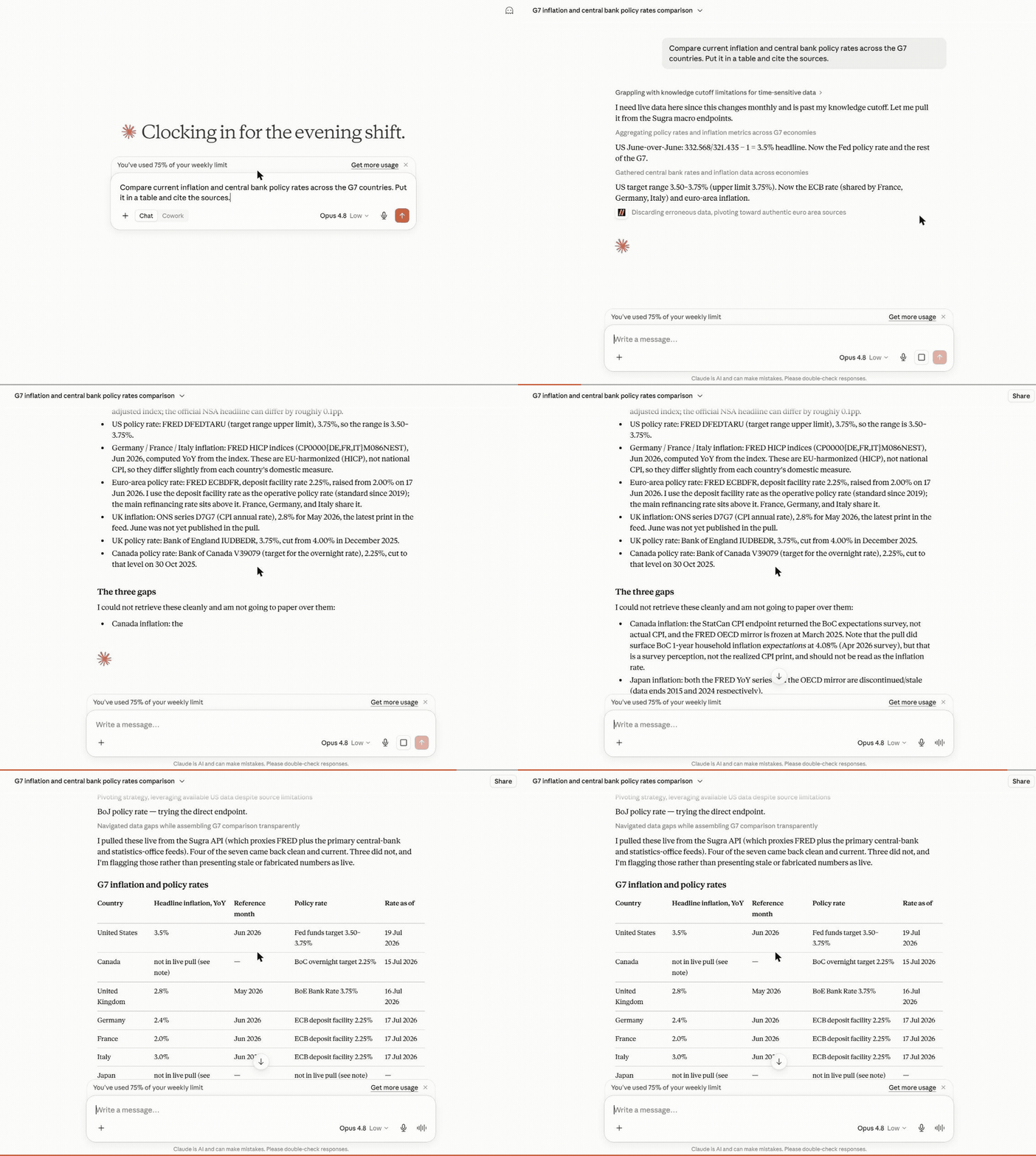
Macro research - one prompt builds a full G7 inflation and policy-rate table, each cell dated and sourced, with the unavailable ones flagged rather than faked:
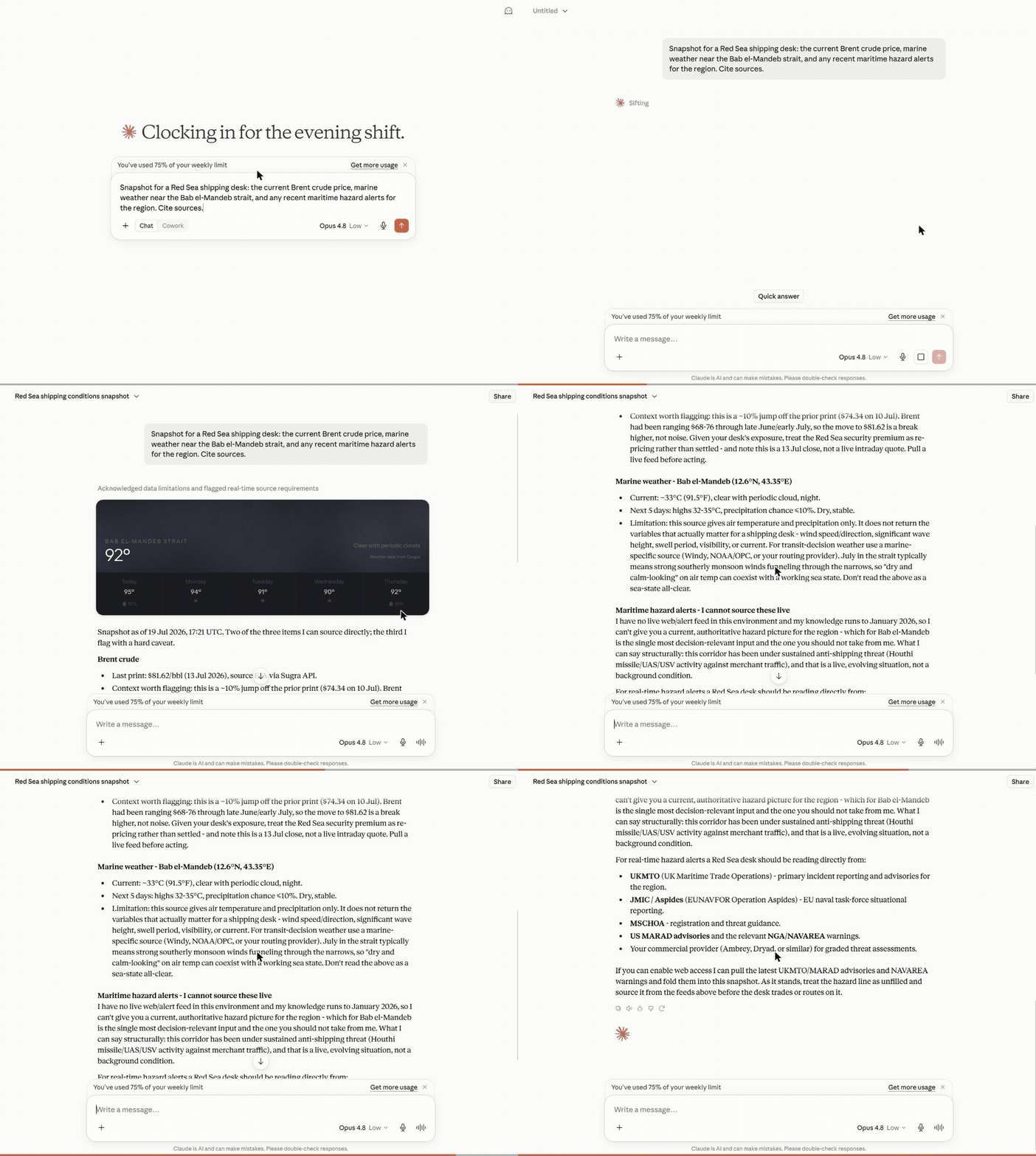
Cross-domain snapshot - Brent crude, marine weather and regional risk pulled together for a shipping desk, each with its source and timestamp:
What a session looks like
Hosted MCP transcript (the three composed tools shown here run on the hosted endpoint). Captured example - wording and figures vary by run and as new BLS data is published:
User: Where does US inflation stand, and how has it trended over the past year?

resolve_entity("US inflation")
  -> macro indicator cpi_us (U.S. Bureau of Labor Statistics)
get_snapshot("cpi_us")
  -> latest reading with freshness, provenance and quota cost
get_timeseries("cpi_us", metric="macro_series", range="1y")
  -> 12 monthly points with an explicit downsampling flag

Agent: US CPI printed 2.9% year over year in the latest release, down from
3.5% twelve months earlier - a steady decline since spring.
Source: U.S. Bureau of Labor Statistics via the Sugra API.
Every tool result carries structured metadata - source attribution, freshness, and rate-limit cost - so agents can cite sources and budget requests instead of guessing.
How it works
flowchart LR
    A["AI agent<br/>(ChatGPT, Claude, Gemini, xAI, IDEs)"] --> B["Sugra MCP<br/>hosted: 11 tools / local: 8 tools"]
    B --> C["Sugra API<br/>1,500+ endpoints, 36 data domains"]
    C --> D["160+ primary sources<br/>markets, economics, government,<br/>news, climate, maritime"]
Behind the gateway sits the Sugra API: 160+ primary sources - sovereign statistics agencies, central banks, intergovernmental bodies and more - feeding 1,500+ endpoints across 36 data domains. The server ships a bundled catalog of the full endpoint surface, so discovery (search, describe, toolsets) runs locally without network calls; only actual data requests hit the API.
What agents build with it
Six workflow prompts ship with the server and turn these into one-click flows in clients that surface MCP prompts:
- Market and macro research - "Compare inflation and central bank policy rates across the G7." (
macro_briefing) - Equity snapshots with sources - "Where does NVIDIA stand today - price, profile, and market backdrop?" (
market_snapshot) - Sanctions and compliance screening - "Screen this supplier and resolve its LEI identity." (
sanctions_screening) - Sector comparison - "Energy versus technology: valuations and flows side by side." (
sector_compare) - Climate, maritime and trade intelligence - "Red Sea shipping this week: chokepoint transits, crude price, and weather on the route." (
earth_conditionsplus the transport and commodities catalog) - Source discovery - "What does the catalog offer for fixed income, and from which institutions?" (
source_overview)
Every answer carries source attribution and freshness metadata, so agents cite instead of guessing.
Hosted MCP (recommended)
No install. Point your client at the hosted Streamable HTTP endpoint:
https://app.sugra.ai/mcp
- 11 tools: the eight gateway tools plus three composed agent tools (
resolve_entity,get_snapshot,get_timeseries) - OAuth sign-in through the claude.ai and ChatGPT connector UIs, or
Authorization: Bearer sugra_xxx_...with an API key - In claude.ai: Settings -> Connectors -> Add custom connector
- In ChatGPT: Settings -> Connectors -> Add MCP server
Local package
Runs on your machine over stdio (or self-hosted HTTP) with an API key:
pip install sugra-api-mcp
- Eight gateway tools
- stdio for desktop clients and IDEs, Streamable HTTP for self-hosting
- Authenticates with
SUGRA_API_KEY
Get a free API key at app.sugra.ai/settings/billing (Free tier: 50 req/day).
Quick start
pip install sugra-api-mcp
export SUGRA_API_KEY=sugra_xxx_...   # free key: app.sugra.ai/settings/billing
sugra-api-mcp call quotes_symbol_price --params '{"symbol":"AAPL"}'
The same call through an agent: connect the server to your client (next section) and ask "What is AAPL trading at? Use Sugra." The agent finds quotes_symbol_price in the catalog and calls it with the symbol.
Connect your client
Supported clients:
- Anthropic Claude: Claude Desktop, Claude Code (CLI), claude.ai (web)
- OpenAI GPT: ChatGPT (via MCP connector)
- Google Gemini: Gemini CLI, Gemini Code Assist (VS Code + JetBrains)
- xAI: Remote MCP Tools in xAI SDK and Responses API
- IDEs: VS Code (native), Cursor, Zed, Cline, Continue.dev, Windsurf
- Custom agents: anything built on the Python or TypeScript MCP SDK
Claude Desktop (stdio)
Add to claude_desktop_config.json:
- macOS:
~/Library/Application Support/Claude/claude_desktop_config.json - Windows:
%APPDATA%\Claude\claude_desktop_config.json - Linux: Claude Desktop has no Linux build. On Linux,
pip install sugra-api-mcpand use Claude Code (CLI), an IDE client, or the hosted HTTP endpoint below.
{
  "mcpServers": {
    "sugra": {
      "command": "sugra-api-mcp",
      "env": {
        "SUGRA_API_KEY": "sugra_xxx_yourkey..."
      }
    }
  }
}
Restart Claude Desktop. Sugra tools appear in the tools menu.
Claude Code (Anthropic CLI)
claude mcp add sugra -- sugra-api-mcp
# then set the env var that sugra-api-mcp reads
export SUGRA_API_KEY=sugra_xxx_...
Or edit ~/.claude/config.json manually with the same shape as Claude Desktop above.
Usage with Gemini CLI
Gemini CLI reads MCP servers from ~/.gemini/settings.json (user scope) or
.gemini/settings.json in the project. For a local stdio install, add:
{
  "mcpServers": {
    "sugra": {
      "command": "sugra-api-mcp",
      "env": {
        "SUGRA_API_KEY": "sugra_xxx_yourkey..."
      }
    }
  }
}
If the console script is not on PATH, use "command": "python" with
"args": ["-m", "sugra_api_mcp"] instead. The equivalent Gemini CLI command
is:
gemini mcp add --scope user -e SUGRA_API_KEY=sugra_xxx_yourkey... sugra sugra-api-mcp
Or connect to the hosted endpoint without installing the package:
gemini mcp add --scope user --transport http \
  --header "Authorization: Bearer sugra_xxx_yourkey..." \
  sugra https://app.sugra.ai/mcp
Run gemini mcp list to check the connection, then enter /mcp in an
interactive session to inspect the available tools. A local stdio connection
shows the eight gateway tools in Tool reference; the hosted
endpoint also shows the three hosted-only agent tools.
If a local server does not connect from a new directory, review and trust that
workspace with gemini trust before retrying.
These examples were checked against the Gemini CLI MCP documentation and Gemini CLI v0.51.0.
Cursor, Zed, Cline, Continue.dev, Windsurf
Each of these has an MCP settings file (typically mcp.json or equivalent) with the same stdio config shape as Claude Desktop.
ChatGPT
ChatGPT supports MCP through its connector UI. Use the hosted HTTP endpoint (below) since ChatGPT does not launch local stdio processes.
HTTP (claude.ai, ChatGPT, remote agents)
Hosted Streamable HTTP endpoint:
https://app.sugra.ai/mcp
Add to claude.ai, ChatGPT, or any Streamable HTTP MCP client. Authenticate with Authorization: Bearer sugra_xxx_....
In claude.ai: Settings -> Connectors -> Add custom connector. In ChatGPT: Settings -> Connectors -> Add MCP server.
Tool reference
The local package exposes eight gateway tools. The hosted endpoint adds three composed analysis tools on top (see Hosted MCP above). The package exposes exactly eight tools:
| Tool | Purpose |
|---|---|
fetch_data | One-step: find best endpoint for a natural-language query and call it. Combines search + call in one round trip. |
search_endpoints | Search the bundled endpoint catalog. Runtime search does not fetch /openapi.json. |
describe_endpoint | Inspect an endpoint by operation_id, including path, method, parameters, required inputs, agent_hints, and request_body_schema for JSON-body POST operations. |
call_endpoint | Call a Sugra API operation by operation_id. Arbitrary path calls are no longer supported. |
list_toolsets | List catalog groups with endpoint counts and descriptions. |
list_sources | Show bundled catalog source metadata. |
sugra_entity_screen | Screen a name against sanctions and watchlists (Sugra Entity). |
sugra_entity_lookup | Composed entity lookup by identifier - anchor is lei or vat, plus the identifier value; returns registry identity + screening (Sugra Entity). |
call_endpoint and fetch_data both support response shaping with limit, fields, and include_raw. Shaping works on enveloped ({"data": ...}) and envelope-less payloads alike; fields entries may use dotted paths into nested objects (geo.city), and meta.shaped reports what was actually applied (fields_applied / fields_unmatched, limit_applied) rather than echoing the request. limit bounds ONLY the top-level list - the envelope data list or a bare top-level array; lists nested inside records are never truncated, and meta.shaped.limit_applied says whether the bound took effect.
describe_endpoint returns computed agent_hints per endpoint so agents can budget time and parallelism before calling:
duration_class-fast(under ~2s, snapshot-backed),slow(live upstream proxying, occasionally 15s+), orheavy(per-item upstream work, large batches can exceed the gateway timeout)max_concurrency- advisory ceiling for parallel calls from one sessionbulk_cost- on per-item bulk endpoints: 1 request credit per item in the request body (the API reports the total in theX-RateLimit-Costresponse header)
Hosted-only agent tools (app.sugra.ai/mcp)
The hosted MCP endpoint at https://app.sugra.ai/mcp serves the same eight tools PLUS three composed agent tools that are not available on stdio or self-hosted installs:
| Tool | Purpose |
|---|---|
resolve_entity | Free text (ticker, company, indicator, coin, currency pair) to a canonical market or macro entity. Ambiguous matches return ranked candidates, never a silent pick. |
get_snapshot | Entity plus a named recipe to one composed current view with freshness, provenance, coverage, and billing blocks. Composed calls charge a fixed recipe cost (1-2 requests) from the daily quota. |
get_timeseries | Entity plus metric (price, macro_series, etf_flows) to a bounded series with an explicit downsampling flag. |
These three tools wrap an internal composed plane that requires an infrastructure credential available only on the hosted deployment. The tool code ships inside the package, but it is registered only by the hosted HTTP entry point and only when that credential is present - pip install sugra-api-mcp (stdio and self-hosted HTTP) always exposes the classic eight-tool gateway. Hosted-only examples in any documentation are labeled as such. For compliance entity lookups (LEI / VAT, sanctions screening) use sugra_entity_lookup and sugra_entity_screen, which work on every transport.
CLI
Server startup is unchanged:
sugra-api-mcp
sugra-api-mcp --transport streamable-http --port 8001
Catalog and gateway helpers:
sugra-api-mcp doctor
sugra-api-mcp list-toolsets
sugra-api-mcp search "NASDAQ futures"
sugra-api-mcp describe cot_financial
sugra-api-mcp call quotes_symbol_price --params '{"symbol":"AAPL"}'
Environment variables
User-facing configuration for local installs, MCP clients, Docker stdio, and directory sandboxes (for example Glama Try in Browser). Set only this:
| Variable | Required | Default | Description |
|---|---|---|---|
SUGRA_API_KEY | For API calls | - | Your Sugra API key (sugra_...). Get a free key at app.sugra.ai/settings/billing (Free tier: 50 req/day). Not needed to start the server: catalog tools (search_endpoints, describe_endpoint, list_toolsets, list_sources) work without it; API-calling tools return a structured missing_api_key error until it is set. In HTTP mode with a client Bearer token this is only a fallback. |
Optional overrides (leave unset unless you need them):
| Variable | Default | Description |
|---|---|---|
SUGRA_API_BASE | https://sugra.ai | Override the Sugra API base URL (self-hosted or beta API only). |
SUGRA_TIMEOUT | 30 | Downstream HTTP timeout in seconds for calls from this server to the Sugra API. |
Operator-only settings for self-hosted Streamable HTTP (reverse proxy CORS/hosts, OAuth authorization-server wiring, and shared secrets) are documented in docs/self-hosting.md. Do not put operator secrets into public directory sandboxes.
HTTP transport with OAuth
When running with --transport streamable-http the server allows unauthenticated MCP discovery requests (initialize, notifications/initialized, tools/list, resources/list, prompts/list, and ping) so ChatGPT Apps and other mixed-auth clients can discover tool metadata. Tool calls still require Authorization: Bearer .... Two token formats are accepted:
- Raw API key (
sugra_...) - passed through as the downstreamx-api-key. Compatible with earlier local API-key setups. - OAuth JWT - signature verified against the issuer's JWKS. The audience must match
https://app.sugra.ai/mcp, the token must includesugra:read, and hosted access is validated against APP before resolving the user's primary API key. Successful hosted OAuth requests update MCP connection activity in APP.
Most users should use the hosted endpoint https://app.sugra.ai/mcp instead of
self-hosting OAuth. If you run your own HTTP process, see
docs/self-hosting.md.
Timeouts and the error contract
SUGRA_TIMEOUT caps each downstream HTTP call from this server to the Sugra API (default 30 seconds). It is one link in a longer chain; when a tool call fails, elapsed_ms in the error payload tells you which link cut it:
MCP client (agent harness)         own tool timeout, often 60-180s, client-controlled
  -> hosted proxy (app.sugra.ai)   86400s, effectively unlimited
    -> this server (httpx)         SUGRA_TIMEOUT, default 30s
      -> Sugra API -> upstreams    15-60s per upstream call, server-side
Tool failures return structured JSON instead of raising, so agents can pick a retry strategy:
error value | Meaning | Retry strategy |
|---|---|---|
upstream_timeout | No response within SUGRA_TIMEOUT (elapsed_ms close to timeout_s x 1000) | Retry once: the aborted attempt usually completes server-side and warms upstream caches. Then narrow the request (smaller batch, tighter filters). |
upstream_connect_error | Could not reach the Sugra API (DNS failure, connection refused) | Retry after a short delay. |
upstream_transport_error | Connection dropped mid-request | Retry once. |
free-text string + status_code | The API answered with HTTP 4xx/5xx; retry_after included when the API sent a Retry-After header | Honor retry_after for 429/503; fix the request for 4xx. |
tool_execution_failed | Unexpected failure inside the gateway (exception_type included) | Report if persistent. |
All error payloads carry elapsed_ms. url is present on transport and HTTP errors (not on tool_execution_failed, which can fire before a URL exists). On the three transport errors status_code is null (no HTTP status was received) - consumers comparing status_code numerically should guard for that. If a tool call instead fails with a bare client-side message and no structured JSON, the timeout fired in your agent harness above this server: raise the client's tool timeout, not SUGRA_TIMEOUT.
Examples
Ask Claude:
- "Search Sugra endpoints for NASDAQ futures."
- "Describe the
cot_financialoperation." - "Call
quotes_symbol_pricewith symbol AAPL and return only symbol and price." - "List available Sugra toolsets."
Troubleshooting
Looking for get_market_price, get_macro_indicator, or get_news? Those curated tool names appear in some older directory listings and never shipped in this package - use fetch_data for one-step natural-language calls or search_endpoints plus call_endpoint for explicit routing.
missing_api_key in tool responses
The server starts and lists its tools without a key, but API-calling tools (call_endpoint, fetch_data, the entity tools) return {"error": "missing_api_key"} until the server can find one. Depending on how you run it:
- As an MCP tool from your client (Claude, ChatGPT, Gemini, xAI, IDE, etc.): check the
envblock in your MCP config file. Value should be a full key likesugra_ao1_..., not empty and not wrapped in extra quotes. - Shell / CI:
export SUGRA_API_KEY=sugra_...before runningsugra-api-mcp. - HTTP mode: set via
.envor systemdEnvironmentFile, not the shell.
sugra-api-mcp doctor reports whether the key is visible to the process.
401 Unauthorized or 403 Forbidden in tool responses
Key accepted but rejected. Common causes:
- Key was regenerated in app.sugra.ai/settings/billing and your config still has the old one.
- Typo - key contains only lowercase letters and digits, no spaces, no trailing newlines.
- Free tier was deactivated. Sign in to verify status.
429 Too Many Requests
Hit your plan's daily limit. Response headers include X-RateLimit-Reset with the UTC timestamp when the counter resets (midnight UTC). Upgrade your plan at app.sugra.ai/settings/billing.
Invalid Host header (only if self-hosting HTTP mode)
FastMCP has DNS rebinding protection for public hostnames behind a reverse proxy. See docs/self-hosting.md for the allowed-hosts setting.
Tool result truncated with meta.truncated notice
Some endpoints return very large payloads (global wildfires, full table catalogs). The client enforces the MCP 25k token limit - when hit, the data list is trimmed and a retry hint appears in meta.truncated.retry_hint. Add narrower filters (country, date range, limit) to get the full result.
Python version 3.11 or higher is required
sugra-api-mcp requires Python 3.11+. Check: python --version. If you have 3.10 or older:
- Ubuntu: install Python 3.11 or newer from your distribution packages or the deadsnakes PPA.
- macOS:
brew install python@3.11 - Windows: download from python.org
Then recreate your venv.
Hosted app.sugra.ai/mcp returns 5xx
The hosted endpoint can briefly restart after deploys. Wait 60 seconds and retry. If persistent, email support@sugra.systems.
Debugging tool calls locally
Run with stdio and log JSON-RPC messages:
SUGRA_API_KEY=sugra_... sugra-api-mcp 2>&1 | tee mcp-debug.log
Send manual JSON-RPC from a second terminal using nc or an MCP inspector.
Development
git clone https://github.com/Sugra-Systems/sugra-api-mcp
cd sugra-api-mcp
pip install -e ".[dev,http]"
export SUGRA_API_KEY=sugra_...
python -m sugra_api_mcp  # stdio mode
python -m sugra_api_mcp --transport streamable-http --port 8001  # HTTP mode
python scripts/build_endpoint_catalog.py  # rebuild bundled catalog from sibling API openapi.json
Run tests:
pytest
Docker
Build the image from the repository root:
docker build -t sugra-api-mcp .
Run in stdio mode (the default entrypoint) for MCP clients that spawn a local process:
docker run -i --rm -e SUGRA_API_KEY=sugra_... sugra-api-mcp
Run the Streamable HTTP transport on port 8001 with Docker Compose:
export SUGRA_API_KEY=sugra_...
docker compose up -d
Then point your MCP client at http://localhost:8001/mcp. The compose service
passes SUGRA_API_KEY and the optional overrides (SUGRA_API_BASE,
SUGRA_TIMEOUT) from your shell when set, and checks container health against
http://localhost:8001/health. Reverse-proxy and OAuth operator settings are
documented in docs/self-hosting.md.
A note on auth: no environment variable is baked into the image and none is
required for the container to start. In HTTP mode clients authenticate per
request with Authorization: Bearer sugra_..., so SUGRA_API_KEY on the
container is only a fallback for requests without a Bearer token.
License
MIT © 2026 Sugra Systems, Inc.
Reviews
No reviews yet
Be the first to review this server!
More Developer Tools MCP Servers
Git
Freeby Modelcontextprotocol · Developer Tools
Read, search, and manipulate Git repositories programmatically
Fetch
Freeby Modelcontextprotocol · Developer Tools
Web content fetching and conversion for efficient LLM usage
Toleno
Freeby Toleno · Developer Tools
Toleno Network MCP Server — Manage your Toleno mining account with Claude AI using natural language.
mcp-creator-python
Freeby mcp-marketplace · Developer Tools
Create, build, and publish Python MCP servers to PyPI — conversationally.
MCP Marketplace
Freeby mcp-marketplace · Developer Tools
Search and install MCP servers from inside your AI client.
MarkItDown
Freeby Microsoft · Content & Media
Convert files (PDF, Word, Excel, images, audio) to Markdown for LLM consumption