
Server data from the Official MCP Registry
Static analysis scanner for MCP server code and multi-tenant SaaS applications.
About
Static analysis scanner for MCP server code and multi-tenant SaaS applications.
Security Report
This is a legitimate static analysis tool for detecting tenant isolation vulnerabilities in multi-tenant SaaS and MCP applications. The code demonstrates strong security practices with well-structured rule definitions, proper input validation via path boundary enforcement, and read-only-by-default MCP server design. No malicious patterns, credential exfiltration, or dangerous operations detected. Minor code quality observations around broad exception handling and logging do not materially impact security posture. Supply chain analysis found 1 known vulnerability in dependencies (1 critical, 0 high severity). Package verification found 1 issue.
3 files analyzed · 5 issues found
Security scores are indicators to help you make informed decisions, not guarantees. Always review permissions before connecting any MCP server.
Permissions Required
This plugin requests these system permissions. Most are normal for its category.
How to Install
Add this to your MCP configuration file:
{
  "mcpServers": {
    "io-github-subodhkc-mcp-tenant-isolation": {
      "args": [
        "-y",
        "mcp-tenant-isolation"
      ],
      "command": "npx"
    }
  }
}Documentation
View on GitHubFrom the project's GitHub README.
mcp-tenant-isolation
Static analysis scanner for multi-tenant SaaS and MCP server code. 57 deterministic rules that catch cross-tenant data leakage before it reaches production.




What it does
If you build multi-tenant software, every query, every cache key, every file access, every API response needs to be scoped to the right tenant. Miss one, and Tenant A sees Tenant B's data. That's not a bug you want to find in production.
This scanner reads your source code and checks whether tenant isolation guards are present where they need to be. It covers 57 patterns across database queries, API routes, cache keys, file storage, schema design, logging, and MCP server architecture. It works with TypeScript, JavaScript, Prisma, Drizzle, raw SQL, Next.js, Express, and Fastify.
The scanner also runs as an MCP server, so you can plug it into Claude Desktop, Cursor, or any MCP-compatible agent and have your AI assistant scan code on demand.
Who uses this
- SaaS engineering teams who need to catch tenant isolation gaps before code ships
- MCP server developers building tools that handle tenant-scoped data
- Security teams who want tenant isolation checks in CI/CD
- AI agent developers who want their agents to scan code for cross-tenant risks
Why this exists
General-purpose security scanners are not purpose-built for tenant isolation patterns. They catch SQL injection and XSS. They do not check whether your findMany query includes an organizationId filter. They do not check whether your MCP tool handler scopes tool visibility by tenant. They do not check whether your cache key includes a tenant prefix.
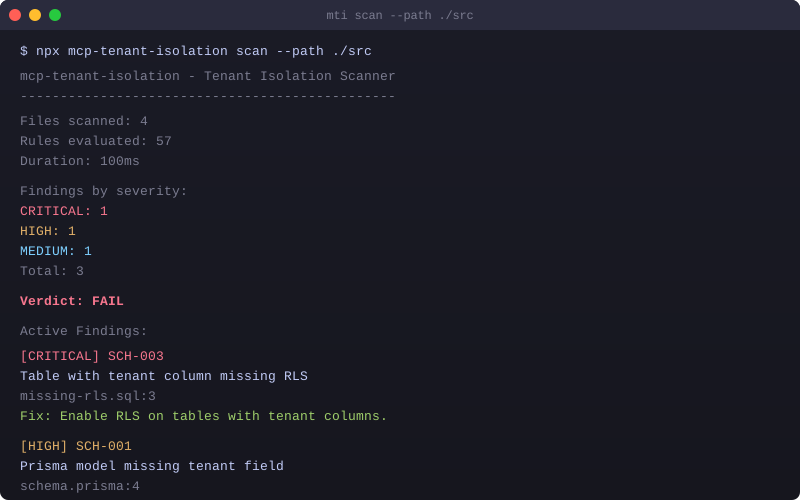
This scanner does exactly that. 57 rules, each checking for a specific tenant isolation pattern, each producing a finding with the rule ID, file, line, missing guard, and a remediation hint.
Every rule is deterministic. Given the same source code, the scanner produces the same findings. No machine learning, no probabilistic scoring. Static analysis has inherent limitations though. It cannot verify runtime behavior, database-level enforcement, or dynamic tenant isolation. The scan output includes a limitations field that lists what was and was not checked for each run.
Install
npm install -g mcp-tenant-isolation

# or use npx (no install needed)
npx mcp-tenant-isolation scan ./src

# or use Docker (no Node.js needed)
docker run --rm -v $(pwd):/code subodhkc/mcp-tenant-isolation scan /code/src
Requires Node.js 22 or later.
Quick start
mti scan ./src
mti scan ./src --format sarif --output results.sarif
mti scan ./src --format markdown --output TENANT-ISOLATION-REPORT.md
mti scan ./src --format ai --output findings.json
mti scan ./src --severity HIGH
mti rules                          # list all 57 rules
mti baseline                       # snapshot current findings for proof-of-fix tracking
mti init                           # create .mtirc.json with defaults
Demo
Rules
42 general multi-tenant rules
| Prefix | Category | Count | Severity | What it checks |
|---|---|---|---|---|
| TCM | Tenant Context Management | 6 | Critical | Tenant ID comes from session, not client input. Context propagation across async boundaries. |
| DBQ | Database Query Isolation | 10 | Critical | Every query touching tenant-scoped data includes a tenant filter. Prisma, Drizzle, raw SQL. |
| IDOR | IDOR Prevention | 5 | Critical | ID-based lookups verify tenant ownership before returning data. |
| CSI | Cache and Session Isolation | 4 | High | Cache keys and session data are tenant-scoped. |
| API | API Security | 3 | High | Tenant-aware rate limiting and response scoping. |
| FSI | File Storage Isolation | 4 | High | S3, Blob, and filesystem access is tenant-scoped. |
| LOG | Logging and Audit | 4 | Medium | Audit logs include tenant context. |
| SCH | Schema and Migration | 6 | High | Prisma models and SQL migrations include tenant columns and indexes. |
15 MCP-specific rules
| ID | Title | Severity | What it checks |
|---|---|---|---|
| MCP-001 | Tool Visibility Scoping | Critical | Tool handler has no tenant-based allow/deny filter. |
| MCP-002 | Cache Key Tenant Prefix | Critical | Tool results cached without tenant prefix. |
| MCP-003 | Session Binding to User+Tenant | Critical | Session ID used as sole authorization. |
| MCP-004 | Token Exchange (RFC 8693) | High | Original token forwarded instead of token exchange. |
| MCP-005 | Per-Tenant Rate Limiting | Medium | No per-tenant rate limiting on tool calls. |
| MCP-006 | Vector Store Tenant Namespace | High | Shared vector store without tenant namespaces. |
| MCP-007 | Tool Description Injection | Medium | Tool description could bypass isolation. |
| MCP-008 | Credential Vault Tenant Scoping | Critical | Credential vault stores tokens without tenant scoping. |
| MCP-009 | Shared Service Account | High | Single shared API key for all tenant API calls. |
| MCP-010 | Session Cleanup on Disconnect | Medium | No deterministic session cleanup. |
| MCP-011 | Telemetry Tenant Identifier | Low | Telemetry strips tenant identifier. |
| MCP-012 | Local Bind (127.0.0.1) | High | MCP server binds to 0.0.0.0 instead of 127.0.0.1. |
| MCP-013 | Filesystem Tenant Root | High | Tool handler accesses filesystem without tenant root. |
| MCP-014 | Cross-Tenant Artifact Leakage | High | Artifact storage without tenant prefix. |
| MCP-015 | Dynamic Tool Namespace | Medium | Tools registered without tenant namespace. |
MCP rules are mapped to the OWASP MCP Top 10 (2025). See docs/OWASP-MAPPING.md for the full mapping. The mappings are advisory, for triage and reporting. This scanner does not certify OWASP compliance.
Architecture
The scanner pipeline runs in six stages:
- Parsers — Babel AST for TypeScript/JavaScript, Prisma schema parser, SQL migration parser, MCP SDK import detection
- IR and Flow Graph — Intermediate representation capturing sources, sinks, guards, routes, MCP tool definitions
- Rule Engine — 57 deterministic rules evaluated against the IR. Each rule defines sources, sinks, and required guards
- False Positive Filter — Test file detection, confidence scoring, pattern refinement
- Reporters — Terminal, JSON, SARIF 2.1.0, AI-friendly JSON with remediation hints, Markdown
- CLI and MCP Server —
mtiCLI with scan/init/rules/suppress/baseline/mcp commands. MCP server exposes 4 tools
Structured output
Scan results include structured metadata beyond just findings:
- Completeness — COMPLETE, PARTIAL, or ERROR. If files fail to parse or rules fail to evaluate, completeness drops to PARTIAL and the reasons are listed.
- Coverage — Files discovered, parsed, failed to parse. Rules available, selected, evaluated, failed, triggered. Unsupported file types counted.
- Concern families — Findings grouped into 8 concern families (Tenant Context, Data Isolation, Cache and Session, MCP Security, Secrets and Credentials, Vector and Storage, API and Access, Audit and Logging) for triage.
- Limitations — What the scan could and could not verify. Always includes static analysis limitation. Includes flow analysis scope and proof-of-fix status.
- Scan receipt — Provenance metadata with engine version, rulepack digest, timestamp, and a SHA-256 receipt hash for tamper detection.
- Proof-of-fix — Each finding is tagged as STILL_PRESENT, NEW, or NOT_VERIFIABLE relative to a baseline file. Run
mti baselineto establish a baseline.
Fingerprints
Findings use v2 semantic fingerprints that are stable under line movement and formatting changes. The fingerprint is derived from the rule ID, file path, normalized code snippet, and sorted missing guards. It does not include the line number. This means if you move code around without changing its semantics, the fingerprint stays the same and baseline tracking remains accurate.
MCP server
The package includes an MCP server for AI agent integration. It runs locally via stdio transport. No hosting, no network exposure.
{
  "mcpServers": {
    "tenant-isolation": {
      "command": "npx",
      "args": ["-y", "mcp-tenant-isolation", "mcp"]
    }
  }
}
Add this to your Claude Desktop, Cursor, Windsurf, or other MCP client config to let your AI agent scan code for tenant isolation issues on demand.
MCP tools
| Tool | Description | Write? |
|---|---|---|
scan_tenant_isolation | Scan a project path. Returns structured findings with completeness, coverage, concern families, and receipt. | No |
list_tenant_isolation_rules | Returns all 57 rules with metadata. Filterable by category. | No |
explain_tenant_isolation_rule | Returns rule details, OWASP mapping, CWE IDs, fix suggestions. | No |
suppress_tenant_isolation_finding | Add a suppression with reason, approver, controls, and expiry. | Yes (opt-in) |
The suppression tool is hidden by default. It only appears when the server is started with --allow-write-tools. This is a security boundary: read-only by default, write operations require explicit opt-in.
All filesystem operations during MCP scans are constrained to the project root configured at server startup. Traversal attacks (../), absolute paths outside root, UNC paths, and symlink escapes are rejected. See SECURITY.md for details.
CI/CD integration
Option 1: Pre-built GitHub Action (easiest)
Add this to .github/workflows/tenant-isolation.yml:
name: Tenant Isolation Scan
on: [push, pull_request]
jobs:
  scan:
    runs-on: ubuntu-latest
    permissions:
      contents: read
      security-events: write
    steps:
      - uses: actions/checkout@v4
      - uses: subodhkc/mcp-tenant-isolation@v2
        with:
          path: ./src
          severity: HIGH
          fail-on: HIGH
Runs the scan, uploads SARIF to GitHub Code Scanning, generates a Markdown report artifact, and fails the workflow if HIGH or CRITICAL findings are detected.
Option 2: Manual npx
name: Tenant Isolation Scan
on: [push, pull_request]
jobs:
  scan:
    runs-on: ubuntu-latest
    permissions:
      contents: read
      security-events: write
    steps:
      - uses: actions/checkout@v4
      - uses: actions/setup-node@v4
        with:
          node-version: 22
      - run: npx mcp-tenant-isolation scan ./src --format sarif --output results.sarif
      - uses: github/codeql-action/upload-sarif@v3
        with:
          sarif_file: results.sarif
Exit codes
| Code | Meaning |
|---|---|
| 0 | No findings |
| 1 | Findings found |
| 2 | Error (config invalid, parse failure, etc.) |
GitHub Code Scanning integration
When you upload SARIF output using github/codeql-action/upload-sarif@v3, findings appear in your repository's Security > Code scanning alerts tab. This works with both free and Advanced Security-enabled repos.
What happens:
mti scan --format sarif --output results.sarifgenerates a SARIF 2.1.0 fileupload-sarifaction sends it to GitHub's code scanning API- Each finding becomes a code scanning alert with file, line, severity, and remediation hint
- Alerts can be dismissed, fixed, or tracked directly in the GitHub UI
- Pull request annotations appear automatically on changed files
Requirements:
permissions: security-events: writein your workflow- The SARIF file must be generated before the upload step
Configuration
Create .mtirc.json in your project root:
{
  "rules": {
    "severity": {
      "DBQ-001": "HIGH",
      "MCP-001": "CRITICAL"
    },
    "exclude": ["DBQ-010"]
  },
  "paths": {
    "include": ["src/**/*"],
    "exclude": ["**/*.test.ts", "**/*.spec.ts"]
  },
  "suppressions": ".mti-suppressions.json",
  "baseline": ".mti-baseline.json"
}
Advanced configuration
{
  "rules": {
    "severity": { "DBQ-001": "HIGH" },
    "exclude": ["DBQ-010"]
  },
  "paths": {
    "include": ["src/**/*"],
    "exclude": ["**/*.test.ts"]
  },
  "output": "terminal",
  "framework": "nextjs-app-router",
  "authHelpers": ["requireAuth", "getServerSession", "withAuth"],
  "tenantGuards": ["organizationId", "tenantId", "workspaceId"],
  "modelScopes": {
    "userScoped": ["User", "UserSession"],
    "global": ["Tenant", "AuditLog"]
  },
  "rulePacks": ["./custom-rules.json"],
  "suppressions": ".mti-suppressions.json",
  "baseline": ".mti-baseline.json"
}
| Field | Description |
|---|---|
output | Default output format: terminal, json, sarif, ai, markdown |
framework | Framework hint: nextjs-app-router, nextjs-pages, express, fastify, auto |
authHelpers | Custom auth function names to detect (reduces false positives) |
tenantGuards | Custom tenant guard variable names beyond the defaults |
modelScopes | Override model scope classification (userScoped, global, tenantScoped) |
rulePacks | Paths to custom rule pack JSON files |
Custom rule packs
You can extend the scanner with custom rules via JSON rule packs. Custom rules are validated at load time:
- Rule IDs must match
PREFIX-NNNformat (e.g.,CUST-001) - Rule IDs cannot collide with built-in rules
- Severity must be one of INFO, LOW, MEDIUM, HIGH, CRITICAL
- Maximum 50 custom rules across all rulepacks
- Rulepack paths are constrained to the project root (MCP mode)
Invalid custom rules are rejected with warnings. The scan continues with built-in rules.
Suppressions
Suppressions require a concrete finding fingerprint, a rule ID, a documented approver identifier, a reason, compensating controls, and an expiry date. Rule-wide suppressions (no fingerprint) are only permitted as documented permanent exceptions.
The documentedApprover field records who approved the suppression. It does not represent independent human verification. It is a recorded attribution string, not a claim of external review.
Baselines
Run mti baseline to snapshot current findings. Future scans compare against the baseline and tag each finding as STILL_PRESENT, NEW, or NOT_VERIFIABLE (if no baseline exists). This gives you proof-of-fix tracking over time.
Report formats
| Format | Flag | Use case |
|---|---|---|
| Terminal | --format terminal (default) | Developer console with pass/fail verdict |
| JSON | --format json | Programmatic consumption, piping to other tools |
| SARIF | --format sarif | GitHub Code Scanning, Azure DevOps |
| AI JSON | --format ai | AI agent consumption with remediation hints and context |
| Markdown | --format markdown | Shareable report for PRs, team review, documentation |
# Generate a Markdown report for a PR
mti scan ./src --format markdown --output TENANT-ISOLATION-REPORT.md

# Upload SARIF to GitHub Code Scanning
mti scan ./src --format sarif --output results.sarif
Trust and supply chain
- npm Trusted Publishing — packages are published via GitHub Actions OIDC, not long-lived tokens. Each publish uses a short-lived, workflow-specific credential.
- Provenance attestations — every published package includes a signed provenance statement in the Sigstore transparency log. You can verify that the package was built from the exact source in this repository.
- 0 npm audit vulnerabilities — dependencies are audited on every CI run. The lockfile is committed and CI uses
npm cifor reproducible installs. - Deterministic rules — no machine learning, no probabilistic scoring. Given the same source code, the scanner produces the same findings every time.
- Cross-platform CI — tested on Ubuntu, Windows, and macOS with Node 22 and 24. Node 26 canary runs as informational.
- MIT licensed — free and open source. No telemetry, no phone-home, no data collection.
Limitations
Static analysis has inherent limits. Being upfront about them:
- Intra-procedural flow analysis only. The scanner traces data flow within a single function body. It does not trace flow across function calls, files, or framework middleware boundaries. Most tenant isolation defects are missing-guard-at-sink problems that do not require inter-procedural analysis, but some edge cases may be missed.
- No runtime verification. The scanner checks source code patterns. It cannot verify that database-level RLS policies are actually enabled, that middleware actually runs, or that tenant context is actually propagated at runtime.
- TypeScript and JavaScript only. Python, Go, Ruby, and other languages are not supported yet.
- False positives are possible. The scanner uses pattern-based detection with false-positive filtering (test file exclusion, auth signal detection, confidence scoring). Custom auth helpers and tenant guards can be configured via
.mtirc.jsonto reduce false positives. - MCP stdio transport only. The MCP server runs locally via stdio. Remote/HTTP transport is not supported in v2.0.
See docs/FLOW-ANALYSIS-QUALIFICATION.md for detailed flow analysis scope.
Tech stack
- AST Parsing: @babel/parser (TypeScript, JSX), Prisma schema parser, SQL migration parser
- Rule Engine: RuleSpec declarative pattern with guard detection and evidence building
- CLI: Commander
- MCP: @modelcontextprotocol/server v2 (stdio transport, Zod schemas, structured output)
- Output: Terminal, JSON, SARIF 2.1.0, AI JSON, Markdown
- Testing: Vitest (203 tests, cross-platform CI on Ubuntu, Windows, macOS)
Roadmap
v2.0.0 (Current)
- 57 rules (42 general + 15 MCP-specific)
- TypeScript and JavaScript support
- Prisma schema analysis
- SQL migration analysis (RLS, tenant columns, indexes)
- CLI with terminal, JSON, SARIF, AI JSON, Markdown output
- MCP server v2 SDK (stdio transport, Zod schemas, structured output)
- Structured MCP output with completeness, coverage, and concern families
- Scan Receipt with rulepack digest and tamper-detection hash
- Evidence Envelope for verifiable scan artifacts
- Stable v2 semantic fingerprints (line-movement resistant)
- OWASP MCP Top 10 mapping (official 2025 categories)
- Path boundary enforcement (traversal, symlink, UNC, Windows 8.3)
- Write-tool gating (read-only by default, suppression opt-in)
- Suppression policy with expiration and documented approver
- Baseline tracking with proof-of-fix states
- Severity override in .mtirc.json
- Custom rule packs with validation
- Configurable auth helpers and tenant guards
- Model scope classification with config overrides
- Framework detection (Next.js, Express, Fastify)
- Cross-platform CI matrix (Node 22/24, Ubuntu/Windows/macOS)
Future
- Python support (FastAPI, Django, Flask)
- SQLAlchemy ORM analysis
- Watch mode (mti scan --watch)
- VS Code extension
- Runtime two-tenant adversarial test harness
- Go and Ruby language support
- Incremental scanning with AST cache
Links
- Landing page
- GitHub
- npm
- Docker Hub
- Changelog
- Contributing
- Security policy
- HAIEC (Human AI Evidence Company) — AI security validation and audit-evidence platform
- Subodh Kc — builder
License
MIT. Free and open source.
Reviews
No reviews yet
Be the first to review this server!
More Developer Tools MCP Servers
Rea
Freeby Morluto · Developer Tools
Reverse engineer anything from your terminal or agent with one CLI and MCP server.
Paperclip
Freeby Paperclipai · Developer Tools
Trending hip-hop artist momentum scores across four cultural dimensions.
Git
Freeby Modelcontextprotocol · Developer Tools
Read, search, and manipulate Git repositories programmatically
Toleno
Freeby Toleno · Developer Tools
Toleno Network MCP Server — Manage your Toleno mining account with Claude AI using natural language.
MCP Marketplace
Freeby mcp-marketplace · Developer Tools
Search and install MCP servers from inside your AI client.
mcp-creator-python
Freeby mcp-marketplace · Developer Tools
Create, build, and publish Python MCP servers to PyPI — conversationally.