
Server data from the Official MCP Registry
Local, read-only Google Search Console MCP server. Quick Connect needs no Cloud project.
About
Local, read-only Google Search Console MCP server. Quick Connect needs no Cloud project.
Security Report
The visible code is a local Google Search Console MCP server that defaults to read-only OAuth, gates writes and history/export behind explicit environment flags, and validates setup inputs carefully. The review is limited because the source is truncated, and the main items to review are an outbound HTTP fetch surface in the image and page audit tools, child process invocation of external CLIs during setup, and an embedded shared OAuth client. Supply chain analysis found 3 known vulnerabilities in dependencies (0 critical, 3 high severity). Package verification found 1 issue.
5 files analyzed · 9 issues found
Security scores are indicators to help you make informed decisions, not guarantees. Always review permissions before connecting any MCP server.
Permissions Required
This plugin requests these system permissions. Most are normal for its category.
What You'll Need
Set these up before or after installing:
Environment variable: GSC_AUTH_MODE
Environment variable: GSC_ACCESS_MODE
Environment variable: GSC_SITE_URLS
Environment variable: GSC_KEY_FILE
Environment variable: GSC_DATA_DIR
Environment variable: GSC_EXPORTS
Environment variable: GSC_HISTORY
Environment variable: GSC_OAUTH_SECRETS_FILE
Environment variable: GSC_OAUTH_CLIENT_ID
Environment variable: GSC_OAUTH_CLIENT_SECRET
Environment variable: GSC_SCOPES
Environment variable: GSC_ENABLE_WRITE
How to Install
Add this to your MCP configuration file:
{
  "mcpServers": {
    "io-github-sonnivasquez-gsc-mcp": {
      "env": {
        "GSC_SCOPES": "your-gsc-scopes-here",
        "GSC_EXPORTS": "your-gsc-exports-here",
        "GSC_HISTORY": "your-gsc-history-here",
        "GSC_DATA_DIR": "your-gsc-data-dir-here",
        "GSC_KEY_FILE": "your-gsc-key-file-here",
        "GSC_AUTH_MODE": "your-gsc-auth-mode-here",
        "GSC_SITE_URLS": "your-gsc-site-urls-here",
        "GSC_ACCESS_MODE": "your-gsc-access-mode-here",
        "GSC_ENABLE_WRITE": "your-gsc-enable-write-here",
        "GSC_OAUTH_CLIENT_ID": "your-gsc-oauth-client-id-here",
        "GSC_OAUTH_SECRETS_FILE": "your-gsc-oauth-secrets-file-here",
        "GSC_OAUTH_CLIENT_SECRET": "your-gsc-oauth-client-secret-here"
      },
      "args": [
        "-y",
        "@sonnivasquez/gsc-mcp"
      ],
      "command": "npx"
    }
  }
}Documentation
View on GitHubFrom the project's GitHub README.
Google Search Console MCP server





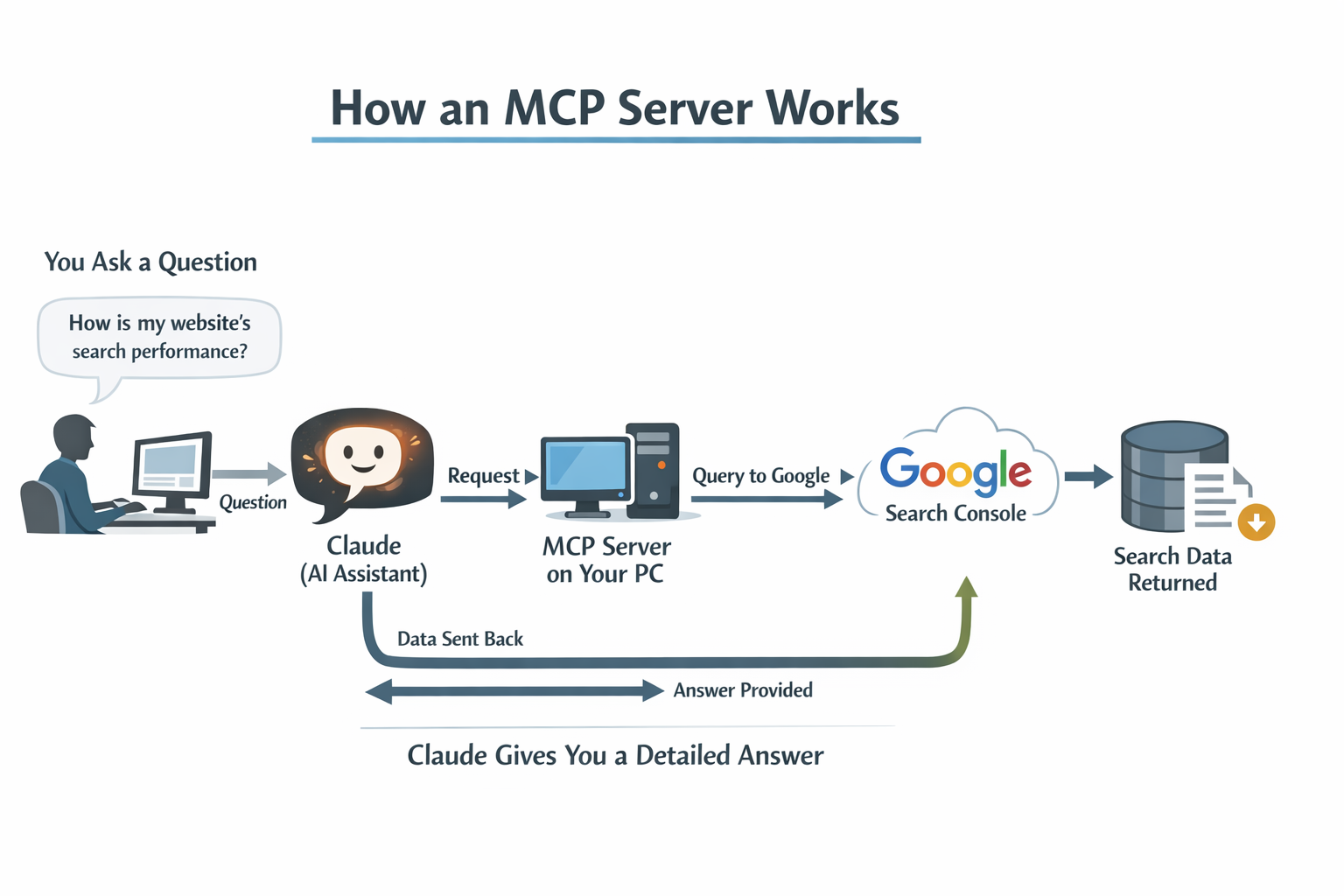
A local Google Search Console MCP server to compare search performance, find SEO opportunities, and check URL indexing status from your AI assistant using your own Google Search Console data.
GSC MCP is an open-source MCP server by Sonni Vasquez. It runs locally over stdio with Node.js or Bun and provides 34 tools. Google API requests run from your machine, with read-only Google access by default and access limited to the properties you select.
Website · npm package · Quickstart · Guía en español · Tool catalog
This is an independent project, not an official Google product.
Install with npx
The buttons and snippets below start the local stdio server with npx -y @sonnivasquez/gsc-mcp. They set GSC_AUTH_MODE=oauth and GSC_ACCESS_MODE=readonly. They do not sign you in to Google and they do not choose a property. Node.js 22 or newer is required. After the client starts the server, set GSC_SITE_URLS to your Search Console property and run gsc auth login or gsc setup. Quick Connect uses the shared read-only OAuth client shipped in this package, so you do not create a Google Cloud project for that path.


Claude Code
Replace sc-domain:example.com with your Search Console property id:
claude mcp add gsc-mcp -e GSC_AUTH_MODE=oauth -e GSC_ACCESS_MODE=readonly -e GSC_SITE_URLS=sc-domain:example.com -- npx -y @sonnivasquez/gsc-mcp
JSON config
Same command, for a client that reads mcpServers. Replace the example property:
{
  "mcpServers": {
    "gsc-mcp": {
      "command": "npx",
      "args": ["-y", "@sonnivasquez/gsc-mcp"],
      "env": {
        "GSC_AUTH_MODE": "oauth",
        "GSC_ACCESS_MODE": "readonly",
        "GSC_SITE_URLS": "sc-domain:example.com"
      }
    }
  }
}
Why this one
Quick Connect is the path that skips creating a Google Cloud OAuth client. Custom OAuth and service accounts in this same server still use credentials you create. Both paths run locally.
| Quick Connect in this server | Your own Google credentials | |
|---|---|---|
| Google Cloud project | Not required. This package ships a shared read-only OAuth client. | Custom OAuth needs your client (GSC_OAUTH_SECRETS_FILE, or GSC_OAUTH_CLIENT_ID plus GSC_OAUTH_CLIENT_SECRET). A service account needs GSC_KEY_FILE. |
| Where it runs | Local stdio process. Google API requests run from your machine. | Same local process. |
| Default access | Read-only. Setup refuses full access for Quick Connect. | Read-only unless GSC_ACCESS_MODE=full. That mode enables gsc_submit_url, gsc_submit_batch, and gsc_submit_sitemap. |
| Tools | 34 gsc_* tools registered by the server. | The same 34 tools. |
| Also registered here | gsc_genai_conversation_queries, gsc_check_update_impact, and gsc_image_page_audit. | The same tools. |
gsc_genai_conversation_queries reads AI-conversation exhaust in query data. gsc_check_update_impact compares a drop window with confirmed ranking updates and reports temporal coincidence only. gsc_image_page_audit fetches your own pages and their image bytes.
What you can do
| SEO task | What GSC MCP returns | Example tools |
|---|---|---|
| Understand a traffic change | Clicks, impressions, CTR, average position and period comparisons by page or query | gsc_performance_overview, gsc_compare_periods, gsc_analyze_traffic_drop |
| Prioritize pages and queries | Candidates with low CTR, weak positions or declining traffic, using explicit thresholds | gsc_find_opportunities, gsc_content_decay |
| Review competing pages | Queries served by multiple pages on your site, with evidence for editorial review | gsc_detect_cannibalization, gsc_query_pages |
| Inspect indexing and sitemaps | Google's indexed view of selected URLs and registered sitemap states | gsc_inspect_urls, gsc_list_sitemaps |
| Compare segments | Brand terms, site folders, countries, devices, or web versus image search | gsc_analyze_segments, gsc_compare_web_image |
| Audit on-page images | Findings from downloading your own pages and their referenced images | gsc_image_page_audit |
| Audit a page or an index sample | Current HTTP HTML and exact-page queries, or indexed-view inspection from sitemap discovery | gsc_page_audit, gsc_indexing_audit |
| Review internal links | Bounded HTML link graph and literal suggestions | gsc_internal_link_audit |
| Evaluate changes or a migration | Observed before/after metrics and declared URL mappings | gsc_change_impact, gsc_migration_audit |
| Prepare reports | Markdown reports and optional local dataset exports | gsc_generate_report, gsc_export_dataset |
These are analysis tools. Opportunity and cannibalization results are candidates to review, not proof that a particular SEO change will improve rankings.
Get started
You need Node.js 22 or newer, npm or Bun, and a Google account with access to a Search Console property. Bun can install the package and run the MCP server; the global gsc CLI still requires Node.js.
npm install -g @sonnivasquez/gsc-mcp
gsc setup
Setup guides you through:
- Sign in to Google. Choose read-only Quick Connect, or use your own OAuth client or a service account.
- Choose properties. Select the Search Console properties this server may access.
- Connect your client. Review and approve the configuration preview. Setup preserves other MCP servers.
Quick Connect uses a shared Desktop OAuth application and needs no Google Cloud project setup. Complete Google sign-in in your browser. Never paste passwords, OAuth credentials or tokens into an AI chat.
Check your local installation and saved authentication state:
gsc doctor
gsc auth status
To check access with a minimal request to Google, run gsc auth status --online. Restart your MCP client if the tools do not appear.
Other installation options
With Bun as the package manager:
bun install -g @sonnivasquez/gsc-mcp
gsc setup
The shell installer installs the latest package globally and opens setup. It uses npm by default and does not use sudo:
curl -fsSL https://gscmcp.dev/install.sh | sh
To use Bun with the installer:
curl -fsSL https://gscmcp.dev/install.sh | sh -s -- --manager bun
Read the installer or follow the quickstart for details.
Supported clients
Guided setup supports Claude Desktop, Claude Code, Cursor, Codex, OpenCode and Pi. It can also print JSON for another compatible MCP client. GSC MCP uses local stdio, so the client must support launching a local server.
See client setup instructions. Use gsc setup --dry-run to preview changes or gsc setup --verbose for configuration details. OpenCode and Pi configuration is global.
Install with your AI agent
Copy this prompt into an agent that can run terminal commands. You complete Google sign-in yourself:
Install @sonnivasquez/gsc-mcp globally with npm, or Bun if I prefer, then run gsc setup.
Use read-only Quick Connect. Help me sign in to Google, choose my Search Console
properties and connect my MCP client while preserving other MCP servers.
Never ask me to paste credentials or tokens into chat. Verify with gsc doctor
and tell me whether I need to restart my client. Do not query Search Console
until I ask.
Try it with your site
After setup, ask your assistant to list the properties it can access. Use an exact property identifier such as sc-domain:example.com or https://example.com/ in subsequent requests.
The prompts below are examples, not measured results:
For sc-domain:example.com, compare the last 28 days with the previous period.
Show the pages with the largest observed click losses, including impressions,
CTR and average position. State the dates and coverage of the returned data.
Find queries for sc-domain:example.com with at least 500 impressions and CTR
below 2% in the last 28 days. Show their ranking pages and prioritize candidates
for a title and snippet review. Do not edit the site.
Inspect these three URLs on my selected property and show Google's indexed
status for each. Then list its registered sitemaps. Do not submit anything.
You can also ask for pages with sustained traffic declines, query overlap across your own pages, brand versus non-brand segments, or a Markdown performance report. Saving reports and exporting datasets require GSC_EXPORTS=1 in your MCP client's server environment. Restart the client after changing that environment.
On-demand website audits and change history
Version 1.1.0 adds gsc_page_audit, gsc_indexing_audit,
gsc_internal_link_audit, gsc_change_impact, and gsc_migration_audit.
They combine bounded HTTP HTML or sitemap reads with your own GSC data.
They do not render JavaScript or run in the background; client-rendered content
and links remain unknown. Continue batches
explicitly using nextCursor; sessions expire after 15 idle minutes.
GSC_HISTORY=1 enables explicit local change records and saved measurements,
independently of GSC_EXPORTS. Transient before/after analysis needs no history.
Results may be partial even when the scheduled work completes: check status,
coverage and warnings. Full evidence may require gsc_get_dataset. No alerts
service, scheduler or automatic captures are installed.
See audit inputs, limits, evidence pagination and examples.
These audits require version 1.1.0 or later. Check gsc_capabilities in the
running server after updating and restarting your MCP client.
Authentication and access
| Connection | Requirements | Access |
|---|---|---|
| Quick Connect | Browser sign-in with a Google account that can access the property | Read-only, using the shared OAuth application |
| Custom OAuth | Your own Google Cloud OAuth client and browser sign-in | Read-only, or full access after explicit configuration |
| Service account | Your own credentials file and permissions for the property | Read-only, or full access after explicit configuration |
Read-only access blocks Google write operations. Full access uses GSC_ACCESS_MODE=full and enables sitemap submission and eligible Indexing API URL notifications. Setup asks for separate confirmation before enabling writes. Quick Connect does not support full access.
URL Inspection reads Google's indexed view; it does not request indexing. Indexing API submissions have eligibility and permission requirements and do not guarantee indexing. See the credentials guide and tool catalog before enabling writes.
Choosing all properties also includes future properties and requires an explicit confirmation. Setup's --yes option does not enable writes, a sample query, or the optional agent skill.
Privacy and data limits
GSC MCP has no hosted MCP backend or product telemetry. OAuth tokens stay in your local data directory, ~/.gsc-mcp/ by default, or GSC_DATA_DIR. Quick Connect shares an OAuth application and its Google API quotas; it does not share your tokens or property access with the maintainer.
Website audits fetch selected pages, robots.txt and sitemaps directly from authorized properties. The image audit also fetches referenced images, including images served by external public hosts.
Tool responses go to your MCP client and may be sent to its AI provider. Local execution does not mean your Search Console data stays entirely on your machine. Review your client's retention and training settings and the privacy policy.
When interpreting results:
- Date presets such as
last_28_daysend three days before today in Pacific Time. This is a conservative product default, not a guarantee of Google's data availability. - Search Console returns limited rows and coverage. Missing rows are not necessarily zero traffic.
- Average position is an impression-weighted average, not a live rank tracker.
- Traffic drops and overlap with Google updates do not establish causation.
- URL Inspection does not trigger a live crawl or guarantee indexing.
- Alerts run on demand; GSC MCP does not continuously monitor your site.
Update or uninstall
Check for a newer release without installing it:
gsc update --check
Run gsc update for an assisted reinstall and verification, or reinstall with your package manager. Check gsc --version and restart your MCP client after updating.
Uninstall with npm uninstall -g @sonnivasquez/gsc-mcp or bun remove -g @sonnivasquez/gsc-mcp. Removing the package does not revoke Google access or delete saved tokens. Follow the uninstall guide to remove local data or revoke access.
Documentation
- Quickstart · Guía rápida en español
- Tool catalog and response contracts
- Credentials and permissions
- Supported clients
- CLI commands
- Troubleshooting
- Privacy · Changelog · Roadmap
Development
npm ci
npm run typecheck:node
npm run test:node
For Bun, build with bun run build and run bun --test test. The package includes an optional Google Search Console MCP agent skill, available from setup with --install-skill.
License and attribution
Apache-2.0. Copyright Sonni Vasquez.
If this server helps, star the repo: https://github.com/sonnivasquez/gsc-mcp
Reviews
No reviews yet
Be the first to review this server!
More Developer Tools MCP Servers
Rea
Freeby Morluto · Developer Tools
Reverse engineer anything from your terminal or agent with one CLI and MCP server.
Paperclip
Freeby Paperclipai · Developer Tools
Trending hip-hop artist momentum scores across four cultural dimensions.
Fetch
Freeby Modelcontextprotocol · Developer Tools
Web content fetching and conversion for efficient LLM usage
Git
Freeby Modelcontextprotocol · Developer Tools
Read, search, and manipulate Git repositories programmatically
Toleno
Freeby Toleno · Developer Tools
Toleno Network MCP Server — Manage your Toleno mining account with Claude AI using natural language.
MCP Marketplace
Freeby mcp-marketplace · Developer Tools
Search and install MCP servers from inside your AI client.