
Server data from the Official MCP Registry
40+ production-ready SwiftUI recipes for building full-stack iOS apps via MCP.
About
40+ production-ready SwiftUI recipes for building full-stack iOS apps via MCP.
Remote endpoints: streamable-http: https://api.shipswift.app/mcp
Security Report
Valid MCP server (1 strong, 0 medium validity signals). No known CVEs in dependencies. Imported from the Official MCP Registry.
3 tools verified · Open access · No issues found
Security scores are indicators to help you make informed decisions, not guarantees. Always review permissions before connecting any MCP server.
Permissions Required
This plugin requests these system permissions. Most are normal for its category.
How to Connect
Remote Plugin
No local installation needed. Your AI client connects to the remote endpoint directly.
Add this to your MCP configuration to connect:
{
  "mcpServers": {
    "io-github-signerlabs-shipswift": {
      "url": "https://api.shipswift.app/mcp"
    }
  }
}Documentation
View on GitHubFrom the project's GitHub README.
ShipSwift
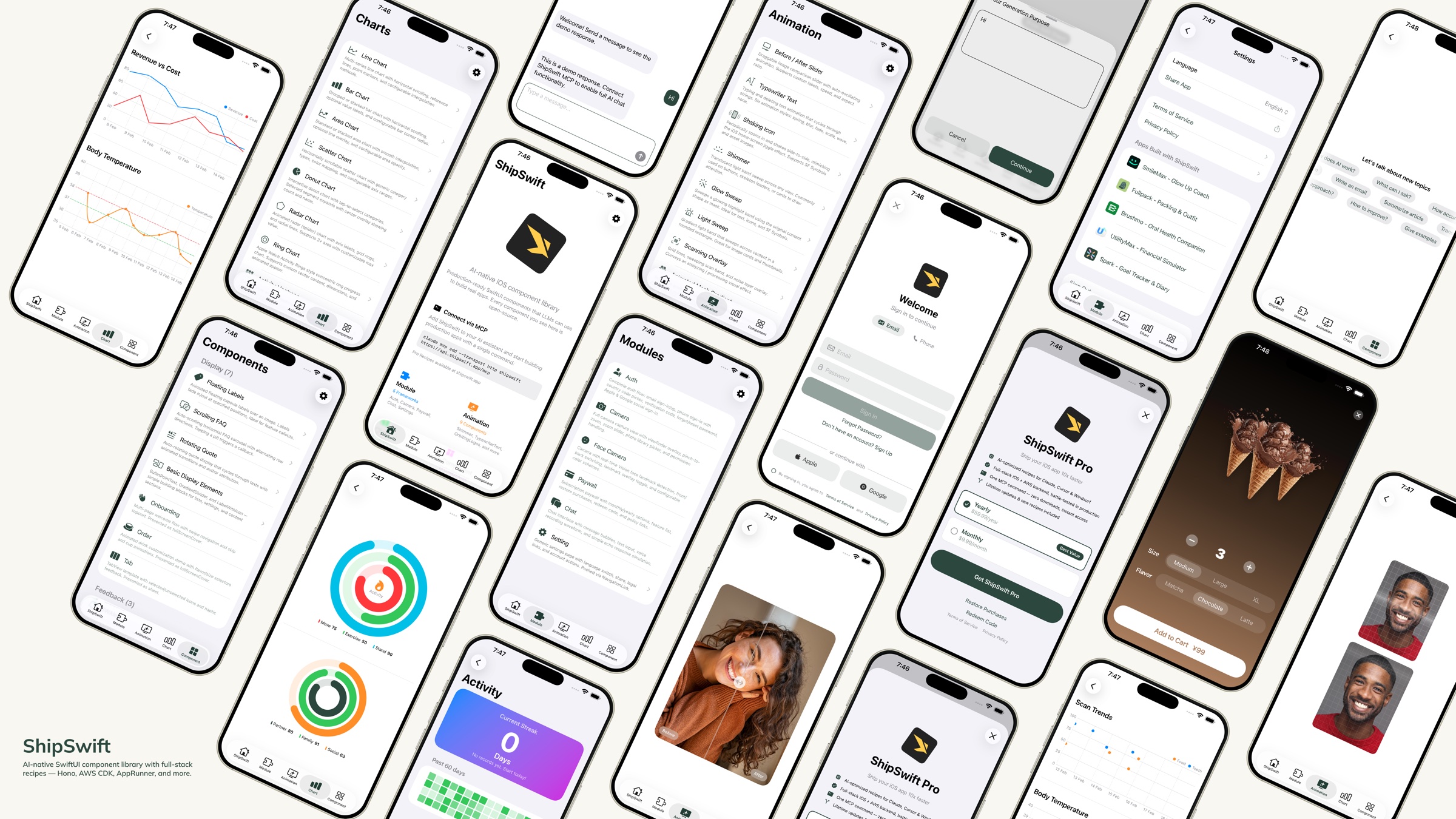
AI-native SwiftUI component library — production-ready code that LLMs can use to build real apps.





Quick Start · Components · Custom Dev — $5K, 4 weeks · Recipes
What is ShipSwift?
One command gives your AI everything it needs — production-ready SwiftUI components, full-stack recipes, and the context to build real apps without guessing.
Browse every recipe live at shipswift.app — searchable catalog, copy-paste source, live previews.
Download the Showcase App to preview every component on your device.
Need a custom app built? We do that too.
ShipSwift gets your AI 80% of the way. If you need the last 20% — your unique features, your brand, your backend — wired up by the people who wrote the recipes, we ship it for you.
| ⚡ 48-hour demo | Working prototype on your TestFlight within 2 days of brief |
| 🚀 4-week delivery | Production-ready iOS app, App Store-submission ready |
| 💵 From $5,000 | Fixed price, milestone-billed, no hourly surprises |
Built on the same component library you see in this repo, so you keep ownership and can extend forever.
Get a quote: wei@signerlabs.com · shipswift.app
Quick Start
Option 1: Skills + Recipe Server (Recommended)
Step 1 — Install ShipSwift Skills:
npx skills add signerlabs/shipswift-skills
Step 2 — Connect the recipe server so your AI can fetch recipes:
# Claude Code
claude mcp add --transport http shipswift https://api.shipswift.app/mcp

# Gemini CLI
gemini mcp add --transport http shipswift https://api.shipswift.app/mcp
For Cursor, VS Code Copilot, Windsurf, and other tools, see the Skills repo for MCP setup.
Step 3 — Ask your AI:
- "Add a shimmer loading animation"
- "Build an authentication flow with Cognito"
- "Show me all chart components"
Option 2: Local Skills (No MCP Required)
Install skills that read source files directly from this repo — works offline, no server needed:
npx skills add signerlabs/ShipSwift
Your AI can then browse the component catalog and read source code locally. Try:
- "Explore ShipSwift recipes"
- "Add a shimmer animation"
- "Build a chat feature"
Tip: If you also connect the MCP server (Option 1), your AI gets access to additional Pro recipes (backend guides, compliance templates, pitfall docs).
Option 3: File Copy
- Clone this repository
- Copy the files you need from
ShipSwift/SWPackage/into your Xcode project - Each component in
SWAnimation/,SWChart/, andSWComponent/is self-contained — just copy the file andSWUtil/if needed
Run the Showcase App
git clone https://github.com/signerlabs/ShipSwift.git
cd ShipSwift
open ShipSwift.xcodeproj
Select a simulator or device, then press Cmd+R to build and run.
Components
SWAnimation — Animation Components
SwiftUI animations: Shimmer · TypewriterText · ShakingIcon · GlowSweep · LightSweep · ScanningOverlay · AnimatedMeshGradient · BeforeAfterSlider · OrbitingLogos · FullScreenButton
Canvas-rendered 3D: DotSphere · CharSphere
Metal-shader procedural backgrounds: Dots · Starfield · FractalClouds · InkSmoke · LiquidChrome · Plasma · AnimatedLoop
Metal-shader backgrounds: Metaballs · Halftone · Water · LiquidMetal · NeuroNoise · DotOrbit · Voronoi · SimplexNoise · ColorPanels · SmokeRing · Swirl
30 animation components total — see the Showcase App for live previews.
SWChart — Chart Components
LineChart · BarChart · AreaChart · DonutChart · RingChart · RadarChart · ScatterChart · ActivityHeatmap
SWComponent — UI Components
Display: FloatingLabels · ScrollingFAQ · RotatingQuote · BulletPointText · GradientDivider · Label · MarkdownText · OnboardingView · OrderView · RootTabView · VideoPlayer Feedback: Alert · Loading · ThinkingIndicator Input: TabButton · Stepper · AddSheet · SearchBar
SWModule — Multi-File Frameworks
- SWAuth — User authentication (Amplify/Cognito, social login, email/password, phone sign-in with country code picker)
- SWCamera — Camera capture with viewfinder, zoom, photo picker, and face detection with Vision landmark tracking
- SWPaywall — Subscription paywall using StoreKit 2 — iOS client included free. Full-stack recipe (backend + compliance + pitfalls) → Pro
- SWChat — All-in-one chat view with message list, text input, and optional voice recognition (VolcEngine ASR)
- SWSetting — Settings page template with language switch, share, legal links, recommended apps
- SWSubjectLifting — Background removal using VisionKit ImageAnalysis
- SWTikTokTracking — TikTok Events API integration for attribution tracking — iOS client included free. Full-stack recipe (backend + compliance + pitfalls) → Pro
SWUtil — Shared Utilities
DebugLog · String/Date/View extensions · LocationManager
Directory Structure
ShipSwift/
├── SWPackage/
│   ├── SWAnimation/          # Animation components
│   ├── SWChart/              # Chart components
│   ├── SWComponent/          # UI components
│   │   ├── Display/          #   Display components
│   │   ├── Feedback/         #   Feedback components
│   │   └── Input/            #   Input components
│   ├── SWModule/             # Multi-file frameworks
│   │   ├── SWAuth/           #   Authentication
│   │   ├── SWCamera/         #   Camera + face detection
│   │   ├── SWPaywall/        #   Subscription paywall
│   │   ├── SWChat/           #   Chat + voice input
│   │   ├── SWSetting/        #   Settings page
│   │   ├── SWSubjectLifting/ #   Background removal
│   │   └── SWTikTokTracking/ #   TikTok attribution
│   └── SWUtil/               # Shared utilities
├── View/                     # Showcase app views
├── Service/                  # App services
└── Component/                # Shared app components
Naming Convention
All types use the SW prefix (e.g., SWAlertManager, SWStoreManager).
View modifiers use .sw lowercase prefix (e.g., .swAlert(), .swPageLoading(), .swPrimary).
Dependency Rules
SWUtil        ← no dependencies on other SWPackage directories
SWAnimation   ← may depend on SWUtil only
SWChart       ← may depend on SWUtil only
SWComponent   ← may depend on SWUtil only
SWModule      ← may depend on SWUtil and SWComponent
Recipes
ShipSwift provides free and pro recipes via Skills — each recipe includes complete SwiftUI source code, implementation steps, and best practices. Your AI assistant can retrieve any recipe on demand.
| Category | Examples |
|---|---|
| Animation | Shimmer, Typewriter, Orbiting Logos |
| Chart | Line, Bar, Donut, Radar, Heatmap |
| Component | Alert, Onboarding, Stepper, FAQ |
| Module | Auth, Camera, Chat, Setting, Infra CDK, Subscription*, TikTok Tracking*, Export & Share* |
* Pro recipes — includes full backend, compliance templates, and pitfall guides. Coming soon: Push Notifications, Analytics Dashboard.
Three tools are available: listRecipes, getRecipe, searchRecipes.
Learn more at shipswift.app · Skills repo: signerlabs/shipswift-skills
Free vs Pro
All iOS client code is open-source under the MIT license. Pro recipes add everything you need to go from prototype to production.
| Free (Open Source) | Pro Recipe | |
|---|---|---|
| iOS client code | Full source | Enhanced version |
| Backend implementation | — | Hono routes, DB schema, webhooks |
| Integration guides | — | End-to-end setup checklists |
| Compliance templates | — | Privacy manifest, App Store labels |
| Known pitfalls | — | 10+ battle-tested tips per recipe |
See pricing for details.
Tech Stack
- SwiftUI + Swift
- StoreKit 2
- Amplify SDK (Cognito)
- AVFoundation + Vision
- SpriteKit
- VolcEngine ASR
Contributing
Contributions are welcome! Please follow these steps:
- Fork the repository
- Create a feature branch (
git checkout -b feature/amazing-feature) - Commit your changes (
git commit -m 'Add amazing feature') - Push to the branch (
git push origin feature/amazing-feature) - Open a Pull Request
Code Style
- All comments and documentation in English
- Follow the naming conventions, dependency rules, and self-containment described above
License
This project is licensed under the MIT License — see the LICENSE file for details.
Reviews
No reviews yet
Be the first to review this server!
More Developer Tools MCP Servers
Git
Freeby Modelcontextprotocol · Developer Tools
Read, search, and manipulate Git repositories programmatically
Fetch
Freeby Modelcontextprotocol · Developer Tools
Web content fetching and conversion for efficient LLM usage
Toleno
Freeby Toleno · Developer Tools
Toleno Network MCP Server — Manage your Toleno mining account with Claude AI using natural language.
mcp-creator-python
Freeby mcp-marketplace · Developer Tools
Create, build, and publish Python MCP servers to PyPI — conversationally.
MCP Marketplace
Freeby mcp-marketplace · Developer Tools
Search and install MCP servers from inside your AI client.
MarkItDown
Freeby Microsoft · Content & Media
Convert files (PDF, Word, Excel, images, audio) to Markdown for LLM consumption