
Server data from the Official MCP Registry
AI image generation and editing with prompt optimization and quality presets
About
AI image generation and editing with prompt optimization and quality presets
Security Report
Valid MCP server (2 strong, 1 medium validity signals). 1 code issue detected. No known CVEs in dependencies. Package registry verified. Imported from the Official MCP Registry. Trust signals: trusted author (4/4 approved); 4 highly-trusted packages. 1 finding(s) downgraded by scanner intelligence.
3 files analyzed · 2 issues found
Security scores are indicators to help you make informed decisions, not guarantees. Always review permissions before connecting any MCP server.
Permissions Required
This plugin requests these system permissions. Most are normal for its category.
What You'll Need
Set these up before or after installing:
Environment variable: IMAGE_PROVIDER
Environment variable: GEMINI_API_KEY
Environment variable: OPENAI_API_KEY
Environment variable: ARK_API_KEY
Environment variable: IMAGE_OUTPUT_DIR
Environment variable: IMAGE_QUALITY
Environment variable: SKIP_PROMPT_ENHANCEMENT
How to Install
Add this to your MCP configuration file:
{
  "mcpServers": {
    "io-github-shinpr-mcp-image": {
      "env": {
        "ARK_API_KEY": "your-ark-api-key-here",
        "IMAGE_QUALITY": "your-image-quality-here",
        "GEMINI_API_KEY": "your-gemini-api-key-here",
        "IMAGE_PROVIDER": "your-image-provider-here",
        "OPENAI_API_KEY": "your-openai-api-key-here",
        "IMAGE_OUTPUT_DIR": "your-image-output-dir-here",
        "SKIP_PROMPT_ENHANCEMENT": "your-skip-prompt-enhancement-here"
      },
      "args": [
        "-y",
        "mcp-image"
      ],
      "command": "npx"
    }
  }
}Documentation
View on GitHubFrom the project's GitHub README.
MCP Image Generator 🍌
Generate and edit images from Cursor, Claude Code, Codex, or any MCP-compatible tool. Supports Google Gemini, OpenAI GPT Image, and BytePlus Seedream.



This MCP server turns a plain-language request into an image file. It adds relevant photographic details such as lighting, camera angle, materials, and palette, then returns the saved image as an MCP resource.
How It Works
You: "a roast chicken for a recipe page, partway through
      carving so you can see how juicy it is"
        ↓
  Your AI assistant sends the request to mcp-image
        ↓
  Prompt enhancement adds relevant photographic details
  (subject, lighting, camera, and palette)
        ↓
  The selected provider generates the image
  (using the configured grounding, consistency, and resolution options)
        ↓
  Saved file, returned as an MCP resource
Your AI assistant supplies the style, purpose, and context from your request. mcp-image fills in missing visual details and selects the generation settings.
The prompt optimizer uses a Subject–Context–Style framework. It runs on Gemini 2.5 Flash by default, OpenAI Responses when IMAGE_PROVIDER=openai, or ModelArk Responses when IMAGE_PROVIDER=seedream. It adds missing details about the subject, environment, lighting, and camera work while keeping the details already present in the request. Detailed prompts receive fewer changes.
Example
You write: "a photo of a roast chicken dinner for a recipe site. it should look like it was actually cooked, and it should be partway through being carved so you can tell how juicy it is"
What the server sends to the image model: "...a beautifully roasted whole chicken, golden-brown and glistening, resting on a rustic wooden cutting board. One leg is partially carved, revealing tender, succulent white meat and rich, glistening juices pooling around the carving knife ... shallow depth of field to keep the focus sharply on the carved chicken."
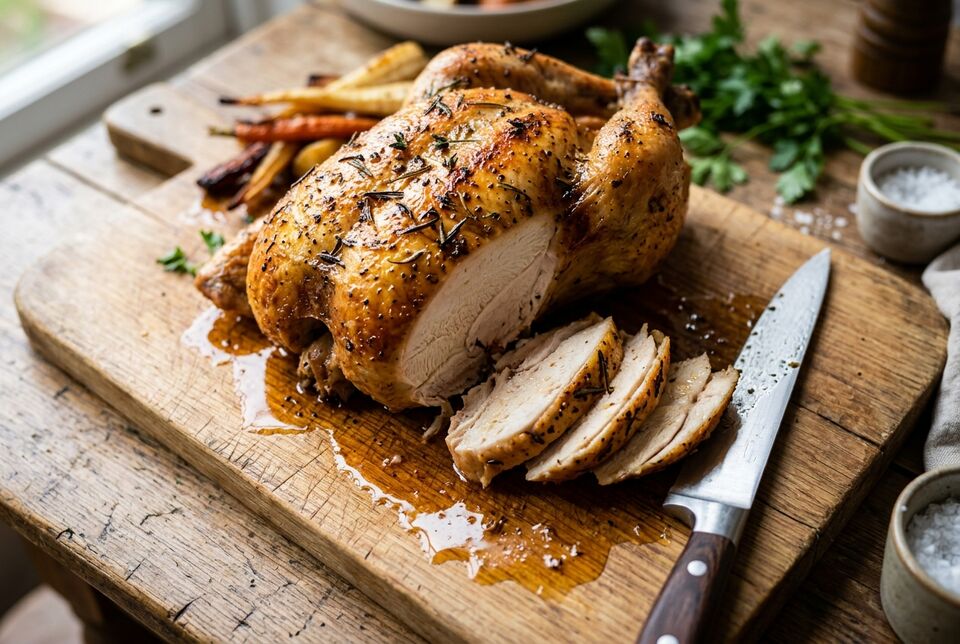
Gemini provider, default fast preset.
What carried through:
for a recipe site→ one subject, with everything else kept subordinateactually cooked→ juices spread across the board, uneven browningpartway through being carved→ the cut face, with slices laid beside ithow juicy it is→ close framing and shallow depth of field on the cut
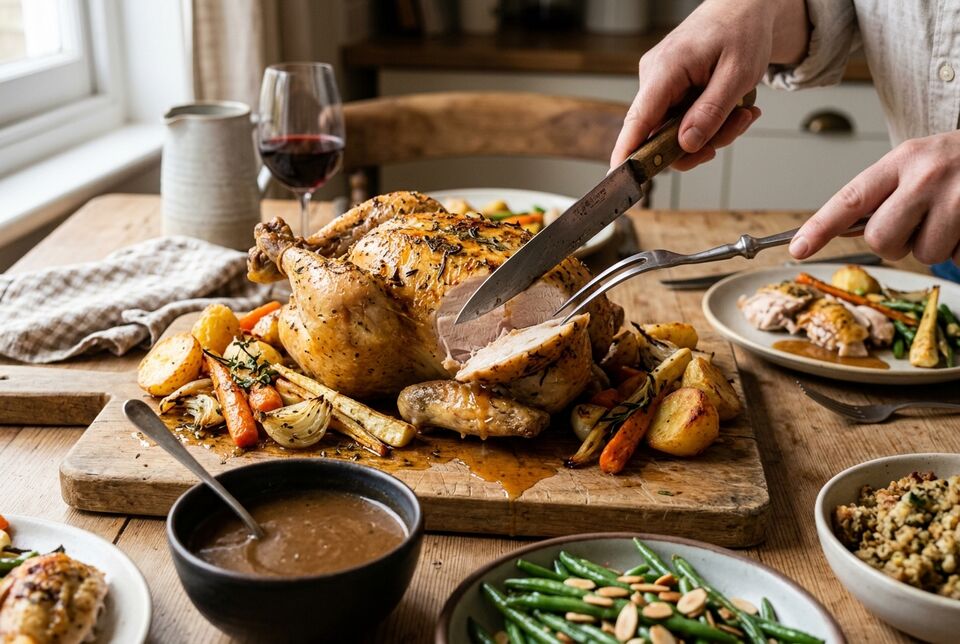
Set SKIP_PROMPT_ENHANCEMENT=true to send your prompt through unchanged.
Features
- Prompt enhancement: Adds lighting, composition, camera, and palette details using the selected provider's text model.
- Image providers: Set
IMAGE_PROVIDER=openaifor OpenAI GPT Image orIMAGE_PROVIDER=seedreamfor BytePlus Seedream through ModelArk. Passprovideron a single request to switch providers without changing the server configuration. - Quality presets: Select
fast,balanced, orquality. Each provider maps these values to a supported model route. See Quality Presets. - Image editing: Edit an existing image with natural-language instructions while retaining its style and visual details.
- Resolution controls: Request up to 4K, depending on the provider and quality route.
- Aspect ratios: Supports formats from square (1:1) to ultra-wide (21:9) and ultra-tall (1:8).
- Character consistency: Keep a character's appearance consistent across storyboards, product shots, or a series of images.
- Provider-specific options:
- Google Search grounding for real-time factual accuracy with the Gemini provider
- World knowledge for photorealistic depictions of historical figures, landmarks, and factual scenarios
- Prompt-level blending guidance for composite scenes
- Purpose-aware generation (e.g., "cookbook cover" produces different results than "social media post")
- Output formats: OpenAI and Seedream support PNG or JPEG selection through the output filename.
Prerequisites
- Node.js 22 or higher
- Gemini API Key - Get yours at Google AI Studio for the default Gemini provider
- OpenAI API Key - Get yours from OpenAI when using
IMAGE_PROVIDER=openai - BytePlus ModelArk API Key - Create one in the AP region ModelArk console when using
IMAGE_PROVIDER=seedream - An MCP-compatible AI tool: Cursor, Claude Code, Codex, or others
- Basic terminal/command line knowledge
Quick Start
1. Get Your Gemini API Key
Get your API key from Google AI Studio
To use OpenAI instead, get an OpenAI API key and set:
IMAGE_PROVIDER=openai
OPENAI_API_KEY=your_openai_api_key_here
OpenAI mode requires organization verification. See Using the OpenAI provider for setup details and feature differences.
To use BytePlus Seedream instead, create an API key in the ModelArk AP region and set:
IMAGE_PROVIDER=seedream
ARK_API_KEY=<your-api-key>
See Using the BytePlus Seedream provider for compatibility details.
2. MCP Configuration
For Codex
Add to ~/.codex/config.toml:
[mcp_servers.mcp-image]
command = "npx"
args = ["-y", "mcp-image"]

[mcp_servers.mcp-image.env]
GEMINI_API_KEY = "your_gemini_api_key_here"
IMAGE_OUTPUT_DIR = "/absolute/path/to/images"
For OpenAI GPT Image from a local fork:
[mcp_servers.mcp-image]
command = "node"
args = ["/absolute/path/to/mcp-image/dist/index.js"]

[mcp_servers.mcp-image.env]
IMAGE_PROVIDER = "openai"
OPENAI_API_KEY = "your_openai_api_key_here"
IMAGE_OUTPUT_DIR = "/absolute/path/to/images"
For Cursor
Add to your Cursor settings:
- Global (all projects):
~/.cursor/mcp.json - Project-specific:
.cursor/mcp.jsonin your project root
{
  "mcpServers": {
    "mcp-image": {
      "command": "npx",
      "args": ["-y", "mcp-image"],
      "env": {
        "GEMINI_API_KEY": "your_gemini_api_key_here",
        "IMAGE_OUTPUT_DIR": "/absolute/path/to/images"
      }
    }
  }
}
For OpenAI GPT Image from a local fork:
{
  "mcpServers": {
    "mcp-image": {
      "command": "node",
      "args": ["/absolute/path/to/mcp-image/dist/index.js"],
      "env": {
        "IMAGE_PROVIDER": "openai",
        "OPENAI_API_KEY": "your_openai_api_key_here",
        "IMAGE_OUTPUT_DIR": "/absolute/path/to/images"
      }
    }
  }
}
For Claude Code
Run in your project directory to enable for that project:
cd /path/to/your/project
claude mcp add mcp-image --env GEMINI_API_KEY=your-api-key --env IMAGE_OUTPUT_DIR=/absolute/path/to/images -- npx -y mcp-image
Or add globally for all projects:
claude mcp add mcp-image --scope user --env GEMINI_API_KEY=your-api-key --env IMAGE_OUTPUT_DIR=/absolute/path/to/images -- npx -y mcp-image
For OpenAI GPT Image from a local fork:
npm install
npm run build
claude mcp add mcp-image --scope user \
  --env IMAGE_PROVIDER=openai \
  --env OPENAI_API_KEY=your-openai-api-key \
  --env IMAGE_OUTPUT_DIR=/absolute/path/to/images \
  -- node /absolute/path/to/mcp-image/dist/index.js
Security: Never commit API keys to version control. Use environment-specific configuration.
Path requirements:
IMAGE_OUTPUT_DIRmust be an absolute path (e.g.,/Users/username/images, not./images)- Defaults to
./outputin the current working directory if not specified - Directory will be created automatically if it doesn't exist
Quality Presets
The presets trade off speed, quality, and cost:
| Preset | Model | Best for | Speed |
|---|---|---|---|
fast (default) | Nano Banana 2 (Gemini 3.1 Flash Image) | Quick iterations, drafts, high-volume generation | ~30–40s |
balanced | Nano Banana 2 + Thinking | Production images, good quality with reasonable speed | Medium |
quality | Nano Banana Pro (Gemini 3 Pro Image) | Final deliverables, maximum fidelity, critical visuals | Slow |
Set the default via IMAGE_QUALITY environment variable:
IMAGE_QUALITY=fast       # (default) Fastest generation
IMAGE_QUALITY=balanced   # Enhanced thinking for better quality
IMAGE_QUALITY=quality    # Maximum quality output
To override the preset for one request, tell your AI assistant to "generate in high quality" or "use balanced quality." The assistant passes the corresponding quality parameter.
Codex:
[mcp_servers.mcp-image.env]
GEMINI_API_KEY = "your_gemini_api_key_here"
IMAGE_QUALITY = "balanced"
Cursor:
Add "IMAGE_QUALITY": "balanced" to the env section in your config.
Claude Code:
claude mcp add mcp-image --env GEMINI_API_KEY=your-api-key --env IMAGE_QUALITY=balanced --env IMAGE_OUTPUT_DIR=/absolute/path/to/images -- npx -y mcp-image
Skip Prompt Enhancement
Set SKIP_PROMPT_ENHANCEMENT=true to send prompts directly to the image generator. Use this when the exact prompt wording needs to remain unchanged.
Provider Configuration
| Variable | Default | Description |
|---|---|---|
IMAGE_PROVIDER | gemini | gemini, openai, or seedream. Used when a request does not set provider |
GEMINI_API_KEY | - | Required to use the gemini provider |
OPENAI_API_KEY | - | Required to use the openai provider |
ARK_API_KEY | - | Required to use the seedream provider; use a ModelArk AP region key |
A request-level provider takes precedence over IMAGE_PROVIDER; if neither is set, gemini is
used. The server can start without any API keys, but generate_image requires a key for the
selected provider. If a key is missing, the error identifies the environment variable to configure.
Using the BytePlus Seedream provider
As of July 29, 2026, Seedream 5.0 Pro is available only in ModelArk AP (ap-southeast-1). Create an
API key in the ModelArk AP region console.
mcp-image uses seed-2-0-lite-260428 for prompt enhancement and Seedream 5.0 Pro for image generation. These model choices are fixed by the server and are not configurable through environment variables.
Seedream quality routing is fixed:
| Public preset | Seedream route | Native image optimizer | Supported imageSize | Default when omitted |
|---|---|---|---|---|
fast | Seedream 5.0 Pro | fast | 1K, 2K | 1K |
balanced | Seedream 5.0 Pro | standard | 1K, 2K | 1K |
quality | Seedream 5.0 Pro | standard | 1K, 2K | 1K |
All supported aspect ratios use BytePlus Method 1, so final pixel dimensions are model-selected.
Seedream rejects imageSize: "4K" and useGoogleSearch: true. Image requests have a fixed
300-second timeout. Seedream image editing accepts PNG and JPEG input images only.
Using the OpenAI provider
Set IMAGE_PROVIDER=openai to use OpenAI for both prompt enhancement and image generation. mcp-image currently uses gpt-5.4-nano for prompt enhancement and gpt-image-2 for image generation. These model choices are fixed by the server and are not configurable through environment variables.
OpenAI may require organization verification before allowing access to gpt-image-2. If image generation fails with a 403 permission or verification error, check your organization settings: https://platform.openai.com/settings/organization/general
OpenAI provider behavior:
- Supports text-to-image and image-to-image generation.
- Supports
aspectRatio, mapped to the closest supported OpenAI image size. - Supports
imageSizevalues1K,2K, and4K. - Maps
qualityasfast -> low,balanced -> medium, andquality -> high. For anything beyond simple subjects,balancedorqualityis recommended. - Does not support
useGoogleSearch; that option is only available with the Gemini provider.
Prompt enhancement uses a separate OpenAI Responses API call. Set SKIP_PROMPT_ENHANCEMENT=true to send prompts directly to the image model.
Usage Examples
Once configured, describe the image in natural language:
Basic Image Generation
"Generate a serene mountain landscape at sunset with a lake reflection"
Prompt enhancement fills in relevant details about lighting, materials, composition, and atmosphere.
Image Editing
"Edit this image to make the person face right"
(with inputImagePath: "/path/to/image.jpg")
Generation Options
Character Consistency:
"Generate a portrait of a medieval knight, maintaining character consistency for future variations"
(with maintainCharacterConsistency: true)
High-Resolution 4K with Text Rendering:
"Generate a professional product photo of a smartphone with clear text on the screen"
(with imageSize: "4K")
Custom Aspect Ratio:
"Generate a cinematic landscape of a desert at golden hour"
(with aspectRatio: "21:9")
API Reference
generate_image Tool
The server uses a separate model for each of its two stages:
- Prompt Optimization (Gemini 2.5 Flash by default,
gpt-5.4-nanovia OpenAI Responses in OpenAI mode, orseed-2-0-lite-260428via ModelArk Responses in Seedream mode): Refines your prompt using the Subject–Context–Style framework. Skippable viaSKIP_PROMPT_ENHANCEMENT. - Image Generation (Nano Banana 2/Pro by default,
gpt-image-2in OpenAI mode, or Seedream 5.0 Pro in Seedream mode): Creates the final image. Provider-specific quality mappings are described above.
Parameters
| Parameter | Type | Required | Description |
|---|---|---|---|
prompt | string | ✅ | Text description or editing instruction |
quality | string | - | Quality preset: fast (default), balanced, quality. Overrides IMAGE_QUALITY env var for this request |
provider | string | - | Image provider: gemini, openai, seedream. Overrides IMAGE_PROVIDER env var for this request; the provider's API key must be configured |
inputImagePath | string | - | Absolute path to input image for image-to-image editing |
fileName | string | - | .png, .jpg, or .jpeg selects that output format for OpenAI/Seedream. Other or absent suffixes use the provider default, and the saved name is corrected to the actual image extension |
aspectRatio | string | - | 1:1 (default), 2:3, 3:2, 3:4, 4:3, 4:5, 5:4, 9:16, 16:9, 21:9, 1:4, 1:8, 4:1, 8:1 |
imageSize | string | - | 1K, 2K, 4K. Leave unspecified for standard quality |
blendImages | boolean | - | Enable multi-image blending for combining multiple visual elements naturally |
maintainCharacterConsistency | boolean | - | Maintain character appearance consistency across different poses and scenes |
useWorldKnowledge | boolean | - | Use real-world knowledge for accurate context (historical figures, landmarks, factual scenarios) |
useGoogleSearch | boolean | - | Enable Google Search grounding with Gemini. OpenAI and Seedream reject true |
purpose | string | - | Intended use (e.g., "cookbook cover", "social media post"). Helps tailor visual style and details |
Response
{
  "type": "resource",
  "resource": {
    "uri": "file:///path/to/generated/image.png",
    "name": "image-filename.png",
    "mimeType": "image/png"
  },
  "metadata": {
    "model": "gemini-3.1-flash-image",
    "provider": "gemini",
    "processingTime": 5000,
    "timestamp": "2026-01-01T12:00:00.000Z"
  }
}
Troubleshooting
Common Issues
"API key not found"
- Ensure
GEMINI_API_KEYis set when using Gemini,OPENAI_API_KEYis set whenIMAGE_PROVIDER=openai, orARK_API_KEYis set whenIMAGE_PROVIDER=seedream - Verify the API key is valid and has image generation permissions
"Input image file not found"
- Use absolute file paths, not relative paths
- Ensure the file exists and is accessible
- Supported formats: PNG, JPEG, WebP (max 10MB)
"No image data found in Gemini API response"
- Try rephrasing your prompt with more specific details
- Ensure your prompt is appropriate for image generation
- Check if your API key has sufficient quota
Performance Tips
- In Gemini mode, the
fastpreset typically takes ~30–40 seconds including prompt optimization - In Gemini mode,
balanceduses additional thinking andqualityselects Nano Banana Pro - In Seedream mode, use the route table above; all tiers use Pro, with
fastselecting nativefastoptimization andbalanced/qualityselectingstandard - High-resolution (2K/4K): Processing time varies by provider and route
- Say what the image is for; the optimizer supplies the photographic terms it implies
- Details you specify yourself are carried through rather than rewritten
- Consider
useWorldKnowledgefor historical or factual subjects - Use
imageSize: "4K"when the selected provider supports it; Seedream accepts1Kand2K
Usage Notes
- This MCP server uses the paid Gemini API:
- Prompt optimization: Gemini 2.5 Flash (minimal token usage)
- Image generation: Model depends on quality preset
fast/balanced: Nano Banana 2 (Gemini 3.1 Flash Image, lower cost)quality: Nano Banana Pro (Gemini 3 Pro Image, higher cost)
balanceduses additional thinking tokens (slightly higher cost thanfast)
- Check current pricing and rate limits at Google AI Studio
- Monitor your API usage to avoid unexpected charges
- The prompt optimization step adds minimal cost and keeps the intent of your request in the generated image
Standalone Agent Skill: Image Generation Prompt Guide
This project also includes a standalone Agent Skill (SKILL.md). Use it to help an AI assistant write prompts for a tool that already supports image generation. The skill is separate from the MCP server, does not call it, and does not require an API key.
The skill covers the Subject-Context-Style framework, lighting, textures, camera angles, character consistency, composition, and image editing. It works with Gemini, GPT Image, Flux, Stable Diffusion, Midjourney, and other image models.
Install
npx mcp-image skills install --path <skills-directory>
The skill will be placed at <skills-directory>/image-generation/SKILL.md. For example: ~/.cursor/skills (Cursor), ~/.codex/skills (Codex), or ~/.claude/skills (Claude Code).
License
MIT License - see LICENSE for details.
Need help? Open an issue or check the troubleshooting section above.
Reviews
No reviews yet
Be the first to review this server!
More Developer Tools MCP Servers
Git
Freeby Modelcontextprotocol · Developer Tools
Read, search, and manipulate Git repositories programmatically
Fetch
Freeby Modelcontextprotocol · Developer Tools
Web content fetching and conversion for efficient LLM usage
Toleno
Freeby Toleno · Developer Tools
Toleno Network MCP Server — Manage your Toleno mining account with Claude AI using natural language.
mcp-creator-python
Freeby mcp-marketplace · Developer Tools
Create, build, and publish Python MCP servers to PyPI — conversationally.
MCP Marketplace
Freeby mcp-marketplace · Developer Tools
Search and install MCP servers from inside your AI client.
MarkItDown
Freeby Microsoft · Content & Media
Convert files (PDF, Word, Excel, images, audio) to Markdown for LLM consumption