
Connect Redash to Claude -- query data, manage dashboards, and run SQL with natural language.
About
Connect Redash to Claude -- query data, manage dashboards, and run SQL with natural language.
Security Report
redash-mcp is a well-structured MCP server for querying Redash with comprehensive SQL safety guards. Authentication uses environment variables (REDASH_URL, REDASH_API_KEY) appropriately. The codebase demonstrates good security practices with input validation, no credential hardcoding, and permissions scoped to HTTP API calls. Minor code quality issues exist (broad error handling, potential logging of errors), but these are low-severity and do not significantly impact security. Supply chain analysis found 2 known vulnerabilities in dependencies (0 critical, 1 high severity). Package verification found 1 issue.
4 files analyzed · 7 issues found
Security scores are indicators to help you make informed decisions, not guarantees. Always review permissions before connecting any MCP server.
Permissions Required
This plugin requests these system permissions. Most are normal for its category.
What You'll Need
Set these up before or after installing:
Environment variable: REDASH_URL
Environment variable: REDASH_API_KEY
Environment variable: REDASH_SAFETY_MODE
Environment variable: REDASH_SAFETY_DISABLE_PII
Environment variable: REDASH_SAFETY_DISABLE_COST
How to Install
Add this to your MCP configuration file:
{
  "mcpServers": {
    "io-github-seob717-redash-mcp": {
      "env": {
        "REDASH_URL": "your-redash-url-here",
        "REDASH_API_KEY": "your-redash-api-key-here",
        "REDASH_SAFETY_MODE": "your-redash-safety-mode-here",
        "REDASH_SAFETY_DISABLE_PII": "your-redash-safety-disable-pii-here",
        "REDASH_SAFETY_DISABLE_COST": "your-redash-safety-disable-cost-here"
      },
      "args": [
        "-y",
        "redash-mcp"
      ],
      "command": "npx"
    }
  }
}Documentation
View on GitHubFrom the project's GitHub README.
redash-mcp








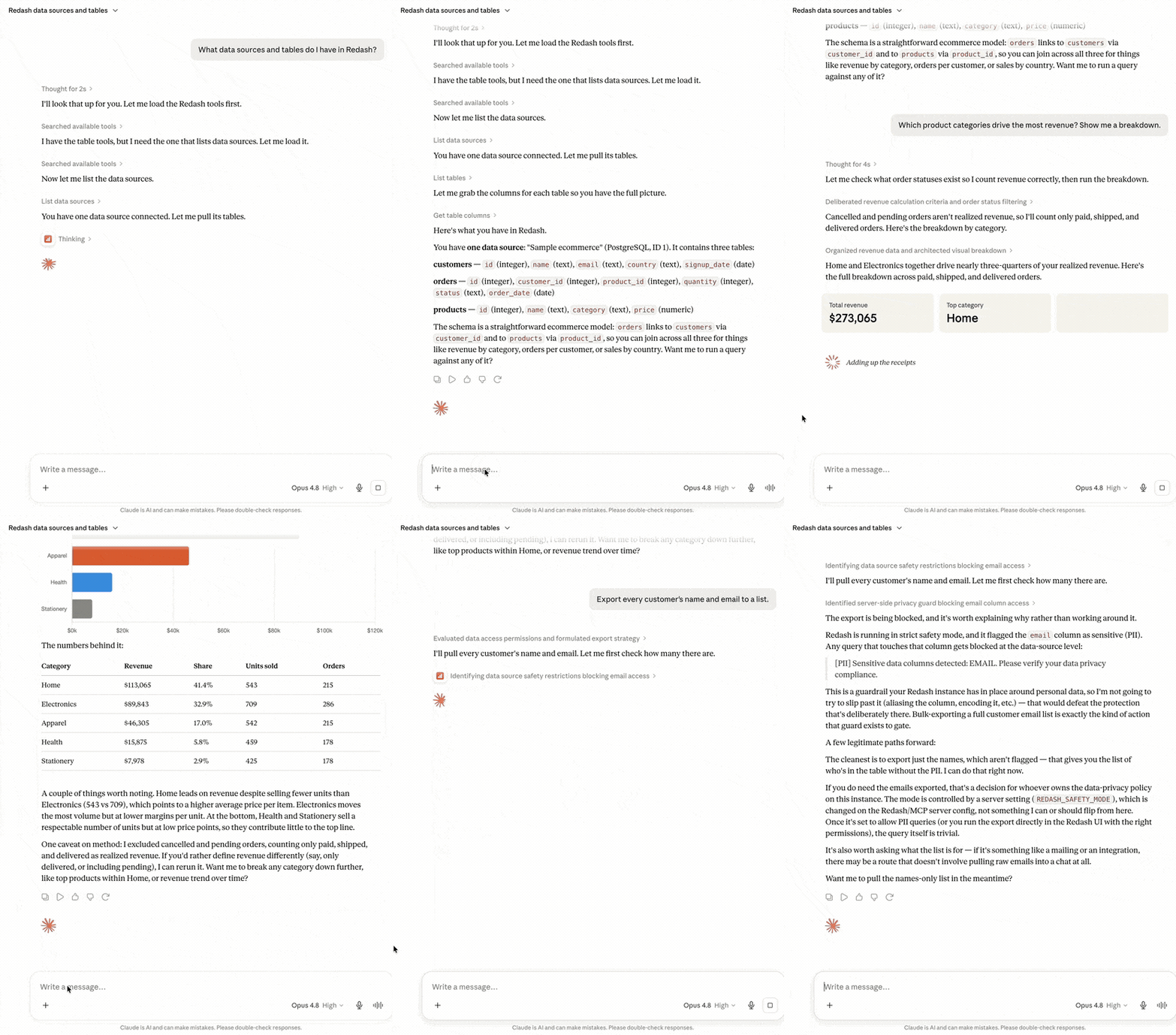
MCP server that connects Redash to Claude, Cursor, Gemini CLI, Codex, and any MCP client — query data, manage dashboards, and run SQL with natural language.
Why · Features · Install · Env · Examples · Privacy
Why redash-mcp?
There are several Redash MCP servers. This one is built for letting an LLM touch production data safely:
- 🛡️ SQL Safety Guard — blocks
DROP/TRUNCATE/ALTERandDELETE/UPDATEwithoutWHERE;strict/warn/offmodes, PII detection, and auto-LIMIT. Hand Claude your real Redash without flinching. - 🧠 BIRD Smart Query — analyzes the question, auto-selects the right tables, and guides SQL generation (based on the BIRD text-to-SQL methodology). Optional Claude Haiku fallback for table selection.
- ⚡ One-command setup —
npx redash-mcp setupconfigures Claude Desktop / Claude Code / Cursor / Gemini CLI / Codex CLI for you. No hand-editing JSON. - 🔒 Fully local — talks directly to your Redash instance. API key and query results never leave your machine.
- 📊 End-to-end — query, save, fork, dashboards, widgets, and alerts — 20+ tools across 6 categories.
Features
Tools
| Category | Tool | Description |
|---|---|---|
| Data Sources | list_data_sources | List connected data sources |
| Schema | list_tables | List tables (supports keyword search) |
| Schema | get_table_columns | Get column names and types |
| Smart Query | smart_query | Analyze a question, auto-select tables, guide SQL generation (BIRD) |
| Smart Query | get_bird_config | Inspect the active BIRD smart-query configuration |
| Smart Query | evaluate_queries | Evaluate generated SQL against expected results |
| Smart Query | submit_query_feedback | Record feedback to improve future table selection |
| Smart Query | manage_few_shot_examples | Add/list BIRD few-shot examples |
| Smart Query | manage_keyword_map | Add/list keyword→table mappings |
| Query | run_query | Execute SQL and return results |
| Saved Queries | list_queries | List saved queries |
| Saved Queries | get_query | Get query details (SQL, visualizations) |
| Saved Queries | get_query_result | Run a saved query and get results |
| Saved Queries | create_query | Save a new query |
| Saved Queries | update_query | Update a saved query |
| Saved Queries | fork_query | Fork a saved query |
| Saved Queries | archive_query | Archive (delete) a query |
| Dashboards | list_dashboards | List dashboards |
| Dashboards | get_dashboard | Get dashboard details and widgets |
| Dashboards | create_dashboard | Create a new dashboard |
| Dashboards | add_widget | Add a visualization widget to a dashboard |
| Alerts | list_alerts | List alerts |
| Alerts | get_alert | Get alert details |
| Alerts | create_alert | Create a new alert |
SQL Safety Guard
Protects your database from dangerous queries:
- Blocked always:
DROP,TRUNCATE,ALTER TABLE,GRANT/REVOKE,DELETE/UPDATEwithoutWHERE - Warned (warn mode) / Blocked (strict mode):
SELECT *, queries withoutWHEREorLIMIT, PII column access - Auto-LIMIT: Automatically appends
LIMIT NwhenREDASH_AUTO_LIMITis set
Query Cache
Results are cached in-memory to reduce redundant API calls:
- TTL: configurable via
REDASH_MCP_CACHE_TTL(default: 300s) - Max memory: configurable via
REDASH_MCP_CACHE_MAX_MB(default: 50MB)
Installation
Auto Setup (Recommended)
npx redash-mcp setup
The setup wizard will guide you through configuring Claude Desktop, Claude Code (CLI), Cursor, Gemini CLI, and Codex CLI — pick any combination.
Shell Script Install
Installs Node.js, Claude Desktop, and MCP config all at once:
curl -fsSL https://raw.githubusercontent.com/seob717/redash-mcp/main/install.sh | bash
Manual Setup
1. Get your Redash API Key
Go to Redash → Profile (top right) → Edit Profile → Copy API Key
2-A. Claude Desktop
Open ~/Library/Application Support/Claude/claude_desktop_config.json and add:
{
  "mcpServers": {
    "redash-mcp": {
      "command": "npx",
      "args": ["-y", "redash-mcp"],
      "env": {
        "REDASH_URL": "https://your-redash-instance.com",
        "REDASH_API_KEY": "your_api_key_here"
      }
    }
  }
}
Fully quit and restart Claude Desktop after saving.
2-B. Claude Code (CLI)
claude mcp add --scope user redash-mcp \
  -e REDASH_URL=https://your-redash-instance.com \
  -e REDASH_API_KEY=your_api_key_here \
  -- npx -y redash-mcp
2-C. Cursor
Open ~/.cursor/mcp.json (create it if missing) and add:
{
  "mcpServers": {
    "redash-mcp": {
      "command": "npx",
      "args": ["-y", "redash-mcp"],
      "env": {
        "REDASH_URL": "https://your-redash-instance.com",
        "REDASH_API_KEY": "your_api_key_here"
      }
    }
  }
}
2-D. Gemini CLI
gemini mcp add -s user \
  -e REDASH_URL=https://your-redash-instance.com \
  -e REDASH_API_KEY=your_api_key_here \
  redash-mcp npx -y redash-mcp
2-E. Codex CLI
codex mcp add redash-mcp \
  --env REDASH_URL=https://your-redash-instance.com \
  --env REDASH_API_KEY=your_api_key_here \
  -- npx -y redash-mcp
macOS: If
npxis not found, runwhich npxto get the full path and use that instead.
Environment Variables
Required
| Variable | Description |
|---|---|
REDASH_URL | Redash instance URL (e.g. https://redash.example.com) |
REDASH_API_KEY | Redash user API key |
Optional
| Variable | Default | Description |
|---|---|---|
REDASH_SAFETY_MODE | warn | SQL safety level: off / warn / strict |
REDASH_SAFETY_DISABLE_PII | false | Disable PII detection |
REDASH_SAFETY_DISABLE_COST | false | Disable cost warnings |
REDASH_AUTO_LIMIT | 0 | Auto-append LIMIT N to queries without one (0 = disabled) |
REDASH_DEFAULT_MAX_AGE | 0 | Redash cache TTL in seconds |
REDASH_MCP_CACHE_TTL | 300 | MCP query cache TTL in seconds (0 = disabled) |
REDASH_MCP_CACHE_MAX_MB | 50 | Max memory for MCP query cache in MB |
REDASH_MCP_CONFIG_DIR | ~/.redash-mcp | Directory for BIRD few-shot, feedback, eval, keyword-map data |
REDASH_BIRD_ENABLED | true | Set to false to disable BIRD smart query tools |
REDASH_HTTP_TIMEOUT_SECS | 30 | Per-request HTTP timeout against the Redash API |
ANTHROPIC_API_KEY | — | If set, BIRD smart_query falls back to Claude Haiku for table selection when keyword scoring fails |
Usage Examples
Just ask Claude in natural language:
- "Show me the columns in the users table"
- "Run a query to get order counts for the last 7 days"
- "List all saved queries"
- "Show widgets in the revenue dashboard"
- "Create an alert when daily signups drop below 100"
Example 1: Query data with natural language
Prompt: "How many new users signed up this month?"
Tool flow:
list_data_sources→ Identify the target data sourcesmart_query→ Analyze the question, auto-select theUsertable, provide SQL generation guidancerun_query→ Execute the generated SQL
Result:
There were 18,197 new signups this month.
Example 2: Complex business questions
Prompt: "What percentage of last week's new users made a purchase?"
Tool flow:
smart_query→ Analyze the question, auto-selectUserandPaymenttables, provide JOIN query guidancerun_query→ Execute the SQL
Result:
Out of 1,204 new users last week, 312 made a purchase (25.9%).
Example 3: Create a query and dashboard
Prompt: "Create a monthly revenue trend query and add it to a dashboard"
Tool flow:
smart_query→ Analyze revenue-related tablescreate_query→ Save the "Monthly Revenue Trend" querycreate_dashboard→ Create a "Revenue Dashboard"get_query→ Get the visualization ID from the saved queryadd_widget→ Add the chart widget to the dashboard
Result:
Created "Revenue Dashboard" with the monthly revenue trend chart.
View in Redash: https://your-redash.com/dashboard/monthly-revenue
Privacy Policy
Data Collection and Processing
redash-mcp is a local MCP server that communicates directly with your Redash instance. No intermediate servers are involved.
| Item | Description |
|---|---|
| Redash API Key | Stored only as a local environment variable (REDASH_API_KEY). Never transmitted externally. |
| Query content & results | Delivered only to the local MCP client (Claude Desktop/Code) via the MCP protocol. |
| BIRD SQL settings | Stored only in local files (~/.redash-mcp/). Includes few-shot examples, keyword maps, and feedback. |
| LLM Fallback | When ANTHROPIC_API_KEY is set, only table name lists are sent to the Anthropic API. Query data and results are never transmitted. |
Third-Party Sharing
We do not sell or share user data with third parties. When the LLM Fallback feature is active, only table name lists are sent to the Anthropic API, and only when the user has explicitly configured an ANTHROPIC_API_KEY.
Data Retention
- Config files: Stored locally in
~/.redash-mcp/(user can delete at any time) - Query cache: In-memory only, cleared on server shutdown
- Schema cache: In-memory only, auto-expires after 10-minute TTL
Contact
For inquiries and security reports: GitHub Issues
Disclaimer
redash-mcp is an unofficial, community-built integration and is not affiliated with, endorsed by, or sponsored by Redash. "Redash" is a trademark of its respective owners and is used here only to describe compatibility. This project communicates with Redash solely through its public REST API.
License
MIT
Reviews
No reviews yet
Be the first to review this server!
More Developer Tools MCP Servers
Git
Freeby Modelcontextprotocol · Developer Tools
Read, search, and manipulate Git repositories programmatically
Fetch
Freeby Modelcontextprotocol · Developer Tools
Web content fetching and conversion for efficient LLM usage
Toleno
Freeby Toleno · Developer Tools
Toleno Network MCP Server — Manage your Toleno mining account with Claude AI using natural language.
mcp-creator-python
Freeby mcp-marketplace · Developer Tools
Create, build, and publish Python MCP servers to PyPI — conversationally.
MCP Marketplace
Freeby mcp-marketplace · Developer Tools
Search and install MCP servers from inside your AI client.
MarkItDown
Freeby Microsoft · Content & Media
Convert files (PDF, Word, Excel, images, audio) to Markdown for LLM consumption