
Server data from the Official MCP Registry
Runs physverify checks on physics code. It runs the code it checks: use on trusted code only.
About
Runs physverify checks on physics code. It runs the code it checks: use on trusted code only.
Security Report
physverify is a numerical verification library for ODE/PDE solvers that depends only on NumPy and runs static, non-executing source analysis for its scan command. The reviewed code shows no network calls, shell execution, credential handling, or data exfiltration; the only notable items are low-severity observations about the scan's parsing of untrusted code and the truncated remainder of the file that could not be fully reviewed. Package verification found 1 issue.
4 files analyzed · 4 issues found
Security scores are indicators to help you make informed decisions, not guarantees. Always review permissions before connecting any MCP server.
Permissions Required
This plugin requests these system permissions. Most are normal for its category.
How to Install
Add this to your MCP configuration file:
{
  "mcpServers": {
    "io-github-rcgiri-physics-physverify": {
      "args": [
        "physverify"
      ],
      "command": "uvx"
    }
  }
}Documentation
View on GitHubFrom the project's GitHub README.
physverify





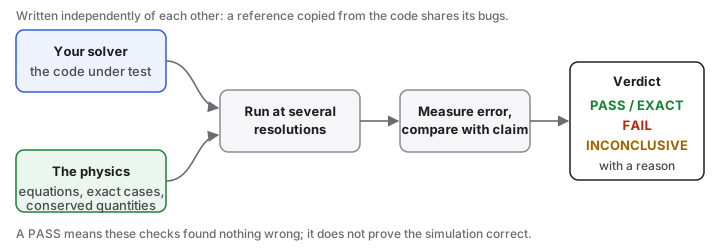
Checks that a simulation solves the equations it claims, at the order of accuracy it claims, not just that it runs.
physverify is actively evolving (v0.7.0), welcoming contributions and test cases from the computational physics community. Status: under active development and maintenance, tested on a growing corpus of public physics codes; releases come at milestones. Scope: numerical solutions of ODEs and PDEs (time integration, convergence, conservation), plus a few Monte Carlo checks. It needs only NumPy.
pip install physverify
physverify demo
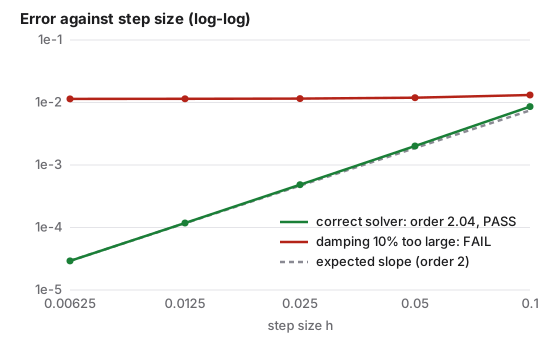
The demo checks a correct solver (all checks pass), then the same solver with the damping 10% too large (all fail):
New to this? Start here walks through installation and a first check in about ten minutes, with a prompt to paste if you use an AI coding assistant.
Use it on your own code
- Any project, no set-up:
physverify scan PATHreads the code (it runs nothing) and flags Runge-Kutta methods that do not have their stated order (written as tables, as class attributes or as stages in code), grid spacings that do not match their grid, near-miss physical constants, and inverse function pairs worth a round-trip test. - An ODE solver:
physverify init verify_solver.py --solver mysolver --order 4writes a spec; fill in the equations (from the physics, not from your code) and runphysverify run verify_solver.py. - A Runge-Kutta table:
check_tableau(A, b, c, claimed=3)fromphysverify.butcherchecks its order, stage order and stability from the coefficients alone. - Errors you already have:
check_order(hs, errors, expected=2)gives PASS, FAIL or INCONCLUSIVE with a reason.
Run it in CI
A failed check fails the job, like a broken unit test (CI guide: options, pre-commit, pytest):
      - uses: rcgiri-physics/physverify@v0.7.0
        with:
          specs: tests/verify_*.py
Getting started · Recipes · What a PASS means · Troubleshooting · API
Does it catch bugs?
Of 37 bugs seeded into five small solvers, it flagged 35 (plain "compare with one answer" tests: 27), with no false alarms. The bugs and checks were written by the same person, so this shows the tool works as designed, not how it does on other people's code. On public physics repositories, 74 defects were reported to authors; 14 of them were found by a physverify check as such, 11 by simply running the code, and the rest by the per-repository test scripts or by reading the code. physverify scan alone, with no script, now finds 18 of the 74, up from 2 in its first version, and found 7 new defects in the same repositories (which found what). The counts describe that sample only and are not a bug rate. Details: results, and results/README.md to regenerate every table.
Limits
Works best for ODEs; PDEs only in 1D so far. Your code needs a way to add a source term, or a small wrapper that can itself be wrong. A PASS means these checks found nothing wrong; it does not prove the simulation correct, and it is only as independent as the reference you wrote: see What a PASS means.
Contributing, citing, licence
Help is welcome: a trial report on your own solver, seeded bugs written by someone other than the author, adapters, documentation. See CONTRIBUTING.md, the code of conduct, SUPPORT.md for help, SECURITY.md on running untrusted code, and AGENTS.md for AI assistants. To cite, use doi:10.5281/zenodo.23534512 or CITATION.cff. Changes: CHANGELOG.md; plans: ROADMAP.md. The methods are standard and other tools do parts of this, some better (NodePy for Runge-Kutta analysis); see related work and credits. MIT licence, copyright (c) 2026 Ram Chandra Giri.
Reviews
No reviews yet
Be the first to review this server!
More Developer Tools MCP Servers
Rea
Freeby Morluto · Developer Tools
Reverse engineer anything from your terminal or agent with one CLI and MCP server.
Paperclip
Freeby Paperclipai · Developer Tools
Trending hip-hop artist momentum scores across four cultural dimensions.
Toleno
Freeby Toleno · Developer Tools
Toleno Network MCP Server — Manage your Toleno mining account with Claude AI using natural language.
MCP Marketplace
Freeby mcp-marketplace · Developer Tools
Search and install MCP servers from inside your AI client.
mcp-creator-python
Freeby mcp-marketplace · Developer Tools
Create, build, and publish Python MCP servers to PyPI — conversationally.
by Lharries · Communication
Read, search, and send WhatsApp messages through your AI assistant