
Server data from the Official MCP Registry
Publication-quality chemical structure and reaction rendering for AI agents.
About
Publication-quality chemical structure and reaction rendering for AI agents.
Security Report
Valid MCP server (1 strong, 2 medium validity signals). 4 known CVEs in dependencies Package registry verified. Imported from the Official MCP Registry.
4 files analyzed · 5 issues found
Security scores are indicators to help you make informed decisions, not guarantees. Always review permissions before connecting any MCP server.
Permissions Required
This plugin requests these system permissions. Most are normal for its category.
How to Install
Add this to your MCP configuration file:
{
  "mcpServers": {
    "io-github-random-orbit-chemglyph": {
      "args": [
        "chemglyph"
      ],
      "command": "uvx"
    }
  }
}Documentation
View on GitHubFrom the project's GitHub README.
ChemGlyph
Publication-quality chemical structure and reaction rendering for AI agents. ChemGlyph is the KaTeX of chemistry: a rendering layer, a validation layer, and an MCP interface on top of RDKit.

Install
pip install chemglyph
Render a molecule
import chemglyph

result = chemglyph.render_molecule("c1ccccc1")  # benzene
open("benzene.svg", "w").write(result.data)
render_molecule takes SMILES, InChI, or molblock and returns SVG (or PNG)
plus canonical_smiles, mol_formula, mol_weight, and warnings.
Styles
Three styles, same molecules (benzoic acid, caffeine, (S)-ibuprofen):
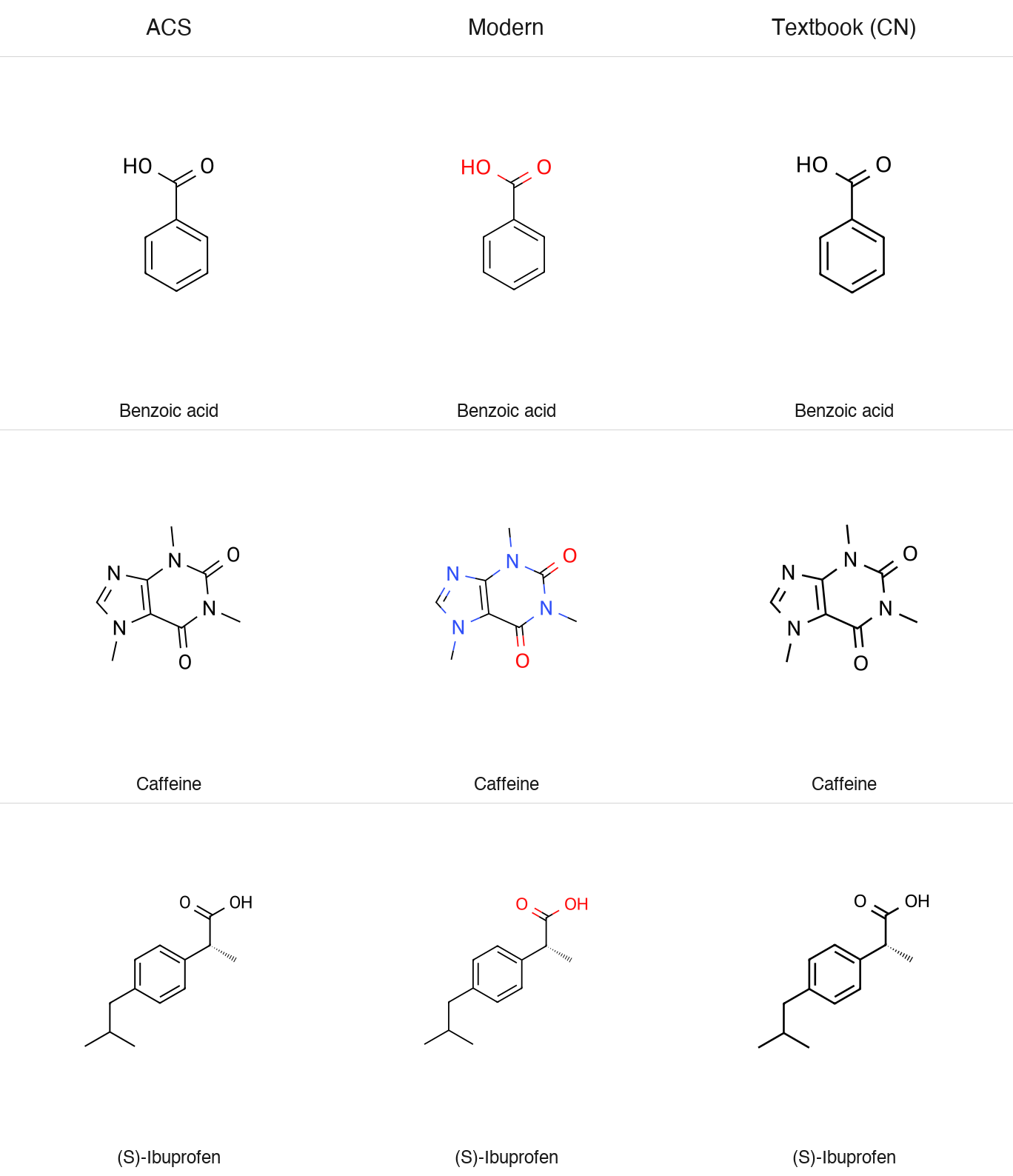
chemglyph.render_molecule(smiles)  # screen: coloured O, N, S, Cl for screens and chat
chemglyph.render_molecule(smiles, style="acs1996")  # black, ACS journal sizes
chemglyph.render_molecule(smiles, style="textbook")  # heavier lines for teaching
Every style draws at one physical scale. acs1996 follows the ACS Document
1996 settings: 14.4 pt bonds, 0.6 pt lines, 10 pt labels, and bond ends that
stop 1.6 pt from each label. Two structures drawn with the same style have
the same bond length and label size, so they line up in a paper. screen
keeps that geometry and colours O, N, S, and Cl (classic CPK); textbook
uses 0.8 pt lines and 12 pt labels.
The SVG size is given in points and the background is transparent unless
transparent=False. fmt="png" takes a dpi, fmt="pdf" gives a vector
PDF for LaTeX, and fmt="mol" a molfile with the drawn coordinates for a
structure editor.
result = chemglyph.render_molecule("CC(=O)Oc1ccccc1C(=O)O", style="acs1996")
result.report  # {'bond_length_pt': [14.4, 14.4], 'label_clearance_pt': 1.6, ...}
png = chemglyph.render_molecule(smiles, style="acs1996", fmt="png", dpi=600)
The style names from 0.1 (acs, modern, textbook-cn) still work, map to
acs1996, screen, and textbook, and give a deprecation warning; they go
in 1.0.
These numbers are measured in the rendered output by the test suite
(tests/test_profiles.py).
Compound numbers
chemglyph.render_molecule(smiles, style="acs1996", number="12a")
The number is set in bold at the label size, centred half a bond length under the structure, as in ACS journals. It is also stored with the embedded structure (the molfile title line), so a figure still says which compound it shows when it is read back.
Abbreviations
chemglyph.render_molecule(smiles, abbreviate=True)  # Boc, Ts, TBS, OAc, NHBoc, ...
chemglyph.render_molecule(smiles, abbreviate=["Ph", "t-Bu", "CO2Me"])
abbreviate=True draws protecting and activating groups as labels, with
the spellings of the J. Org. Chem. list of standard abbreviations. Acyl,
carbamate, and benzyl groups are abbreviated only on heteroatoms, so a
benzyl side chain stays a CH2 and a ring; silyl and sulfonyl groups also on
carbon. A group on a terminal O or NH joins its label (OTs, BocHN). A label
that would run into another label or a bond is drawn in full instead.
Only the drawing changes. The embedded structure, the identity, and the
name check use every atom, and fmt="mol" keeps the abbreviations as SUP
groups, which structure editors show as labels and can expand.
Checked figures
Figures from these profiles check themselves and carry their structure:
result = chemglyph.render_molecule(smiles, style="acs1996", name="cholesterol")
result.report["verified"]  # bonds and labels drawn, wedges right, structure reads back
result.report["name_check"]["status"]  # match, stereo_differs, mismatch, or unchecked
chemglyph.read_structure(result.data)  # the RDKit molecule embedded in the SVG or PNG
A name that belongs to another structure produces a warning, which catches a wrong SMILES from an AI model before the figure reaches a manuscript. Names resolve offline through the built-in Chinese dictionary or OPSIN.
Reactions
spec = {
    "steps": [
        {
            "reactants": ["OC(=O)c1ccccc1O", "CC(=O)OC(C)=O"],
            "products": ["CC(=O)Oc1ccccc1C(=O)O", "CC(=O)O"],
            "conditions": {"above": "H₂SO₄ (cat.)", "below": "rt, 15 min"},
            "yield": "89%",
            "arrow": "forward",
        }
    ],
    "style": "screen",
}
svg = chemglyph.render_reaction(spec)
Reaction schemes are not yet drawn at a fixed scale; that comes with the reaction phase of the roadmap.
Conditions are pre-formatted Unicode text, so pass H₂SO₄, not H2SO4.
ChemGlyph does not parse formulas out of text. The full schema
(multi-step chains, equilibrium and retro arrows, line wrapping) is in
docs/reaction_schema.md.
The aspirin demo writes a two-step route:
python examples/aspirin_synthesis.py # writes examples/aspirin_synthesis.svg
Validation
validate_structure reports parse errors and applies four quick fixes:
unmatched brackets and ring closures (reported, not guessed), kekulization
failures of lowercase aromatic atoms, and nitrogen valence errors via a
formal [N+]. Anything else passes RDKit's message through unchanged.
report = chemglyph.validate_structure("c1cccc1")
report.fixes[0].description  # 'lowercase aromatic atoms could not be kekulized...'
report.fixes[0].fixed_smiles  # 'C1CCCC1'
Naming
chemglyph.parse_name("aspirin") # 'CC(=O)Oc1ccccc1C(=O)O'
English IUPAC and common names resolve offline through OPSIN
(pip install 'chemglyph[opsin]', plus a Java runtime). Chinese names use
the built-in dictionary, and the library API accepts a translator callable
for names that are not in it:
chemglyph.parse_name("阿司匹林")  # 'CC(=O)Oc1ccccc1C(=O)O'
chemglyph.parse_name("六甲基苯", translator=to_english)
ChemGlyph itself never calls an online service, including for translation.
MCP server
Run the bundled console script (stdio transport):
chemglyph-mcp
Claude Desktop registration (macOS:
~/Library/Application Support/Claude/claude_desktop_config.json):
{
  "mcpServers": {
    "chemglyph": {
      "command": "chemglyph-mcp"
    }
  }
}
| Tool | Use it when | Returns |
|---|---|---|
render_molecule | the user asks to draw one structure from SMILES/InChI/molblock | PNG image plus formula, MW, warnings (SVG source on request) |
render_reaction | the user asks for a reaction or synthesis route | PNG image of the reaction scheme |
validate_structure | a SMILES may be malformed and you need a repair | validation report JSON |
parse_name | the user gives a name like "aspirin" instead of SMILES | canonical SMILES or an error |
One thing to know about clients. Some MCP clients, LM Studio included, only
pass the text part of a tool result to the model and never display the
attached image. The render tools write their PNG to ~/Downloads/chemglyph/
and return that path in the text, so you can always open the file yourself.
If a model claims it rendered a figure but nothing shows up, ask it for the
saved path rather than having it redraw the structure by hand.
Benchmarks
benchmarks/ holds the fixed 20-molecule blind test and a generator that
writes shuffled, numbered PNG/SVG figures plus answer_key.json:
python benchmarks/generate_blind_test.py --seed 1234
The protocol, the A/B deck generator, the runbook, and the scorer are all in benchmarks/; the pass threshold and procedure are in benchmarks/RUNBOOK.md. Anyone can run it and contribute results.
No blind test against ChemDraw has been run yet, so no comparison is
claimed. Every render is instead checked as it is made (see "Checked
figures"), and tests/test_corpus.py renders a 416-structure corpus
on every commit.
Known limitations
- 14 of the 416 corpus structures have a layout problem that is reported
with a warning: helicene and fullerene (no planar drawing); BINAP,
morphine, codeine, paclitaxel, vinblastine, tetrodotoxin (crowded
polycycles); and cyclodextrins, amphotericin B, forskolin, rifampicin,
sitagliptin (labels in crowded places). Passing a molfile with your own
coordinates avoids them. The list is in
tests/test_corpus.py. - Reaction schemes still use the 0.1 renderer, not the fixed scale.
- Full automatic Chinese name-to-structure parsing is not implemented; Chinese names resolve through a small built-in dictionary plus an optional translator hook. English names resolve through OPSIN.
Roadmap
Work proceeds in phases, and each phase ships as a minor version once its exit criteria pass. The plan, the standards ChemGlyph follows, and the quality gates are in docs/SPEC.md; release notes are in CHANGELOG.md.
- 0.1.3: fixes and release hygiene.
- 0.2 (released): molecules done right. One fixed physical scale for every drawing, style profiles measured against published standards (ACS Document 1996 settings first), a verification report with every render, automated layout checks, abbreviations, compound numbers, PDF and MOL output.
- 0.3: formulas and equations in mhchem syntax, with atom and charge balance checks.
- 0.4: reaction schemes on the shared scale, with an object API for compounds and figures.
- 0.5: mechanism (curved) arrows anchored to atoms and bonds.
Non-goals
No structure editor GUI (Ketcher/ChemDraw competition), no 3D visualization, no retrosynthesis or property prediction, no online database queries, and no automatic mechanism generation. The full list is in the project specification.
Development
python -m venv .venv
.venv/bin/pip install -e ".[dev]"
.venv/bin/ruff check . && .venv/bin/ruff format . && .venv/bin/pytest
Python 3.11+, RDKit 2024.9+, MIT license. All errors derive from
chemglyph.errors.ChemGlyphError.
Reviews
No reviews yet
Be the first to review this server!
More Developer Tools MCP Servers
Rea
Freeby Morluto · Developer Tools
Reverse engineer anything from your terminal or agent with one CLI and MCP server.
Paperclip
Freeby Paperclipai · Developer Tools
Trending hip-hop artist momentum scores across four cultural dimensions.
Git
Freeby Modelcontextprotocol · Developer Tools
Read, search, and manipulate Git repositories programmatically
Toleno
Freeby Toleno · Developer Tools
Toleno Network MCP Server — Manage your Toleno mining account with Claude AI using natural language.
MCP Marketplace
Freeby mcp-marketplace · Developer Tools
Search and install MCP servers from inside your AI client.
mcp-creator-python
Freeby mcp-marketplace · Developer Tools
Create, build, and publish Python MCP servers to PyPI — conversationally.