
Server data from the Official MCP Registry
Persistent memory for MCP-compatible agents: memory bank, fact cortex, dreams, graph.
About
Persistent memory for MCP-compatible agents: memory bank, fact cortex, dreams, graph.
Security Report
Pseudolife-MCP is a legitimate memory persistence server for coding agents with well-structured architecture and reasonable security practices. The codebase exhibits professional design patterns and appropriate permission scoping for its stated purpose. However, several moderate-severity concerns exist: broad exception handling in critical paths, potential information disclosure through detailed error responses, and the complexity of the daemon-based architecture introduces attack surface. The server's reliance on bearer token authentication without built-in rate limiting, combined with powerful memory mutation capabilities, presents moderate risk if a token is compromised. Supply chain analysis found 15 known vulnerabilities in dependencies (1 critical, 7 high severity). Package verification found 1 issue.
2 files analyzed · 26 issues found
Security scores are indicators to help you make informed decisions, not guarantees. Always review permissions before connecting any MCP server.
Permissions Required
This plugin requests these system permissions. Most are normal for its category.
How to Install
Add this to your MCP configuration file:
{
  "mcpServers": {
    "io-github-pseudogiant-xr-pseudolife-mcp": {
      "args": [
        "pseudolife-mcp"
      ],
      "command": "uvx"
    }
  }
}Documentation
View on GitHubFrom the project's GitHub README.
Pseudolife-MCP




简体中文 · 日本語 · 한국어 · Português (BR) · Español
Persistent long-term memory for Claude Code, Codex, and other MCP clients.
An MCP server that gives coding agents a long-term memory that persists across sessions — surviving context compactions and fresh tasks. Your coding agent is the intelligence; this server is its memory on disk.
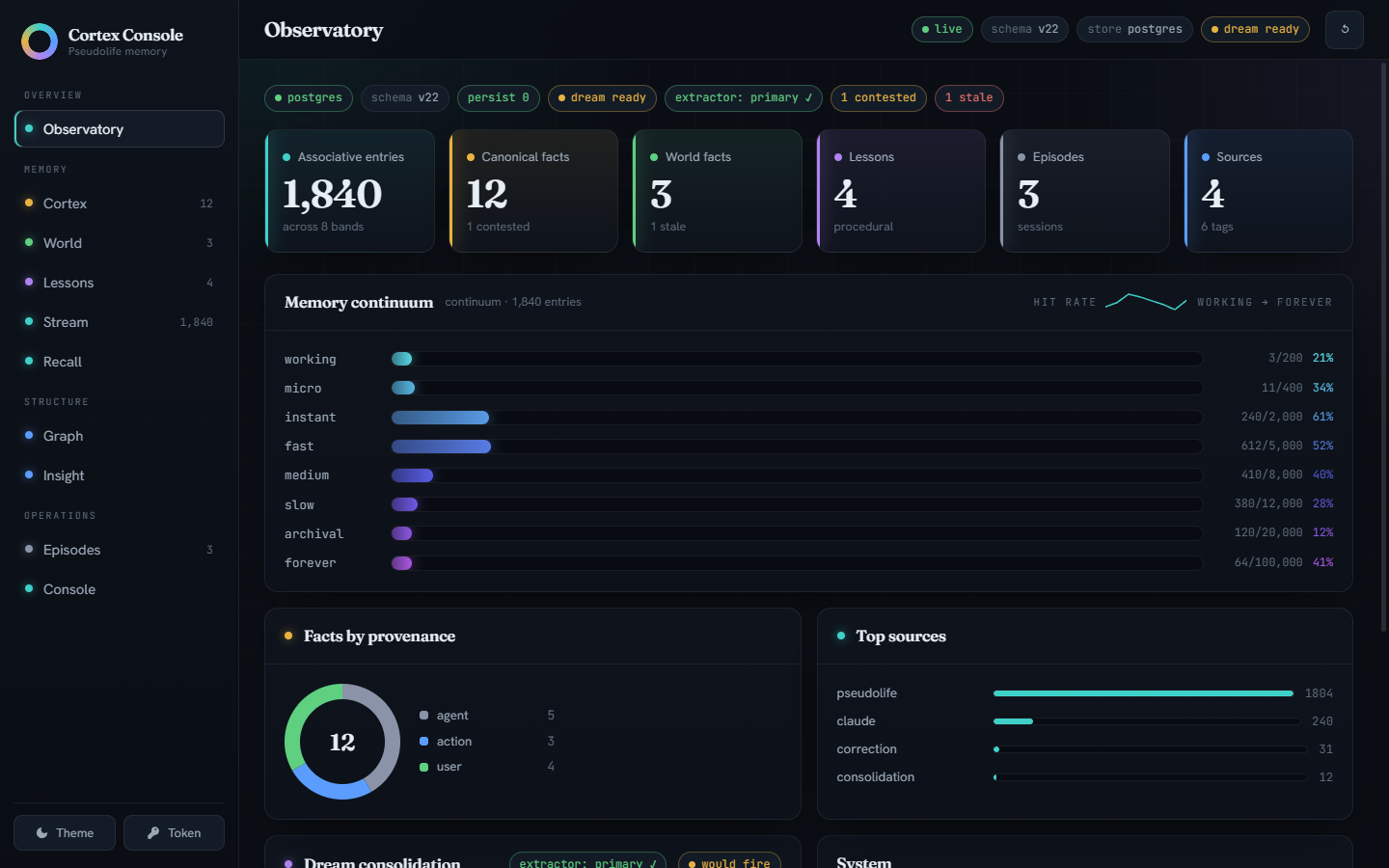
What you get:
- Associative memory with honest forgetting — a flat similarity store ranked by hybrid dense-plus-lexical retrieval, with contradiction detection and supersession. (The measured verdict: a preregistered ablation campaign found the previous 8-band continuum tied a flat store on every gate, so the simpler structure ships; the continuum remains one config line away.)
- Canonical facts, not vibes — one current value per
entity.attributeslot (or a member set, for slots that hold many concurrent values); corrections supersede rather than silently overwrite, and the full version history survives. - Dreams — a bundled extractor (or a Claude model via your Max plan) consolidates the memory stream into facts and a knowledge graph while you're not looking.
- Lessons from its own work — successes, dead-ends, and your corrections become do/avoid guidance surfaced at the start of every session.
- A web console to watch it think — the Cortex Console above, plus cited world facts, session episodes, and document RAG.
Measured, with receipts — the full 500-question LongMemEval sweep, all six question types, and every number ships with its committed run artifact:
| LongMemEval oracle, 500 questions | naive RAG | commit-gated cascade |
|---|---|---|
| accuracy, all six question types | 0.688 | 0.690 |
| context tokens per question | ~1210 | ~883 |
| knowledge-update slice (78 of the 500) | 0.859 |
Equal accuracy to naive RAG across the whole benchmark on ~73% of the context, and a large edge at knowing when it doesn't know: on BEAM-100K's abstention questions the fact spine scores 0.950 against naive RAG's 0.775, unchanged under two independent judges. It loses where an answer has to be aggregated across sessions. Graded by a local, byte-reproducible judge (the cross-judge check names its second judge) — compare within rows, never against GPT-judged leaderboards.
Retired 2026-08-25 (#188): the 0.936 knowledge-update headline. It was measured on the 2026-07-30 bench stack (Qwen3.6-27B answerer and judge). Re-running the same 78 questions after the 2026-08-17 migration to Qwen3.8-27B puts the cascade at 0.846, below the naive-RAG control — which lands on 0.859 on both stacks. The cascade serves the fact-spine answer unless that channel says "I don't know", so it measures the answerer's abstention behaviour as much as the memory: 32/78 abstentions at 46/46 commit precision on the old stack, 22/78 at 0.839 on the new one. The 500-question table above is on the older judge and has not been re-judged, so read its cascade row as an upper bound.
Full tables, the per-type breakdown, both stacks side by side, and every artifact: Benchmarks.
Quickstart
Two commands. No Docker, no database to set up, no container runtime:
pip install "pseudolife-mcp[lite]"
claude mcp add --scope user pseudolife-memory -- pseudolife-mcp
Codex instead of Claude Code — same shape:
pip install "pseudolife-mcp[lite]"
codex mcp add pseudolife-memory -- pseudolife-mcp
Then in either coding agent: "remember that my staging box is haze-02" →
the agent calls memory_store; next session, "which box is staging?" →
memory_search finds it. Browse everything at the Cortex Console:
http://127.0.0.1:8765/ui/.
The first session auto-starts the daemon, which provisions an embedded
PostgreSQL 18 (pgvector included, via pg0-embedded) under a stable
per-user data dir and downloads the embedding model (~1.2 GB, one-time).
It is a real Postgres bank, not a cut-down one: pseudolife-mcp backup
writes a standard owner-free pg_dump archive (plus a state archive, 7-day
rotation) that restores into any PostgreSQL 18 target regardless of role —
the Docker tier included — so outgrowing lite is a dump/restore, not a
migration project (backups). For a
tier- and Postgres-version-independent copy, pseudolife-mcp export /
import move the whole bank as portable JSONL
(logical export / import).
Windows needs an ASCII-only data path
(PSEUDOLIFE_MCP_DATA_DIR).
What lite gives you, and the one thing it doesn't
| lite (pip) | durable (Docker) | |
|---|---|---|
| Associative store, hybrid search, supersession, version history | yes | yes |
| Cortex facts, knowledge graph, lessons, world facts, episodes | yes | yes |
Cortex Console, document RAG, pseudolife-mcp backup | yes | yes |
| Dream consolidation filling the cortex on its own | no extractor ships | yes — bundled local CPU sidecar |
| External volumes, health-checked services, deploy/rollback tooling | no | yes |
The gap, stated plainly. Lite ships no extractor, so the dream
pass still runs, prunes, and advances its cursor, but writes no
canonical facts: on this path memory_fact_set is the only cortex
writer. Everything else above works. Nothing about this is silent —
curl http://127.0.0.1:8765/health reports "extractor": "none", and the
stdio shim says the same on stderr at session start.
Any OpenAI-compatible endpoint closes it. The daemon inherits the environment it starts from, so two variables are the whole fix — with a local Ollama:
export PSEUDOLIFE_DREAM_BASE_URL=http://localhost:11434/v1
export PSEUDOLIFE_DREAM_MODEL=qwen2.5:7b
pseudolife-mcp serve
$env:PSEUDOLIFE_DREAM_BASE_URL = "http://localhost:11434/v1"
$env:PSEUDOLIFE_DREAM_MODEL    = "qwen2.5:7b"
pseudolife-mcp serve
/health then reports "extractor": "configured". One gotcha: a daemon
that is already running keeps the environment it started with, and the shim
reattaches to it rather than spawning a new one — stop the old daemon
first. A hosted endpoint works too, and costs you the zero-egress
property: memory text leaves the machine. Extractor tiers, quality, and the
trade-offs: Dreaming.
Durable tier — Docker (recommended for a long-lived bank)
Everything above plus the bundled extractor, external volumes, health-checked services, and backup/rollback tooling. Requires Docker and at least one MCP-capable coding agent — Claude Code, Codex, and Gemini CLI are wired end-to-end; anything else gets paste-ready config (provider matrix). One command from clone to first memory:
git clone https://github.com/Pseudogiant-xr/Pseudolife-MCP.git
cd Pseudolife-MCP
ops/install.sh          # Linux / macOS
ops\install.ps1         # Windows (pwsh 7+)
# Codex: add --client codex / -Client codex
# Both:  add --client both  / -Client both
# Gemini: add --client gemini — or several: --client claude,codex,gemini
# Other MCP agents (Cursor, Windsurf, Zed, ...): --client generic
The installer asks which agents to wire (multi-select, with a capability matrix showing exactly what each one gets — session briefing, per-turn discipline, standing file), runs the preflight (one exact fix line per missing prerequisite), then asks which dream extractor should consolidate memories —
- sidecar — the bundled local CPU model; no Claude plan needed, works for everyone, and keeps every memory on the box (~11.8 GB image);
- sonnet-only — the lightest install: a Claude model via a CLI shim
(
claude-opus-5by default; the mode name is historical. Needs a logged-in Max-planclaudeCLI); the sidecar image is never built or pulled (~11.8 GB lighter; dreams pause while the shim is down); - sonnet-fallback — the Claude shim primary, the bundled sidecar as automatic fallback (Max-plan CLI plus the ~11.8 GB image);
- codex-only / codex-fallback — the same two shapes on an OpenAI subscription: a GPT-5.6 model (Sol / Terra / Luna) via the Codex CLI shim on a signed-in ChatGPT plan (extraction quality unmeasured — see the dreaming guide) —
then brings the stack up, installs the selected clients' session hooks
(where the client has a hook system), registers the MCP transport (the
stdio shim by default, with a per-provider writer id; direct HTTP via
--transport http), and health-checks the daemon — finishing with a
per-agent ladder of what got wired and what that agent's platform cannot
support. Where a session-hook briefing exists (Claude, Codex off-Windows)
no standing-file edit is needed; for hook-less providers (Gemini CLI,
generic agents, Codex on Windows) the installer offers to append the
standing block instead — there it is the briefing. --instructions append always writes the block from examples/CLAUDE.memory.md into
~/.claude/CLAUDE.md / ~/.codex/AGENTS.md / ~/.gemini/GEMINI.md
(useful for subagent visibility even with hooks).
Idempotent — re-run any time; --extractor <mode> switches extractor
setups. Non-interactive example:
ops/install.sh --extractor sidecar --client codex.
Linux (Docker Engine): your user must be in the docker group —
sudo usermod -aG docker $USER, then log out/in (the preflight checks this).
Image sizes, the Windows WSL2 memory cap, and what the installer automates: the containerized install below.
ops/preflight.sh --client codex    # or ops\preflight.ps1 -Client codex
docker volume create pseudolife-mcp-bank
docker volume create pseudolife-mcp-state
docker compose -f ops/docker-compose.yml up -d --build   # first build, once

# ...or pull the prebuilt images instead of building (releases >= 0.14.0):
docker compose -f ops/docker-compose.yml -f ops/docker-compose.ghcr.yml pull pseudolife-pg pseudolife-daemon
docker compose -f ops/docker-compose.yml -f ops/docker-compose.ghcr.yml up -d

# Verify, then wire the transport into one or both clients.
curl http://127.0.0.1:8765/health

# Stdio shim (the installer's default — per-session episode identity).
# PSEUDOLIFE_MCP_NO_SPAWN=1 makes the shim wait for the container instead
# of spawning a host fallback that can shadow the Docker bank after a
# reboot; set it on Docker-tier registrations like these.
pip install pseudolife-mcp
claude mcp add --scope user pseudolife-memory --env PSEUDOLIFE_MCP_NO_SPAWN=1 -- pseudolife-mcp
codex mcp add pseudolife-memory --env PSEUDOLIFE_MCP_NO_SPAWN=1 -- pseudolife-mcp

# ...or direct HTTP (no pip package needed; fine for single-session setups):
claude mcp add --transport http --scope user pseudolife-memory http://127.0.0.1:8765/mcp
codex mcp add pseudolife-memory --url http://127.0.0.1:8765/mcp

# Reinforce the protocol-level memory loop with a global standing instruction:
cat examples/CLAUDE.memory.md >> ~/.claude/CLAUDE.md
cat examples/CLAUDE.memory.md >> ~/.codex/AGENTS.md
# (PowerShell: Add-Content "$env:USERPROFILE\.claude\CLAUDE.md" (Get-Content examples\CLAUDE.memory.md -Raw))
Optional knobs live in ops/.env (cp ops/.env.example ops/.env — the
install/update scripts scaffold it too; every value is commented, a missing
file runs entirely on defaults).
What this is
A memory engine exposed over MCP. There's no chat UI and no LLM doing the thinking — your coding agent is the intelligence; these are tools it calls to store and recall what matters. (Models are bundled as plumbing: baked embedding weights for retrieval, and the optional CPU extractor sidecar that consolidates memories into facts while you sleep.)
Where it sits among the common approaches to agent memory — each column is a fair tool for what it's for; this table is about what question each one answers, not who's wrong:
notes file (CLAUDE.md) | auto-journaling plugin | plain vector store | Pseudolife-MCP | |
|---|---|---|---|---|
| Survives sessions and compactions | yes | yes | yes | yes |
| "What is X now?" has one current answer | if you curate it | no — replays what happened | no — every stored version competes at recall | yes — slot-keyed cortex |
| A correction replaces the old value | you edit the file | appended beside it | old and new both retrievable, unranked by recency of truth | supersedes, with full version history kept |
| Facts know their age and go stale | no | no | no | dated, freshness-decayed, quarantined when stale |
| Distils do/avoid lessons from its own outcomes | no | no | no | yes |
| Benchmark numbers ship with their raw run artifacts | — | typically no | typically no | every published number, test-enforced |
Auto-journaling records what the agent did; Pseudolife curates what it learned. Both are useful — they answer different questions. Named alternatives — Mem0, Zep/Graphiti, Letta, Cognee, memU, Memori — and the cases where one of them is the better pick: Comparison.
It layers several complementary stores: the associative store (a flat
embedding store ranked by cosine similarity fused with a BM25 lexical pool
(on by default), with contradiction detection and supersession; an 8-tier
banded layout is available as an opt-in preset); the cortex (slot-keyed canonical facts — one current
value per entity.attribute, or a member set for set-valued slots — with
provenance tiers and contender parking instead of silent overwrites); a typed knowledge graph over those facts
with a closed relation vocabulary and on-read inference; the world
cortex (durable cited facts about external reality, age-decayed trust);
procedural lessons learned from the agent's own work; and a ChromaDB
reference bank for document RAG. The canonical layers in depth:
the memory model; the graph and multi-hop
recall: retrieval.
State lives in Postgres (the durable source of truth) behind a single long-lived daemon; every session attaches through a thin stdio shim (installer default — per-session identity) or directly over HTTP (single-session setups). The result: Claude can pick up where it left off, correct itself when facts change, and reason over relationships — without you re-explaining context each session.
Documentation
This README is the front door — install, wiring, and the basic loop. The deep material lives in the user guide:
| Page | What's in it |
|---|---|
| Configuration | Env vars, tuned defaults, toolset tiers, stdio shim, LAN sharing, data layout, backups, schema history |
| Providers | Capability matrix per coding agent, the hook-equivalent ladder, AGENTS.md standard, Codex hooks opt-in, writer ids |
| Retrieval | Reranker, BM25 hybrid, abstention floors, ranking-trace debugging, memory_recall, the knowledge graph |
| Dreaming | Extractor tiers, the bundled sidecar, upgrading the extractor, Sonnet-fallback, cadence, deep dream, consolidation |
| Episodes & sessions | Daemon-owned session episodes, the briefing hook, nested sub-episodes, tags |
| The memory model | Cortex slots, provenance contenders, world cortex, lessons, temporal/HLC stamps |
| Benchmarks | LongMemEval results; why extraction quality dominates |
| Comparison | Mem0, Zep/Graphiti, Letta, Cognee, memU, Memori — the axes, and when to use something else |
| Security posture | Memory poisoning (ASI06): every shipped mitigation, and what is not defended |
Plus evals/README.md (full benchmark methodology) and
CONTRIBUTING.
Tools exposed
The surface was consolidated 2026-07-02 (55 → 32 tools; now 35 with
memory_toolset and the set-slot pair): lifecycle families became verb-dispatched tools
(memory_dream, memory_forget, memory_graph_review), and
dump/introspection views moved to the Cortex Console (REST) — the manifest
is agent context every session, so it stays lean.
| Tool | Purpose |
|---|---|
memory_store(text, source?, tags?, origin?, episode?) | Remember one durable fact / decision / observation (canonical facts reach the cortex via the dream pass or memory_fact_set) |
memory_search(query, top_k?, filters..., rerank?, bm25?, explain?, verbose?) | Associative retrieval; canonical cortex facts surface ahead of recall hits, each dated (asserted_at / last_confirmed / human age, plus stale when it has rotted); explain=True attaches a ranking trace |
memory_recent(n?, sources?, episodes?, tags?, verbose?) | Newest stores, timestamp-ordered (debug + session catch-up) |
memory_supersede(old_text, new_text) | Explicit correction — mark a memory obsolete, keep it as history |
memory_forget(scope, ...) | Hard-delete from one store: memory (by text/substring/source/episode/tag), fact, world, or lesson (by entity/attribute) |
memory_stats() | Store occupancy, hit rates, totals |
memory_get(entry_id) / memory_reinforce(entry_id) | Dereference a memory id to its full episode (+ consolidated_into); reinforce it after finding it useful |
memory_fact_get(entity, attribute) | The one CURRENT canonical value at a slot (+ parked contenders); on an empty slot returns ranked candidates (same-entity, then similar slots); aged/contested facts carry a ready-made correct_with call (as do memory_search / memory_world_search hits) |
memory_fact_set(entity, attribute, value, origin?, confidence?, episode?, freshness_class?) | Assert a canonical fact deliberately (insert / confirm / supersede / contest); freshness_class (auto default) says how fast the slot rots — auto infers it from the entity's kind |
memory_fact_resolve(entity, attribute, accept) | Settle a contested slot — adopt (true) or discard (false) the contender |
memory_set_add(entity, attribute, member) / memory_set_remove(entity, attribute, member) | Add/confirm or retract one member of a set-valued slot (many concurrent values, e.g. tags — not one NOW value); a scalar there converts to a set one-way on first memory_set_add, except a number-led aggregate scalar ("32", "$1,500"), which is protected — the add parks as a contender instead. Read with memory_fact_get, which returns {kind: "set", members, removed} for these slots |
memory_history(entity, attribute?) | With attribute: version timeline at a slot, with writer/temporal stamps. Without: the entity's causal chain — dated fact/entry/edge/lesson events ("what led to X") |
memory_world_set(entity, attribute, value, source_url?, ...) | Assert a cited WORLD fact (external knowledge; age-decayed trust by freshness class) |
memory_world_search(query, top_k?, verbose?) | Search world facts — each carries effective_confidence, a stale flag, and its citation |
memory_outcome(task, outcome, about?, detail?, polarity?, episode?) | Record a procedural outcome signal (success/failure/correction); the dream distils signals into lessons |
memory_lesson_search(query, top_k?, verbose?) | Recall learned lessons for the task at hand — heed polarity - dead-ends; re_verify flags lessons whose subject facts changed since |
memory_dream(action, limit?, cursor?, apply?, snippets?, run_id?) | Drive the dream: status / pull / commit / run (server-side extractor) / runs (audit trail of recent passes) / rollback (revert the latest committed pass from its pre-image journal) / deep (full-corpus graph consolidation; dry-run unless apply, which snapshots the graph tables first; snippets=false omits candidate evidence; responses carry evidence-enriched merge_proposals for near-duplicate triage) |
memory_graph_review(action, proposal_id?, proposals?, scope?, src?, dst?) | Work the review queue: list / propose / relate (link a pair and dismiss its duplicate proposal in one call) / dismiss_pair / dismiss_slot_pair / accept_link / reject_link / accept_merge / accept_junk / reject_entity (merge/entity decisions are audit-stamped decided_by=agent over MCP, human via Console) |
memory_session_title(title) | Name THIS session's auto-opened episode (default titles are generic) |
memory_episode_start(title, hint?) / memory_episode_end() | Open/close a nested sub-episode for a substantial task; entries stored while open carry its id |
memory_episode_summary(id) | Stats + tag/source distribution + recent entries within an episode |
memory_consolidation_candidates(query?, episode?, ...) | Cluster near-duplicate memories ripe for consolidation |
memory_consolidate(replaces, new_text, source?, tags?) | Atomic supersede + store — replace a cluster with one canonical note |
memory_graph_relate(src, relation, dst, ...) | Assert a typed edge (closed relation vocabulary; re-assertion bumps confidence) |
memory_graph_unrelate(src, relation, dst) | Retract an edge (superseded, kept for audit) |
memory_alias(entity, alias) | Bind an alternative name — lookups resolve aliases first |
memory_graph(entity, depth?, include_facts?, to?, relation_filter?) | Entity neighborhood (≤3 hops) with derived transitive/inverse edges and per-edge EXTRACTED/INFERRED/AMBIGUOUS provenance tags; to returns the shortest path between two entities |
memory_recall(query, hops?, top_k?, verbose?) | Multi-hop retrieval for relational questions; low_confidence: true → fall back to memory_search |
memory_relation_define(name, description, ...) | Grow the closed relation vocabulary (deliberate, rare act) |
document_ingest(path, source?) | Index a file (txt/md/pdf/html) verbatim in the reference bank — the lossless complement to agent-side distillation (division of labor) |
document_search(query, top_k?) | RAG search over the reference bank only |
memory_toolset(action) | Check or change this principal's visibility tier: status / expand / collapse |
Each tool returns plain JSON. See pseudolife_memory/mcp_server.py for
docstrings — those are what Claude reads to decide when to call which tool.
The five recall-path tools return compact entries by default (result
payloads are agent context on every retrieval); pass verbose=true for full
metadata. Full-table dumps and topology views live in the Cortex Console
(/api/*) and the pseudolife-mcp briefing CLI.
Toolset tiers. Three visibility tiers — minimal (9 tools), core
(22), full (35) — filtered per principal at
tools/list; a principal (the named bearer-token identity, or the writer
id for single-token installs) steps its own tier up or down with
memory_toolset before calling a hidden tool. Defaults, per-client mapping, and weak-model
deployments:
Configuration — toolset tiers.
Architecture
One memory daemon owns the bank and serves MCP over streamable HTTP
at /mcp; every Claude Code session (and any LAN agent) attaches to it.
Postgres 18 + pgvector (in Docker on the durable tier; the lite tier
runs the same Postgres embedded, no container) is the durable source of
truth —
the in-memory store is a write-through cache hydrated at startup
(a small weights.pt persists only counters — there are no MLP weights).
The daemon runs either containerized (recommended — portable, no host Python) or as a host process. Claude Code attaches through a thin torch-free stdio shim (the installer default — per-session identity, needed for concurrent sessions) or directly over HTTP (simpler for a single session):
Claude session A ─┐  stdio shim (installer default) or HTTP
Claude session B ─┼───────────────────► pseudolife-mcp daemon ─► Postgres (Docker)
LAN agent ────────┘  or stdio shim         (single writer)        pgvector
                     (per session)         host proc OR Docker
This kills two v0.1 hazards by construction: a single writer means
concurrent sessions can't clobber each other, and entries are transactional
so a crash can't wipe the bank. On top of the associative store sit the
canonical layers — cortex, world facts, lessons, temporal/HLC stamps
(the memory model) — joined to a typed
knowledge graph walkable via memory_graph and multi-hop memory_recall
(retrieval & the graph).
Install — containerized (any OS)
What the durable tier
installer above does, by hand. The whole stack — Postgres and the memory daemon — runs in Docker.
No host Python, no torch install, no version skew; the daemon image bakes
in CPU-only torch and the embedding weights — Qwen/Qwen3-Embedding-0.6B
(the default retrieval backbone since schema v25) plus all-MiniLM-L6-v2
(kept baked for the ONNX-parity test path) — so it runs identically on
Windows / macOS / Linux. Requires only Docker; built once: ~5.0 GB daemon
image (measured 2026-07-29 on the deployed build) + ~0.6 GB Postgres +
~11.8 GB extractor sidecar (measured 2026-08-20 with the v3 multi-task
bake; skip the sidecar entirely with the installer's sonnet-only mode).
The ~12.6 GB and ~10.4 GB figures published before
2026-07-29 are retired: both were inflated by a CUDA torch build that a
dependency-resolution bug pulled into the image (see the CHANGELOG); the
daemon has always been CPU-only.
git clone https://github.com/Pseudogiant-xr/Pseudolife-MCP.git
cd Pseudolife-MCP

# 1. One-time: create the two persistent volumes (bank + daemon state).
docker volume create pseudolife-mcp-bank
docker volume create pseudolife-mcp-state

# 2. Build + start all three services (Postgres, extractor, then the daemon).
docker compose -f ops/docker-compose.yml up -d --build
Or skip the ~5 GB daemon build entirely and pull the prebuilt images (releases ≥ 0.14.0):
docker compose -f ops/docker-compose.yml -f ops/docker-compose.ghcr.yml pull pseudolife-pg pseudolife-daemon
docker compose -f ops/docker-compose.yml -f ops/docker-compose.ghcr.yml up -d
The extractor sidecar is not published and still builds locally; updates on
the pull path are pull + up -d, not ops/update.ps1.
Upgrading from a pre-rename install (volumes
ops_pseudolife_pgdata/ops_pseudolife_data)? Don't rename those volumes — keep pointing at them by creatingops/.envwithPSEUDOLIFE_BANK_VOLUME=ops_pseudolife_pgdataandPSEUDOLIFE_STATE_VOLUME=ops_pseudolife_databeforeup. See the compose header.
Windows: cap Docker Desktop's WSL2 VM, which otherwise claims up to ~50% of host RAM — how much the stack actually needs, the
ops/wslconfig.exampletemplate, and the daemon container's own memory cap: Configuration — Windows / WSL2 memory.
The daemon serves MCP at http://127.0.0.1:8765/mcp and restarts with
Docker — no logon task needed. First build downloads the model into the
image (once); every container start after that is offline and fast. Wire
Claude Code in via the stdio shim (installer default) or directly over
HTTP (both below). Where the data actually lives, and
how to back it up:
Configuration — data layout.
Host-process install (Windows, for GPU / dev): run Postgres in Docker
but the daemon on host Python — for hacking on the daemon or running the
embedder on a local GPU. Steps, the pseudolife-mcp CLI modes, and the
logon autostart task:
Configuration — host-process install.
Updating
Lite tier: one command, bank untouched:
pip install -U "pseudolife-mcp[lite]"
Docker tier: after a git pull (or local code change), redeploy the
daemon only — safely, without touching Postgres or the extractor:
.\ops\update.ps1 # Windows
./ops/update.sh # Linux / macOS
It backs up the bank (pg_dump + a state-volume tar), tags a rollback
image (when a previous one exists — it says so loudly when there isn't),
rebuilds + recreates only the daemon, and waits for /health.
It never runs down -v. (Host-process install: just restart the daemon —
pip install -e . is editable.) Build cache is pruned automatically after
every healthy deploy; see
Docker disk retention for the
weekly Scheduled Task and the manual .vhdx compact. Never run
docker system prune --volumes, which deletes volumes.
Two upgrades are not automatic, because neither can be done safely in place. Both have a step-by-step runbook — backup, dry run, apply, verify, roll back — and a fresh install needs neither:
- A bank older than 0.11.0 (schema v25): every embedding column moved from
vector(384)tovector(1024), so the daemon refuses to start rather than half-migrate. Re-embed offline withops/migrate_embeddings.py— the v25 migration runbook.- A Docker-tier bank created before 2026-08-14 (PostgreSQL 16 → 18): a Postgres major bump cannot reuse the old data volume. Run
pwsh ops/migrate-pg18.ps1— the PostgreSQL 18 migration runbook.
Wire into your coding agent
Plugin (hooks + commands). With the daemon running, two commands inside
Claude Code wire the session hooks (briefing + episode identity), the
memory-loop instructions, and the /dream + /memory-status commands:
/plugin marketplace add Pseudogiant-xr/Pseudolife-MCP
/plugin install pseudolife-memory@pseudolife-mcp
The plugin replaces the settings.json hook and the CLAUDE.md block below
— the same standing instructions arrive as session context from the daemon.
It deliberately does not bundle the MCP server: Claude Code loads a
plugin server alongside any user-registered one with no deduplication, which
doubled every session's tool namespace next to the installer's registration
— so the transport is registered exactly once, by ops/install.* (stdio
shim by default — per-session episode identity) or the one-liner below.
Details, non-default ports/tokens, and migration:
plugin/README.md.
Manual transport registration. The installer's default (shim mode) registers a thin stdio shim — one shim process per session, so every session carries its own tier-1 identity. The same wiring by hand:
pip install pseudolife-mcp    # daemon in Docker; add [lite] for the pip tier
claude mcp add --scope user pseudolife-memory --env PSEUDOLIFE_MCP_NO_SPAWN=1 -- pseudolife-mcp
PSEUDOLIFE_MCP_NO_SPAWN=1 belongs on Docker-tier registrations: the shim
then waits for the container instead of spawning a host-side fallback whose
port bind can race a still-booting Docker and shadow the real bank. On the
[lite] pip tier drop the --env — there the spawn fallback is the
zero-config path.
Direct HTTP works too — the daemon serves MCP over HTTP natively (no shim, no host command, nothing OS-specific; concurrent sessions then share one episode identity, so it fits single-session setups best):
claude mcp add --transport http --scope user pseudolife-memory http://127.0.0.1:8765/mcp
(--scope user registers it for every project; drop it to register for the
current project only.) Or write the equivalent JSON yourself — into
~/.claude.json under the top-level mcpServers key for user scope, or into
a .mcp.json at a project root for project scope:
{
  "mcpServers": {
    "pseudolife-memory": {
      "type": "http",
      "url": "http://127.0.0.1:8765/mcp"
    }
  }
}
For a token-protected daemon, add a headers key to that Claude JSON entry:
"headers": { "Authorization": "Bearer <your-token>" }.
Codex — the installer's default (shim mode) wires the same stdio shim, so a Codex session gets its own tier-1 identity instead of inheriting a concurrent Claude session's episode:
pip install pseudolife-mcp
codex mcp add pseudolife-memory --env PSEUDOLIFE_MCP_NO_SPAWN=1 -- pseudolife-mcp
(Same Docker-tier note as the Claude wiring above: keep
PSEUDOLIFE_MCP_NO_SPAWN=1 when the daemon runs in Docker; drop it on the
[lite] pip tier.)
The HTTP one-liner works too (no pip package needed):
codex mcp add pseudolife-memory --url http://127.0.0.1:8765/mcp
Or add the equivalent user-level entry to ~/.codex/config.toml:
[mcp_servers.pseudolife-memory]
url = "http://127.0.0.1:8765/mcp"
bearer_token_env_var = "PSEUDOLIFE_MCP_TOKEN"
For that Codex HTTP configuration, export PSEUDOLIFE_MCP_TOKEN in the
environment that launches Codex. The token stays out of config.toml, and
Codex reads it when connecting. This is unnecessary for the default stdio shim.
Gemini CLI — same shape (-s user matters: Gemini defaults to project
scope; the -e env gives Gemini sessions their own write attribution, and
the same Docker-tier PSEUDOLIFE_MCP_NO_SPAWN=1 note as above applies):
pip install pseudolife-mcp
gemini mcp add -s user -e PSEUDOLIFE_WRITER_ID=gemini -e PSEUDOLIFE_MCP_NO_SPAWN=1 pseudolife-memory pseudolife-mcp
Or HTTP, no pip package needed:
gemini mcp add -s user -t http pseudolife-memory http://127.0.0.1:8765/mcp
Note: since 2026-06-18 Google no longer serves individual-tier accounts
(free, AI Pro, AI Ultra) through Gemini CLI — OAuth sign-in fails and
points at Antigravity. The wiring above stays correct, but individual
accounts need API-key auth (GEMINI_API_KEY) to actually run sessions —
or use Google Antigravity itself, which connects to the same bank via
~/.gemini/config/mcp_config.json; both are covered in
the providers guide.
Any other MCP-capable agent (Cursor, Windsurf, Zed, Copilot CLI, …) —
add the generic mcpServers entry to that tool's MCP config (ops/install.sh --client generic prints both shapes ready to paste):
{
  "mcpServers": {
    "pseudolife-memory": {
      "command": "pseudolife-mcp",
      "env": {
        "PSEUDOLIFE_WRITER_ID": "mcp-client",
        "PSEUDOLIFE_MCP_NO_SPAWN": "1"
      }
    }
  }
}
What each agent gets — and what its platform can't support (hooks, per-turn discipline): the provider matrix.
Verify: run claude mcp list, codex mcp list, or gemini mcp list
(the server should report connected), then ask the agent to "store a memory
that this install works" and check it
appears in the Stream tab of the Console at http://127.0.0.1:8765/ui/.
Preferring stdio (this is what the installer wires by default, for per-session identity)? A thin torch-free shim proxies stdio to the daemon: stdio shim · LAN sharing · backups & restore rehearsal.
Recommended agent setup (CLAUDE.md / AGENTS.md)
The server's value depends entirely on the agent using it well — this step
is what makes the memory loop actually fire. The MCP server advertises the
core loop through protocol-level instructions, and the session hook (one
command, below) delivers the full block every session — plugin users and
hook users need nothing more. If you want it in a standing file instead —
or additionally, for subagent visibility (subagents read CLAUDE.md but not
hook output) — append it to Claude's global ~/.claude/CLAUDE.md, Codex's
global ~/.codex/AGENTS.md, Gemini's global ~/.gemini/GEMINI.md, or a
per-project CLAUDE.md / AGENTS.md:
cat examples/CLAUDE.memory.md >> ~/.claude/CLAUDE.md
cat examples/CLAUDE.memory.md >> ~/.codex/AGENTS.md
cat examples/CLAUDE.memory.md >> ~/.gemini/GEMINI.md
Add-Content "$env:USERPROFILE\.claude\CLAUDE.md" (Get-Content examples\CLAUDE.memory.md -Raw)
Add-Content "$env:USERPROFILE\.codex\AGENTS.md" (Get-Content examples\CLAUDE.memory.md -Raw)
For hook-less providers this standing block is not a nice-to-have — it is
the session briefing. AGENTS.md is the cross-vendor standard for standing
agent instructions (Linux Foundation-governed; read by Codex, Copilot,
Cursor, Gemini CLI, Zed, and 30+ others), so a per-project AGENTS.md
carrying the block reaches almost every agent at once. Claude Code is the
holdout — it reads CLAUDE.md — but a CLAUDE.md whose first line is
@AGENTS.md imports the shared file, so one copy serves every tool.
The block (examples/CLAUDE.memory.md) teaches
the loop: RECALL at the start (memory_search / memory_lesson_search /
memory_fact_get / memory_world_search), CAPTURE as you go
(memory_store with an honest origin, memory_fact_set for canonical
facts, memory_world_set for cited external facts, source="status" for
verbose logs so they stay out of the dream), REFLECT at the end
(memory_outcome — the dream distils these signals into the lessons
surfaced at your next session start).
One command — ops\install-hook.ps1 -Client codex (Windows, PowerShell 7) or
ops/install-hook.sh --client codex (Linux/macOS) — installs the
SessionStart briefing hook for the selected client (what your memory is
unsure about + lessons from past work + verified world facts + where we left
off, injected at every session start) and, for the Claude client, a
UserPromptSubmit discipline hook: a static one-line memory reminder on
every turn — recall before reviewing code, docs, or PRs, then compare memory
against the files; status questions are memory questions; log outcomes.
(Codex is excluded from the per-turn hook: its per-prompt hook support is
unverified, and every new Codex hook needs a manual trust review.) The
installer backs up ~/.claude/settings.json
or ~/.codex/hooks.json and is idempotent. The manual hook JSON,
the briefing budget flags, and how session episodes open/close/resume
without any hooks: Episodes & sessions.
Codex hooks are experimental and off by default (and not available on
Windows — use the standing AGENTS.md block there). Writing hooks.json is
not enough on its own; first enable the hook engine in ~/.codex/config.toml:
[features]
codex_hooks = true
Documentation truncated — see the full README on GitHub.
Reviews
No reviews yet
Be the first to review this server!
More Developer Tools MCP Servers
Fetch
Freeby Modelcontextprotocol · Developer Tools
Web content fetching and conversion for efficient LLM usage
Git
Freeby Modelcontextprotocol · Developer Tools
Read, search, and manipulate Git repositories programmatically
Toleno
Freeby Toleno · Developer Tools
Toleno Network MCP Server — Manage your Toleno mining account with Claude AI using natural language.
mcp-creator-python
Freeby mcp-marketplace · Developer Tools
Create, build, and publish Python MCP servers to PyPI — conversationally.
MCP Marketplace
Freeby mcp-marketplace · Developer Tools
Search and install MCP servers from inside your AI client.
MarkItDown
Freeby Microsoft · Content & Media
Convert files (PDF, Word, Excel, images, audio) to Markdown for LLM consumption