
Server data from the Official MCP Registry
AI drafting, design review and a drawing memory in BricsCAD on Linux: 128 tools, pure AutoLISP
About
AI drafting, design review and a drawing memory in BricsCAD on Linux: 128 tools, pure AutoLISP
Security Report
This MCP server provides CAD drawing capabilities through a file-based bridge to BricsCAD on Linux. The architecture is sound with appropriate use of file locking and process serialization to prevent race conditions. However, there are notable security concerns: the server exposes `run_lisp` and `run_command` tools that execute arbitrary code by design, file permissions on the bridge files are not validated, and telemetry logging could theoretically capture sensitive drawing paths despite claims of safety. Permissions are appropriate for the stated purpose (CAD automation), but users must understand they are trusting the MCP client completely. Supply chain analysis found 3 known vulnerabilities in dependencies (1 critical, 1 high severity).
3 files analyzed · 12 issues found
Security scores are indicators to help you make informed decisions, not guarantees. Always review permissions before connecting any MCP server.
Permissions Required
This plugin requests these system permissions. Most are normal for its category.
How to Install
Add this to your MCP configuration file:
{
  "mcpServers": {
    "io-github-psalmustrack-lambdacad-mcp": {
      "args": [
        "lambdacad-mcp"
      ],
      "command": "uvx"
    }
  }
}Documentation
View on GitHubFrom the project's GitHub README.
λ lambdacad-mcp
Let AI draw in your CAD. An MCP server for any AutoLISP-capable CAD — no COM, no SDK, no plugins. Pure AutoLISP. The reference adapter drives BricsCAD on Linux: the first MCP server for a professional DWG CAD on Linux.






"Draw a DN80 flange: front view, hatched section, dimensions — then model it in 3D."
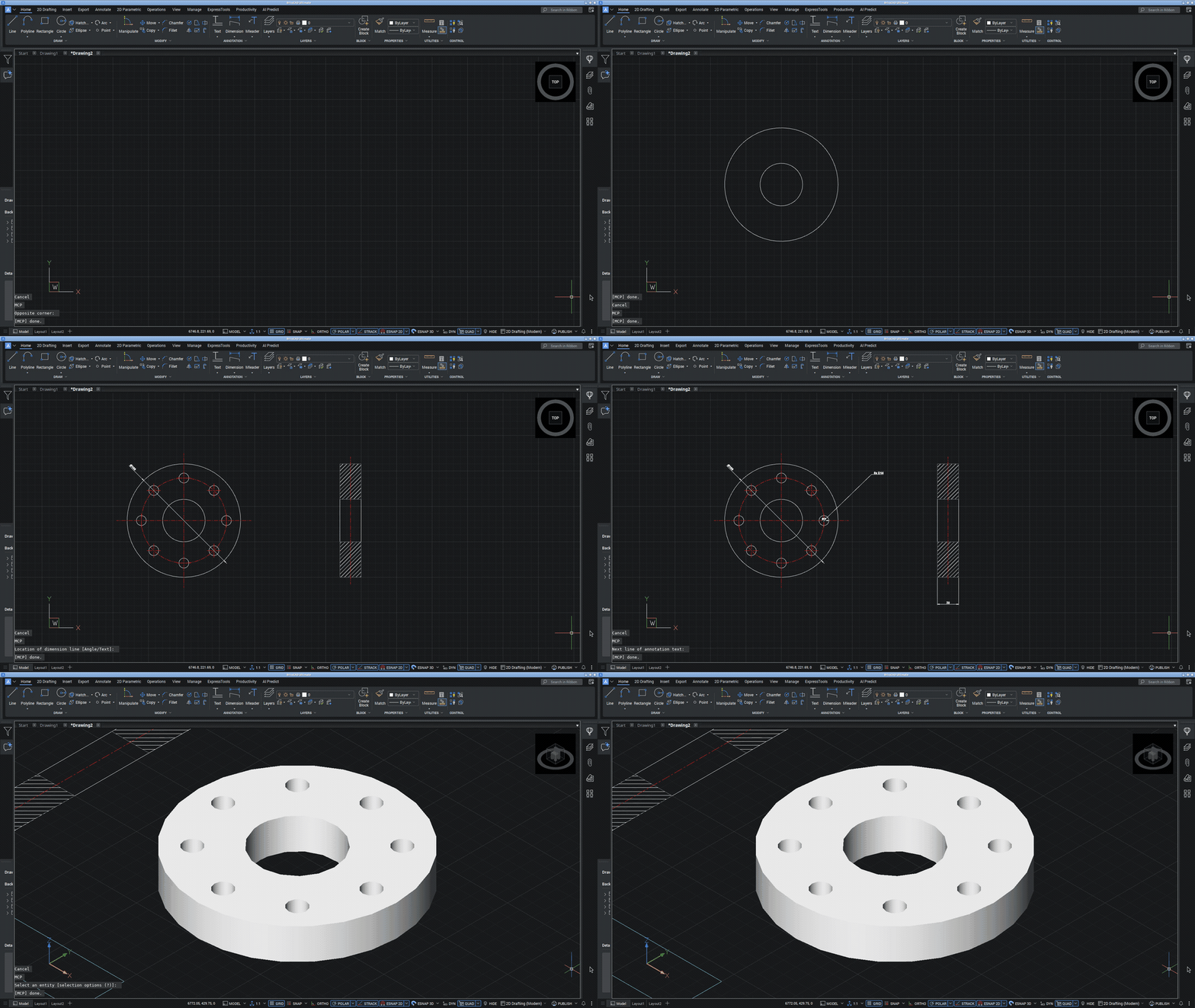
Real-time capture, unedited: front view with bolt circle, hatched section, radial/diameter dimensions, leader, title block — then the same flange modeled as a 3D solid with an AI-written parametric AutoLISP loop and one boolean subtraction. ~20 seconds, 12 tool calls.
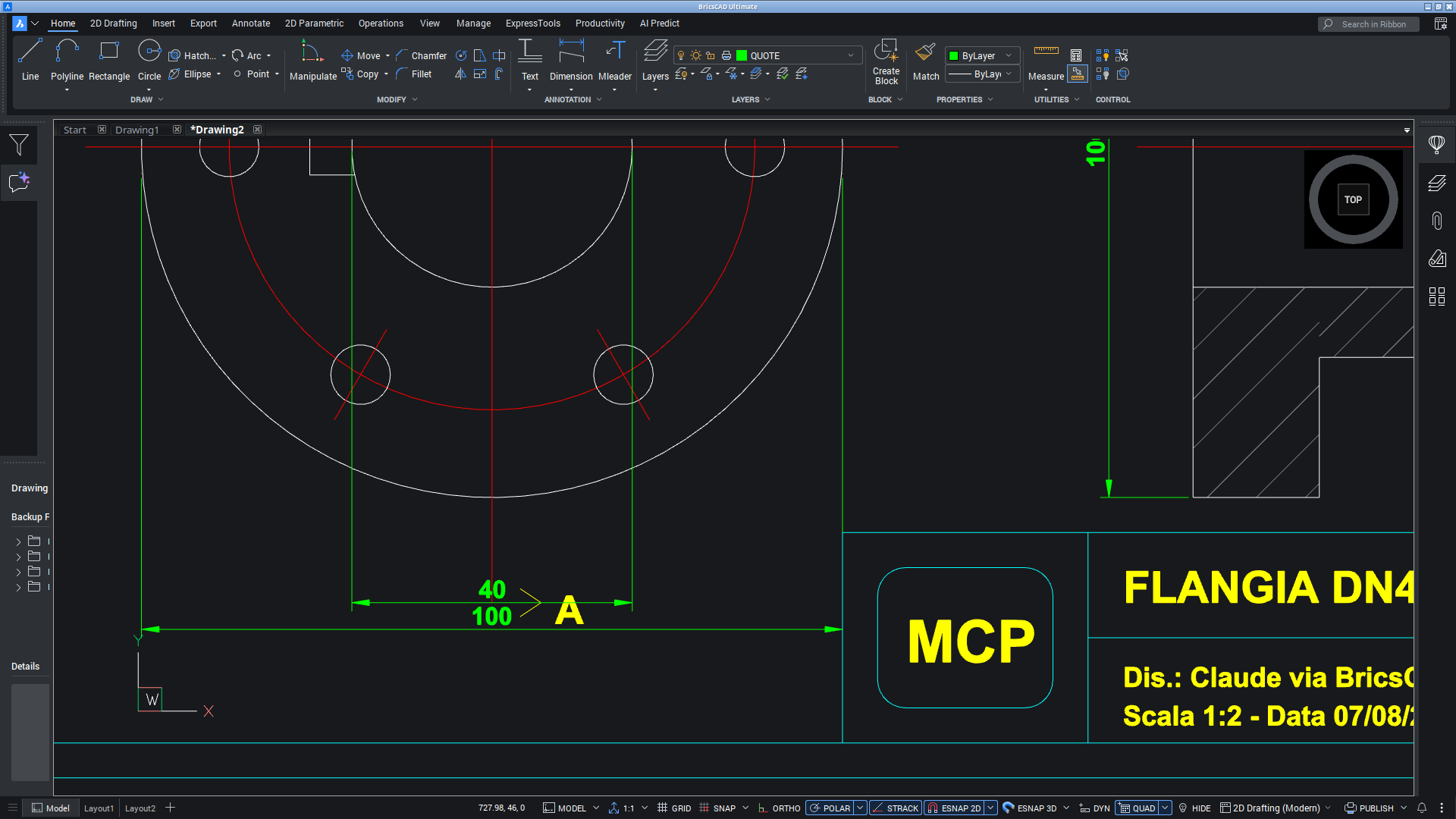
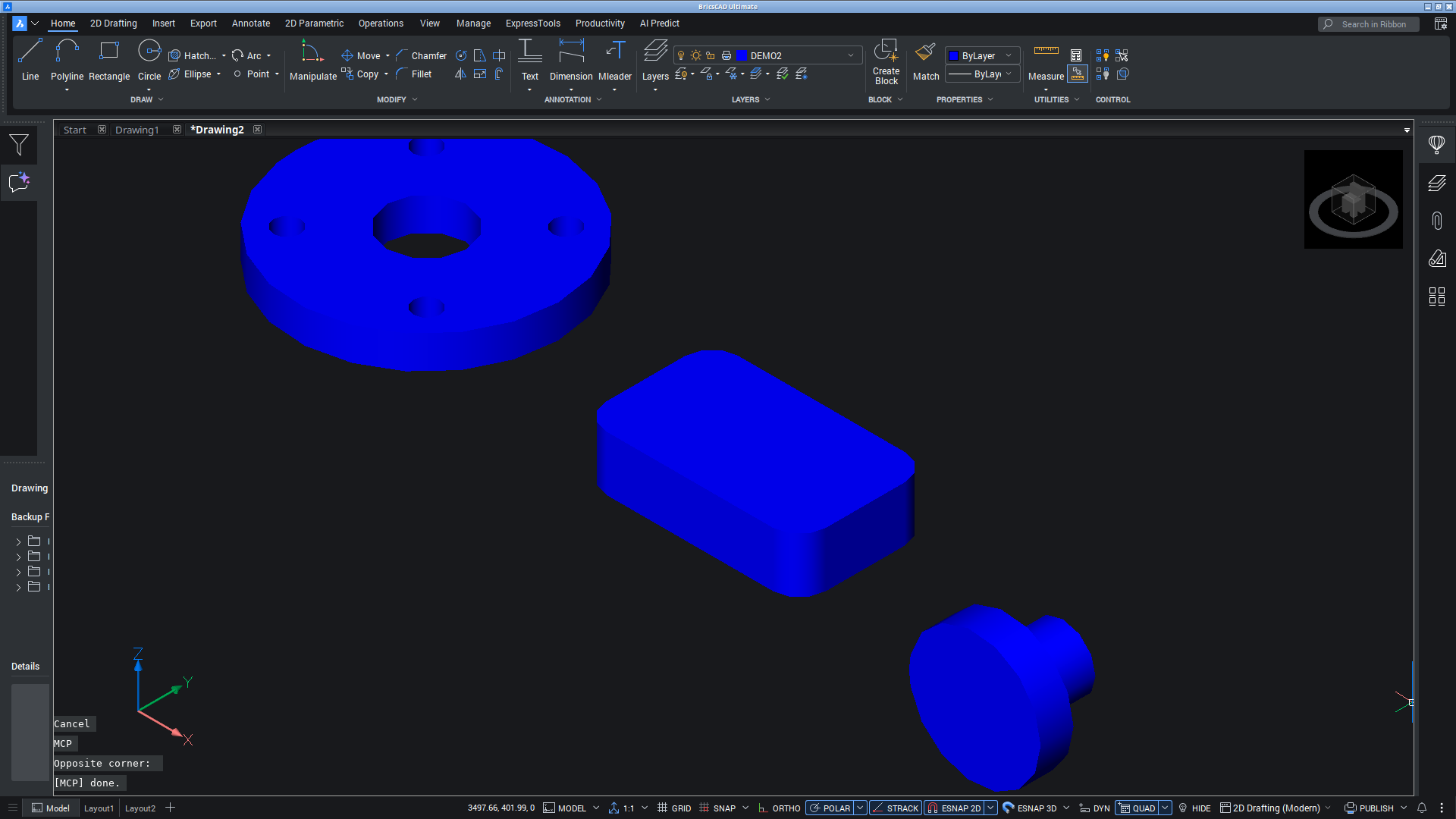
| Complete 2D drawing, drawn by Claude | 3D solids with booleans | Clean render for AI vision |
|---|---|---|
 |  |  |
Why this exists
Every other MCP server for a professional DWG CAD (multiCAD-mcp, autocad-mcp, CAD-MCP, ...) talks to the CAD through Windows COM — none of them can run on Linux, and none of them does real 3D.
BricsCAD is the professional DWG CAD that does run natively on Linux. This server drives it through a mechanism that needs no API at all: an AutoLISP file bridge. The MCP server writes LISP expressions to a file, triggers a tiny MCP command inside the CAD, and reads the result back. That's the whole trick — and it unlocks everything the CAD can do, including 3D solid modeling.
Because the bridge is plain AutoLISP + standard DXF entmake + AutoCAD-compatible commands, it is portable by construction: AutoCAD, ARES Commander (also Linux-native!), ZWCAD, GstarCAD and the IntelliCAD family all speak the same language. Porting means swapping the autoload file name and the keystroke trigger — adapters welcome.
MCP client (Claude, Cursor, ...)            BricsCAD (Linux)
        │                                        │
        ▼                                        ▼
  server.py (FastMCP, 128 tools)          c:MCP AutoLISP command
        │        writes LISP  ──►  /tmp/mcp_bricscad.in
        │        triggers via xdotool ──► reads, evals line by line
        │        reads result ◄──  /tmp/mcp_bricscad.out
What it can do
- Full 2D drafting — lines/arcs/polylines/splines, line weights per layer (0.50 walls / 0.35 edges / 0.18 dimensions — measured on the plotted page, not just set), real HATCH (with islands), dimensions incl. radius/diameter/angular, leaders, linetypes (chain/hidden), text styles, trim/extend/fillet/chamfer/offset/mirror/arrays, blocks
- Semantic shapes —
slot,bolt_circle,rounded_rect,polygon,center_mark: one call, the server does the math - 3D solid modeling — box/cylinder/sphere/cone/wedge/torus, extrude/revolve/sweep, union/subtract/intersect, slice, fillet/chamfer on solid edges, 3D move/rotate around any axis — and
flatshot_view: auto-generate correct 2D drawing views from the 3D model - Batch & atomic —
draw_batchexecutes N operations in one round-trip, wrapped in one undo group (one batch = one Ctrl+Z) - Talk about what the user selected —
get_selectionreads the GUI pickfirst set;select_by/select_windowhighlight what the AI found before acting; modify tools accept"selection" - Verification without screenshots — bounding boxes, key points, exact lengths/areas, intersection checks (collision detection), solid volume/centroid
- Design review — tools that answer an engineering question, not just run a command (new in 1.2) —
boolean_verifiedcuts and measures the change against the volume you expected (a cut that lands short reads SHORT, not success);overhang_reportreads the STL mesh and says whether a part prints without supports, scoring all six orientations;contact_reportover an assembly (assembly_place/assembly_list/assembly_clear) says who touches whom, who interferes, and who is an orphan — a part touching nothing, because its job was superseded and nobody noticed;hole_reportphysically probes every hole and says which are actually open (a drawing lies about its holes until something checks);graph_build/graph_traceread the 2D geometry as a connectivity graph — separate networks, exact run lengths, and the open ends that are real breaks vs T-junctions, with the joining tolerance emerging from the drawing instead of hardcoded - The drawing REMEMBERS (new in 1.3, beta) —
memory_enableputs a journal beside the .dwg that the CAD writes by itself, catching the edits the human makes in the GUI while no tool is running;tag_entitygives entities semantic roles ("muro-nord", "asta-principale") keyed to handles, which survive save and reopen;world_reportanswers what is here, what did I call it, what changed since I last looked — and revalidates every claim against the live drawing before answering (an entity erased behind the AI's back readsDEAD (erased since tagging), reported, never hidden). The next prompt — or the next session — starts knowing the drawing instead of re-surveying it - Instructions in the protocol (new in 1.2) — the server ships the rules that cannot be learned by trying (OK is not evidence; calibrate before trusting; booleans keep the first handle; one line is one complete expression; consult the drawing's memory first), plus a
lambdacad://trapsresource that costs nothing until read - Eyes when needed —
render_view: BricsCAD's internal PNG render (clean, no UI, ~30 KB) for vision models - Sheets, at a real scale —
create_sheet(A4…A0, margins zeroed so paper mm = sheet mm),add_viewport(ask for 1:50 and it is 1:50 — measured back off the entity, and parked on a non-plotting layer),fit_viewport(measures what is drawn and picks the largest STANDARD scale that fits — 1:37 is not a scale),title_block(border + ISO 7200 cartouche, sized from the sheet),export_sheet_pdf, which checks its own work by measuring the page of the PDF it just wrote - Deliverables — save DWG, export DXF, PDF and STL (
export_stl: 3D solids straight to the slicer, parked on the origin) - Several drawings open —
list_documentsshows which one the tools are pointing at (plus unsaved changes and read-only),use_documentpicks another; every reply says which drawing answered, and warns when it changes underfoot - Escape hatch —
run_lispevaluates arbitrary AutoLISP (multi-line, multi-expression): capable models write parametric code and love it
Full reference: docs/TOOLS.md · How it works: docs/ARCHITECTURE.md
Measured, not promised
| Metric | Result |
|---|---|
| Tool calls for a complete dimensioned flange | 200 → 22 (9× fewer round-trips vs primitive-per-call) |
| Trigger latency | 0.25 s per call |
| Error reporting | per-line LISP errors (msg=L2: ...) → models self-correct without screenshots |
| Exactness | entity_length on an r=20 circle: 125.664 / 1256.637 (2πr, πr² exact) |
Details and model-behavior notes (Sonnet writes parametric LISP, Haiku uses typed tools): docs/BENCHMARKS.md
Tests
BRICS_DISPLAY=:0 python tests/test_tools.py     # ~135 checks incl. review + memory groups, ~2-4 min
python tests/test_tools.py 3d edges export      # or just some groups
python tests/test_tools.py --list
An integration suite: it drives the CAD you already have running, then measures what came out — closed-form volumes, bounding boxes, the value stored inside a dimension, triangle counts read out of the STL. Never "no error".
That distinction is the whole point. The bridge answers OK whenever the CAD
accepted the command, which is not the same as the CAD having done what was
asked. Every bug found so far was of that shape: the classic CHAMFER silently
switching to all edges; a layout that plots rotated 90°, so an A3 landscape
sheet comes out portrait, the drawing falls off the paper and the export writes
a perfectly valid, entirely empty page; and — the one that reached a release —
running object snap dragging programmatic coordinates onto nearby geometry, so
five blocks placed in a row each landed on the previous. A volume, a bounding
box, a measured dimension and the page of a PDF are exact signatures: every one
of those surfaced as arithmetic that did not add up.
The suite draws in a scratch region (x ≥ 50000), erases it afterwards, and
fails if the entity count does not come back to where it started. It still works
in the active drawing, so point it at a scratch one.
Usage telemetry (local only)
With 128 tools, the interesting question is which ones earn their place — and
which fail often enough to signal a docstring or design problem. The server
appends one JSON line per call to ~/.lambdacad/usage.jsonl:
{"t": 1786526823.4, "tool": "draw_batch", "ms": 198, "err": 0}
Tool name, duration, error flag. Never the arguments — no coordinates, no
paths, no drawing data — and nothing ever leaves your machine. Disable with
LAMBDACAD_TELEMETRY=0.
python scripts/usage_report.py              # per-tool calls, error rate, p50
python scripts/usage_report.py --core 95    # smallest set covering 95% of calls
python scripts/usage_report.py --reset      # archive the current log
The --core output is a data-driven candidate for CORE_TOOLS (compact mode):
after a few weeks of real use, the choice of which tools deserve a place in a
schema-limited client stops being a guess. Early signal from the integration
suite itself: run_lisp alone is ~half of all calls — on clients that load
schemas on demand (Claude Code's tool search), the long tail of typed tools
costs nothing until used, so the rich docstrings stay.
Quick start
Requirements: Linux, BricsCAD (any recent version — tested on V26), Python 3.10+, xdotool.
git clone https://github.com/Psalmustrack/lambdacad-mcp
cd lambdacad-mcp
./install.sh
The installer creates a venv, installs the AutoLISP bridge into BricsCAD's Support/on_doc_load.lsp (idempotent, marker-delimited), and prints ready-to-paste config for Claude Code / Claude Desktop.
Then:
- Start BricsCAD and open a drawing (the bridge loads when a document opens).
- Start a new AI session — the
bricscadtools appear. - Ask: "draw the plan of a 4×3 m room with a door and dimensions".
Configuration (env vars)
| Variable | Default | Purpose |
|---|---|---|
BRICS_DISPLAY | session $DISPLAY | X display where BricsCAD runs (e.g. :77 for a nested Xephyr) |
BRICS_COMPACT | off | 1 = expose only 14 essential tools (~1k schema tokens instead of ~7k) for clients that inject every schema |
BRICS_MCP_IN / BRICS_MCP_OUT | /tmp/mcp_bricscad.{in,out} | bridge file paths |
Security note
run_lisp and run_command execute arbitrary code inside BricsCAD by design — that's what makes the server fully general. Only connect MCP clients you trust, and treat the bridge files as trusted input. The bridge itself never loads foreign files (read+eval only) and honors BricsCAD's SECURELOAD.
Troubleshooting
| Symptom | Fix |
|---|---|
ERR: BricsCAD window not found | Is BricsCAD running on BRICS_DISPLAY? |
ERR: no response from BricsCAD | Is a drawing open (not the Start page)? The bridge loads on document open. |
| Commands typed into the drawing as text | Click once inside the drawing area so the command line has focus, then retry. |
| Updated the bridge, nothing changed | on_doc_load.lsp runs per document, and each open drawing keeps its own copy of the definitions. Drawings already open still hold the old bridge: close and reopen them, or (load "…/Support/on_doc_load.lsp") in each. |
| The tools are drawing in the wrong file | list_documents shows which drawing they are pointing at; use_document moves them. Replies carry dwg=<name> and warn when it changes on its own. |
| Wayland | Works via XWayland; if your compositor struggles with heavy CAD redraws, run BricsCAD under a nested X server (Xephyr) and set BRICS_DISPLAY. |
Related projects
| Project | CAD | Platform | 3D |
|---|---|---|---|
| λ lambdacad-mcp (this) | any AutoLISP CAD — BricsCAD reference | Linux | yes |
| multiCAD-mcp | AutoCAD/BricsCAD/ZWCAD via COM | Windows | no |
| puran-water/autocad-mcp | AutoCAD LT (LISP bridge) | Windows | no |
| hvkshetry/autocad-mcp | AutoCAD LT | Windows | no |
| freecad-mcp (various) | FreeCAD | cross-platform | yes (FreeCAD) |
Credit where due: multiCAD-mcp inspired the project; puran-water/autocad-mcp independently validated the LISP-bridge approach on Windows.
Roadmap
- Focus-free dispatch (targeted X synthetic events — no window activation)
- In-process socket bridge (no keystroke trigger, ~0 latency)
- VIEWBASE paper-space drawing views; sheet metal (
SMUNFOLD) and BIM commands - Compact-mode behavioral benchmark
License
Apache 2.0 — with an explicit patent grant and trademark protection for the lambdacad-mcp name.
Trademarks
AutoCAD® and AutoLISP® are registered trademarks of Autodesk, Inc. BricsCAD® is a registered trademark of Bricsys NV (Hexagon). ARES Commander®, ZWCAD® and all other CAD product names mentioned are trademarks of their respective owners, used here only to identify compatibility. This project is independent open-source software: it is not affiliated with, endorsed or sponsored by Autodesk, Bricsys, or any CAD vendor.
Reviews
No reviews yet
Be the first to review this server!
More Developer Tools MCP Servers
Rea
Freeby Morluto · Developer Tools
Reverse engineer anything from your terminal or agent with one CLI and MCP server.
Paperclip
Freeby Paperclipai · Developer Tools
Trending hip-hop artist momentum scores across four cultural dimensions.
Fetch
Freeby Modelcontextprotocol · Developer Tools
Web content fetching and conversion for efficient LLM usage
Git
Freeby Modelcontextprotocol · Developer Tools
Read, search, and manipulate Git repositories programmatically
Toleno
Freeby Toleno · Developer Tools
Toleno Network MCP Server — Manage your Toleno mining account with Claude AI using natural language.
MCP Marketplace
Freeby mcp-marketplace · Developer Tools
Search and install MCP servers from inside your AI client.