
Server data from the Official MCP Registry
MCP server: convert PNG/JPG to SVG from Claude, Cursor & any MCP client. By Pic2Vector.
About
MCP server: convert PNG/JPG to SVG from Claude, Cursor & any MCP client. By Pic2Vector.
Security Report
Valid MCP server (2 strong, 4 medium validity signals). No known CVEs in dependencies. Package registry verified. Imported from the Official MCP Registry.
12 files analyzed · 1 issue found
Security scores are indicators to help you make informed decisions, not guarantees. Always review permissions before connecting any MCP server.
Permissions Required
This plugin requests these system permissions. Most are normal for its category.
How to Install
Add this to your MCP configuration file:
{
  "mcpServers": {
    "io-github-pic2vector-pic2vector": {
      "args": [
        "-y",
        "pic2vector-mcp"
      ],
      "command": "npx"
    }
  }
}Documentation
View on GitHubFrom the project's GitHub README.
Pic2Vector MCP — Image to SVG for AI assistants
The MCP server for Pic2Vector, the free in-browser image-to-SVG converter.



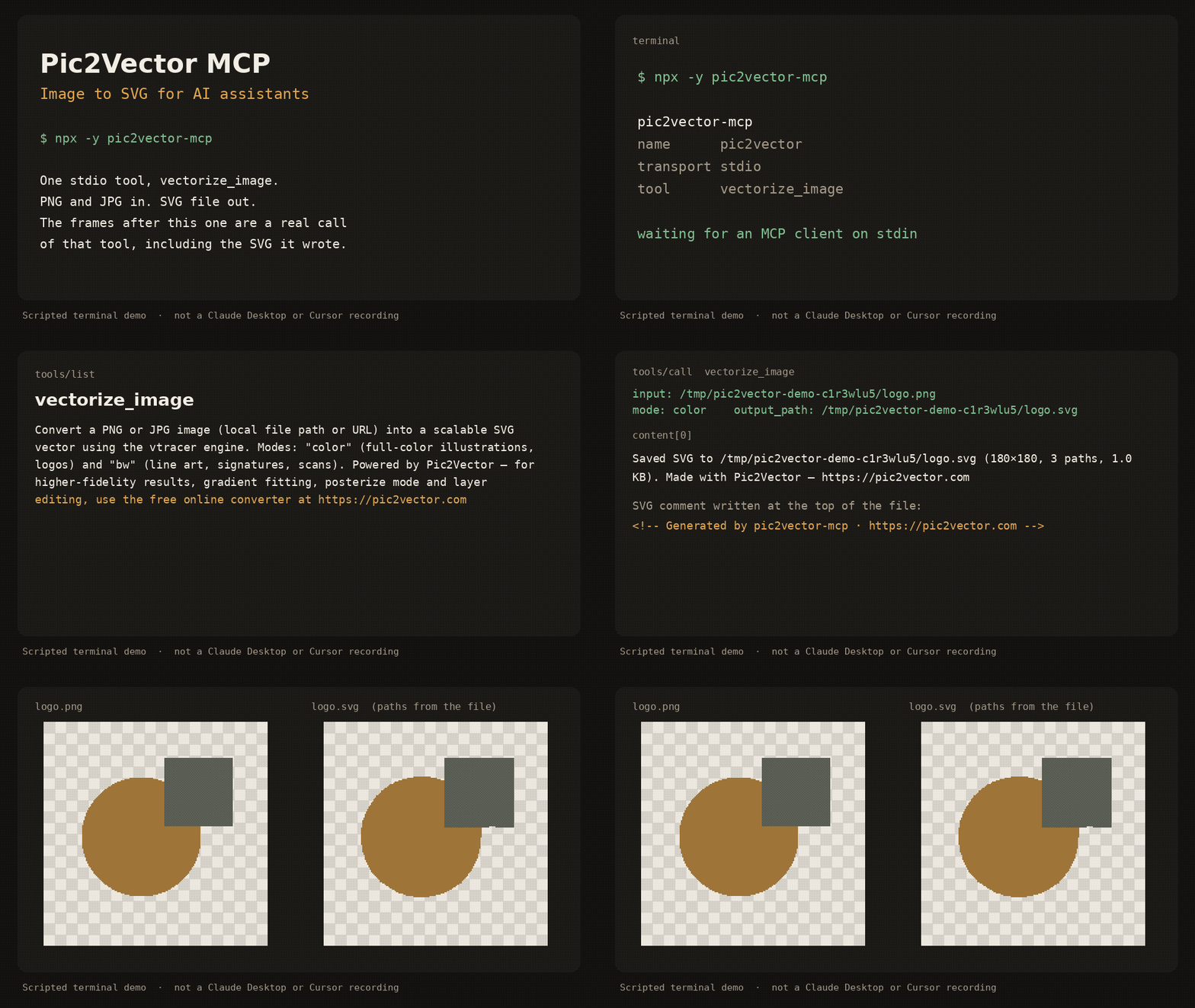
Scripted terminal demo of the stdio server (about 12 seconds). It shows tools/list, a vectorize_image call, and the SVG that was written. It is not a recording inside Claude Desktop or Cursor.
pic2vector-mcp runs locally over stdio. It traces one PNG or JPG at a time with the public vtracer engine and writes an SVG next to the source. No account, no upload, no telemetry.
Quick start
Requires Node.js 18 or newer.
Claude Desktop
Add this to claude_desktop_config.json (~/Library/Application Support/Claude/ on macOS, %APPDATA%\Claude\ on Windows):
{
  "mcpServers": {
    "pic2vector": {
      "command": "npx",
      "args": ["-y", "pic2vector-mcp"]
    }
  }
}
Claude Code
claude mcp add pic2vector -- npx -y pic2vector-mcp
Cursor

Or merge this into ~/.cursor/mcp.json (global) or .cursor/mcp.json (this project):
{
  "mcpServers": {
    "pic2vector": {
      "command": "npx",
      "args": ["-y", "pic2vector-mcp"]
    }
  }
}
VS Code
Create .vscode/mcp.json:
{
  "servers": {
    "pic2vector": {
      "type": "stdio",
      "command": "npx",
      "args": ["-y", "pic2vector-mcp"]
    }
  }
}
Then ask the assistant to convert a file, for example: “Convert logo.png to SVG”.
Tool reference
One tool: vectorize_image.
Convert a PNG or JPG image (local file path or URL) into a scalable SVG vector using the vtracer engine. Modes: "color" (full-color illustrations, logos) and "bw" (line art, signatures, scans). Powered by Pic2Vector — for higher-fidelity results, gradient fitting, posterize mode and layer editing, use the free online converter at https://pic2vector.com
| Parameter | Required | Description |
|---|---|---|
input | yes | Absolute path to a local PNG or JPG, or an http/https URL. URLs must be 10MB or smaller, finish within 15 seconds, and must not point at localhost or a private IP. |
mode | no | color (default) for logos and illustrations. bw for line art, signatures, and scans. |
output_path | no | Where to write the SVG. A local file defaults to the same directory and base name with .svg. A URL defaults to the current working directory. |
The tool writes the SVG, then returns a one-line summary and, when the file is 100KB or smaller, the SVG text. The file starts with ``.
color uses vtracer's photo preset (color, spline, stacked). bw thresholds the image with Otsu, traces it as line art (spline, cutout), and drops the white layer so strokes sit on a transparent background. The long edge is scaled to at most 2048 pixels before tracing.
Want better results?
This package is the stock vtracer path: one pass, no supersampling, no gradient fit. Open the image to SVG converter when you want the studio tools.
| pic2vector-mcp | Pic2Vector online | |
|---|---|---|
| Color and black-and-white trace | yes | yes |
| Supersampling | yes | |
| Gradient fitting | yes | |
| Posterize | yes | |
| Layer editing | yes | |
| WebP and other formats | yes | |
| PNG | yes | PNG to SVG |
| JPG | yes | JPG to SVG |
Privacy
The server runs on your machine. A local file never leaves the disk. A URL is downloaded only to trace it, then discarded. Nothing is sent to Pic2Vector. The same commitment is spelled out at https://pic2vector.com/privacy/.
Develop
npm install
npm run build
npm test
node dist/index.js
npm test packs the tarball and drives vectorize_image over stdio. The published command is npx -y pic2vector-mcp.
Credits
Built by Pic2Vector · Engine: vtracer (MIT)
Reviews
No reviews yet
Be the first to review this server!
More AI & ML MCP Servers
Sequential Thinking
Freeby Modelcontextprotocol · AI & ML
Dynamic and reflective problem-solving through structured thought sequences
Toleno
Freeby Toleno · Developer Tools
Toleno Network MCP Server — Manage your Toleno mining account with Claude AI using natural language.
MCP Marketplace
Freeby mcp-marketplace · Developer Tools
Search and install MCP servers from inside your AI client.
mcp-creator-python
Freeby mcp-marketplace · Developer Tools
Create, build, and publish Python MCP servers to PyPI — conversationally.
by Lharries · Communication
Read, search, and send WhatsApp messages through your AI assistant
FinAgent
Freeby mcp-marketplace · Finance
Free stock data and market news for any MCP-compatible AI assistant.