
Server data from the Official MCP Registry
Local tools for planning and validating focused browser-game prototypes.
About
Local tools for planning and validating focused browser-game prototypes.
Security Report
Valid MCP server (1 strong, 2 medium validity signals). 1 code issue detected. No known CVEs in dependencies. Package registry verified. Imported from the Official MCP Registry. 1 finding(s) downgraded by scanner intelligence.
9 files analyzed · 2 issues found
Security scores are indicators to help you make informed decisions, not guarantees. Always review permissions before connecting any MCP server.
Permissions Required
This plugin requests these system permissions. Most are normal for its category.
How to Install
Add this to your MCP configuration file:
{
  "mcpServers": {
    "io-github-opengameapp-browser-game": {
      "args": [
        "-y",
        "opengame-browser-game-mcp"
      ],
      "command": "npx"
    }
  }
}Documentation
View on GitHubFrom the project's GitHub README.
OpenGame Showcases
Public browser-game showcases from OpenGame.
Website: https://opengame.app/
Featured preview
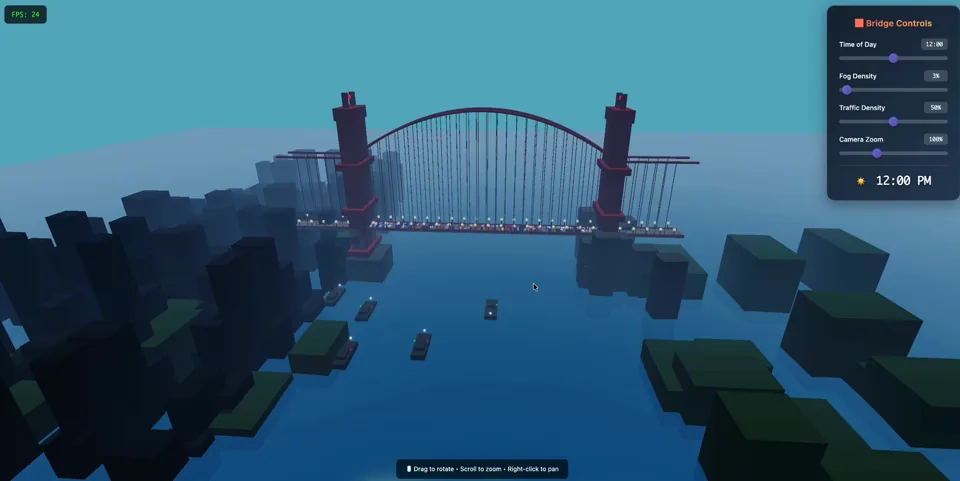
Golden Gate Bridge — 3D Cinematic
Click the poster to play the live demo, or watch the video preview.
This repository is intentionally small. It contains public showcase material only: playable static HTML examples, prompts, and links to the matching OpenGame pages. It does not contain OpenGame production runtime code, deployment configuration, credentials, user data, billing data, or analytics exports.
Showcases
| Showcase | Type | Play | Video | Prompt | OpenGame page |
|---|---|---|---|---|---|
| Golden Gate Bridge — 3D Cinematic | 3D / Three.js / WebGL | Live demo | Video preview | Prompt | OpenGame page |
| Vaporwave Platformer — Night City | 2D / Platformer / Canvas | Live demo | — | Prompt | OpenGame page |
| PokeBonk: Pocket Survivor (showcase copy) | 3D / Survival / Three.js | Play and guide | — | Brief and revision | OpenGame page |
Run locally
Open the HTML files directly in a browser:
open showcases/golden-gate-bridge/index.html
open showcases/vaporwave-platformer/index.html
The Golden Gate Bridge showcase imports Three.js from jsDelivr. The Vaporwave Platformer is self-contained.
OpenGame Skills
Reusable public Skills now have a dedicated canonical repository: opengameapp/OpenGame-skills. Install them from that source:
npx skills add opengameapp/OpenGame-skills \
  --skill opengame-browser-game-builder

npx skills add opengameapp/OpenGame-skills \
  --skill opengame-marketplace-publisher
The legacy skills/ folder is retained temporarily so existing
marketplace source links do not break during migration. New Skills and future
versions are maintained only in the dedicated repository. See its
Skill catalog.
OpenGame MCP servers
The mcp/ directory contains independently installable Model Context
Protocol servers. The first server, OpenGame Browser Game
MCP, gives AI clients deterministic tools to
scope a browser-game vertical slice, choose Canvas/DOM or Three.js/WebGL,
validate a brief, and discover these public showcases. It is local, read-only,
requires no API key, and never connects to OpenGame production systems.
Install it from the
public npm package
or find io.github.opengameapp/browser-game in the
Official MCP Registry.
It is also listed on
LobeHub Market.
See the MCP publishing guide for the versioned
release process.
Remix with OpenGame
Use the prompt files in prompts/ as starting points, then remix them with OpenGame on the official website:
Repository scope
Included:
- Public playable HTML showcases.
- Original prompts used to guide generation.
- Links to the dedicated public OpenGame Skills catalog.
- Links to matching OpenGame live demos and detail pages.
Not included:
- Proprietary OpenGame app/runtime source.
- Production secrets, API keys, cookies, user records, analytics, payments, or deployment config.
- Private prompts or customer-generated content.
License
MIT for the showcase material in this repository. Third-party runtime libraries loaded by examples remain under their own licenses.
PokeBonk is an unofficial fan experiment. Its code license does not grant rights to third-party character names, designs or trademarks; see its license and attribution notes.
Contact
Product support: support@opengame.app
General contact: hello@opengame.app
Reviews
No reviews yet
Be the first to review this server!
More Developer Tools MCP Servers
Rea
Freeby Morluto · Developer Tools
Reverse engineer anything from your terminal or agent with one CLI and MCP server.
Paperclip
Freeby Paperclipai · Developer Tools
Trending hip-hop artist momentum scores across four cultural dimensions.
Toleno
Freeby Toleno · Developer Tools
Toleno Network MCP Server — Manage your Toleno mining account with Claude AI using natural language.
MCP Marketplace
Freeby mcp-marketplace · Developer Tools
Search and install MCP servers from inside your AI client.
mcp-creator-python
Freeby mcp-marketplace · Developer Tools
Create, build, and publish Python MCP servers to PyPI — conversationally.
by Lharries · Communication
Read, search, and send WhatsApp messages through your AI assistant