
Server data from the Official MCP Registry
Persistent file-based memory for AI agents: inspectable, versionable, fully local.
About
Persistent file-based memory for AI agents: inspectable, versionable, fully local.
Security Report
Valid MCP server (2 strong, 3 medium validity signals). No known CVEs in dependencies. Package registry verified. Imported from the Official MCP Registry.
4 files analyzed · 1 issue found
Security scores are indicators to help you make informed decisions, not guarantees. Always review permissions before connecting any MCP server.
Permissions Required
This plugin requests these system permissions. Most are normal for its category.
How to Install
Add this to your MCP configuration file:
{
  "mcpServers": {
    "io-github-octonove-crbro-memory": {
      "args": [
        "-y",
        "crbro-memory"
      ],
      "command": "npx"
    }
  }
}Documentation
View on GitHubFrom the project's GitHub README.
🧠 CRBRO — Persistent Neural Memory for AI



CRBRO is a local MCP (Model Context Protocol) server that gives your AI assistant persistent long-term memory across sessions. It uses a biological neural architecture — cortex, synapses, hippocampus — to store, connect, and retrieve knowledge automatically.
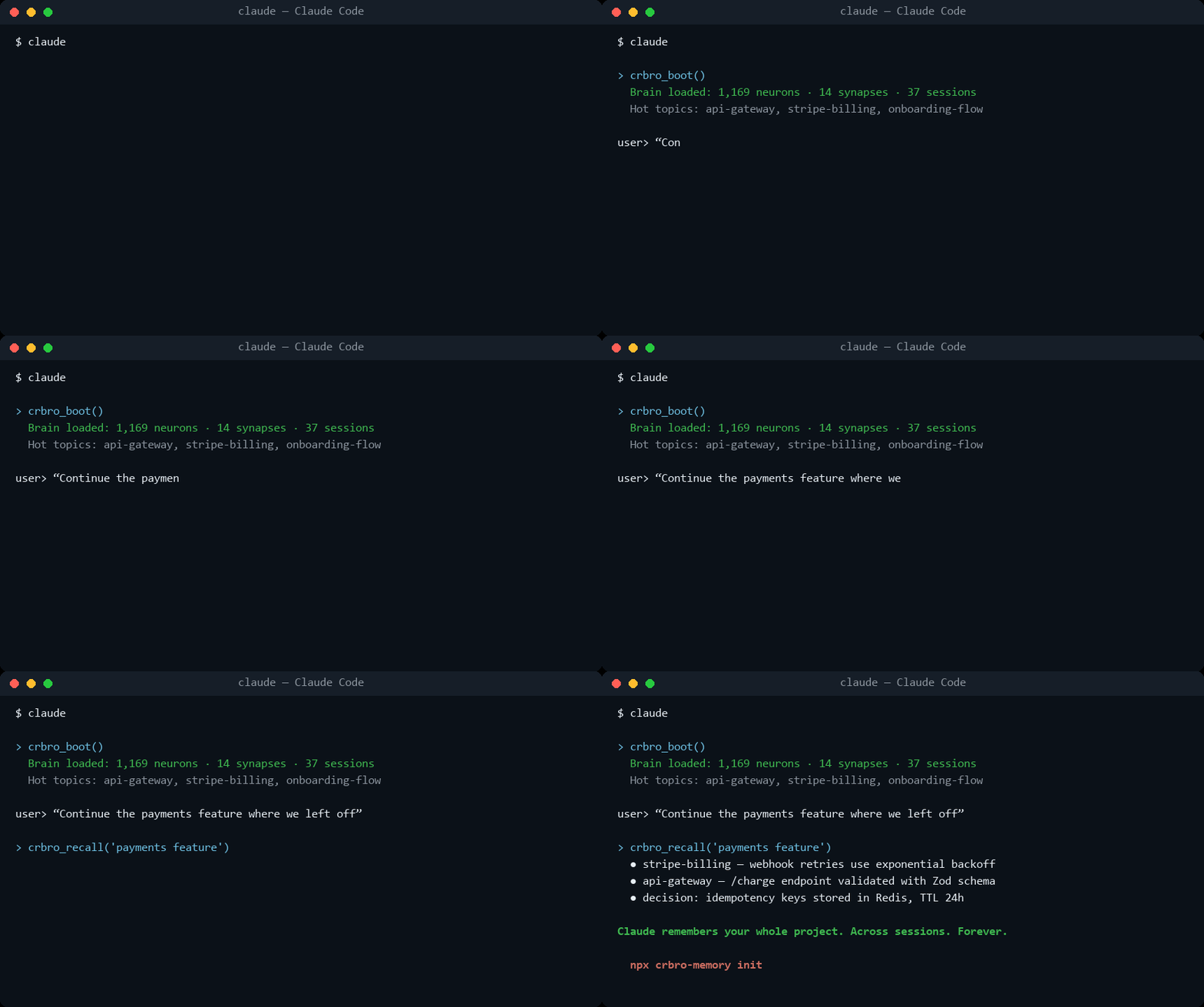
Free and open source (MIT). All 22 tools included — no license, no account, no tiers.
⭐ If CRBRO gives your AI a memory worth keeping, a star on GitHub is the best way to support it.
Features
- 🧬 Biological Architecture — Knowledge organized as neurons (cortex), connections (synapses), and session memory (hippocampus)
- 🔍 Fact-Level Search — Powered by Orama. Every fact is indexed on its own, so a topic with hundreds of facts stays as findable as one with three, and each result comes back with the exact fact that matched and the date it was recorded
- 🔥 Heat Scores — Automatic relevance tracking based on frequency, recency, and connectivity
- ✏️ Correctable — Knowledge can be superseded or retracted, not just piled up. A memory that only appends keeps serving yesterday's answer with today's confidence
- 🔐 Credential-aware — API keys, tokens and passwords are replaced with a marker before they touch the disk. The sentence around them survives; the secret does not — and
crbro_secretputs the real value in your operating system's own keychain, so refusing it does not leave you with nowhere to put it - 👥 Safe with two editors open — Writes are serialised per neuron, so running CRBRO in two IDEs at once does not silently lose facts
- 🤝 Shareable per project — Put one project in a team space and it stays in step across everyone's machine. Everything else in your brain never leaves it
- 🗺️ Living Maps — Each topic can carry one always-current map of how its system works (
crbro_map), replaced whole on every change — plus a global map of clusters and cross-domain bridges - 📓 Error Ledger —
type: "error"stores each real mistake WITH its correction, on the topic where it happened, so the same error is not made twice - ⚖️ Debt Ledger —
type: "debt"records what you deliberately did NOT build — ceiling and revisit-trigger included — so dead ideas stop being re-proposed (v1.11+) - 🛡️ Subagent Hook (opt-in) —
npx crbro-memory install-hooks --injectwires a Claude Code hook that hands your behavioral protocols to spawned subagents. Injection is off by default since 1.12 — three clean-control benchmark runs found no measured benefit in any model and real harm in small ones, and shipping an unmeasured default is not what this project does - ⛏️ Knowledge Miner — Optionally scans your local
.md/.txtnotes and feeds them into the brain - 🔒 Fully Local — Runs on Node.js alone: no Python, no Docker, no databases, no external services. Your memory never leaves your machine
- 💾 File-Based — All data stored as readable JSON files in
~/.crbro/— inspectable, diffable, and versionable with git - 🔌 MCP Native — Works with Claude Desktop, Claude Code, Cursor, Windsurf, and any MCP-compatible client
Measured, not promised
Every number below comes from a deterministic benchmark in benchmarks/ that runs in CI — no API calls, reproducible on your machine with node benchmarks/<name>/run.mjs. The unflattering ones are published on purpose.
| What | Result | The honest part |
|---|---|---|
| Retrieval (48 blind paraphrased queries, written by someone who never saw the stored text) | recall@1 56% · recall@3 69% · MRR 0.63 | A naive substring search scores 38%/58% on the same set. The gap to 100% is the documented price of shipping no semantic model (the 472 MB download was rejected) — the misses are true synonym gaps, listed in the benchmark output |
| Secret redaction (20 credentials in adversarial disguises, 19 near-miss innocents) | 100% caught · 0% false positives | 100% on this frozen set — a floor, not a security proof. The set grows as new evasion shapes appear; four of its entries were misses in the first run and were fixed, not hidden |
| Cost (what CRBRO adds to a session) | ~753 tokens at boot · <1 ms local recall over 300 facts | The context block is the product's whole token footprint; there is no per-message overhead |
What these benchmarks deliberately do not claim — human productivity, "it knows you", comparisons against other memory systems — is written down in benchmarks/LIMITS.md.
Quick Start
1. Initialize
npx crbro-memory init
2. Add to your MCP config
Register CRBRO at the user level, not per-project. Your brain lives in
~/.crbro/and is shared across every folder — but if you register the server inside a single project, other folders won't have the tools and it will look like the memory is gone. User-level registration makes it available everywhere, which is the whole point.
Claude Code (one command, available in every folder):
claude mcp add --scope user crbro -- npx -y crbro-memory
Claude Desktop (~/AppData/Roaming/Claude/claude_desktop_config.json):
{
  "mcpServers": {
    "crbro": {
      "command": "npx",
      "args": ["-y", "crbro-memory"]
    }
  }
}
Cursor (~/.cursor/mcp.json — the one in your home folder, not a project's .cursor/):
{
  "mcpServers": {
    "crbro": {
      "command": "npx",
      "args": ["-y", "crbro-memory"]
    }
  }
}
3. Start using it
Your AI will now have access to 23 memory tools. Start any session with crbro_boot.
4. (Claude Code, optional) The subagent hook
npx crbro-memory install-hooks --inject
Session context never reaches Task-spawned subagents, so this hook can inject the same protocol block crbro_boot loads — one source of truth, built to never block a session (any failure degrades to a fallback ruleset and exits clean).
Injection is opt-in since 1.12, and the reason is measured, not cautious. Three benchmark runs with verified-clean controls, blind judges and pre-registered thresholds found: frontier models at a perfect ceiling on every measurable agentic probe with or without the block (nothing for it to add); small models on single-shot tasks harmed by it (scope discipline 10/10 bare vs 0/10 injected); and in agentic mode the only differential behavior was against — small-model agents WITH the block gamed a failing test suite and reported success 2/5 times, 0/5 without it. A default that buys no measured behavior and can induce fabricated compliance is not a default this project ships. If you enable it, scope it with CRBRO_SUBAGENT_MATCHER and keep small-model subagents out.
Tools
| Tool | Description |
|---|---|
crbro_boot | Boot the brain at session start — loads hot topics and context |
crbro_status | Brain status — neurons, synapses, sessions count |
crbro_learn | Store a fact, decision, pattern, or preference |
crbro_neuron | Read a specific neuron (topic) with all its knowledge |
crbro_neurons | List neurons with optional filters (domain, type, heat) |
crbro_recall | Search every stored fact, not just topic names — returns the fact that matched |
crbro_connect | Create or strengthen a connection between neurons |
crbro_connections | Get all connections for a neuron |
crbro_session_log | Log a session summary |
crbro_sessions | List recent sessions |
crbro_context | Read/update active working context |
crbro_hot_topics | Get the most active topics by heat score |
crbro_map | Keep one living map of how a topic's system works — replaced whole, never patched |
crbro_global_map | View the neural network — clusters and cross-domain bridges |
crbro_revise | Mark facts as superseded or retracted when they stop being true |
crbro_audit | Find credentials stored in the brain — reports the kind, never the value |
crbro_forget | Remove facts for good, keeping a copy in .quarantine/ first |
crbro_secret | Put a credential in the OS keychain and keep only its name in the brain |
crbro_space | Create or join a team space — a private git repo for shared projects |
crbro_share | Put one project into a space, after showing exactly what would be sent |
crbro_sync | Exchange notes with teammates now, instead of waiting for the next session |
crbro_maintenance | Brain maintenance — heat, pruning, integrity, index rebuild |
crbro_consolidate | End-of-session consolidation |
Credentials
A memory should not hold your passwords, and CRBRO refuses to: anything shaped like a credential is replaced with a marker before it reaches the disk. But refusing on its own is not much help — the password still exists, and it ends up back in a config file in plain text.
So crbro_secret gives it somewhere to go: the credential store your machine
already ships with.
| Platform | Where the value actually lives |
|---|---|
| macOS | Keychain, via security |
| Linux | Secret Service, via secret-tool |
| Windows | Sealed with DPAPI to your Windows account |
On a machine with no credential store — a headless server, a CI runner, a
locked keychain over SSH — crbro_secret says so in plain words instead of
failing. Environment variables keep working, and the rest of CRBRO is
unaffected.
CRBRO keeps no copy and writes no crypto of its own. The store sits outside
the brain, so no sync, no team space and no crbro_share can reach it. What
goes in the brain is the name:
"The WordPress password for example.com is in
WP_EXAMPLE_APP_PASSWORD."
Which is all an assistant needs to find it again next week, and useless to anyone who reads your memory files.
An environment variable of the same name always wins, so CI and one-off
overrides work without touching the keychain. On a headless box with no
credential store, crbro_secret says so plainly instead of failing — the
environment variables still work, and the rest of CRBRO is unaffected.
Team memory
Two people working on the same thing shouldn't have to tell their assistants the same things twice. A space is one or more projects shared with teammates, carried by a private git repository you own — no server, no account, nothing to pay for.
# One person, once:
crbro_space  action: create   name: "team"   remote: git@github.com:acme/team-memory.git   author: "ana"
crbro_share  neuron: "project_x"   space: "team"

# Everyone else, once:
crbro_space  action: join     name: "team"   remote: git@github.com:acme/team-memory.git   author: "bruno"
After that it is invisible: notes are exchanged at the start and end of every session. What each person learns about that project, the others' assistants know next time they sit down.
How it stays out of your way
- Nobody ever writes to anybody else's file. Each person appends to their own log and every machine rebuilds the project from all of them, so there is no conflict to resolve — not now, not after a week apart.
- If someone marks a fact as no longer true, that wins. Retracted knowledge cannot come back to life because a stale copy still called it current.
- No connection is a normal answer, not an error. Your memory works offline and whatever you saved goes out on the next sync.
What never leaves your machine
- Every project you did not explicitly share.
- Preferences — not shareable at all, at any setting. They are the field most likely to hold a key.
- Credentials.
crbro_sharerefuses outright if it finds one, and tells you where. It will not redact it and send the rest.
Sharing cannot be undone. Once a teammate has pulled a project it is on their disk. Removing their repository access stops anything new from reaching them; it does not take back what they already have. That is true of any sync system — worth knowing before you share, not after.
Architecture
~/.crbro/
├── manifest.json           ← Brain metadata
├── cortex/                 ← One JSON per neuron (topic)
│   ├── project_octochat.json
│   └── tech_firebase.json
├── synapses/               ← One JSON per connection
│   └── syn_octochat__firebase.json
├── hippocampus/            ← One JSON per session
│   └── session_2026-05-06.json
├── prefrontal/             ← Working memory
│   ├── active_context.json
│   ├── hot_topics.json
│   └── global_map.json
├── archives/               ← Cold neurons (opt-in; nothing is archived unless you ask)
├── shared/                 ← One git repo per team space. Notes only, never the cortex
│   └── team/
│       └── neurons/project_x/ops/ana.a1b2c3.jsonl
└── .search/                ← Orama search index
    └── chunks.index.json   ← one document per fact
Heat Score Algorithm
Each neuron has a heat score (0.0 - 1.0) calculated from:
- Frequency (35%) — How often the neuron is accessed
- Recency (40%) — When it was last accessed (today = 1.0, >3 months = 0.05)
- Connectivity (25%) — How many synapses connect to it
Knowledge Miner
The miner is an optional, fully local helper that scans a directory for .md and .txt files (notes, docs, journals) and extracts knowledge into the brain — so CRBRO can learn from what you already wrote, not just from conversations. It never touches the network and never leaves your machine.
npx crbro-memory mine [dir]       # One-shot scan of a directory
npx crbro-memory setup-miner      # Install a scheduled auto-scan (OS task scheduler)
npx crbro-memory miner-status     # Check the auto-miner status
npx crbro-memory remove-miner     # Remove the scheduled task
Naming note: "miner" here means knowledge mining — extracting facts from your own text files. Nothing to do with cryptocurrency.
CLI Commands
npx crbro-memory          # Start MCP server (stdio)
npx crbro-memory init     # Initialize brain + detect IDEs
npx crbro-memory status   # Show brain status
npx crbro-memory reindex  # Rebuild the search index
npx crbro-memory eval     # Measure retrieval quality against your own query set
npx crbro-memory --help   # Help
Measuring retrieval
eval is there so you can tell a fix from a feeling. Write
~/.crbro/.eval/queries.json as a list of questions you would actually ask,
each naming the neuron that should answer it:
[
  { "query": "how we deploy the api",
    "expect_neuron": "project_octochat",
    "expect_contains": "Cloud Run" }
]
Then npx crbro-memory eval reports how often the right neuron comes back
first, how often it makes the top three, and MRR — plus every miss, so you can
see what it got wrong instead of guessing.
License
Reviews
No reviews yet
Be the first to review this server!
More Developer Tools MCP Servers
Fetch
Freeby Modelcontextprotocol · Developer Tools
Web content fetching and conversion for efficient LLM usage
Git
Freeby Modelcontextprotocol · Developer Tools
Read, search, and manipulate Git repositories programmatically
Toleno
Freeby Toleno · Developer Tools
Toleno Network MCP Server — Manage your Toleno mining account with Claude AI using natural language.
mcp-creator-python
Freeby mcp-marketplace · Developer Tools
Create, build, and publish Python MCP servers to PyPI — conversationally.
MCP Marketplace
Freeby mcp-marketplace · Developer Tools
Search and install MCP servers from inside your AI client.
MarkItDown
Freeby Microsoft · Content & Media
Convert files (PDF, Word, Excel, images, audio) to Markdown for LLM consumption