
Server data from the Official MCP Registry
Extract a website’s design tokens (colors, type, spacing, shadows) as DESIGN.md, W3C, or CSS.
About
Extract a website’s design tokens (colors, type, spacing, shadows) as DESIGN.md, W3C, or CSS.
Security Report
Valid MCP server (3 strong, 3 medium validity signals). No known CVEs in dependencies. ⚠️ Package registry links to a different repository than scanned source. Imported from the Official MCP Registry. 1 finding(s) downgraded by scanner intelligence.
9 files analyzed · 1 issue found
Security scores are indicators to help you make informed decisions, not guarantees. Always review permissions before connecting any MCP server.
Permissions Required
This plugin requests these system permissions. Most are normal for its category.
How to Install
Add this to your MCP configuration file:
{
  "mcpServers": {
    "io-github-ms-zaman-designscan": {
      "args": [
        "-y",
        "@designscan/extractor"
      ],
      "command": "npx"
    }
  }
}Documentation
View on GitHubFrom the project's GitHub README.
DesignScan
URL → design tokens → DESIGN.md. Point it at any website and get a
spec-compliant DESIGN.md file
(YAML tokens + prose) that AI coding agents can read to match that site's look.
Preview
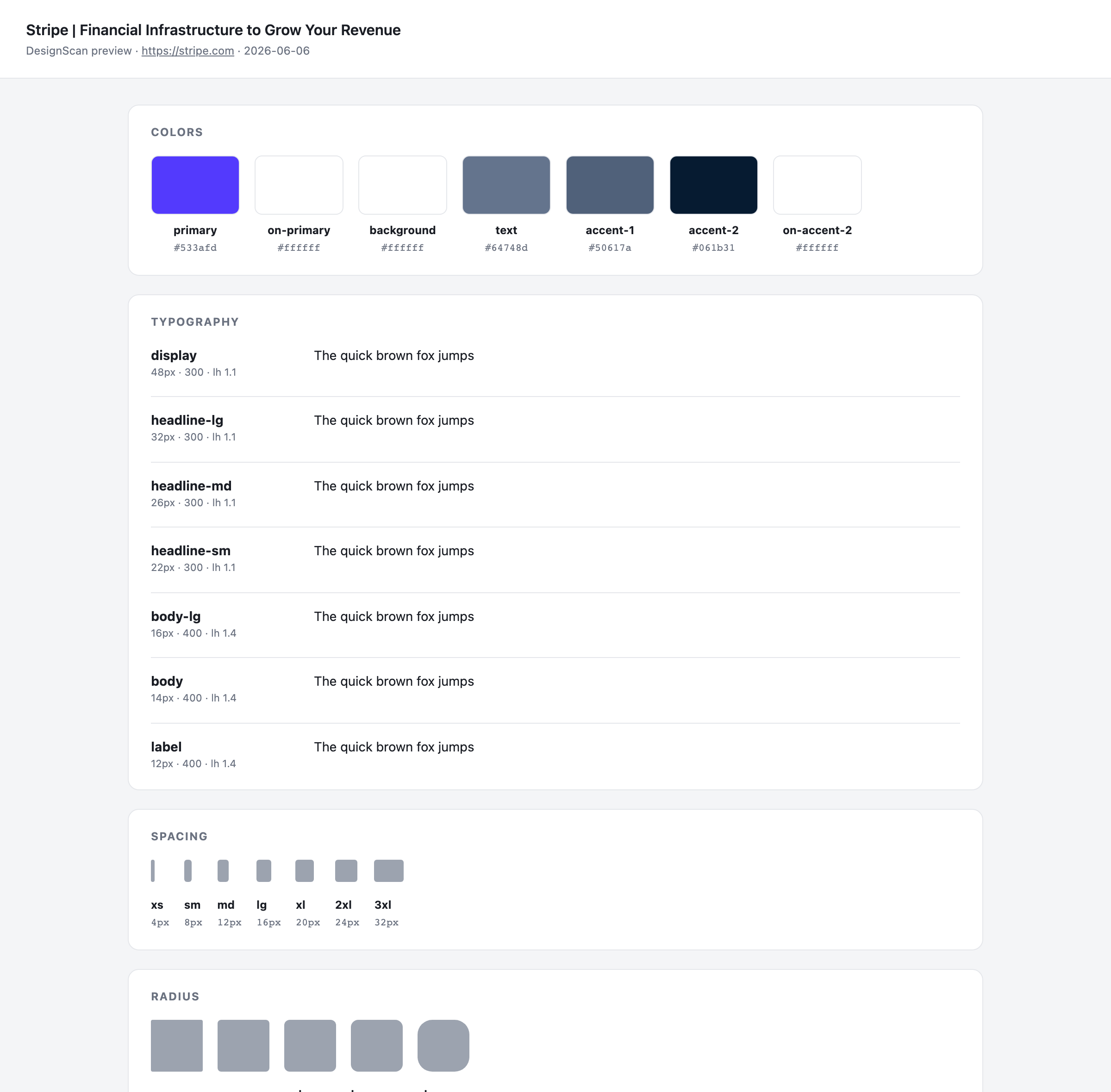
Every run can also emit a self-contained HTML proof sheet (--preview) that
renders the extracted tokens — color roles, type specimens, spacing/radius
scales, components — so you can eyeball the result before trusting it:
Notes for your coding agent
A DESIGN.md is always consumed by an AI coding agent (Cursor, Claude Code, …).
So rather than run our own LLM to resolve semantic intent, every file ends with a
Notes for your coding agent section: deterministic, per-extraction
instructions computed from the actual tokens — heading hierarchy vs. a muted
text color, sub-AA body contrast, brand-font fallback, the primary-button
contract, shape/spacing rhythm. The reasoning stays on our side (no API key); the
application happens for free inside the agent you already use.
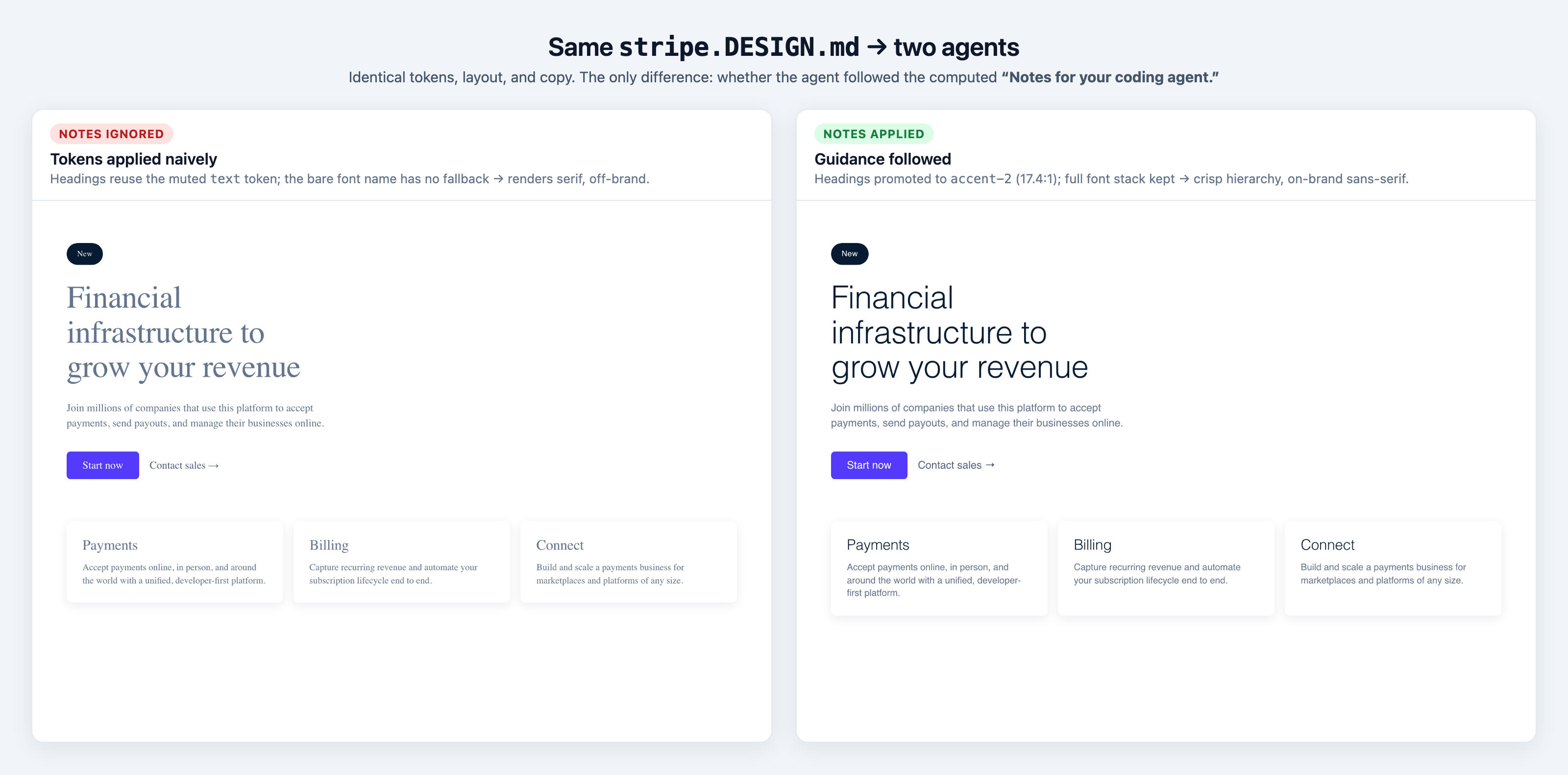
It measurably changes the output. Below: the same stripe.DESIGN.md cloned by an
agent that ignored the notes (left) vs one that followed them (right) —
identical tokens, layout, and copy:
Brand corpus
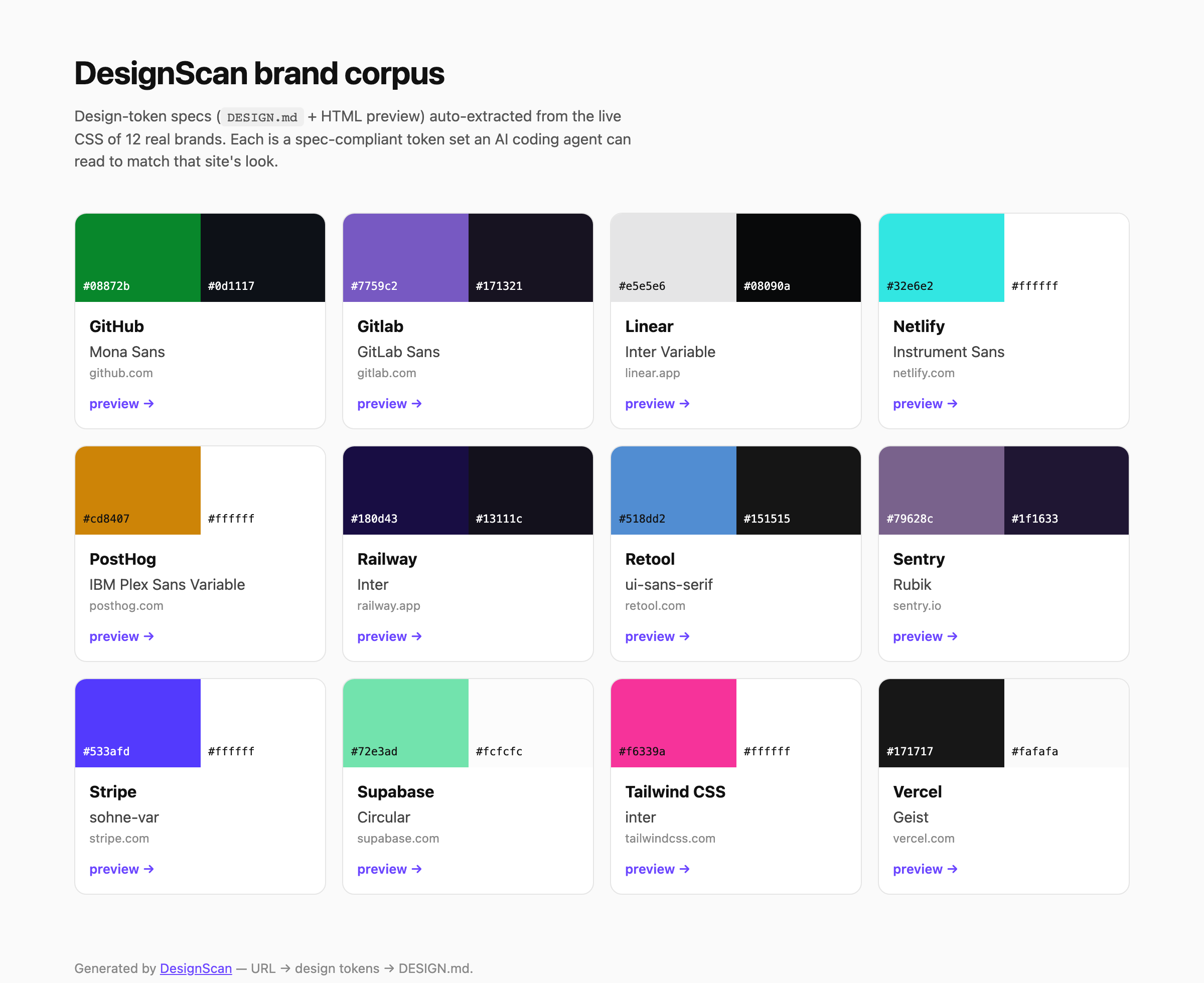
A growing, curated library of real-brand specs lives in examples/ —
each one a DESIGN.md, an HTML preview, and the raw token JSON, indexed in
examples/README.md (visual gallery: index.html).
Rebuild it from the committed JSON with pnpm seed rebuild (no network), or add
brands with pnpm seed add <url> — degenerate / bot-challenged pages are skipped
automatically so the corpus only holds trustworthy specs.
Monorepo layout
| Path | What |
|---|---|
packages/extractor | The extraction + generation engine (Playwright → tokens → DESIGN.md). |
packages/designscan | The short npm name — a thin CLI shim over the engine (npx designscan <url>). |
examples/ | The brand corpus — DESIGN.md + HTML preview + token JSON per brand, with a gallery index. |
Install (as a CLI / library)
The engine ships as the publishable @designscan/extractor
package — a designscan CLI and a typed library — with
designscan as its short npx alias.
# one-off, no install
npx designscan stripe.com --md --out stripe.DESIGN.md

# or install the CLI
npm i -g @designscan/extractor
npx playwright install chromium   # one-time (the engine drives headless Chromium)
designscan stripe.com --md --preview --out stripe.DESIGN.md
Quick start (from this repo)
This is a pnpm workspace (corepack enable to get pnpm).
pnpm install
pnpm --filter @designscan/extractor exec playwright install chromium  # one-time

# token profile (JSON) for any URL
pnpm extract stripe.com

# generate a DESIGN.md (light theme by default)
pnpm extract stripe.com --md --out out/stripe.DESIGN.md

# pick a theme: light (default) | dark | both
pnpm extract vercel.com --md --theme dark --out out/vercel.dark.DESIGN.md

# both = bundle light + dark into one file (parallel *-dark tokens)
pnpm extract vercel.com --md --theme both --out out/vercel.DESIGN.md

# --preview = also write a self-contained HTML proof sheet beside the file,
# rendering every token (swatches, type specimens, scales, components) so you
# can eyeball the extraction before trusting it (--theme both adds a Light/Dark toggle)
pnpm extract stripe.com --md --preview --out out/stripe.DESIGN.md
# → out/stripe.DESIGN.md  +  out/stripe.preview.html

# --format = pick your output: json (profile) | md (DESIGN.md) | w3c | css
pnpm extract stripe.com --format w3c --out out/stripe.tokens.json  # W3C Design Tokens (Style Dictionary etc.)
pnpm extract stripe.com --format css --out out/stripe.tokens.css   # CSS custom properties, paste-ready
# (--theme both folds a genuinely distinct dark pass into every format)

# --strict = exit non-zero if the result looks degenerate (bot challenge / too
# few signals), for CI/automation that must not consume junk tokens
pnpm extract stripe.com --strict --quiet

# seed / rebuild the curated brand corpus under examples/
pnpm seed add tailwindcss.com vercel.com   # extract live + add to the corpus
pnpm seed rebuild                          # regen md/preview/gallery from JSON
Scripts (root)
| Script | Does |
|---|---|
pnpm extract <url> [--format json|md|w3c|css] [--theme light|dark|both] [--preview] [--strict] [--timeout ms] [--out f] | Extract tokens in your format: profile JSON, DESIGN.md (--md shorthand), W3C Design Tokens, or CSS custom properties (--theme both = light + dark in one file; --preview = HTML proof sheet beside it; --strict = non-zero exit on a degenerate result) |
pnpm seed rebuild / pnpm seed add <url…> | Build the brand corpus under examples/ (md + preview + gallery; add extracts live) |
pnpm build | Compile the publishable package (tsc → dist) |
pnpm typecheck | Type-check all packages |
pnpm test | Run the test suite (vitest) |
pnpm check | Biome — format + lint (use pnpm format to auto-fix) |
pnpm lint:designmd | Validate examples/*.DESIGN.md against the official spec |
All of these run on every push/PR via GitHub Actions.
The engine is consumable as a library through its public API
(packages/extractor/src/index.ts).
Status
- Step 1 — Extraction engine (Playwright → clean token profile)
- Step 2 — Generator (token profile → spec-valid
DESIGN.md, lint-clean) - Step 3 — HTML preview (
--preview→ self-contained token proof sheet, light/dark toggle) - [~] Step 4 — agent guidance. Each
DESIGN.mdnow ships a Notes for your coding agent section: deterministic, per-extraction instructions (contrast, heading hierarchy, font fallback) so the consuming agent applies the tokens with intent — no LLM on our side. (Optional LLM-refined prose still future.) - [~] Step 5 — brand-seed library (
pnpm seed, curated corpus + gallery) done;npx … add/ checkout next
See packages/extractor/README.md for the full
roadmap and engine details.
Reviews
No reviews yet
Be the first to review this server!
More Developer Tools MCP Servers
Rea
Freeby Morluto · Developer Tools
Reverse engineer anything from your terminal or agent with one CLI and MCP server.
Paperclip
Freeby Paperclipai · Developer Tools
Trending hip-hop artist momentum scores across four cultural dimensions.
Git
Freeby Modelcontextprotocol · Developer Tools
Read, search, and manipulate Git repositories programmatically
Toleno
Freeby Toleno · Developer Tools
Toleno Network MCP Server — Manage your Toleno mining account with Claude AI using natural language.
MCP Marketplace
Freeby mcp-marketplace · Developer Tools
Search and install MCP servers from inside your AI client.
mcp-creator-python
Freeby mcp-marketplace · Developer Tools
Create, build, and publish Python MCP servers to PyPI — conversationally.