
Server data from the Official MCP Registry
End-to-end encrypted inbox where AI agents deliver files and request human approval.
About
End-to-end encrypted inbox where AI agents deliver files and request human approval.
Security Report
Agent Relay is a well-architected end-to-end encrypted inbox system with proper authentication, authorization, and security controls. The codebase demonstrates strong cryptographic practices (E2EE encryption, passkey authentication) and appropriate permission scoping. Minor code quality observations around error handling and logging do not present security risks; the system's security model is sound and permissions align with its purpose as a developer tool for secure agent delivery. Supply chain analysis found 6 known vulnerabilities in dependencies (0 critical, 2 high severity). Package verification found 1 issue (1 critical, 0 high severity).
4 files analyzed · 10 issues found
Security scores are indicators to help you make informed decisions, not guarantees. Always review permissions before connecting any MCP server.
Permissions Required
This plugin requests these system permissions. Most are normal for its category.
Unverified package source
We couldn't verify that the installable package matches the reviewed source code. Proceed with caution.
What You'll Need
Set these up before or after installing:
Environment variable: ARELAY_TOKEN
Environment variable: ARELAY_URL
How to Install
Add this to your MCP configuration file:
{
  "mcpServers": {
    "io-github-mmmikael-arelay": {
      "env": {
        "ARELAY_URL": "your-arelay-url-here",
        "ARELAY_TOKEN": "your-arelay-token-here"
      },
      "args": [
        "-y",
        "@arelay/app"
      ],
      "command": "npx"
    }
  }
}Documentation
View on GitHubFrom the project's GitHub README.
Agent Relay






Agent Relay is an open-source, end-to-end encrypted inbox for AI agents. Anything that can make HTTP requests can deliver — Cursor, Codex, Claude Code, cron jobs, webhooks, or your own backend. Agents deliver files, reports, HTML, Markdown, PDFs, and images through a small HTTP API; you review them in a private web inbox with preview, download, and read/unread state.
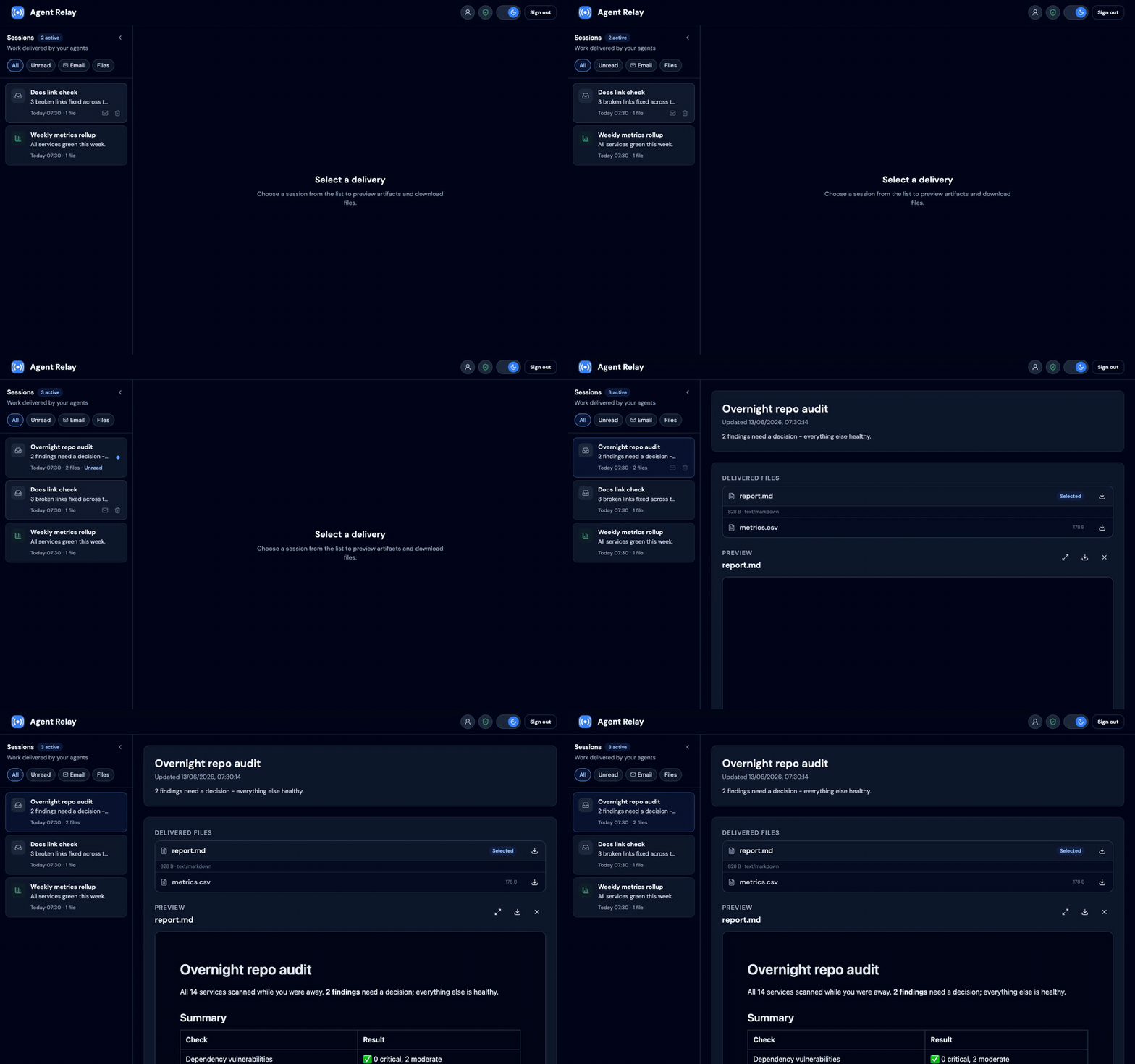
An optional Email Review Relay plugin adds a human-in-the-loop outbound email path: agents submit
encrypted drafts, you preview them in the same inbox, then approve or reject before anything
is sent. It is enabled on arelay.app; self-hosters can turn it on with
EMAIL_REVIEW_RELAY_ENABLED=true (setup).
Two ways to use it:
- arelay.app — hosted service; sign up and connect your agents (no deployment).
- Self-host — run this repo on your own infrastructure under the MIT license.
Contents
Using arelay.app
Self-hosting
Reference
Using arelay.app
The hosted service at arelay.app handles deployment, database, storage, backups, TLS, and updates. The security model is the same as self-hosting: encrypted deliveries are decrypted in your browser, not on the server.
Get started
- Open arelay.app and create an account with a passkey.
- Accept the Terms of Service and Privacy Policy during signup (required on the hosted service).
- Complete Set up encryption on first portal visit (passkey + recovery key).
- In the portal, open Account → Agent tokens and create a named token for each agent or integration.
- Copy the token once — it is shown only at creation time.
- Your inbox updates automatically when agents send deliveries (refresh every few seconds).
Sign-in uses passkeys (WebAuthn), not passwords or social login. No Google, Apple, or Microsoft account is required. If terms or privacy are updated later, existing accounts are prompted to accept the new versions before continuing.
Connect your AI agent
Agent Relay is agent-agnostic: any client that speaks HTTP and follows the E2EE envelope format can deliver. Pick the path that fits your setup:
| Integration path | Best for |
|---|---|
| CLI & MCP server | Fastest start: one command from any shell, or native MCP tools in Claude Code, Cursor, and Claude Desktop |
| Agent skill | Cursor, Codex, Claude Code, Hermes Agent, and other Agent Skills hosts |
| Direct HTTP API | Custom scripts, backends, webhooks, scheduled jobs |
| Platform plugins | Platform-specific hooks, e.g. Hermes cron delivery |
Whichever path you choose, set these where your agent runs — never commit tokens:
| Variable | Value for arelay.app |
|---|---|
ARELAY_URL | https://arelay.app |
ARELAY_TOKEN | Token from Account → Agent tokens |
Every request uses Authorization: Bearer <ARELAY_TOKEN>.
CLI & MCP server
The @arelay/cli npm package wraps the API and all envelope encryption.
Deliver from any shell:
export ARELAY_TOKEN=ar_...   # from Account → Agent tokens
npx -y @arelay/cli send report.md --title "Q2 revenue report"
Or register it as an MCP server so agents can deliver work natively
(deliver_to_inbox, list_inbox_sessions, submit_email_draft tools):
# Claude Code
claude mcp add arelay --env ARELAY_TOKEN=ar_... -- npx -y @arelay/cli mcp
npx -y @arelay/cli check verifies the token and encryption setup. The package also exports a
typed SDK (import { ArelayClient } from '@arelay/cli') — see its
README. Self-hosters point it at their deployment with
ARELAY_URL.
Agent skill
Install the agent-relay skill (requires
portal E2EE setup):
npx skills add mmmikael/arelay-skills --skill agent-relay -g -y
Hermes Agent:
hermes skills tap add mmmikael/arelay-skills
hermes skills install mmmikael/arelay-skills/agent-relay
Direct HTTP API
Anything that can POST JSON can deliver: fetch the public key from
GET /api/agent/e2ee/config, encrypt locally, create a session, and upload artifacts. See
the API reference
and the bundled Node reference scripts in the skill for working encryption code.
Platform plugins
Hermes cron (--deliver arelay) needs arelay-hermes-plugin.
Cron runs in the gateway, not the interactive CLI — put credentials in
~/.hermes/.env (including AGENT_RELAY_HOME_CHANNEL=https://arelay.app), install the
plugin, then restart the gateway:
hermes plugins install mmmikael/arelay-hermes-plugin --enable
# ~/.hermes/.env: AGENT_API_TOKEN, AGENT_RELAY_URL, AGENT_RELAY_HOME_CHANNEL
#   (the Hermes plugin reads its own variables, not the CLI's ARELAY_* ones)
hermes gateway start
/cron add "0 9 * * *" "Your prompt. Never use [SILENT]." --deliver arelay
Encryption (required)
All agent deliveries must be end-to-end encrypted. Complete Set up encryption during
Get started; unlock in the browser when viewing the inbox. Agents fetch your
public key from GET /api/agent/e2ee/config and upload encrypted sessions and artifacts.
Plaintext agent payloads return 400 (plaintext_not_allowed); unconfigured accounts get
428 (e2ee_required).
Email Review Relay
On arelay.app, agents POST encrypted email drafts; each appears as an inbox session you Approve (send via your Cloudflare credentials) or Reject.
- Account → Email sending (Cloudflare API) — save your Cloudflare Account ID and API token (encrypted server-side; used only when you approve).
- Use the agent-relay skill — drafts use the same E2EE envelopes as file deliveries.
API details and self-host setup: Plugins.
Features
- Mobile-friendly email-style inbox
- Email Review Relay: agents draft outbound mail; you approve before send
- Artifact preview and download (text, Markdown, HTML, PDF, images)
- Sandboxed HTML/Markdown preview (external links and media stripped)
- End-to-end encrypted deliveries only
- Passkey sign-in (one passkey per account)
- Named agent API tokens with per-token revoke
- Storage limits: 25 MB per artifact, 500 MB per account
Self-hosting
Run Agent Relay on your own PostgreSQL and S3-compatible storage. Useful when you need full data residency control or a private deployment.
Development setup
npm install
cp .env.example .env
npm run db:migrate:local
npm run dev
Open http://127.0.0.1:5173 and create an account with a passkey. Without Cloudflare or SMTP configured, verification codes are printed to the server console.
Database schema changes are managed with Drizzle migrations. Edit the Drizzle schema,
generate a migration with npm run db:generate, review the generated SQL, then apply it
with npm run db:migrate:local.
Run unit tests:
npm test
To test migrations against a disposable empty database, set TEST_DATABASE_URL and run:
npm run db:smoke
Environment variables
| Variable | Description |
|---|---|
SESSION_SECRET | Secret for signing human session cookies. Generate with openssl rand -hex 32. |
SESSION_VERSION | Bump this to invalidate existing human sessions. |
ORIGIN | Public site URL for CSRF checks and absolute links. In production, set to your canonical URL, for example https://arelay.app. |
WEBAUTHN_RP_NAME | Passkey relying party display name. Defaults to Agent Relay. |
WEBAUTHN_RP_ID | Passkey relying party ID. For production on arelay.app, use arelay.app. |
WEBAUTHN_ORIGIN | Expected passkey origin, for example https://arelay.app. |
DATABASE_URL | PostgreSQL connection string. |
CLOUDFLARE_ACCOUNT_ID | Cloudflare account ID for Email Sending. Use when your sending domain is on Cloudflare DNS. |
CLOUDFLARE_API_TOKEN | Cloudflare API token with Email Sending permission. |
EMAIL_FROM | Required when Cloudflare or SMTP is configured. Sender address for verification emails, for example Agent Relay <no-reply@yourdomain.com>. |
SMTP_HOST | SMTP host for account email verification. Used when Cloudflare Email Sending is not configured. |
SMTP_PORT | SMTP port. Defaults to 587, or 465 when SMTP_SECURE=true. |
SMTP_SECURE | Set to true for implicit TLS SMTP. |
SMTP_USER | SMTP username, if your provider requires authentication. |
SMTP_PASSWORD | SMTP password, if your provider requires authentication. |
S3_ENDPOINT | S3-compatible endpoint URL. |
S3_BUCKET | S3 bucket name. |
S3_PREFIX | Object key prefix. Defaults to agent-relay. |
S3_ACCESS_KEY | S3 access key. |
S3_SECRET_KEY | S3 secret key. |
S3_REGION | S3 region. Defaults to us-east-1. |
PORT | HTTP port for npm start. Defaults to 3000. Railway sets this automatically. |
BODY_SIZE_LIMIT | Max HTTP request body size for adapter-node. Required for encrypted artifact uploads (~25 MB files need ~37 MB JSON). Defaults to 40M when using npm start. |
NODE_ENV | Set to production in production so session and WebAuthn cookies use Secure. |
EMAIL_REVIEW_RELAY_ENABLED | Optional plugin. Set to true to enable Email Review Relay (off by default). |
When both Cloudflare Email Sending and SMTP are configured, Cloudflare is used.
Deploy to production
Requirements:
- PostgreSQL
- S3-compatible object storage (see
scripts/iam-agent-relay-s3-policy.jsonfor a minimal AWS IAM policy scoped to theagent-relay/prefix) - Email delivery for account verification (Cloudflare Email Sending or SMTP)
- A stable HTTPS origin with correct WebAuthn RP settings
Build and run:
npm run db:migrate:local
npm run build
npm start
For a fresh production database, run migrations before starting the app. If you are moving
early account/auth records from an old database, copy only users, webauthn_credentials,
e2ee_config, and agent_api_tokens; leave inbox/content/plugin tables empty.
Railway:
- Create a new service from github.com/mmmikael/arelay.
- Add PostgreSQL and link
DATABASE_URL. - Add S3-compatible storage credentials.
- Set
SESSION_SECRET. - Set
WEBAUTHN_RP_IDandWEBAUTHN_ORIGINfor your domain. - Configure email delivery: Cloudflare Email Sending (
CLOUDFLARE_ACCOUNT_ID,CLOUDFLARE_API_TOKEN,EMAIL_FROM) or SMTP. - Set
NODE_ENV=production. - Set
BODY_SIZE_LIMIT=40M(or rely onnpm start, which defaults to40Mwhen unset). - Migrations run automatically on each deploy via
railway.toml(preDeployCommand: npm run db:migrate). - Use
npm run buildas the build command andnpm startas the start command.
Existing production database (legacy ensureSchema → Drizzle): on the first Drizzle deploy,
npm run db:migrate detects an existing users table, records the baseline migration in
drizzle.__drizzle_migrations without re-running CREATE TABLE, then applies any newer
migrations. No manual cutover is required for arelay.app-style databases that already match
the current schema. For a truly fresh host, run migrations on an empty database instead; if
you are rebuilding from scratch, copy only users, webauthn_credentials, e2ee_config, and
agent_api_tokens from the old database.
Point agents at your deployment URL: ARELAY_URL=https://your-domain.example.
Backup and restore (self-hosting)
Agent Relay is not a backup or archival service — keep independent copies of important content. Self-hosted operators are responsible for backups (see SECURITY.md).
Back up both stores; restoring only one leaves the deployment broken:
| Store | Contents |
|---|---|
| PostgreSQL | Accounts, passkeys, E2EE config, API tokens, inbox session metadata, email drafts |
S3 (S3_BUCKET / S3_PREFIX) | Encrypted artifact blobs referenced by inbox_artifacts.storage_key |
Backup
# PostgreSQL (custom format; adjust connection string)
pg_dump "$DATABASE_URL" -Fc -f agent-relay-$(date +%Y%m%d).dump

# S3 prefix (AWS CLI example; use your provider's equivalent)
aws s3 sync "s3://${S3_BUCKET}/${S3_PREFIX}/" "./agent-relay-s3-$(date +%Y%m%d)/"
Use your host's managed snapshots (Railway Postgres, S3 versioning, etc.) when available.
Restore
- Restore PostgreSQL, then object storage under the same
S3_BUCKETandS3_PREFIX. - Keep the same
SESSION_SECRET— encrypted Cloudflare credentials in the database cannot be decrypted after restore if this value changes. - Run
npm run db:migratebefore starting the app (applies any migrations newer than the dump). - Spot-check: sign in with a passkey, open a session, download an artifact.
Delivered content stays E2EE-encrypted in backups. Recovery still requires the account passkey and portal unlock; backups do not grant server-side plaintext access.
Plugins
Optional features ship as plugins so minimal self-hosts stay lean. Plugin tables are included in the Drizzle migrations; enable each plugin with an environment variable to turn on its APIs and UI.
Email Review Relay
Agents submit outbound email drafts for human review before send. On arelay.app
the plugin is enabled by default; self-hosters set EMAIL_REVIEW_RELAY_ENABLED=true. When
disabled, plugin APIs return 404 and the portal UI is hidden.
Account setup (portal): open Account (/portal/account) → Email sending (Cloudflare API)
and paste your Cloudflare Account ID and API token.
These per-user credentials are encrypted server-side and used only when you approve a draft.
System CLOUDFLARE_* env vars remain for signup verification only.
Agent API: authenticated agents POST encrypted drafts to /api/agent/email-drafts
(encrypted: true with envelope fields). Plaintext drafts are rejected.
{
  "encrypted": true,
  "encrypted_to": { "v": 1, "alg": "P-256-ECDH-A256GCM", "...": "..." },
  "encrypted_from_email": { "...": "..." },
  "encrypted_subject": { "...": "..." },
  "encrypted_html": { "...": "..." },
  "idempotency_key": "optional-stable-key"
}
The response includes the inbox session and draft (status: pending). Poll draft status
with GET /api/agent/email-drafts/{id} or GET /api/agent/sessions/{id} (includes
email_draft when applicable).
Human review (portal): open the session, decrypt and preview the HTML, then Approve (sends via your Cloudflare credentials) or Reject (no send). Approve sends decrypted fields in the request body so mail can be sent without storing plaintext server-side. Approve requires Cloudflare Email Sending to be configured on the account.
Base64 data:image/... sources in approved HTML are converted in the browser to CID inline
attachments before sanitization and send. This keeps the encrypted portal preview
self-contained while making embedded images compatible with Gmail and other email clients.
Tech stack
- SvelteKit 2, Svelte 5, TypeScript, Tailwind CSS
- PostgreSQL, S3-compatible object storage
- WebAuthn/passkeys
Contributing & help wanted
Agent Relay is open source (MIT) and built in the open — contributions of all sizes are welcome, and there's real room to have an impact while the project is young.
The fastest way in is to build an integration. Most integrations talk to the HTTP API
through the @arelay/cli SDK and never touch the core app, so you can
ship something useful without learning the whole codebase or the encryption internals. The
Building integrations guide walks through four levels
— from a dozen-line delivery script to a full server-side feature plugin — with working
examples.
A few things that would genuinely help:
- Delivery bridges and notifiers (Slack, Discord, Telegram)
- A GitHub Action for delivering CI artifacts
- Platform plugins for more agent runners
- An additional email backend (e.g. SMTP) for Email Review Relay
See CONTRIBUTING.md for dev setup and conventions. Rough ideas are welcome — open an issue to start a conversation.
Security model
- Human login uses passkeys and signed session cookies.
- Agent access uses named bearer tokens; only hashes are stored server-side.
- Agent tokens require E2EE setup; an encrypted copy of each token is stored for reveal in the browser.
- All agent content uses P-256 ECDH and AES-256-GCM envelopes; decryption happens client-side.
- Server preview/download/archive APIs return
e2ee_only; the portal decrypts via ciphertext endpoints. - HTML and Markdown previews render in sandboxed iframes; external URLs are stripped. Users can optionally open HTML artifacts or email drafts in a new browser tab to view unsanitized content they trust.
- Artifact uploads are capped at 25 MB per file and 500 MB per account.
- Download and preview URLs are short-lived.
Report security issues privately as described in SECURITY.md.
License
Agent Relay is released under the MIT License.
Reviews
No reviews yet
Be the first to review this server!
More Developer Tools MCP Servers
Git
Freeby Modelcontextprotocol · Developer Tools
Read, search, and manipulate Git repositories programmatically
Fetch
Freeby Modelcontextprotocol · Developer Tools
Web content fetching and conversion for efficient LLM usage
Toleno
Freeby Toleno · Developer Tools
Toleno Network MCP Server — Manage your Toleno mining account with Claude AI using natural language.
mcp-creator-python
Freeby mcp-marketplace · Developer Tools
Create, build, and publish Python MCP servers to PyPI — conversationally.
MCP Marketplace
Freeby mcp-marketplace · Developer Tools
Search and install MCP servers from inside your AI client.
MarkItDown
Freeby Microsoft · Content & Media
Convert files (PDF, Word, Excel, images, audio) to Markdown for LLM consumption