
Server data from the Official MCP Registry
Official Microsoft MCP Server to query Microsoft Entra data using natural language
About
Official Microsoft MCP Server to query Microsoft Entra data using natural language
Remote endpoints: streamable-http: https://mcp.svc.cloud.microsoft/enterprise
Security Report
Valid MCP server (1 strong, 1 medium validity signals). No known CVEs in dependencies. Imported from the Official MCP Registry.
Endpoint verified · Requires authentication · 1 issue found
Security scores are indicators to help you make informed decisions, not guarantees. Always review permissions before connecting any MCP server.
Permissions Required
This plugin requests these system permissions. Most are normal for its category.
How to Connect
Remote Plugin
No local installation needed. Your AI client connects to the remote endpoint directly.
Add this to your MCP configuration to connect:
{
  "mcpServers": {
    "io-github-microsoft-enterprisemcp": {
      "url": "https://mcp.svc.cloud.microsoft/enterprise"
    }
  }
}Documentation
View on GitHubFrom the project's GitHub README.
 Microsoft MCP Server for Enterprise
⚠️ If Visual Studio Code displays the error
Error getting token from server metadata: Error: Cannot force new registration for a non-dynamic authentication provider., change"microsoft-authentication.implementation"from"msal"to"msal-no-broker"in your Settings.
Overview
Built on the open Model Context Protocol, the public preview of Microsoft MCP Server for Enterprise lets AI agents access Microsoft Entra data by converting natural language queries into Microsoft Graph API calls. Developers and IT administrators use it to query Microsoft Entra data from their AI-powered workflows.
Full Documentation: Overview of Microsoft MCP Server for Enterprise
MCP Server Provisioning (execute once per tenant)
To set up the MCP Server for your tenant:
-
Provision the MCP Server. In Graph Explorer, send:
POST https://graph.microsoft.com/v1.0/servicePrincipals
Body: { "appId": "e8c77dc2-69b3-43f4-bc51-3213c9d915b4" } -
Register a new app, representing the MCP Client.
Set the appropriate Redirect URI (also called Reply URL) depending on the client. For example:
Claude Desktop needshttps://claude.ai/api/mcp/auth_callback,
ChatGPT generates a different one for each client using the format:https://chatgpt.com/connector/oauth/<random_chars>,
Microsoft Foundry generates a different Redirect URI for each connector using the format:https://<random_chars>.<region>.azurecontainerapps.io/rest/oauth2-credential/callbackRedirect URI type matters in Microsoft Entra. If you add the URI under Web, Entra treats the app as a confidential client. Use that for apps that run on a server and can protect credentials (like Copilot Studio). At sign-in, Entra expects that app to authenticate with a
client_secretor a certificate-basedclient_assertion.
If you add the URI under Mobile and desktop applications or another public-client platform, Entra treats the app as a public client. Use that for desktop, CLI, or device apps that cannot keep a secret (like ChatGPT or Claude). These apps usually use the authorization code flow with PKCE instead of a client secret. -
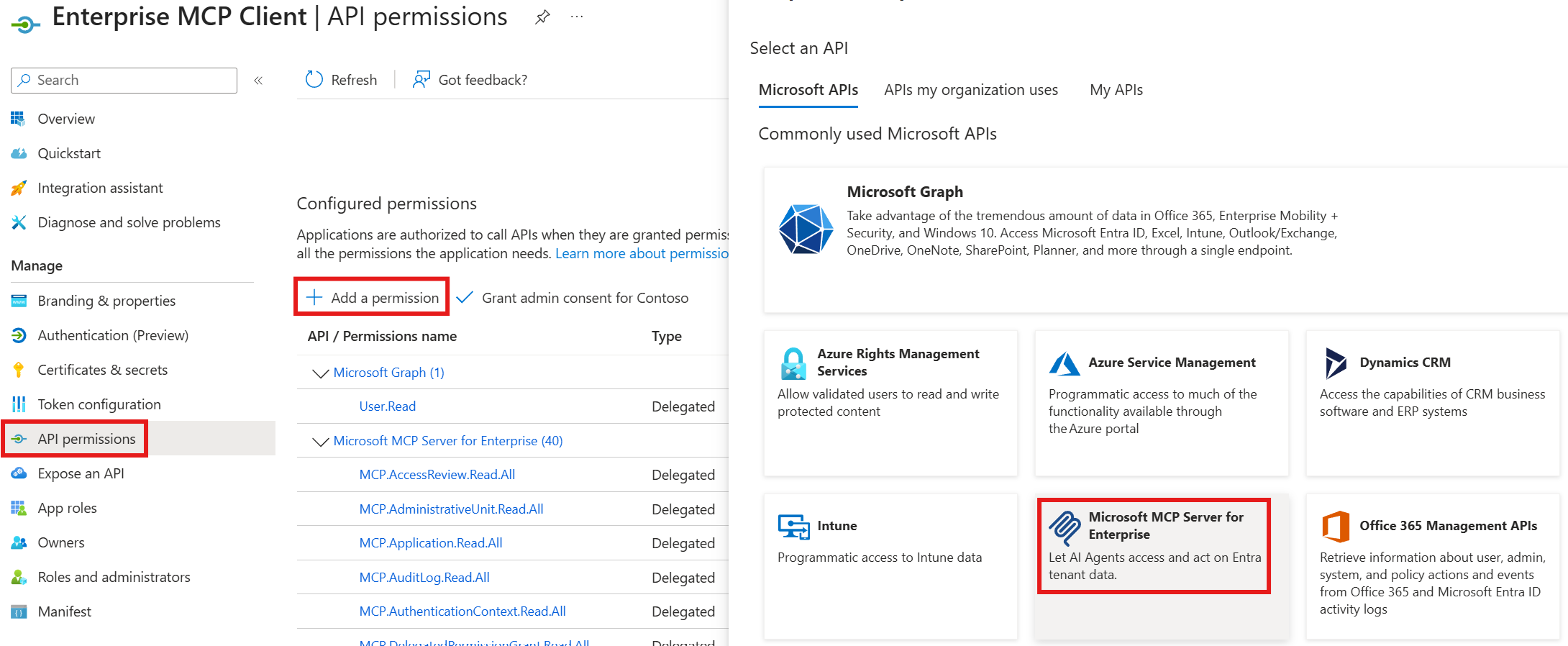
Associate the MCP permissions (
MCP.<Microsoft_Graph_Scope>) between the MCP Server and the MCP Client
Info Table
| Property | Value | Notes |
|---|---|---|
| MCP Endpoint | https://mcp.svc.cloud.microsoft/enterprise | Configure in your agent or mcp.json |
| MCP Server App Id | e8c77dc2-69b3-43f4-bc51-3213c9d915b4 | Used for provisioning and telemetry |
| MCP Client App Id | < The one you registered in your tenant > | Required to configure your agent |
| Token URL | https://login.microsoftonline.com/organizations/oauth2/v2.0/token | Required in some agents config |
| Token endpoint auth method | client_secret_post | Required in some agents config |
| Auth URL | https://login.microsoftonline.com/organizations/oauth2/v2.0/authorize | Required in some agents config |
| Refresh URL | https://login.microsoftonline.com/organizations/oauth2/v2.0/token | Required in some agents config |
| Scopes | api://e8c77dc2-69b3-43f4-bc51-3213c9d915b4/.default | Required in some agents config |
Tools
This MCP Server uses Retrieval-Augmented Generation (RAG) and few-shot prompting to generate complete Microsoft Graph queries rather than exposing a separate tool per Graph operation.
It exposes three tools:
microsoft_graph_suggest_queries: Finds relevant Microsoft Graph API calls based on user intent.microsoft_graph_get: Executes read-only Microsoft Graph API calls, respecting User roles and MCP Client scopes.microsoft_graph_list_properties: Retrieves properties of specific Microsoft Graph entities to help the AI model
Current scope and capabilities
For Public Preview, we support read-only enterprise IT scenarios in Microsoft Entra identity and directory operations (user, group, application, device management, and administrative actions).
The MCP Server handles queries such as:
- Security posture: authentication methods/strengths, Conditional Access, Security Defaults.
- Privileged access: Who has which directory roles, how assigned (direct vs group), and PIM status.
- Application risk: Which Apps / Service Principals exist, who owns them, what permissions/SSO they use, and which are ownerless or external.
- Access governance: Who has access to what (users, groups, packages); review decisions, automate joiner/mover/leaver.
- Device readiness: Managed/compliant status, join state, OS/version distribution, and stale or inactive devices.
- Provenance and investigation: End‑to‑end telemetry (sign‑in, audit, provisioning, network), health alerts, and SLA/availability.
- Optimize spending & hygiene: License counts/usage, unused or stale apps/groups, domain configuration and contacts.
Supported Clients and Configurations
The Microsoft MCP Server for Enterprise works with any MCP-compatible client that supports the latest standard.
⚠️ Notes:
- Dynamic Client Registration (DCR) is not supported, but we are working to support OAuth Client ID Metadata Documents (CIMD) in a future release.
- ChatGPT, Claude, and other 3P Agents require a custom client Id: register your own MCP Client application in your tenant, assign the required MCP.* scopes, and configure the redirect URIs accordingly.
Microsoft Agent Platforms
Third Party MCP clients
These clients require a custom MCP Client application registered in your tenant. See Authorization and permissions to grant the required MCP.* scopes to your app.
Go to Settings, Apps, Create App, and fill the dialog:
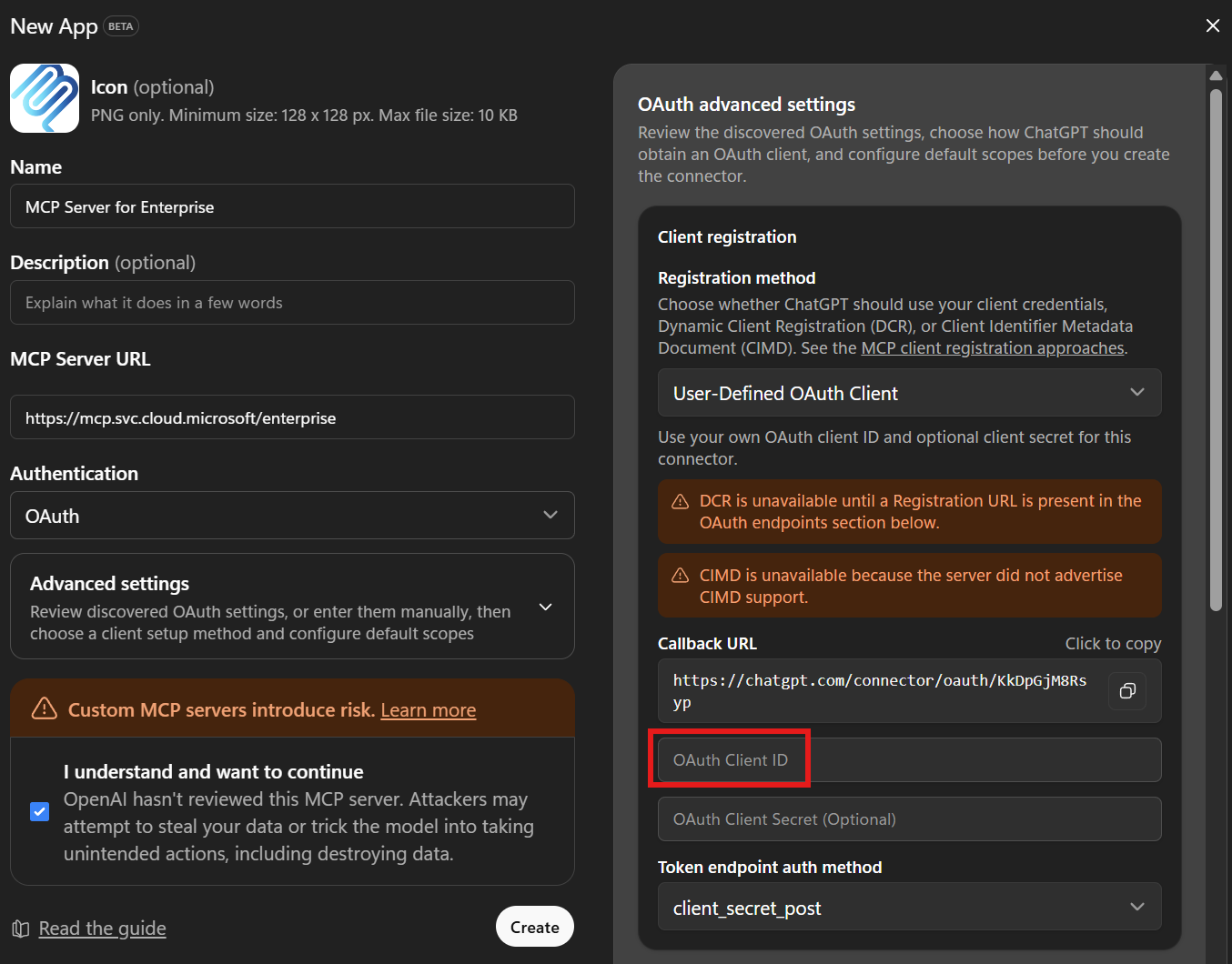
Put the App ID of the Registered app in the red box.
Go to Customize, Connectors, click "+", Add Custom Connector, and fill the dialog:
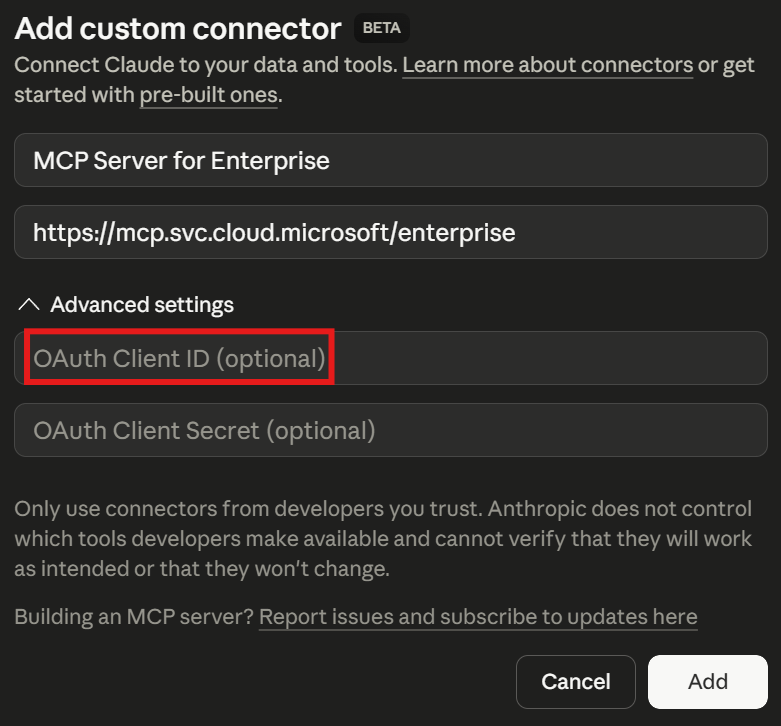
Put the App ID of the Registered app in the red box.
Visual Studio Code and GitHub Copilot CLI
Visual Studio Code and GitHub Copilot CLI share the same Visual Studio Code MCP Client app Id, so they use the same setup.
GitHub Copilot CLI can also use a custom client Id (see Option 2).
Prerequisites
These steps provision the Visual Studio Code MCP Client application in your tenant and grant it the MCP permissions.
They're required for Visual Studio Code and for GitHub Copilot CLI when it uses the default application Id (Option 1 below). Skip them if you're configuring GitHub Copilot CLI with a custom oauthClientId instead (Option 2 below).
-
Install Microsoft.Entra.Beta PowerShell module (version 1.0.13 or later, requires PowerShell 7):
Install-Module Microsoft.Entra.Beta -Force -AllowClobber -
Connect Microsoft Entra ID to your tenant:
Connect-Entra -Scopes 'Application.ReadWrite.All', 'DelegatedPermissionGrant.ReadWrite.All' -
Grant all MCP permissions to the Visual Studio Code MCP Client app (also used by GitHub Copilot CLI when configured with the default application Id):
Grant-EntraBetaMCPServerPermission -ApplicationName VisualStudioCode
Learn more about Grant-EntraBetaMCPServerPermission. For detailed installation help, see the installation instructions.
If the Microsoft Graph PowerShell SDK modules conflict with Microsoft.Entra.Beta, run the following and retry from step 1:
Install-Module Uninstall-Graph
Uninstall-Graph -All
- Click Install Microsoft MCP Server for Enterprise to launch the MCP install page.
- Click the Install button in VS Code and sign in with your account from the tenant above.
- If Visual Studio Code displays the error
Error getting token from server metadata: Error: Cannot force new registration for a non-dynamic authentication provider., change"microsoft-authentication.implementation"from"msal"to"msal-no-broker"in your Settings: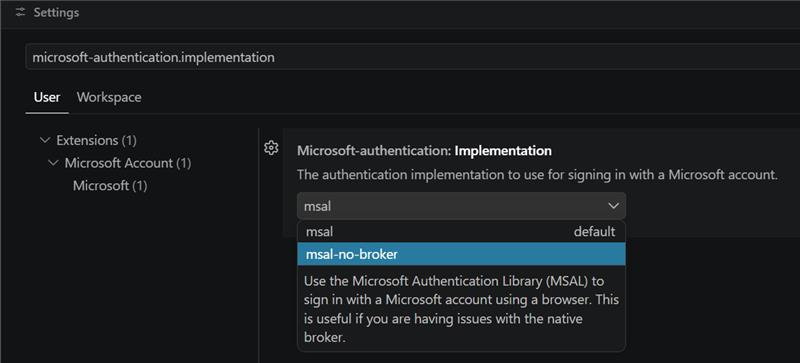
GitHub Copilot CLI can connect using either the default Visual Studio Code MCP Client app Id or a custom MCP Client app Id you register in your tenant.
Option 1. Default (uses the Visual Studio Code app Id)
-
Complete the Prerequisites above.
-
Add the MCP server to Copilot CLI. You can do this interactively with
/mcp add:/mcp add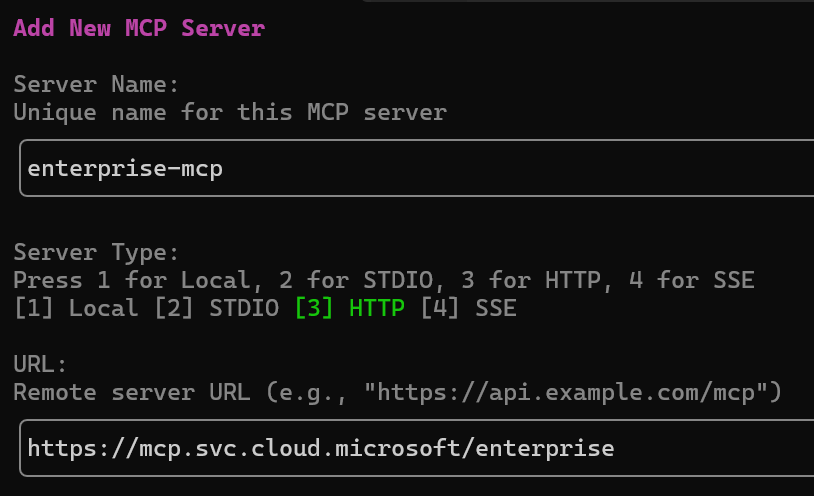
Option 2. Custom MCP Client app Id
-
Register your own MCP Client application in your tenant and grant it the required
MCP.*scopes (see Authorization and permissions). -
Set
http://127.0.0.1:51001as Redirect URI for "Mobile and desktop applications" -
Specify your app Id via
oauthClientIdandoauthPublicClienttotruein~/.copilot/mcp-config.json:"mcp-enterprise": { "type": "http", "url": "https://mcp.svc.cloud.microsoft/enterprise", "headers": {}, "tools": [ "*" ], "oauthClientId": "<REGISTERED_APP_CLIENT_ID>", "oauthPublicClient": true }
In either case, sign in with your account from the provisioned tenant when prompted.
For more information, see the GitHub Copilot CLI documentation.
Authorization and permissions
The MCP Server for Enterprise uses Microsoft Graph API to access data in your Microsoft Entra tenant using delegated permissions only, and provides a reduced set of permissions exposed by Microsoft Graph.
Use the following cmdlet to list the permissions provided by the MCP Server for Enterprise:
(Get-EntraBetaServicePrincipal -Property "PublishedPermissionScopes" -Filter "AppId eq 'e8c77dc2-69b3-43f4-bc51-3213c9d915b4'").PublishedPermissionScopes | Where-Object { $_.IsEnabled -eq $true -and $_.AdditionalProperties["isPrivate"] -ne $true } | Select-Object Value, AdminConsentDisplayName | Sort-Object
If you'd like to use your own Registered Application, use the following cmdlets to to manage scopes granted to your MCP Client Application:
Grant-EntraBetaMCPServerPermission -ApplicationId "<MCP_Client_Application_Id>" -Scopes "<Scope1>", "<Scope2>", "<...>"
Revoke-EntraBetaMCPServerPermission -ApplicationId "<MCP_Client_Application_Id>" -Scopes "<Scope1>", "<Scope2>", "<...>"
Learn more: Manage MCP Server for Enterprise permissions
Advantages
- Remote MCP Server: easy to configure and standards-compliant, deployed in the same regions as Microsoft Graph.
- IT Admins in control: MCP clients need specific MCP.* scopes (mirroring Microsoft Graph scopes) to access your tenant data.
- Simplified architecture: 3 tools cover the workflow instead of one tool per API operation.
- High-quality query generation: generates accurate queries from over 500 real-world examples via RAG (Retrieval-Augmented Generation).
- Full auditability: all MCP operations run under the same App ID with a specific user agent.
- No extra license required: your existing Microsoft Entra and Microsoft Graph API licenses apply.
Availability, Roadmap and feedback
The Microsoft MCP Server for Enterprise is available only in the public cloud (global service), with support for sovereign clouds planned for a future release.
We will continue expanding beyond the current Microsoft Entra scenarios, but M365 APIs will be covered by Agent 365.
Support for write operations is planned for a future release.
Please share suggestions or issues through our feedback form: Submit feedback.
Licensing and usage
- The MCP Server for Enterprise doesn't require extra cost or separate license.
- You need the right licenses for the data you access (for example, Microsoft Entra ID Governance or Microsoft Entra ID P2 license for Privileged Identity Management (PIM) data).
- Any request to this MCP server is limited to 100 requests per minute per user. Requests to
microsoft_graph_getare also subject to Microsoft Graph Throttling limits.
Logs
To monitor usage, enable Microsoft Graph activity logs in your tenant. The system logs all API calls made through the MCP server.
Filter for MCP Server usage:
Use the Application (Client ID) of the Microsoft MCP Server for Enterprise: e8c77dc2-69b3-43f4-bc51-3213c9d915b4.
The following Kusto query retrieves these logs:
MicrosoftGraphActivityLogs
| where TimeGenerated >= ago(30d)
| where AppId == "e8c77dc2-69b3-43f4-bc51-3213c9d915b4"
| project RequestId, TimeGenerated, UserId, RequestMethod, RequestUri, ResponseStatusCode
Support and reference
For documentation, troubleshooting, and feedback, refer to the official Microsoft Learn documentation and support channels.
Security and compliance
All operations respect Microsoft Graph permissions and security policies. Ensure compliance with your organizational, regulatory, and contractual requirements when integrating the MCP Server.
No warranty/limitation of liability
This software is provided "as is" without warranties or conditions of any kind, either express or implied. Microsoft isn't liable for any damages that result from use, misuse, or misconfiguration of this software.
Reviews
No reviews yet
Be the first to review this server!
More Developer Tools MCP Servers
Git
Freeby Modelcontextprotocol · Developer Tools
Read, search, and manipulate Git repositories programmatically
Fetch
Freeby Modelcontextprotocol · Developer Tools
Web content fetching and conversion for efficient LLM usage
Toleno
Freeby Toleno · Developer Tools
Toleno Network MCP Server — Manage your Toleno mining account with Claude AI using natural language.
mcp-creator-python
Freeby mcp-marketplace · Developer Tools
Create, build, and publish Python MCP servers to PyPI — conversationally.
MCP Marketplace
Freeby mcp-marketplace · Developer Tools
Search and install MCP servers from inside your AI client.
MarkItDown
Freeby Microsoft · Content & Media
Convert files (PDF, Word, Excel, images, audio) to Markdown for LLM consumption