
Server data from the Official MCP Registry
Open-source human-in-the-loop QA runner: an AI agent works the test sheet, a person signs off.
About
Open-source human-in-the-loop QA runner: an AI agent works the test sheet, a person signs off.
Security Report
git-qa is a human-in-the-loop QA runner whose purpose requires screen capture, input injection, and accessibility access, so most of its permissions match its stated function. The main concerns are that the accessibility and input tools can read text from any running application and act on arbitrary screen coordinates, and that the Tauri open_sheet command passes a caller-supplied path to the OS opener without visible validation. No hardcoded secrets or malicious patterns were found, and the MCP server exposes no network-facing authentication surface in the code shown. Supply chain analysis found 8 known vulnerabilities in dependencies (1 critical, 4 high severity).
14 files analyzed · 15 issues found
Security scores are indicators to help you make informed decisions, not guarantees. Always review permissions before connecting any MCP server.
Permissions Required
This plugin requests these system permissions. Most are normal for its category.
How to Install
Add this to your MCP configuration file:
{
  "mcpServers": {
    "io-github-meta-taro-git-qa": {
      "args": [
        "-y",
        "git-qa"
      ],
      "command": "npx"
    }
  }
}Documentation
View on GitHubFrom the project's GitHub README.
git-qa
Your test sheet runs itself. You watch, and sign off each case with one key.
git-qa is an open-source human-in-the-loop QA runner. An AI agent works through your test sheet on Android, iPhone, web and desktop apps; you watch the live screen and sign off each case, and the evidence records who verified what. AI agents can also drive it over MCP.
日本語版はこちら / Japanese · Download
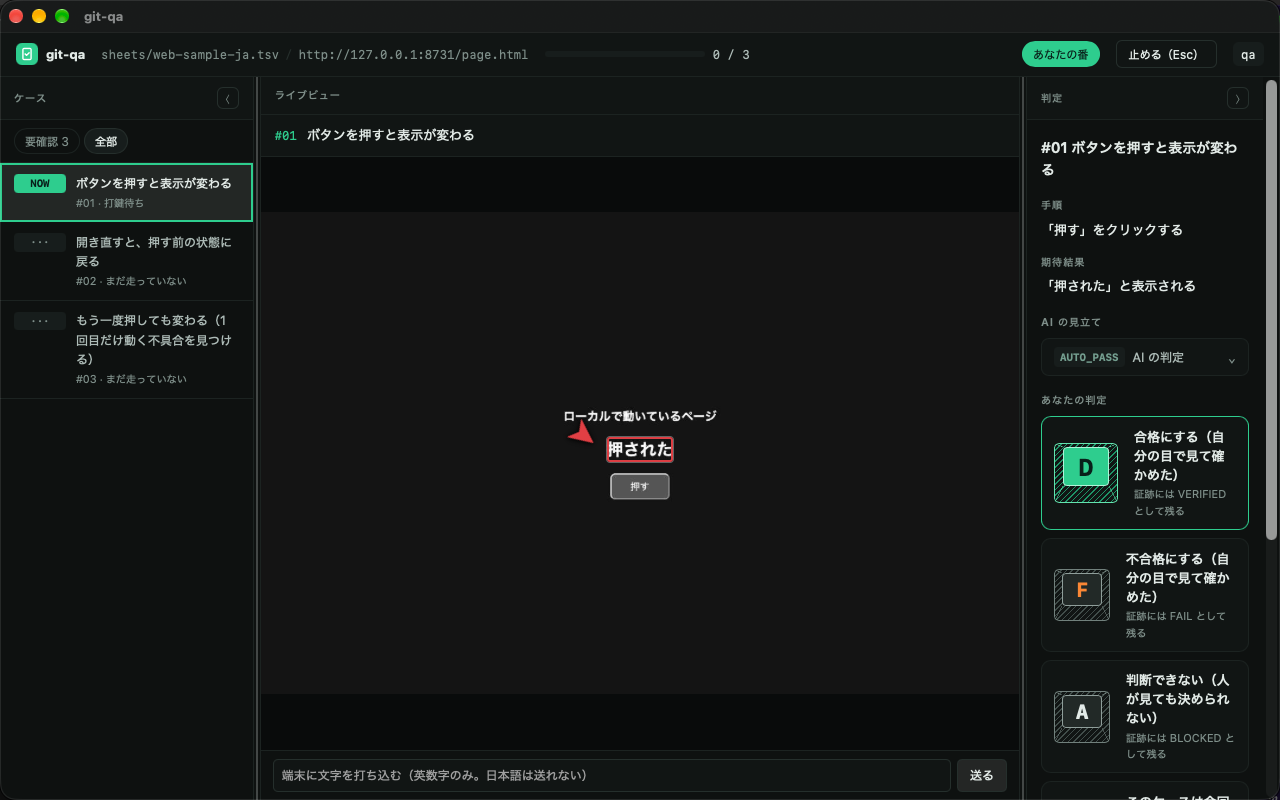
Left: the cases in your test sheet. Middle: the page, device or app, live, while the AI drives it —
the red marker is where it found the expected text. Right: one key per verdict — D pass, F fail.
Your handle goes into the evidence when you press it. (The UI is shown in Japanese; it also speaks English.)
When you would reach for it
The release check nobody wants to click through again. You have a 30-row regression sheet for an Android app, a web page and a desktop app. Instead of tapping through it by hand, the AI follows the sheet while you watch the live view and press a key per case. You only stop to look closely where something changed or failed.
"Who actually checked this?"
A client, an auditor or your own team asks after an incident. The evidence answers:
each case says VERIFIED (a person looked and signed) or AUTO_PASS (the AI passed it, nobody looked),
with the name, the time, and the screen at that moment.
An AI agent built the feature — now it should check it, on a real device.
Over MCP, Claude Code (or any agent) can screenshot, read the screen, list what can be pressed and tap it,
on Android, web, desktop or iPhone. It can run the sheet unattended overnight (--no-ui);
in the morning you review the failures. The pass is still yours to give.
The server is listed in the official MCP registry as io.github.meta-taro/git-qa; it runs from this clone (there is no npm package).
Try it
- Download the app from the distribution page (macOS, Windows x64 / ARM64) and install Node 22+
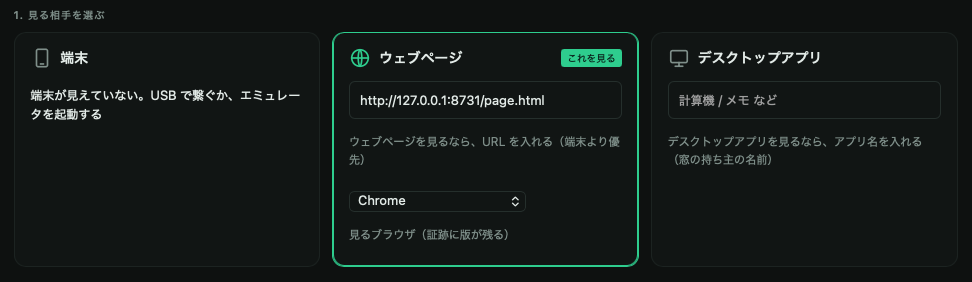
- Open git-qa. Enter a handle (it goes into the evidence as "who looked"), pick what to look at —
an
adbdevice, a web page URL, or a desktop app by name — and a test sheet - Start, watch, and press
D/Fper case
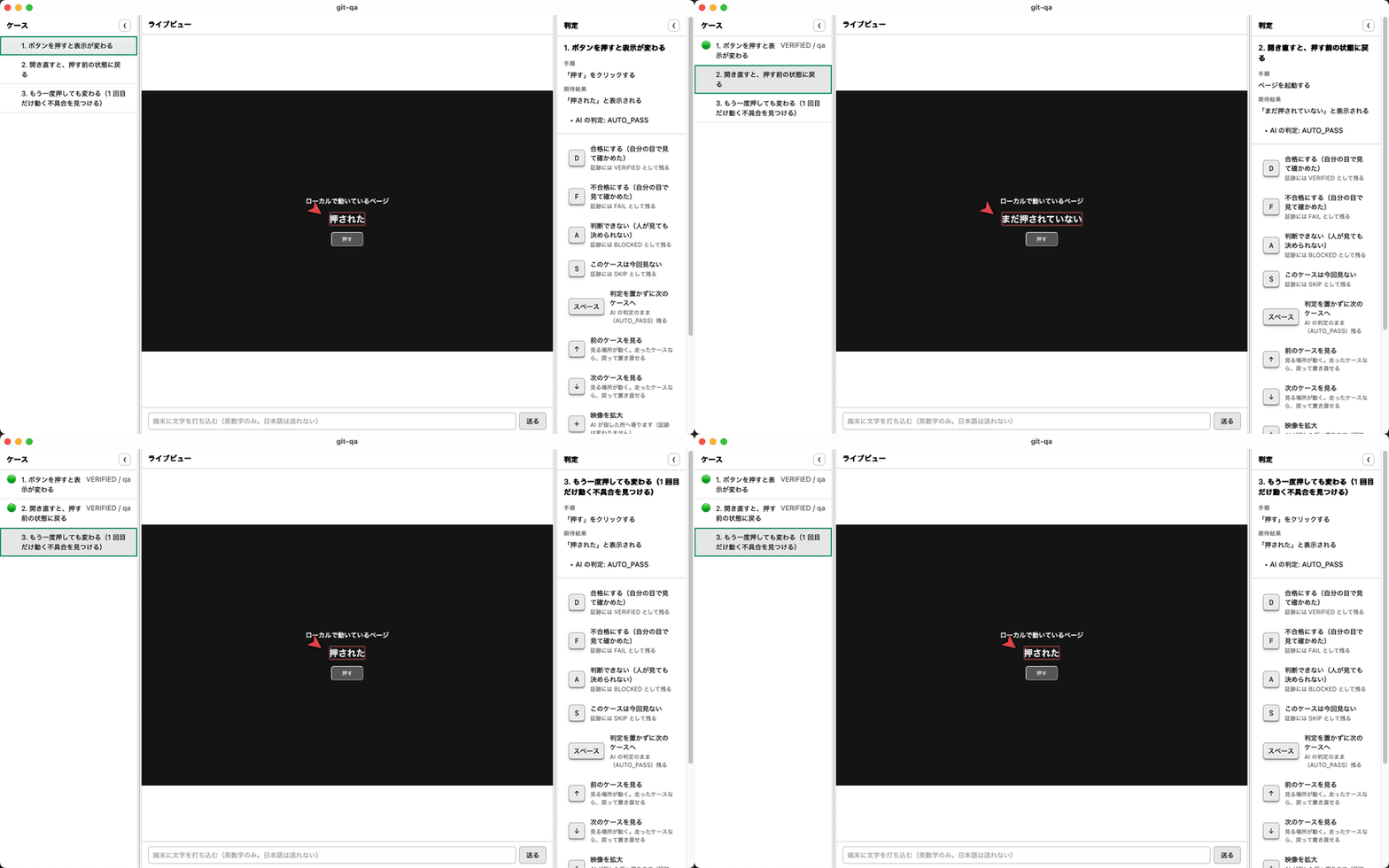
A run, case by case — the AI runs each step (press the button, reopen the page, press it again), you press D, the case turns VERIFIED / qa and the next one starts:
A test sheet is a TSV you can write in any spreadsheet — samples are in sheets/.
From source instead: git clone … && pnpm install && pnpm app (see Install).
Launch from another tool
Another tool (a traceability ledger, for instance) can open git-qa on a given sheet and case:
git-qa://run?sheet=<absolute path to the TSV>&case=<No.>&target=<what to look at>
case runs that one case only and sets finishedAt in run.json when it is done. target is a URL,
app:<name> for a desktop app, or an adb serial. With both present and a handle already entered, the run
starts without a click; if git-qa is already open, that window takes it. Installed app only (not pnpm app).
Why it is built this way
This is not a tool for handing verification to an AI and letting it say "everything passed." When something ships broken, the person is accountable — "the AI did it" is not an answer anyone accepts.
So git-qa splits the work:
- The AI operates the device, the browser, or the desktop app, following a test sheet
- The human watches, and places the verdict with a single keystroke
- The evidence records who saw what, and when
The vocabulary is the point
| Value | Meaning |
|---|---|
VERIFIED | A person put their name on it |
AUTO_PASS | The AI passed it. Nobody looked |
FAIL | It failed |
BLOCKED | Could not run — a precondition was not met |
SKIP | Not run |
A plain PASS would collapse the first two into one value. That collapse is
exactly what this tool exists to prevent.
You can place VERIFIED without looking. That is a feature, not a hole.
The moment you press the key, your handle goes into the evidence. It is a
signature, not a lock. There is no anti-cheat machinery — adding it would make a
tool that exists to save effort expensive to use.
What it can drive
| Android devices | Real devices and emulators over adb — tap, swipe, type |
| Web pages | Chrome / Edge / Firefox / Safari. Same viewport every run, so you can compare |
| Desktop apps | macOS (Accessibility + Vision OCR) and Windows (UI Automation) |
| iPhone / iPad | Watch, read and record over USB. Tap, type, swipe and launch apps through WebDriverAgent, which you sign and install on the device yourself (guide). Tried on a real iPhone (iOS 17.5.1) |
| Mobile browsers | Android Chrome over adb forward + CDP. iOS Safari through the iPhone path above. Not yet tried |
| From an AI agent | Over MCP — screenshot, read the screen, list the names you can press, tap by name. Android, web, desktop, or iPhone / iPad |
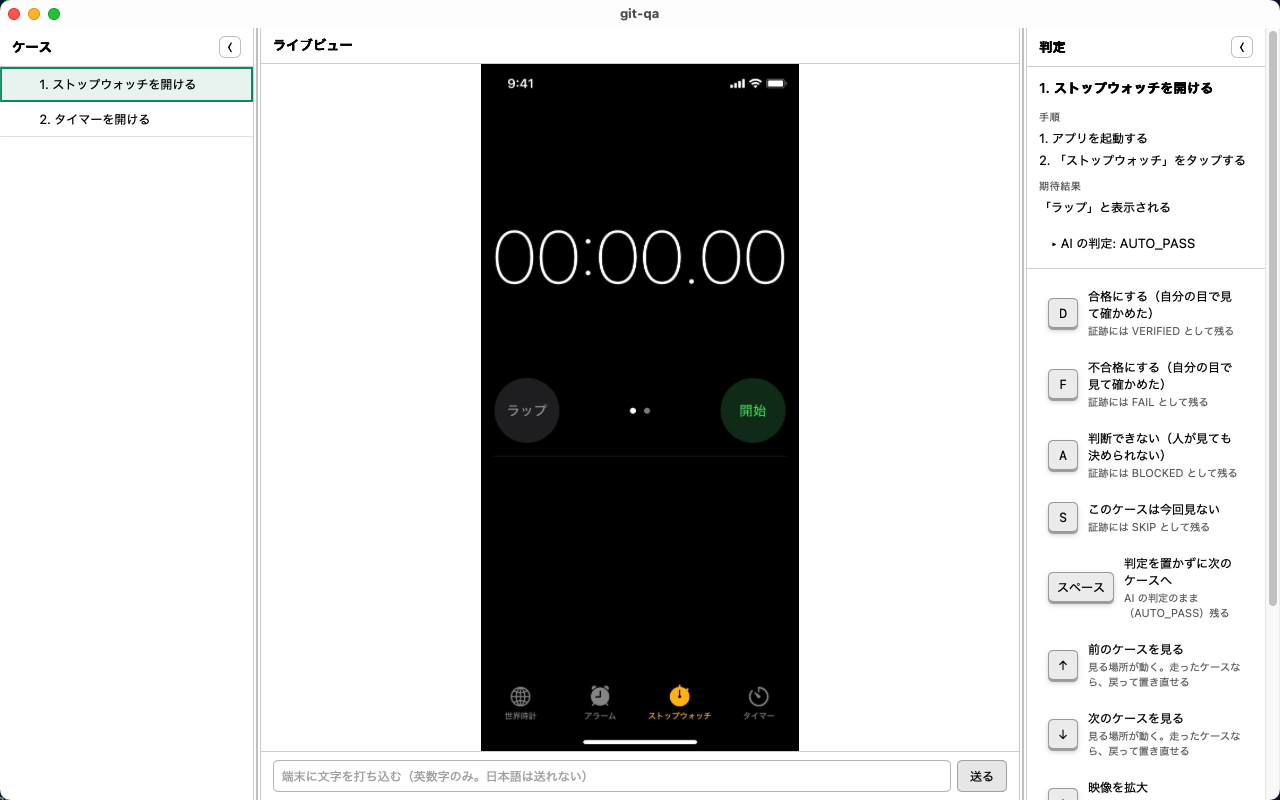
A real iPhone, driven through WebDriverAgent: git-qa launched the Clock app and tapped "Stopwatch". The case waits for a person's verdict.
What evidence looks like
One folder per test run. Commit the whole folder if you want the test itself under version control.
<workspace>/
  git-qa.json        marks this folder as one test project
  sheet.tsv          the test sheet
  runs/
    20260914-100000/
      run.json       verdicts, steps, who placed them and when
      case-001/
        screen.webp  the screen at the moment the verdict was placed
        screen.webm  video of the run — **only when asked for** (`--record`,
                     or "Record video" on the app's start screen)
After a verdict is placed, the app shows "Open the evidence folder" under the path it wrote to, so the screenshot and video of each case are one click away.
Nothing about your machine goes into the evidence: paths are relative to the workspace, so the same run reads the same way on anyone's machine.
Requirements
- Node 22 or newer — required. The app starts a runner process
adbfor Android, a browser for web — only if you use themffmpeg/cwebp— optional. Without them, evidence is kept in the format it was captured in, uncompressed
Install
Download from the distribution page, or run it from source:
git clone https://github.com/meta-taro/git-qa.git
cd git-qa
pnpm install
pnpm app
macOS builds are signed and notarized. Windows builds are not signed — you will see "Windows protected your PC"; check the source before choosing Run.
To see what this machine can actually do — measured, not guessed:
pnpm doctor
The app also states its own version on the start screen ("This git-qa is v0.2.0-beta.20"). Paste that line into bug reports — it decides which build you are talking about. When a newer build exists, the same place says so; git-qa never replaces itself.
Status
Beta. Three products are using it. Rough edges are listed in each release's notes, and nothing fails silently — where a step cannot run, it is recorded as "a person needs to do this," not as a pass.
Bug reports and requests: Issues. Please write them in your own words, right after you hit the problem. Summarizing loses the part that actually hurt.
License
MIT — see LICENSE.
Reviews
No reviews yet
Be the first to review this server!
More Developer Tools MCP Servers
Rea
Freeby Morluto · Developer Tools
Reverse engineer anything from your terminal or agent with one CLI and MCP server.
Paperclip
Freeby Paperclipai · Developer Tools
Trending hip-hop artist momentum scores across four cultural dimensions.
Fetch
Freeby Modelcontextprotocol · Developer Tools
Web content fetching and conversion for efficient LLM usage
Git
Freeby Modelcontextprotocol · Developer Tools
Read, search, and manipulate Git repositories programmatically
Toleno
Freeby Toleno · Developer Tools
Toleno Network MCP Server — Manage your Toleno mining account with Claude AI using natural language.
MCP Marketplace
Freeby mcp-marketplace · Developer Tools
Search and install MCP servers from inside your AI client.