
Server data from the Official MCP Registry
Query Magic: The Gathering cards, sets, and prices and manage your I Want My MTG collection.
About
Query Magic: The Gathering cards, sets, and prices and manage your I Want My MTG collection.
Security Report
This MCP server for I Want My MTG is well-structured with appropriate authentication patterns and reasonable permissions matching its purpose. The code properly handles API keys via environment variables, implements typed API clients, and maintains clear separation between authenticated and unauthenticated operations. Minor quality improvements around input validation could be made, but no security vulnerabilities were identified. Supply chain analysis found 1 known vulnerability in dependencies (0 critical, 1 high severity). Package verification found 1 issue.
3 files analyzed · 4 issues found
Security scores are indicators to help you make informed decisions, not guarantees. Always review permissions before connecting any MCP server.
Permissions Required
This plugin requests these system permissions. Most are normal for its category.
What You'll Need
Set these up before or after installing:
Environment variable: IWMM_API_KEY
How to Install
Add this to your MCP configuration file:
{
  "mcpServers": {
    "io-github-matthewdtowles-iwantmymtg-mcp": {
      "env": {
        "IWMM_API_KEY": "your-iwmm-api-key-here"
      },
      "args": [
        "-y",
        "iwantmymtg-mcp"
      ],
      "command": "npx"
    }
  }
}Documentation
View on GitHubFrom the project's GitHub README.
iwantmymtg-mcp


An MCP server for I Want My MTG. Exposes IWMM's API as tools so Claude Desktop, Claude Code, Cursor, and other MCP clients can search Magic: The Gathering cards/sets and manage a user's collection conversationally.
Published on npm, the MCP Registry, and Smithery. Coverage expands to match the API; see
docs/TOOLS.mdfor the full, always-current tool list.
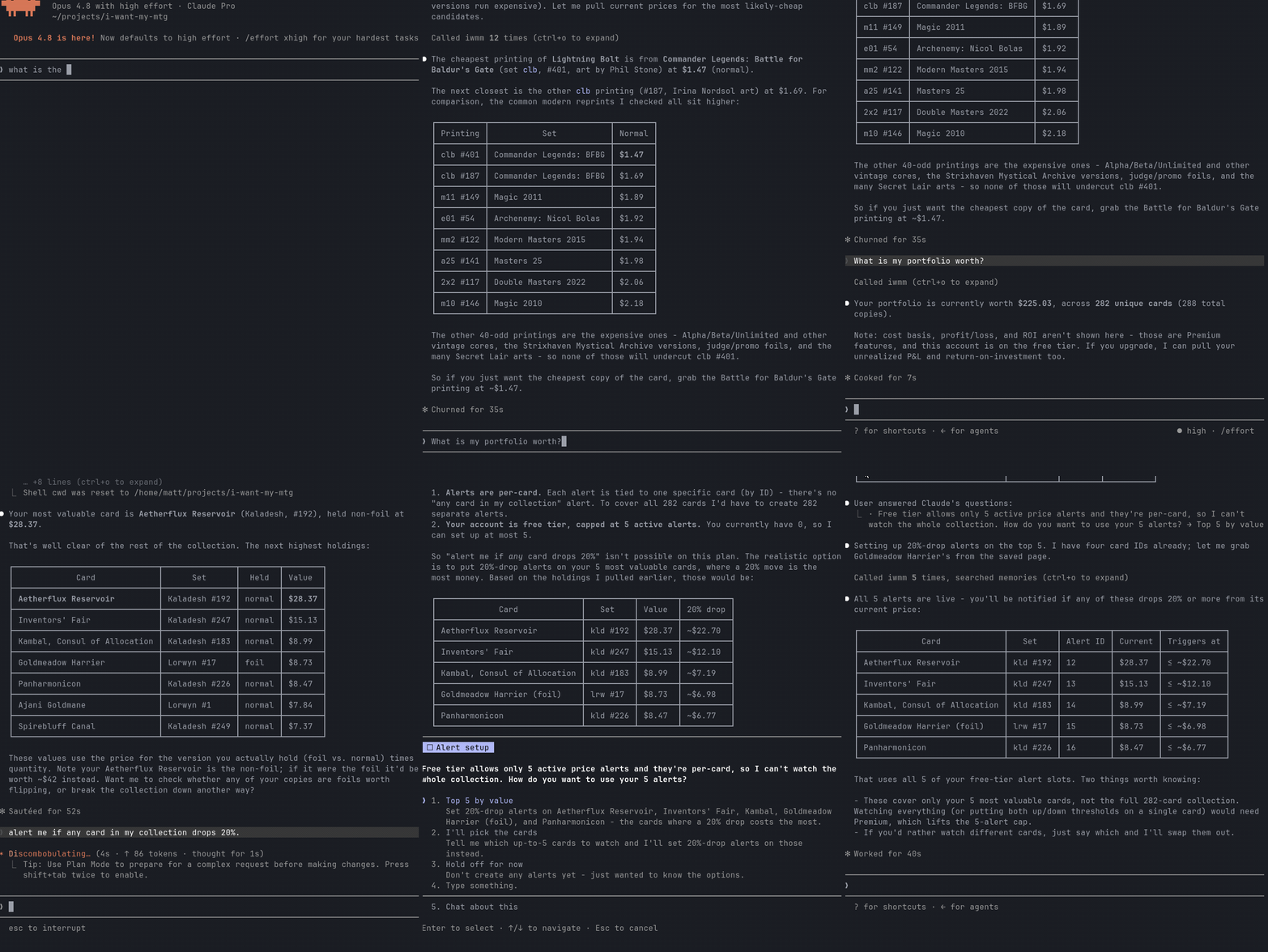
What you can do
- Anonymous (no key): search cards, look up a card by set+number, get current prices and 30-day price history, get a card's buylist (sell-to-vendor) offers, list sets and their cards, list sealed products.
- Authenticated (with an IWMM API key): manage your inventory and transactions; build and manage decks (create, import from a decklist, edit cards, add the cards you're missing to your buy-list); view portfolio summaries, history, performance, cash flow, realized gains, and breakdowns (including by color, with per-slice drill-down); manage price alerts and notifications.
- Sell tools (with a key): see your collection's market sell value (best buylist offer per card, grouped by vendor), manage a buy-list (want-list), and get a cash-vs-store-credit recommendation for selling toward your buy list.
See the project roadmap for what's next.
Install
Requires Node 20+.
npx iwantmymtg-mcp
Or install globally if you prefer:
npm install -g iwantmymtg-mcp
iwantmymtg-mcp
Claude Desktop
Add to claude_desktop_config.json (macOS: ~/Library/Application Support/Claude/claude_desktop_config.json; Windows: %APPDATA%\Claude\claude_desktop_config.json):
{
  "mcpServers": {
    "iwmm": {
      "command": "npx",
      "args": ["-y", "iwantmymtg-mcp"],
      "env": {
        "IWMM_API_KEY": "iwm_live_..."
      }
    }
  }
}
IWMM_API_KEY is optional - read-only tools work without it. Create a key at https://iwantmymtg.net/user/api-keys.
Claude Code
Add to .mcp.json in your project (or ~/.claude/.mcp.json globally):
{
  "mcpServers": {
    "iwmm": {
      "command": "npx",
      "args": ["-y", "iwantmymtg-mcp"],
      "env": { "IWMM_API_KEY": "iwm_live_..." }
    }
  }
}
Cursor
Add to ~/.cursor/mcp.json (global) or .cursor/mcp.json in your project:
{
  "mcpServers": {
    "iwmm": {
      "command": "npx",
      "args": ["-y", "iwantmymtg-mcp"],
      "env": { "IWMM_API_KEY": "iwm_live_..." }
    }
  }
}
After saving, restart Cursor and confirm iwmm appears under Settings -> Features -> MCP Servers.
Example prompts
- "Search for Lightning Bolt printings and show me the cheapest one."
- "What's the price history of Bloodbraid Elf from Modern Horizons 3?"
- "Add 4 copies of Lightning Bolt LEA to my inventory."
- "What sealed products are available for MH3?"
- "What's my collection worth to sell right now, and which vendor pays most?"
- "Add these cards to my buy list, then tell me whether cash or store credit is the better deal."
See examples/ for walkthroughs of common flows, and docs/TOOLS.md for the full tool reference.
Configuration
| Env var | Default | Purpose |
|---|---|---|
IWMM_API_KEY | (unset) | Personal API key. Required only for authenticated tools. |
IWMM_BASE_URL | https://iwantmymtg.net | Override for self-hosted or local-dev IWMM instances. |
Local development
npm install
npm run build
node dist/index.js
Or with tsx for live reload:
npm install
npx tsx src/index.ts
License
This project is licensed under the MIT License — see the LICENSE file for details.
Reviews
No reviews yet
Be the first to review this server!
More Developer Tools MCP Servers
Git
Freeby Modelcontextprotocol · Developer Tools
Read, search, and manipulate Git repositories programmatically
Fetch
Freeby Modelcontextprotocol · Developer Tools
Web content fetching and conversion for efficient LLM usage
Toleno
Freeby Toleno · Developer Tools
Toleno Network MCP Server — Manage your Toleno mining account with Claude AI using natural language.
mcp-creator-python
Freeby mcp-marketplace · Developer Tools
Create, build, and publish Python MCP servers to PyPI — conversationally.
MCP Marketplace
Freeby mcp-marketplace · Developer Tools
Search and install MCP servers from inside your AI client.
MarkItDown
Freeby Microsoft · Content & Media
Convert files (PDF, Word, Excel, images, audio) to Markdown for LLM consumption