
Server data from the Official MCP Registry
A deterministic A-F grade for a repo without running it, plus a verify loop: plan, fix, diff.
About
A deterministic A-F grade for a repo without running it, plus a verify loop: plan, fix, diff.
Security Report
The code-guardian MCP server is a read-only, stdio-only static analyzer with no dependencies, and its tools are annotated as non-destructive. The main points to be aware of are the opt-in explain tool, which POSTs redacted findings to a user-configured model URL, and the --history option, which spawns git log. Only the first part of scanners.py and the README were visible, so the truncated sections were not fully reviewed. Supply chain analysis found 8 known vulnerabilities in dependencies (0 critical, 1 high severity). Package verification found 1 issue.
16 files analyzed · 12 issues found
Security scores are indicators to help you make informed decisions, not guarantees. Always review permissions before connecting any MCP server.
Permissions Required
This plugin requests these system permissions. Most are normal for its category.
What You'll Need
Set these up before or after installing:
Environment variable: CODE_GUARDIAN_LLM_URL
Environment variable: CODE_GUARDIAN_LLM_MODEL
How to Install
Add this to your MCP configuration file:
{
  "mcpServers": {
    "io-github-luminarisoftwares-code-guardian": {
      "env": {
        "CODE_GUARDIAN_LLM_URL": "your-code-guardian-llm-url-here",
        "CODE_GUARDIAN_LLM_MODEL": "your-code-guardian-llm-model-here"
      },
      "args": [
        "-y",
        "risky-web"
      ],
      "command": "npx"
    }
  }
}Documentation
View on GitHubFrom the project's GitHub README.
code-guardian


mcp-name: io.github.LuminariSoftwares/code-guardian
Before you run a repository you did not write, or merge a change an AI assistant made, you want to know whether it is dangerous, whether it is broken and what is missing. code-guardian answers that from the source alone, in one command that tells you three things about any repo without running it:
- Safe: is it safe to run?
- Works: will it work?
- Complete: does it have what it needs?
Each is a score out of 100 (higher is better), combined into an Overall score and an A–F grade. Scores come only from deterministic checks with fixed weights: same repo, same version, same output, every time. On top of that:
- Orphan code: functions, classes and modules nothing reachable from the project's entry points uses, judged against a small goal contract.
- An optional plain-English explanation from a local model, which never adds, removes or rescores a finding.
- A verify loop for AI-assisted changes: run it before and after every change to learn what the change fixed, what it broke, what to fix next, and whether the scan itself can be trusted (see The verify loop).
It parses the code (ast for Python; json, tomllib and configparser for manifests; regular expressions for
secrets) and never executes, imports or installs it. A scan makes
no network calls. Python 3.11+, standard library only. Status: 0.4.2 is the current release.
Who it is for. Anyone running local AI models, or code an AI assistant wrote, on their own machine: you cloned a repository, or an assistant just rewrote a module, and you want a verdict before you run it. It is the fourth of four free, MIT-licensed guardians, each answering one question about a local setup from the outside:
| guardian | the question it answers |
|---|---|
| code-guardian (this one) | is this codebase safe to run, will it work, does it have what it needs? |
| stack-guardian | is my home AI stack healthy — nodes, loaded models, GPUs, tailnet peers? |
| context-guardian | will this session hit the model's context limit and die? |
| tool-guardian | what are my MCP servers' tool definitions costing the context window? |
Install it as code-guardian-mcp; code-guardian on PyPI is an unrelated project by someone else. You get a
CLI, a GitHub Action, a pre-commit hook and an MCP server. The MCP side is a hand-written stdio server speaking
MCP protocol 2024-11-05 — no SDK, no dependencies (see
ADR 0003) — and it is stdio only: to reach it over a network,
put an authenticating proxy in front of it rather than exposing the process. One maintainer, best effort: issues
and pull requests get a reply when evenings allow, and there is no paid support
(CONTRIBUTING.md, SECURITY.md).
What it analyses
Python is analysed in depth; every Safe, Works and Complete check runs on it. Other languages (JavaScript,
TypeScript, Go, Rust, shell and the rest) get the secret scan and the repo-hygiene checks only: key shapes,
manifest and install-hook reading (package.json, setup.py, pyproject.toml, ...) and the Complete checks
(licence, README, CI, .env.example). Every report prints a coverage: line saying which files were analysed, e.g.
coverage: 40 Python analysed; 112 .ts, 9 .go secret-scan only. When there is no Python source at all, Works is
not scored (n/a (Python only), null in JSON), Safe is labelled partial, Overall comes from the scored
dimensions only, and the status is PARTIAL. A repo whose source is mostly another language is also PARTIAL with
the same scores (rule in Scan status). PARTIAL means "do not read this grade as covering the whole
repo"; it never fails --fail-on on its own.
Install
pip install code-guardian-mcp
The distribution is code-guardian-mcp (code-guardian on PyPI is someone else's project); the commands are
code-guardian and code-guardian-mcp. To run the MCP server without installing anything: uvx code-guardian-mcp mcp.
From a clone (for the tests):
git clone https://github.com/LuminariSoftwares/code-guardian.git
cd code-guardian
python -m venv .venv
.venv\Scripts\activate          # Windows;  macOS/Linux: source .venv/bin/activate
pip install -e ".[test]"
python -m pytest -q
The [test] extra is pytest, build and jsonschema — the whole suite needs them, and the package's own
runtime dependencies stay empty. See CONTRIBUTING.md.
Quick start (60 seconds)
From a clean Python 3.11+ environment (no other dependencies):
pip install code-guardian-mcp
code-guardian scan /home/user/project              # the grade, every finding with file:line; exit 0, 1 or 3
code-guardian plan /home/user/project --top 3      # the three fixes worth the most Overall points
Success looks like a first line code-guardian 0.4.2 scan of <name>, then a status: COMPLETE line and four score
lines. On a one-file project it takes well under a second. To give the same tools to an AI client, add the MCP server
(see MCP server for Claude Desktop and other clients):
claude mcp add code-guardian -- uvx code-guardian-mcp mcp
The app
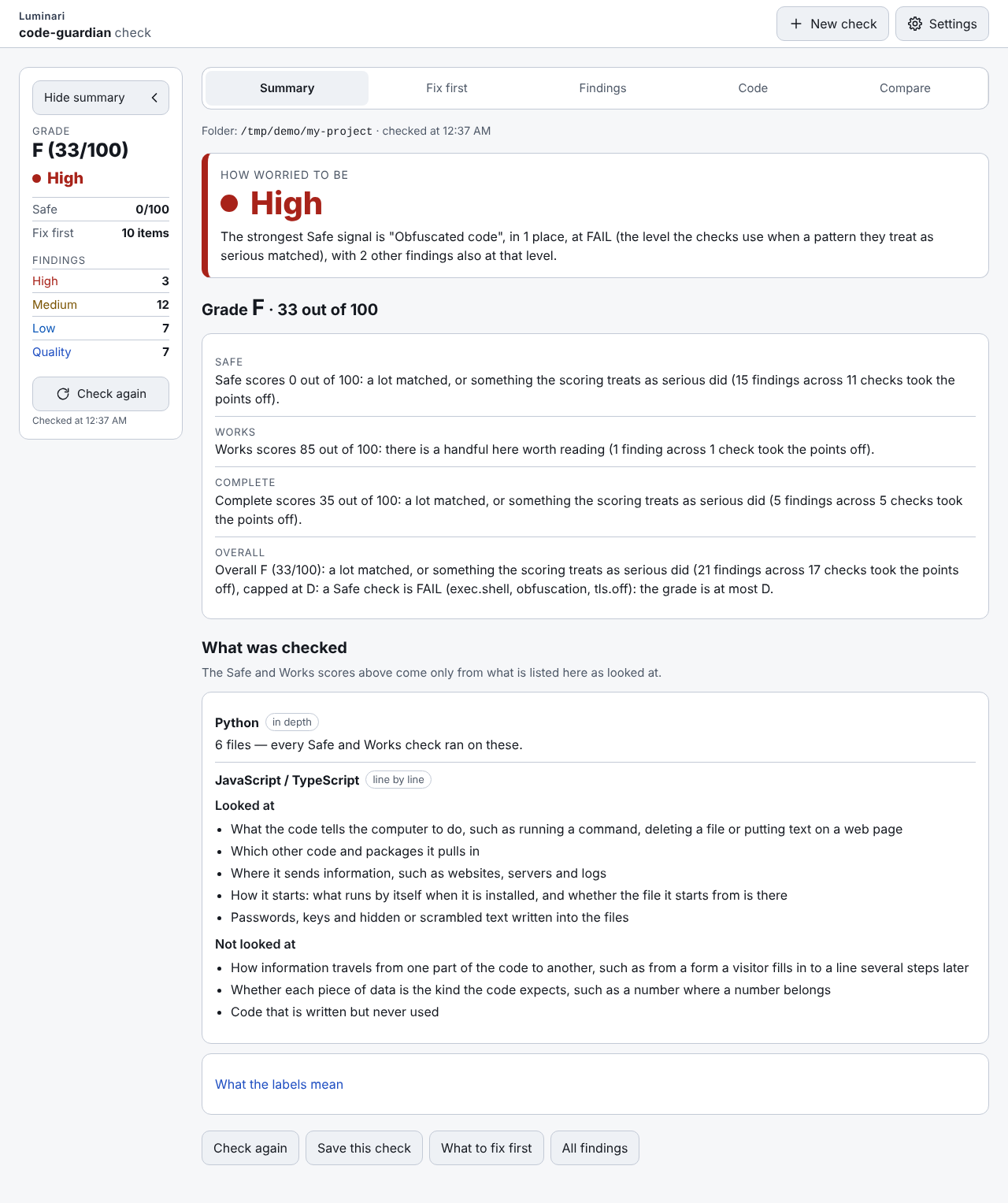
code-guardian ui shows the same scan as a page in your browser, in plain words, for people who use AI to write code
but do not read code well. code-guardian ui PATH checks that folder first; code-guardian ui alone opens the page
and you pick a folder there. It prints one line, code-guardian ui: open http://127.0.0.1:8765/#t=…, and opens that
link in your browser; the part after #t= is a key for this run, so use the printed link, not just the address. The
page never changes your files, and the grade and findings are the ones code-guardian scan gives.
Settings
The gear at the top of every screen opens three choices: Theme (Dark, the default, or Light), Text size (Normal, Larger or Largest) and whether the Luminari name shows at the top. Your choices are kept by this browser only, not in a file on the computer and not by code-guardian, so another browser or a private window starts from the defaults. The page never turns light because your computer is set to light; light is only ever your choice.
Sizes
Every screen fits a phone, a narrow side window (about 520 px wide) and a full or wide screen, at all three text sizes, with nothing cut off: on a phone or in a side window the summary becomes one line under the tabs that you tap to open, and the file list on the Code screen becomes a drawer. The phone is shown below; the same screen at the other sizes is result_520x900.png (side window) and result_1280x800.png (full screen).
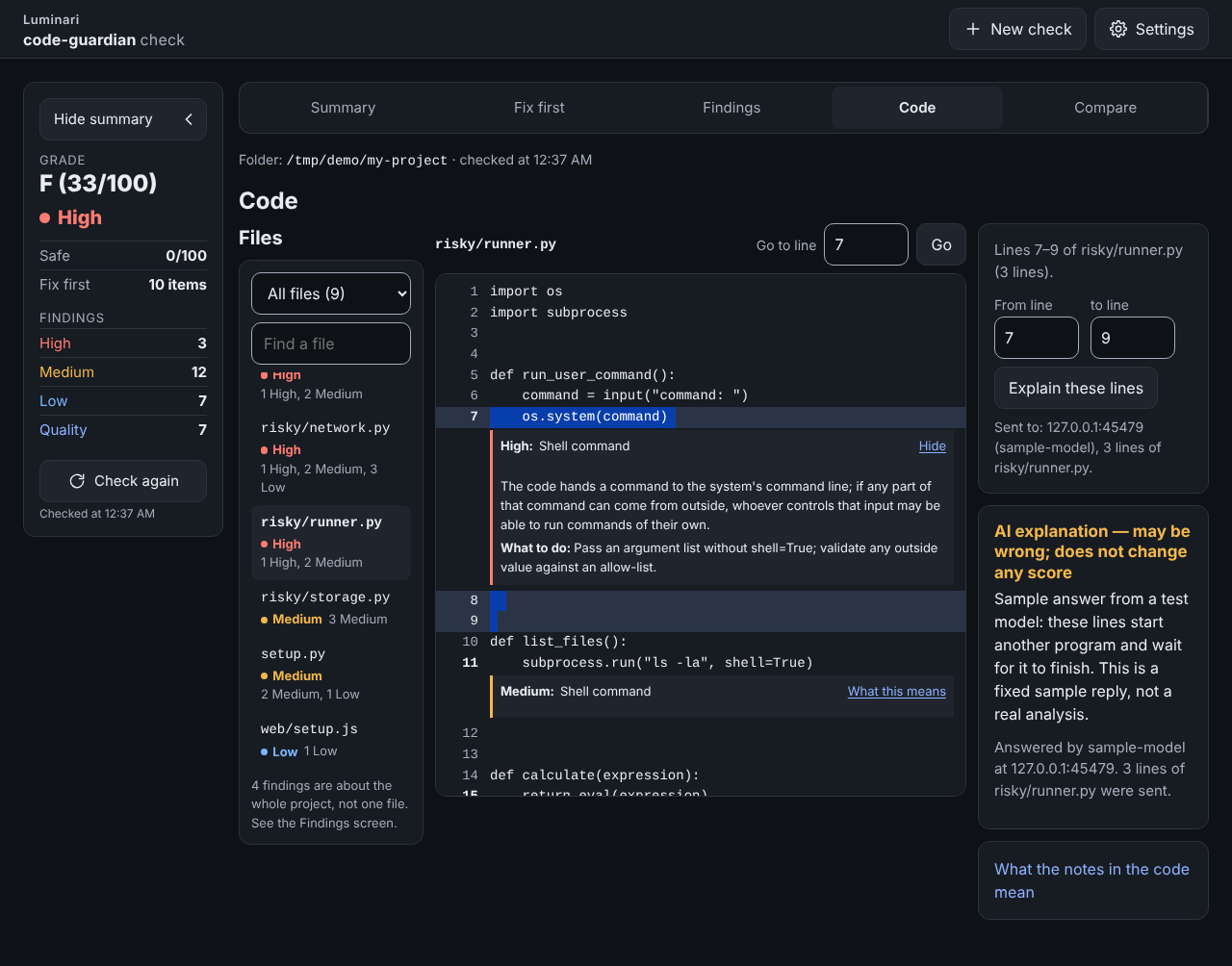
Every file
The Code screen lists every file the check saw, not only the files with a finding, and gives each file one word. A file with a safety finding is marked High, Medium or Low by its worst one. The filter above the list picks which files you see, each with its count:
- All files: every file the check saw.
- Files with findings: files with at least one finding of any kind.
- No known risks found: a Python file that was fully read and understood, or a manifest such as
pyproject.tomlorpackage.json, with no safety finding. It means the checks found nothing, not that the file is proven safe, so it is grey, never green. - Partly checked: a file in a language this tool does not analyse yet (JavaScript, Go, shell and the rest), where only the shapes of keys were looked for, or a Python file that could not be understood (it did not parse). The row says which.
- Not read: a file the check did not open: a binary file, a link to another place (a symlink), a file it could not read, or one over 2 MB.
Partly checked and Not read do not mean no known risks: the tool looked at those files only in part or not at all, so a problem in them may not show in the grade. A find box next to the filter narrows the list by name.
Browse and the folders it refuses
Browse…, beside the folder field, opens your computer's own folder window so you can pick the project folder instead of typing it; if this Python has no folder window, the button is hidden and the page asks you to paste the path. Some folders are refused as a whole, before anything in them is read, because they hold far more than one project:
- a whole drive, the top of an external disk, or the top of a network share;
- your home folder, and the folders above it;
- Downloads, Desktop, Documents and your OneDrive as a whole (a project folder inside any of them is fine);
- system folders, such as
C:\Windows, Program Files,/usror/System.
The same rule applies to a folder you type or paste and to code-guardian ui PATH, and the page says why in one
plain sentence under the field. code-guardian scan on the command line is not limited.
Re-open vs Check again
Re-open: opening the page again, or picking an earlier check in the list, shows that check as it was kept in
memory while code-guardian ui runs (the last 20), without reading the folder again; the summary says when it was
made, in your browser's own time format ("Checked at 02:05 PM" on a US computer). Check again reads the files in the folder again now and redraws every screen, and it
runs only when you press it, never on a timer. Save this check (on the Summary screen) keeps a check as a file in your browser's
Downloads folder, which Open a saved check shows again later and Compare can set against a newer one, all without reading the folder.
Backup copies
AI-written projects collect copies: an _archive/ folder, old/, main.py.backup-20260824. Their findings are real
findings in files nobody runs, and they can bury the ones that matter. code-guardian never leaves a copy out on its
own; leaving one out is something you choose. In the app, after a check, a banner says how many findings sit in
folders that look like backup copies, with one button, Check again without them. A copy is offered only when it
has findings and the code you keep does not import it. A copy that kept code imports, or that holds a risk that runs
code (an install hook, an obfuscated payload, an exec risk), is not offered: it is listed under the banner with the
reason in plain words. A copy that kept files only name in a string is offered with a caution line naming those
files, because leaving a folder out only hides its findings and never breaks code. The new result then says Left
out at your request: … with Put them back. When key-shaped values were graded as test values, the summary says
how many, with a link to them. On the command line the same choice is --exclude '_archive/*'; the report says how
many files that left out ("N left out at your request") and lists the glob under excluded_by_request.
From a phone
code-guardian ui only ever listens on 127.0.0.1 of the computer it runs on; it never opens a port to your network,
and the page only answers when the address in the browser is 127.0.0.1 or localhost with the port code-guardian
printed. To look at it from a phone, use an SSH tunnel you already trust with the same port number on both ends
(ssh -L <port>:127.0.0.1:<port> you@that-computer, where is the one in the printed link, usually 8765), then
open the printed link on the phone. Tailscale Serve and other proxies that pass on their own address are refused for
now. The Browse button opens its folder window on the computer running code-guardian, not on the phone.
Example: a repo that trips every scanner
tests/fixtures/risky_repo is a small project that trips every scanner. Its key-shaped strings are never stored in
the repository; tests/make_risky.py adds them to a copy at test time:
python tests/make_risky.py risky_repo
code-guardian scan risky_repo
Real output:
code-guardian 0.4.2  scan of risky_repo
files: 7 Python, 3 manifests, 2 other (0 skipped, 0 excluded by the goal file)
status: COMPLETE
coverage: 7 Python analysed; 1 .js secret-scan only

  Safe       0/100  is it safe to run?           -237
  Works     85/100  will it work?                -15
  Complete  35/100  does it have what it needs?  -65
  Overall   33/100  grade F  (a Safe check is FAIL (exec.shell, obfuscation, secret.key, tls.off): the grade is at most D)

biggest deductions:
  -60  Safe     secret.key FAIL          x3   at deploy/id_rsa:1, risky/settings.py:1, risky/settings.py:2
  -40  Safe     obfuscation FAIL         x1   at risky/loader.py:7
  -30  Safe     exec.shell FAIL          x1   at risky/runner.py:7
  -25  Safe     tls.off FAIL             x1   at risky/network.py:11
  -23  Safe     install.hook WARN        x3   at package.json:5, setup.py:5, setup.py:14

findings (6 FAIL, 19 WARN, 7 INFO; egress listed below):
  Safe:
    FAIL  secret.key    deploy/id_rsa:1  private-key block in the source; value redacted
    WARN  install.hook  package.json:5  npm postinstall script runs on install
    INFO  deps.unpinned package.json:8  dependency left-pad has no pin or upper bound
    INFO  deps.unpinned pyproject.toml:4  dependency flask has no pin or upper bound
    WARN  obfuscation   risky/loader.py:3  base64-like blob of 340 characters
    WARN  exec.dynamic  risky/loader.py:7  exec() runs code built at runtime
    FAIL  obfuscation   risky/loader.py:7  exec() runs decoded or decompressed data
    FAIL  tls.off       risky/network.py:11  TLS certificate checking is switched off (verify=False)
    WARN  net.bind_all  risky/network.py:16  binds to all interfaces (0.0.0.0)
    FAIL  exec.shell    risky/runner.py:7  os.system runs a shell command built from input, env or network
    WARN  exec.shell    risky/runner.py:11  subprocess.run(shell=True) runs a command through the shell
    WARN  exec.dynamic  risky/runner.py:15  eval() runs code built at runtime
    FAIL  secret.key    risky/settings.py:1  sk- key shape (privacy pattern 5) in the source; value redacted
    FAIL  secret.key    risky/settings.py:2  password-like literal assigned to 'password' in the source; value redacted
    WARN  obfuscation   risky/settings.py:3  high-entropy literal of 48 characters
    WARN  deser.unsafe  risky/storage.py:8  pickle.load can run code hidden in the data
    WARN  deser.unsafe  risky/storage.py:12  yaml.load without SafeLoader can build arbitrary Python objects
    WARN  fs.outside    risky/storage.py:16  writes outside the project: /tmp/risky-report.txt (absolute path)
    WARN  install.hook  setup.py:5  class PostInstall overrides the install command
    INFO  deps.unpinned setup.py:13  dependency requests has no pin or upper bound
    WARN  install.hook  setup.py:14  setup() cmdclass overrides build/install commands
  Works:
    WARN  works.tests_missing .  no test files: nothing checks that the code works
  Complete:
    WARN  complete.ci_missing .  no CI configuration: nothing runs the tests on each change
    WARN  complete.license_missing .  no licence file: nobody may legally reuse this code
    WARN  complete.readme_missing .  no README: nobody can tell what this is or how to run it
    WARN  complete.license_undeclared pyproject.toml:1  the package metadata declares no licence
    WARN  complete.metadata pyproject.toml:1  pyproject.toml [project] is missing: requires-python
    INFO  deps.declared_unused pyproject.toml:4  dependency flask is declared but never imported

egress inventory (4):
  WARN  risky/network.py:5  url   http://{host}:8080/upload
  INFO  risky/network.py:6  url   https://example.com/docs
  INFO  risky/network.py:7  ip    100.64.0.5
  INFO  risky/network.py:11  call  requests.post

hygiene (inferred (library public API) entry points: 1): 0 dead, 0 test-only, 0 uncertain

weights used (each check (code + level) deducts its weight once, plus a quarter of the weight per extra occurrence (rounded up), at most 2x the weight; INFO is never scored):
  Safe     deps.unpinned INFO 0 · deser.unsafe WARN 10 · exec.dynamic FAIL 30 · exec.dynamic WARN 10 ·
           exec.shell FAIL 30 · exec.shell WARN 10 · fs.outside WARN 3 · install.hook WARN 15 ·
           net.bind_all WARN 5 · net.egress INFO 0 · net.egress WARN 2 · obfuscation FAIL 40 ·
           obfuscation WARN 10 · privacy.pii_log WARN 5 · privacy.pii_prompt WARN 5 · secret.history FAIL 30 ·
           secret.key FAIL 40 · secret.key INFO 0 · supply.lookalike WARN 15 · supply.unknown_package FAIL 40 ·
           supply.unknown_package INFO 0 · supply.unknown_package WARN 10 · tls.off FAIL 25 · tls.off WARN 10
  Works    orphan.dead WARN 3 · works.commented_code INFO 0 · works.dead_flag INFO 0 ·
           works.entry_missing FAIL 30 · works.import_unresolved WARN 10 · works.relative_missing FAIL 25 ·
           works.syntax FAIL 30 · works.syntax INFO 0 · works.test_no_assert WARN 5 ·
           works.tests_missing WARN 15 · works.todo_stub WARN 3
  Complete complete.ci_missing WARN 10 · complete.env_example WARN 10 · complete.license_missing WARN 20 ·
           complete.license_undeclared WARN 5 · complete.lockfile WARN 10 · complete.metadata WARN 10 ·
           complete.readme_missing WARN 20 · complete.readme_sections WARN 5 · complete.readme_short WARN 10 ·
           deps.declared_unused INFO 0

static analysis: every finding is LIKELY; the scores come from fixed weights, never from a model
Exit code 1: there are FAIL findings. --json prints the same report as JSON (shape below); --fail-on WARN (or
INFO) lowers the bar for CI.
| exit | meaning |
|---|---|
| 0 | nothing at or above --fail-on (default FAIL), and the scan is COMPLETE (or PARTIAL for coverage only) |
| 1 | findings at or above it |
| 2 | usage error, a missing PATH, or a bad goal file |
| 3 | incomplete scan: the status is PARTIAL or INVALID (see Scan status) and nothing is at or above --fail-on; a PARTIAL that is only about coverage (other languages) never gives 3 |
scan gates on every scored finding (Safe, Works and Complete); code-guardian orphans PATH gates on the hygiene
findings.
The verify loop
code-guardian answers four questions about a change, so a developer or a coding agent can run it before and after every edit:
| question | command | MCP tool |
|---|---|---|
| Can I trust this scan? | every report's status: COMPLETE, PARTIAL (grade capped at B) or INVALID (no grade); exit 3 | scan |
| What should be fixed next? | code-guardian plan PATH (each check row's estimated gain if fixed, best first) | plan |
| What did the change fix, and what did it break? | code-guardian diff BEFORE.json AFTER.json (exit 1 when anything regressed) | diff |
| Is this finding new? | code-guardian baseline PATH, then scan --baseline FILE (gate on new findings only) | scan with baseline |
An agent's loop, from the shell:
code-guardian scan . --json > before.json      # 1. scan: is the scan COMPLETE? what is the grade?
code-guardian plan . --top 5                   # 2. plan: the five fixes worth the most points, with locations
#                                                3. fix the top item (the plan never edits code)
code-guardian scan . --json > after.json       # 4. scan again
code-guardian diff before.json after.json      # 5. diff: verdict improved / regressed / mixed / unchanged
verdict: improved (1 fixed, 0 new, 31 unchanged)

            before  after  delta
  Safe           0      0     +0
  Works         85     85     +0
  Complete      35     55    +20
  Overall       33     37     +4
  grade          F      F
  status    COMPLETE -> COMPLETE

fixed (1):
  WARN  complete.license_missing .  no licence file: nobody may legally reuse this code

new (0):
  none

matched by fingerprint (code, level, file and the evidence line; line numbers ignored); INFO findings never decide the verdict
The same loop over MCP is scan → plan → edit → scan → diff(before, after), where before and after are the
two scan replies (JSON text) or paths to scan --json files. Findings are matched by fingerprint (code, level,
file and the evidence line, never the line number), so moving code does not count as a change. Everything in the
loop is deterministic, offline and read-only.
Architecture
flowchart LR
    subgraph entry["Front ends"]
        CLI["cli.py<br/>code-guardian"]
        MCP["mcp_server.py<br/>stdio JSON-RPC"]
        GHA["action.yml<br/>pre-commit hook"]
    end
    GHA --> CLI
    CLI --> REP["report.scan()"]
    MCP --> REP
    REP --> WALK["walk.py<br/>files + goal contract"]
    WALK --> CHECKS["Checks, each guarded<br/>scanners · manifests · supply · history (Safe)<br/>works · leftovers · orphans (Works)<br/>complete (Complete)"]
    CHECKS --> FIND["finding.py<br/>findings + fingerprints"]
    FIND --> SCORE["score.py<br/>fixed weights, A-F, caps"]
    SCORE --> RED["redact()"]
    RED --> OUT["outputs.py<br/>text · JSON · Markdown · SARIF"]
    RED --> VER["verify.py · baseline.py<br/>plan · diff · new-only gate"]
    RED -. "findings only, opt-in" .-> LLM["explain.py<br/>local model"]
One pipeline serves every front end: the CLI, the MCP server, the GitHub Action and the pre-commit hook all call
report.scan() and get the same report. Each check reads the parsed tree or the raw text and returns findings; none
of them imports, executes or installs the project. Every output path passes through one redact().
Key design decisions, each with its trade-off (full records in docs/adr):
| decision | why | trade-off |
|---|---|---|
| Static analysis only, standard library only | scanning a repo you do not trust must not run it; nothing to install or audit | cannot see runtime behaviour; Python only in depth |
| Fixed weights, no model in the score | same repo, same version, same grade; a CI gate needs that | weights are judgement calls, published and calibrated rather than learned |
| Hand-written MCP stdio server | keeps the zero-dependency install; five read-only tools need little protocol | follows the protocol by hand; only stdio, protocol 2024-11-05 |
| Scan status and exit code 3 | a crashed or skipped check must not read as a clean A | one more exit code and status for callers to handle |
| Line-number-free fingerprints | moving code is not a change; baseline and diff stay stable | editing a flagged line makes it "new" |
| Offline package list, opt-in PyPI | a scan never touches the network and is reproducible | offline, an unknown name is only INFO; --online is not reproducible |
How the scores work
Every check is a small pure function with its own tests. Every finding has the guardian family's shape (code,
severity, level, node = file:line, summary of at most 120 characters, evidence, try) and confidence
LIKELY: a parse proves the code is there, not that it runs. Each check code belongs to one dimension: Safe, Works or
Complete.
- Per check, not per occurrence. A check (one row of the tables below: a code at a level) deducts its weight once, plus a quarter of the weight for each extra occurrence (rounded up), at most twice the weight. Fifty copies of one minor issue cannot zero a score.
- Dimension score = max(0, 100 − its deductions). Safe is 100 minus the v0.1 threat score; its weights are the v0.1 weights, unchanged.
- Overall = 0.5 × Safe + 0.3 × Works + 0.2 × Complete, rounded half up. A dimension that is not scored (Works when there is no Python source) is left out and the others keep their relative weights: (5 × Safe + 2 × Complete) / 7. The Overall line names the dimension left out.
- Grade: A ≥ 90 · B ≥ 75 · C ≥ 60 · D ≥ 40 · F below 40.
- FAIL cap: any Safe finding at FAIL caps the grade at D, whatever the average. One leaked key never hides behind a good README.
- INFO findings are never scored. Every report prints the weight table it used.
- Every deduction cites its evidence. Each check row lists every distinct
file:lineit was counted at (sorted, at most 20, plusmore: how many were left out); the text report shows up to three per row. - Nothing secret is printed. Every output (JSON, text, Markdown, SARIF, MCP) goes through one
redact(): API-key shapes and email addresses are masked as<redacted key>/<redacted email>wherever they appear (a URL literal, a path), and the evidence ofsecret.*andprivacy.*findings is also stripped of any long token-like value.
The weight tables live in code_guardian/score.py (TABLES); tests/test_readme_sync.py fails if the tables in
this README drift from them.
Scan status
Can I trust this scan? Every report carries a status, the reasons for it, and the outcome of every scanner,
check and the file walk (ran, skipped with a reason, or crashed with the error):
| status | when | effect |
|---|---|---|
COMPLETE | everything ran | none |
PARTIAL | a check crashed or was skipped, a Python file did not parse, or a Python file or manifest was too large (over 2 MB) or unreadable | the grade is capped at B and the report says why; exit 3 unless a finding already gives exit 1 |
PARTIAL (coverage) | there is no Python source, or the source is mostly in other languages (rule below) | the grade is capped at B and the coverage: line says what was not analysed; the exit code is unchanged (0 or 1 from the findings, never 3) |
INVALID | PATH is unreadable, or there are no Python files and no manifests to judge | no grade (scores.grade is null); exit 3 |
Coverage rule. Source files are counted by extension (.js, .mjs, .ts, .tsx, .go, .rs, .java,
.rb, .php, .sh, .c, .cs and other common languages; data, docs and config files are not source). With
no Python source, Works is not scored, Safe is partial (it can only see secrets, manifests and install hooks),
Overall is the weighted mean of Safe and Complete, and the scan is PARTIAL. With Python present, the scan is PARTIAL
when there are at least 5 other-language source files and more than twice as many as Python files (Python is
under a third of the source); the scores are computed as usual. A Python project with a few build, docs or shell
helpers stays COMPLETE: in calibration the most JS-heavy repo has 37 .js/.mjs files to 33
Python files and is COMPLETE. tests/test_coverage.py pins both sides of the line.
Binary files, symlinks and large non-source files (images, design files) are only ever secret-scanned; skipping them is listed in the notes but does not make a scan PARTIAL.
JSON shape (--json, and the MCP scan tool)
{
  "tool", "version", "schema_version": 2, "path", "goal_file",
  "status": "COMPLETE" | "PARTIAL" | "INVALID", "status_reasons": [...],
  "outcomes": [{"check", "outcome": "ran" | "skipped" | "crashed", "reason"}],
  "files": {"python", "manifests", "other", "skipped", "ignored", "excluded", "unparsed"},
  "other_languages": {".js": 1, ...},
  "coverage": {"analysed": "python", "python", "other_source": {".js": 1, ...}, "other_source_files",
               "works_scored", "safe_partial", "partial", "reason"},
  "anchor": "pyproject.toml",                (the file repo-level findings are attached to in SARIF)
  "scores": {"safe", "works", "complete", "overall", "grade", "grade_uncapped", "capped", "cap_reason"},
                                             (a dimension that is not scored is null)
  "dimensions": {"safe" | "works" | "complete": {"score", "scored", "partial", "deducted",
                 "checks": [{"code", "level", "count", "weight", "deduction", "first",
                             "locations": [every distinct file:line, sorted, at most 20], "more": N}]}},
  "top": [the five biggest deductions, each a check row plus "dimension"],
  "weights": {"safe" | "works" | "complete": {"code LEVEL": weight}},
  "weights_rule": "...",
  "findings": [{"code", "severity", "level", "node", "summary", "evidence", "try", "confidence", "fix",
                "fingerprint", "new" (only with --baseline)}],
  "baseline": {"file", "version", "new", "known"}   (only with --baseline)
  "excluded_by_request": [{"glob", "files"}]        (only with --exclude)
  "test_values_graded": n                          (only when n > 0: secret.key findings at INFO because the value
                                                    looks like a test value)
  "egress": [{"node", "level", "kind", "target"}],
  "hygiene": {"source", "goal", "entry_points", "keep", "findings", "counts", "notes"},
  "notes": [...],
  "explanation": {"label", "text"}          (only with --explain and a model that answered)
}
The MCP scan reply adds exit_code. Nothing in the report depends on the clock. schema_version 2 only adds
keys to the v0.2 shape (which had no schema_version); every v0.2 key keeps its meaning. scores.grade (and
grade_uncapped) is null for an INVALID scan; capped and cap_reason also cover the PARTIAL cap. With no Python
source, scores.works is null and dimensions.works is {"score": null, "scored": false, ...};
dimensions.safe.partial is true. SARIF carries status, status_reasons and coverage in the run properties;
the text and Markdown reports print the status and the coverage line above the scores.
Safe checks
| code | what it looks for | level | weight |
|---|---|---|---|
secret.key | API-key shapes (the privacy workflow's built-in list: sk- (which covers Anthropic's sk-ant-), sk-or-, tvly-, ghp_, github_pat_, nvapi-, gsk_, AIza; plus AWS access key IDs AKIA/ASIA + 16, Stripe sk_live_/rk_live_, Slack xox[abprs]-, Hugging Face hf_ + 30 letters), a 40-character AWS secret key assigned to a name containing aws and secret, private-key blocks, password = "<literal>" (also api_key, secret, access_token…), and any *_KEY / *_TOKEN name holding a long, high-entropy literal. One finding per line. Values are never printed; values that call themselves fake (mock, dummy, example…) are skipped | FAIL | 40 |
secret.key | a Stripe test-mode key (sk_test_), or a key-shaped value that looks like a test value: its body spells out a placeholder word (fake, dummy, sample, mock…), has at most 4 distinct characters, repeats one character 6 or more times in a row, or counts up (12345678, abcdefgh). The finding says why ("looks like a test value: …"); a key-shaped value on the same line that does not look like one stays FAIL. Private-key blocks are never graded this way | INFO | 0 |
secret.history | opt-in, scan --history: a key shape (the secret.key API-key shapes, AWS secret keys, private-key blocks) that a commit added and the file no longer has; it may still be valid. INFO (weight 0) when the value looks like a test value, with the reason in the evidence. Names the short sha and the path, never the value | FAIL | 30 |
exec.dynamic | eval, exec, compile on non-literal input; __import__ with a variable | WARN | 10 |
exec.dynamic | …when eval or exec runs text from input(), sys.argv, request data, os.environ or a network read (the exec.shell taint rule, one function deep; exec(compile(...)) counts at the exec): "runs code typed by the user" | FAIL | 30 |
exec.shell | os.system, os.popen, subprocess.*(..., shell=True) | WARN | 10 |
exec.shell | …when the command is built from input(), os.environ, sys.argv or a network read | FAIL | 30 |
deser.unsafe | pickle.load(s), marshal.loads, yaml.load without SafeLoader, torch.load without weights_only=True | WARN | 10 |
net.egress | every URL and IP literal plus every urllib/requests/httpx/socket.connect call site: the egress inventory | INFO | 0 |
net.egress | a publicly routable IP, or plain http/ws/ftp to a public name or to a host chosen at runtime | WARN | 2 |
net.bind_all | binding 0.0.0.0 or :: | WARN | 5 |
tls.off | verify=False, ssl._create_unverified_context, CERT_NONE, check_hostname = False, hard-coded | FAIL | 25 |
tls.off | …only under an if on a function parameter: the caller opts out (how httpx implements verify=False) | WARN | 10 |
install.hook | setup.py cmdclass or install-command subclasses, package.json preinstall/install/postinstall, an in-tree build backend | WARN | 15 |
obfuscation | exec/eval of base64/zlib/marshal/hex-decoded data | FAIL | 40 |
obfuscation | base64 or hex blobs of 200+ characters, high-entropy string literals | WARN | 10 |
fs.outside | writes, deletes and moves aimed at absolute paths, ~, or .. escapes | WARN | 3 |
privacy.pii_log | a personal-data name (email, phone, ssn, dob/birth, a person's address, passport, credit_card/card_number, iban, ip_address; whole words, so emails_sent and server_address do not count) flows into logging.*, a logger method or print (the exec.shell taint rule, one function deep) | WARN | 5 |
privacy.pii_prompt | the same names flow into an LLM prompt: a messages= or prompt= argument, or a .chat(, .complete( or .generate( call | WARN | 5 |
deps.unpinned | dependencies with no pin or upper bound (pyproject.toml, setup.py, setup.cfg, requirements*.txt, package.json) | INFO | 0 |
net.egress targets that stay in the inventory at INFO: https to a named host, loopback, the local network
(non-global addresses such as 10/8, 192.168/16 and 100.64/10, single-label names like gpu-box, .local, .lan,
.internal, .home.arpa) and reserved documentation names (example.com, .test, .invalid).
The walk skips .git, venv/.venv, node_modules, __pycache__, dist, build and the tool caches, anything
the root .gitignore matches (simple globs; ! negation is ignored), binary files, files over 2 MB and symlinks.
Key-shaped values that say they are test values
A key-shaped value is graded by what it says and by how it is used, never by where the file sits. The value itself
decides first: a body that spells out a placeholder word, repeats one character or counts up is INFO (the
secret.key row above). For a value that reads like a real key, the code around it can still say it is a test value:
- assigned to a fake-named variable (
test_key,FAKE_TOKEN,sample_key=; the name has a whole placeholder word in it), and at least one more of: in a test file, inside a test or fake function (test_x(),_selftest()), compared in an assert. Both together make it INFO, and the finding says why ("looks like a test value: assigned to test_key and inside _selftest()"). - Anything else stays FAIL. A test file alone, a function alone, an assert alone or a fake name alone never grade a
key: a real key pasted into
tests/test_live.pyis still leaked. If at least one of those signals is present the finding names them ("test signals seen: in a test file, inside test_x(), compared in an assert") and gains one more line in its fix list: if this is a test value, make it say so (FAKE or TEST in the value, or one character repeated, like 000000) and it is reported as information.
This reads Python files that parsed; other files are graded by the value alone. The limit is real: a real key put in a
variable called test_key inside a test is reported at INFO, so rotate any key that ever sat in a file, whatever the
grade says. The report's top-level test_values_graded counts the secret.key findings reported at INFO because the
value looks like a test value (it is absent when there are none), and the text report prints the same sentence. See
ADR 0010.
Secrets in the git history (opt-in)
code-guardian scan . --history [--history-depth 500]
A key deleted from a file is still in every clone's history. --history runs one read-only git command (an argument
list, never a shell): git log -p --no-color --no-ext-diff --no-textconv --relative --format=%H --max-count=N -- .
with the scanned repo's fsmonitor and signature-checking config switched off, so the repo cannot make the scan run a
program. It checks only the lines commits added, with the secret.key key-shape rules, reads at most the last N
commits (default 500) and at most 64 MB of log, and never modifies the repository. A key still present in the current
file is left to secret.key; the oldest commit that added a value is the one reported. Without git, or when PATH is
not a repository, the history check is skipped with a note (and the scan is PARTIAL, since what was asked did not
run). The scan itself stays offline.
Invented and lookalike packages (Safe)
AI coding assistants sometimes suggest a package that does not exist. Anyone can register that name on PyPI and put anything in it, and attackers do exactly that with the names assistants invent. A package existing is not proof it is safe: these checks flag names worth a second look; they do not vouch for any package.
| code | what it looks for | level | weight |
|---|---|---|---|
supply.unknown_package | offline (default): a declared dependency or an unresolved import that is not in the bundled list of known packages; run with --online to check it exists | INFO | 0 |
supply.unknown_package | --online: PyPI has no such project (likely invented by an AI assistant; anyone could register the name) | FAIL | 40 |
supply.unknown_package | --online: the project's first release is under 90 days old, or it has only one release | WARN | 10 |
supply.lookalike | one or two edits (insert, delete, change, swap) away from a known package without being it; two edits only for names of 8+ characters, none under 5 | WARN | 15 |
Documentation truncated — see the full README on GitHub.
Reviews
No reviews yet
Be the first to review this server!
More Security MCP Servers
Toleno
Freeby Toleno · Developer Tools
Toleno Network MCP Server — Manage your Toleno mining account with Claude AI using natural language.
MCP Marketplace
Freeby mcp-marketplace · Developer Tools
Search and install MCP servers from inside your AI client.
mcp-creator-python
Freeby mcp-marketplace · Developer Tools
Create, build, and publish Python MCP servers to PyPI — conversationally.
FinAgent
Freeby mcp-marketplace · Finance
Free stock data and market news for any MCP-compatible AI assistant.
by Lharries · Communication
Read, search, and send WhatsApp messages through your AI assistant
Memory
Freeby Modelcontextprotocol · Productivity
Knowledge graph-based persistent memory across sessions