
Server data from the Official MCP Registry
Windows AutoCAD MCP server for handle-first CAD automation, validation, and drawing exports.
About
Windows AutoCAD MCP server for handle-first CAD automation, validation, and drawing exports.
Security Report
Valid MCP server (2 strong, 1 medium validity signals). No known CVEs in dependencies. Package registry verified. Imported from the Official MCP Registry.
4 files analyzed · 1 issue found
Security scores are indicators to help you make informed decisions, not guarantees. Always review permissions before connecting any MCP server.
Permissions Required
This plugin requests these system permissions. Most are normal for its category.
What You'll Need
Set these up before or after installing:
Environment variable: CAD_MCP_WORKSPACE_ROOT
How to Install
Add this to your MCP configuration file:
{
  "mcpServers": {
    "io-github-lokmenower-best-cad-mcp": {
      "env": {
        "CAD_MCP_WORKSPACE_ROOT": "your-cad-mcp-workspace-root-here"
      },
      "args": [
        "best-cad-mcp"
      ],
      "command": "uvx"
    }
  }
}Documentation
View on GitHubFrom the project's GitHub README.
best-cad-mcp




A local, handle-first MCP server for agents that work with real AutoCAD drawings.
Inspect a DWG, reason over structured geometry, plan guarded edits, validate the result, and export visual evidence without hiding agent state inside the drawing.
简体中文 · Live demo · Install · Workflow · Tool profiles · Safety · Limitations
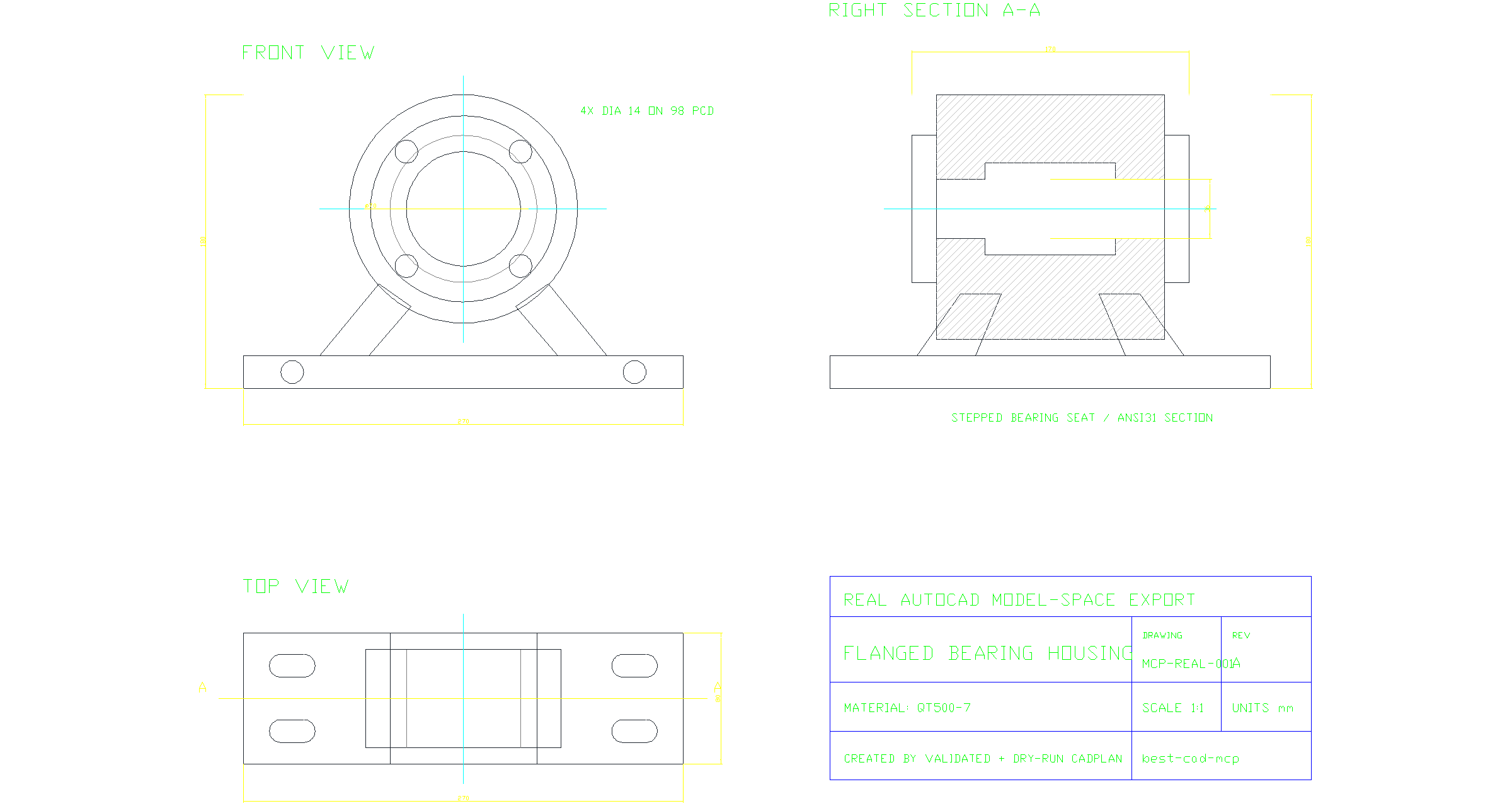
A real AutoCAD model-space export created by a validated, dry-run CADPlan: front and top projections, a sectioned side view, centerlines, dimensions, feature callouts, hatches, and a title block. Download the source DWG or inspect the executed CADPlan.
[!IMPORTANT] best-cad-mcp is beta software. It is designed for controlled local workflows where an operator can review plans and evidence, not unattended changes to valuable production drawings.
Why best-cad-mcp
Most CAD automation stops at drawing primitives. Useful agent workflows also need to know exactly what they are changing, why a target was selected, and whether the result is correct.
| Handle-first control | Drawing understanding | Evidence before trust |
|---|---|---|
| Scan real AutoCAD handles, query exact entities, and edit those handles instead of guessing from labels or pixels. | Build CAD-IR, semantic objects and graphs, dimension bindings, constraints, and validation reports in a local workspace. | Validate and dry-run CADPlans, execute explicitly, rescan, and compare structured and visual results. |
The server runs on the same Windows account as AutoCAD and communicates over MCP stdio. It runs natively on the official MCP Python SDK 2.x, negotiates the 2026-07-28 protocol, and retains legacy client negotiation. AutoCAD remains the source of truth; SQLite stores model-private context, scan results, and review artifacts alongside the workspace. AutoCAD-facing tool calls are intentionally serialized on one event-loop thread to preserve COM apartment safety.
Live AutoCAD demo
Prompt: Create a production-style A3 landscape bolted flange-coupling assembly drawing at true 1:1 size, with a longitudinal half-section, aligned end view, exploded schematic, true dimensions, differentiated hatching, an eight-item BOM, matching item leaders, technical requirements, and a controlled title block.
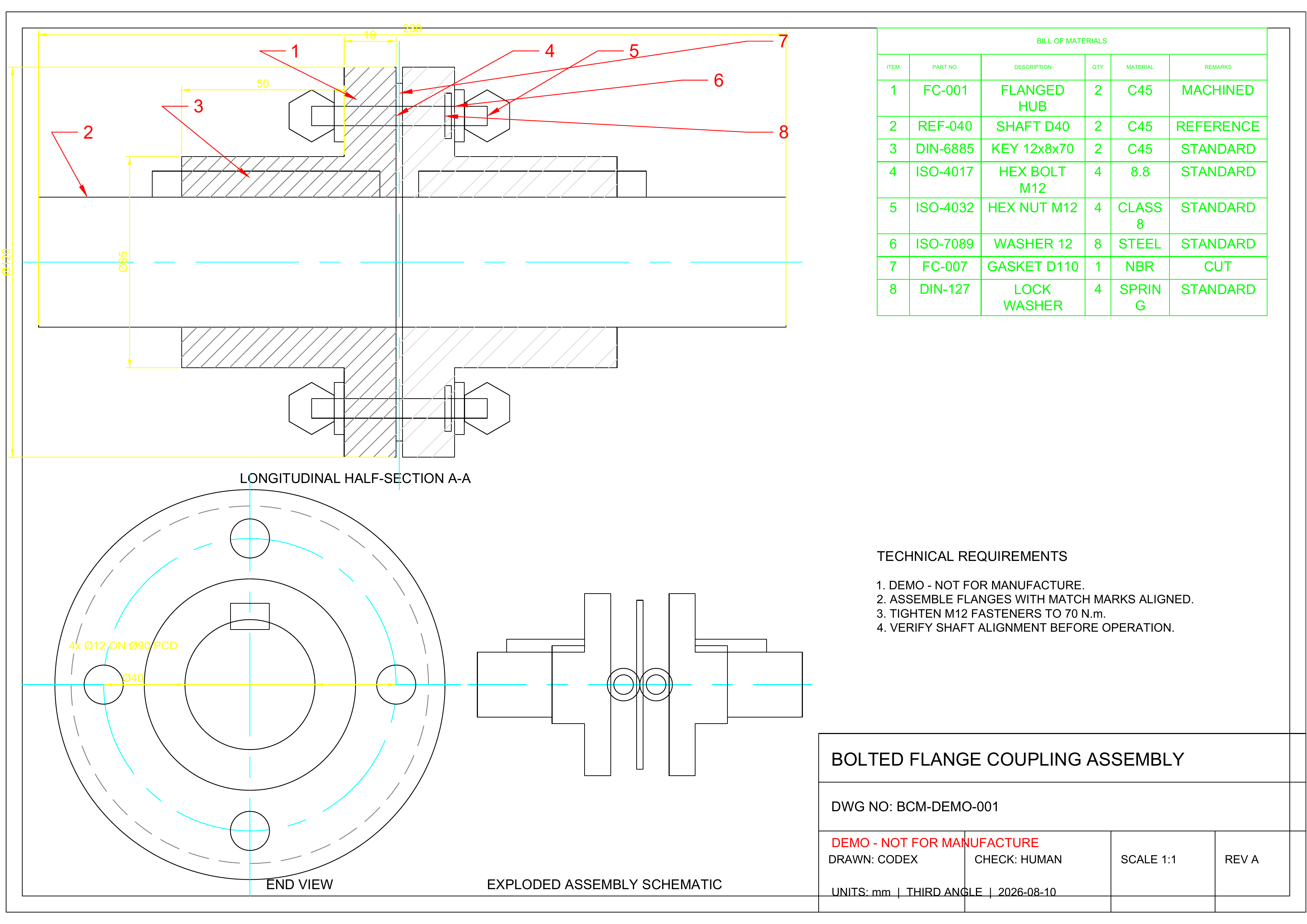
This is the result of a live AutoCAD session, not a hand-authored SVG. The MCP
client loaded the shipped precise_draw_from_spec prompt, then ran 18 bounded
generation phases (162 steps). Its autonomous visual-repair loop used two
layout-repair plans (4 steps); three separately recorded, operator-authorized
presentation-only release-QA plans added 10 steps. Every plan was validated and
dry-run before transactional execution. The final
rescan indexed 91 entities; structured verification detected 129 semantic
objects, processed 7 true dimension annotations, and checked 134 constraints
(127 satisfied, 7 unknown, and none violated). Post-repair geometry validation reported zero
issues. The release plot was independently checked as a one-page landscape A3
PDF.
For reproducibility, the checked-in MCP client builds the deterministic CADPlans used for this recorded run. The demo shows live execution of the optimized prompt's guarded workflow, not an unscripted one-shot LLM generation.
DXF · A3 PDF · Exact prompt · CADPlan bundle · Verification report · MCP client
The drawing follows the repository's generic mechanical assembly practice and
is marked DEMO - NOT FOR MANUFACTURE; it does not claim formal ISO, GB, ASME,
or other standards compliance.
Quick start
Requirements
- Windows
- AutoCAD 2020 or newer recommended, installed and licensed
- AutoCAD and the MCP client running as the same Windows user
- Python 3.11 or newer
- An MCP-compatible local client
Install the package
python -m pip install --upgrade best-cad-mcp
cad-mcp-doctor --check-autocad
For rendered overlays and visual-review helpers:
python -m pip install --upgrade "best-cad-mcp[visual]"
cad-mcp-doctor --check-autocad --require-visual-export
Keep AutoCAD open, then configure your MCP client to launch cad-mcp.
Codex
Codex supports both global ~/.codex/config.toml and trusted,
project-scoped .codex/config.toml files. This minimal installed-package
configuration uses the curated core tool profile:
[mcp_servers.best-cad-mcp]
command = "cad-mcp"
cwd = 'C:\CAD\your-project'
enabled = true
startup_timeout_sec = 30
tool_timeout_sec = 120
default_tools_approval_mode = "writes"

[mcp_servers.best-cad-mcp.env]
CAD_MCP_TOOL_PROFILE = "core"
CAD_MCP_WORKSPACE_ROOT = 'C:\CAD\your-project'
Restart Codex after editing the file, then inspect the connected server with
/mcp. See the
official Codex MCP configuration guide
for configuration scopes and current options.
Claude Code and other JSON-configured clients
{
  "mcpServers": {
    "best-cad-mcp": {
      "command": "cad-mcp",
      "env": {
        "CAD_MCP_TOOL_PROFILE": "core",
        "CAD_MCP_WORKSPACE_ROOT": "C:\\CAD\\your-project"
      }
    }
  }
}
Save this as .mcp.json in the CAD project root and start the client from that
project. CAD_MCP_WORKSPACE_ROOT should point to the CAD project being worked
on, not to this repository. With an installed package, setting both the process
cwd and workspace root to the project keeps runtime files together.
git clone https://github.com/LokmenoWer/best-cad-mcp.git
cd best-cad-mcp
python -m venv .venv
.\.venv\Scripts\Activate.ps1
python -m pip install --upgrade pip
python -m pip install -e ".[visual]"
.\.venv\Scripts\python.exe -m src.doctor --check-autocad
For a source checkout, start python -m src.server from the repository or
set the MCP server cwd to the repository. Keep
CAD_MCP_WORKSPACE_ROOT pointed at the separate CAD project you want to
index.
The guarded workflow
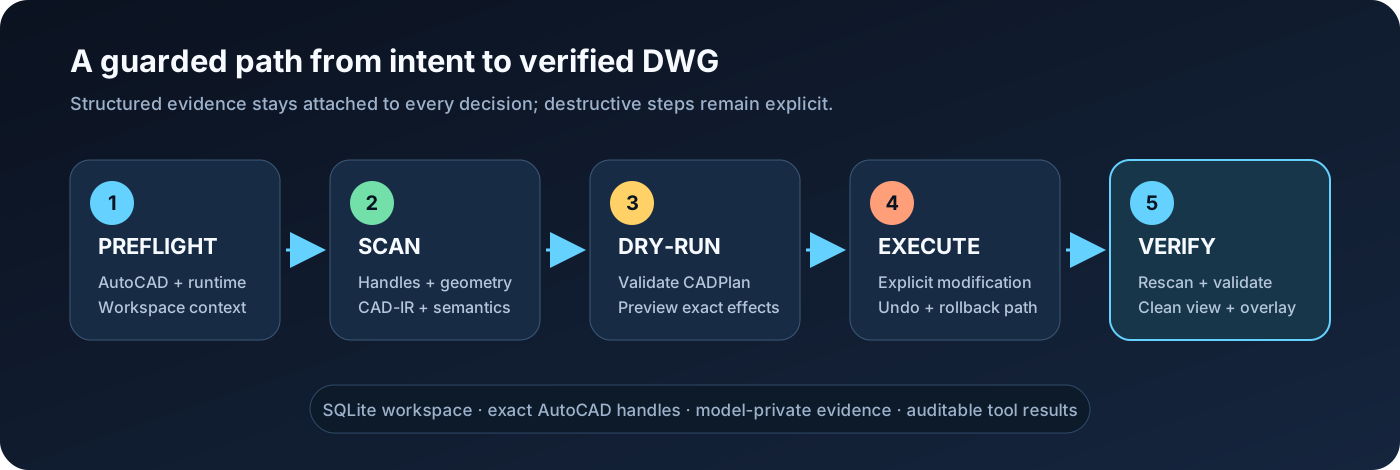
- Preflight — run
check_runtime_environment(check_autocad=true)orcad-mcp-doctor --check-autocad; stop when the result reportsok=false. - Scan — run
scan_all_entitiesbefore reasoning about an existing DWG. Usetopology_detail="full"for primitive grounding or cross-entity profiles. - Understand — build CAD-IR, summarize the drawing, query semantics, and
confirm important targets with
explain_entity. - Plan — express multi-step changes as a CADPlan, then call
validate_cad_plananddry_run_cad_plan. - Execute explicitly — only after authorization and an acceptable dry-run,
call
execute_cad_plan(..., allow_modify=true, transactional=true). - Verify — rescan, run geometric validation, export a clean view and overlay, and save only when the operator intends to persist the DWG.
For precise edits, prefer handles returned by AutoCAD over names inferred from screenshots. For visual findings, treat grounding as evidence: confirm the candidate entity and its geometry before changing it.
What it can do
| Area | Representative capabilities |
|---|---|
| 2D drafting | Lines, polylines, curves, circles, regions, hatches, text, dimensions, leaders, tables, layers, blocks, and attributes |
| Editing | Move, copy, rotate, scale, mirror, offset, trim, extend, fillet, chamfer, arrays, properties, selections, and handle-targeted changes |
| Drawing understanding | SQLite scan, CAD-IR v2, summaries, semantic objects/graphs, constraints, dimension binding, validation, and repair proposals |
| Guarded automation | CADPlan variables, dependencies, captured handles, preconditions, postconditions, dry-runs, transactional execution, undo, and rollback attempts |
| Visual grounding | Clean exports, adaptive numeric overlays, pixel/world mapping, path and polygon grounding, tile crops, and VLM finding reconciliation |
| Image-to-CAD | ImageDrawingSpec tracing, calibration, fidelity checks, staged execution, and visual comparison against the source image |
| Mechanical drawings | Orthographic views, sections, hatches, centerlines, dimensions, BOMs, balloons, layouts, and assembly-oriented prompt/skill assets |
| 3D and output | 3D solids and operations, layouts, plotting, PDF/DXF/DWF/image export, and direct in-result image content |
Tool profiles
The shipped client configs and examples recommend core because it keeps tool
selection reliable while covering normal guarded workflows. When the profile
environment variable is omitted, the Python server falls back to full for
backward compatibility.
| Profile | Tools | Intended use |
|---|---|---|
lean | 114 | Smallest dependable surface for common drawing and inspection tasks |
core | 215 | Recommended default for full guarded CAD workflows |
full | 322 | Every registered tool, including specialized and legacy operations |
Select a profile with CAD_MCP_TOOL_PROFILE=lean|core|full. Fine-grained
allow/deny controls are also available through
CAD_MCP_TOOLS_INCLUDE and CAD_MCP_TOOLS_EXCLUDE.
From visual understanding to grounded CAD evidence
The hero is not an explanatory mockup. It was drawn in a new AutoCAD document through a 90-step CADPlan, scanned as 81 real entities, validated with zero geometry issues, exported as WMF, and rasterized to the PNG shown above. The source DWG, plan, dry-run, validation output, pixel/world mapping, and VLM review are retained as reviewable artifacts.
A VLM review should return more than a caption. Below are real artifacts from the same snapshot: the clean AutoCAD tile inspected by the model and its actual handle overlay. They are raster crops produced by the mapping tool, not redrawn documentation graphics.
| Clean AutoCAD raster tile | Handle overlay from the same snapshot |
|---|---|
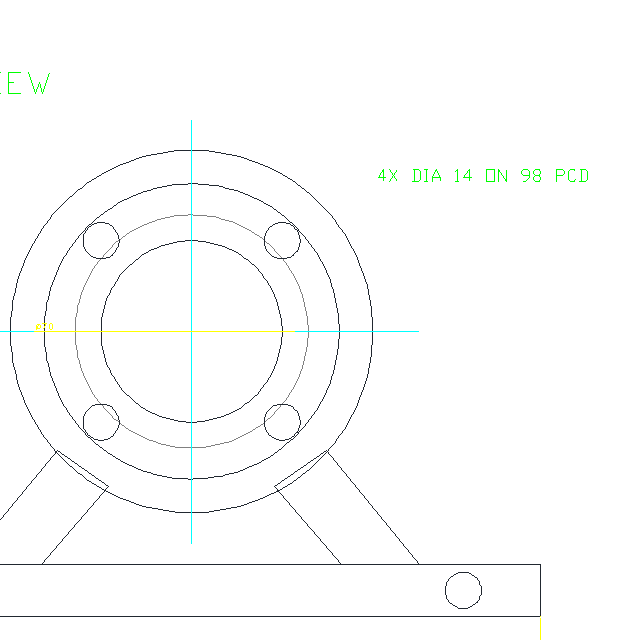 | 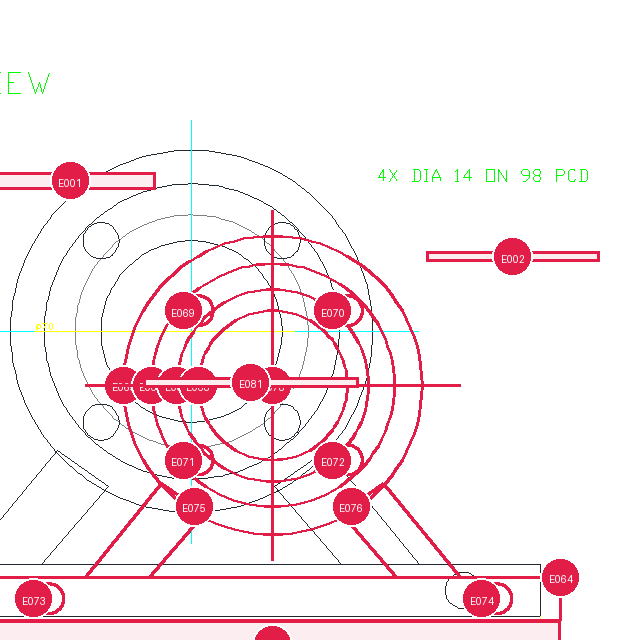 |
The overlay is registered to the WMF selection-export frame, not to the active
viewport. AutoCAD's measured proportional frame margin is preserved while the
old generic viewport padding is excluded. In this capture the mapped front-view
origin is (734.870, 331.032) px and the cyan centerline intersection observed
in the real raster is (735, 331) px: a maximum error of 0.13 px.
The real vlm_review_drawing/v3 result was schema-validated and submitted
without pre-claiming handles. Its four regions are authored from the raster and
locked to that raster's dimensions and SHA-256; the capture script rejects them
if AutoCAD produces a different image. Grounding resolved the central bore to handle
8A, the rounded mounting-slot profile to 115, and the title-block semantic
group to 236. The section hatch correctly remained ambiguous because two
real hatch candidates had a narrow score margin.
{
  "central_bore":  {"status": "grounded",  "handles": ["8A"]},
  "mounting_slot": {"status": "grounded",  "handles": ["115"]},
  "section_hatch": {"status": "ambiguous", "handles": []},
  "title_block":   {"status": "grounded",  "handles": ["236"]}
}
Inspect the hash-locked visual observation, submitted VLM return, grounded result, pixel/world alignment check, CADPlan dry-run, and zero-issue geometry validation.
Copy a mechanical drawing from one image
The full path separates non-mutating understanding from the one explicitly
authorized DWG modification stage, then closes with a rescan and visual diff.
This README does not present a generated flow illustration as trace evidence;
a real run should retain the source raster, ImageDrawingSpec, validated and
dry-run CADPlan, resulting DWG, and final AutoCAD export.
A typical tracing loop is:
- call
prepare_image_trace(image_path, domain="mechanical"); - use
prepare_visual_semantic_contextandget_trace_source_imageto inspect global and tiled source images; - produce
ImageDrawingSpec/v1, echoing each observed image'ssource_ref_templatefor measured coordinates; - call
validate_image_drawing_spec, thensubmit_image_drawing_spec; - call
compile_image_spec_to_cad_plan; - call
validate_image_fidelity_contract(spec, cad_plan); - call
validate_cad_plan, thendry_run_cad_plan; - only after authorization, call
execute_cad_plan(..., allow_modify=true, transactional=true); - rescan, validate, and compare the final AutoCAD export with the source.
Do not execute a trace just because its JSON is valid. Check view count, symmetry, dimensions, centerlines, hole placement, and source/render fidelity first.
Visual grounding in v1.6
Version 1.6 adds drawing-level topology for boundaries assembled across
multiple entities, including line-line and supported line-curve intersections
plus closed-loop profiles. Use scan_all_entities(topology_detail="full") when
primitive relations are required. Grounding now carries real path/polygon
geometry, multiple-handle candidates, adaptive overlays, and tile-aware
pixel/world contracts.
This improves selection quality on mechanical profiles, but it does not make vision infallible. Important edits should still follow:
visual finding -> grounding candidates -> explain_entity -> handle-targeted edit
The default VLM review prompt is vlm_review_drawing/v3. Snapshot schema
versions are returned in tool results; overlay schema versions are stored in
the referenced sidecars so strict consumers can detect contract changes.
Safety model
- Read and scan before editing an existing drawing.
- Keep raw command execution, deletion, purge, audit, save, close, and
execute_cad_planbehind explicit client approval. - Validate and dry-run plans before modification.
- Use returned handles and structured geometry for exact targets.
- Rescan after modifications; do not rely on stale SQLite rows.
- Keep model-private notes and spatial annotations in
.cad_mcp/, not in visible DWG geometry, XData, or hidden layers. - Treat saving and closing as separate operator decisions.
- Treat top/plan model-space views as the strongest grounding case. View twist, custom UCS, 3D geometry, and complex layout viewports can reduce confidence.
Transaction and rollback support reduce risk but cannot guarantee recovery from every AutoCAD or COM failure. Work on copies when the drawing is valuable.
Known limitations
- View grounding is exact only for plan/top model-space views. An
untwisted plan view gives numerically stable world↔pixel mapping. View
twist is included and flagged; non-plan and 3D views fall back to a 2D
plan-view approximation with
transform_confidence=lowand explicit warnings; paperspace/layout viewport mapping is not fully supported. Carry returnedlimitationsand confidence forward instead of claiming exact grounding in those cases. - Raster overlays need the
[visual]extra. Without Pillow/cairosvg the overlay degrades to an SVG fallback with a warning; WMF exports rely on the native Windows GDI+ conversion path. - Dimension binding is heuristic. Dimensions are matched to candidate
geometry with evidence and confidence; ambiguous or unbound dimensions stay
unknownby design and are never reported as falsely satisfied. - Semantic detection is deterministic and rule-based. Richer objects (slots, bolt-circle patterns, walls, doors, wires, title blocks, BOM tables) are reported as candidates with confidence, not guaranteed classifications, and no external model runs inside the server.
- CADPlan executes a fixed operation set. Advanced 3D solids, boolean operations, trim/extend, layout editing, plotting, and save/open are not plan operations; use the direct MCP tools for those.
- Rollback is best-effort. Transactional execution uses AutoCAD undo
marks (
StartUndoMark/EndUndoMark+ undo); it cannot guarantee recovery from every COM or AutoCAD failure, and a failed plan always reportscompleted_stepsfor inspection. - Scans are bounded.
scan_all_entitieshonorsmax_entitiesand reportstruncatedwhen the drawing exceeds the cap;topology_detail="full"is expensive on large drawings, so use summary topology by default. - Image tracing depends on the agent-side VLM and calibration. The server prepares, validates, compiles, and enforces fidelity; it never calls a model provider. Without reliable dimension calibration, traced drawings carry a scale warning and must not be claimed as true engineering scale.
- Windows + AutoCAD COM only. Tool calls are serialized on one COM
thread, the server must run on the same Windows account as AutoCAD, and
hosted CI cannot exercise live COM paths — live smoke benchmarks run
locally via
scripts/verify_cad_understanding_workflow.py.
Workspace and data
CAD_MCP_WORKSPACE_ROOT controls
<workspace>/.cad_mcp/workspace.db. The default log, visual exports, and image
trace assets are written relative to the MCP process cwd as cad_mcp.log,
cad_visual_exports/, and cad_image_traces/.
External CAD projects are not ignored automatically. Add these entries to the
project's .gitignore when it is a Git repository:
.cad_mcp/
cad_mcp.log
cad_visual_exports/
cad_image_traces/
The database helps connect turns and tools, but AutoCAD remains authoritative.
If a drawing changes outside the server, scan it again before using stored
entities. A warning about a legacy root autocad_data.db means an older
database exists; verify migration, then archive it separately.
Troubleshooting
| Symptom | Check |
|---|---|
| Server fails to import after upgrading | Run cad-mcp-doctor --json with the same Python environment used by the client. best-cad-mcp 1.7+ requires MCP Python SDK >=2,<3; upgrade the package/environment and restart the client if mcp_sdk_version is blocked. |
| AutoCAD is open but unavailable | Run cad-mcp-doctor --check-autocad; make sure both processes use the same Windows account and privilege level. |
| Server starts with too many tools | Set CAD_MCP_TOOL_PROFILE=core or lean, then restart the client. |
| Visual export is unavailable | The [visual] extra provides Pillow for raster overlays. On Windows, AutoCAD WMF uses the native GDI+ fallback; ImageMagick/Wand, Inkscape, or LibreOffice provide alternate paths. Check get_vision_capabilities() and wmf_to_png_available; PDF can also be rasterized externally. |
| Queries return stale entities | Activate the intended drawing and rerun scan_all_entities. |
| MCP server starts in the wrong folder | Set server cwd to the source checkout only when developing; set CAD_MCP_WORKSPACE_ROOT to the CAD project. |
| A plan is rejected | Run validate_cad_plan, inspect the exact failing step, and dry-run again after correcting it. |
For machine-readable diagnostics:
cad-mcp-doctor --json
Development
git clone https://github.com/LokmenoWer/best-cad-mcp.git
cd best-cad-mcp
python -m venv .venv
.\.venv\Scripts\Activate.ps1
python -m pip install -e ".[dev,visual]"
python -m pytest -q -m "not autocad_com"
Release publication validates the version, runs the non-COM suite (reserving
the autocad_com marker for local live-CAD checks), verifies native modern and
legacy MCP stdio, builds and clean-installs the wheel, checks it with Twine,
publishes to PyPI, and then publishes the MCP server metadata. Live AutoCAD
preflight and CADPlan checks must be run locally because hosted runners do not
have AutoCAD.
Contributions are welcome. Please keep changes scoped, add regression tests for behavior changes, and preserve the scan → plan → validate → verify safety model.
Acknowledgements
The model-private annotation and pointer-style CAD context design was informed by the public Pointer-CAD project and paper. No Pointer-CAD source code is copied into this repository.
License
MIT. See LICENSE.
Reviews
No reviews yet
Be the first to review this server!
More Developer Tools MCP Servers
Git
Freeby Modelcontextprotocol · Developer Tools
Read, search, and manipulate Git repositories programmatically
Fetch
Freeby Modelcontextprotocol · Developer Tools
Web content fetching and conversion for efficient LLM usage
Toleno
Freeby Toleno · Developer Tools
Toleno Network MCP Server — Manage your Toleno mining account with Claude AI using natural language.
mcp-creator-python
Freeby mcp-marketplace · Developer Tools
Create, build, and publish Python MCP servers to PyPI — conversationally.
MCP Marketplace
Freeby mcp-marketplace · Developer Tools
Search and install MCP servers from inside your AI client.
MarkItDown
Freeby Microsoft · Content & Media
Convert files (PDF, Word, Excel, images, audio) to Markdown for LLM consumption