
Server data from the Official MCP Registry
Clone any web page from a URL into a verified offline HTML copy, embed, or rebuild.
About
Clone any web page from a URL into a verified offline HTML copy, embed, or rebuild.
Remote endpoints: streamable-http: https://webembedding-jongkos-mcp.vercel.app/mcp
Security Report
Valid MCP server (1 strong, 1 medium validity signals). No known CVEs in dependencies. Package registry verified. Imported from the Official MCP Registry.
6 tools verified · Open access · 1 issue found
Security scores are indicators to help you make informed decisions, not guarantees. Always review permissions before connecting any MCP server.
Permissions Required
This plugin requests these system permissions. Most are normal for its category.
How to Install & Connect
Available as Local & Remote
This plugin can run on your machine or connect to a hosted endpoint. during install.
Documentation
View on GitHubFrom the project's GitHub README.
webEmbedding
webEmbedding clones any web page from its URL for AI coding agents. Give Claude Code, Codex, Cursor, or any MCP client a URL and it returns a verified clone: the original embed when the page allows it, otherwise a self-contained offline HTML snapshot (inlined CSS, shadow DOM, localized fonts and images) or a bounded rebuild, scored against desktop, tablet, and mobile screenshots of the live page.
Add it to your agent in one line:
claude mcp add web-embedding -- npx -y web-embedding@latest mcp   # Claude Code
codex mcp add web-embedding -- npx -y web-embedding@latest mcp    # Codex CLI
Then ask: "Clone https://example.com into ./clone and tell me the fidelity score." (Machine-readable summary for LLMs: llms.txt.)
webEmbedding is a source-first website cloning engine: it captures live pages with Playwright, replays network evidence from HAR artifacts, rebuilds only when direct reuse is blocked, and self-verifies the result.
It ships as a Skill + MCP server. Instead of asking a model to "clone this site" from a screenshot, it inspects the URL, chooses a reuse or rebuild route, captures DOM/runtime HTML/styles/assets/network traces, generates bounded frontend reconstruction artifacts, and checks the output with visual, DOM, computed-style, interaction, and responsive-breakpoint verification.
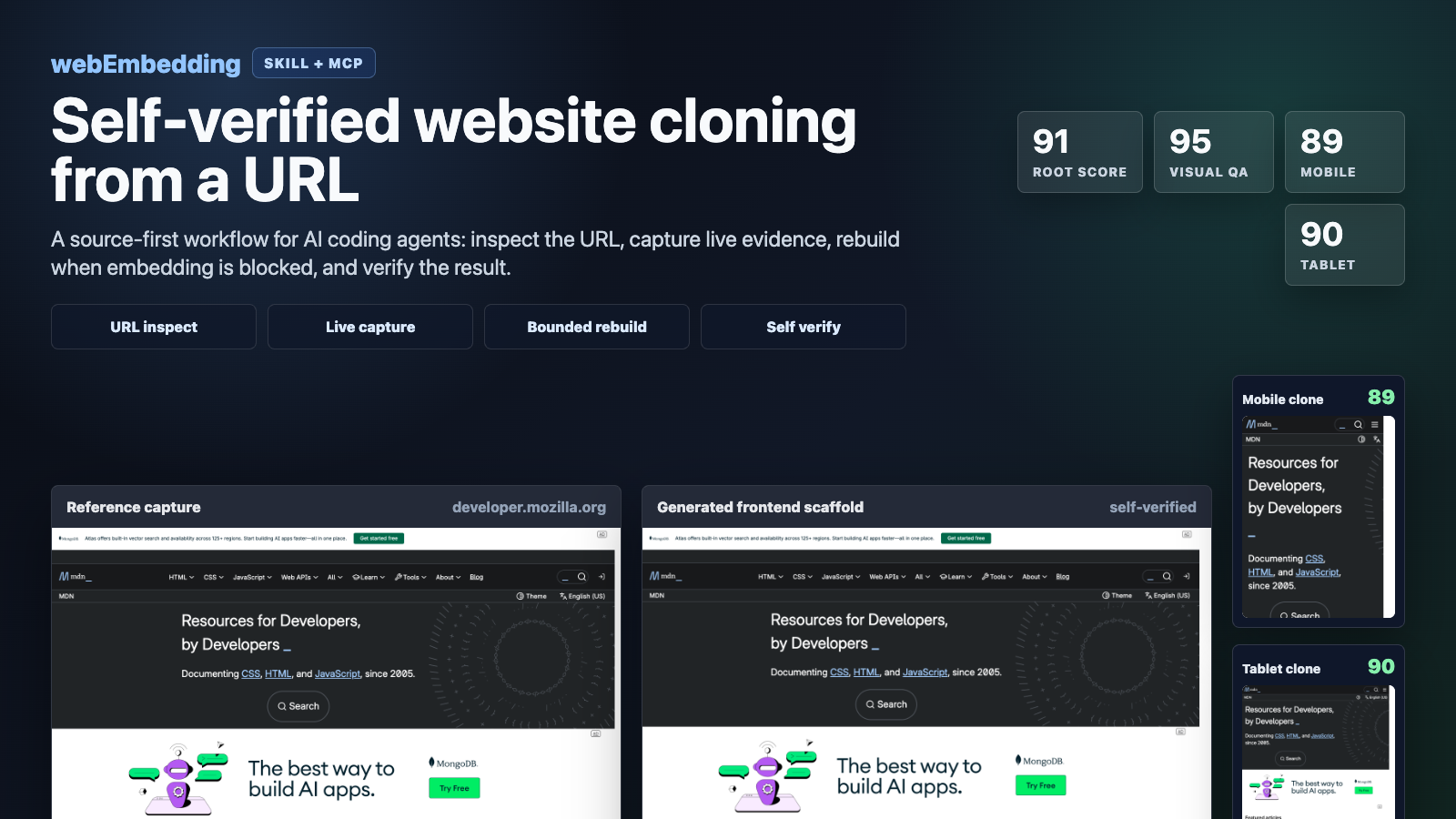
GitHub listing, social preview, and launch-copy recommendations are in docs/github-listing.md.
Current Status
The current pipeline is strongest for static and semi-static web pages:
- company, brand, marketing, and documentation pages
- public landing pages
- iframe-blocked pages that need capture-based reconstruction
- responsive page snapshots across desktop, tablet, and mobile
It is not a full backend or app-logic clone engine. Login-only screens, app-first or native-app-required services, captcha-heavy sites, maps, games, canvas/WebGL-heavy pages, real-time feeds, payments, booking flows, and private server behavior still need separate handling.
Operationally, the repo is now a production-candidate clone engine for URL-based capture and bounded reconstruction: jobs can be queued, network evidence can be replay-audited from HAR artifacts, authenticated dashboard runs can be driven from user-owned browser state, and local gates verify the route corpus, score checks, package contents, and CI wiring. The remaining hard boundary is server-side product behavior, not front-end evidence capture and reconstruction.
Measured Checkpoints
Local benchmark runs from this repo (scripts/check_clone_quality_bench.py, mobile + tablet breakpoints, 2026-10-28):
| URL | Path | Score | Wall time |
|---|---|---|---|
https://developer.mozilla.org/en-US/ | runtime snapshot | root 99, visual 100, mobile 99, tablet 99 | ~34 s |
https://lit.dev/ (web components / shadow DOM) | runtime snapshot | root 99, visual 100, mobile 98, tablet 98 | ~40 s |
https://www.mozilla.org/ | runtime snapshot | root 95, visual 100, mobile 95, tablet 95 | ~43 s (was ~160 s) |
https://www.python.org | runtime snapshot | root 98, visual 100, mobile 98, tablet 94 | ~226 s (was ~1011 s, failed at 73) |
https://www.example.com | exact reuse | ready yes | — |
These are generated by the local self-verify pipeline, not manually assigned ratings. Earlier bounded-rebuild previews embedded the reference screenshot, which inflated their visual score; the runtime snapshot renders real DOM and CSS, and every row above was also checked by side-by-side screenshot review. Known gap: layouts that page scripts compute for viewports other than the captured one (for example masonry footers) can still drift at tablet width.
The reproducible commands and score thresholds are tracked in docs/benchmark-evidence.json.
Production readiness gates are tracked in docs/production-pipeline-gates.json.
Core Features
- Source-first routing:
- direct iframe or embed reuse when it is safe and frameable
- original preview, export, remix, or source routes when available
- bounded rebuild only when exact reuse is unavailable
- Live browser capture:
- DOM snapshot
- runtime HTML
- full-page screenshot
- computed style summaries
- CSS analysis
- asset inventory
- HAR-like network metadata
- interaction states and replay traces
- storage state export for session-aware flows
- Blocked-site rebuild:
- handles
X-Frame-Optionsand CSP-blocked pages by rebuilding from captured evidence - generates reusable frontend reconstruction artifacts from captured page structure
- preserves custom tags, shadow-root host structure, and semantic document structure where captured
- handles
- Evidence limitation reporting:
- separates directly captured artifacts from inferred or missing evidence in reproduction results and prompts
- marks app-gated, auth-gated, and native-app-led surfaces as bounded evidence, with recommendations for user screenshots or authenticated session capture
- Operational failure classification:
- reports typed pipeline action codes such as
network-replay-limited,auth-session-missing,public-app-gate, andcanvas-visual-fallback - exposes HAR/network
replay_readinessbefore treating captured network evidence as replay-grade
- reports typed pipeline action codes such as
- Production pipeline helpers:
- filesystem-backed async clone job queue with durable JSON records, worker locks, retry scheduling, cancellation, and manifest annotation
- deterministic HAR replay engine for standard HAR, near-HAR, and captured
network/manifest.jsonartifacts - authenticated dashboard live corpus runner that accepts user-provided
storage_state_pathoruser_data_diroutside the repo
- Self-verification:
- screenshot similarity
- DOM snapshot similarity
- computed-style similarity
- hover/focus/click interaction state parity
- interaction trace parity
- desktop/mobile/tablet breakpoint reports
- Responsive benchmark support:
- primary desktop viewport:
1440x1200 - tablet profile:
768x1024 - mobile profile:
390x844
- primary desktop viewport:
- Repair loop:
- bounded self-repair can run when the first scaffold misses the readiness threshold
Install
Requirements
- Node.js 18 or newer
- Python 3.9 or newer
- Chrome or Chromium available locally for Playwright runtime capture
The package uses playwright-core; it does not download a browser by itself.
Installing this project adds the source-first-clone plugin bundle, the exact-clone-intake skill, and the MCP server that exposes the URL inspection, capture, rebuild, and verification tools.
Install From npm
npm install -g web-embedding
web-embedding install
web-embedding doctor
Clone a public URL after installing:
web-embedding clone \
  --url https://developer.mozilla.org/en-US/ \
  --output-dir ./.tmp/mdn-clone \
  --wait-seconds 2 \
  --timeout-seconds 35 \
  --breakpoints mobile tablet
If you already have an older local plugin installed, overwrite it with:
web-embedding install --force
web-embedding doctor
You can also run the installer without a global install:
npx web-embedding install
Use As An MCP Server
For MCP clients that can launch npm stdio servers:
{
  "mcpServers": {
    "source-first-clone": {
      "command": "npx",
      "args": ["-y", "web-embedding@latest", "mcp"]
    }
  }
}
For local smoke testing:
npx web-embedding@latest mcp
The MCP Registry identity is io.github.jongko54/web-embedding; server.json and package.json#mcpName are kept in sync for registry ownership verification.
Hosted Apps SDK Intake Endpoint
The public remote MCP intake endpoint for Apps SDK Developer Mode is:
https://webembedding-jongkos-mcp.vercel.app/mcp
It exposes low-risk source-first routing tools such as URL inspection, embed candidate discovery, clone-mode classification, and embed snippet generation. Full browser capture, HAR replay, queues, bounded rebuilds, and one-pass clone execution remain local-first through the stdio MCP package.
Apps SDK review pages are hosted alongside the endpoint:
https://webembedding-jongkos-mcp.vercel.app/privacy.html,
https://webembedding-jongkos-mcp.vercel.app/terms.html, and
https://webembedding-jongkos-mcp.vercel.app/submission.html.
Sandboxing And Approvals
webEmbedding has two different execution boundaries:
- Hosted Apps SDK intake: read-only URL routing and classification only. It accepts absolute
httpandhttpsURLs, does not run Playwright, does not read local files, does not use browser profiles or storage state, and does not persist capture artifacts. - Local stdio MCP and CLI: full capture, HAR replay, queues, rebuild scaffolds, and self-verify run on the user's machine under the user's local agent and filesystem permissions. Output is written only to caller-provided paths such as
output_dirorqueue_root. - Authenticated capture: session-aware runs require the caller to intentionally provide a
storage_state_pathoruser_data_dir. webEmbedding does not collect credentials, perform login bypasses, or treat a public login shell as private app evidence. - Access-controlled surfaces: paywalls, captcha flows, private dashboards, payment/checkout/account/admin flows, and native-app-led screens should be blocked, marked
needs_session, or sent to manual review unless the user has explicit authorization and supplies the needed evidence.
Local URL entrypoints reject non-HTTP schemes such as file:// so an agent cannot use clone/capture tools as a local file reader. Telemetry is disabled by default and, when enabled, excludes target URLs, local paths, captured HTML, screenshots, storage state, environment variables, API keys, and command output.
Agent Marketplaces
This repository includes marketplace metadata for the two local agent surfaces:
- Codex:
.agents/plugins/marketplace.jsonpoints to./bundle/source-first-clone. - Claude Code:
.claude-plugin/marketplace.jsonpoints to the same bundle and the bundle includes.claude-plugin/plugin.json.
Claude Code users can add the marketplace from GitHub with:
/plugin marketplace add jongko54/webEmbedding
/plugin install source-first-clone@webembedding
AI auto-selection expectations and golden prompts live in docs/ai-distribution.md and evals/ai-selection/webembedding-golden-prompts.json.
Install From Release
curl -fsSL https://github.com/jongko54/webEmbedding/releases/latest/download/install.sh | bash
Install From This Checkout
git clone https://github.com/jongko54/webEmbedding.git
cd webEmbedding
npm install
node ./bin/web-embedding.mjs install
node ./bin/web-embedding.mjs doctor
Install Into A Temporary Home
Useful for testing without touching your real agent home:
python3 python/web_embedding/installer.py install --target-home ./.tmp/home
python3 python/web_embedding/installer.py doctor --target-home ./.tmp/home
python3 python/web_embedding/installer.py uninstall --target-home ./.tmp/home
Opt-in Telemetry
Telemetry is disabled by default. On an interactive first install, web-embedding install asks once and defaults to No. Non-interactive installs such as CI and curl | bash do not prompt. If you opt in, web-embedding sends a small anonymous command-completion event to a JSON POST endpoint you control. It does not send target URLs, local paths, captured HTML, screenshots, storage state, environment variables, API keys, or command output.
Enable it during install:
web-embedding install --telemetry --telemetry-endpoint https://your-collector.example/events
Or manage it later:
web-embedding telemetry enable --endpoint https://your-collector.example/events
web-embedding telemetry status
web-embedding telemetry disable
web-embedding telemetry reset-id
Each event contains an anonymous install id, package version, command name, success/failure status, OS/runtime basics, and coarse option flags such as breakpoint_count or install_source.
Environment controls:
WEB_EMBEDDING_TELEMETRY=1
WEB_EMBEDDING_NO_TELEMETRY=1
WEB_EMBEDDING_TELEMETRY_PROMPT=0
WEB_EMBEDDING_TELEMETRY_ENDPOINT=https://your-collector.example/events
WEB_EMBEDDING_TELEMETRY_LOG=./telemetry.jsonl
Run a local/self-hosted JSONL collector:
npm run telemetry:collector -- --host 127.0.0.1 --port 8765 --out ./telemetry.jsonl
WEB_EMBEDDING_TELEMETRY=1 \
WEB_EMBEDDING_TELEMETRY_ENDPOINT=http://127.0.0.1:8765/events \
web-embedding doctor
Summarize collected usage:
npm run telemetry:summarize -- ./telemetry.jsonl
The summary includes install and clone executions, total command executions, unique anonymous install IDs, command counts, and version counts. See docs/telemetry.md for collector and analyzer details.
Quick Start
Inspect a URL and get route hints:
node ./bin/web-embedding.mjs inspect \
  --url https://developer.mozilla.org/en-US/
Run a safe preflight audit before capture or clone:
node ./bin/web-embedding.mjs audit \
  --url https://developer.mozilla.org/en-US/
The audit reports whether the reference is ready for exact/embed reuse, needs local capture, needs an authenticated session, requires manual review, or should be blocked before any browser capture or filesystem output runs.
Run the full clone workflow:
node ./bin/web-embedding.mjs clone \
  --url https://developer.mozilla.org/en-US/ \
  --output-dir ./.tmp/mdn-clone \
  --wait-seconds 2 \
  --timeout-seconds 35 \
  --breakpoints mobile tablet
Run a lightweight quality benchmark:
python3 scripts/check_clone_quality_bench.py \
  https://developer.mozilla.org/en-US/ \
  --output-root ./.tmp/clone-quality-bench \
  --wait-seconds 1 \
  --timeout-seconds 35 \
  --breakpoints mobile tablet
The benchmark prints compact rows for root, visual, and breakpoint scores. The full artifacts are written under the output directory.
CLI Commands
node ./bin/web-embedding.mjs capabilities
node ./bin/web-embedding.mjs install
node ./bin/web-embedding.mjs doctor
node ./bin/web-embedding.mjs uninstall
node ./bin/web-embedding.mjs paths
node ./bin/web-embedding.mjs telemetry status
node ./bin/web-embedding.mjs inspect --url https://www.mozilla.org/
node ./bin/web-embedding.mjs audit --url https://www.mozilla.org/
node ./bin/web-embedding.mjs capture \
  --url https://www.mozilla.org/ \
  --output-dir ./.tmp/capture-mozilla \
  --breakpoints mobile tablet
node ./bin/web-embedding.mjs reproduce \
  --url https://www.mozilla.org/ \
  --output-dir ./.tmp/reproduce-mozilla \
  --breakpoints mobile tablet
node ./bin/web-embedding.mjs clone \
  --url https://www.mozilla.org/ \
  --output-dir ./.tmp/clone-mozilla \
  --breakpoints mobile tablet
node ./bin/web-embedding.mjs verify \
  --reference-bundle ./.tmp/reference/capture.json \
  --candidate-bundle ./.tmp/candidate/capture.json
Output Artifacts
A clone run can produce:
capture.jsonpipeline-run-manifest.jsondom/snapshot.jsondom/runtime.htmlstyles/computed-summary.jsonstyles/css-analysis.jsonnetwork/manifest.jsonnetwork/har.jsonnetwork/har-like.jsonnetwork/replay-report.jsonassets/inventory.jsoninteractions/states.jsoninteractions/trace.jsonscreenshots/runtime.pngsession/storage-state.jsonreproduction/plan.jsonreproduction/evidence-limitations.jsonreproduction/rebuild-prompt.txtreproduction/rebuild/starter.htmlreproduction/rebuild/starter.cssreproduction/rebuild/starter.tsxreproduction/rebuild/next-app/reproduction/self-verify/summary.jsonreproduction/self-verify/renderers/*/verification.jsonreproduction/self-verify/renderers/*/visual-qa.jsonreproduction/self-verify/renderers/*/breakpoints/*-verification.json
Quality Benchmark
Run the default small benchmark:
npm run check:clone-bench:local
Run the universal route regression corpus and expectations gate:
npm run check:benchmark-routes:local
Run a lightweight clone score gate:
npm run check:clone-score-gate:local
Validate the committed benchmark evidence manifest:
npm run check:benchmark-evidence:local
Validate production pipeline gates:
npm run check:production-readiness:local
Run the operational smokes individually:
npm run check:job-queue:local
npm run check:har-replay:local
npm run check:authenticated-corpus:local
Classify failure/action codes from a route report:
npm run classify:pipeline-failures -- --report ./.tmp/universal-route-benchmark/universal-route-report.json
Find low-scoring persisted benchmark artifacts:
npm run summarize:benchmark-scores -- --root ./.tmp --min-score 60 --max-score 70
Run specific URLs:
python3 scripts/check_clone_quality_bench.py \
  https://www.example.com \
  https://www.mozilla.org/ \
  --no-breakpoints
Run a responsive benchmark:
python3 scripts/check_clone_quality_bench.py \
  https://developer.mozilla.org/en-US/ \
  --breakpoints mobile tablet
Development Checks
python3 -m py_compile \
  bundle/source-first-clone/mcp/source_first_clone/*.py \
  scripts/check_integration_smoke.py \
  scripts/check_clone_quality_bench.py
npm run check:integration:local
git diff --check
Repo Layout
bundle/source-first-cloneInstalled plugin bundle, MCP server, and exact-clone intake skill.bundle/source-first-clone/mcp/source_first_cloneCapture, planning, rebuild, repair, and verification engine.bin/web-embedding.mjsNode CLI wrapper.python/web_embedding/installer.pyShared installer and command dispatcher.scripts/check_clone_quality_bench.pyURL clone quality benchmark helper.scripts/benchmark_routes.pyUniversal route/capture-depth regression benchmark helper.scripts/check_benchmark_report.pyBenchmark expectation validator for exact, minimum, and contains-style checks.scripts/check_benchmark_evidence.pyBenchmark evidence manifest validator.scripts/check_job_queue_smoke.pyFilesystem async clone job queue smoke test.scripts/check_har_replay_smoke.pyDeterministic HAR replay engine smoke test.scripts/benchmark_authenticated_corpus.pyUser-provided authenticated dashboard corpus runner.scripts/summarize_benchmark_scores.pyUtility for finding low or high scoring persisted benchmark artifacts under an output root.scripts/classify_pipeline_failures.pyOperational failure/action taxonomy summarizer for reports and capture artifacts.scripts/check_production_readiness.pyProduction readiness gate validator for corpus, failure taxonomy, CI wiring, and policy docs.scripts/check_integration_smoke.pyRelease, install, and URL-only clone smoke test.scripts/release_bundle.pyRelease artifact builder.docs/Architecture notes and universal benchmark documentation.
Positioning
The strongest claim for this project is:
A source-first website cloning engine that combines Playwright capture, HAR replay, MCP tools, and self-verification to rebuild iframe-blocked public pages with reproducible visual, DOM, style, interaction, and responsive scores.
Avoid treating the output as a legal or ownership bypass. The engine can reconstruct public page structure, but permission, licensing, and acceptable use still matter.
FAQ
How can an AI coding agent clone a website from a URL?
Install the MCP server (npx -y web-embedding@latest mcp) and ask the agent to clone the URL. The agent calls clone_reference_url, which inspects the page, captures it in a real Chromium, picks reuse or rebuild, and returns the clone entrypoint with fidelity scores.
What does the clone look like on disk?
For pages that block iframes, snapshot/index.html plus snapshot/assets/ is a self-contained copy of the rendered page: stylesheets inlined from source (including CSS-in-JS and adoptedStyleSheets), open shadow roots as declarative shadow DOM, canvas pixels, form state, and localized images, fonts, and SVG sprites. Serve it over HTTP (python3 -m http.server); file:// blocks external SVG <use> references.
How is this different from SingleFile, screenshot-to-code, or open-lovable? SingleFile saves a page from a browser extension or CLI; webEmbedding uses the same class of DOM serialization but runs as an MCP tool, decides between embed reuse, snapshot, and rebuild, and verifies the result at three breakpoints. Screenshot-to-code and open-lovable generate new code from an image or scrape with an LLM; webEmbedding starts from the live DOM and CSS, so text, fonts, and layout come from the source instead of being re-imagined.
What can't it clone? Server behavior (logins, payments, search, real-time data), captcha- or bot-protected pages, closed shadow roots, and canvas/WebGL apps beyond a static frame. Authenticated pages need a user-provided browser session, and you still need the right to reproduce the page.
License
MIT
Reviews
No reviews yet
Be the first to review this server!
More AI & ML MCP Servers
Sequential Thinking
Freeby Modelcontextprotocol · AI & ML
Dynamic and reflective problem-solving through structured thought sequences
Toleno
Freeby Toleno · Developer Tools
Toleno Network MCP Server — Manage your Toleno mining account with Claude AI using natural language.
MCP Marketplace
Freeby mcp-marketplace · Developer Tools
Search and install MCP servers from inside your AI client.
mcp-creator-python
Freeby mcp-marketplace · Developer Tools
Create, build, and publish Python MCP servers to PyPI — conversationally.
FinAgent
Freeby mcp-marketplace · Finance
Free stock data and market news for any MCP-compatible AI assistant.
by Lharries · Communication
Read, search, and send WhatsApp messages through your AI assistant