
Server data from the Official MCP Registry
Let Claude listen to audio and watch video: transcribe, summarize and edit recordings and links.
About
Let Claude listen to audio and watch video: transcribe, summarize and edit recordings and links.
Security Report
mediasense is a local stdio MCP server for transcribing and editing audio and video, and its network and file access largely match that purpose. The main concerns are the optional cookies-browser option, which lets link downloads reuse the user's browser session cookies, and the README's curl-to-shell and irm-to-iex install pattern, which runs remote scripts. Several source files were truncated, so their behavior could not be verified. Supply chain analysis found 15 known vulnerabilities in dependencies (2 critical, 12 high severity). Package verification found 1 issue.
5 files analyzed · 23 issues found
Security scores are indicators to help you make informed decisions, not guarantees. Always review permissions before connecting any MCP server.
Permissions Required
This plugin requests these system permissions. Most are normal for its category.
What You'll Need
Set these up before or after installing:
Environment variable: MEDIASENSE_COOKIES_FROM_BROWSER
How to Install
Add this to your MCP configuration file:
{
  "mcpServers": {
    "io-github-joaoestella-mediasense": {
      "env": {
        "MEDIASENSE_COOKIES_FROM_BROWSER": "your-mediasense-cookies-from-browser-here"
      },
      "args": [
        "mediasense"
      ],
      "command": "uvx"
    }
  }
}Documentation
View on GitHubFrom the project's GitHub README.
mediasense




Give Claude ears and eyes. Claude can't listen to audio or watch videos on its own; with mediasense it can. Point at a voice message, podcast, recording or meeting, or paste a TikTok, YouTube or Instagram link, in Claude Code or Claude Desktop and ask in plain language. Claude can then transcribe it, summarize it, explain what happens, find the moment something is said, or edit it.
you: what does this voice message say? ~/Downloads/audio-from-maria.opus
you: summarize this https://www.tiktok.com/@someone/video/7350…
you: what does he show at 0:30? and what tool is he talking about?
you: clean up ~/Desktop/podcast.m4a — remove the "um"s and long pauses
you: make short captions for ~/Videos/reel.mp4
you: put intro.mp3 under the first 5 seconds of talk.mp4, ducked
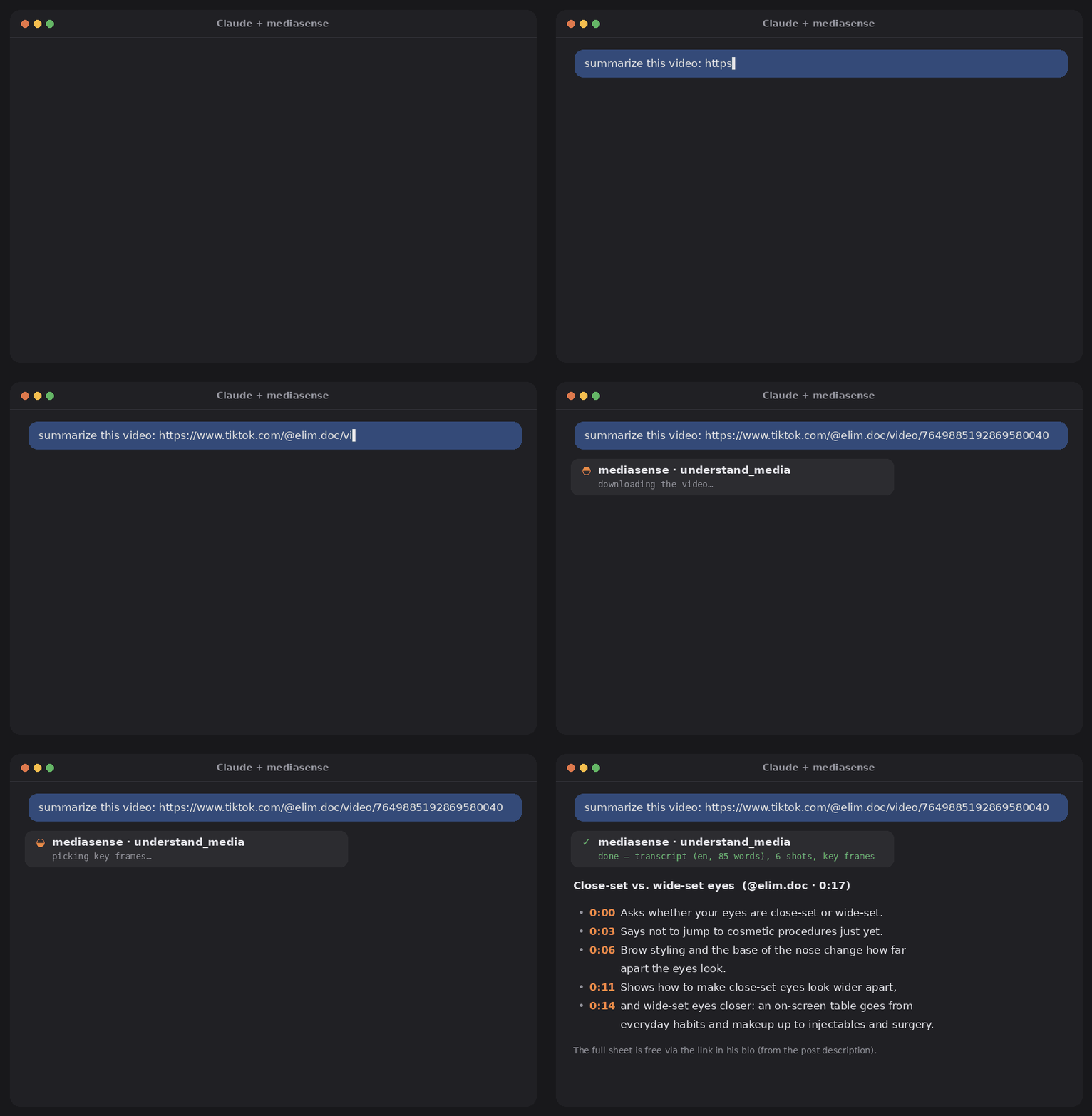
Real output for a 17-second TikTok by @elim.doc, shown with the creator's permission. Regenerate the
animation with python docs/make_demo.py.
mediasense runs on your computer: it downloads the link, transcribes speech in ~99 languages with a timestamp for every word, picks key frames at scene changes, and hands Claude a transcript, a shot list and contact-sheet images. Nothing is uploaded anywhere.
Setup
Windows – paste in PowerShell:
irm https://raw.githubusercontent.com/joaoestella/mediasense/main/install.ps1 | iex
macOS / Linux – paste in a terminal:
curl -LsSf https://raw.githubusercontent.com/joaoestella/mediasense/main/install.sh | sh
Then quit Claude Desktop completely (tray/menu-bar icon → Quit), open it again and ask "summarize this video: ". The first transcription downloads the speech model (≈ 500 MB).
irm https://raw.githubusercontent.com/joaoestella/mediasense/main/install.ps1 -OutFile install.ps1
notepad install.ps1
powershell -ExecutionPolicy Bypass -File .\install.ps1
(macOS/Linux: curl -LsSfO …/install.sh, read it, then sh install.sh.)
The installer only installs what is missing — Python 3.12 and FFmpeg via winget (Homebrew/apt on
macOS/Linux) and pipx via pip — then pipx installs mediasense from this repository and runs
mediasense setup. It stops at the first failed step.
winget install ffmpeg                    # macOS: brew install ffmpeg · Linux: sudo apt install ffmpeg
python -m pip install --user pipx
python -m pipx ensurepath                # then close and reopen the terminal
python -m pipx install "mediasense[all]"
mediasense setup -n                      # preview what setup will change
mediasense setup
mediasense doctor
Use python -m pipx … rather than plain pipx right after installing it: the pipx command only
appears on PATH in a new terminal. No Git needed.
The repository is also a Claude plugin: installing it adds both the mediasense tools and the skill that
tells Claude when to use them. It starts the server with uv, so install uv
first (winget install astral-sh.uv · brew install uv · curl -LsSf https://astral.sh/uv/install.sh | sh)
plus FFmpeg if you don't have it.
In Claude Code:
/plugin install mediasense --marketplace joaoestella/mediasense
mediasense is a standard stdio MCP server, also listed in the
official MCP Registry as io.github.joaoestella/mediasense:
{ "mcpServers": { "mediasense": { "command": "uvx", "args": ["mediasense", "mcp"] } } }
Or with a normal install: pipx install mediasense, then use mediasense mcp as the command.
Download mediasense.mcpb and double-click it (or drag it into Claude Desktop → Settings → Extensions). No Python, pipx or FFmpeg needed: Claude Desktop sets up Python by itself, and FFmpeg is downloaded on first use. The first start takes a few minutes while it installs everything. This uses Claude Desktop's new "UV" extension type, so if it doesn't work on your version, use the installer above.
What mediasense setup changes
- Claude Desktop: adds one entry,
mcpServers.mediasense, toclaude_desktop_config.json(%APPDATA%\Claude\– or%LOCALAPPDATA%\Claude-Data\claude_…\for the Microsoft Store app –~/Library/Application Support/Claude/on macOS,~/.config/Claude/on Linux; Claude Desktop → Settings → Developer → Edit Config opens the one your app uses). Everything else in the file is kept, and the previous file is saved next to it asclaude_desktop_config.json.<date>.bak. If the file isn't valid JSON, setup stops without touching it. - Claude Code (if installed): runs
claude mcp add --scope user mediasense -- <path>\mediasense mcp. - Nothing else.
mediasense setup -nshows the exact changes without making them;--desktopor--codelimits it to one app. To undo: remove themediasenseentry from the config file and runclaude mcp remove mediasense --scope user.
Updating on Windows and pipx says a file "is being used by another process"? Claude Desktop is still
running the old server: Get-Process mediasense | Stop-Process -Force, then install again (the
installer script does this for you).
Something not working? mediasense doctor checks FFmpeg, the speech model, the GPU, link downloads and
the Claude connection.
Teach Claude when to use it (recommended)
mediasense comes with a skill: a short guide that makes Claude reach for mediasense whenever you paste a video link, instead of trying to open the page (TikTok & co. block that).
- Claude Code: installed automatically by
mediasense setup. - Claude Desktop / claude.ai: download
mediasense-skill.zip
(the installer also saves it to
Downloads/mediasense/), then in Claude open Settings → Skills and upload it. One time only; it syncs to all your devices.
Note: Claude Desktop sends files you attach in the chat to the model, not to your computer, so give mediasense a link or a file path instead (in Claude Code you can drag the file into the terminal).
Slash commands
The server adds ready-made prompts. In Claude Code they appear as /mcp__mediasense__summarize and so on.
| Prompt | Does |
|---|---|
summarize | gist, key points with timestamps, steps, names and links, call to action |
explain_video | shot-by-shot explanation, plus how the video is built (hook, structure) |
clean_up | remove fillers and long pauses, show the plan first, render after your OK |
subtitles | SRT captions, standard or short 1–3-word style for vertical video |
Tools Claude gets
| Tool | What it does |
|---|---|
understand_media | one call: download link, transcribe, key frames + speech per shot, post title/description |
transcribe | speech → <file>.transcript.json with word timestamps; vocabulary fixes brand names |
read_transcript, search_transcript | read a time range or find every time a phrase is said |
plan_edit, render_edit | cut phrases, passages, fillers, silences or ranges; preview, then render |
export_transcript | SRT, VTT, TXT, CSV, JSON |
place_audio | insert a clip at a timestamp (mix / duck / replace) |
watch_video, get_frame | contact sheets, or one frame at a given time |
media_info | duration, resolution, fps, streams |
check_job | result of long work: new videos and the first run reply "still working" and finish in the background |
Long work never hits Claude's tool time limit: if a video takes more than ~30 s (a long video on a
CPU, or the very first run while the speech model downloads), the tool answers "still working" with a
progress percentage and Claude checks back with check_job until it's done.
All tools accept a file path or a link. Links are downloaded once to ~/Downloads/mediasense
(change with MEDIASENSE_HOME) and reused.
Command line
Everything also works without Claude:
mediasense understand "https://youtu.be/…"           # transcript + shots + metadata, as text
mediasense transcribe talk.mp4 -l pt --vocab "Cloudflare, Claude" --also srt
mediasense search talk.transcript.json "next quarter"
mediasense edit talk.mp4 --fillers --silences 0.7 -n   # -n = only show the plan
mediasense edit talk.mp4 --fillers --silences 0.7 --srt --edl --fcpxml
mediasense edit talk.mp4 --cut-between "let me check" "okay so" --cut-range 12:03-12:40
mediasense export talk.transcript.json captions.srt --words-per-cue 2
mediasense place video.mp4 voiceover.wav --at 0:12.5 --mode duck
mediasense storyboard reel.mp4
mediasense fetch "https://www.tiktok.com/@…/video/…"
Edits never touch the original: results are written as <name>.edited.* / <name>.placed.*.
EDL opens in Premiere, Resolve and Avid; FCPXML in Final Cut Pro and Resolve.
Good to know
-
Names and jargon. Whisper may write "Cloud Fair" for Cloudflare. Pass
--vocab(Claude does this automatically when it can infer the names from the title or the screen). -
Fillers. Whisper tends to leave hesitations out; transcribe with
--verbatimwhen you want to cut them. Real words are protected per language ("um" is an article in Portuguese, so it is never cut there). Ambiguous words like "like", "tipo" or "né" are only removed if you list them. -
Speed. Everything works on a plain CPU: short clips take seconds, a few minutes of audio takes about as long as the audio with the default
smallmodel (baseis faster,mediummore accurate). No GPU?--backend openaisends the audio to an OpenAI-compatible transcription API instead (fast on any machine, but the audio leaves your computer). -
NVIDIA GPU (optional, much faster). mediasense uses it automatically once the CUDA libraries are present; no CUDA toolkit needed:
python -m pipx inject mediasense nvidia-cublas-cu12 "nvidia-cudnn-cu12>=9,<10" nvidia-cuda-runtime-cu12(≈ 1.5 GB; needs a driver that supports CUDA 12 –
mediasense doctorchecks both). Restart Claude Desktop afterwards. -
Word timing is approximate (0.1–0.2 s). For tighter cuts and speaker labels use
--backend whisperx(pip install "mediasense[whisperx]"). -
Downloading from links follows each site's terms. Use it for content you're allowed to download.
Privacy Policy
mediasense runs entirely on your computer: no accounts, no analytics, no telemetry, and the author
receives no data. It connects to the internet only to download the links you ask about, the speech
model (first run), FFmpeg if it's missing, and – only if you choose the openai backend – to send audio
to the transcription API you configure. Results stay on your disk until you delete them. When used from
Claude, tool results (transcripts, key frames, metadata) are returned to the Claude app and handled
under Anthropic's privacy policy. Full policy: PRIVACY.md.
Development
git clone https://github.com/joaoestella/mediasense && cd mediasense
pip install -e ".[dev,mcp]"
pytest
The tests build synthetic audio/video with FFmpeg and use fake model and downloader libraries, so they
run in seconds with nothing to download. Ideas welcome: more filler words for your language, a
one-click Claude Desktop extension (.mcpb), and a GUI.
Releasing
- Bump
versioninpyproject.toml,src/mediasense/__init__.py,server.json(both places) and.claude-plugin/plugin.json, and the pinnedmediasense==X.Y.Zin.mcp.json, commit. The workflow refuses a tag that doesn't match them. git tag vX.Y.Z && git push origin vX.Y.Z. The Release workflow publishes to PyPI, updates the entry in the MCP Registry and creates a GitHub release with the wheel,mediasense-skill.zipandmediasense.mcpb.
One-time PyPI setup (trusted publishing, no token): on pypi.org → Your account → Publishing → Add a
new pending publisher: project mediasense, owner joaoestella, repository mediasense, workflow
release.yml, environment left empty.
License
MIT
Reviews
No reviews yet
Be the first to review this server!
More Developer Tools MCP Servers
Rea
Freeby Morluto · Developer Tools
Reverse engineer anything from your terminal or agent with one CLI and MCP server.
Paperclip
Freeby Paperclipai · Developer Tools
Trending hip-hop artist momentum scores across four cultural dimensions.
Fetch
Freeby Modelcontextprotocol · Developer Tools
Web content fetching and conversion for efficient LLM usage
Git
Freeby Modelcontextprotocol · Developer Tools
Read, search, and manipulate Git repositories programmatically
Toleno
Freeby Toleno · Developer Tools
Toleno Network MCP Server — Manage your Toleno mining account with Claude AI using natural language.
MCP Marketplace
Freeby mcp-marketplace · Developer Tools
Search and install MCP servers from inside your AI client.