
Server data from the Official MCP Registry
Universal AI Memory - Sync context across Claude, VsCode, Cursor, Continue, Windsurf, Zed & more
About
Universal AI Memory - Sync context across Claude, VsCode, Cursor, Continue, Windsurf, Zed & more
Security Report
Valid MCP server (2 strong, 3 medium validity signals). 4 known CVEs in dependencies (1 critical, 3 high severity) Package registry verified. Imported from the Official MCP Registry.
3 files analyzed · 5 issues found
Security scores are indicators to help you make informed decisions, not guarantees. Always review permissions before connecting any MCP server.
Permissions Required
This plugin requests these system permissions. Most are normal for its category.
How to Install
Add this to your MCP configuration file:
{
  "mcpServers": {
    "io-github-intina47-context-sync": {
      "args": [
        "-y",
        "@context-sync/server"
      ],
      "command": "npx"
    }
  }
}Documentation
View on GitHubFrom the project's GitHub README.
Context Sync
Local-first project memory for AI coding tools over MCP.
Context Sync gives an agent a persistent memory layer for a codebase:
- project identity and tech stack
- active work, decisions, constraints, and caveats
- structured file exploration
- git-aware context
- optional read-only Notion lookup
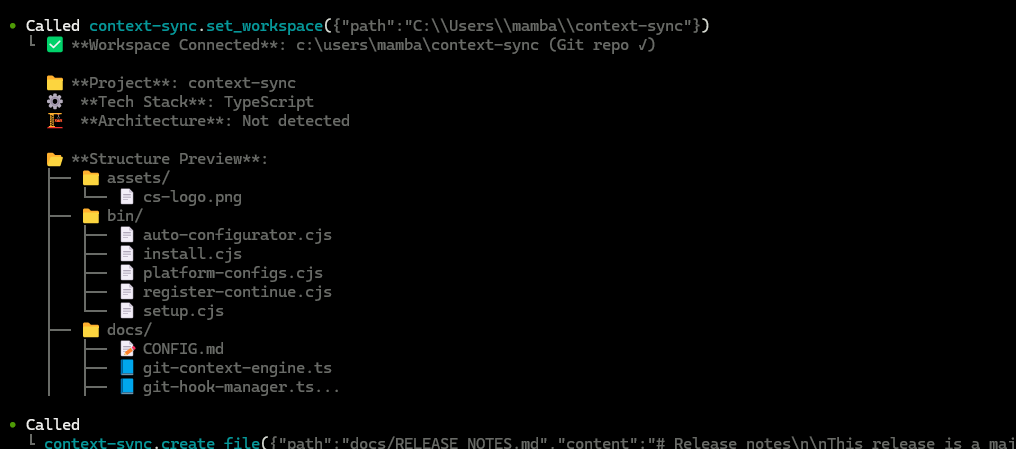
What It Does
Context Sync is built for session continuity. Instead of relying on a model to remember earlier conversations, it stores the project context that matters and makes it retrievable through a small MCP tool surface.
The current core tools are:
set_projectrememberrecallread_filesearchstructuregitnotion
Install
Install globally:
npm install -g @context-sync/server
Auto-configuration runs during global install. After install, restart your AI tool.
If you install locally instead of globally, auto-config does not run. Use the manual config guide in docs/CONFIG.md.
Verify
Check that context-sync appears in your MCP tool list:
- Claude Desktop: open the tools list
- Cursor: open the tools list
- VS Code / Copilot Chat Agent mode: check tools
- Continue.dev: open the Continue panel
- Codex CLI:
codex mcp list - Claude Code:
claude mcp list
If auto-config fails, use docs/TROUBLESHOOTING.md and docs/CONFIG.md.
Optional Notion Setup
Run the setup wizard if you want Notion integration:
context-sync-setup
or:
npx context-sync-setup
Notion support is intentionally read-only at the tool surface:
notion({ action: "search", query: "..." })notion({ action: "read", pageId: "..." })
First-Time Workflow
Start every new session by setting the project first:
1. set_project({ path: "/absolute/path/to/project" })
2. recall()
3. structure({ depth: 2 })
4. read_file({ path: "src/index.ts" })
5. remember({ type: "decision", content: "Use SQLite for local storage" })
Recommended pattern:
set_projectonce per project/session startrecallto recover contextstructureandsearchto exploreread_filefor focused inspectionrememberwhen something should survive the current session
Git Integration
When you run set_project inside a git repository, Context Sync can install hooks for automatic context capture.
Installed hooks:
post-commitpre-pushpost-mergepost-checkout
Hooks are marked with Context Sync Auto-Hook, and existing hooks are backed up first.
The git tool supports:
statuscontexthotspotscouplingblameanalysis
Data And Config
Default locations:
- Database:
~/.context-sync/data.db - Config:
~/.context-sync/config.json - Install status:
~/.context-sync/install-status.json
Custom database options:
- CLI:
context-sync --db-path /absolute/path/to/db - Env var:
CONTEXT_SYNC_DB_PATH
See docs/DATA.md for storage details.
Supported Platforms
- Claude Desktop
- Cursor
- VS Code + GitHub Copilot
- Continue.dev
- Zed
- Windsurf
- Codeium
- TabNine
- Codex CLI
- Claude Code
- Antigravity
Docs
Reviews
No reviews yet
Be the first to review this server!
More Developer Tools MCP Servers
Fetch
Freeby Modelcontextprotocol · Developer Tools
Web content fetching and conversion for efficient LLM usage
Git
Freeby Modelcontextprotocol · Developer Tools
Read, search, and manipulate Git repositories programmatically
Toleno
Freeby Toleno · Developer Tools
Toleno Network MCP Server — Manage your Toleno mining account with Claude AI using natural language.
mcp-creator-python
Freeby mcp-marketplace · Developer Tools
Create, build, and publish Python MCP servers to PyPI — conversationally.
MCP Marketplace
Freeby mcp-marketplace · Developer Tools
Search and install MCP servers from inside your AI client.
MarkItDown
Freeby Microsoft · Content & Media
Convert files (PDF, Word, Excel, images, audio) to Markdown for LLM consumption