
Server data from the Official MCP Registry
Apple Mail MCP server with full-coverage FTS5 body search, reliable on large mailboxes.
About
Apple Mail MCP server with full-coverage FTS5 body search, reliable on large mailboxes.
Security Report
Apple Mail MCP is a well-engineered macOS mail server with thoughtful security patterns. Authentication is not applicable (local-only access to user's own mailbox). The codebase demonstrates strong defensive practices: proper file permission handling (0o600 for cached attachments, 0o700 for cache dirs), careful fallback strategies, input validation, and good error handling. Permissions (file_read, file_write, env_vars, process_spawn) align appropriately with the mail-reading purpose. Minor code quality observations do not impact security posture. Supply chain analysis found 3 known vulnerabilities in dependencies (1 critical, 1 high severity). Package verification found 1 issue.
3 files analyzed · 7 issues found
Security scores are indicators to help you make informed decisions, not guarantees. Always review permissions before connecting any MCP server.
Permissions Required
This plugin requests these system permissions. Most are normal for its category.
How to Install
Add this to your MCP configuration file:
{
  "mcpServers": {
    "io-github-imdinu-apple-mail-mcp": {
      "args": [
        "apple-mail-mcp"
      ],
      "command": "uvx"
    }
  }
}Documentation
View on GitHubFrom the project's GitHub README.
Apple Mail MCP






The only Apple Mail MCP server with full-coverage body search — reliable on large mailboxes where AppleScript-based servers timeout. 8 tools for reading, searching, and extracting email content.
Read the docs for the full guide.
Quick Start
pipx install apple-mail-mcp
Add to your MCP client:
{
  "mcpServers": {
    "mail": {
      "command": "apple-mail-mcp"
    }
  }
}
Build the Search Index (Recommended)
# Requires Full Disk Access for Terminal
# System Settings → Privacy & Security → Full Disk Access → Add Terminal

apple-mail-mcp index --verbose
Configure (Optional)
apple-mail-mcp init # writes ~/.apple-mail-mcp/config.toml
Writes a commented config file you can edit to set defaults like your
primary account or mailbox. Every key has a matching APPLE_MAIL_* env
var if you prefer environment-based config. See
Configuration
for the full schema and precedence rules.
Tools
| Tool | Purpose |
|---|---|
list_accounts() | List email accounts |
list_mailboxes(account?) | List mailboxes |
get_emails(filter?, limit?) | Get emails — all, unread, flagged, today, last_7_days |
get_email(message_id) | Get single email with full content + attachments |
search(query, scope?, before?, after?, highlight?) | Search — all, subject, sender, body, attachments |
get_email_links(message_id) | Extract links from an email |
get_email_attachment(message_id, filename) | Extract attachment content |
get_attachment(message_id, filename) | Deprecated — use get_email_attachment() |
Performance
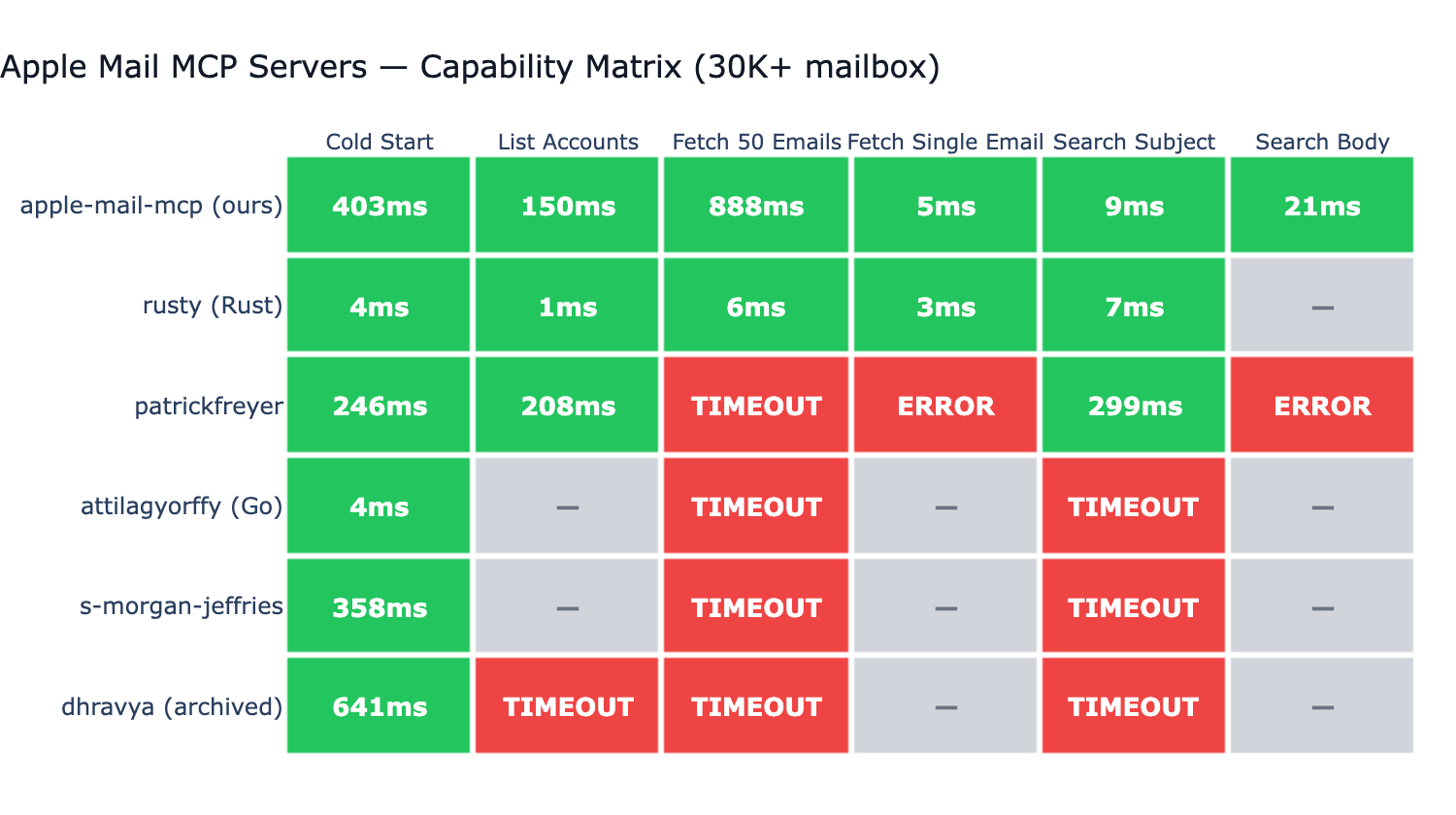
Tested against 6 other Apple Mail MCP servers on a real ~73K-message mailbox:
- Only server with full-coverage body search. Most competitors don't support body search at all; the one that does (BastianZim) live-scans only the 5000 most recent messages — silent miss on anything older. Our FTS5 index covers the entire mailbox.
- ~3ms single email fetch via disk-first
.emlxreading (no JXA round-trip). - ~1ms
list_accountsand ~5ms 50-email listing via direct Envelope-Index SQLite reads (0.4+) — same path BastianZim/rusty/pl-lyfx use, with JXA as the correctness fallback. - ~7ms subject search via FTS5 — competitive with native Rust on the same operation.
- Reliable across all 6 benchmarked operations on a 73K mailbox; AppleScript-based servers timeout, throw syntax errors, or skip operations they don't support.
Configuration
Apple Mail MCP works out of the box. To customize defaults, run
apple-mail-mcp init to generate a config.toml template — or use
the matching APPLE_MAIL_* environment variables. See the
Configuration docs
for the full schema and the CLI > env > file > default precedence.
Per-client env overrides via the MCP client's launch config also work:
{
  "mcpServers": {
    "mail": {
      "command": "apple-mail-mcp",
      "args": ["--watch"],
      "env": {
        "APPLE_MAIL_DEFAULT_ACCOUNT": "Work"
      }
    }
  }
}
CLI Usage
All tools are also available as standalone CLI commands (no MCP server needed):
apple-mail-mcp search "quarterly report" --scope subject
apple-mail-mcp search "invoice" --after 2026-01-01 --limit 10
apple-mail-mcp read 12345
apple-mail-mcp emails --filter unread --limit 10
apple-mail-mcp accounts
apple-mail-mcp mailboxes --account Work
apple-mail-mcp extract 12345 invoice.pdf
All commands output JSON. Generate a Claude Code skill for CLI-based access:
apple-mail-mcp integrate claude > ~/.claude/skills/apple-mail.md
Development
git clone https://github.com/imdinu/apple-mail-mcp
cd apple-mail-mcp
uv sync
uv run ruff check src/
uv run pytest
License
GPL-3.0-or-later
Reviews
No reviews yet
Be the first to review this server!
More Developer Tools MCP Servers
Fetch
Freeby Modelcontextprotocol · Developer Tools
Web content fetching and conversion for efficient LLM usage
Git
Freeby Modelcontextprotocol · Developer Tools
Read, search, and manipulate Git repositories programmatically
Toleno
Freeby Toleno · Developer Tools
Toleno Network MCP Server — Manage your Toleno mining account with Claude AI using natural language.
mcp-creator-python
Freeby mcp-marketplace · Developer Tools
Create, build, and publish Python MCP servers to PyPI — conversationally.
MCP Marketplace
Freeby mcp-marketplace · Developer Tools
Search and install MCP servers from inside your AI client.
MarkItDown
Freeby Microsoft · Content & Media
Convert files (PDF, Word, Excel, images, audio) to Markdown for LLM consumption