
Server data from the Official MCP Registry
Actual Budget, carefully: deletes preview first, and new transactions check for duplicates.
About
Actual Budget, carefully: deletes preview first, and new transactions check for duplicates.
Security Report
Valid MCP server (2 strong, 3 medium validity signals). No known CVEs in dependencies. Package registry verified. Imported from the Official MCP Registry.
4 files analyzed · 1 issue found
Security scores are indicators to help you make informed decisions, not guarantees. Always review permissions before connecting any MCP server.
Permissions Required
This plugin requests these system permissions. Most are normal for its category.
What You'll Need
Set these up before or after installing:
Environment variable: ACTUAL_SERVER_URL
Environment variable: ACTUAL_PASSWORD
Environment variable: ACTUAL_SESSION_TOKEN
Environment variable: ACTUAL_BUDGET_ID
Environment variable: ACTUAL_ENCRYPTION_PASSWORD
Environment variable: ACTUAL_READ_ONLY
Environment variable: ACTUAL_TOOLSET
Environment variable: ACTUAL_DATA_DIR
Environment variable: ACTUAL_HTTP_TIMEOUT_MS
How to Install
Add this to your MCP configuration file:
{
  "mcpServers": {
    "io-github-henfrydls-actual-budget-mcp": {
      "env": {
        "ACTUAL_TOOLSET": "your-actual-toolset-here",
        "ACTUAL_DATA_DIR": "your-actual-data-dir-here",
        "ACTUAL_PASSWORD": "your-actual-password-here",
        "ACTUAL_BUDGET_ID": "your-actual-budget-id-here",
        "ACTUAL_READ_ONLY": "your-actual-read-only-here",
        "ACTUAL_SERVER_URL": "your-actual-server-url-here",
        "ACTUAL_SESSION_TOKEN": "your-actual-session-token-here",
        "ACTUAL_HTTP_TIMEOUT_MS": "your-actual-http-timeout-ms-here",
        "ACTUAL_ENCRYPTION_PASSWORD": "your-actual-encryption-password-here"
      },
      "args": [
        "-y",
        "actual-budget-mcp"
      ],
      "command": "npx"
    }
  }
}Documentation
View on GitHubFrom the project's GitHub README.
actual-budget-mcp



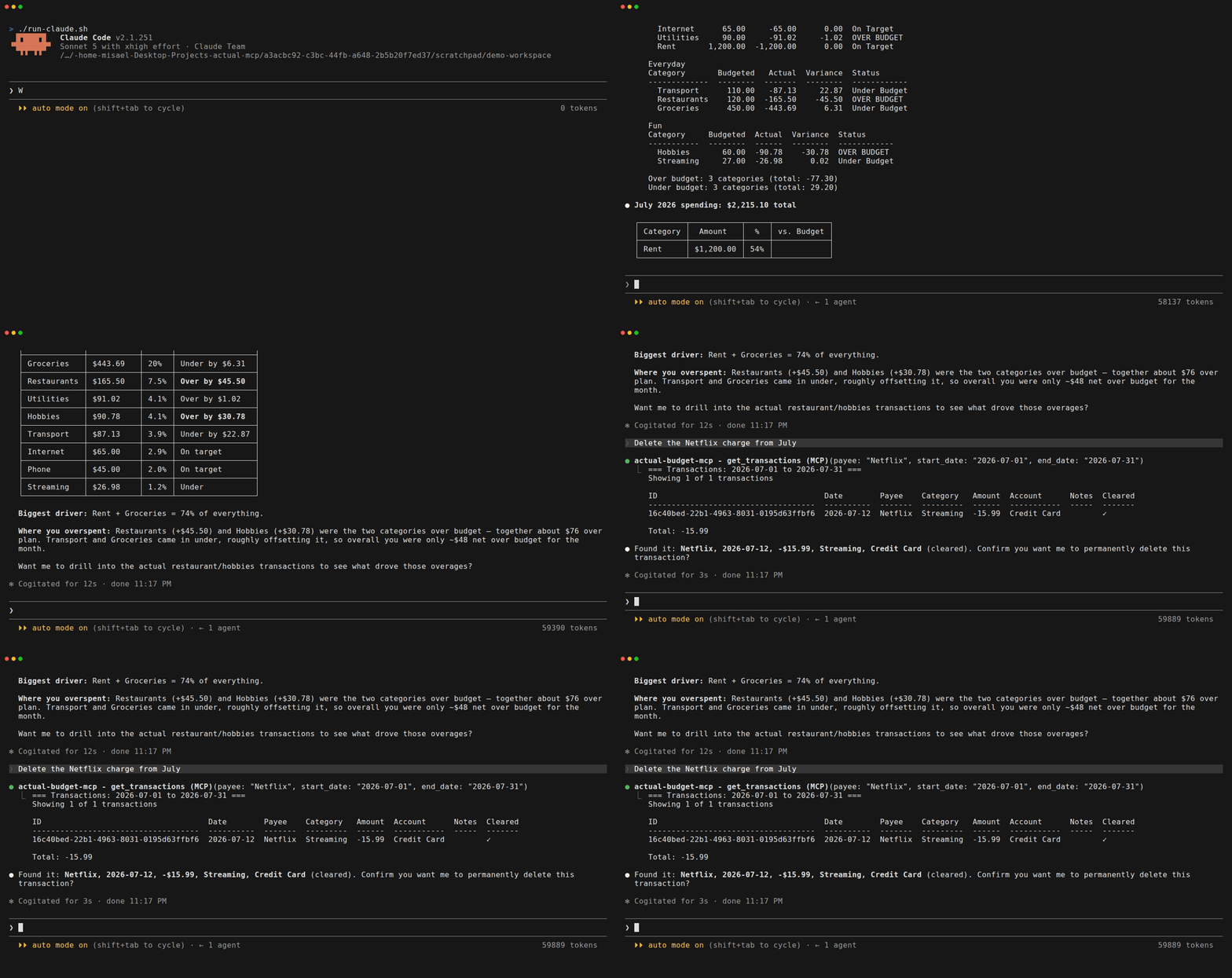
Talk to your budget. An MCP server that connects Actual Budget to Claude. Ask where the money went, get real analysis back, and let it write without holding your breath.
Listed in the official Actual Budget community projects.
Features
- Real analysis, not just lookups - Projections, category trends, budget vs actual, and month summaries
- Writes you can trust - Every delete previews what it will remove and waits for you to confirm;
ACTUAL_READ_ONLY=1hides the write tools from the model entirely (Safety) - Multi-currency that survives reality - Splits and residual reconciliation, not just a currency symbol
- Recovers from an out-of-sync budget -
repair_syncrebuilds the local sync state when@actual-app/apiand your server disagree, the failure that otherwise leaves every tool erroring - Ask about your budget in plain language - "How much did I spend on food this month?" or "Am I over budget on anything?"
- Create and manage transactions - Add expenses, transfers, and edits without opening the app
- Manage categories, payees, and rules - Full CRUD without opening the app
- Use names, not IDs - Say "Wallet" instead of
a1b2c3d4-..., with helpful suggestions if ambiguous - Natural dates in English and Spanish - "last month", "este mes", "hace 3 meses", "yesterday"
- Clean formatted output - Aligned tables and clear summaries, not raw JSON
- Clear error messages - If something's wrong, you'll know exactly what to fix
Does it work with local models?
Yes. This is an MCP server, so it works with any client that speaks MCP, and the model behind that client is the client's business, not this server's. Claude Desktop, Claude Code, Cursor and VS Code are the ones documented below because they are the ones people ask about, but anything that can run an MCP client, including a local setup pointed at Ollama or LM Studio, talks to it the same way.
Your budget data goes to whatever model your client uses. If that matters to you, and for a lot of people running Actual it does, a local model keeps it on your machine.
Does it work with ChatGPT?
No, and the reason is not this server. ChatGPT's connectors only accept remote MCP servers: a public HTTPS endpoint speaking SSE or Streamable HTTP. There is no way to point ChatGPT at a process running on your own machine, which is what this server is. OpenAI does offer a tunnel for local servers, but it is limited to enterprise plans.
Making it work would mean exposing your Actual server to the internet, which is the opposite of what most people running Actual want. Anything that can start a local MCP process works instead: Claude Desktop, Claude Code, Cursor, VS Code, Gemini CLI, or your own setup pointed at a local model.
If what you actually want is OpenAI's model, use Codex, which does run MCP servers locally over stdio. Option 6 is the one command it takes.
Prerequisites
- Actual Budget server running (local or remote)
- Node.js 22.14 or newer for every option below except the Desktop Extension (see Node.js requirement)
- The Desktop Extension needs nothing but Claude Desktop. It runs on the Node that Claude Desktop ships, and the bundle carries a SQLite binary for every platform it supports, so nothing is compiled either. Checked on Windows 11 with Claude Desktop 2.110.0 and Node removed from the machine.
Quick Start
On Claude Desktop, the shortest path is the extension: no config file to edit and no command to run. Otherwise, copy this into Claude Code or Claude Desktop:
Install the actual-budget-mcp MCP server from npm (https://github.com/henfrydls/actual-budget-mcp).
Configure it with these credentials:
    - My Actual Budget server: http://localhost:5006
    - Password: YOUR_PASSWORD
    - Budget ID: YOUR_BUDGET_ID
Claude will configure everything for you.
Installation
Option 1: Claude Desktop extension (no config files)
A packaged Desktop Extension is available: install it and Claude Desktop asks for your server URL, password and Sync ID in its own settings UI, with the password and session token stored in your operating system's keychain rather than a config file you have to edit.
Download actual-budget-mcp.mcpb, then open Claude Desktop, go to Settings > Extensions, and drag the file onto that screen.
On Windows, dragging is the way in: double-clicking the file opens Windows'
"select an app to open this file" dialogue instead, because Claude Desktop does
not register the .mcpb file type. Verified on a clean Windows 11 install with
Claude Desktop 0.14.10.
The extension carries everything it needs, so the first question you ask is answered straight away rather than after an install you cannot see. It is a large download, once, with a progress bar.
You do not need Node.js installed for this route. Claude Desktop runs the extension on the Node it ships with. Checked by renaming Node out of the way on a Windows 11 machine and asking a question anyway: the server started and answered.
Earlier builds launched the package from npm instead. That made the download small and moved it to the first run, where nothing showed progress: Claude Desktop waited, decided the server was dead and said it could not connect, and the extension started working on its own a few minutes later. The bundle now includes Actual's SQLite binary for every platform it supports. They are N-API binaries, so one per platform serves every Node version, and nothing has to be chosen at startup.
Updating the extension
Installing a new version over an old one keeps the settings you filled in, with one exception seen in practice: the saved server password was cleared when a field's title changed between versions. If Claude cannot connect after an update, open the extension's settings and check the password field before looking anywhere else.
Option 2: Claude Code (one command)
claude mcp add actual-budget-mcp -e ACTUAL_SERVER_URL=http://localhost:5006 -e ACTUAL_PASSWORD=your-password -e ACTUAL_BUDGET_ID=your-budget-id -- npx -y actual-budget-mcp
Option 3: Claude Desktop (edit the config file)
Add this to your claude_desktop_config.json:
macOS: ~/Library/Application Support/Claude/claude_desktop_config.json
Windows: %APPDATA%\Claude\claude_desktop_config.json
{
  "mcpServers": {
    "actual-budget-mcp": {
      "command": "npx",
      "args": ["-y", "actual-budget-mcp"],
      "env": {
        "ACTUAL_SERVER_URL": "http://localhost:5006",
        "ACTUAL_PASSWORD": "your-password",
        "ACTUAL_BUDGET_ID": "your-budget-sync-id"
      }
    }
  }
}
Option 4: Cursor

The button installs it with placeholder values. Open Cursor Settings > MCP afterwards and replace the three: your server URL, your password, and your budget's Sync ID. To do it all by hand instead, go to Cursor Settings > MCP > Add new MCP server and add:
{
  "mcpServers": {
    "actual-budget-mcp": {
      "command": "npx",
      "args": ["-y", "actual-budget-mcp"],
      "env": {
        "ACTUAL_SERVER_URL": "http://localhost:5006",
        "ACTUAL_PASSWORD": "your-password",
        "ACTUAL_BUDGET_ID": "your-budget-sync-id"
      }
    }
  }
}
Option 5: VS Code (GitHub Copilot)


Same as above: the button fills in placeholders, and you replace the three
values afterwards. By hand, add this to your VS Code settings.json:
{
  "mcp": {
    "servers": {
      "actual-budget-mcp": {
        "command": "npx",
        "args": ["-y", "actual-budget-mcp"],
        "env": {
          "ACTUAL_SERVER_URL": "http://localhost:5006",
          "ACTUAL_PASSWORD": "your-password",
          "ACTUAL_BUDGET_ID": "your-budget-sync-id"
        }
      }
    }
  }
}
Option 6: Codex (OpenAI)
One command, and it writes the entry into ~/.codex/config.toml for you:
codex mcp add actual-budget-mcp \
  --env ACTUAL_SERVER_URL=http://localhost:5006 \
  --env ACTUAL_PASSWORD=your-password \
  --env ACTUAL_BUDGET_ID=your-budget-sync-id \
  -- npx -y actual-budget-mcp
Codex has no extension or bundle format, so this one-liner is the shortest route
there is. codex mcp list shows it afterwards, and codex mcp remove actual-budget-mcp undoes it.
This is Codex the local agent, the CLI and the IDE extension. Codex in the browser runs on OpenAI's machines and cannot reach an Actual server on your network.
Option 7: Docker
The image speaks stdio like every other option, so your client starts the container and owns its lifetime:
{
  "mcpServers": {
    "actual-budget-mcp": {
      "command": "docker",
      "args": [
        "run", "-i", "--rm",
        "--add-host=host.docker.internal:host-gateway",
        "-v", "actual-budget-mcp-data:/data",
        "-e", "ACTUAL_SERVER_URL",
        "-e", "ACTUAL_PASSWORD",
        "-e", "ACTUAL_BUDGET_ID",
        "ghcr.io/henfrydls/actual-budget-mcp:latest"
      ],
      "env": {
        "ACTUAL_SERVER_URL": "http://host.docker.internal:5006",
        "ACTUAL_PASSWORD": "your-password",
        "ACTUAL_BUDGET_ID": "your-budget-sync-id"
      }
    }
  }
}
Two things that bite everyone once:
- Inside the container,
localhostis the container. Your Actual server is not there.host.docker.internal(with the--add-hostflag above, which is what makes it resolve on Linux) reaches the host instead. - Mount
/data. That is the budget cache. Without a volume, every start re-downloads your entire budget from the server.
Option 8: From source (for contributors)
git clone https://github.com/henfrydls/actual-budget-mcp.git
cd actual-budget-mcp
npm install
cp .env.example .env   # Edit with your credentials
npm run build
npm run test:connection # Verify it works
Verify your setup
--verify reads the environment of the shell you run it in, and the install options above
put your credentials in your MCP client's configuration instead. So set them for the
command:
ACTUAL_SERVER_URL=http://localhost:5006 \
ACTUAL_PASSWORD=your-password \
ACTUAL_BUDGET_ID=your-sync-id \
npx -y actual-budget-mcp --verify
It connects, downloads the budget and prints how many accounts and category groups it found. Running it without those variables reports them as missing, which is about the command, not about your install.
After changing your client's configuration, restart the client. Claude Desktop, Claude Code and the rest read MCP configuration at startup and will not pick up an edit until they are restarted.
Running it for days at a time
Most clients start this server when you open them and stop it when you close them, and nothing below matters. If you run it as a process that stays up, an always-on chat bot or a service, it does.
The server downloads your budget once at startup and keeps a local copy. Before
every read, whether you asked through a tool or read actual://accounts, it
pulls whatever the Actual server has that the copy does not, so an edit you
make in the Actual app shows up in the next question you ask. You do not have
to restart it, and you do not have to run a bank sync to shake it loose.
Three limits keep that from costing a round trip on every call:
- A copy pulled less than 60 seconds ago is treated as current, so a burst of questions syncs once. Any sync counts, including the one a write does before deciding whether to write.
- A read waits at most 20 seconds for the pull. Past that it answers from the local copy rather than hanging, and says so.
- After a pull that fails or runs past that deadline, the next 60 seconds of reads answer straight from the local copy instead of trying again. A server that is down would otherwise charge every read the full wait, one after another.
When the pull does not happen, because the Actual server is down, unreachable or simply slow, the reply ends with a line saying it could not refresh, how old the figures are, and what went wrong:
Could not refresh from the Actual server; these figures are from the last
sync, 14 minutes ago. Anything changed in the Actual app since then may be
missing. Reason: The budget's sync state is out of sync with the Actual
server, so no operation can run until it is repaired. Run the `repair_sync`
tool to rebuild the sync state (non-destructive), or repair it in the Actual
app under Settings > Show advanced settings.
That line is the point of it. A server that is down otherwise goes back to answering with figures from hours ago and nothing says which. The reason is there because these do not all want the same thing done about them: a network blip clears on its own, an out-of-sync budget has to be repaired, and a refused login needs your credentials looked at.
Writes are not affected: they already pull before the checks that decide whether to write, so they do not pay for a second one.
Each client needs its own ACTUAL_DATA_DIR. Two processes sharing one local
copy will corrupt it, and a long-lived server makes that easier to do by
accident, because it is there all day for a second client to point at.
Configuration
| Variable | Required | Description |
|---|---|---|
ACTUAL_SERVER_URL | Yes | Your Actual Budget server URL. See Which URL and port |
ACTUAL_PASSWORD | Yes* | Server password (set in Actual Budget under Settings). *Not needed if you use ACTUAL_SESSION_TOKEN |
ACTUAL_SESSION_TOKEN | No | For servers behind OIDC, which have no password. Use this instead of ACTUAL_PASSWORD; if both are set, the token wins |
ACTUAL_BUDGET_ID | Yes | Budget Sync ID (found in Settings > Show advanced settings) |
ACTUAL_ENCRYPTION_PASSWORD | No | Only if your budget file is encrypted |
ACTUAL_DATA_DIR | No | Where the budget cache lives. Defaults to your OS data directory (see below) |
ACTUAL_READ_ONLY | No | Set to 1/true/yes to run read-only. See Safety |
ACTUAL_TOOLSET | No | chat offers the 18 everyday tools instead of all 44. Defaults to full. See Choosing a toolset |
Using a session token (OIDC servers)
If your Actual server signs you in through OIDC, there is no password to put in
ACTUAL_PASSWORD, because the server issues a session token instead. Set
ACTUAL_SESSION_TOKEN to that token and leave the password unset.
To find it, in the browser where you are signed in to Actual:
- Open your browser's developer tools
- Go to Application (Chrome/Edge) or Storage (Firefox)
- Expand IndexedDB → the
actualdatabase → theasyncStoragestore - Copy the value of the key
user-token
It is stored in IndexedDB, not Local Storage, so looking there is why people often cannot find it.
Treat the token like a password: it grants the same access. It also expires; if it does, the server says so and tells you to issue a new one, rather than blaming a password you do not have.
Which URL and port
It depends on how you run Actual, and picking the wrong one gives a connection error that does not explain itself:
| How you run Actual | URL |
|---|---|
| Self-hosted sync server (Docker, a VPS, etc.) | http://localhost:5006, or wherever you host it |
| The desktop app | http://localhost:5007 |
The desktop app runs its own sync server on port 5007, and only while the app is open. Close the app and nothing is listening, so the server cannot connect.
That embedded server also binds to 127.0.0.1 only. It is reachable from the
same machine and from nowhere else, so if Claude runs somewhere other than the
machine with the app, for example another computer or a virtual machine, you need
an SSH tunnel or a port forward. Pointing at the host's LAN address will not
work.
Where the cache is kept
Unless you set ACTUAL_DATA_DIR, the budget cache goes to the standard data
directory for your system:
| OS | Default location |
|---|---|
| Linux | $XDG_DATA_HOME/actual-budget-mcp, or ~/.local/share/actual-budget-mcp |
| macOS | ~/Library/Application Support/actual-budget-mcp |
| Windows | %APPDATA%\actual-budget-mcp |
It is a cache, not your data: deleting it only forces a fresh download on the next run. It lives outside the temp directory on purpose, so a reboot does not throw it away and make the next startup re-download your whole budget.
Finding your Budget ID
- Open Actual Budget
- Open Settings: click the arrow next to your budget name, or use the sidebar, More, then Settings
- Click Show advanced settings
- Copy the Sync ID
Take the Sync ID, not the Budget ID. Actual shows both, one under the other, and they
are both UUIDs. ACTUAL_BUDGET_ID wants the one labelled Sync ID, despite the name of
the variable. Using the other one gives you Budget "..." not found on the server, which
reads as though you mistyped it when the value was simply the wrong field.
If Sync ID shows (none), that budget has never been synced to a server. This server
talks to Actual through its sync server, so a local-only budget cannot be used until you
sync it.
Privacy Policy
Data collection. This server collects nothing. It has no telemetry, no analytics and no usage reporting, and none is planned: it reads personal finances, and a tool that does that should not be phoning home. There is no account to create and nothing to opt out of.
Usage and storage. The server talks to one place: the Actual Budget server whose URL you configure. Your budget is cached on your own machine, in the data directory documented under Where the cache is kept, so that it does not have to be downloaded on every start. Nothing is written anywhere else.
Your credentials are handled by your MCP client, not by this server. Claude Desktop stores the password and session token in your operating system's keychain; the server receives them as environment variables at launch, uses them to connect, and never writes them to disk.
Third-party sharing. None. No data is sent to the author, to any analytics service, or to any third party. The only network connection the server opens is to your own Actual server.
Two things worth naming because they are also true: the model you are talking to
(Claude, or whichever client you use) necessarily sees the budget data you ask
about, under that provider's own terms; and installing via npx downloads the
package from npm, which is an ordinary package download and involves no budget
data.
Data retention. The cache lives on your machine until you delete it. Deleting it loses nothing, since it is a copy of what is on your Actual server; the next run downloads it again. Uninstalling the server leaves nothing behind except that directory, which you can remove.
Contact. Open an issue at https://github.com/henfrydls/actual-budget-mcp/issues. The full policy is also published at https://actual-mcp.henfrydls.com/privacy/.
Transactions this server writes carry an id it generates
Every transaction, split and transfer created through this server is given a
UUID before it is sent, and that id is what the server uses to find the row
again if the write reports an error. It is the transaction's own id, not
imported_id, so Actual's deduplication of imported files still works on these
rows exactly as it does on any other.
Nothing about this is visible in Actual, and it changes nothing for you. It is documented because it is a real difference from writing the same transaction by hand.
Safety
Three things protect your budget from an agent acting on a vague instruction.
Deletes preview before they delete
Every delete tool refuses to destroy anything on the first call. It reports what would be lost and stops there. Deleting takes a second, deliberate call:
delete_category(category: "Groceries")
  → preview: transactions affected, budget and rollover warning. Nothing deleted.

delete_category(category: "Groceries", confirm: true, confirm_name: "Groceries")
  → deleted
The preview covers every row that can be deleted, which is the point of it: dated ahead of today, older than the rest of the budget, one part of a split, or in a closed account. Those four used to preview as blank and delete anyway, so the guard was asking you to confirm nothing. An id that matches no transaction is now refused rather than reported as deleted.
Tools that find their target by name (delete_account, delete_category,
delete_category_group, delete_payee) also require confirm_name with the
exact name. That is where deleting the wrong thing actually happens: asking for
"Adicionales" can resolve to "Ingresos Adicionales". Tools that take an exact id
(delete_transaction, delete_rule) need only confirm: true.
A transaction that already exists is not created twice
create_transaction looks before it writes. If the account, the date and the
amount all match something already in the budget, it creates nothing and shows
you what is there:
create_transaction(account: "Checking", amount: -50, date: "2026-06-05")
  → A transaction like this one already exists, so nothing was created:

      2026-06-05  -50.00  Checking  Claro
        id: 0b6d516e-...

    Same account, same date, same amount. If this is a second, genuine payment
    rather than the same one recorded twice, call again with allow_duplicate: true.

create_transaction(account: "Checking", amount: -50, date: "2026-06-05", allow_duplicate: true)
  → Transaction created
Two identical coffees on one card on one day are a real thing, so the flag exists and one extra call is the whole cost. This is a change from 0.9.x, where the second call created a second row without saying anything.
The check syncs first, so it sees what another client wrote and not only what
this one did. That is the case it is for: two agents against one budget, neither
able to see the other. reconcile_currency_residual takes the same flag, for
the same reason, and syncs before reading the balance it computes from.
It is not returned as an error. The delete tools set isError on their
preview so that a repeated call cannot destroy anything by accident. This one
does the opposite, deliberately: a repeated call creates nothing at all, and an
agent that reads isError treats being asked as being refused and retries,
which is what duplicates. Deletes flag; this one does not.
What it costs. One extra round trip per create_transaction, whether or not
a duplicate is found. Against a server on the same machine that is not
measurable. Against a remote server it roughly doubles the time per write:
measured at 80 ms of round-trip latency, 87 ms becomes 171 ms for a single
create, and 22 creates in a row go from 1.9 s to 3.8 s. Passing
allow_duplicate: true skips the sync as well as the check, so a bulk import
that has already been deduplicated elsewhere pays nothing.
Offline and hung servers. If the sync fails the check still runs against the local copy and the write is not blocked, so an offline session keeps working with a weaker check rather than no writes. It says so on stderr, with the reason, so a weakened check is never silent.
A server that accepts the connection and then never answers used to be the slow
case: the Actual library sets no timeout of its own, so the call fell back to
Node's own five-minute header timeout, and there are two places that can happen,
before the write and after it. ACTUAL_HTTP_TIMEOUT_MS, below, now ends those
waits at 60 seconds by default (#99).
What it does not catch:
- A rule that rewrites the amount or the date of the row as it is stored, since the stored row then no longer matches what was asked. Renaming rules, the common kind, make no difference to it.
- A transaction that arrives between the check and the write. The sync narrows that window; it does not close it. This looks before it writes, which is not the same as doing both at once.
create_transferandcreate_split_transaction, which do not run the check yet, and an opening balance fromcreate_account. Tracked in #98.
reconcile_currency_residual and rows that are not marked cleared
It compares against every transaction in the account up to today, which is what it has always done. A bank statement generally shows only what has posted, so if the account holds rows nobody has ticked off, the two figures may not be measuring the same thing.
It does not decide that for you. It reports it:
Currency residual reconciled:
  Account:    Card (USD)
  Was:        -120.00
    includes 1 row not marked cleared, -20.00
    cleared rows alone come to -100.00, and against that
    figure the adjustment would have been 100.00.
    Check which of the two the balance you gave is measuring.
  Target:     0.00
  Adjustment: 120.00
Nothing appears when every row is marked cleared.
Comparing against the cleared rows instead was considered and measured against a real budget first. Most rows that were not marked cleared turned out to have been sitting there for weeks, and none of them had come from a bank: they were rows nobody had ticked off, not items in flight, which clear in a day or two. Reconciling against the cleared figure would have booked all of that as an adjustment into a residual category, which is the failure this is about reached from the other side. So the figure stays as it is and you get both numbers.
reconcile_account, which writes nothing, reads the same two numbers and takes
balance_counts to choose between them.
reconcile_currency_residual and dates
It refuses a date in the future for the adjustment it writes. Its whole promise is to bring the account to the balance the bank reports now, and a row that takes effect later does not do that. It also could not be made to behave: the balance counts transactions up to today, so a future-dated adjustment never entered it and every run booked another one.
"Today" here is the server's today. A client in a timezone ahead of the server
can be told its own date is in the future; omitting date, or passing "today",
uses the same clock as the check and always works. create_transaction has no
such restriction, so recording a purchase dated ahead, which is what you want
when a card posts a weekend purchase on the next business day, still works
there.
When the account holds transactions dated after today, it asks which they are. Actual's balance stops at today; your bank's figure may not. A card purchase made at the weekend is commonly posted with the following business day's date, so the bank has already counted something the balance has not, and the difference would otherwise be booked as currency drift.
So reconcile reports those rows and books nothing until you say which reading you gave it:
reconcile_currency_residual(account: "Card", target_balance: -140, category: "Cashback")
  → No adjustment was booked for Card.

    This account holds 2 transactions dated after today, so the balance Actual
    reports and the balance your bank reports are not measuring the same thing.

      2026-09-28  -40.00  WEEKEND-PURCHASE  (came from the bank, so the bank counts it)
      2026-10-26  -80.00  SCHEDULED-LATER

      Balance to today:        -100.00
      Those rows come to:      -120.00
      Balance counting them:   -220.00
      You said the bank says:  -140.00

    Which is it?

      future_rows: "exclude"   the bank has not posted them yet.
                               Adjustment would be -40.00.
      future_rows: "include"   the bank has posted them already, ...
                               Adjustment would be 80.00.
The choice is yours, because in general nothing says which a row is. Where something does, it is said: a row that arrived from the bank is one the bank obviously counts, and a row entered here and not reconciled may be one it has not seen. Neither settles it, both narrow it. Rows are listed oldest first, so the nearest one, the one most likely to have been posted, is the first you read.
Accounts with nothing dated ahead are unaffected and never see the question. A row dated exactly today counts as present, not as ahead, because the balance already includes it.
Whichever you choose is recorded on the adjustment itself, as
FX residual adjustment (counting 2 transactions dated after today), so a row
booked on the wrong reading can be found later instead of being a puzzle.
Measured before this existed: an account at -100.00 to today, a -40.00 purchase dated ahead that the bank had posted, a -80.00 transfer scheduled for later that it had not, and a bank figure of -140.00. It booked -40.00 and left the account summing to -260.00 where the bank ends at -220.00. The adjustment was exactly the purchase, recorded a second time, in a category that calls it drift.
It also refuses a date that does not exist, such as 2026-09-31 or
2026-02-30, rather than calling it a future one. Other tools still accept an
impossible date and store it verbatim; that is older than this and unchanged.
It also syncs three times on the happy path: once before reading the balance, once inside the create it delegates to, and once to push. Two of those are consecutive pulls, so a remote server pays a redundant round trip.
Read-only mode
Set ACTUAL_READ_ONLY=1 and the server exposes only the 17 read, analysis and
repair tools. The write tools are not registered at all, so they never
appear in tool discovery, and an agent cannot be talked into calling something it
cannot see.
repair_sync stays available on purpose: it repairs sync state rather than
budget data, and hiding it would leave a desynced budget with no way to recover.
Writes are enabled by default. Read-only is opt-in.
Choosing a toolset
Every connection is sent the whole tool list before anything is asked. Measured
with scripts/measure-toolset.mjs, which registers the real tools and asks a
real client for tools/list:
ACTUAL_TOOLSET | Tools | tools/list |
|---|---|---|
full (default) | 44 | 39.7 KiB |
chat | 18 | 17.4 KiB |
chat with ACTUAL_READ_ONLY=1 | 8 | 5.7 KiB |
full with ACTUAL_READ_ONLY=1 | 17 | 12.4 KiB |
chat is the everyday set: reading the budget, recording and categorising
transactions, and moving budgeted money between categories. What it leaves out
is setting up and repairing a budget, which is creating and deleting accounts,
categories, groups, payees and rules, along with reconcile_currency_residual
and repair_sync.
It is worth setting for two reasons, and the second is the bigger one: the context is spent whatever the conversation turns out to be about, and a model choosing between 44 descriptions picks the wrong tool more often than one choosing between 18.
The prompts go with the tools they call. Each one is a short script naming
three or four tools, so a prompt whose tools are not offered is not offered
either. With chat that leaves none of them, and a server with no prompts
does not advertise prompts at all: prompts/list answers that the method is
not supported, rather than with an empty list.
The two settings narrow together rather than fighting: read-only decides which
tools exist, ACTUAL_TOOLSET decides which of those are offered.
Tools (44)
Read (11)
| Tool | Description | Example prompt |
|---|---|---|
list_accounts | All accounts with balances | "Show me all my accounts" |
get_budget_month | Budget for a specific month | "What does my March budget look like?" |
get_transactions | Transactions with filters | "Show me transactions from last week over 5000" |
get_category_balance | Category history across a window of months | "How did food look in the three months to June?" |
get_budget_summary | Executive budget overview | "Give me a budget summary for February" |
get_categories | All category groups and categories, with include_hidden for the hidden ones | "What categories do I have?" |
get_payees | All payees in the budget | "List all my payees" |
get_schedules | Recurring payments: what is due next, how much, and whether the last one posted | "What bills are coming up?" |
reconcile_account | Compare an account against a bank figure and explain the gap | "My checking statement says 12,500.00, what am I missing?" |
get_rules | All transaction rules | "Show me my rules" |
balance_history | Account balance over time | "Show balance history for my checking account" |
get_budget_month - month (optional): YYYY-MM or natural language ("this month", "last month", "enero 2025")
reconcile_account - account (required) | expected_balance (required): what the bank says | as_of (optional): the date that figure is from, defaults to today; transactions after it are not counted | balance_counts (optional): all (default) counts uncleared rows too, cleared_only does not | lookback_days (optional, default 90). Reads only, books nothing. Lists what might explain a difference, strongest signal first: a charge entered twice, the amount sitting on another account, a row dated past the cutoff, and last a bare amount match. Combinations are not searched on purpose, because on an ordinary account some pair sums to almost any round figure. When nothing explains it, it says so.
get_transactions - account (optional): account name | start_date / end_date (optional): YYYY-MM-DD or natural language | category (optional): category name, matched on any part of it, or a full category ID | payee (optional): payee name | min_amount / max_amount (optional): filter by amount | notes_contains (optional): text to find in the notes, case-insensitive, matching the note of the split a transaction belongs to as well; searches every date unless you give a range | uncategorized (optional): only transactions with no category, leaving out split parents, transfers between accounts on the same side of the budget, and off-budget accounts; searches all dates unless you give a range | limit (optional, default 50)
get_category_balance - category (required): category name or ID | months (optional, default 3): how many months the window covers, and the default is a default, not a limit | month (optional): the month the window ends in, defaulting to this month, so a past period can be asked for directly
get_budget_summary - month (optional): YYYY-MM or natural language. A group with nothing budgeted against it gets no percentage: a share of a non-positive budget has no correct reading, so the row says what it is instead.
balance_history - account (required): account name or ID | start_date (optional, default 3 months ago) | end_date (optional, default today)
Analysis (5)
| Tool | Description | Example prompt |
|---|---|---|
budget_vs_actual | Budgeted vs spent per category | "Am I over budget on anything this month?" |
spending_projection | End-of-month spending forecast | "Will I stay within budget this month?" |
category_trends | Spending trends over a window of months | "What were my trends in the six months to June?" |
spending_by_category | Spending breakdown by category | "Show me spending by category for February" |
monthly_summary | Income vs expenses vs savings | "How have my finances been the last 3 months?" |
budget_vs_actual - a category whose net for the month is positive says money came in rather than being listed as under budget, and is left out of the under-budget total. month (optional): YYYY-MM or natural language | group (optional): filter by category group
spending_projection - money coming in is not projected as going out, and the headline counts categories already over budget, including those with nothing budgeted at all. month (optional): YYYY-MM or natural language
category_trends - category (optional): specific category or top spending if omitted | months (optional, default 6): how many months the window covers, and the default is a default, not a limit | month (optional): the month the window ends in, defaulting to this month. Months earlier than the budget file are named in the reply rather than ending the call
spending_by_category - start_date / end_date (optional): date range | include_income (optional, default false) | limit (optional, default 20). It counts each half of a split against its own category and leaves off-budget accounts out, using the same sum as the month cross-check. The share column is a share of spending, so a category whose net for the period is positive (a refund, a reimbursement) is still listed but carries no share, and the footer separates spending, money in and the net. Otherwise a single incoming row shrinks the denominator and the shares add up to more than 100%.
monthly_summary - months (optional, default 3): number of months to show
Write: Transactions (11)
Documentation truncated — see the full README on GitHub.
Reviews
No reviews yet
Be the first to review this server!
More Finance MCP Servers
Toleno
Freeby Toleno · Developer Tools
Toleno Network MCP Server — Manage your Toleno mining account with Claude AI using natural language.
MCP Marketplace
Freeby mcp-marketplace · Developer Tools
Search and install MCP servers from inside your AI client.
mcp-creator-python
Freeby mcp-marketplace · Developer Tools
Create, build, and publish Python MCP servers to PyPI — conversationally.
by Lharries · Communication
Read, search, and send WhatsApp messages through your AI assistant
FinAgent
Freeby mcp-marketplace · Finance
Free stock data and market news for any MCP-compatible AI assistant.
Memory
Freeby Modelcontextprotocol · Productivity
Knowledge graph-based persistent memory across sessions