Server data from the Official MCP Registry
Unified MCP & Skill management gateway, shared across AI agents, 99% context token savings
About
Unified MCP & Skill management gateway, shared across AI agents, 99% context token savings
Security Report
Valid MCP server (3 strong, 4 medium validity signals). 4 known CVEs in dependencies (0 critical, 2 high severity) Package registry verified. Imported from the Official MCP Registry.
6 files analyzed · 5 issues found
Security scores are indicators to help you make informed decisions, not guarantees. Always review permissions before connecting any MCP server.
Permissions Required
This plugin requests these system permissions. Most are normal for its category.
How to Install
Add this to your MCP configuration file:
{
  "mcpServers": {
    "io-github-gybob-aai-gateway": {
      "args": [
        "-y",
        "aai-gateway"
      ],
      "command": "npx"
    }
  }
}Documentation
View on GitHubFrom the project's GitHub README.
AAI Gateway: Unified MCP & Skill Management, Shared Across AI Agents, 99% Context Token Savings


What Is It
AAI = Agent App Interface
AAI Gateway is the interaction gateway for Agent Apps.
What is an Agent App? An Agent App is a collection of capabilities that an Agent can use. For example:
- An MCP Server is an Agent App — it provides a set of tools
- A Skill package is an Agent App — it provides one or more skills
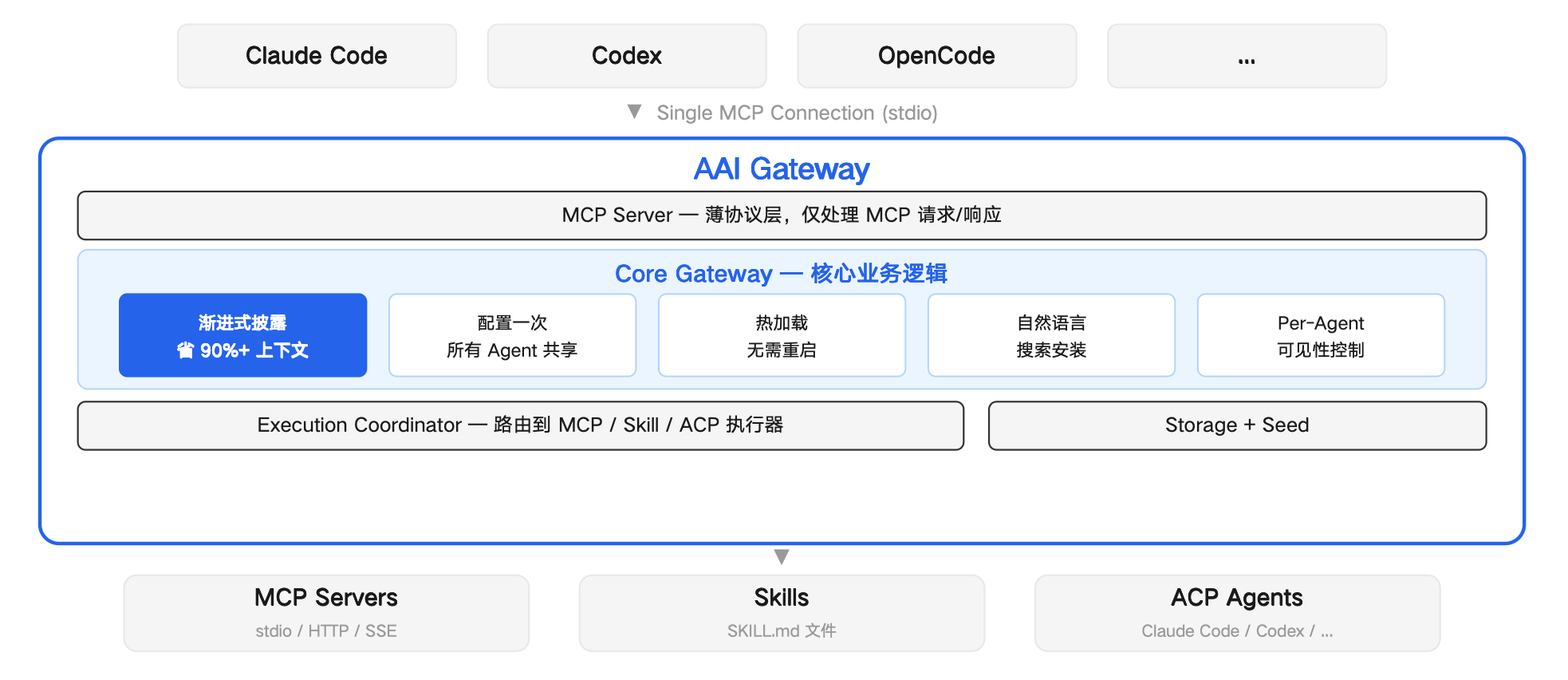
In AAI Gateway, they are abstracted as Agent Apps under unified management. Import once, and all AI Agents can use them immediately.
What Problems Does It Solve
Context Bloat
Traditional: 10 MCPs × 5 tools = 50 full schemas ≈ 7,500 tokens injected into every conversation.
AAI Gateway: each Agent App needs only fewer than 50 tokens for a summary, with details loaded on demand. 99% token savings.
Finding Tools Is Hard
Traditional: search GitHub → read READMEs → copy JSON configs → debug connections → restart Agent.
AAI Gateway: tell your Agent "use AAI to search for xxx" — auto-searches, installs, ready to use.
"Use AAI to search for a browser automation tool"
→ Search → finds Playwright MCP → Agent summarizes a one-line Agent App summary → install → ready to use, no restart needed
"Use AAI to search for a PPT creation skill"
→ Search → finds PPT Skill → uses skill description as Agent App summary → install → ready to use, no restart needed
Duplicate Config
Configure the same thing in Claude Code, Codex, and OpenCode separately? Import once through AAI Gateway, all Agents share instantly.
Quick Start (30 Seconds)
Claude Code:
claude mcp add --scope user --transport stdio aai-gateway -- npx -y aai-gateway
Codex:
codex mcp add aai-gateway -- npx -y aai-gateway
OpenCode — add to ~/.config/opencode/opencode.json:
{
  "mcp": {
    "aai-gateway": {
      "type": "local",
      "command": ["npx", "-y", "aai-gateway"],
      "enabled": true
    }
  }
}
openclaw plugins install openclaw-aai-gateway-plugin
Once installed, just tell your Agent what you want to do.
Built-in Tools
| Tool | Description |
|---|---|
search:discover | Search and install new tools with natural language |
mcp:import | Import an MCP Server as an Agent App |
skill:import | Import a Skill package as an Agent App |
listAllAaiApps | List all registered Agent Apps |
enableApp / disableApp | Enable or disable an Agent App per Agent |
removeApp | Remove an Agent App |
aai:exec | Execute a specific tool within an Agent App |
Each imported Agent App generates an app_<app-id> tool that returns the full operation guide and tool list when called.
Preset Agent Apps (auto-discovered when locally installed)
| App ID | Name | Description |
|---|---|---|
claude | Claude Code | AI coding assistant for code editing, analysis, and development |
codex | Codex | OpenAI-powered AI coding assistant |
opencode | OpenCode | AI development assistant for editing files and running commands |
Architecture
Developers: Get Your Agent App Auto-Discovered
Create an aai.json descriptor and submit it to src/discovery/descriptors/. When a user's local environment meets the discovery.checks conditions, the Agent will auto-discover your Agent App.
{
  "schemaVersion": "2.0",
  "version": "1.0.0",
  "app": {
    "name": { "default": "My App" }
  },
  "discovery": {
    "checks": [
      { "kind": "command", "command": "my-app" }
    ]
  },
  "access": {
    "protocol": "mcp",
    "config": {
      "command": "my-app-mcp",
      "args": ["--stdio"]
    }
  },
  "exposure": {
    "summary": "Use when the user wants to do X."
  }
}
discovery.checks supports three check types: command (command exists), file (file exists), path (directory exists).
Supported protocols: mcp, skill, acp-agent
Welcome to submit a PR to contribute new Agent App descriptors, or open an issue for feedback.
Reviews
No reviews yet
Be the first to review this server!
More Developer Tools MCP Servers
Git
Freeby Modelcontextprotocol · Developer Tools
Read, search, and manipulate Git repositories programmatically
Fetch
Freeby Modelcontextprotocol · Developer Tools
Web content fetching and conversion for efficient LLM usage
Toleno
Freeby Toleno · Developer Tools
Toleno Network MCP Server — Manage your Toleno mining account with Claude AI using natural language.
mcp-creator-python
Freeby mcp-marketplace · Developer Tools
Create, build, and publish Python MCP servers to PyPI — conversationally.
MCP Marketplace
Freeby mcp-marketplace · Developer Tools
Search and install MCP servers from inside your AI client.
MarkItDown
Freeby Microsoft · Content & Media
Convert files (PDF, Word, Excel, images, audio) to Markdown for LLM consumption