
Server data from the Official MCP Registry
Generate, randomize, explain, and manage u-he synthesizer presets via the Model Context Protocol.
About
Generate, randomize, explain, and manage u-he synthesizer presets via the Model Context Protocol.
Security Report
Valid MCP server (2 strong, 4 medium validity signals). No known CVEs in dependencies. Package registry verified. Imported from the Official MCP Registry.
5 files analyzed · 1 issue found
Security scores are indicators to help you make informed decisions, not guarantees. Always review permissions before connecting any MCP server.
Permissions Required
This plugin requests these system permissions. Most are normal for its category.
What You'll Need
Set these up before or after installing:
Environment variable: UHE_CUSTOM_FOLDER
Environment variable: DEBUG
How to Install
Add this to your MCP configuration file:
{
  "mcpServers": {
    "io-github-fannon-u-he-preset-randomizer": {
      "env": {
        "DEBUG": "your-debug-here",
        "UHE_CUSTOM_FOLDER": "your-uhe-custom-folder-here"
      },
      "args": [
        "-y",
        "u-he-preset-randomizer",
        "--yes",
        "u-he-preset-randomizer@1.2.0",
        "u-he-mcp-server"
      ],
      "command": "npx"
    }
  }
}Documentation
View on GitHubFrom the project's GitHub README.
u-he-preset-randomizer
Generate u-he synth presets through randomization and merging of your existing presets (genetics like).
This tool can generate random presets in three different modes:
- Generate fully random presets based on real values and value distributions in your preset library
- Randomize existing presets, with a customizable amount of randomness
- Merge multiple presets together, with randomness introduced by different ratios between them.
The randomization / merging approach is very generic as it analyzes your actual preset library and bases the random values on the resulting statistical distributions.
There are optional flags / modes that that affect the randomization:
- Narrow down the analyzed presets that are the basis for random generation.
- E.g. by only using a sub-folder, a certain tag category, author or a favorite file export.
- This will influence / limit the range of values in the generated presets.
- Use
stablemode for more reliable, but slightly less random results - Use
binarymode, see--binaryCLI arguments documentation.
It should work for all u-he synths on all platforms. Some synths may work better, due to their simpler architecture (e.g. u-he Diva, Repro). More modular synths like Bazille or Zebra also work, but you'll get more "varied" results or broken presets.
How to use
This is a CLI application that you need to run in your terminal / command line.
First you need to install the Node.js runtime.
Then you can open your Terminal / Console / Command Prompt and start it by entering a command, optionally with some arguments.
They start with npx u-he-preset-randomizer@latest, which will download and run the latest version of this tool:
npx u-he-preset-randomizer@latest
This will start the tool in interactive mode. It will guide you though the necessary choices. Alternatively, you can pass some arguments if you already know the choices (non interactive).
The generated patches will be put into your selected synth preset directory, under a /RANDOM folder in your user presets.
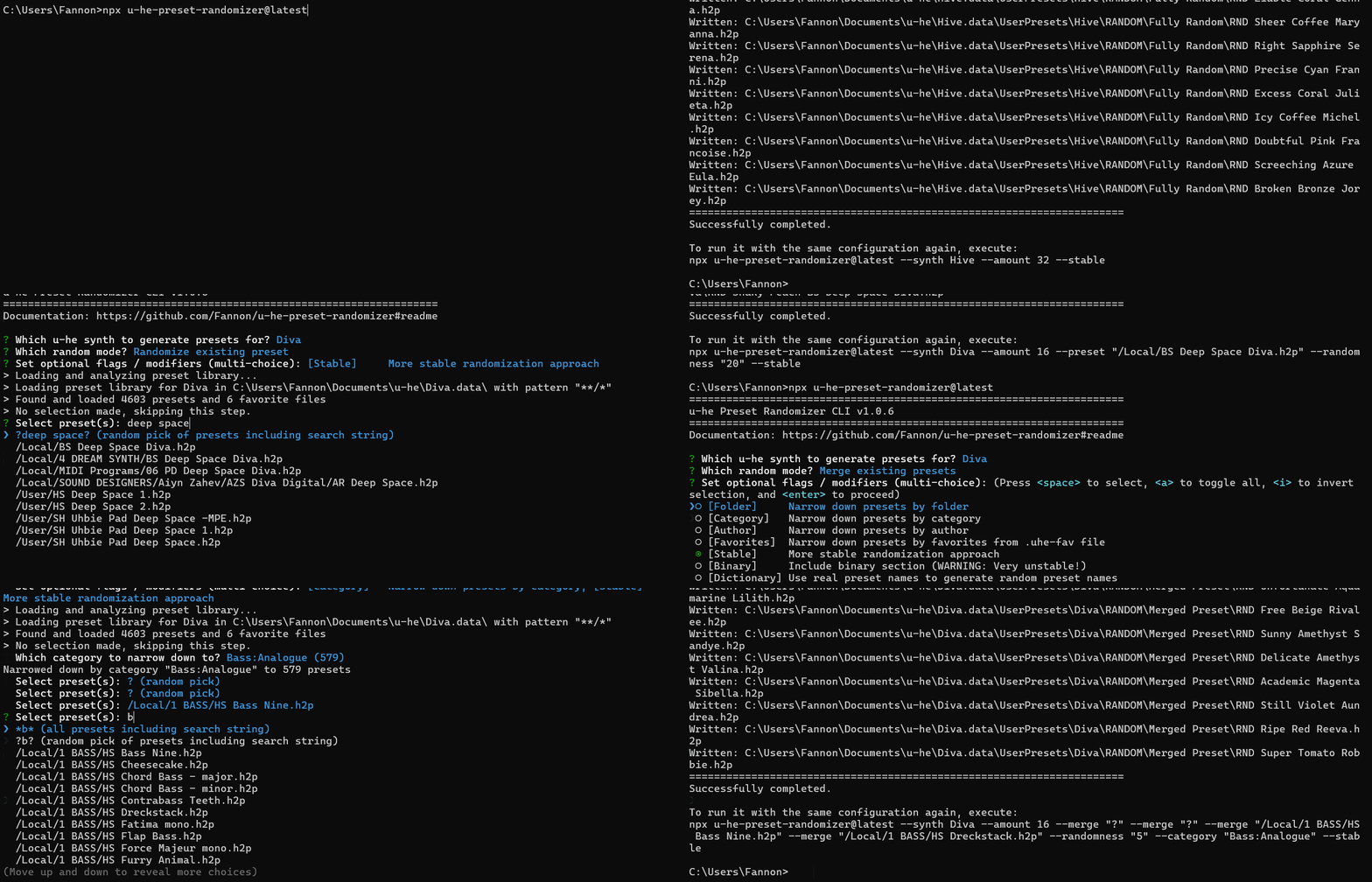
If you want to download the tool for offline use and manual updates:
# install it as a global CLI tool
npm i -g u-he-preset-randomizer

# Now you can run it without npx:
u-he-preset-randomizer
MCP Server Interface
In addition to the CLI, this tool provides a Model Context Protocol (MCP) server that allows AI assistants like Claude to interact with your u-he presets through natural conversation.
Features:
- 🔍 Search and browse your preset libraries conversationally
- 📝 Get detailed explanations of what makes presets unique
- 🎲 Generate random presets with natural language instructions
- 🔄 Create variations and merge presets through AI-assisted workflows
- 💾 Stateful sessions - select a synth once, then explore freely
Quick Setup for Claude Desktop:
Add this to your Claude Desktop config (~/Library/Application Support/Claude/claude_desktop_config.json on macOS):
{
  "mcpServers": {
    "u-he-preset-randomizer": {
      "command": "u-he-mcp-server"
    }
  }
}
Then you can ask Claude things like:
- "What synths do I have installed?"
- "Show me bass presets from Diva"
- "Create 5 variations of the '303 Bass' preset with 30% randomness"
- "Merge my favorite pad presets to create hybrid sounds"
📚 Read the full MCP Server documentation →
CLI Usage Examples
Generate Fully Randomized Presets
This command will run the randomizer to generate 3 fully randomized Diva presets. Random values will be based on real values (and their distribution) of your actual presets.
npx u-he-preset-randomizer@latest --synth Diva --amount 3
Randomize a particular Preset
This command will take one particular preset "HS Greek Horn" and create 5 random variations of it, with a 20% randomization ratio.
npx u-he-preset-randomizer@latest --synth Diva --amount 5 --preset "HS Greek Horn" --randomness 20
Merge multiple Presets together
This command will merge multiple presets together, with a random ratio on how much weight each one has in the "inheritance".
The following example will take three Diva presets (each indicated with --merge) and create 5 merged variants out of them.
npx u-he-preset-randomizer@latest --synth Diva --amount 5 --merge "HS Greek Horn" --merge "HS Strumpet" --merge "HS Baroqualog"
Tips & Tricks
- The u-he preset browser have the most flexibility in filtering and combining presets by category, tags, etc. You can use this to either copy them to a new folder or create a .uhe-fav file export and using this as narrow down selection in the CLI
- When merging presets, it's possible to select the same preset multiple times. Use this to assign "weights" between how strong a preset will influence the outcome.
CLI Arguments / Configuration
If you're unsure which values are correct to use, run the tool in interactive mode. Most config options here will be available with auto-complete or suggestions.
--synth: Choose the u-he synth. Not all synths have been tested, but the randomizer tries to be generic. The name must match the folder name convention of u-he. E.g.Diva,Hive,ZebraHZ.--amount: How many presets to generate. Positive integer number.--randomness: Amount of randomness (in percentage) to apply, when randomizing existing presets or resulting merged presets. Value needs to be between 0 and 100.--preset: If given, an existing preset will be used as a based and randomized by--randomnessratio.- Use "?" to choose random preset
- Use
?search string?to choose a random preset containing "search string" in its path and file name.
--merge: Can be provided multiple times, for each preset that should be part of the merging. Ratio between merged presets is random and NOT driven by the--randomnessparameter.- Use
?to choose random preset - Use
?search string?to choose a random preset containing "search string" in its path and file name. - Use
*to select all presets (careful! Better first reduce via--pattern.) - Use
*search string*to select all presets containing "search string" in its path and file name.
- Use
--pattern: Define a glob pattern, which presets should be loaded.- By default, it's
**/*which will load all presets from all sub-folders. - To select a subfolder, use e.g.
My Folder/**/* - To select presets starting with something, use e.g.
**/PD *
- By default, it's
--folder: narrow down presets by folder. Use/Local/or/User/as starting point.--category: narrow down presets by preset category (metadata)--author: narrow down presets by preset author (metadata)--favorites: narrow down presets by selection fia.uhe-favfile. The files must be located somewhere within your preset library.--stable: Uses more stable randomization approach- For fully random presets, it will randomize not per parameter, but per section (e.g. the entire OSC1 together)
- Only parameters with numeric non-binary assignments will be further randomized. Otherwise they stay consistent with the chosen base preset or a random starter preset.
--binary: Keep the binary part of the u-he presets. They will not be changed, but randomly generated presets will now include the binary section of either a random preset or the base preset that is randomized.- This contains advanced settings like MSEG curves, but this tool cannot really parse or modify it. Not every binary section seems to be compatible with other parameter adjustment, leading to invalid presets.
- ⚠ Using binary mode may lead to broken presets that may crash your synth plugin when loading. Use with care. For some synths this works better (Repro, Diva, Zebralette 3) and for some it frequently leads to invalid presets.
--binary-template: Uses curated binary section templates instead of random library presets. This is enabled by default for Zebralette 3.- Templates are stored in
src/templates/{synthName}/and are prefixed with a weight (e.g.,15-Basic Shapes.h2phas weight 15, making it 15x more likely to be selected than a01-prefixed template). - This approach is safer than
--binaryas the templates are tested to work well with randomized parameters.
- Templates are stored in
--dictionary: Creates random names from a dictionary of names used in the preset library--custom-folder: In case the installation folder is custom, it can be given here- E.g.
--custom-folder "C:/Audio/Plugin Installationen/u-he/"
- E.g.
--debug: Enables some optional debug logging and file exporting
Soundsets
| Cover | Links | Description |
|---|---|---|
| Diva Generated Vol. 1 (ZIP), Audio Demo (YouTube) | 50 randomly generated presets for u-he Diva, curated, modified and tagged by Simon Heimler in 2024. | |
| Repro-5 Generated (ZIP), Audio Demo (YouTube) | 42 randomly generated presets for u-he Repro, curated, modified and tagged by Simon Heimler in 2024. | |
| Repro-1 Generated Vol. 1 (ZIP), | 28 randomly generated presets for u-he Repro, curated, modified and tagged by Simon Heimler in 2024. |
Developer Guide
To run this tool locally in developer mode, you need Node.js and Bun installed. Check out the repo and:
npm i
npm run build

# Run the CLI in development mode (using Bun):
bun run dev --synth Diva --amount 3

# Run tests:
bun test

# Maintenance scripts
npm run clean      # remove dist output and incremental build cache
npm run build:dist # emit declarations + source maps for npm publish (runs automatically via prepublishOnly)
The AGENTS.md provides more context how the project works from development perspective.
I've also exposed the u-he preset parser / serializer functions in the NPM module, so they could be used programmatically by other projects. However, you might inherit more dependencies than necessary if you're just interested in the parser. See ./src/parser.ts.
Help / Feedback
Please use the related KVR Thread or create a GitHub issue.
Reviews
No reviews yet
Be the first to review this server!
More Developer Tools MCP Servers
Git
Freeby Modelcontextprotocol · Developer Tools
Read, search, and manipulate Git repositories programmatically
Fetch
Freeby Modelcontextprotocol · Developer Tools
Web content fetching and conversion for efficient LLM usage
Toleno
Freeby Toleno · Developer Tools
Toleno Network MCP Server — Manage your Toleno mining account with Claude AI using natural language.
mcp-creator-python
Freeby mcp-marketplace · Developer Tools
Create, build, and publish Python MCP servers to PyPI — conversationally.
MCP Marketplace
Freeby mcp-marketplace · Developer Tools
Search and install MCP servers from inside your AI client.
MarkItDown
Freeby Microsoft · Content & Media
Convert files (PDF, Word, Excel, images, audio) to Markdown for LLM consumption