
Server data from the Official MCP Registry
MCP for building, inspecting, and live-debugging Firefox UI and CSS themes.
About
MCP for building, inspecting, and live-debugging Firefox UI and CSS themes.
Security Report
Valid MCP server (2 strong, 3 medium validity signals). No known CVEs in dependencies. Package registry verified. Imported from the Official MCP Registry.
8 files analyzed · 1 issue found
Security scores are indicators to help you make informed decisions, not guarantees. Always review permissions before connecting any MCP server.
Permissions Required
This plugin requests these system permissions. Most are normal for its category.
How to Install
Add this to your MCP configuration file:
{
  "mcpServers": {
    "io-github-easonwong-de-firefox-css-theme": {
      "args": [
        "-y",
        "firefox-css-theme"
      ],
      "command": "npx"
    }
  }
}Documentation
View on GitHubFrom the project's GitHub README.
Firefox CSS Theme


A CLI toolkit for scaffolding, compiling, live-debugging, and installing Firefox UI and CSS themes (userChrome.css and userContent.css). It also provides a Model Context Protocol (MCP) server for AI-assisted inspection and styling.
Requirements
- Node.js >= 20
- Firefox Browser
Getting Started
Installation
Install as a development dependency within your theme repository:
npm install --save-dev firefox-css-theme
Once installed, run it directly with npx firefox-css-theme [command] [option] or use firefox-css-theme in your npm scripts:
{
	"scripts": {
		"create": "firefox-css-theme create", // scaffold starter userChrome.css and userContent.css files
		"start": "firefox-css-theme start", // launch Firefox with live stylesheet bundling and hot-reloading
		"profiles": "firefox-css-theme profiles", // list all detected Firefox profiles
		"install:theme": "firefox-css-theme install" // install compiled stylesheets into a Firefox profile's chrome folder
	}
}
[!NOTE]
userChrome.cssanduserContent.cssmust be located at the project root directory by default; otherwise, specify their paths using the-c, --chromeand-u, --contentoptions.
For the full list of CLI options, run npx firefox-css-theme --help in your project.
Command Line Interface
firefox-css-theme create
Scaffold starter userChrome.css and userContent.css boilerplate files with Firefox namespace headers.
Usage
firefox-css-theme create [options]
Options
| Option | Description |
|---|---|
-c, --chrome <path> | Custom output path for userChrome.css (default: ./userChrome.css) |
-u, --content <path> | Custom output path for userContent.css (default: ./userContent.css) |
-f, --force | Overwrite existing files without confirmation |
firefox-css-theme start
Launch Firefox with live stylesheet bundling and hot-reloading.
Usage
firefox-css-theme start [options]
Options
| Option | Description |
|---|---|
-p, --profile <name> | Designate an existing Firefox profile by name (temporary profile if omitted) |
-c, --chrome <path> | Custom path to userChrome.css (default: ./userChrome.css) |
-u, --content <path> | Custom path to userContent.css (default: ./userContent.css) |
--no-watch | Disable file watching and live reloading |
--headless | Run Firefox in headless mode |
--nova-ui | Enable Firefox Nova UI redesign preferences |
--binary <path> | Path to custom Firefox executable binary |
firefox-css-theme profiles
List all detected Firefox profiles and their directory paths.
Usage
firefox-css-theme profiles
firefox-css-theme install
Compile and install stylesheets directly into a Firefox profile's chrome/ directory.
Usage
firefox-css-theme install [options]
Options
| Option | Description |
|---|---|
-p, --profile <name> | Target Firefox profile name (mandatory if multiple profiles exist) |
-c, --chrome <path> | Custom path to userChrome.css (default: ./userChrome.css) |
-u, --content <path> | Custom path to userContent.css (default: ./userContent.css) |
-m, --merge | Merge with existing theme stylesheets instead of overwriting |
-f, --force | Overwrite existing theme files in the profile without confirmation prompt |
[!WARNING] This operation will overwrite existing CSS themes in the profile. A backup is advised.
firefox-css-theme mcp
Start the Model Context Protocol (MCP) server over standard I/O for AI-assisted inspection and styling.
Usage
firefox-css-theme mcp [options]
Options
| Option | Description |
|---|---|
-p, --profile <name> | Designate an existing Firefox profile by name (isolated temporary profile if omitted) |
--nova-ui | Enable Firefox Nova UI redesign preferences |
--headless | Run Firefox in headless mode |
--binary <path> | Path to custom Firefox executable binary |
MCP Server Usage
The MCP server enables AI assistants to inspect the Firefox chrome DOM, query computed styles, inject custom CSS, and capture UI screenshots in real time.
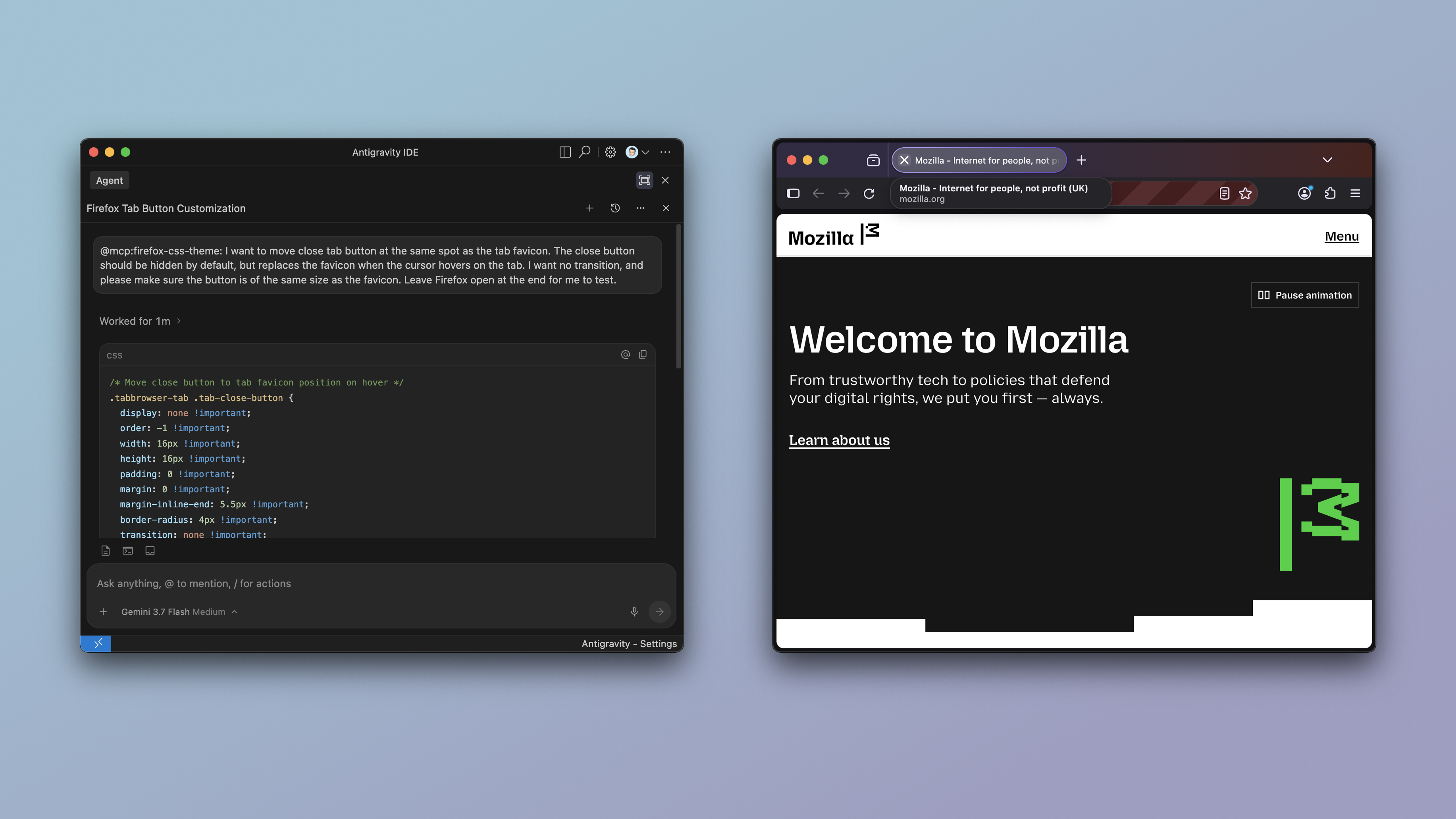
Configuration
Add the server to your preferred client or development environment:
Claude Code
claude mcp add firefox-css-theme -- npx -y firefox-css-theme mcp --nova-ui
Codex
codex mcp add firefox-css-theme -- npx -y firefox-css-theme mcp --nova-ui
IDE MCP Configuration
Using npx:
{
	"mcpServers": {
		"firefox-css-theme": {
			"command": "npx",
			"args": ["-y", "firefox-css-theme", "mcp", "--nova-ui"]
		}
	}
}
Or using a local build:
{
	"mcpServers": {
		"firefox-css-theme": {
			"command": "node",
			"args": [
				"/path/to/firefox-css-theme/dist/cli.js",
				"mcp",
				"--nova-ui"
			]
		}
	}
}
Available MCP Tools
launch_browser: Launches Firefox with chrome debugging capabilities enabled.close_browser: Terminates the browser instance.customize_toolbar: Activates or controls the Firefox "Customise Toolbar" mode.get_ui_tree: Dumps the hierarchical DOM tree of the chrome window.query_ui_elements: Queries elements matching a CSS selector in the browser chrome.get_computed_styles: Extracts computed CSS property values of a specific UI element.inject_theme_css: Injects stylesheets in the live UI (target: "chrome" | "content").remove_theme_css: Removes an injected stylesheet by id (target: "chrome" | "content").list_theme_css: Lists all currently injected custom stylesheets (target: "chrome" | "content").take_ui_screenshot: Captures a screenshot of the browser window or a specific UI component.execute_chrome_javascript: Runs privileged JavaScript in the browser chrome window context.
Reviews
No reviews yet
Be the first to review this server!
More Developer Tools MCP Servers
Fetch
Freeby Modelcontextprotocol · Developer Tools
Web content fetching and conversion for efficient LLM usage
Git
Freeby Modelcontextprotocol · Developer Tools
Read, search, and manipulate Git repositories programmatically
Toleno
Freeby Toleno · Developer Tools
Toleno Network MCP Server — Manage your Toleno mining account with Claude AI using natural language.
mcp-creator-python
Freeby mcp-marketplace · Developer Tools
Create, build, and publish Python MCP servers to PyPI — conversationally.
MCP Marketplace
Freeby mcp-marketplace · Developer Tools
Search and install MCP servers from inside your AI client.
MarkItDown
Freeby Microsoft · Content & Media
Convert files (PDF, Word, Excel, images, audio) to Markdown for LLM consumption