
Inspect and edit Three.js scenes, materials, shaders, lights in real time from any AI agent
About
Inspect and edit Three.js scenes, materials, shaders, lights in real time from any AI agent
Security Report
Valid MCP server (2 strong, 1 medium validity signals). No known CVEs in dependencies. Package registry verified. Imported from the Official MCP Registry.
5 files analyzed · 1 issue found
Security scores are indicators to help you make informed decisions, not guarantees. Always review permissions before connecting any MCP server.
Permissions Required
This plugin requests these system permissions. Most are normal for its category.
What You'll Need
Set these up before or after installing:
Environment variable: DEV_PORT
Environment variable: BRIDGE_PORT
Environment variable: BROWSER
Environment variable: HEADLESS
Environment variable: CHROME_PATH
How to Install
Add this to your MCP configuration file:
{
  "mcpServers": {
    "io-github-dmitriygolub-threejs-devtools": {
      "env": {
        "BROWSER": "your-browser-here",
        "DEV_PORT": "your-dev-port-here",
        "HEADLESS": "your-headless-here",
        "BRIDGE_PORT": "your-bridge-port-here",
        "CHROME_PATH": "your-chrome-path-here"
      },
      "args": [
        "-y",
        "threejs-devtools-mcp"
      ],
      "command": "npx"
    }
  }
}Documentation
View on GitHubFrom the project's GitHub README.
threejs-devtools-mcp


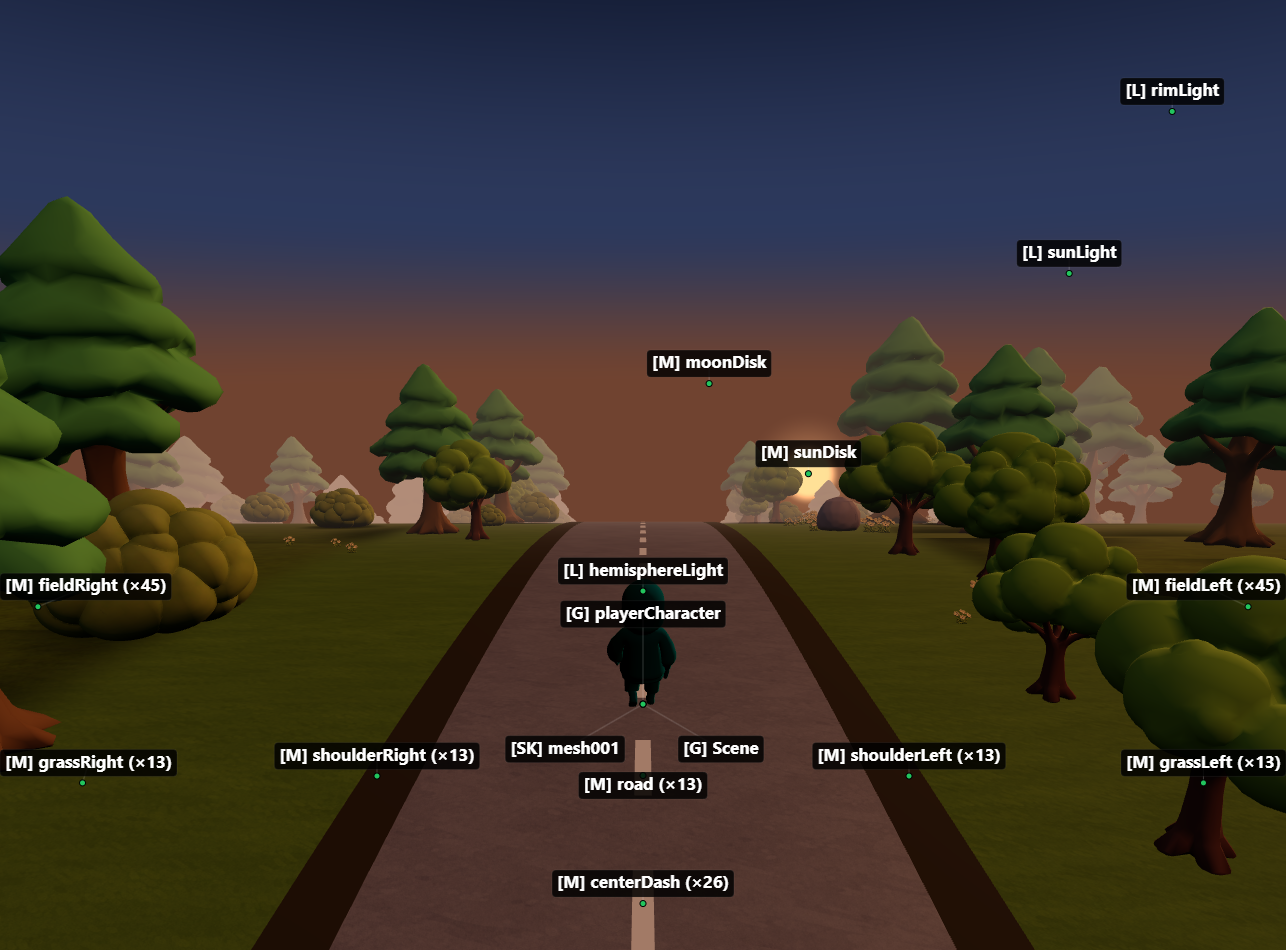
MCP server for inspecting and modifying Three.js scenes in real time — 59 tools for objects, materials, shaders, textures, animations, performance monitoring, memory diagnostics, and code generation.
Zero changes to your project. Works with vanilla Three.js, React Three Fiber, and any framework.
Setup
1. Add the MCP server
claude mcp add threejs-devtools-mcp -- npx threejs-devtools-mcp
Add to claude_desktop_config.json:
{
  "mcpServers": {
    "threejs-devtools-mcp": {
      "command": "npx",
      "args": ["-y", "threejs-devtools-mcp"]
    }
  }
}
Add to .cursor/mcp.json in your project:
{
  "mcpServers": {
    "threejs-devtools-mcp": {
      "command": "npx",
      "args": ["-y", "threejs-devtools-mcp"]
    }
  }
}
Or use the HTTP transport — see Cursor setup guide.
Add to ~/.codeium/windsurf/mcp_config.json:
{
  "mcpServers": {
    "threejs-devtools-mcp": {
      "command": "npx",
      "args": ["-y", "threejs-devtools-mcp"]
    }
  }
}
Add to .vscode/mcp.json:
{
  "servers": {
    "threejs-devtools-mcp": {
      "command": "npx",
      "args": ["-y", "threejs-devtools-mcp"]
    }
  }
}
Add to opencode.json in your project:
{
  "$schema": "https://opencode.ai/config.json",
  "mcp": {
    "threejs-devtools-mcp": {
      "type": "local",
      "command": ["npx", "-y", "threejs-devtools-mcp"],
      "enabled": true
    }
  }
}
2. Start your dev server and open the browser
Start your Three.js dev server as usual (npm run dev). The MCP server auto-detects the port from package.json and opens a browser at localhost:9222 with the devtools bridge injected.
Keep the browser tab open. The MCP server talks to your scene through a WebSocket bridge. Close the tab = tools stop working.
3. Ask the AI about your scene
"show me the scene tree"
"why is my model invisible?"
"make the car red"
"check for memory leaks"
"what's my FPS?"
"generate a React component from character.glb"
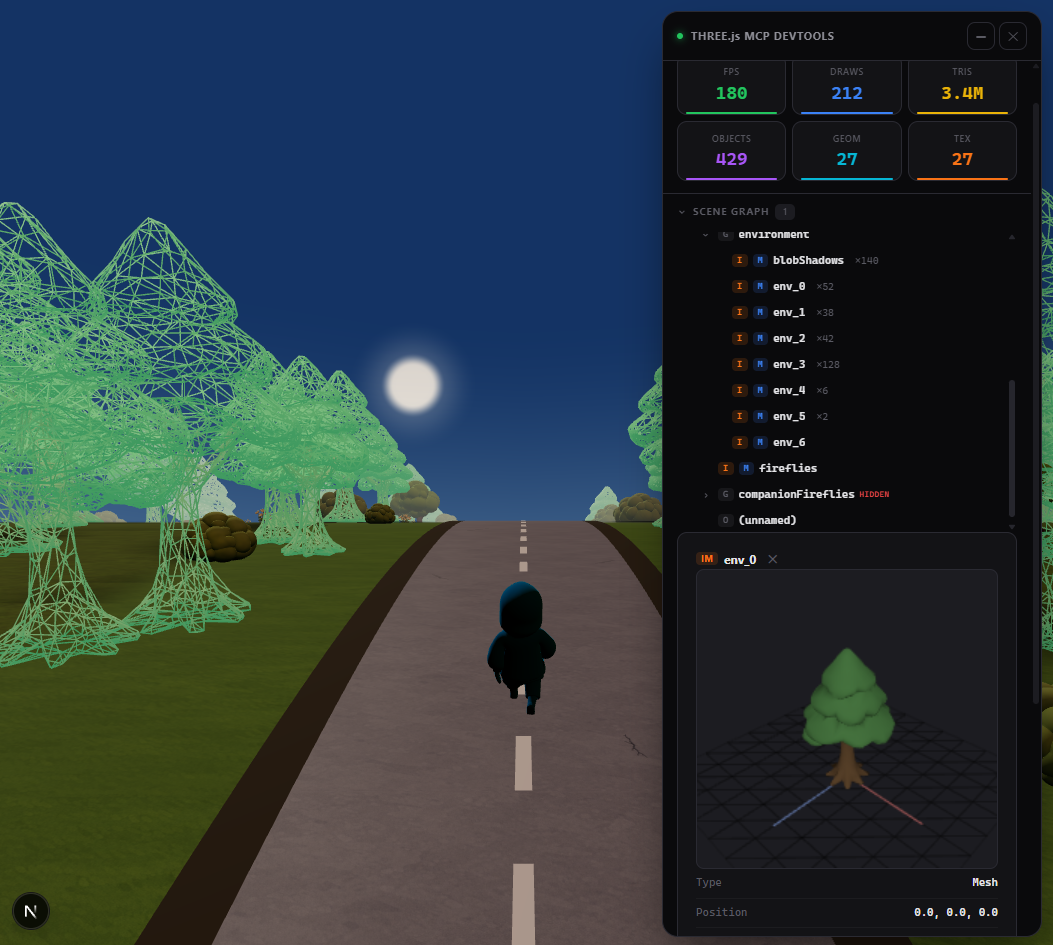
In-browser overlay
A built-in devtools panel with live performance stats, interactive scene graph, material editor, and 3D object preview. Activated automatically or via the toggle_overlay tool.
Tip: name your objects
Unnamed objects show as (unnamed) in the scene tree. Named objects are easier to find and modify:
// Three.js
mesh.name = "player";
// React Three Fiber
<mesh name="player" geometry={geometry} material={material} />
Documentation
- Tools reference — all 59 tools with parameters
- Advanced setup — animations, scene export, configuration, transports
- Cursor setup — step-by-step guide for Cursor
- Token-efficient workflow — best practices for saving context
License
MIT
Reviews
No written reviews yet. Be the first!
Version History
More Developer Tools MCP Servers
Git
Freeby Modelcontextprotocol · Developer Tools
Read, search, and manipulate Git repositories programmatically
Fetch
Freeby Modelcontextprotocol · Developer Tools
Web content fetching and conversion for efficient LLM usage
Toleno
Freeby Toleno · Developer Tools
Toleno Network MCP Server — Manage your Toleno mining account with Claude AI using natural language.
mcp-creator-python
Freeby mcp-marketplace · Developer Tools
Create, build, and publish Python MCP servers to PyPI — conversationally.
MCP Marketplace
Freeby mcp-marketplace · Developer Tools
Search and install MCP servers from inside your AI client.
MarkItDown
Freeby Microsoft · Content & Media
Convert files (PDF, Word, Excel, images, audio) to Markdown for LLM consumption