
Server data from the Official MCP Registry
AlbumentationsX MCP for batch previews, compare preview runs, segmentation masks, and exports.
About
AlbumentationsX MCP for batch previews, compare preview runs, segmentation masks, and exports.
Security Report
Valid MCP server (2 strong, 1 medium validity signals). No known CVEs in dependencies. Package registry verified. Imported from the Official MCP Registry.
6 files analyzed · 1 issue found
Security scores are indicators to help you make informed decisions, not guarantees. Always review permissions before connecting any MCP server.
Permissions Required
This plugin requests these system permissions. Most are normal for its category.
What You'll Need
Set these up before or after installing:
Environment variable: ALBU_MCP_ALLOWED_ROOTS
Environment variable: ALBU_MCP_ARTIFACT_ROOT
Environment variable: ALBU_MCP_MAX_PREVIEW_RUNS
How to Install
Add this to your MCP configuration file:
{
  "mcpServers": {
    "io-github-dkosarevsky-albu-mcp": {
      "env": {
        "ALBU_MCP_ALLOWED_ROOTS": "your-albu-mcp-allowed-roots-here",
        "ALBU_MCP_ARTIFACT_ROOT": "your-albu-mcp-artifact-root-here",
        "ALBU_MCP_MAX_PREVIEW_RUNS": "your-albu-mcp-max-preview-runs-here"
      },
      "args": [
        "albumentationsx-mcp"
      ],
      "command": "uvx"
    }
  }
}Documentation
View on GitHubFrom the project's GitHub README.
AlbumentationsX MCP
Model Context Protocol server for AlbumentationsX: inspect datasets, preview augmentations, refine them with visual feedback, and export reproducible pipelines.




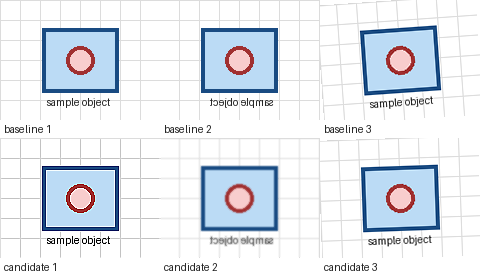
Ask an MCP host for several robustness variants, reject an excessive result such as too_noisy:high, compare the adjusted batch previews, and export the accepted pipeline.
Install
Claude Desktop
Download the latest albumentationsx-mcp.mcpb, install it from Settings -> Extensions -> Advanced settings, and select separate image and artifact directories.
Other MCP Hosts
Run the published server with bounded local access:
uvx --from albumentationsx-mcp albumentationsx-mcp \
  --allowed-root /absolute/path/to/images \
  --artifact-root /absolute/path/to/albu-artifacts
run_first_preview requires the default full or dataset capability profile. The smaller review profile uses the
explicit validate/render fallback in the usage guide, or you can restart with dataset or full; see
configuration. Copyable host configurations are in the install guide.
The repository also contains a native Codex plugin bundle. npx skills add dKosarevsky/albu-mcp installs agent guidance, not the MCP server.
First Preview
After connecting the server, ask your host:
Run the host smoke check. If preview_ready is true, call run_first_preview for /absolute/path/to/images with low
intensity and at most 8 images. Show me the contact sheet. When I mention a specific result, call
trace_preview_variant before adjusting it.
run_host_smoke_check returns preview_ready and a preview_request_template. If resource reads are unavailable, call
get_workflow_example with example_id="client-smoke".
Try the classification robustness use case, or follow the
First 10 Minutes guide. The validate_preview_request fallback, batch previews, and how to
compare preview runs are in Usage. Use too_noisy:high or exposure_too_weak:medium, then optionally
share one redacted loop through first-preview feedback.
If setup fails, read albumentationsx://diagnostics/guide and call diagnose_environment for bounded remediation actions.
Capabilities
- Transform discovery, schemas, recipes, and pipeline validation.
- Classification, detection, segmentation, OCR, bbox, mask, keypoint, and dataset-quality workflows.
- Deterministic previews, contact sheets, annotation overlays, comparison, ranking, and reports.
- Interactive MCP Apps review with a text-only fallback for other hosts.
- Structured feedback, tuning sessions, and Python, JSON, or YAML export.
- Runtime-aware CPU
torch.Tensorpipeline validation and guarded Python handoff. - MCP
2026-07-28plus legacy negotiation; stable agent workflow resources, diagnostics, and contract snapshots.
The server does not execute arbitrary Python, fetch remote images, overwrite datasets, or train models. Reads are restricted by --allowed-root; generated files stay under --artifact-root.
Integrations
- Official Albumentations MCP guide
- Official MCP Registry entry
- skills.sh agent skill
- Upstream documentation PR
Documentation
- Install and host configuration
- Runtime settings and capability profiles
- First 10 minutes
- First-preview feedback
- Usage and recipes
- CPU Tensor Compose validation and export
- MCP Apps review and compatibility policy
- Documentation index
- CHANGELOG.md
- server.json: public MCP Registry metadata.
Development
uv sync --all-extras --dev
uv run pytest
uv run ruff check .
uv run ruff format --check .
uv run ty check
Licensed under AGPL-3.0-or-later.
Reviews
No reviews yet
Be the first to review this server!
More Developer Tools MCP Servers
Fetch
Freeby Modelcontextprotocol · Developer Tools
Web content fetching and conversion for efficient LLM usage
Git
Freeby Modelcontextprotocol · Developer Tools
Read, search, and manipulate Git repositories programmatically
Toleno
Freeby Toleno · Developer Tools
Toleno Network MCP Server — Manage your Toleno mining account with Claude AI using natural language.
mcp-creator-python
Freeby mcp-marketplace · Developer Tools
Create, build, and publish Python MCP servers to PyPI — conversationally.
MCP Marketplace
Freeby mcp-marketplace · Developer Tools
Search and install MCP servers from inside your AI client.
MarkItDown
Freeby Microsoft · Content & Media
Convert files (PDF, Word, Excel, images, audio) to Markdown for LLM consumption