
An MCP server that provides access to your expense data on ExpenseLM.
About
An MCP server that provides access to your expense data on ExpenseLM.
Security Report
Valid MCP server (0 strong, 4 medium validity signals). 5 known CVEs in dependencies (1 critical, 3 high severity) Package registry verified. Imported from the Official MCP Registry.
4 files analyzed · 6 issues found
Security scores are indicators to help you make informed decisions, not guarantees. Always review permissions before connecting any MCP server.
What You'll Need
Set these up before or after installing:
Environment variable: EXPENSELM_API_KEY
How to Install
Add this to your MCP configuration file:
{
  "mcpServers": {
    "io-github-clarenceh-expenselm-mcp-server": {
      "env": {
        "EXPENSELM_API_KEY": "your-expenselm-api-key-here"
      },
      "args": [
        "expenselm-mcp-server"
      ],
      "command": "uvx"
    }
  }
}Documentation
View on GitHubFrom the project's GitHub README.
ExpenseLM MCP Server
Introduction
MCP server for ExpenseLM.
ExpenseLM is an easy to use, GenAI powered Expense Management application. From expense recording to expense insights and advice, ExpenseLM puts you in control of your money like never before. MCP server enables access to your expense data with your favorite AI Agent.
mcp-name: io.github.clarenceh/expenselm-mcp-server
Installation
Prerequisites
- uv
- Python 3.9+
- ExpenseLM API key (Instructions)
Setup MCP Client
Claude Desktop (Mac)
Add the following MCP server in your Claude Desktop configuration.
Config file (create if not exists): ~/Library/Application Support/Claude/claude_desktop_config.json
Add the following into your config file (replace the value of EXPENSELM_API_KEY with your own key).
{
  "mcpServers": {
    "expenselm": {
      "command": "uvx",
      "args": [
        "expenselm-mcp-server"
      ],
      "env": {
        "EXPENSELM_API_KEY": "Replace with your ExpenseLM API Key",
        "MCP_TIMEOUT": "200000"
      }
    }
  }
}
Claude Desktop (Windows)
Add the following MCP server in your Claude Desktop configuration.
Config file (create if not exists): %AppData%\Claude\claude_desktop_config.json (e.g. C:\Users[YourUsername]\AppData\Roaming\Claude\claude_desktop_config.json)
Add the following into your config file (replace the value of EXPENSELM_API_KEY with your own key).
{
  "mcpServers": {
    "expenselm": {
      "command": "uv",
      "args": [
        "tool",
        "run",
        "expenselm-mcp-server"
      ],
      "env": {
        "EXPENSELM_API_KEY": "Replace with your ExpenseLM API Key",
        "MCP_TIMEOUT": "200000"
      }
    }
  }
}
Perplexity Desktop (Mac)
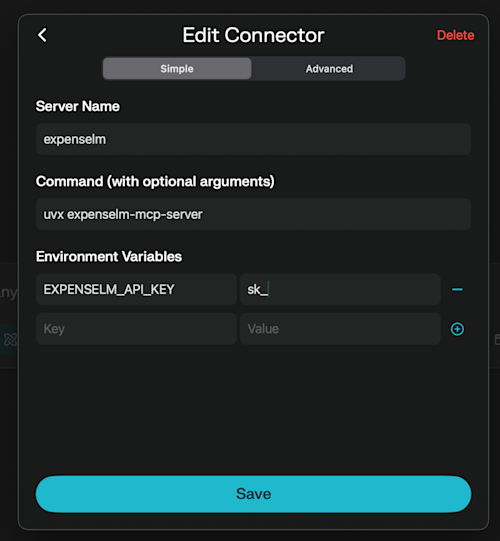
- In Perplexity Desktop for Mac, navigate to "Settings" -> "Connectors". Click "Add Connector".
- Enter ExpenseLM MCP Server configuration like the below screenshot. Replace the environment variable "EXPENSELM_API_KEY" with your own key.
Publish new version
Reviews
No reviews yet
Be the first to review this server!
More Finance MCP Servers
Toleno
Freeby Toleno · Developer Tools
Toleno Network MCP Server — Manage your Toleno mining account with Claude AI using natural language.
mcp-creator-python
Freeby mcp-marketplace · Developer Tools
Create, build, and publish Python MCP servers to PyPI — conversationally.
MCP Marketplace
Freeby mcp-marketplace · Developer Tools
Search and install MCP servers from inside your AI client.
MarkItDown
Freeby Microsoft · Content & Media
Convert files (PDF, Word, Excel, images, audio) to Markdown for LLM consumption
FinAgent
Freeby mcp-marketplace · Finance
Free stock data and market news for any MCP-compatible AI assistant.
Google Workspace MCP
Freeby Taylorwilsdon · Productivity
Control Gmail, Calendar, Docs, Sheets, Drive, and more from your AI