
Server data from the Official MCP Registry
Minimal, token-efficient Database MCP Server for PostgreSQL, MySQL, SQL Server, SQLite, MariaDB
About
Minimal, token-efficient Database MCP Server for PostgreSQL, MySQL, SQL Server, SQLite, MariaDB
Security Report
Valid MCP server (3 strong, 1 medium validity signals). 1 code issue detected. 3 known CVEs in dependencies ⚠️ Package registry links to a different repository than scanned source. Imported from the Official MCP Registry. 2 finding(s) downgraded by scanner intelligence.
9 files analyzed · 5 issues found
Security scores are indicators to help you make informed decisions, not guarantees. Always review permissions before connecting any MCP server.
Permissions Required
This plugin requests these system permissions. Most are normal for its category.
What You'll Need
Set these up before or after installing:
Environment variable: DSN
Environment variable: DB_TYPE
Environment variable: DB_HOST
Environment variable: DB_PORT
Environment variable: DB_USER
Environment variable: DB_PASSWORD
Environment variable: DB_NAME
Environment variable: TRANSPORT
Environment variable: PORT
Environment variable: ID
Environment variable: SSH_HOST
Environment variable: SSH_PORT
Environment variable: SSH_USER
Environment variable: SSH_PASSWORD
Environment variable: SSH_KEY
Environment variable: SSH_PASSPHRASE
How to Install
Add this to your MCP configuration file:
{
  "mcpServers": {
    "io-github-bytebase-dbhub": {
      "env": {
        "ID": "your-id-here",
        "DSN": "your-dsn-here",
        "PORT": "your-port-here",
        "DB_HOST": "your-db-host-here",
        "DB_NAME": "your-db-name-here",
        "DB_PORT": "your-db-port-here",
        "DB_TYPE": "your-db-type-here",
        "DB_USER": "your-db-user-here",
        "SSH_KEY": "your-ssh-key-here",
        "SSH_HOST": "your-ssh-host-here",
        "SSH_PORT": "your-ssh-port-here",
        "SSH_USER": "your-ssh-user-here",
        "TRANSPORT": "your-transport-here",
        "DB_PASSWORD": "your-db-password-here",
        "SSH_PASSWORD": "your-ssh-password-here",
        "SSH_PASSPHRASE": "your-ssh-passphrase-here"
      },
      "args": [
        "-y",
        "@bytebase/dbhub"
      ],
      "command": "npx"
    }
  }
}Documentation
View on GitHubFrom the project's GitHub README.
[!NOTE]
Brought to you by Bytebase, open-source database governance platform.
            +------------------+    +--------------+    +------------------+
            |                  |    |              |    |                  |
            |                  |    |              |    |                  |
            |  Claude Desktop  +--->+              +--->+    PostgreSQL    |
            |                  |    |              |    |                  |
            |  Claude Code     +--->+              +--->+    SQL Server    |
            |                  |    |              |    |                  |
            |  Cursor          +--->+    DBHub     +--->+    SQLite        |
            |                  |    |              |    |                  |
            |  VS Code         +--->+              +--->+    MySQL         |
            |                  |    |              |    |                  |
            |  Copilot CLI     +--->+              +--->+    MariaDB       |
            |                  |    |              |    |                  |
            |                  |    |              |    |                  |
            +------------------+    +--------------+    +------------------+
                 MCP Clients           MCP Server             Databases
DBHub is a minimal MCP server: token-efficient, zero-dependency, and just two tools by default with opt-in extras. This lightweight gateway allows MCP-compatible clients to connect to and explore different databases:
- Minimal: Zero dependency, token efficient with a minimal set of MCP tools to maximize context window
- Multi-Database: PostgreSQL, MySQL, MariaDB, SQL Server, and SQLite through a single interface
- Multi-Connection: Connect to multiple databases simultaneously with TOML configuration
- Guardrails: Read-only mode, row limiting, and query timeout to prevent runaway operations
- Secure Access: SSH tunneling and SSL/TLS encryption
DBHub is the official example in the Claude Code docs for connecting to PostgreSQL via MCP.
Token Efficiency
DBHub loads just 2 tools by default at 1.4k tokens — 13-14x fewer than alternatives — keeping the context window open for your actual work.
| MCP Server | Default Config | Default Tools |
|---|---|---|
| DBHub | 1.4k | 2 (execute_sql, search_objects) |
| MCP Toolbox | 19.0k | 28 |
| Supabase MCP | 19.3k | all |
Use Cases
- Local Development: Schema exploration, query validation, and data debugging with Claude Code, VS Code, Cursor, etc.
- Non-Technical Access: Expose curated, read-only views to non-technical staff via Claude Desktop, VS Code, Cursor, etc.
- Multi-Database Consolidation: Replace separate MCP servers for each database with a single DBHub process
- Production Troubleshooting: Read-only diagnostics with guardrails against runaway queries
Supported Databases
PostgreSQL, MySQL, SQL Server, MariaDB, and SQLite.
MCP Tools
DBHub implements MCP tools for database operations:
- execute_sql: Execute SQL queries with transaction support and safety controls
- search_objects: Search and explore database schemas, tables, columns, indexes, and procedures with progressive disclosure
- explain_sql (opt-in): Show a query's execution plan without running it
- health_check (opt-in): Report connection pool state and buffer cache hit ratio
- Custom Tools: Define reusable, parameterized SQL operations in your
dbhub.tomlconfiguration file
Workbench
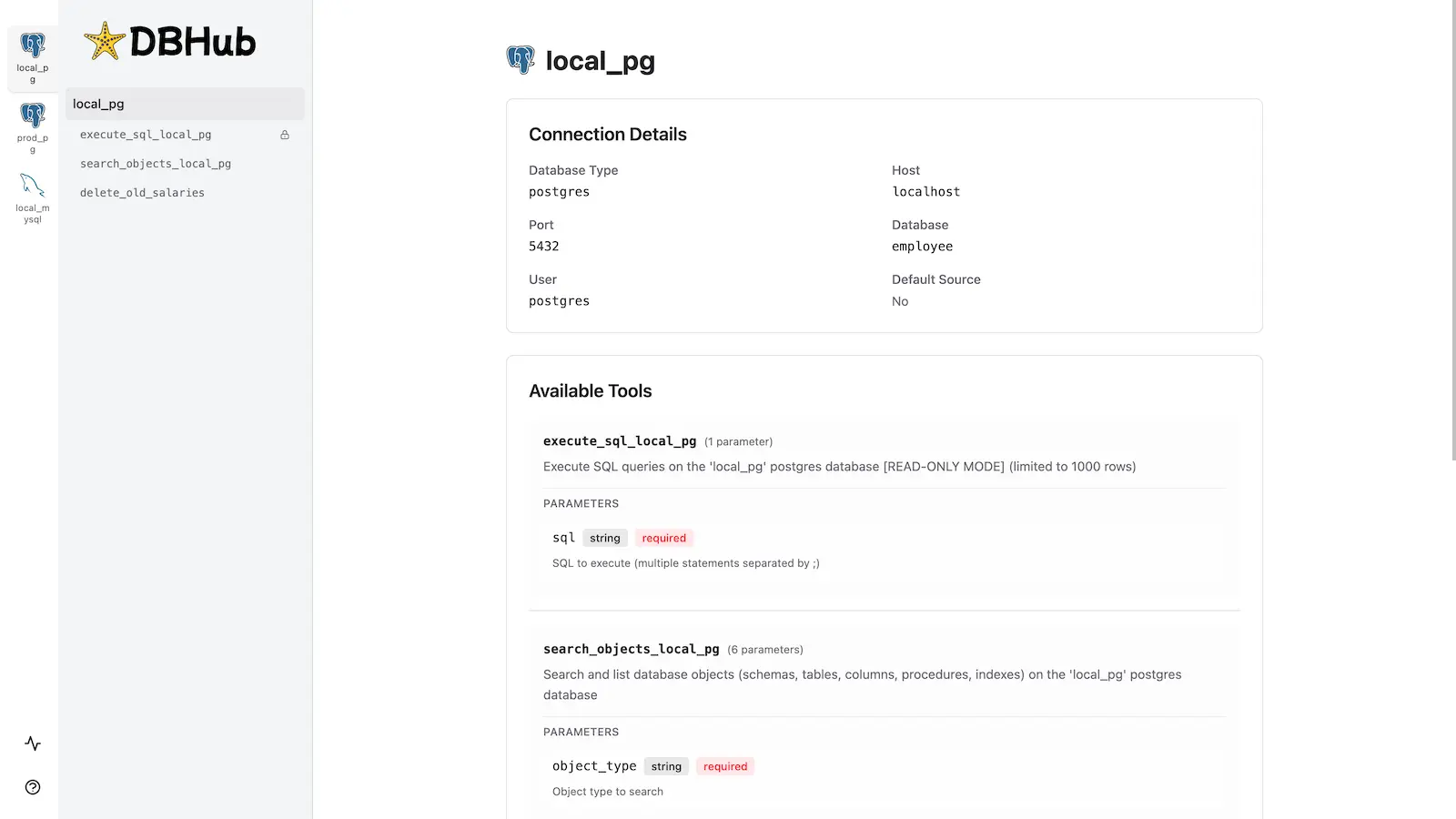
DBHub includes a built-in web interface for interacting with your database tools. It provides a visual way to execute queries, run custom tools, and view request traces without requiring an MCP client.
Installation
npx @bytebase/dbhub@latest --transport http --port 8080 --dsn "postgres://user:password@localhost:5432/dbname?sslmode=disable"
Also available as:
- Docker image
- MCP Bundle (one-click install, read-only)
- Claude Code plugin
See the Installation Guide for all options, Command-Line Options for parameters, and Multi-Database Configuration for connecting several databases at once.
Development
Requires Node.js >= 22.5.0 (DBHub uses the built-in node:sqlite module).
# Install dependencies
pnpm install

# Run in development mode
pnpm dev

# Build and run for production
pnpm build && pnpm start --transport stdio --dsn "postgres://user:password@localhost:5432/dbname"
Contributors
Star History
Reviews
No reviews yet
Be the first to review this server!
More Developer Tools MCP Servers
Fetch
Freeby Modelcontextprotocol · Developer Tools
Web content fetching and conversion for efficient LLM usage
Git
Freeby Modelcontextprotocol · Developer Tools
Read, search, and manipulate Git repositories programmatically
Toleno
Freeby Toleno · Developer Tools
Toleno Network MCP Server — Manage your Toleno mining account with Claude AI using natural language.
mcp-creator-python
Freeby mcp-marketplace · Developer Tools
Create, build, and publish Python MCP servers to PyPI — conversationally.
MCP Marketplace
Freeby mcp-marketplace · Developer Tools
Search and install MCP servers from inside your AI client.
MarkItDown
Freeby Microsoft · Content & Media
Convert files (PDF, Word, Excel, images, audio) to Markdown for LLM consumption