
Server data from the Official MCP Registry
Fail reads in web and Electron test apps, inspect recovery, and compare before/after evidence.
About
Fail reads in web and Electron test apps, inspect recovery, and compare before/after evidence.
Security Report
Valid MCP server (0 strong, 2 medium validity signals). No known CVEs in dependencies. Package registry verified. Imported from the Official MCP Registry.
12 files analyzed · 1 issue found
Security scores are indicators to help you make informed decisions, not guarantees. Always review permissions before connecting any MCP server.
Permissions Required
This plugin requests these system permissions. Most are normal for its category.
How to Install
Add this to your MCP configuration file:
{
  "mcpServers": {
    "io-github-bojankovachki-recovery-probe": {
      "args": [
        "-y",
        "recovery-probe",
        "-y"
      ],
      "command": "npx"
    }
  }
}Documentation
View on GitHubFrom the project's GitHub README.
Recovery Probe
Stop assuming your code works. Test what actually happens.
Recovery Probe helps developers and AI coding agents discover bugs that ordinary tests can miss. It deliberately triggers failures in web and Electron applications, observes how the UI responds, and produces evidence you can use to reproduce, fix, and verify problems.
A failed request should not silently turn a populated screen into “No items found.” Recovery Probe helps you reproduce that failure and check whether the application recovers as expected.


Try it
You need Node.js 22 or newer.
npm install --save-dev recovery-probe playwright
npx playwright install chromium
npx recovery-probe demo
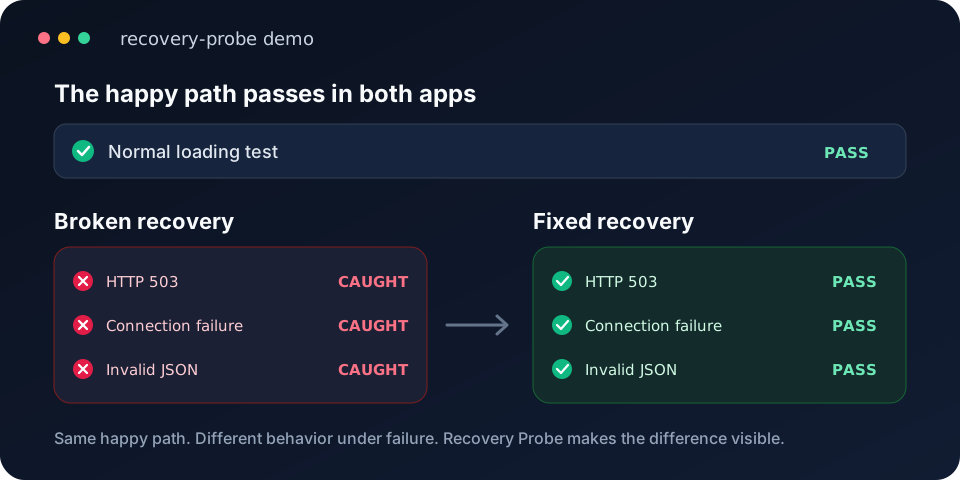
The demo runs two versions of a small app. Both load fine. Only the fixed one survives a 503, a dropped connection and a broken JSON response.
Check your own app
Web app. Start it, then run:
npx recovery-probe init http://localhost:3000
A browser opens. Sign in, go to the screen you care about, and click something that only shows up once its data has loaded. Recovery Probe finds the request behind it, fails it three ways, and tells you whether the data came back.
Electron app. Start it with --remote-debugging-address=127.0.0.1 --remote-debugging-port=9222, then run npx recovery-probe init.
Electron app that loads data over IPC. Load the small development-only hook in the main process. npx recovery-probe doctor prints the code and the path to load it from. Restart the app with the inspector on, then run npx recovery-probe init: it lists the hook's channels, asks which one loads the screen, and fails it in a few ways.
Each run saves an HTML and JSON report. Run the same command again to repeat the check, or add --fresh to set it up again. If something's missing, npx recovery-probe doctor says what and how to fix it.
More
| To | Run | Docs |
|---|---|---|
| Fail the read behind a screen without writing assertions | discover | Discovery |
| Catch stale screens and rows stuck in an old state, without faults | observe | Observe |
| See what users get when Save or Send fails | action | Action check |
| Fail an SDK's or a main process's own HTTPS connections | net | Network faults |
| Find code that turns a failed read into "no data" | suspects | Suspects |
| Prove a change fixed it | compare, watch, verify | Compare, Watch, Verify |
Use it from a coding agent
recovery-probe mcp is an MCP server. Any agent that supports MCP can use it to fail a read and look at the screen before it claims the code handles errors. Most agents take this config:
{
  "mcpServers": {
    "recovery-probe": { "command": "npx", "args": ["recovery-probe", "mcp"] }
  }
}
Other config formats and the list of tools are in MCP.
Use it in your tests
withFault fails matching requests inside a Playwright test:
import { test, expect } from '@playwright/test'
import { withFault } from 'recovery-probe'

test('profile recovers after a 503', async ({ page }) => {
  const stats = await withFault(
    page,
    { match: '**/api/profile', kind: 'http-error', status: 503 },
    async () => {
      await page.goto('http://127.0.0.1:3000/profile')
      await page.getByRole('button', { name: 'Retry' }).click()
      await expect(page.getByTestId('profile-name')).toHaveText('Test User')
    },
  )
  expect(stats.applied).toBe(1)
})
If nothing matches, withFault throws FAULT_NOT_TRIGGERED instead of passing. For code that takes a fetch function there's createFaultFetch. See API.
How it decides
- Every faulted run has a healthy run right before it, on the same screen, and the report compares the two.
- A result is a pass, a failure or inconclusive. A fault that never fired, an unstable baseline or a path it can't reach is inconclusive, never a pass.
- Some findings, like
SILENT_EMPTY, are leads. They tell you where to look, not that the code is wrong. - Exit codes: 0 passed, 1 a check failed, 2 needs review or inconclusive, 3 wrong usage or config, 4 couldn't run.
Where it works
- Web apps in Chromium, either launched by Recovery Probe or attached through a local debugging port.
- Electron apps, over HTTP in the renderer or over IPC with the hook.
- Native HTTPS clients that use
HTTPS_PROXY, such as an SDK in the main process. Only whole connections can fail there. - Android WebViews, experimental.
It doesn't simulate a whole device going offline, WebSocket drops, token expiry, sleep or slow networks.
Privacy
Reports stay on your machine and there's no telemetry. Request and response bodies aren't recorded, and discovery and observation keep screen text only as hashes. Reports can still contain endpoint paths, selectors, text you picked as a marker and, with --screenshots, what was on screen, so check them before you share them. Nothing calls an AI service except the opt-in repair workflow.
Failed recovery checks can also save screenText: up to 200 characters of newly visible screen text, included in terminal output, reports, fix briefs and MCP results. These quotes are not redacted and can contain personal or sensitive data even without screenshots. Review these outputs before sharing them or passing them to an agent.
Only test apps and accounts you're allowed to, and keep debugging ports on localhost.
Compatibility in 1.x
The compatibility commitment covers documented, non-experimental package exports, CLI commands and options, exit codes, configuration fields, MCP tools and JSON report fields. Removing or renaming these interfaces, changing their types incompatibly, or changing their documented meaning requires a major version. Backward-compatible additions can ship in minor releases; fixes that restore documented behavior can ship in patch releases.
Consumers should tolerate additional JSON fields. Exact terminal wording, HTML layout, timing measurements and heuristic findings are not fixed contracts. Internal files under dist/ are not public imports; use the package's declared exports. Features explicitly labeled experimental, including Android WebView support and repair, may change in minor releases, with changes recorded in the changelog.
Upgrading to 1.0
1.0 removes the old command spellings desktop, web, ipc, --demo and --config. Each now stops with a usage error that names the commands that replaced it, such as windows, reads, check, discover, action and demo. Usage errors exit with 3 and setup failures with 4, where the old spellings exited with 2, so update CI scripts that read exit codes. demo and the JSON runner's check write report.json into the --out folder. Restart the development app after upgrading so its IPC hook matches the CLI. Public package imports and the hook's path are unchanged. See the changelog.
Docs
Guided start · Desktop and browsers · IPC · Discovery · Observe · Refresh · Network faults · Android · Suspects · Compare · Watch · Verify · MCP · API · JSON runner · CI · Repair · Changelog
Contributing
See CONTRIBUTING.md. Report security issues as described in SECURITY.md.
License
MIT © 2026 Bojan Kovachki
Reviews
No reviews yet
Be the first to review this server!
More Developer Tools MCP Servers
Rea
Freeby Morluto · Developer Tools
Reverse engineer anything from your terminal or agent with one CLI and MCP server.
Paperclip
Freeby Paperclipai · Developer Tools
Trending hip-hop artist momentum scores across four cultural dimensions.
Fetch
Freeby Modelcontextprotocol · Developer Tools
Web content fetching and conversion for efficient LLM usage
Git
Freeby Modelcontextprotocol · Developer Tools
Read, search, and manipulate Git repositories programmatically
Toleno
Freeby Toleno · Developer Tools
Toleno Network MCP Server — Manage your Toleno mining account with Claude AI using natural language.
MCP Marketplace
Freeby mcp-marketplace · Developer Tools
Search and install MCP servers from inside your AI client.