
Server data from the Official MCP Registry
Chrome breakpoint debugging MCP server for inspecting runtime values and stepping through code
About
Chrome breakpoint debugging MCP server for inspecting runtime values and stepping through code
Security Report
Valid MCP server (2 strong, 4 medium validity signals). 3 known CVEs in dependencies (0 critical, 3 high severity) Package registry verified. Imported from the Official MCP Registry.
3 files analyzed · 4 issues found
Security scores are indicators to help you make informed decisions, not guarantees. Always review permissions before connecting any MCP server.
How to Install
Add this to your MCP configuration file:
{
  "mcpServers": {
    "io-github-bitepro-chrome-debugger-mcp": {
      "args": [
        "-y",
        "chrome-debugger-mcp"
      ],
      "command": "npx"
    }
  }
}Documentation
View on GitHubFrom the project's GitHub README.
chrome-debugger-mcp
English
An MCP server for breakpoint-driven Chrome debugging.
chrome-debugger-mcp exposes Chrome DevTools Protocol primitives as MCP tools so an AI agent can attach to a real Chrome tab, pause execution, inspect scope values, evaluate expressions inside the current call frame, and step through code with runtime facts instead of guessing from static source.
It is not a general browser automation server. The focus is runtime debugging.
Core Capabilities
- Attach to a real Chrome tab over CDP after explicit user confirmation
- Pause at breakpoints or
debugger;statements and wait for the exact pause you expect - Read local, closure, and module scope values from the paused frame
- Evaluate JavaScript in the current call frame and step execution forward
- Resume cleanly so the agent can continue with actual runtime values
Demo
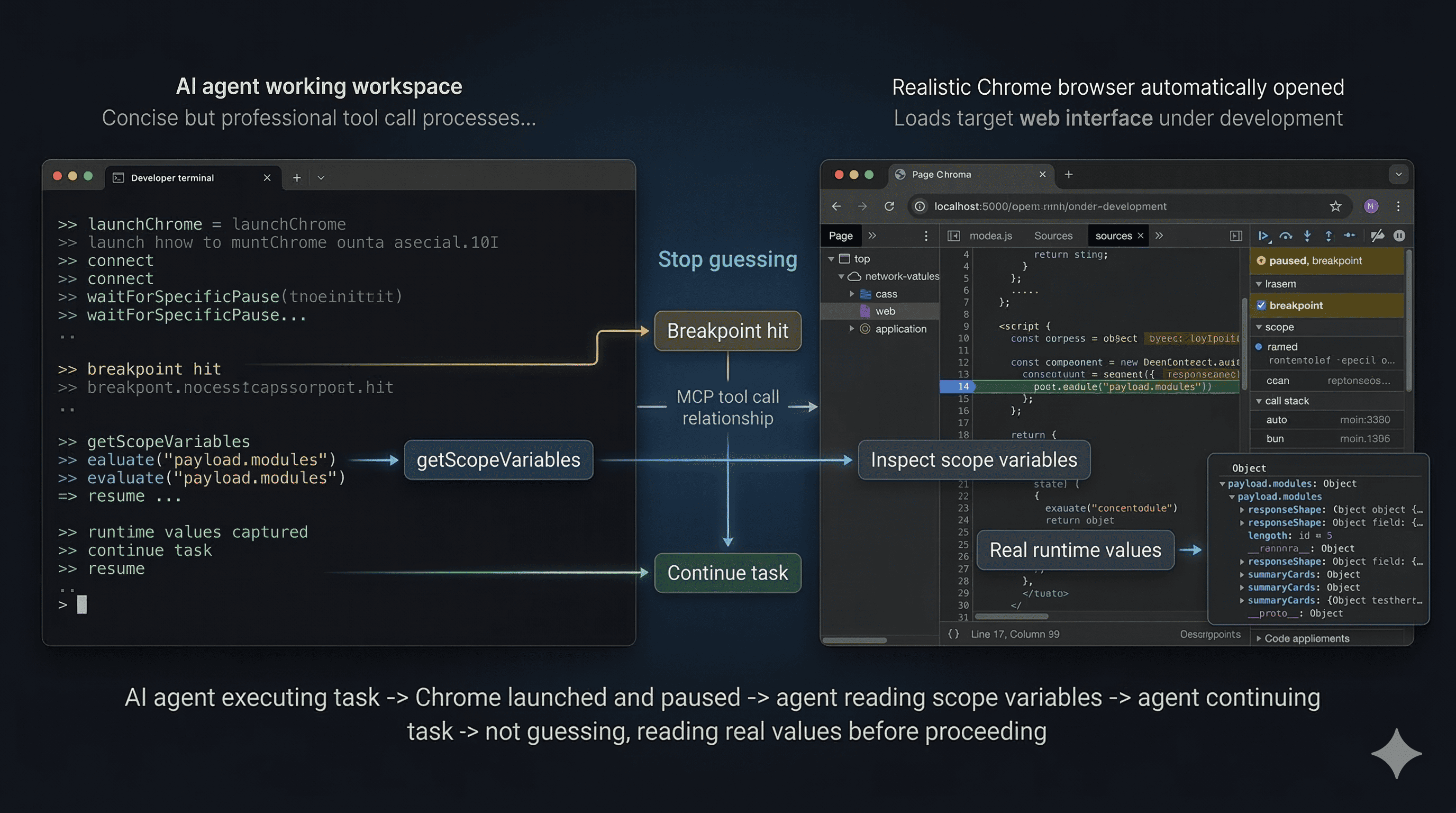
Demo: the agent launches Chrome, waits for a breakpoint, inspects real scope variables, and resumes with runtime facts instead of guessing.
MCP Client Configuration
Use the published package
{
  "mcpServers": {
    "chrome-debugger": {
      "command": "npx",
      "args": ["-y", "chrome-debugger-mcp"]
    }
  }
}
Installation
From npm
npx -y chrome-debugger-mcp
Or install it globally:
npm install -g chrome-debugger-mcp
From source
pnpm install
pnpm build
node dist/index.js
Other Highlights
- Launch a dedicated Chrome instance with remote debugging enabled
- Set and remove DevTools breakpoints without editing source code
- Reload the page through CDP so breakpoints reliably bind after navigation
- Poll debugger state when the MCP client has short request timeouts
- Emit
_uipayloads and logging messages that clients can surface to the user
Why It Helps
Many browser-focused MCP tools are strong at DOM interaction and network inspection, but weak at runtime debugging. This server gives an MCP client the missing loop you would normally use in Chrome DevTools: attach to the right tab, pause at the right time, inspect real values, step if needed, and resume cleanly.
It also adds guardrails that prevent common agent mistakes:
- guessing which tab to attach to
- concluding behavior without inspecting runtime values
- ending the turn between
reloadPage()andwaitForSpecificPause()
Requirements
- Google Chrome installed locally
- An MCP client that supports stdio servers and tool calling
- Access to the application you want to debug
- Local source access if you plan to insert temporary
debugger;statements
Tooling Model
The server runs over stdio and exposes MCP tools. The most important tools are:
startDebuggingSession: returns the recommended debugging workflow and critical rules for agent behaviorlaunchChrome: launches a dedicated Chrome instance with remote debugging enabledlistTargets: lists available Chrome tabs and requires the user to pick oneconnect: attaches to the confirmed tabsetBreakpoint: creates a CDP breakpoint without modifying source filesremoveBreakpoint: removes a breakpoint created bysetBreakpointreloadPage: reloads the current page through CDPwaitForSpecificPause: waits for the next pause and checks whether it matches a target file and linewaitForPause: waits for any pause without location matchinggetScopeVariables: reads local, closure, and module scope values from the paused frameevaluate: executes JavaScript in the paused call framestepInto,stepOver,stepOut: standard execution controlresume: resumes execution after inspectiongetStatus: non-blocking polling for connected or paused stateforcePause: requests a pause at the next JavaScript statement
Recommended Workflow
For AI clients, the intended flow is:
- Call
startDebuggingSession(). - Call
launchChrome()or use an already-running Chrome instance with a CDP port. - Call
listTargets()and show the full tab list to the user. - Wait for the user to confirm the exact page URL.
- Call
connect({ targetUrl }). - Insert a temporary
debugger;statement in local source code, or callsetBreakpoint(). - Call
reloadPage(). - Immediately call
waitForSpecificPause()in the same turn. - Call
getScopeVariables()andevaluate()to inspect runtime values. - Step if necessary with
stepInto(),stepOver(), orstepOut(). - Call
resume(). - Remove any temporary
debugger;statements from source code.
Important Rules For Agent Authors
This server is designed for tool-using agents, not only for humans. If you are integrating it into an MCP client, keep these rules:
- Never skip
listTargets(). - Never guess the target URL, even if only one tab is open.
- Always wait for explicit user confirmation before
connect(). - After
reloadPage(), immediately callwaitForSpecificPause()orwaitForPause()in the same turn. - Do not explain behavior from static code when runtime values can be inspected directly.
- Always
resume()after inspection. - If you added temporary
debugger;statements to source code, remove them before finishing.
How waitForSpecificPause Matches
waitForSpecificPause is the preferred waiting primitive because it is more reliable than waiting for an arbitrary pause.
It matches a pause using two strategies:
- URL fragment plus line tolerance
- URL fragment plus
debugger-statementpause reason
The second path matters when source maps, transpilation, or bundling shift compiled line numbers away from editor line numbers.
Example Tool Sequence
An agent debugging a local Vite app might do something like this:
launchChrome({ dryRun: true })launchChrome()listTargets()- Wait for the user to confirm
http://127.0.0.1:5173 connect({ targetUrl: "127.0.0.1:5173" })- Insert
debugger;inApp.jsx reloadPage()waitForSpecificPause({ urlFragment: "App.jsx", line: 62, actionHint: "click the Refetch payloads button" })getScopeVariables()evaluate({ expression: "payload.modules" })resume()
Chrome Launch Behavior
launchChrome() uses a dedicated profile so it does not interfere with the user's normal browser session.
Defaults:
- remote debugging port:
9222 - profile directory:
~/.chrome-debug-profile
Expected Chrome binary locations:
- macOS:
/Applications/Google Chrome.app/Contents/MacOS/Google Chrome - Linux:
google-chrome - Windows:
C:\Program Files\Google\Chrome\Application\chrome.exe
If automatic launch fails, the tool returns a command the user can run manually.
Local Playground
This repository includes a disposable test app under test/ so you can exercise the debugger server against a realistic browser workflow.
Start the mock service
cd test/service
node src/server.js
The service listens on http://127.0.0.1:3030.
Start the web app
cd test/web
pnpm install
pnpm dev
The web app runs on http://127.0.0.1:5173.
Useful places to pause:
test/web/src/App.jsxinsideloadWorkbenchtest/web/src/App.jsxinsideloadModuleDetailtest/web/src/App.jsxaround the unfinished detail sections
Runtime payload areas worth inspecting:
summaryCardsmodulesapiContractsnextActionsresponseShape
Troubleshooting
No targets found
Make sure Chrome is running with --remote-debugging-port=9222 and the target page is open.
More than one tab matches targetUrl
Pass a more specific substring so the match becomes unique.
waitForPause or waitForSpecificPause times out
This can happen when:
- the page action was never triggered
- the wrong breakpoint was set
- the MCP client itself has a shorter request timeout than the tool call
If your client times out quickly, use getStatus() to poll or increase the client timeout.
The paused line number does not match the editor line
Bundlers and transpilers can shift compiled line numbers. Use waitForSpecificPause() and rely on URL fragment matching plus debugger-statement semantics.
Chrome does not launch automatically
The machine may use a non-default Chrome install path. Run the returned launch command manually or adjust the implementation to match your environment.
Development
pnpm install
pnpm build
node dist/index.js
The implementation lives in:
src/index.ts: MCP tool definitions and user-facing workflow hintssrc/chrome-manager.ts: Chrome DevTools Protocol integration and debugger state management
License
MIT
中文
一个面向 Chrome 断点调试的 MCP Server。
chrome-debugger-mcp 把 Chrome DevTools Protocol 的核心调试能力暴露为 MCP 工具,让 AI agent 可以连接真实的 Chrome 标签页,在运行时暂停执行、读取作用域变量、在当前调用帧中执行表达式、单步跟踪代码,并基于真实值继续任务,而不是只靠静态源码猜测行为。
它不是通用浏览器自动化工具。它的重点是运行时调试。
核心能力
- 在用户明确确认后,通过 CDP 连接真实的 Chrome 标签页
- 在断点或
debugger;命中时暂停,并等待指定文件和行附近的 pause - 读取当前暂停帧中的 local、closure、module 作用域变量
- 在当前调用帧里执行 JavaScript,并继续单步跟踪
- 检查完成后恢复执行,让 agent 基于真实运行时值继续工作
功能演示
演示流程:agent 拉起 Chrome,等待断点命中,读取真实作用域变量,再基于运行时事实继续执行,而不是靠猜测推进。
MCP 客户端配置
使用已发布包
{
  "mcpServers": {
    "chrome-debugger": {
      "command": "npx",
      "args": ["-y", "chrome-debugger-mcp"]
    }
  }
}
安装方式
从 npm 使用
npx -y chrome-debugger-mcp
也可以全局安装:
npm install -g chrome-debugger-mcp
从源码运行
pnpm install
pnpm build
node dist/index.js
其他特点
- 启动带远程调试端口的独立 Chrome 实例
- 无需修改源码即可设置和移除断点
- 通过 CDP 重载页面,确保跳转后断点可靠绑定
- 当 MCP 客户端请求超时较短时,可轮询调试器状态
- 输出
_ui结果和 logging 消息,方便客户端展示给用户
为什么适合这个场景
很多浏览器方向的 MCP 工具更擅长 DOM 操作和网络请求观察,但不擅长回答运行时调试问题。这个服务补上的是 Chrome DevTools 里最关键的那条链路:连接正确标签页、在正确时机暂停、读取真实值、必要时单步跟踪、最后恢复执行。
它也内置了几条 guardrails,避免 agent 出现这些常见错误:
- 猜测应该连接哪个标签页
- 没看运行时值就直接下结论
- 在
reloadPage()和waitForSpecificPause()之间错误地结束当前轮次
运行要求
- 本机安装了 Google Chrome
- 使用支持 stdio MCP server 和工具调用的 MCP 客户端
- 可以访问你要调试的应用
- 如果要插入临时
debugger;,需要能访问本地源码
工具模型
这个服务通过 stdio 运行,并暴露一组 MCP tools。最核心的工具有:
startDebuggingSession:返回推荐调试流程和 agent 行为约束launchChrome:启动带远程调试能力的独立 Chrome 实例listTargets:列出可调试标签页,并要求用户做选择connect:连接到已确认的目标标签页setBreakpoint:在不改源码的情况下通过 CDP 设置断点removeBreakpoint:移除通过setBreakpoint创建的断点reloadPage:通过 CDP 重载当前页面waitForSpecificPause:等待下一次暂停,并判断是否命中目标文件和行waitForPause:不做位置匹配,等待任意暂停getScopeVariables:读取当前暂停帧中的局部、闭包、模块作用域变量evaluate:在暂停调用帧中执行 JavaScriptstepInto、stepOver、stepOut:标准单步控制resume:检查完毕后恢复执行getStatus:非阻塞方式查询是否已连接、是否已暂停forcePause:请求在下一条 JavaScript 语句处暂停
推荐工作流
对于 AI 客户端,建议流程是:
- 调用
startDebuggingSession()。 - 调用
launchChrome(),或直接复用已经开启 CDP 端口的 Chrome。 - 调用
listTargets(),并把完整标签页列表展示给用户。 - 等待用户明确确认要调试的页面 URL。
- 调用
connect({ targetUrl })。 - 在本地源码插入临时
debugger;,或者调用setBreakpoint()。 - 调用
reloadPage()。 - 在同一轮里立刻调用
waitForSpecificPause()。 - 调用
getScopeVariables()和evaluate()检查运行时值。 - 必要时使用
stepInto()、stepOver()、stepOut()继续跟踪。 - 调用
resume()。 - 删除源码里临时加入的
debugger;。
给 Agent 作者的重要规则
这个服务首先是为会调用工具的 agent 设计的,而不仅仅是给人手动点工具用。如果你要把它接入自己的 MCP 客户端,建议遵守这些规则:
- 不要跳过
listTargets()。 - 即使只看到一个标签页,也不要猜测目标 URL。
- 一定要等用户明确确认后再调用
connect()。 - 调用
reloadPage()后,必须在同一轮里立刻调用waitForSpecificPause()或waitForPause()。 - 能读取运行时值时,不要只根据静态代码解释行为。
- 检查完之后一定要
resume()。 - 如果向源码里插入了临时
debugger;,结束前要清理掉。
waitForSpecificPause 如何匹配
waitForSpecificPause 是首选的等待工具,因为它比“等待任意暂停”更可靠。
它有两层匹配策略:
- URL 片段加行号容差
- URL 片段加
debugger-statement暂停原因
第二层匹配对经过 source map、转译、打包后的代码尤其重要,因为编译后的行号可能和编辑器行号不完全一致。
调用序列示例
一个 agent 调试本地 Vite 应用时,调用顺序大致会像这样:
launchChrome({ dryRun: true })launchChrome()listTargets()- 等用户确认
http://127.0.0.1:5173 connect({ targetUrl: "127.0.0.1:5173" })- 在
App.jsx插入debugger; reloadPage()waitForSpecificPause({ urlFragment: "App.jsx", line: 62, actionHint: "click the Refetch payloads button" })getScopeVariables()evaluate({ expression: "payload.modules" })resume()
Chrome 启动行为
launchChrome() 会使用独立 profile,不会影响用户平时正在用的浏览器会话。
默认值:
- 远程调试端口:
9222 - profile 目录:
~/.chrome-debug-profile
默认 Chrome 可执行文件路径:
- macOS:
/Applications/Google Chrome.app/Contents/MacOS/Google Chrome - Linux:
google-chrome - Windows:
C:\Program Files\Google\Chrome\Application\chrome.exe
如果自动启动失败,工具会返回一条可供用户手动执行的启动命令。
本地 Playground
仓库里带了一个可丢弃的测试应用,目录在 test/。你可以直接用它验证这个调试 MCP 的完整链路。
启动 mock service
cd test/service
node src/server.js
服务监听在 http://127.0.0.1:3030。
启动 web app
cd test/web
pnpm install
pnpm dev
Web 应用运行在 http://127.0.0.1:5173。
建议下断点的位置:
test/web/src/App.jsx里的loadWorkbenchtest/web/src/App.jsx里的loadModuleDetailtest/web/src/App.jsx里尚未完成的 detail 区域附近
值得在运行时查看的 payload 字段:
summaryCardsmodulesapiContractsnextActionsresponseShape
故障排查
找不到 targets
确认 Chrome 是用 --remote-debugging-port=9222 启动的,并且目标页面已经打开。
targetUrl 匹配到多个标签页
传入更具体的 URL 子串,保证匹配结果唯一。
waitForPause 或 waitForSpecificPause 超时
常见原因包括:
- 页面操作没有真正触发
- 断点位置不对
- MCP 客户端自身的请求超时时间比工具调用更短
如果客户端超时比较短,可以改用 getStatus() 轮询,或者调大客户端超时。
暂停时的行号和编辑器对不上
打包和转译会导致编译后的行号偏移。优先使用 waitForSpecificPause(),并依赖 URL 片段匹配加 debugger-statement 语义匹配。
Chrome 无法自动启动
机器上的 Chrome 安装路径可能不是默认值。可以直接运行工具返回的启动命令,或者按你的环境调整实现。
开发
pnpm install
pnpm build
node dist/index.js
主要实现文件:
src/index.ts:MCP 工具定义和面向用户的工作流提示src/chrome-manager.ts:Chrome DevTools Protocol 集成和调试状态管理
许可证
MIT
Reviews
No reviews yet
Be the first to review this server!
More Developer Tools MCP Servers
Git
Freeby Modelcontextprotocol · Developer Tools
Read, search, and manipulate Git repositories programmatically
Fetch
Freeby Modelcontextprotocol · Developer Tools
Web content fetching and conversion for efficient LLM usage
Toleno
Freeby Toleno · Developer Tools
Toleno Network MCP Server — Manage your Toleno mining account with Claude AI using natural language.
mcp-creator-python
Freeby mcp-marketplace · Developer Tools
Create, build, and publish Python MCP servers to PyPI — conversationally.
MCP Marketplace
Freeby mcp-marketplace · Developer Tools
Search and install MCP servers from inside your AI client.
MarkItDown
Freeby Microsoft · Content & Media
Convert files (PDF, Word, Excel, images, audio) to Markdown for LLM consumption