
Server data from the Official MCP Registry
MCP server for Pickaxe API - manage AI agents, knowledge bases, users, and analytics
About
MCP server for Pickaxe API - manage AI agents, knowledge bases, users, and analytics
Security Report
Valid MCP server (2 strong, 4 medium validity signals). 1 known CVE in dependencies (0 critical, 1 high severity) Package registry verified. Imported from the Official MCP Registry. Trust signals: trusted author (7/7 approved).
3 files analyzed · 2 issues found
Security scores are indicators to help you make informed decisions, not guarantees. Always review permissions before connecting any MCP server.
Permissions Required
This plugin requests these system permissions. Most are normal for its category.
What You'll Need
Set these up before or after installing:
Environment variable: PICKAXE_API_KEY
Environment variable: PICKAXE_STUDIO_ID
How to Install
Add this to your MCP configuration file:
{
  "mcpServers": {
    "io-github-aplaceforallmystuff-mcp-pickaxe": {
      "env": {
        "PICKAXE_API_KEY": "your-pickaxe-api-key-here",
        "PICKAXE_STUDIO_ID": "your-pickaxe-studio-id-here"
      },
      "args": [
        "-y",
        "mcp-pickaxe"
      ],
      "command": "npx"
    }
  }
}Documentation
View on GitHubFrom the project's GitHub README.
MCP Pickaxe Server
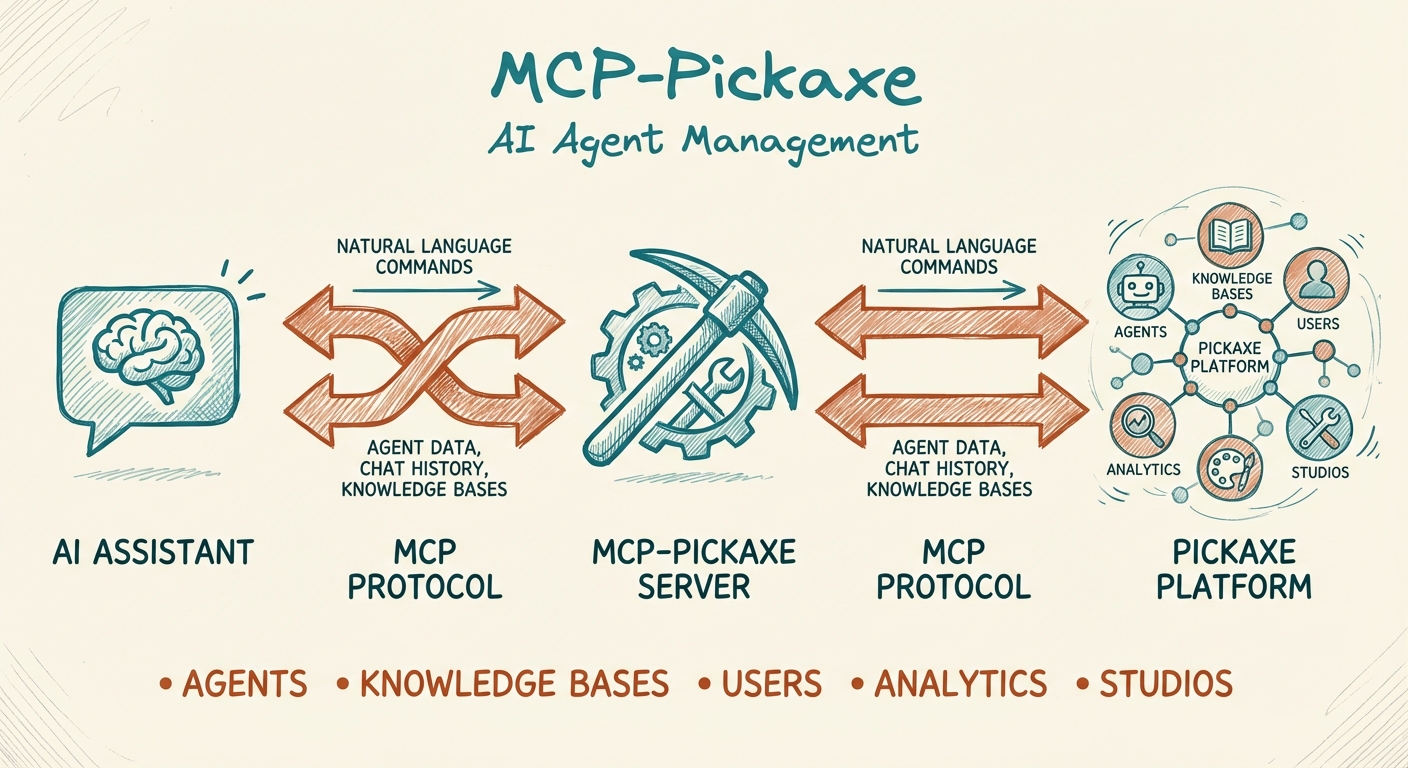



An MCP (Model Context Protocol) server that connects AI assistants like Claude to the Pickaxe platform. Manage your AI agents, knowledge bases, users, and analytics directly through natural language.
Why Use This?
If you're building AI agents on Pickaxe, this MCP server lets you:
- Analyze agent conversations - Review chat history to identify knowledge gaps and improve agent performance
- Manage knowledge bases - Create, update, and connect documents to your agents without leaving your AI workflow
- Handle user management - Create users, manage access, send invitations, and track usage
- Work across multiple studios - Seamlessly switch between different Pickaxe studios in a single session
- Automate workflows - Let Claude handle repetitive Pickaxe admin tasks
Features
| Category | Tools |
|---|---|
| Studios | List configured studios, switch between them |
| Chat History | Fetch and analyze agent conversation logs |
| Documents | Create, list, get, delete, connect/disconnect to agents |
| Users | Create, list, get, update, delete, invite |
| Products | List available products and bundles |
| Memory | List memory schemas, retrieve user memories |
Prerequisites
- Node.js 18+
- A Pickaxe account with API access
- Your Pickaxe Studio API key(s)
Installation
Option 1: Install from npm (recommended)
npx mcp-pickaxe
Or install globally:
npm install -g mcp-pickaxe
Option 2: Clone and Build
git clone https://github.com/aplaceforallmystuff/mcp-pickaxe.git
cd mcp-pickaxe
npm install
npm run build
Configuration
1. Get Your Pickaxe API Key
- Log in to Pickaxe Studio
- Navigate to Settings > API
- Copy your Studio API key (starts with
studio-)
2. Configure Your MCP Client
For Claude Desktop
Add to your Claude Desktop config file:
macOS: ~/Library/Application Support/Claude/claude_desktop_config.json
Windows: %APPDATA%\Claude\claude_desktop_config.json
{
  "mcpServers": {
    "pickaxe": {
      "command": "node",
      "args": ["/path/to/mcp-pickaxe/dist/index.js"],
      "env": {
        "PICKAXE_STUDIO_MAIN": "studio-your-api-key-here"
      }
    }
  }
}
For Claude Code
Add to ~/.claude.json:
{
  "mcpServers": {
    "pickaxe": {
      "command": "node",
      "args": ["/path/to/mcp-pickaxe/dist/index.js"],
      "env": {
        "PICKAXE_STUDIO_MAIN": "studio-your-api-key-here"
      }
    }
  }
}
Multi-Studio Configuration
To work with multiple Pickaxe studios, add multiple environment variables:
{
  "env": {
    "PICKAXE_STUDIO_PRODUCTION": "studio-xxx-xxx-xxx",
    "PICKAXE_STUDIO_STAGING": "studio-yyy-yyy-yyy",
    "PICKAXE_STUDIO_DEV": "studio-zzz-zzz-zzz",
    "PICKAXE_DEFAULT_STUDIO": "PRODUCTION"
  }
}
Then specify which studio to use in your requests:
- If you set
PICKAXE_DEFAULT_STUDIO, that studio is used when none is specified - If only one studio is configured, it's used automatically
- Otherwise, pass
studio="STAGING"(or similar) to any tool
Use Cases
These are real workflows built with mcp-pickaxe in production environments.
1. Security Monitoring with n8n
Scenario: Detect prompt injection attempts across 29+ AI agents in real-time.
Implementation:
An n8n workflow polls chat_history hourly for all agents, runs messages against injection detection patterns (stored in Notion), and routes alerts by severity:
- HIGH/CRITICAL → Telegram alert + Notion log
- LOW/MEDIUM → Notion log only
n8n Schedule (hourly)
    → Fetch patterns from Notion
    → Loop through 29 pickaxe IDs
    → Fetch chat_history for each
    → Detect injections (regex patterns)
    → Route by severity → Alert/Log
Tools used: chat_history, studios_list
Result: Real-time security monitoring across an entire studio with dynamic pattern management and severity-based alerting.
2. Knowledge Base Auto-Research Pipeline
Scenario: Automatically fact-check and maintain 31+ knowledge base articles.
Implementation: An n8n workflow queries KB articles from Notion, extracts key claims, fact-checks via Perplexity API, classifies changes by risk level, and routes to auto-update or human review.
Daily Schedule (2am)
    → Query KB articles from Notion
    → Filter by day (hash-based, ~1/7th daily)
    → Extract key claims
    → Perplexity fact-check
    → Classify: none/low/major risk
    → Route: auto-update or create review task
Tools used: doc_list, doc_get, doc_create, doc_connect
Result: KB content stays current with automated fact-checking and human-in-the-loop for major changes.
3. Agent Performance Review
Scenario: Quarterly review of a training studio to identify KB gaps and user pain points.
Workflow:
1. "Fetch chat history from my training agents"
2. "Analyze: which questions got unclear or uncertain responses?"
3. "List all KB documents - which topics are missing?"
4. "Check user stats - who's most active, who's churning?"
5. "Create KB documents addressing the top 3 gaps"
6. "Connect new documents to the relevant agents"
Tools used: chat_history, doc_list, doc_create, doc_connect, user_list
Result: Data-driven KB improvements based on actual user conversations rather than guesswork.
4. Multi-Studio Operations
Scenario: Managing multiple Pickaxe studios from a single Claude session.
Configuration:
{
  "env": {
    "PICKAXE_STUDIO_PRODUCTION": "studio-xxx",
    "PICKAXE_STUDIO_STAGING": "studio-yyy",
    "PICKAXE_STUDIO_DEV": "studio-zzz",
    "PICKAXE_DEFAULT_STUDIO": "PRODUCTION"
  }
}
Workflow:
1. "List users in PRODUCTION - how many signups this month?"
2. "Switch to STAGING - list products"
3. "Compare KB document counts across all studios"
4. "Find which studio has the most chat activity"
Tools used: studios_list, user_list, doc_list, products_list
Result: Cross-studio visibility without switching contexts or API keys manually.
5. User Memory Auditing
Scenario: Review what your agents remember about users for personalization and privacy compliance.
Workflow:
1. "List all memory schemas defined in the studio"
2. "Get memories for user@example.com"
3. "What does the system know about this user's situation?"
4. "Which memory fields are most populated across users?"
Example output:
User: maria.example@email.com
Nickname: "Cautious Educator from Madrid"
Summary: "Teaching [language] for [platform] at low hourly rate,
         considering self-employment status due to
         uncertain income"
Memories: 1 stored
Tools used: memory_list, memory_get_user, user_list
Result: Visibility into personalization data for both product improvement and GDPR compliance.
Quick Start Examples
Once configured, you can interact with Pickaxe through natural language:
Analyze Agent Performance
"Show me the last 20 conversations from my support agent"
"What questions are users asking that my agent can't answer?"
Manage Knowledge Base
"Create a new document called 'FAQ' with this content: [your content]"
"Connect the FAQ document to my customer support agent"
"List all documents in my knowledge base"
User Management
"Show me all users and their usage stats"
"Create a new user with email user@example.com and give them access to the Pro product"
"Send invitations to these emails: [list of emails]"
Multi-Studio Operations
"List all users in my staging studio"
"Compare the documents between production and staging"
Available Tools
Studio Management
studios_list- List all configured studios and the current default
Chat History
chat_history- Fetch conversation history for an agent- Parameters:
pickaxeId,skip,limit,format("messages" or "raw"),studio
- Parameters:
Document Management
doc_create- Create document from content or URLdoc_list- List all documents (with pagination)doc_get- Get a specific documentdoc_delete- Delete a documentdoc_connect- Link document to an agentdoc_disconnect- Unlink document from an agent
User Management
user_list- List all users with access and usage infouser_get- Get a specific user by emailuser_create- Create a new useruser_update- Update user details, products, or usageuser_delete- Delete a useruser_invite- Send email invitations
Products
products_list- List available products/bundles
Memory
memory_list- List memory schemasmemory_get_user- Get collected memories for a user
Development
# Run in development mode (auto-reloads)
npm run dev

# Build for production
npm run build

# Run the built version
npm start
Troubleshooting
"No Pickaxe studios configured"
Ensure you have at least one PICKAXE_STUDIO_* environment variable set in your MCP config.
"Studio not found"
Check that the studio name matches exactly (case-insensitive). Run studios_list to see available options.
"Pickaxe API error (401)"
Your API key is invalid or expired. Get a new one from Pickaxe Studio settings.
"Pickaxe API error (403)"
Your API key doesn't have permission for this operation. Check your Pickaxe account permissions.
Contributing
Contributions are welcome! Please see CONTRIBUTING.md for guidelines.
License
MIT License - see LICENSE for details.
Links
Reviews
No reviews yet
Be the first to review this server!
More Developer Tools MCP Servers
Git
Freeby Modelcontextprotocol · Developer Tools
Read, search, and manipulate Git repositories programmatically
Fetch
Freeby Modelcontextprotocol · Developer Tools
Web content fetching and conversion for efficient LLM usage
Toleno
Freeby Toleno · Developer Tools
Toleno Network MCP Server — Manage your Toleno mining account with Claude AI using natural language.
mcp-creator-python
Freeby mcp-marketplace · Developer Tools
Create, build, and publish Python MCP servers to PyPI — conversationally.
MCP Marketplace
Freeby mcp-marketplace · Developer Tools
Search and install MCP servers from inside your AI client.
MarkItDown
Freeby Microsoft · Content & Media
Convert files (PDF, Word, Excel, images, audio) to Markdown for LLM consumption