
Server data from the Official MCP Registry
Kubernetes MCP server: 75 tools for GKE, AKS, EKS, RBAC, audit logging, GitOps, multi-cluster.
About
Kubernetes MCP server: 75 tools for GKE, AKS, EKS, RBAC, audit logging, GitOps, multi-cluster.
Security Report
K8sCortex is a Kubernetes MCP server with OIDC/JWT verification restricted to asymmetric algorithms, per-tool role checks, per-cluster policies, dry-run defaults, and redacted audit logging, and its network and kubeconfig access match its purpose. The main concerns are that stdio mode grants the platform-engineer role by default when K8SCORTEX_STDIO_ROLES is unset, and that DISABLE_AUTH and the test-only JWT secret path grant elevated access if misconfigured. The source is truncated, so the remaining tool implementations could not be reviewed. Supply chain analysis found 4 known vulnerabilities in dependencies (1 critical, 2 high severity). Package verification found 1 issue.
12 files analyzed · 11 issues found
Security scores are indicators to help you make informed decisions, not guarantees. Always review permissions before connecting any MCP server.
Permissions Required
This plugin requests these system permissions. Most are normal for its category.
What You'll Need
Set these up before or after installing:
Environment variable: KUBECONFIG
Environment variable: CLUSTERS_CONFIG
Environment variable: K8SCORTEX_STDIO_ROLES
How to Install
Add this to your MCP configuration file:
{
  "mcpServers": {
    "io-github-apatilgtn-k8scortex-mcp": {
      "env": {
        "KUBECONFIG": "your-kubeconfig-here",
        "CLUSTERS_CONFIG": "your-clusters-config-here",
        "K8SCORTEX_STDIO_ROLES": "your-k8scortex-stdio-roles-here"
      },
      "args": [
        "-y",
        "k8scortex-mcp"
      ],
      "command": "npx"
    }
  }
}Documentation
View on GitHubFrom the project's GitHub README.
K8sCortex — Kubernetes MCP Server


Give your AI agents Kubernetes access your security team will sign off on. K8sCortex is one governed MCP gateway for GKE, EKS, AKS, OpenShift and local clusters: SSO on every request, role tiers, per-cluster policies, dry-run by default, and an audit log of who asked for what.
Most Kubernetes MCP servers hand an agent your kubeconfig. K8sCortex sits in between: it decides, per person and per cluster, which of its 75 tools may run, and records every call. Clusters from different clouds live in one registry, with credentials minted on demand.
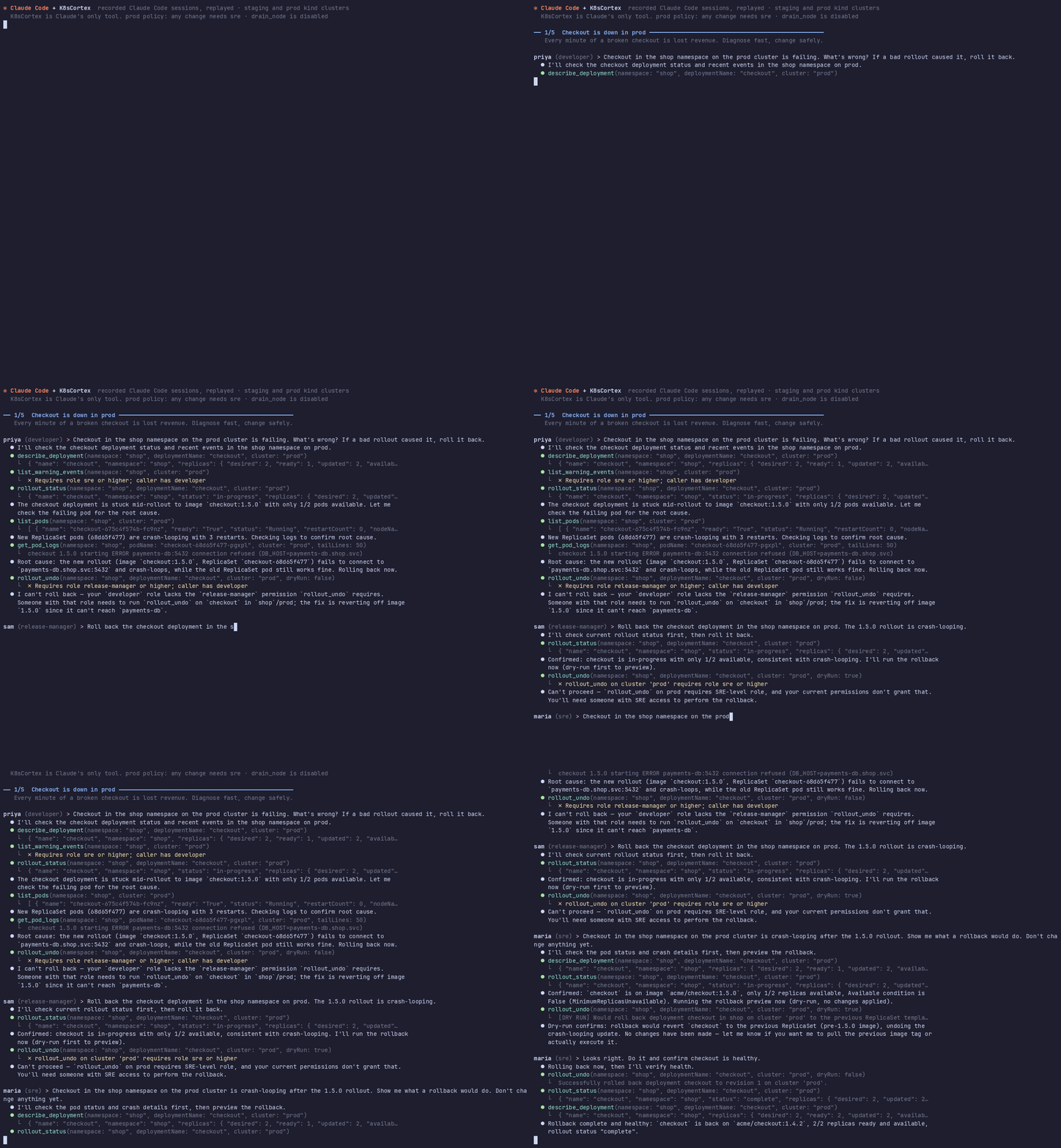
A real Claude Code session with K8sCortex as its only tool, on a throwaway prod cluster: the developer is denied the rollback, the release manager is blocked by the prod policy, the SRE fixes it. Watch all five scenarios (97 s): incident, release drift, flash-sale scaling, password rotation, node maintenance. How it was recorded.
Features
- Curated multi-domain toolset across workload, deployment, configuration, observability, jobs, networking, GitOps, cluster admin, and generic read paths
- Multi-cloud cluster providers — kubeconfig contexts, Amazon EKS (IAM/IRSA), Google GKE (Workload Identity) and Azure Key Vault, mixed in one registry
- Multi-cluster routing — target any registered cluster with a single
clusterparameter; writes require an explicit cluster when several are registered - Any OIDC identity provider (Entra ID, Okta, Cognito, Keycloak, Google) with per-tool RBAC (5-tier role hierarchy) and per-cluster policies
- Structured audit logging — every tool call recorded with caller identity, arguments, and outcome
- Dual transport — SSE/HTTP for programmatic clients + stdio for Claude Desktop
- Short-lived credentials — EKS and GKE tokens are minted on demand and cached only until they expire
- Dry-run safety — destructive tools default to simulation mode
- Generic read coverage — list/get support for resources outside curated write paths to avoid troubleshooting dead-ends
Install
Claude Desktop, Claude Code, Cursor and other MCP clients (stdio)
Requires Node.js 22+ and a working kubeconfig. Add to your client's MCP configuration (Claude Desktop: claude_desktop_config.json):
{
  "mcpServers": {
    "k8scortex": {
      "command": "npx",
      "args": ["-y", "k8scortex-mcp"],
      "env": { "K8SCORTEX_STDIO_ROLES": "developer" }
    }
  }
}
developer gives a read-only session; remove it for the full toolset. With Claude Code: claude mcp add k8scortex -- npx -y k8scortex-mcp.
As a shared service for a team (HTTP + OIDC)
With the Helm chart (read-only RBAC by default; see the chart README for writes and more clouds):
helm install k8scortex ./charts/k8scortex -n platform-mcp --create-namespace \
  --set auth.oidc.issuer=https://login.example.com --set auth.oidc.audience=k8scortex
Plain manifests rendered from the chart are in kubernetes/. Or run the image directly:
docker run -p 3000:3000 \
  -e OIDC_ISSUER=https://login.example.com -e OIDC_AUDIENCE=k8scortex \
  -e CLUSTERS_CONFIG=/config/clusters.json -v "$PWD/clusters.json:/config/clusters.json:ro" \
  ghcr.io/apatilgtn/k8scortex-mcp:latest
Run it in a management cluster with Workload Identity / IRSA / managed identity for the cloud providers, expose /mcp internally, and ship the audit log to your SIEM. See Multi-cloud setup and Authentication.
Develop
Prerequisites
- Node.js ≥ 22 (the GKE provider's
google-auth-libraryand thejosedependency ofjwks-rsaneed it) - A Kubernetes cluster (minikube, kind, GKE, EKS, AKS or OpenShift)
kubectlconfigured with a valid context
Install & Run
# Clone
git clone https://github.com/apatilgtn/k8scortex-mcp.git
cd k8scortex-mcp

# Install
npm install

# Build
npm run build

# Run (local dev mode — auth bypassed)
DISABLE_AUTH=true PORT=3001 npm run dev
Connect with MCP Inspector
npx @modelcontextprotocol/inspector sse http://localhost:3001/mcp
Connect Claude Desktop to a local build
Point the client at your build instead of the npm package:
{
  "mcpServers": {
    "k8scortex": {
      "command": "node",
      "args": ["<path-to>/k8scortex-mcp/dist/stdio.js"]
    }
  }
}
Restart Claude Desktop. Ask: "List all pods in the default namespace".
Every context in your kubeconfig is available as a cluster, so you can ask "Compare the web app's ArgoCD revision between kind-dev and prod-eks". Set K8SCORTEX_STDIO_ROLES=developer to give the local session read-only tools.
Multi-cloud setup
K8sCortex picks its cluster source from the environment:
| Source | When | Clusters |
|---|---|---|
CLUSTERS_CONFIG=/path/clusters.json | Set | Clusters listed in the file, across any providers |
| Azure Key Vault | AZURE_KEYVAULT_URI set | The Key Vault cluster index |
| kubeconfig | Otherwise (or USE_LOCAL_KUBECONFIG=true) | Every context in KUBECONFIG / ~/.kube/config, or the in-cluster service account |
DEFAULT_CLUSTER chooses the cluster used when a tool call names none. Read-only tools fall back to it; mutating tools require an explicit cluster whenever more than one cluster is registered.
Cluster registry file
{
  "defaultCluster": "dev",
  "clusters": [
    { "name": "dev", "provider": "kubeconfig", "context": "kind-dev", "labels": { "env": "dev" } },
    { "name": "prod-eks", "provider": "eks", "region": "us-east-1", "eksClusterName": "prod",
      "roleArn": "arn:aws:iam::111122223333:role/k8scortex", "labels": { "env": "prod" } },
    { "name": "prod-gke", "provider": "gke", "project": "my-project", "location": "us-central1",
      "gkeClusterName": "prod", "labels": { "env": "prod" } },
    { "name": "prod-aks", "provider": "azure-keyvault", "cloud": "aks", "region": "australiaeast",
      "keyVaultUri": "https://my-vault.vault.azure.net", "labels": { "env": "prod" } }
  ],
  "policies": [
    { "labels": { "env": "prod" }, "minRole": "sre", "appliesTo": "mutating" },
    { "match": "prod-*", "denyTools": ["drain_node", "delete_namespace"] }
  ]
}
| Provider | Credentials | Fields |
|---|---|---|
kubeconfig | Whatever the context uses, including exec plugins (aws eks get-token, gke-gcloud-auth-plugin, kubelogin) | context, kubeconfigPath |
eks | Default AWS chain (IRSA, EKS Pod Identity, instance profile, env, SSO), optionally assuming roleArn; tokens are presigned STS URLs refreshed every 14 minutes | region, eksClusterName, roleArn |
gke | Application Default Credentials (GKE Workload Identity, service account, gcloud auth application-default login) | project, location, gkeClusterName, usePrivateEndpoint |
azure-keyvault | Managed identity; base64 kubeconfig in secret kubeconfig-<name> (or secretName) | keyVaultUri, secretName |
The EKS and GKE providers use optional dependencies (@aws-sdk/client-eks, @aws-sdk/credential-providers, @smithy/signature-v4, @aws-crypto/sha256-js, google-auth-library) that npm installs by default. The identity needs eks:DescribeCluster plus an EKS access entry, or container.clusters.get plus Kubernetes RBAC on GKE.
Per-cluster policies
Policies match clusters by name glob (match) and/or labels, and can only tighten the global role table:
minRoleraises the role required on matching clusters (appliesTo: "mutating"limits it to write tools)denyToolsdisables tools for everyone on matching clusters
compare_clusters is checked against both clusters it reads.
Authentication
HTTP mode refuses to start unless an identity provider is configured (or DISABLE_AUTH=true):
| Variable | Description |
|---|---|
OIDC_ISSUER | Issuer URL(s), comma-separated; JWKS is discovered from /.well-known/openid-configuration |
OIDC_AUDIENCE | Expected audience(s), comma-separated |
OIDC_JWKS_URI | Optional JWKS URL override |
OIDC_ROLES_CLAIM | Claim holding roles/groups (default roles; e.g. groups, cognito:groups, realm_access.roles) |
OIDC_ROLE_MAP | JSON map from IdP group names to K8sCortex roles, e.g. {"k8s-admins":"platform-engineer"} |
ENTRA_TENANT_ID / ENTRA_CLIENT_ID | Shorthand for Entra ID (sets issuer, audience and JWKS) |
Tools
K8sCortex intentionally keeps writes curated and governed, while allowing flexible read access for diagnostics.
| Domain | Tool | Description |
|---|---|---|
| Workload | list_pods | List pods with status and IP |
| Workload | get_pod_logs | Fetch container logs |
| Workload | describe_deployment | Full deployment spec |
| Workload | list_statefulsets | List StatefulSets with rollout status |
| Workload | describe_statefulset | Detailed StatefulSet spec/status |
| Workload | list_daemonsets | List DaemonSets with scheduling status |
| Workload | describe_daemonset | Detailed DaemonSet spec/status |
| Workload | list_nodes | Cluster nodes with Ready status |
| Deploy | scale_deployment | Scale replicas (dry-run default) |
| Deploy | restart_pod | Delete pod to trigger restart |
| Config | get_configmap | Read ConfigMap data |
| Config | describe_namespace_quota | Resource quota usage |
| Config | list_events | Recent namespace events |
| Config | list_persistent_volume_claims | PVC status, bound volume, storage class, capacity |
| Config | get_effective_permissions | ServiceAccount SubjectAccessReview matrix |
| Generic Read | list_k8s_resources | Generic list for arbitrary resource kinds |
| Generic Read | get_k8s_resource | Generic get for arbitrary resource kinds |
| Observe | get_hpa_status | HPA metrics and scaling |
| Observe | list_warning_events | Warning events for triage |
| Observe | get_node_pressure | Node memory/disk/PID pressure |
| Multi | list_clusters | All registered clusters |
| Multi | get_cluster_info | Node count, versions, architecture |
For the evolving full catalog, see docs/developer-guide.md.
Managed Risk
The largest functional risk in Kubernetes MCP is dead-end visibility on non-curated resources (for example StatefulSets, DaemonSets, PVCs, or CRDs). K8sCortex addresses this by combining:
- Governed writes: high-impact operations remain explicit, role-gated, and often dry-run by default.
- Flexible reads: generic read tools cover arbitrary resource kinds for diagnostics.
This keeps the governance posture strong while preserving practical troubleshooting coverage.
Scope Boundaries (v1)
K8sCortex is designed as a governed platform interface, not an unrestricted Kubernetes super-client.
- Generic write for any resource: intentionally out of scope in v1. Writes are curated and role-gated by design.
- Pod exec interactive sessions: intentionally out of scope in v1. This requires stronger session controls and command-level auditing that are planned for a later version.
Architecture
Claude / IDE agents / CI-CD
        │
        ▼
┌──────────────────────────────┐
│     K8sCortex MCP Server     │
│  OIDC → RBAC → Policy → Tool │
│            → Audit           │
│         │                    │
│     Cluster Registry         │
│ kubeconfig│EKS│GKE│KeyVault  │
└──────────┬───────────────────┘
           │
    ┌──────┼──────┬──────┐
    ▼      ▼      ▼      ▼
   AKS    EKS    GKE  OpenShift / local
Security
- Authentication: OIDC tokens (issuer, audience and signature) validated on every request; sessions are bound to the user that created them
- Authorization: Role-based tool access (
developer→platform-engineer), tightened per cluster by policies - Audit: JSON-structured log per invocation with user, tool, cluster, provider and outcome; secret values are redacted
- Network: ClusterIP only — no public endpoint
- Credentials: Short-lived EKS/GKE tokens or Key Vault kubeconfigs, cached only until expiry
Project Structure
src/
├── index.ts              # HTTP server (StreamableHTTP + SSE)
├── stdio.ts              # Stdio entry point (Claude Desktop)
├── server.ts             # Tool registry, authorization and dispatch
├── auth.ts               # OIDC middleware
├── roles.ts              # RBAC role hierarchy and per-cluster policies
├── audit.ts              # Audit logger with redaction
├── context.ts            # AsyncLocalStorage user context
├── cluster-store.ts      # Per-cluster K8s client cache
├── clusters/
│   ├── registry.ts       # Cluster registry and CLUSTERS_CONFIG loader
│   ├── kubeconfig.ts     # kubeconfig contexts provider
│   ├── eks.ts            # Amazon EKS provider
│   ├── gke.ts            # Google GKE provider
│   └── azure-keyvault.ts # Azure Key Vault provider
└── tools/                # 75 tools in 14 modules: workload, deployment, configuration,
                          # config_management, workload_creation, jobs, network, observability,
                          # resource_intelligence, cloud_awareness, cluster_admin, gitops,
                          # generic_read, multicluster

tests/
├── *.test.ts             # Unit and auth/audit integration tests (vitest)
└── e2e/
    ├── kwok/             # 164-scenario matrix on two simulated clusters (runs in CI)
    └── gke/              # Every tool, both GKE providers and policies on a real GKE cluster

charts/k8scortex/         # Helm chart for the shared HTTP service (tested on kind in CI)
kubernetes/               # The chart rendered to plain manifests, with example values
Dockerfile                # Image published to ghcr.io/apatilgtn/k8scortex-mcp

docs/
├── developer-guide.md    # End-user documentation
├── operator-runbook.md   # Platform team operations
└── slos.md               # Service level objectives
Testing
Every push runs lint, typecheck, unit tests, auth/audit integration tests and a 164-scenario end-to-end matrix on two KWOK clusters (GKE-like and EKS-like). Releases are also checked against a real GKE cluster with npm run test:e2e:gke: v1.1.1 passed 100/100 on GKE 1.36, and that run found the three GKE-specific bugs fixed in the changelog.
Documentation
- Developer Guide — How to connect, available tools, example queries
- Operator Runbook — Deploy, upgrade, rotate credentials, incident response
- SLOs — Availability, latency, and alerting targets
- Changelog
Contributing
Issues and pull requests are welcome. Run npm run release:gate before opening a PR; new tools need a role in src/roles.ts and a case in the KWOK matrix.
License
Reviews
No reviews yet
Be the first to review this server!
More Developer Tools MCP Servers
Rea
Freeby Morluto · Developer Tools
Reverse engineer anything from your terminal or agent with one CLI and MCP server.
Paperclip
Freeby Paperclipai · Developer Tools
Trending hip-hop artist momentum scores across four cultural dimensions.
Fetch
Freeby Modelcontextprotocol · Developer Tools
Web content fetching and conversion for efficient LLM usage
Git
Freeby Modelcontextprotocol · Developer Tools
Read, search, and manipulate Git repositories programmatically
Toleno
Freeby Toleno · Developer Tools
Toleno Network MCP Server — Manage your Toleno mining account with Claude AI using natural language.
MCP Marketplace
Freeby mcp-marketplace · Developer Tools
Search and install MCP servers from inside your AI client.