
MCP server for Withings health data — sleep, activity, heart, and body metrics.
About
MCP server for Withings health data — sleep, activity, heart, and body metrics.
Remote endpoints: streamable-http: https://withings-mcp.com/mcp
Security Report
Valid MCP server (1 strong, 1 medium validity signals). No known CVEs in dependencies. Imported from the Official MCP Registry.
Endpoint verified · Requires authentication · 1 issue found
Security scores are indicators to help you make informed decisions, not guarantees. Always review permissions before connecting any MCP server.
Permissions Required
This plugin requests these system permissions. Most are normal for its category.
How to Connect
Remote Plugin
No local installation needed. Your AI client connects to the remote endpoint directly.
Add this to your MCP configuration to connect:
{
  "mcpServers": {
    "io-github-akutishevsky-withings": {
      "url": "https://withings-mcp.com/mcp"
    }
  }
}Documentation
View on GitHubFrom the project's GitHub README.
Withings MCP Server
Help me pay for the servers on Patreon
A Model Context Protocol (MCP) server that brings your Withings health data into Claude. Access your sleep patterns, body measurements, workouts, heart data, and more through natural conversation.
🔒 Privacy First: This is my personal project, and the repository is intentionally public to demonstrate transparency. The code shows that no personal information is logged or stored maliciously. All sensitive data (tokens, user IDs) is encrypted at rest and automatically redacted from logs. You can review the entire codebase to verify this commitment to privacy.
⚠️ Disclaimer: This server is provided as-is without any guarantees or warranties. While I've made every effort to ensure security and privacy, I make no guarantees about availability, data integrity, or security. Use at your own risk. For production use cases, consider self-hosting your own instance.
Quick Setup
- Open Claude Desktop → Customize → Connectors
- Click + → Add Custom Connector
- Set URL to
https://withings-mcp.com/mcp→ click Add - Click Connect and authorize with your Withings account
That's it! Ask Claude about your sleep, weight, workouts, or heart data.
Demo
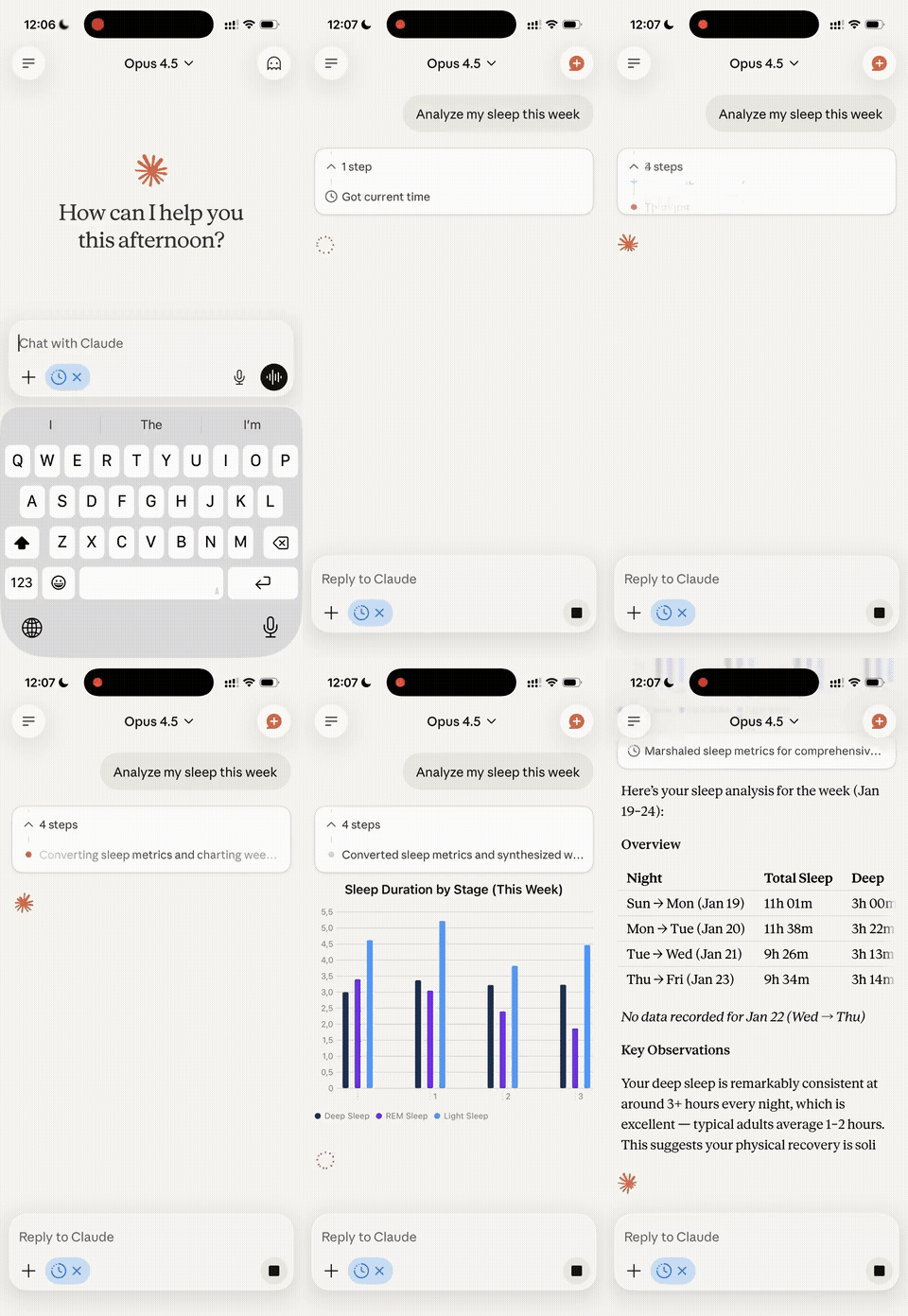
Table of Contents
- Quick Setup
- Demo
- What Can You Do With This?
- For End Users: Using the Hosted Server
- For Developers: Self-Hosting
- Security Features
- Contributing
- License
- Support
- Acknowledgments
What Can You Do With This?
This MCP server gives Claude access to your Withings health data, allowing you to:
- Analyze your sleep: Ask about sleep quality, duration, deep sleep stages, heart rate during sleep
- Track body metrics: Weight trends, body composition, blood pressure, heart rate over time
- Review workouts: Analyze exercise patterns, calories burned, heart rate zones
- Monitor heart health: Access ECG recordings and detailed heart data
- Set and track goals: Review your fitness and health goals
- Identify patterns: Find correlations between sleep, activity, and other metrics
- Generate insights: Get AI-powered analysis of your health trends
All through natural conversation with Claude or any other MCP-compatible client.
For End Users: Using the Hosted Server
If you just want to use this MCP server with Claude Desktop without hosting anything yourself, follow these steps:
Prerequisites
- A Withings account with connected devices
- Claude Desktop or any other MCP-compatible client installed on your computer
Setup Instructions
Step 1: Add Connector in Claude Desktop
- Open Claude Desktop
- Go to Customize (in the sidebar or menu)
- Navigate to the Connectors section
- Click the + button to add a new connector
- Select Add Custom Connector
- Fill in the following details:
- Name:
Withings(or any name you prefer) - Remote MCP server URL:
https://withings-mcp.com/mcp
- Name:
- Click Add
Note: If your MCP client doesn't support UI-based connector configuration, you can manually edit the config file instead. See the manual configuration guide below.
Step 2: Connect and Authorize
- In the Connectors settings, find the Withings connector you just added
- Click Connect next to the connector
- Your web browser will open with the Withings authorization page
- Log in to your Withings account
- Review and approve the permissions requested
- You'll be redirected back and the connection will be complete
After authorization, Claude will have access to your Withings data!
Available Tools
Once connected, Claude can use these tools to access your data:
Sleep & Activity
get_hrv- Minute-level RMSSD, SDNN, and quality scores captured during sleepget_sleep_summary- Sleep duration, stages (light/deep/REM), heart rate, breathing, sleep scoreget_activity- Daily steps, distance, calories, elevation, activity durationsget_intraday_activity- High-frequency activity data throughout the dayget_workouts- Detailed workout summaries with heart rate zones and metrics
Body Measurements
get_measures- Weight, body composition, blood pressure, heart rate, temperature, VO2 max, and more
Devices & Goals
get_user_devices- List of connected Withings devicesget_user_goals- Your health and fitness goals (steps, sleep, weight)
Heart Health
list_heart_records- List of ECG recordingsget_heart_signal- Detailed ECG waveform data
Stethoscope (if you have BPM Core)
list_stetho_records- List of stethoscope recordingsget_stetho_signal- Detailed audio signal data
Example Conversations
Try asking Claude:
- "How has my sleep quality been over the past week?"
- "Show me my weight trend for the last month"
- "What's my average resting heart rate?"
- "Did I hit my step goal this week?"
- "Compare my workout intensity between this month and last month"
- "When did I sleep best this month?"
Privacy & Security
- Encrypted tokens: All authentication tokens and authorization codes are encrypted using AES-256-GCM before storage
- No logging of personal data: The code is public - you can verify that no sensitive information is logged
- Automatic redaction: All user IDs, tokens, and credentials are automatically redacted from system logs
- OAuth 2.0: Industry-standard secure authentication with PKCE support and redirect URI validation
- Session security: MCP sessions are bound to the authenticated user, preventing cross-user access
- You're in control: Revoke access anytime from your Withings account settings
For Developers: Self-Hosting
Want to run your own instance? Here's how to deploy this MCP server yourself.
Prerequisites
- Bun 1.1+ installed
- A Withings Developer Account
Step 1: Create Withings Application
- Go to Withings Developer Portal
- Create a new application
- Note your Client ID and Client Secret
- Set your Redirect URI to:
https://your-domain.com/callback- This must be a publicly accessible URL (localhost is not supported by Withings)
- Can be any domain where you'll host the server (e.g., Fly.io, Railway, your own server, etc.)
Important: Remove Google Analytics
The hosted version includes a Google Analytics tag (G-ZMGF9WXL3W) in the static pages under public/. If you're forking this repo, remove or replace the GA snippet in public/index.html and public/health.html, and update the CSP headers in src/server/app.ts accordingly.
Step 2: Clone and Setup
# Clone the repository
git clone https://github.com/your-username/withings-mcp.git
cd withings-mcp

# Install dependencies
bun install

# Generate encryption secret
bun run generate-secret
# Copy the output - you'll need it for environment variables
Step 2.5: Set Up Supabase Database
- Create a free project at Supabase
- Install the Supabase CLI:
bun install -g supabase(or usebrew install supabase/tap/supabase) - Link your project:
supabase link --project-ref <your-project-ref> - Apply the database migrations:
supabase db push - Get your credentials from Dashboard → Settings → API:
- Project URL →
SUPABASE_URL - Service role key →
SUPABASE_SECRET_KEY
- Project URL →
Step 3: Local Development
Note: Withings requires a publicly accessible URL for OAuth callbacks. For local development, use a tunneling service to expose your local server or deploy to a staging environment for testing.
# Copy environment template
cp .env.example .env

# Edit .env with your values
# WITHINGS_CLIENT_ID=your_client_id
# WITHINGS_CLIENT_SECRET=your_client_secret
# WITHINGS_REDIRECT_URI=https://your-tunnel-url.com/callback
# ENCRYPTION_SECRET=paste_generated_secret_here
# SUPABASE_URL=https://your-project.supabase.co
# SUPABASE_SECRET_KEY=your_service_role_key
# PORT=3000

# Run locally (Bun executes TypeScript directly — no build step)
bun run dev
Make sure your redirect URI in the .env file matches the publicly accessible URL pointing to your local server.
Step 4: Deploy to Production
# The project runs TypeScript directly with Bun — no build step required.
bun run start
Deploy to DigitalOcean App Platform (its Bun buildpack detects package.json and runs bun run start automatically), or any other host that supports Bun.
Set the following environment variables on your hosting platform:
| Variable | Required | Example |
|---|---|---|
WITHINGS_CLIENT_ID | Yes | your_client_id |
WITHINGS_CLIENT_SECRET | Yes | your_client_secret |
WITHINGS_REDIRECT_URI | Yes | https://your-domain.com/callback |
ENCRYPTION_SECRET | Yes | Generated from step 2 |
SUPABASE_URL | Yes | https://your-project.supabase.co |
SUPABASE_SECRET_KEY | Yes | Your Supabase service role key |
PORT | No | 3000 (or your platform's default) |
LOG_LEVEL | No | info |
ALLOWED_ORIGINS | No | https://example.com,https://app.example.com |
Step 5: Update Withings App Settings
Go back to your Withings developer app and update the redirect URI to match your deployed URL:
https://your-domain.com/callback
Step 6: Configure Your MCP Client
For Claude Desktop:
- Open Claude Desktop
- Go to Customize → Connectors section
- Click the + button, then select Add Custom Connector
- Fill in the following details:
- Name:
Withings(or any name you prefer) - Remote MCP server URL:
https://your-domain.com/mcp
- Name:
- Click Add
- Click Connect next to the connector to authorize
For Other MCP Clients:
Configure your MCP client with the following connection details:
- Server URL:
https://your-domain.com - Transport: Streamable HTTP
- Endpoint:
/mcp - Authentication: OAuth 2.0
- Discovery URL:
/.well-known/oauth-authorization-server
Environment Variables Reference
| Variable | Required | Description |
|---|---|---|
WITHINGS_CLIENT_ID | Yes | Your Withings app client ID |
WITHINGS_CLIENT_SECRET | Yes | Your Withings app client secret |
WITHINGS_REDIRECT_URI | Yes | OAuth callback URL (must match Withings app settings) |
ENCRYPTION_SECRET | Yes | 32+ character secret for token encryption (generate with bun run generate-secret) |
SUPABASE_URL | Yes | Your Supabase project URL (from Dashboard → Settings → API) |
SUPABASE_SECRET_KEY | Yes | Your Supabase service role key (from Dashboard → Settings → API) |
PORT | No | Server port (default: 3000) |
LOG_LEVEL | No | Logging level: trace, debug, info, warn, error (default: info) |
ALLOWED_ORIGINS | No | Comma-separated list of allowed CORS origins for browser clients |
Development Commands
bun run start            # Run the server
bun run dev              # Hot-reload mode
bun run typecheck        # Type-check with tsc (no emit)
bun run build            # Bundle for production (outputs to ./build)
bun run generate-secret  # Generate encryption secret for ENCRYPTION_SECRET env variable
Project Structure
src/
├── auth/              # OAuth 2.0 authentication & token storage
├── db/                # Supabase client & cleanup scheduler
├── server/            # Hono app, MCP endpoints, middleware
├── tools/             # MCP tools for Withings API (sleep, measure, user, heart, stetho)
├── types/             # TypeScript type definitions (Hono, Withings API)
├── withings/          # Withings API client
├── utils/             # Logger and encryption utilities
└── index.ts           # Main entry point

supabase/
└── migrations/        # Database schema migrations
See CLAUDE.md for detailed architecture documentation.
Security Features
Token Encryption
All Withings access tokens, refresh tokens, and authorization codes are encrypted at rest using AES-256-GCM:
- Algorithm: AES-256-GCM (authenticated encryption)
- Key Derivation: PBKDF2 with 100,000 iterations
- Defense in Depth: Even if the database is compromised, tokens remain protected
Important: Keep your ENCRYPTION_SECRET:
- At least 32 characters long
- Randomly generated (use
bun run generate-secret) - Secure and never committed to version control
- Consistent across server restarts
OAuth Hardening
- Redirect URI validation: The
/authorizeendpoint validatesredirect_uriagainst the registered client's allowed URIs, preventing open redirect attacks - Single-use auth codes: Authorization codes are atomically consumed to prevent replay attacks (per RFC 6749)
- PKCE support: SHA-256 code challenge method for enhanced security
- Startup validation: Server refuses to start if required environment variables are missing
Transport Security
- Session-token binding: MCP sessions are bound to the bearer token that created them, preventing cross-user session hijacking
- JSON-RPC validation: All incoming messages are validated against the JSON-RPC 2.0 specification before processing
- Request body limits: 1MB global limit to prevent memory exhaustion
- HTTPS redirect: HTTP requests are automatically redirected to HTTPS in production
- Strict CSP: Content Security Policy with no
unsafe-inlinedirectives - Atomic rate limiting: PostgreSQL function with row-level locking prevents race conditions
Privacy-Safe Logging
The custom logger automatically redacts all sensitive information:
- ✅ Operational events and errors logged
- ❌ No tokens, credentials, or auth codes
- ❌ No user IDs or personal information
- ❌ No API request/response payloads with sensitive data
You can review the logging implementation in src/utils/logger.ts.
Contributing
This is a personal project, but contributions are welcome! Please:
- Fork the repository
- Create a feature branch
- Make your changes
- Submit a pull request
License
MIT License - see LICENSE file for details.
Support
- Issues: Report bugs or request features on GitHub Issues
- Withings API: See Withings API Documentation
- MCP Protocol: See Model Context Protocol Documentation
Acknowledgments
Built with:
- Model Context Protocol by Anthropic
- Withings API
- Hono web framework
- Supabase for database
- Bun runtime
Reviews
No reviews yet
Be the first to review this server!
More Developer Tools MCP Servers
Git
Freeby Modelcontextprotocol · Developer Tools
Read, search, and manipulate Git repositories programmatically
Fetch
Freeby Modelcontextprotocol · Developer Tools
Web content fetching and conversion for efficient LLM usage
Toleno
Freeby Toleno · Developer Tools
Toleno Network MCP Server — Manage your Toleno mining account with Claude AI using natural language.
mcp-creator-python
Freeby mcp-marketplace · Developer Tools
Create, build, and publish Python MCP servers to PyPI — conversationally.
MCP Marketplace
Freeby mcp-marketplace · Developer Tools
Search and install MCP servers from inside your AI client.
MarkItDown
Freeby Microsoft · Content & Media
Convert files (PDF, Word, Excel, images, audio) to Markdown for LLM consumption