
Server data from the Official MCP Registry
Access Kernel's cloud-based browsers and app actions via MCP (remote HTTP + OAuth).
About
Access Kernel's cloud-based browsers and app actions via MCP (remote HTTP + OAuth).
Remote endpoints: streamable-http: https://mcp.onkernel.com/mcp
Security Report
Valid MCP server (0 strong, 2 medium validity signals). No known CVEs in dependencies. Imported from the Official MCP Registry.
3 files analyzed · No issues found
Security scores are indicators to help you make informed decisions, not guarantees. Always review permissions before connecting any MCP server.
Permissions Required
This plugin requests these system permissions. Most are normal for its category.
How to Install & Connect
Available as Local & Remote
This plugin can run on your machine or connect to a hosted endpoint. during install.
Documentation
View on GitHubFrom the project's GitHub README.
Kernel MCP Server


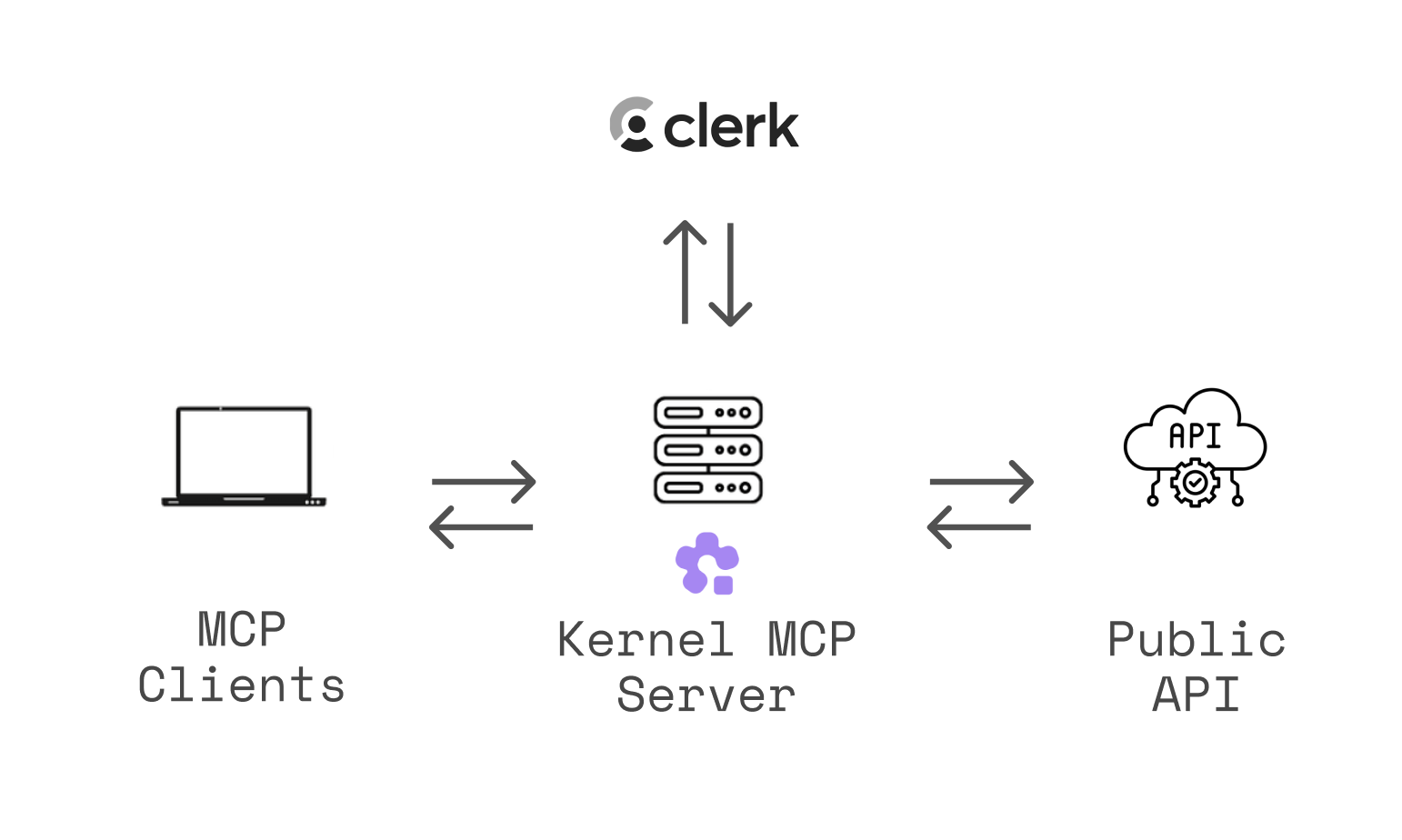
A Model Context Protocol (MCP) server that provides AI assistants with secure access to Kernel platform tools and browser automation capabilities.
🌐 Use instantly at https://mcp.onkernel.com/mcp — no installation required!
What is this?
The Kernel MCP Server bridges AI assistants (like Claude, Cursor, fx, or other MCP-compatible tools) with the Kernel platform, enabling them to:
- 🚀 Deploy and manage Kernel apps in the cloud
- 🌐 Launch and control headless Chromium sessions for web automation
- 📊 Monitor deployments and track invocations
- 🔍 Search Kernel documentation and inject context
- 💻 Execute arbitrary Playwright code against live browsers
- 🎥 Record MP4 video replays of browser automation
Open-source & fully-managed — the complete codebase is available here, and we run the production instance so you don't need to deploy anything.
The server uses OAuth 2.0 authentication via Clerk to ensure secure access to your Kernel resources. During authorization, users can grant organization-wide access or restrict the resulting access and refresh tokens to one Kernel project. Project-scoped tokens cannot switch projects; organization-wide authorization remains available for existing workflows.
For a deeper dive into why and how we built this server, see our blog post: Introducing Kernel MCP Server.
Setup Instructions
General (Transports)
- Streamable HTTP (recommended):
https://mcp.onkernel.com/mcp - stdio via
mcp-remote(for clients without remote MCP support):npx -y mcp-remote https://mcp.onkernel.com/mcp
Use the streamable HTTP endpoint where supported for increased reliability. If your client does not support remote MCP, use mcp-remote over stdio.
Kernel's server is a centrally hosted, authenticated remote MCP using OAuth 2.1 with dynamic client registration.
Quick Setup with Kernel CLI
The fastest way to configure the MCP server is using the Kernel CLI:
# Install the CLI
brew install onkernel/tap/kernel
# or: npm install -g @onkernel/cli

# Install MCP for your tool
kernel mcp install --target <target>
Supported Targets
| Target | Command |
|---|---|
| Cursor | kernel mcp install --target cursor |
| Claude Desktop | kernel mcp install --target claude |
| Claude Code | kernel mcp install --target claude-code |
| VS Code | kernel mcp install --target vscode |
| Windsurf | kernel mcp install --target windsurf |
| Zed | kernel mcp install --target zed |
| Goose | kernel mcp install --target goose |
| fx | kernel mcp install --target fx |
The CLI automatically locates your tool's config file and adds the Kernel MCP server configuration.
Connect in your client
Claude
Our remote MCP server is not compatible with the method Free users of Claude use to add MCP servers.
Pro, Max, Team & Enterprise (Claude.ai and Claude Desktop)
- Go to Settings → Connectors → Add custom connector.
- Enter: Integration name:
Kernel, Integration URL:https://mcp.onkernel.com/mcp, then click Add. - In Settings → Connectors, click Connect next to
Kernelto launch OAuth and approve. - In chat, click Search and tools and enable the Kernel tools if needed.
On Claude for Work (Team/Enterprise), only Primary Owners or Owners can enable custom connectors for the org. After it's configured, each user still needs to go to Settings → Connectors and click Connect to authorize it for their account.
Claude Code CLI
claude mcp add --transport http kernel https://mcp.onkernel.com/mcp
# Then in the REPL run once to authenticate:
/mcp
Cursor
Automatic setup

Manual setup
- Press ⌘/Ctrl Shift J.
- Go to MCP & Integrations → New MCP server.
- Add this configuration:
{
  "mcpServers": {
    "kernel": {
      "url": "https://mcp.onkernel.com/mcp"
    }
  }
}
- Save. The server will appear in Tools.
OpenCode
Add the following to your ~/.config/opencode/opencode.jsonc:
{
  "mcp": {
    "kernel": {
      "type": "remote",
      "url": "https://mcp.onkernel.com/mcp",
    },
  },
}
Then authenticate using the OpenCode CLI:
# Authenticate with Kernel
opencode mcp auth kernel

# If you need to re-authenticate, first logout then auth again
opencode mcp logout kernel
opencode mcp auth kernel
fx
Configure Kernel with the Kernel CLI:
kernel mcp install --target fx
Or add Kernel to the mcp map in ~/.fx/mcp.json manually:
{
  "mcp": {
    "kernel": {
      "type": "http",
      "url": "https://mcp.onkernel.com/mcp",
      "oauth": {}
    }
  }
}
Start fx, or reload the configuration in an existing session:
/mcp reload
Then authenticate with Kernel:
/mcp auth kernel --open
Authorize access in the browser window that opens. Run /mcp list to verify that Kernel is connected.
Goose
Click here to install Kernel on Goose in one click.
Goose Desktop
- Click
Extensionsin the sidebar of the Goose Desktop. - Click
Add custom extension. - On the
Add custom extensionmodal, enter:- Extension Name:
Kernel - Type:
STDIO - Description:
Access Kernel's cloud-based browsers via MCP - Command:
npx -y mcp-remote https://mcp.onkernel.com/mcp - Timeout:
300
- Extension Name:
- Click
Save Changesbutton.
Goose CLI
- Run the following command:
goose configure - Select
Add Extensionfrom the menu. - Choose
Command-line Extension. - Follow the prompts:
- Extension name:
Kernel - Command:
npx -y mcp-remote https://mcp.onkernel.com/mcp - Timeout:
300 - Description:
Access Kernel's cloud-based browsers via MCP
- Extension name:
Visual Studio Code
{
  "mcpServers": {
    "kernel": {
      "url": "https://mcp.onkernel.com/mcp",
      "type": "http"
    }
  }
}
- Press ⌘/Ctrl P → search MCP: Add Server.
- Select HTTP (HTTP or Server-Sent Events).
- Enter:
https://mcp.onkernel.com/mcp - Name the server Kernel → Enter.
Windsurf
- Press ⌘/Ctrl , to open settings.
- Navigate Cascade → MCP servers → View raw config.
- Paste:
{
  "mcpServers": {
    "kernel": {
      "command": "npx",
      "args": ["-y", "mcp-remote", "https://mcp.onkernel.com/mcp"]
    }
  }
}
- On Manage MCPs, click Refresh to load Kernel MCP.
Zed
- Press ⌘/Ctrl , to open settings.
- Paste:
{
  "context_servers": {
    "kernel": {
      "source": "custom",
      "command": "npx",
      "args": ["-y", "mcp-remote", "https://mcp.onkernel.com/mcp"]
    }
  }
}
Smithery
You can connect directly to https://mcp.onkernel.com/mcp, or use Smithery as a proxy using its provided URL.
-
Use Smithery URL in any MCP client:
- Open Smithery: Kernel.
- Copy the URL from "Get connection URL".
- Paste it into your MCP client's "Add server" flow.
-
Use Kernel in Smithery's Playground MCP client:
- Open Smithery Playground.
- Click "Add servers", search for "Kernel", and add it.
- Sign in and authorize Kernel when prompted.
Others
Many other MCP-capable tools accept:
- Command:
npx - Arguments:
-y mcp-remote https://mcp.onkernel.com/mcp
{
  "kernel": {
    "command": "npx",
    "args": ["-y", "mcp-remote", "https://mcp.onkernel.com/mcp"]
  }
}
Configure these values wherever the tool expects MCP server settings.
Tools (19 model-facing, plus 1 app-only helper)
Each Kernel feature has a single manage_* tool with an action parameter, keeping the tool set small and consistent. Standalone tools handle high-frequency and interactive workflows.
One additional Managed Auth helper (begin_auth_login) is marked app-only (_meta.ui.visibility: ["app"]); it refuses to execute on hosts that do not declare MCP Apps support. The App forwards the server-issued signed flow checkpoint to the shared manage_auth_connections wait action, so flow identity and terminal-state decisions stay on the server.
Self-hosted deployments can hide sensitive tool families by setting KERNEL_MCP_DISABLED_TOOLSETS to a comma-separated list. For example, KERNEL_MCP_DISABLED_TOOLSETS=api_keys prevents manage_api_keys from being registered.
Call get_connection_context before deciding whether to create or select a project. Its canonical connection_scope reports whether the connection is organization-wide or fixed to a project. Project-scoped tools advertise an optional project (name or ID) and a deprecated project_id: organization-wide connections may omit them to preserve organization-wide reads and API default-project behavior, while fixed-project connections may omit them or pass the matching project. Project resources use project-qualified kernel://orgs/{organizationId}/projects/{projectId}/... URIs. Authorization remains enforced by the Kernel API; selecting a project never grants access to it.
manage_* tools
manage_browsers- Create, update, list, get, and delete browser sessions, and read archived telemetry for active or deleted sessions. Supports headless/stealth modes, profiles, proxies, viewports, extensions, and SSH tunneling.manage_profiles- Setup (with guided live browser session), search/list with pagination, get, and delete browser profiles for persisting cookies and logins.manage_projects- Create, list, get, update, and delete organization projects. Inspect and update per-project resource limits.manage_api_keys- Create, list, get, update, and delete org-wide or project-scoped API keys. Create returns the plaintext key once.manage_browser_pools- Create, list, get, delete, and flush pools of pre-warmed browsers. Acquire and release browsers from pools.manage_proxies- Create, list, get, check, and delete proxy configurations (datacenter, ISP, residential, mobile, custom).manage_replays- Start, stop, and list MP4 video replay recordings for a browser session. Session-scoped: start once, run your automation, then stop. Requires a paid Kernel plan.manage_extensions- List and delete uploaded browser extensions.manage_apps- List/search apps, invoke actions, get/list/delete deployments, and get invocation results.manage_auth_connections- Create, list, get, delete, login, submit, and wait for managed-auth connections in every client. Use domain-filteredlistfor discovery. App-capable clients additionally receiveopen_auth_login; the programmatic actions remain available there too.manage_credentials- Create, list, get, update, and delete stored credentials; fetch a current TOTP code for credentials with a configured totp_secret.manage_credential_providers- Create, list, get, update, and delete external credential providers (e.g. 1Password); list available items and test the provider connection.
Standalone tools
get_connection_context- Inspect the authenticated principal, organization, credential scope, and effective project scope.computer_action- Mouse, keyboard, clipboard, and screenshot controls for browser sessions (click, type, press_key, scroll, move, get_position, read_clipboard, write_clipboard, screenshot).browser_curl- Send HTTP requests through an existing browser session's Chrome network stack.execute_playwright_code- Execute Playwright/TypeScript code against an existing browser session. Does not create or delete browsers - usemanage_browsersfor session lifecycle.exec_command- Run shell commands inside a browser VM. Returns decoded stdout/stderr.search_docs- Search Kernel platform documentation and guides.submit_feedback- send product, mcp, or documentation feedback directly to the KERNEL team without interrupting the current task.open_auth_login- Open a secure interactive Managed Auth MCP App after user consent. Registered only for clients that declare MCP Apps support; credentials and MFA never enter MCP/model traffic.
Resources
Project resources use the prefix kernel://orgs/{organization_id}/projects/{project_id}.
/browsersand/browsers/{session_id}- List or access browser sessions/browser-poolsand/browser-pools/{id_or_name}- List or access browser pools/profilesand/profiles/{profile_name}- List or access browser profiles/appsand/apps/{app_name}- List or access deployed apps
Prompts
kernel-concepts- Get explanations of Kernel's core concepts (browsers, apps, overview)debug-browser-session- Get a comprehensive debugging guide for troubleshooting browser sessions (VM issues, network problems, Chrome errors)
Troubleshooting
- Cursor clean reset: ⌘/Ctrl Shift P → run
Cursor: Clear All MCP Tokens(resets all MCP servers and auth; re-enable Kernel and re-authenticate). - Clear saved auth and retry:
rm -rf ~/.mcp-auth - Ensure a recent Node.js version when using
npx mcp-remote - If behind strict networks, try stdio via
mcp-remote, or explicitly set the transport your client supports
Examples
Invoke apps from anywhere
Human: Run my web-scraper app to get data from reddit.com
Assistant: I'll execute your web-scraper action with reddit.com as the target.
[Uses manage_apps tool with action: "invoke" to run your deployed app in the cloud]
Execute Playwright code dynamically
Human: Go to example.com and get me the page title
Assistant: I'll create a browser session, then execute Playwright code against it to navigate to the site and retrieve the title.
[Uses manage_browsers tool with action: "create" to get a session_id]
[Uses execute_playwright_code tool with session_id and code: "await page.goto('https://example.com'); return await page.title();"]
Returns: { success: true, result: "Example Domain" }
Use managed authentication for a protected site
- Call
manage_auth_connectionswithaction: "list"and the exactdomain_filter. - Fetch all pages. Reuse an authenticated connection; ask only when multiple relevant accounts match.
- A direct request to log in is consent. If authentication is discovered incidentally, ask before opening the App.
- For a new connection, choose a concise service-derived profile name unless the user supplied one; do not ask solely for a profile name.
- Call
open_auth_login, then immediately follow itsnext_actionand repeat the read-only wait while it reportspending. - The user enters credentials/MFA only in the secure App. Once the wait reports
authenticated, resume the original task with the verifiedprofile_name.
Example: “Log me into my Hacker News account and update my profile to add a random emoji at the bottom.” The agent should discover news.ycombinator.com, open the App when needed, wait for authentication, then continue the profile edit without asking for credentials or a profile name in chat.
The secure App defaults record_session and browser_telemetry.enabled to true, recording replay video plus the operational telemetry categories (control, connection, system, and captcha) for managed-auth browser sessions. Callers can explicitly disable either setting. The programmatic manage_auth_connections create/login actions preserve the API’s opt-in and inheritance behavior when these parameters are omitted.
Set up browser profiles for authentication
Human: Set up a profile for my work accounts
Assistant: I'll create a profile and guide you through the setup process.
[Uses manage_profiles tool with action: "setup"]

Human: I'm done setting up my accounts
Assistant: Perfect! I'll close the browser session and save your profile.
[Uses manage_browsers tool with action: "delete" to save profile]
Debug a browser session
Note: Attach the
debug-browser-sessionprompt to your conversation first, then ask for help debugging.
Human: [Attaches debug-browser-session prompt with session_id and issue_description]
       Help me debug this browser session.
Assistant: [Follows the debugging guide from the prompt: uses Kernel CLI to check session status,
            read VM logs, test network connectivity, and diagnose issues]
Connect local dev server to cloud browser
This is perfect for AI coding workflows where you need to preview local changes in a real browser:
Human: I'm working on a React app running on localhost:3000. I want to test it in a cloud browser.
Assistant: I'll create a browser session with SSH port forwarding for you.
[Uses manage_browsers tool with action: "create" and remote_forward: "3000:localhost:3000"]
Returns: Session ID, live view URL, and SSH tunnel command.
🤝 Contributing
We welcome contributions! Please see our contributing guidelines:
- Fork the repository and create your feature branch
- Make your changes and add tests if applicable
- Run the linter and formatter:
bun run lint bun run format - Test your changes thoroughly
- Submit a pull request with a clear description
Development Guidelines
- Follow the existing code style and formatting
- Add TypeScript types for new functions and components
- Update documentation for any API changes
- Ensure all tests pass before submitting
- Run the required OAuth conformance suite when changing discovery, registration, authorization, token exchange, refresh, or scope enforcement
📄 License
This project is licensed under the MIT License - see the LICENSE file for details.
🔗 Related Projects
- Model Context Protocol - The protocol specification
- Kernel Platform - The platform this server integrates with
- Clerk - Authentication provider
- @onkernel/sdk - Kernel JavaScript SDK
💬 Support
- Issues & Bugs: GitHub Issues
- MCP Feedback: github.com/kernelxyz/mcp-feedback
- Documentation: Kernel Docs • MCP Setup Guide
- Community: Kernel Discord
Built with ❤️ by the Kernel Team
Running this server locally
cp .env .env.local # Values for the .env.local file are in 1Password > DevEnvVars > MCP section
bun install
bun run dev
This will start the server on port 3002.
Reviews
No reviews yet
Be the first to review this server!
More Developer Tools MCP Servers
Git
Freeby Modelcontextprotocol · Developer Tools
Read, search, and manipulate Git repositories programmatically
Fetch
Freeby Modelcontextprotocol · Developer Tools
Web content fetching and conversion for efficient LLM usage
Toleno
Freeby Toleno · Developer Tools
Toleno Network MCP Server — Manage your Toleno mining account with Claude AI using natural language.
mcp-creator-python
Freeby mcp-marketplace · Developer Tools
Create, build, and publish Python MCP servers to PyPI — conversationally.
MCP Marketplace
Freeby mcp-marketplace · Developer Tools
Search and install MCP servers from inside your AI client.
MarkItDown
Freeby Microsoft · Content & Media
Convert files (PDF, Word, Excel, images, audio) to Markdown for LLM consumption